air condition KIA CEED 2017 User Guide
[x] Cancel search | Manufacturer: KIA, Model Year: 2017, Model line: CEED, Model: KIA CEED 2017Pages: 653, PDF Size: 54.59 MB
Page 181 of 653
497
Features of your vehicle
Non-operational conditions of rear parking assist system
The rear parking assist system may
not operate properly when:
1. Moisture is frozen to the sensor. (It willoperate normally when the moisture has been cleared.)
2. The sensor is covered with foreign matter, such as snow or water, or the
sensor cover is blocked. (It will operate
normally when the material is removed
or the sensor is no longer blocked.)
3. Driving on uneven road surfaces (unpaved roads, gravel, bumps, gradi-ent).
4. Objects generating excessive noise (vehicle horns, loud motorcycle
engines, or truck air brakes) are within
range of the sensor.
5. Heavy rain or water spray exists.
6. Wireless transmitters or mobile phones are within range of the sensor.
7. Trailer towing. The detecting range may decrease when:
1. The sensor is stained with foreign mat-
ter such as snow or water. (The sens-
ing range will return to normal when
removed.)
2. Outside air temperature is extremely hot or cold.
The following objects may not be rec-
ognized by the sensor:
1. Sharp or slim objects such as ropes, chains or small poles.
2. Objects which tend to absorb the sen- sor frequency such as clothes, spongy
material or snow.
3. Undetectable objects smaller than 1 m (40 in.) and narrower than 14 cm (6 in.)
in diameter. Rear parking assist system pre- cautions
The rear parking assist system may
not sound sequentially depending on the speed and shapes of the objectsdetected.
The rear parking assist system may malfunction if the vehicle bumperheight or sensor installation has been
modified or damaged. Any non-factory
installed equipment or accessories
may also interfere with the sensor per-
formance.
The sensor may not recognize objects less than 30 cm (11.8 in.) from the sen-
sor, or it may sense an incorrect dis-
tance. Use caution.
When the sensor is frozen or stained with snow, dirt, or water, the sensor
may be inoperative until the stains are
removed using a soft cloth.
Do not push, scratch or strike the sen- sor. Sensor damage could occur.
Page 186 of 653
Features of your vehicle
102
4
Non-operational conditions of parking assist system
Parking assist system may not oper-
ate normally when:
1. Moisture is frozen to the sensor. (It will operate normally when moisture
melts.)
2. Sensor is covered with foreign matter, such as snow or water, or the sensor
cover is blocked. (It will operate nor-
mally when the material is removed or
the sensor is no longer blocked.)
3. Sensor is stained with foreign matter such as snow or water. (Sensing range
will return to normal when removed.)
4.The parking assist button is off.
There is a possibility of parking assist system malfunction when:
1. Driving on uneven road surfaces such as unpaved roads, gravel, bumps, or
gradient.
2. Objects generating excessive noise such as vehicle horns, loud motorcycle
engines, or truck air brakes can inter-
fere with the sensor.
3. Heavy rain or water spray.
4. Wireless transmitters or mobile phones present near the sensor.
5. Sensor is covered with snow.
Detecting range may decrease when:
1. Outside air temperature is extremely hot or cold.
2. Undetectable objects smaller than 1 m and narrower than 14 cm in diameter.
The following objects may not be rec-
ognized by the sensor:
1. Sharp or slim objects such as ropes, chains or small poles.
2. Objects, which tend to absorb sensor frequency such as clothes, spongy
material or snow.
✽✽ NOTICE
1. The warning may not sound sequen- tially depending on the speed and
shapes of the objects detected.
2. The parking assist system may mal-
function if the vehicle bumper height
or sensor installation has been modi-
fied. Any non-factory installed equip-
ment or accessories may also interfere
with the sensor performance.
3. Sensor may not recognize objects less
than 30 cm from the sensor, or it may
sense an incorrect distance. Use with
caution.
4. When the sensor is frozen or stained
with snow or water, the sensor may be
inoperative until the stains are
removed using a soft cloth.
5. Do not push, scratch or strike the sen-
sor with any hard objects that could
damage the surface of the sensor.
Sensor damage could occur.
Page 190 of 653

Features of your vehicle
106
4
Non-operating condition
Never use the Smart Parking Assist
System in the below conditions.
Curved parking space
Inclined roads
A vehicle loaded with longer or wider
cargo compared to the vehicle
Diagonal parking space
Parking space with trash, grass or bar- riers
Heavy snow or rain
A pole close to the parking line
Bumpy roads
A vehicle equipped with a snow chain or spare tire
Tire pressure lower or higher than the standard tire pressure
A trailer connected to the vehicle
Slippery or uneven road
Big vehicles such as buses or trucks parked
Sensor covered with foreign matter, such as snow or water
Moisture frozen on the sensor.
A motorcycle or bicycle parked
A trash can or obstacle near Heavy wind
Wheel changed to an unauthorized
size
A problem with the wheel alignment
Next to a garden or bush
A accessory installed on the detective area the of sensors (such as number plate holder)
Vehicle leaned severely to one side
Strong sunlight or very cold weather
Ultrasonic interference other vehicle's. Such as horn sounds of other vehicles,
motorcycle's engine noise, air brake
noise of heavy vehicles and with the
other vehicle's parking assist system
working.
Near a circular pillar or narrow pillar, or a pillar surrounded by object such as
fire extinguisher, etc.
The sensor is positioned incorrectly by an impact to the bumper
WARNING
Do not use the Smart Parking
Assist System in the following con-
ditions for unexpected results mayoccur and cause a serious accident.
1. Parking on inclines
The driver must apply the accelera- tor and brake pedal when parking
on inclines. If the driver is unfamil-
iar with applying the accelerator
and brake pedal, a car accident may
occur.
(Continued)
OJD042156
Page 210 of 653

Features of your vehicle
126
4
Turn signals and lane change sig- nals
The ignition switch must be on for the
turn signals to function. To turn on the
turn signals, move the lever up or down
(A). Green arrow indicators on the instru-
ment panel indicate which turn signal is
operating.
They will self-cancel after a turn is com-
pleted. If the indicator continues to flash
after a turn, manually return the lever tothe OFF position.
To signal a lane change, move the turn
signal lever slightly and hold it in position
(B). The lever will return to the OFF posi-tion when released.
OED040804
WARNING
Do not place any accessories, stickers or tint the windshield.
Have the windshield glass replaced from an authorized deal-
er.
Do not remove or impact related parts of the high beam assist.
Be careful that water doesn’t get into the high beam assist unit.
Do not place objects on the dash- board that reflects light such as
mirrors, white paper, etc. The sys-
tem may malfunction if the sun-light is reflected.
At times, the high beam assist system may not work properly,
always check the road conditions
for your safety. When the system
does not operate normally, manu-
ally change the high beam and
low beam.CAUTION
When the headlamp is not
repaired or replaced at an author-
ized dealer.
When the headlamp aiming is not properly adjusted.
When driving on a narrow curved road or rough road.
When driving downhill or uphill. When part of the vehicle in front is visible.
When there is a traffic light, reflecting sign, flash sign or mir-ror.
When the road conditions are bad such as being wet or covered
with snow.
When the front vehicle’s head- lights are off but the fog lights on.
When a suddenly appears from a curve.
When the vehicle is tilted from a flat tire or being towed.
Page 224 of 653

Features of your vehicle
140
4
MANUAL CLIMATE CONTROL SYSTEM (IF EQUIPPED)
OJD042100
1. Fan speed control knob 2. Air conditioning button 3. Rear window defroster button4. Mode selection knob5. Air intake control button6. Temperature control knob
CAUTION
Operating the blower when the igni-
tion switch is in the ON position
could cause the battery to dis- charge. Operate the blower when theignition switch is in the ON position.
Page 225 of 653

4141
Features of your vehicle
Heating and air conditioning
1. Start the engine.
2. Set the mode to the desired position.To improve the effectiveness of heat-ing and cooling:
- Heating:- Cooling:
3. Set the temperature control to the desired position.
4. Set the air intake control to the outside (fresh) air or recirculated position.
5. Set the fan speed control to the desired speed.
6. If air conditioning is desired, turn the air conditioning system on. (if equipped)
OJD042102((((iiiiffff eeeeqqqquuuuiiiippppppppeeeedddd))))
Page 228 of 653

Features of your vehicle
144
4
Recirculated air position
With the recirculated airposition selected, air from the passenger
compartment will be
drawn through the heat-ing system and heatedor cooled according to
the function selected.
Outside (fresh) air position With the outside (fresh)air position selected, air
enters the vehicle fromoutside and is heated orcooled according to thefunction selected.
✽✽ NOTICE
Prolonged operation of the heater in the
recirculated air position (without air
conditioning selected) may cause fogging
of the windshield and side windows and
the air within the passenger compart-
ment may become stale.
In addition, prolonged use of the air con-
ditioning with the recirculated air posi-
tion selected will result in excessively dry
air in the passenger compartment.
Fan speed control
The ignition switch must be in the ON
position for fan operation.
The fan speed control knob allows you to
control the fan speed of the air flowing
from the ventilation system. To change
the fan speed, turn the knob to the right
for higher speed or left for lower speed.
Setting the fan speed control knob to the
“0” position turns off the fan.
WARNING
The continuous use of recirculat- ed air in the climate control sys-
tem may increase humidity inside
the vehicle, causing the glass to
fog and obscuring visibility.
Do not sleep in a vehicle with the air conditioning or heating sys-
tem on. It may cause serious
harm or death due to a drop in the
oxygen level and/or body temper-
ature.
The continuous use of recirculat- ed air in the climate control sys-
tem can produce drowsiness or
sleepiness, which may result in a
loss of vehicle control. Set the air
intake control to the outside
(fresh) air position as much as
possible while driving.
OJD042101
Page 229 of 653
4145
Features of your vehicle
To turn off the blowers
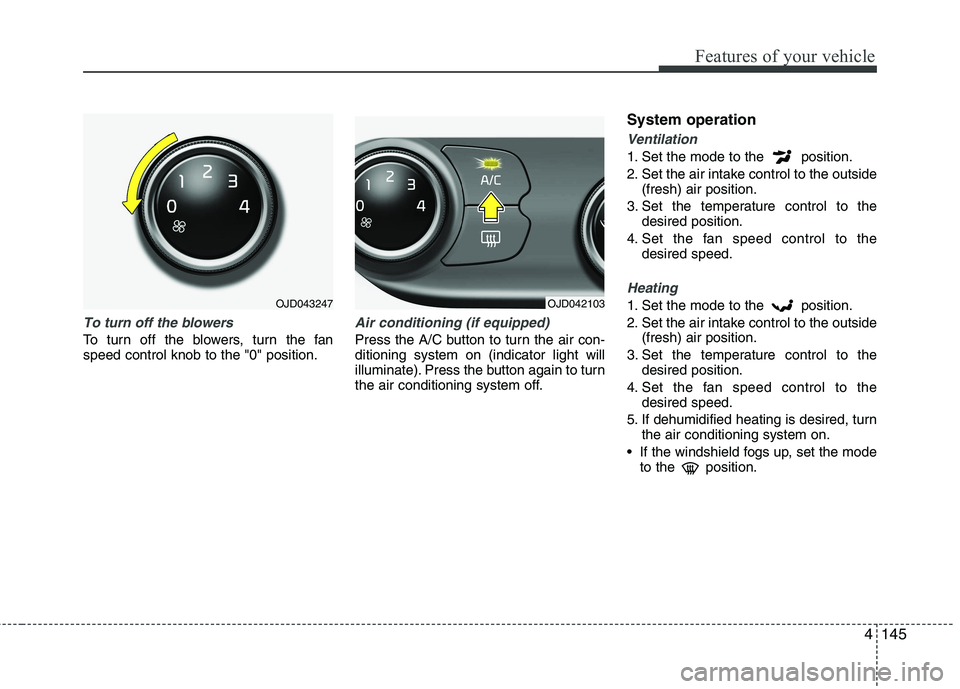
To turn off the blowers, turn the fan speed control knob to the "0" position.
Air conditioning (if equipped)
Press the A/C button to turn the air con- ditioning system on (indicator light will
illuminate). Press the button again to turn
the air conditioning system off.System operation
Ventilation
1. Set the mode to the position.
2. Set the air intake control to the outside
(fresh) air position.
3. Set the temperature control to the desired position.
4. Set the fan speed control to the desired speed.
Heating
1. Set the mode to the position.
2. Set the air intake control to the outside(fresh) air position.
3. Set the temperature control to the desired position.
4. Set the fan speed control to the desired speed.
5. If dehumidified heating is desired, turn the air conditioning system on.
If the windshield fogs up, set the mode to the position.OJD042103OJD043247
Page 230 of 653

Features of your vehicle
146
4
Operation Tips
To keep dust or unpleasant fumes from
entering the vehicle through the venti-
lation system, temporarily set the air
intake control to the recirculated air
position. Be sure to return the control
to the fresh air position when the irrita-
tion has passed to keep fresh air in the
vehicle. This will help keep the driver
alert and comfortable.
Air for the heating/cooling system is drawn in through the grilles just ahead
of the windshield. Care should be
taken that these are not blocked by
leaves, snow, ice or other obstructions.
To prevent interior fog on the wind- shield, set the air intake control to the
fresh air position and fan speed to the
desired position, turn on the air condi-tioning system, and adjust the temper-
ature control to desired temperature.Air conditioning (if equipped)
Kia Air Conditioning Systems are filled
with environmentally friendly refrigerant*.
1. Start the engine. Push the air condi- tioning button.
2. Set the mode to the position.
3. Set the air intake control to the outside air or recirculated air position.
4. Adjust the fan speed control and tem- perature control to maintain maximum
comfort.
*: Your vehicle is filled with R-134a or R- 1234yf according to the regulation in
your country at the time of producing.
You can find out which air conditioning
refrigerant is applied to your vehicle at
the label inside of hood. Refer to chap-
ter 8 for more detail location of air con-
ditioning refrigerant label.CAUTION
The refrigerant system should
only be serviced by trained and
certified technicians to insure proper and safe operation.
The refrigerant system should be serviced in a well-ventilated place.
The air conditioning evaporator (cooling coil) shall never berepaired or replaced with oneremoved from a used or salvagedvehicle and new replacement
MAC evaporators shall be certi-fied (and labeled) as meeting SAEStandard J2842.
Page 231 of 653

4147
Features of your vehicle
✽✽NOTICE
When using the air conditioning sys- tem, monitor the temperature gauge
closely while driving up hills or in
heavy traffic when outside tempera-
tures are high. Air conditioning sys-
tem operation may cause engine over-
heating. Continue to use the blower
fan but turn the air conditioning sys-
tem off if the temperature gauge indi-
cates engine overheating.
When opening the windows in humid weather air conditioning may create
water droplets inside the vehicle.
Since excessive water droplets may
cause damage to electrical equipment,
air conditioning should only be used
with the windows closed.Air conditioning system operation tips
If the vehicle has been parked in directsunlight during hot weather, open the
windows for a short time to let the hot
air inside the vehicle escape.
Use air conditioning to reduce humidi- ty and moisture inside the vehicle on
rainy or humid days.
During air conditioning system opera- tion, you may occasionally notice a slightchange in engine speed as the air con-
ditioning compressor cycles. This is a
normal system operation characteristic.
Use the air conditioning system every month only for a few minutes to ensure
maximum system performance.
When using the air conditioning sys- tem, you may notice clear water drip-
ping (or even puddling) on the ground
under the passenger side of the vehi-
cle. This is a normal system operation
characteristic.
Operating the air conditioning system in the recirculated air position provides
maximum cooling, however, continual
operation in this mode may cause the
air inside the vehicle to become stale.
During cooling operation, you may occasionally notice a misty air flow
because of rapid cooling and humid air
intake. This is a normal system opera-
tion characteristic. Climate control air filter The climate control air filter installed
behind the glove box filters the dust or
other pollutants that come into the vehi-cle from the outside through the heating
and air conditioning system. If dust or
other pollutants accumulate in the filter
over a period of time, the air flow from the
air vents may decrease, resulting in
moisture accumulation on the inside of
the windshield even when the outside
(fresh) air position is selected. If this hap-
pens, we recommend that the climate
control air filter be replaced by an author-
ized Kia dealer.
1LDA5047
Outside air
Recirculatedair
Climate control air filter Blower
Evaporatorcore Heater core