display KIA CEED 2017 User Guide
[x] Cancel search | Manufacturer: KIA, Model Year: 2017, Model line: CEED, Model: KIA CEED 2017Pages: 653, PDF Size: 54.59 MB
Page 137 of 653

453
Features of your vehicle
Speed limiter indicator (if equipped) The indicator illuminates when the speed
limit control system is enabled by move
the lever up on the steering wheel.
The indicator goes off when the lever
up again to deactivate the system.
If there is a problem with the speed limit
control system, the “---” indicator will blink.
If this occurs, we recommend that the
system be checked by an authorized Kia
dealer.
For more details, refer to “Speed limit
control system” in chapter 5.The speed limiter indicators illuminates
on the LCD display.Odometer (km or mi.) The odometer indicates the total dis-
tance the vehicle has been driven.
You will also find the odometer useful to
determine when periodic maintenance
should be performed.
Trip computer
The trip computer is a microcomputer-
controlled driver information system that
displays information related to driving
when the ignition switch is in the ON
position. All stored driving information
(except odometer, distance to empty and
instant fuel economy) resets if the batteryis disconnected.
OJD052031OJD042051OJD042050
Page 138 of 653
Features of your vehicle
54
4
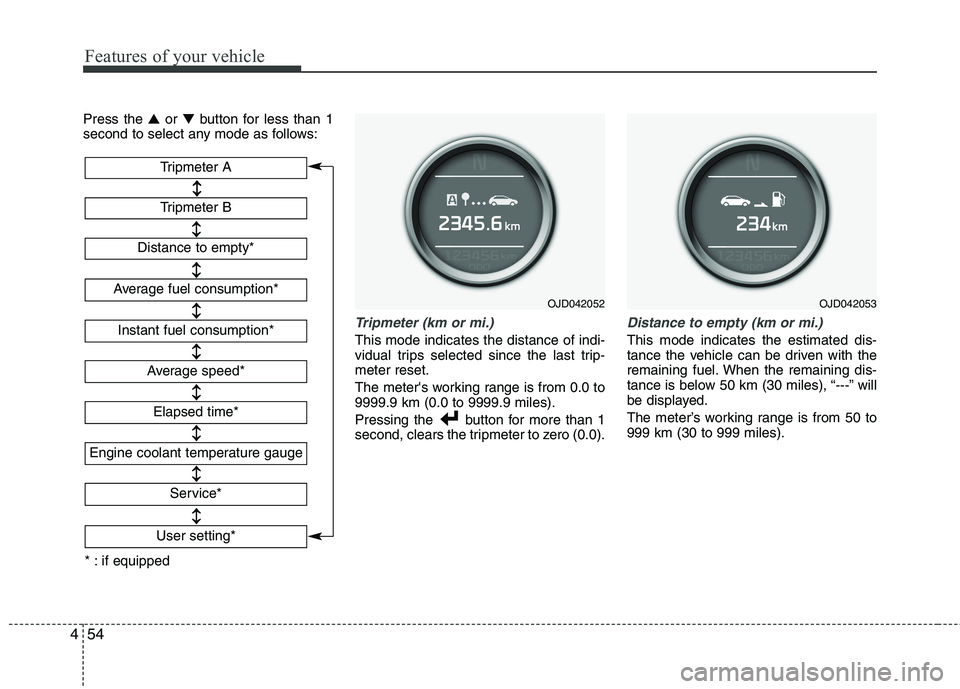
Press the ▲or ▼ button for less than 1
second to select any mode as follows:
Tripmeter (km or mi.)
This mode indicates the distance of indi-
vidual trips selected since the last trip-meter reset.
The meter's working range is from 0.0 to 9999.9 km (0.0 to 9999.9 miles).
Pressing the button for more than 1
second, clears the tripmeter to zero (0.0).
Distance to empty (km or mi.)
This mode indicates the estimated dis-
tance the vehicle can be driven with the
remaining fuel. When the remaining dis-
tance is below 50 km (30 miles), “---” will
be displayed.
The meter’s working range is from 50 to 999 km (30 to 999 miles).
OJD042052
Tripmeter B
Instant fuel consumption*
Tripmeter A
Distance to empty*
Average fuel consumption*
Engine coolant temperature gauge
* : if equipped Elapsed time*
Average speed*
Service*
User setting*
OJD042053
Page 139 of 653
455
Features of your vehicle
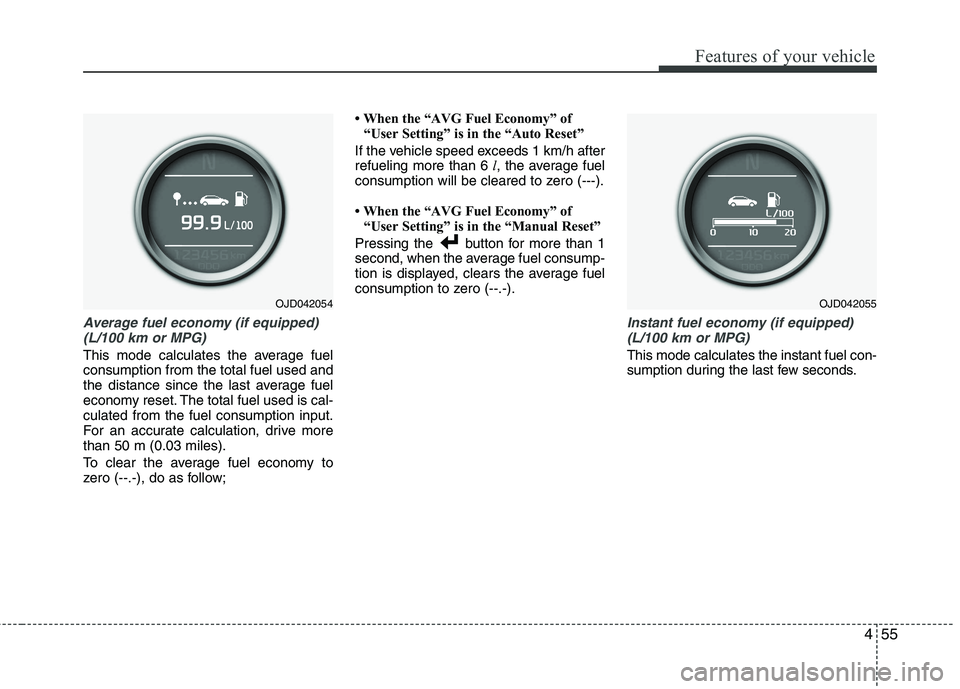
Average fuel economy (if equipped)(L/100 km or MPG)
This mode calculates the average fuel consumption from the total fuel used and
the distance since the last average fuel
economy reset. The total fuel used is cal-culated from the fuel consumption input.
For an accurate calculation, drive morethan 50 m (0.03 miles).
To clear the average fuel economy to
zero (--.-), do as follow; When the “AVG Fuel Economy” of
“User Setting” is in the “Auto Reset”
If the vehicle speed exceeds 1 km/h afterrefueling more than 6 l, the average fuel
consumption will be cleared to zero (---).
When the “AVG Fuel Economy” of “User Setting” is in the “Manual Reset”
Pressing the button for more than 1
second, when the average fuel consump-
tion is displayed, clears the average fuel
consumption to zero (--.-).
Instant fuel economy (if equipped) (L/100 km or MPG)
This mode calculates the instant fuel con-
sumption during the last few seconds.
OJD042054OJD042055
Page 140 of 653

Features of your vehicle
56
4
✽✽
NOTICE
If the vehicle is not on level ground or the battery power has been interrupt-
ed, the “Distance to empty” function
may not operate correctly.
The trip computer may not register
additional fuel if less than 6 liters (1.6
gallons) of fuel are added to the vehicle.
The fuel economy and distance to empty may vary significantly based
on driving conditions, driving habits,
and condition of the vehicle.
The distance to empty is an estimate of the available driving distance. This
value may differ from the actual driv-
ing distance.
Average speed (km/h or MPH)
This mode calculates the average speed
of the vehicle since the last averagespeed reset.
Even if the vehicle is not in motion, the
average speed keeps going while the
engine is running.
Pressing the button for more than 1
second, when the average speed is dis-
played, clears the average speed to zero(---).
Elapsed time
This mode indicates the total time trav-
eled since the last driving time reset.
Even if the vehicle is not in motion, the
driving time keeps going while the engine
is running.
The meter’s working range is from 0:00~99:59.
Pressing the button for more than 1
second, when the driving time is being
displayed, clears the driving time to zero(0:00).
OJD042056OJD042057
Page 141 of 653

457
Features of your vehicle
Service mode
This mode calculates when you need a
scheduled maintenance service (mileage
or days)
If you want to see the service mode when
other modes are displayed, press the ▲
or ▼ button less than 1 second. If you do not have your vehicle servicedaccording to the scheduled maintenance
service on the LCD display, this LCD dis-
play will show the elapsed mileage or days.
If you want to reset the maintenance
schedule, when the service required mes-
sage is displayed :
- Press the button more than 5 sec-
onds.
- " : Reset" will be shown on the LCD display.
- Press the button again more than 1 second.
If you do not press the button within 5
seconds, " : Reset" will disap pear.If you want to change the interval of the
maintenance service schedule, we rec-
ommend that you consult an authorized
Kia dealer.
✽✽
NOTICE
If you reset the maintenance schedule, when the displayed service schedule
has not elapsed or elapsed without
actual vehicle service, the displayed
service schedule on the LCD display
might not be match the actual service
schedule anymore.
You should comply with the displayed
service schedule on the LCD display
for the maintenance of your vehicle.
If the battery is disconnected or dis- charged, the displayed service sched-
ule might not match the actual service
schedule.
OJD042061OJD042059
Page 142 of 653

Features of your vehicle
58
4
If service mode is not activated, the LCD
display shows, like the above picture.
In this case, we recommend that you
consult an authorized Kia dealer.User Settings
In this mode there are 3 kinds of the sub-
menu. 1. Stop the vehicle with the ignition
switch in the ON position or engine
running.
2. Press the ▲ or ▼ button until the User
setting mode is displayed.
3. With the User setting mode displayed, press the button until the screenis changed.
4. You can change the item by pressing the ▲ or ▼ button and select an item
by pressing the button.
OJD042063OJD042060OJD042064
WARNING
Do not adjust the User Setting
while driving. You may lose your
steering control and cause severe
personal injury or accidents.
Page 144 of 653

Features of your vehicle
60
4
AVG fuel ECO Reset
Auto Reset - The average fuel economy
will reset automatically
when you drive after refuel-ing.
Manual Reset - The average fuel econo- my will not reset auto-
matically when you drive
after refueling. You can
reset the average fuel
economy by pressing
the button for morethan 1 second when the
average fuel economy is
displayed.
Language
Choose the language you prefer within
the LCD display.
Page 145 of 653

461
Features of your vehicle
INSTRUMENT CLUSTER (SUPERVISION)
1. Tachometer
2. Speedometer
3. Fuel gauge
4. Warning and indicator lights (if equipped)
5. Turn signal indicators
6. LCD display ❈The actual cluster in the vehicle may differ
from the illustration.
For more details, refer to "Gauges" in the
following pages.
OJD045100
■ Type A
Page 146 of 653

Features of your vehicle
62
4
1. Tachometer
2. Speedometer
3. Fuel gauge
4. Warning and indicator lights (if equipped)
5. Turn signal indicators
6. LCD display
7. Engine torque gauge
8. Turbo boost pressure gauge
9. Engine coolant temperature gauge
OJD043038/OJD043248
❈
The actual cluster in the vehicle may differ
from the illustration.
For more details, refer to "Gauges" in the
following pages.
■ Type B (for T-GDI engine)
Page 147 of 653

463
Features of your vehicle
Instrument panel illumination
The instrument panel illumination intensity
can be adjusted as follows:
Ignition switch in the ON position
Pressing the upper or lower part of theswitch
The illumination intensity is shown on the
instrument cluster LCD display. Gauges
Tachometer
The tachometer indicates the engine
speed in revolutions per minute (rpm). Use the tachometer to select the correct
shift points and to prevent lugging and/or
over-revving the engine.
OJD042047
CAUTION
Do not operate the engine within
the tachometer's RED ZONE. This
may cause severe engine damage.
OJD042044/OJD042045
■
Diesel Engine
■ Gasoline Engine