ESP KIA CERATO 2005 User Guide
[x] Cancel search | Manufacturer: KIA, Model Year: 2005, Model line: CERATO, Model: KIA CERATO 2005Pages: 318, PDF Size: 58.49 MB
Page 192 of 318
Driving your vehicle
80
4
1 23456789
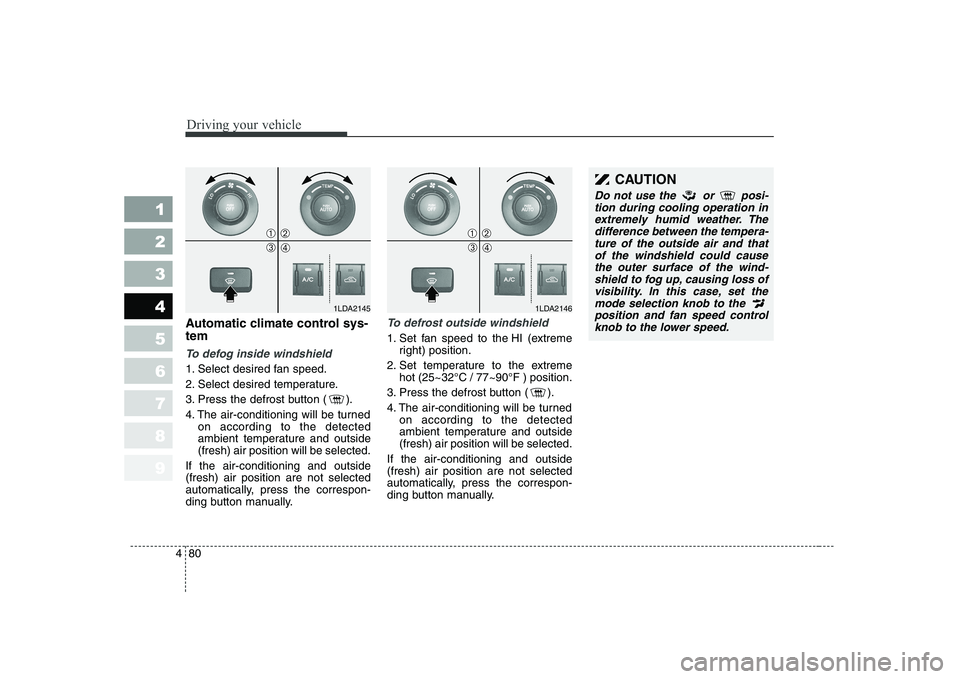
Automatic climate control sys- tem
To defog inside windshield
1. Select desired fan speed.
2. Select desired temperature.
3. Press the defrost button ( ).
4. The air-conditioning will be turned
on according to the detected
ambient temperature and outside(fresh) air position will be selected.
If the air-conditioning and outside(fresh) air position are not selected
automatically, press the correspon-
ding button manually.
To defrost outside windshield
1. Set fan speed to the HI (extreme right) position.
2. Set temperature to the extreme hot (25~32°C / 77~90°F ) position.
3. Press the defrost button ( ).
4. The air-conditioning will be turned on according to the detected
ambient temperature and outside(fresh) air position will be selected.
If the air-conditioning and outside(fresh) air position are not selected
automatically, press the correspon-
ding button manually.
1LDA2145
➀➁
➂➃
1LDA2146
➀➁
➂➃
CAUTION
Do not use the or posi- tion during cooling operation inextremely humid weather. Thedifference between the tempera- ture of the outside air and thatof the windshield could causethe outer surface of the wind-shield to fog up, causing loss of visibility. In this case, set themode selection knob to the position and fan speed control knob to the lower speed.
Page 193 of 318
481
1 23456789
Driving your vehicle
For maximum defrosting, set thetemperature control to the extreme
right/hot position and the fan speedcontrol to the highest speed.
If warm air to the floor is desired while defrosting or defogging, setthe mode to the floor-defrost posi-tion.
Before driving, clear all snow and ice from the windshield, rear win-
dow, outside rear view mirrors, and
all side windows.
Clear all snow and ice from the hood and air inlet in the cowl grill to
improve heater and defroster effi-ciency and to reduce the probabili-
ty of fogging up inside of the wind-shield. Defogging logic
Manual climate control system
To reduce the probability of fogging up the inside of the windshield, the
air intake control is set to the outside(fresh) air position automatically if
any of following occur.
The mode is selected to the ,
or while the system is acti-
vated.
The ignition switch is turned on while the mode is selected to the , or .
In this case, the air conditioning will
automatically operate if the mode is
selected to the or .
If you don’t want the air-conditioning or outside (fresh) air position, press
the corresponding button to cancel
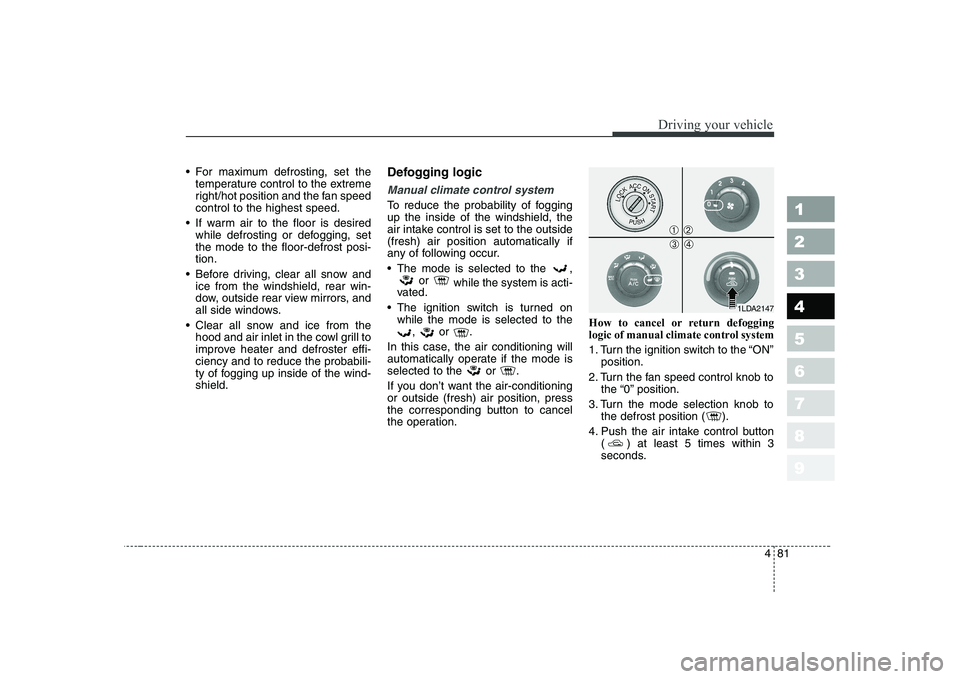
the operation. How to cancel or return defogging
logic of manual climate control system
1. Turn the ignition switch to the “ON”
position.
2. Turn the fan speed control knob to the “0” position.
3. Turn the mode selection knob to the defrost position ( ).
4. Push the air intake control button ( ) at least 5 times within 3
seconds.
1LDA2147
➀➁
➂➃
Page 194 of 318
Driving your vehicle
82
4
1 23456789
Then the indicator light in the air
intake control button will blink 3 times
with 0.5 second of interval. It indi-
cates that the defogging logic is can-
celed or returned to the programmed
status.
If the battery has been discharged or
disconnected, it is reset as the defog
logic status.Automatic climate control system
To reduce the probability of fogging up inside of the windshield, the air
intake control is set to outside (fresh)
air position automatically if any of fol-
lowing occur.
The ignition switch is turned on.
The OFF button is pushed.
The mode is selected to the or
position.
In this case, the air conditioning will
automatically operate if the mode is
selected to the or .
If you don’t want the air-conditioning or outside (fresh) air position, press
the corresponding button to cancel
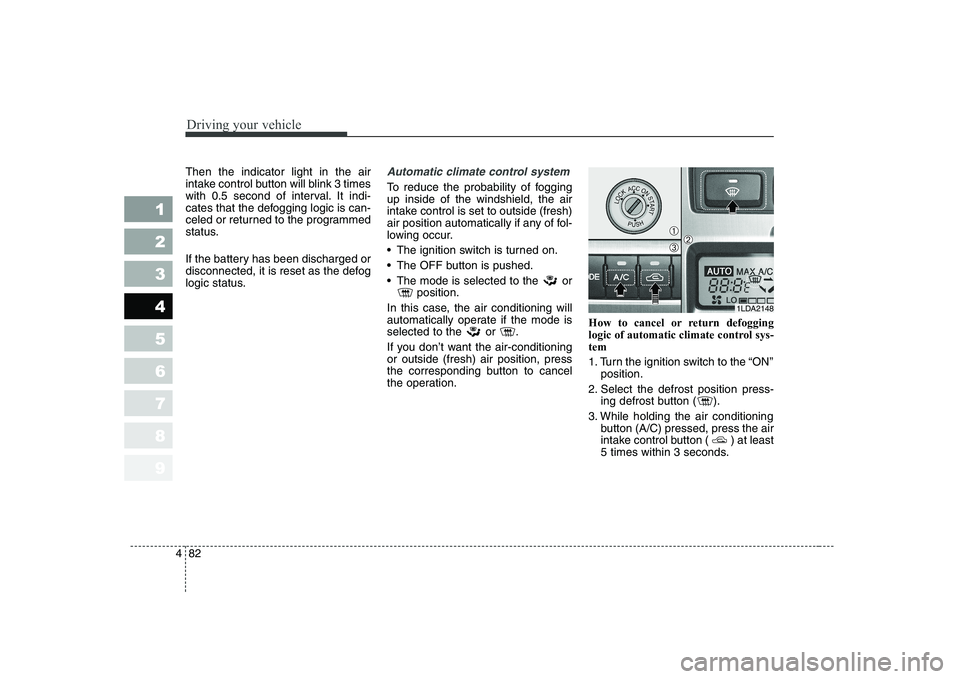
the operation. How to cancel or return defogging
logic of automatic climate control sys-tem
1. Turn the ignition switch to the “ON”
position.
2. Select the defrost position press- ing defrost button ( ).
3. While holding the air conditioning button (A/C) pressed, press the air
intake control button ( ) at least
5 times within 3 seconds.
1LDA2148
➀➁➂
Page 199 of 318
Driving tips
2
5
FUEL REQUIREMENTS
Gasoline engine (unleaded)
Your new Kia vehicle is designed to
use only unleaded fuel having an
Octane Rating of RON (ResearchOctane Number) 91 / AKI (Anti-
Knock Index) 87 or higher.
Your new Kia is designed to obtain
maximum performance with
UNLEADED FUEL, as well as mini-
mize exhaust emissions and spark
plug fouling.
✽✽ NOTICE
NEVER USE LEADED FUEL. The use of leaded fuel is detrimental to
the catalytic converter and will
damage the engine control system’s
oxygen sensor and affect emission
control.
Never add any fuel system cleaning
agents to the fuel tank other thanwhat Kia has specified. (Consult an
Authorized Kia Dealer for details.)
Gasoline Engine (Leaded)
In countries using LEADED FUEL,
your new Kia vehicle must use
LEADED FUEL. Your new Kia Vehicleis designed to correspond to LEAD-
ED FUEL specifically. Please check
your vehicle whether your vehiclecan use LEADED FUEL or not. Gasoline containing alcohol and methanol Gasohol, a mixture of gasoline and
ethanol (also known as grain alco-hol), and gasoline or gasohol con-
taining methanol (also known as
wood alcohol) are being marketedalong with or instead of leaded or
unleaded gasoline. Do not use gasohol containing more than 10% ethanol, and do not use
gasoline or gasohol containing any
methanol. Either of these fuels may
cause drivability problems and dam-age to the fuel system.
Discontinue using gasohol of any
kind if drivability problems occur.
1 23456789
Page 205 of 318
Driving tips
8
5
Driving at night
Because night driving presents more
hazards than driving in the daylight,
here are some important tips to
remember:
Slow down and keep more dis-
tance between you and other vehi-
cles, as it may be more difficult tosee at night, especially in areas
where there may not be any street
lights.
Adjust your mirrors to reduce the glare from other driver's head-
lights.
Keep your headlights clean and properly aimed on vehicles notequipped with the automatic head-
light aiming feature. Dirty or
improperly aimed headlights will
make it much more difficult to seeat night.
Avoid staring directly at the head- lights of oncoming vehicles. You
could be temporarily blinded, and it
will take several seconds for your
eyes to readjust to the darkness. Driving in the rain
Rain and wet roads can make driving
dangerous, especially if you’re not
prepared for the slick pavement.
Here are a few things to consider
when driving in the rain:
A heavy rainfall will make it harder
to see and will increase the dis-
tance needed to stop your vehicle,
so slow down.
Keep your windshield wiping equipment in good shape. Replace
your windshield wiper blades when
they show signs of streaking ormissing areas on the windshield.
If your tyres are not in good condi- tion, making a quick stop on wet
pavement can cause a skid and
possibly lead to an accident. Be
sure your tyres are in good shape.
Turn on your headlights to make it easier for others to see you.
1 23456789
WARNING - Spinning tyres
Do not spin the wheels, espe-
cially at speeds more than 56
km/h (35 mph). Spinning thewheels at high speeds when the
vehicle is stationary could
cause a tyre to overheat,
explode and injure bystanders.
Page 214 of 318
517
Driving tips
1 23456789
Safety chains
You should always attach chains
between your vehicle and your trail-
er. Cross the safety chains under the
tongue of the trailer so that thetongue will not drop to the road if it
becomes separated from the hitch.
Instructions about safety chains may
be provided by the hitch manufactur-
er or by the trailer manufacturer.
Follow the manufacturer’s recom-
mendation for attaching safety
chains. Always leave just enough
slack so you can turn with your trail-
er. And, never allow safety chains to
drag on the ground.
Trailer brakes
If your trailer weighs more than the
maximum trailer weight without trail-
er brakes loaded, then it needs its
own brakes and they must be ade-
quate. Be sure to read and follow the
instructions for the trailer brakes so
you’ll be able to install, adjust and
maintain them properly.
Don’t tap into your vehicle's brakesystem.
Driving with a trailer
Towing a trailer requires a certain
amount of experience. Before setting
out for the open road, you must get
to know your trailer. Acquaint your-
self with the feel of handling and
braking with the added weight of the
trailer. And always keep in mind that
the vehicle you are driving is now a
good deal longer and not nearly so
responsive as your vehicle is by
itself.
Before you start, check the trailer
hitch and platform, safety chains,
electrical connector(s), lights, tyres
and mirror adjustment. If the trailer
has electric brakes, start your vehicle
and trailer moving and then apply the
trailer brake controller by hand to be
sure the brakes are working. This lets
you check your electrical connection
at the same time.
During your trip, check occasionally
to be sure that the load is secure,
and that the lights and any trailer
brakes are still working.
WARNING
Do not use a trailer with its own
brakes unless you are absolute-
ly certain that you have properly
set up the brake system. This is
not a task for amateurs. Use an
experienced, competent trailer
shop for this work.
Page 247 of 318
73
Maintenance
MAINTENANCE SERVICES
You should exercise the utmost care
to prevent damage to your vehicle
and injury to yourself whenever per-
forming any maintenance or inspec-
tion procedures.
Should you have any doubts con-
cerning the inspection or servicing of
your vehicle, we strongly recom-
mend that you have an Authorized
Kia Dealer perform this work.
An Authorized Kia Dealer has facto-
ry-trained technicians and genuine
Kia parts to service your vehicle
properly. For expert advice and qual-
ity service, see an Authorized Kia
Dealer.
Inadequate, incomplete or insuffi-
cient servicing may result in opera-
tional problems with your vehicle that
could lead to vehicle damage, an
accident, or personal injury. Owner’s responsibility
✽✽
NOTICE
Maintenance Service and Record
Retention are the owner's responsi-
bility.
You should retain documents that
show proper maintenance has been
performed on your vehicle in accor-dance with the scheduled mainte-
nance service charts shown on the
following pages. You need this infor-
mation to establish your compliance
with the servicing and maintenance
requirements of your Kia warranties.
Detailed warranty information is pro-
vided in your Warranty & Maintenancebook. Repairs and adjustments required asa result of improper maintenance or
a lack of required maintenance are
not covered.
We recommend you have your vehi-
cle maintained and repaired by an
authorized Kia dealer.
An authorized Kia dealer meets Kia’s
high service quality standards and
receives technical support from Kia
in order to provide you with a high
level of service satisfaction.
1 23456789
Page 259 of 318
715
Maintenance
1 23456789
Owner maintenance precau- tions
Improper or incomplete service may
result in problems. This section gives
instructions only for the maintenance
items that are easy to perform.
As explained earlier in this section,
several procedures can be done only
by an Authorized Kia Dealer with
special tools.
✽✽NOTICE
Improper owner maintenance dur- ing the warranty period may affect
warranty coverage. For details, read
the separate Kia Warranty &
Maintenance book provided with
the vehicle. If you're unsure about
any servicing or maintenance proce-
dure, have it done by an Authorized
Kia Dealer.
WARNING - Maintenance
work
Performing maintenance work on a vehicle can be danger-
ous. You can be seriously
injured while performing some
maintenance procedures. If
you lack sufficient knowledge
and experience or the propertools and equipment to do the
work, have it done by an
Authorized Kia Dealer.
Working under the hood with the engine running is danger-
ous. It becomes even more
dangerous when you wear
jewelry or loose clothing.These can become entangled
in moving parts and result in
injury. Therefore, if you must
run the engine while working
under the hood, make certain
that you remove all jewelry
(especially rings, bracelets,
watches, and necklaces) and
all neckties, scarves, and sim-
ilar loose clothing before get-ting near the engine or cool-ing fans.
Page 278 of 318
Maintenance
34
7
1 23456789
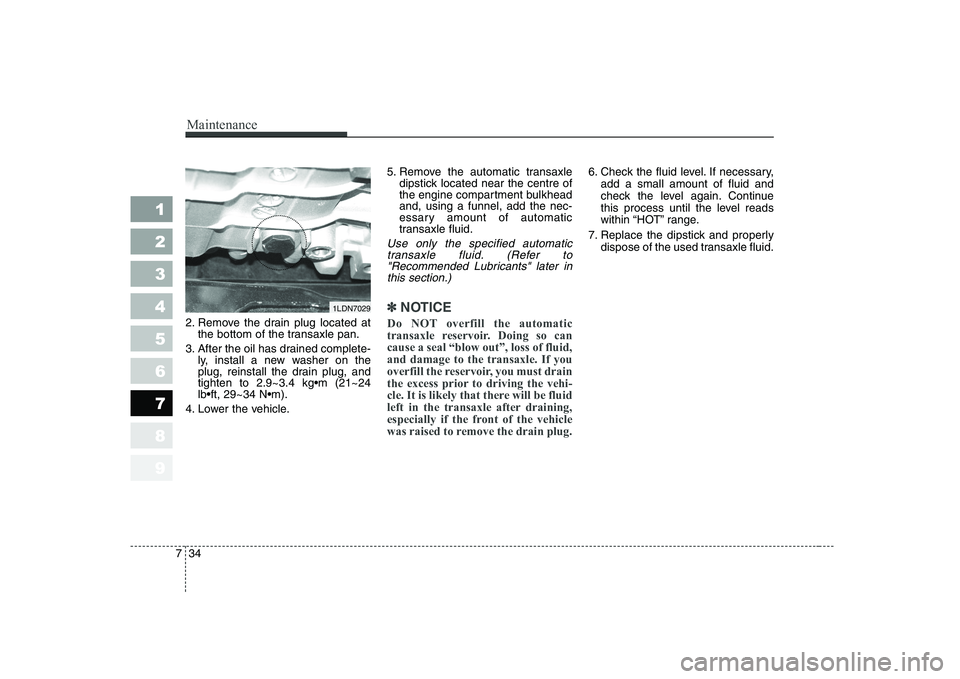
2. Remove the drain plug located at
the bottom of the transaxle pan.
3. After the oil has drained complete- ly, install a new washer on the
plug, reinstall the drain plug, and
4. Lower the vehicle. 5. Remove the automatic transaxle
dipstick located near the centre of
the engine compartment bulkheadand, using a funnel, add the nec-
essary amount of automatic
transaxle fluid.
Use only the specified automatic
transaxle fluid. (Refer to"Recommended Lubricants" later in this section.)
✽✽ NOTICE
Do NOT overfill the automatic
transaxle reservoir. Doing so cancause a seal “blow out”, loss of fluid,and damage to the transaxle. If you
overfill the reservoir, you must drain
the excess prior to driving the vehi-
cle. It is likely that there will be fluid
left in the transaxle after draining,
especially if the front of the vehicle
was raised to remove the drain plug.
6. Check the fluid level. If necessary, add a small amount of fluid and
check the level again. Continue
this process until the level reads
within “HOT” range.
7. Replace the dipstick and properly dispose of the used transaxle fluid.
1LDN7029
Page 294 of 318
Maintenance
50
7
1 23456789
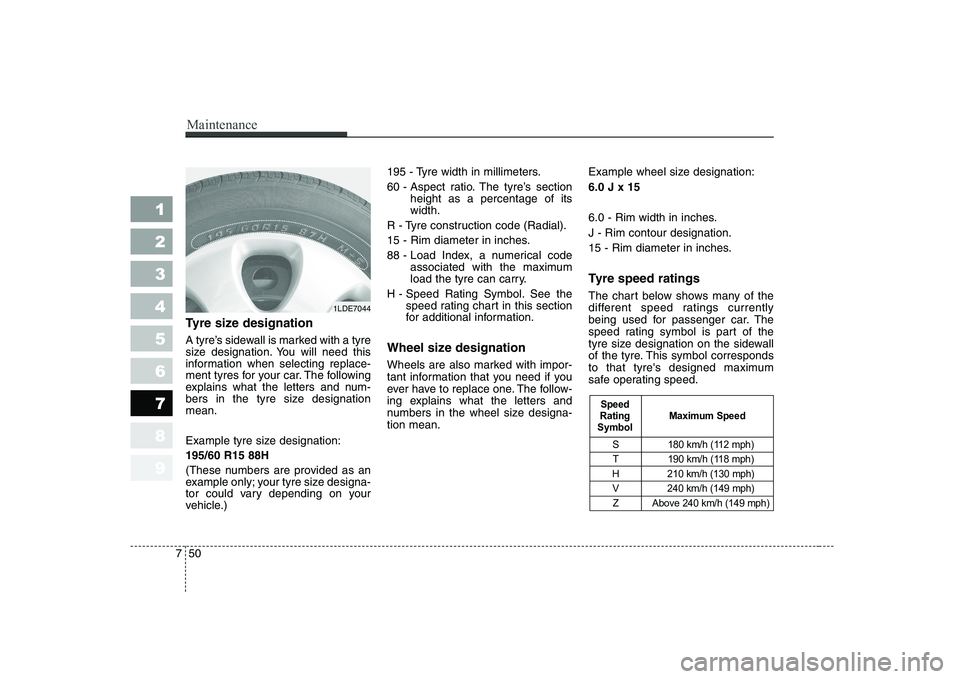
Tyre size designation
A tyre’s sidewall is marked with a tyre
size designation. You will need this
information when selecting replace-
ment tyres for your car. The following
explains what the letters and num-
bers in the tyre size designationmean.
Example tyre size designation: 195/60 R15 88H
(These numbers are provided as an
example only; your tyre size designa-
tor could vary depending on your
vehicle.) 195 - Tyre width in millimeters.
60 - Aspect ratio. The tyre’s section
height as a percentage of its width.
R - Tyre construction code (Radial).
15 - Rim diameter in inches.
88 - Load Index, a numerical code associated with the maximum
load the tyre can carry.
H - Speed Rating Symbol. See the speed rating chart in this section
for additional information.
Wheel size designation
Wheels are also marked with impor-
tant information that you need if you
ever have to replace one. The follow-
ing explains what the letters and
numbers in the wheel size designa-tion mean. Example wheel size designation: 6.0 J x 15
6.0 - Rim width in inches. J - Rim contour designation.
15 - Rim diameter in inches.
Tyre speed ratings
The chart below shows many of the
different speed ratings currently
being used for passenger car. The
speed rating symbol is part of the
tyre size designation on the sidewall
of the tyre. This symbol corresponds
to that tyre's designed maximum
safe operating speed.
S 180 km/h (112 mph)
T 190 km/h (118 mph)
H 210 km/h (130 mph) V 240 km/h (149 mph)
Z Above 240 km/h (149 mph)
Maximum Speed
Speed
Rating
Symbol
1LDE7044