light KIA CERATO 2007 Owner's Guide
[x] Cancel search | Manufacturer: KIA, Model Year: 2007, Model line: CERATO, Model: KIA CERATO 2007Pages: 329, PDF Size: 34.09 MB
Page 159 of 329
Driving your vehicle
24
4
1 23456789
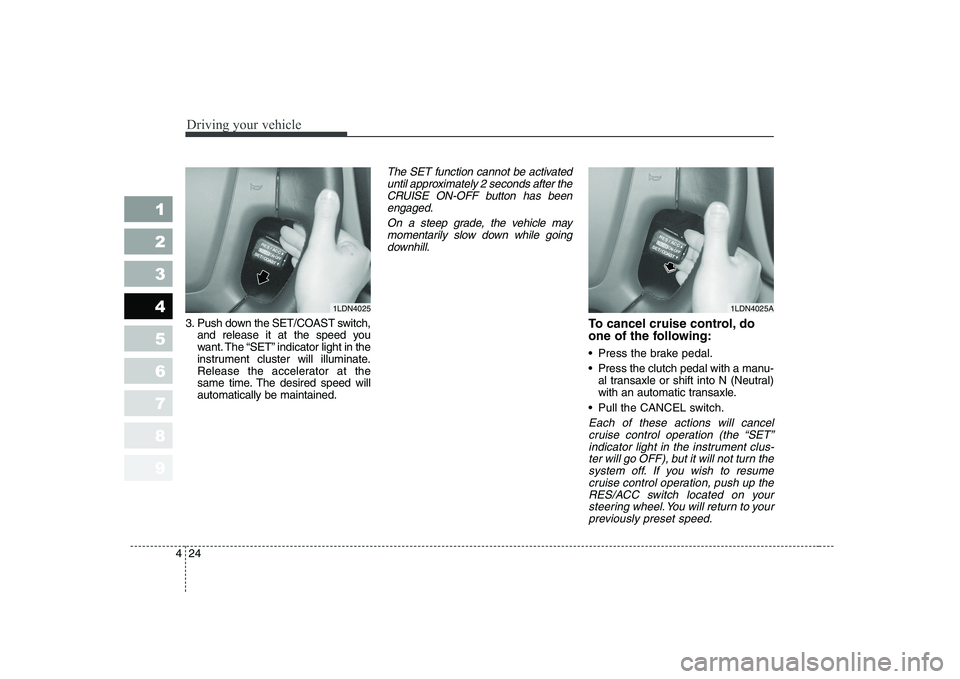
3. Push down the SET/COAST switch,
and release it at the speed you
want. The “SET” indicator light in the
instrument cluster will illuminate.
Release the accelerator at the
same time. The desired speed willautomatically be maintained.
The SET function cannot be activated
until approximately 2 seconds after theCRUISE ON-OFF button has beenengaged.
On a steep grade, the vehicle maymomentarily slow down while goingdownhill.
To cancel cruise control, do
one of the following:
Press the brake pedal.
Press the clutch pedal with a manu- al transaxle or shift into N (Neutral)
with an automatic transaxle.
Pull the CANCEL switch.
Each of these actions will cancel cruise control operation (the “SET”indicator light in the instrument clus-ter will go OFF), but it will not turn the system off. If you wish to resumecruise control operation, push up theRES/ACC switch located on your steering wheel. You will return to yourpreviously preset speed.
1LDN40251LDN4025A
Page 160 of 329
425
1 23456789
Driving your vehicle
To turn cruise control off, do
one of the following:
Push the CRUISE ON-OFF button(the CRUISE indicator light in the
instrument cluster will go OFF).
Turn the ignition off.
Both of these actions cancel cruise control operation. If you want to resume cruise control operation,repeat the steps provided in “To SetCruise Control Speed” on the previ- ous page.
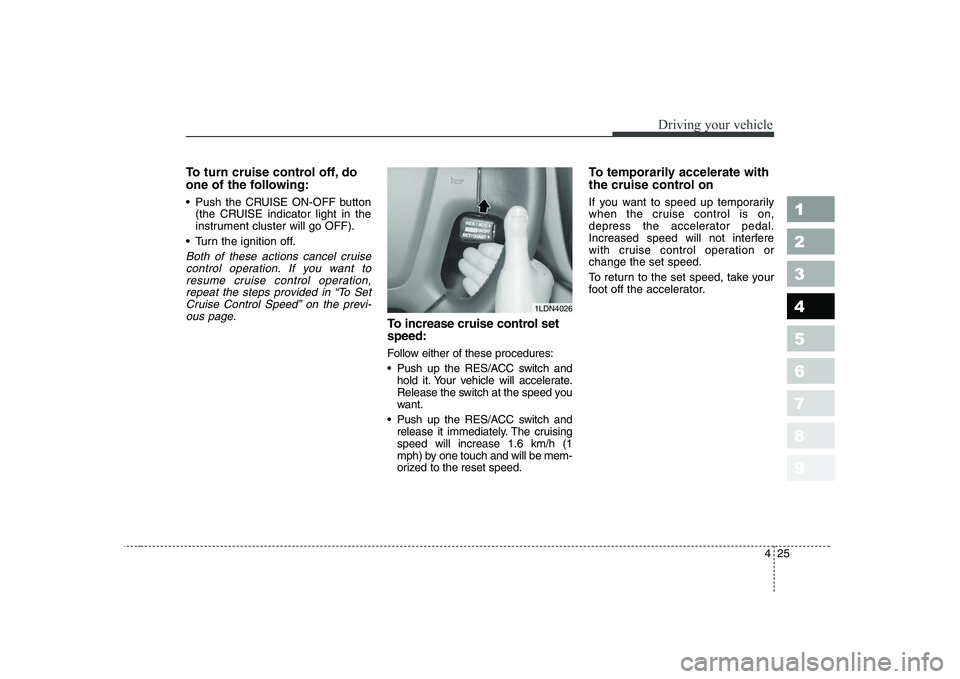
To increase cruise control set speed:
Follow either of these procedures:
Push up the RES/ACC switch and hold it. Your vehicle will accelerate.
Release the switch at the speed you
want.
Push up the RES/ACC switch and release it immediately. The cruisingspeed will increase 1.6 km/h (1
mph) by one touch and will be mem-
orized to the reset speed. To temporarily accelerate with
the cruise control on
If you want to speed up temporarily
when the cruise control is on,
depress the accelerator pedal.
Increased speed will not interfere
with cruise control operation orchange the set speed.
To return to the set speed, take your
foot off the accelerator.
1LDN4026
Page 162 of 329

427
1 23456789
Driving your vehicle
The Traction Control System (TCS)
helps the vehicle accelerate on slip-
pery road surfaces by preventing the
drive wheels from spinning exces-
sively. It also provides improved driv-
ing force and steering.TCS operation
TCS ON condition
ON, TCS and TCS OFF
indicator light illuminate for
approximately 3 seconds,
then TCS is turned on.
turn TCS off. (TCS OFF
indicator will illuminate). To
turn the TCS on, press the
TCS button (TCS OFFindicator light will go off).
you may hear a slight tick-
ing sound. This is the TCS
performing an automatic
system self-check and does
not indicate a problem.
When operating
When the TCS is in opera-
tion, TCS indicator light
blinks.
system is operating prop-
erly, you can feel a slight
pulsation in the vehicle.
This is only the effect of
brake control and indi-
cates nothing unusual.
or driving on a slipperyroad, pressing the accel-
erator pedal may not
cause the engine rpm
(revolutions per minute) to
increase.
TRACTION CONTROL SYSTEM (IF EQUIPPED)
OLD026118
-TCS
Page 163 of 329
Driving your vehicle
28
4
1 23456789
TCS operation off
TCS OFF state
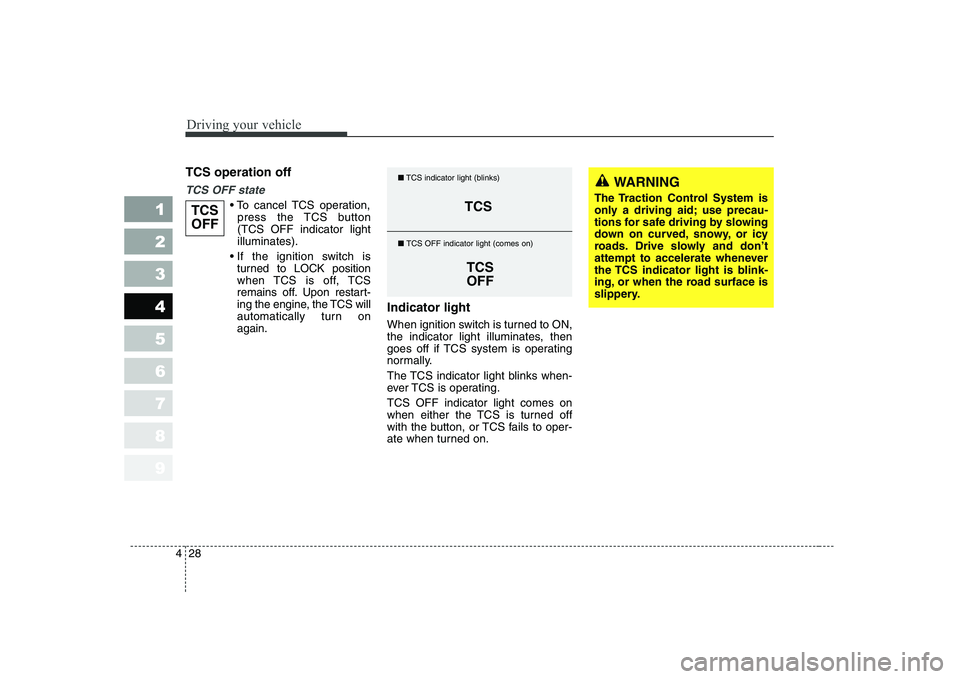
cancel TCS operation,
press the TCS button (TCS OFF indicator lightilluminates).
turned to LOCK position
when TCS is off, TCS
remains off. Upon restart-
ing the engine, the TCS will
automatically turn onagain. Indicator light
When ignition switch is turned to ON,
the indicator light illuminates, then
goes off if TCS system is operating
normally.
The TCS indicator light blinks when-
ever TCS is operating. TCS OFF indicator light comes on
when either the TCS is turned off
with the button, or TCS fails to oper-
ate when turned on.TCS
OFFTCS
TCSOFF
■
TCS indicator light (blinks)
■ TCS OFF indicator light (comes on)
WARNING
The Traction Control System is
only a driving aid; use precau-
tions for safe driving by slowing
down on curved, snowy, or icy
roads. Drive slowly and don’t
attempt to accelerate whenever
the TCS indicator light is blink-
ing, or when the road surface is
slippery.
Page 164 of 329
429
1 23456789
Driving your vehicle
TCS OFF usage
When driving
It’s a good idea to keep the TCSturned on for daily driving whenev-
er possible.
To turn TCS off while driving, press the TCS button while driving on a
flat road surface.
Never press TCS button while TCS is
operating (TCS indicator light blinks).
If TCS is turned off while TCS is
operating, the vehicle may slip out ofcontrol.
✽✽
NOTICE
Page 165 of 329
Driving your vehicle
30
4
1 23456789
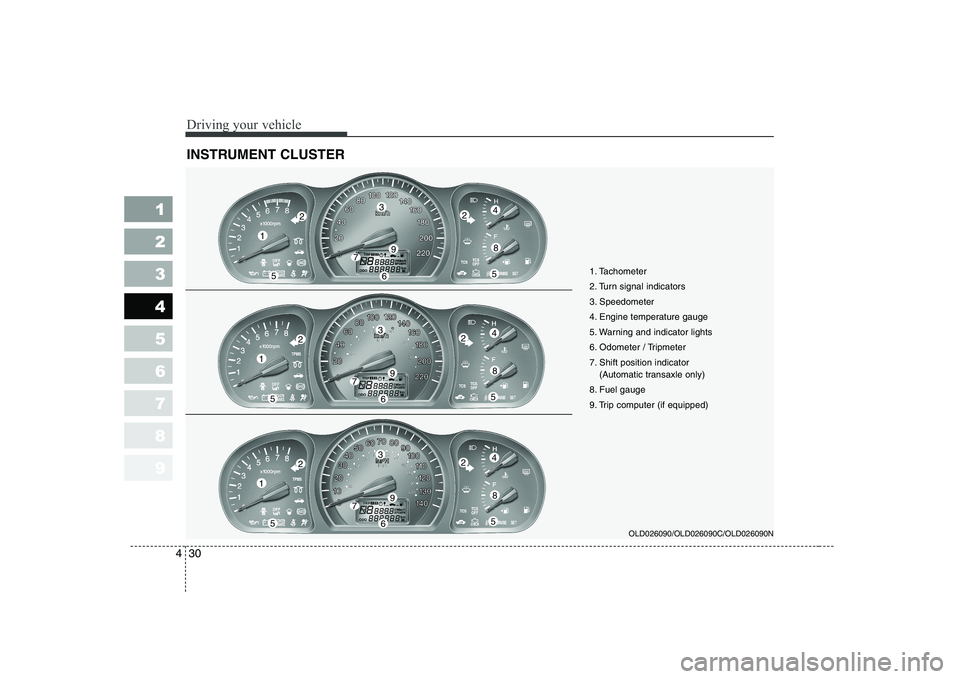
INSTRUMENT CLUSTER
OLD026090/OLD026090C/OLD026090N
1
55
224
8
3
79
6
1
55
224
8
3
79
6
1
55
224
8
3
79
6 1. Tachometer
2. Turn signal indicators
3. Speedometer
4. Engine temperature gauge
5. Warning and indicator lights
6. Odometer / Tripmeter
7. Shift position indicator
(Automatic transaxle only)
8. Fuel gauge
9. Trip computer (if equipped)
Page 167 of 329
Driving your vehicle
32
4
1 23456789
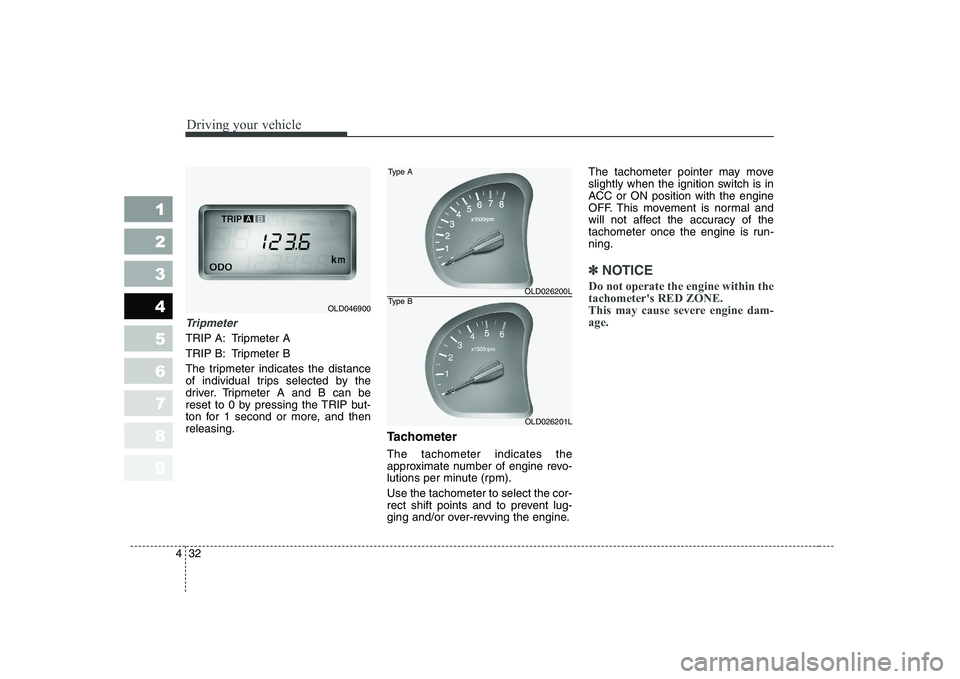
Tripmeter
TRIP A: Tripmeter A
TRIP B: Tripmeter B
The tripmeter indicates the distance
of individual trips selected by the
driver. Tripmeter A and B can be
reset to 0 by pressing the TRIP but-
ton for 1 second or more, and thenreleasing.
Tachometer The tachometer indicates the
approximate number of engine revo-
lutions per minute (rpm). Use the tachometer to select the cor-
rect shift points and to prevent lug-
ging and/or over-revving the engine.The tachometer pointer may move
slightly when the ignition switch is in
ACC or ON position with the engine
OFF. This movement is normal and
will not affect the accuracy of the
tachometer once the engine is run-ning.
✽✽
NOTICE
Do not operate the engine within the tachometer's RED ZONE.
This may cause severe engine dam-age.
OLD046900
OLD026200L
OLD026201L
Type A
Type B
Page 168 of 329
433
1 23456789
Driving your vehicle
Engine temperature gauge
This gauge shows the temperature of the engine coolant when the igni-
tion switch is ON.
Do not continue driving with an over-
heated engine. If your vehicle over-
heats, refer to “Overheating” in the
Index.
✽✽
NOTICE
If the gauge pointer moves beyond
the normal range area toward the“H” position, it indicates overheat-ing that may damage the engine.
Fuel gauge
The fuel gauge indicates the approx- imate amount of fuel remaining in thefuel tank.
Fuel tank capacity - 55 liters.
The fuel gauge is supplemented by a
low fuel warning light, which will illu-
minate when the fuel level has
dropped to about 8.5 liters. Trip computer (if equipped)
Trip computer is a microcomputer-
controlled driver information gauge
that displays information related to
driving, such as estimated distance
to empty, average speed and driving
time on the LCD.
Page 171 of 329

Driving your vehicle
36
4
1 23456789
Average speed
This mode indicates the average
speed from the starting of the vehicle
to the ignition key “OFF”. When the
ignition key is “OFF”, it will initialize to0 km/h (0 mph).
Driving time
This mode indicates the total time
from the starting of the vehicle to the
ignition key “OFF” after resetting.
When the “TRIP” switch is pushed, it
will initialize to 0:00. Reset
Push “TRIP” for more than 1 second
to initialize the displayed information
such as average speed and driving
time. Instrument panel illumination (if equipped)
When the vehicle’s parking lights or headlights are on, rotate the illumina-
tion control knob to adjust the instru-
ment panel illumination intensity.
OLD026204LOLD026097OLD026095
Page 172 of 329

437
1 23456789
Driving your vehicle
Warning lights / audible indi-
cators
Checking operation
All warning lights are checked by
turning the ignition switch ON (do not
start the engine). Any light that does
not illuminate should be checked by
an Authorized Kia Dealer.
After starting the engine, check to
make sure that all warning lights are
off. If any are still on, this indicates a
situation that needs attention. When
releasing the parking brake, the
brake system warning light should go
off. The fuel warning light will stay on
if the fuel level is low.Anti-lock brake sys- tem (ABS) warninglight (if equipped)
This light illuminates if the key is
turned to ON and goes off in approx-imately 3 seconds if the system is
operating normally.
If the light stays on, you may have a
problem with your ABS system.
Contact an authorized Kia dealer as
soon as possible.
Electronic brake force
distribution (EBD)system warning light (if equipped)
If two warning lights illumi- nate at the same time
while driving, your vehicle
has a problem with ABSand EBD system.In this case, your ABS system and
regular brake system may not work
normally. Have the vehicle checked
by an Authorized Kia Dealer as soon
as possible.
WARNINGS AND INDICATORS
ABS
ABS
WARNING
If the both ABS and Brake warn-
ing lights are ON and stay ON,
your vehicle’s brake system will
not work normally. So you may
experience an unexpected and
dangerous situation during sud-
den braking. In this case, avoidhigh speed driving and abrupt
braking. Have your vehicle
checked by Authorized Kia
Dealer as soon as possible.