automatic KIA Cerato 2016 2.G User Guide
[x] Cancel search | Manufacturer: KIA, Model Year: 2016, Model line: Cerato, Model: KIA Cerato 2016 2.GPages: 501, PDF Size: 14.8 MB
Page 81 of 501
Features of your vehicle
10
4
Trunk open (3) (if equipped)
The trunk is opened if the button is
pressed for more than 1 second.
Once the trunk is opened and then
closed, the trunk will lock automatically.
Alarm (4)
The horn sounds and the hazard
warning lights blink for about 30 sec-
onds if this button is pressed for
more than 0.5 seconds. To stop the
horn and lights, press any button on
the transmitter.
Transmitter precautions
The transmitter (or smart key) will not
work if any of following occurs:
The ignition key is in the ignition
switch.
You exceed the operating distance limit (about 30 m [90 feet]).
The battery in the transmitter (or smart key) is weak.
Other vehicles or objects may be blocking the signal.
The weather is extremely cold.
The transmitter (or smart key) is close to a radio transmitter such as
a radio station or an airport which
can interfere with normal operation
of the transmitter.
When the transmitter (or smart key)
does not work properly, open and
close the door with the ignition key. If
you have a problem with the trans-
mitter (or smart key), contact an
authorized Kia dealer. If the transmitter is in close proximi-
ty to your cell phone or smart phone,
the signal from the transmitter could
be blocked by normal operation of
your cell phone or smart phone. This
is especially important when the
phone is active such as making call,
receiving calls, text messaging,
and/or sending/receiving emails.
Avoid placing the transmitter and
your cell phone or smart phone in
the same pants or jacket pocket and
maintain adequate distance
between the two devices.
Page 84 of 501
413
Features of your vehicle
To deactivate the immobilizersystem:
Insert the ignition key into the key
cylinder and turn it to the ON position.
To activate the immobilizer sys-tem:
Turn the ignition key to the OFF posi-
tion. The immobilizer system acti-
vates automatically. Without a valid
ignition key for your vehicle, the
engine will not start.
Your Immobilizer password is a cus-
tomer unique password and should
be kept confidential. Do not leave this
number anywhere in your vehicle.
✽ ✽ NOTICE
Keep each key separately in order to
avoid a starting malfunction.
Do not put metal accessories near
the ignition switch.
Metal accessories may interrupt the
transponder signal and may prevent
the engine from being started.
If you need additional keys or lose
your keys, consult an authorized Kia
dealer. This device complies with Industry
Canada Standard RSS-210.
Operation is subject to the following
two conditions:
1. This device may not cause harm-
ful interference, and
2. This device must accept any inter- ference received, including inter-
ference that may cause undesired
operation.
✽ ✽NOTICE
Changes or modifications not
expressly approved by the party
responsible for compliance could
void the user's authority to operate
the equipment.
CAUTION - Immobilizer
damage
Do not expose your immobilizersystem to moisture, static elec-tricity and rough handling. Thismay damage your immobilizer.
CAUTION - Immobilizer
alterations
Do not change, alter or adjustthe immobilizer system becauseit could cause the immobilizersystem to malfunction.
Page 89 of 501
Features of your vehicle
18
4
DOOR LOCKS
Operating door locks from
outside the vehicle
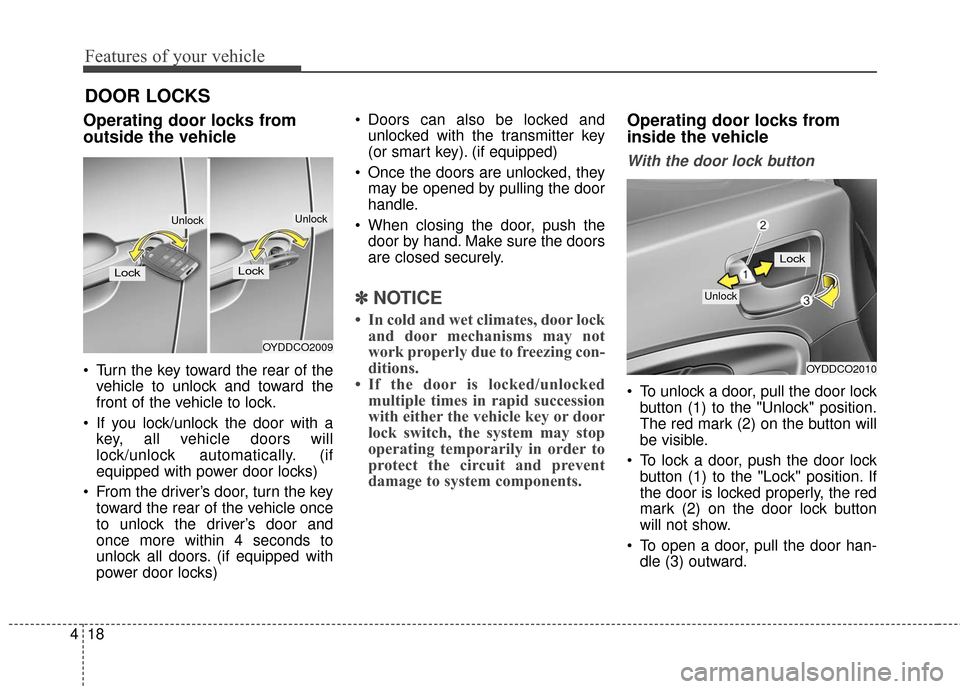
Turn the key toward the rear of the
vehicle to unlock and toward the
front of the vehicle to lock.
If you lock/unlock the door with a key, all vehicle doors will
lock/unlock automatically. (if
equipped with power door locks)
From the driver’s door, turn the key toward the rear of the vehicle once
to unlock the driver’s door and
once more within 4 seconds to
unlock all doors. (if equipped with
power door locks) Doors can also be locked and
unlocked with the transmitter key
(or smart key). (if equipped)
Once the doors are unlocked, they may be opened by pulling the door
handle.
When closing the door, push the door by hand. Make sure the doors
are closed securely.
✽ ✽ NOTICE
• In cold and wet climates, door lock
and door mechanisms may not
work properly due to freezing con-
ditions.
• If the door is locked/unlocked multiple times in rapid succession
with either the vehicle key or door
lock switch, the system may stop
operating temporarily in order to
protect the circuit and prevent
damage to system components.
Operating door locks from
inside the vehicle
With the door lock button
To unlock a door, pull the door lock
button (1) to the "Unlock" position.
The red mark (2) on the button will
be visible.
To lock a door, push the door lock button (1) to the "Lock" position. If
the door is locked properly, the red
mark (2) on the door lock button
will not show.
To open a door, pull the door han- dle (3) outward.
OYDDCO2010
Lock
Unlock
OYDDCO2009
Lock
Unlock
Lock
Unlock
Page 91 of 501
Features of your vehicle
20
4
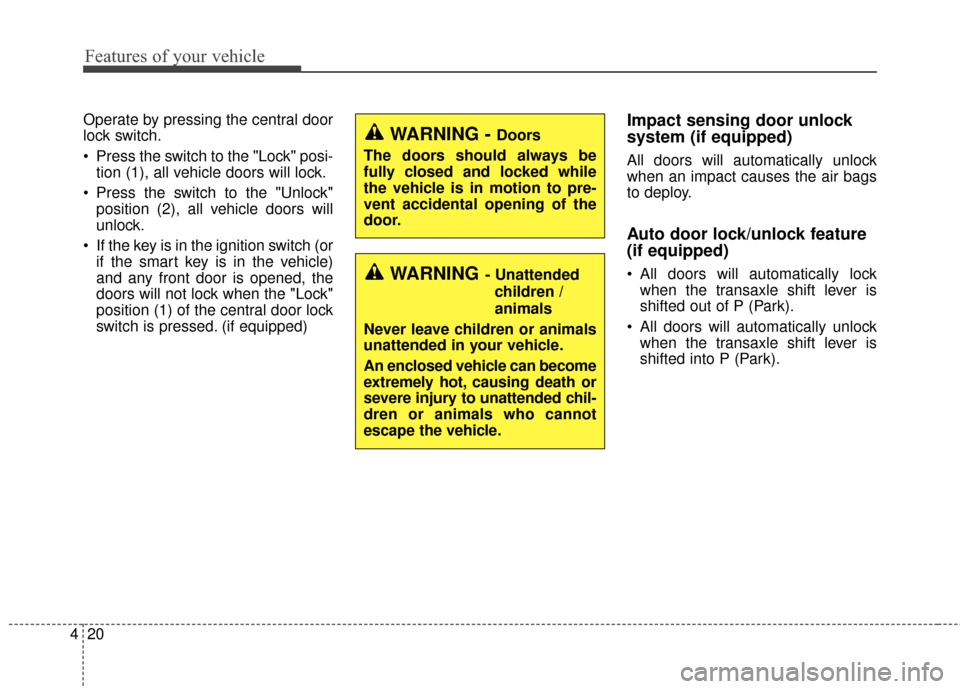
Operate by pressing the central door
lock switch.
Press the switch to the "Lock" posi-
tion (1), all vehicle doors will lock.
Press the switch to the "Unlock" position (2), all vehicle doors will
unlock.
If the key is in the ignition switch (or if the smart key is in the vehicle)
and any front door is opened, the
doors will not lock when the "Lock"
position (1) of the central door lock
switch is pressed. (if equipped)Impact sensing door unlock
system (if equipped)
All doors will automatically unlock
when an impact causes the air bags
to deploy.
Auto door lock/unlock feature
(if equipped)
All doors will automatically lockwhen the transaxle shift lever is
shifted out of P (Park).
All doors will automatically unlock when the transaxle shift lever is
shifted into P (Park).WARNING- Unattended
children /
animals
Never leave children or animals
unattended in your vehicle.
An enclosed vehicle can become
extremely hot, causing death or
severe injury to unattended chil-
dren or animals who cannot
escape the vehicle.
WARNING - Doors
The doors should always be
fully closed and locked while
the vehicle is in motion to pre-
vent accidental opening of the
door.
Page 92 of 501
421
Features of your vehicle
Speed sensing door lock sys-
tem (if equipped)
All doors will be automatically locked
after the vehicle speed exceeds 9.3
mph. And all doors will be automati-
cally unlocked when you turn the
engine off or when you remove the
ignition key. (if equipped)
An authorized Kia dealer can acti-
vate or deactivate some auto door
lock/ unlock features as follows;
Auto door unlock by using the dri-ver's door lock button
Auto door lock/unlock by shifting the transaxle shift lever out of P
(Park) or into P (Park)
Auto door unlock when the ignition key is removed from the ignition
switch (for smart key, when the
ENGINE START/STOP button is
turned to the OFF position)
If you want to activate or deactivate
some door lock/unlock feature, con-
sult an authorized Kia dealer.
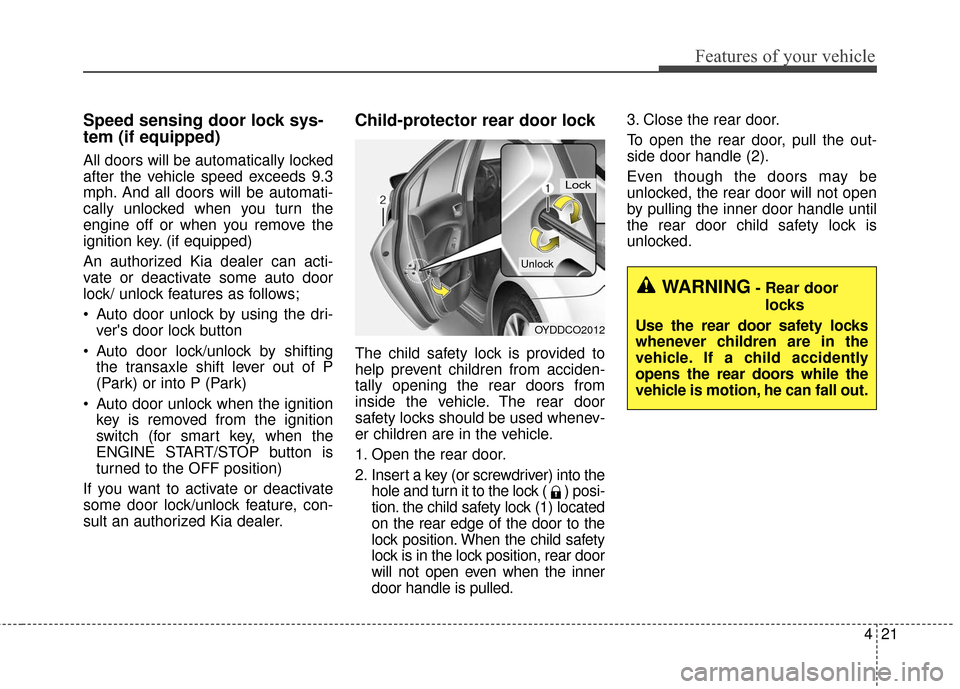
Child-protector rear door lock
The child safety lock is provided to
help prevent children from acciden-
tally opening the rear doors from
inside the vehicle. The rear door
safety locks should be used whenev-
er children are in the vehicle.
1. Open the rear door.
2. Insert a key (or screwdriver) into the hole and turn it to the lock ( ) posi-
tion. the child safety lock (1) located
on the rear edge of the door to the
lock position. When the child safety
lock is in the lock position, rear door
will not open even when the inner
door handle is pulled. 3. Close the rear door.
To open the rear door, pull the out-
side door handle (2).
Even though the doors may be
unlocked, the rear door will not open
by pulling the inner door handle until
the rear door child safety lock is
unlocked.
OYDDCO2012
Lock
Unlock
WARNING- Rear door
locks
Use the rear door safety locks
whenever children are in the
vehicle. If a child accidently
opens the rear doors while the
vehicle is motion, he can fall out.
Page 95 of 501
Features of your vehicle
24
4
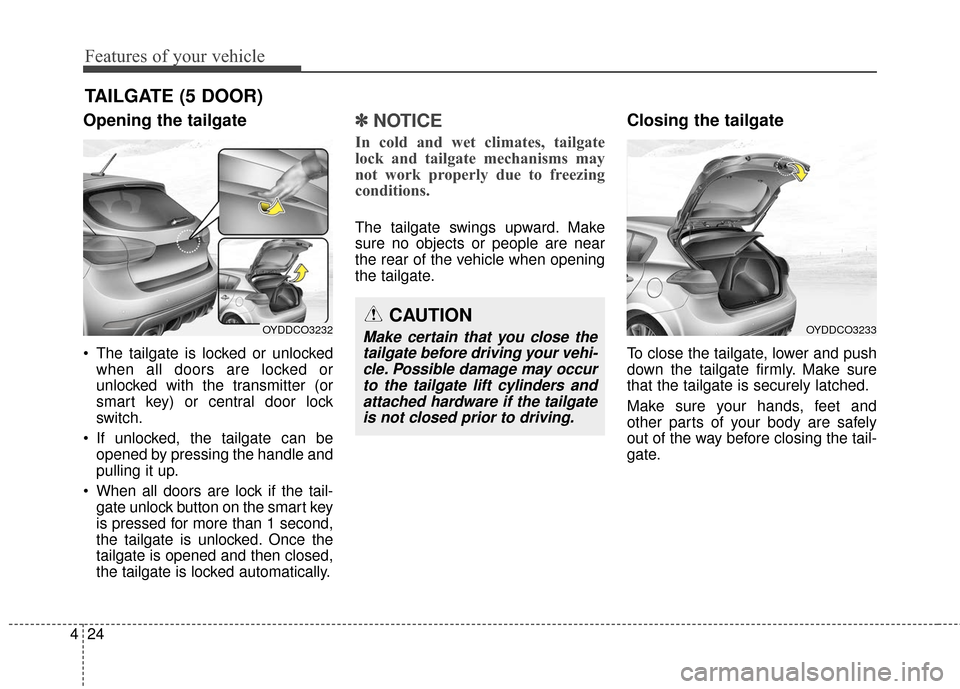
Opening the tailgate
The tailgate is locked or unlocked
when all doors are locked or
unlocked with the transmitter (or
smart key) or central door lock
switch.
If unlocked, the tailgate can be opened by pressing the handle and
pulling it up.
When all doors are lock if the tail- gate unlock button on the smart key
is pressed for more than 1 second,
the tailgate is unlocked. Once the
tailgate is opened and then closed,
the tailgate is locked automatically.
✽ ✽ NOTICE
In cold and wet climates, tailgate
lock and tailgate mechanisms may
not work properly due to freezing
conditions.
The tailgate swings upward. Make
sure no objects or people are near
the rear of the vehicle when opening
the tailgate.
Closing the tailgate
To close the tailgate, lower and push
down the tailgate firmly. Make sure
that the tailgate is securely latched.
Make sure your hands, feet and
other parts of your body are safely
out of the way before closing the tail-
gate.
TAILGATE (5 DOOR)
CAUTION
Make certain that you close the
tailgate before driving your vehi-cle. Possible damage may occurto the tailgate lift cylinders andattached hardware if the tailgateis not closed prior to driving.OYDDCO3233OYDDCO3232
Page 98 of 501
427
Features of your vehicle
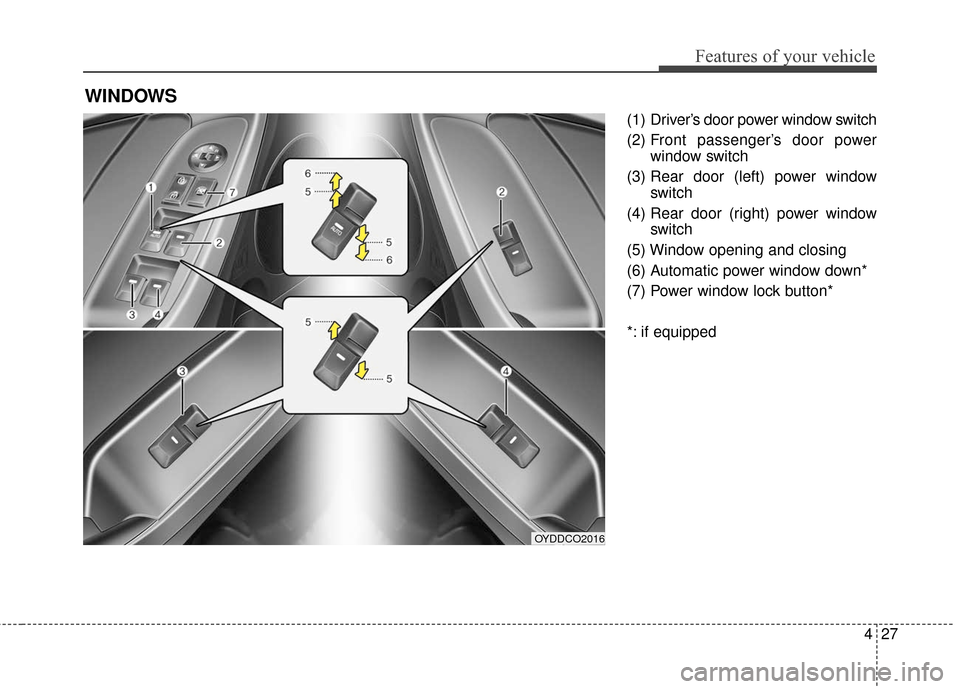
(1) Driver’s door power window switch
(2) Front passenger’s door powerwindow switch
(3) Rear door (left) power window switch
(4) Rear door (right) power window switch
(5) Window opening and closing
(6) Automatic power window down*
(7) Power window lock button*
*: if equipped
WINDOWS
OYDDCO2016
Page 100 of 501
429
Features of your vehicle
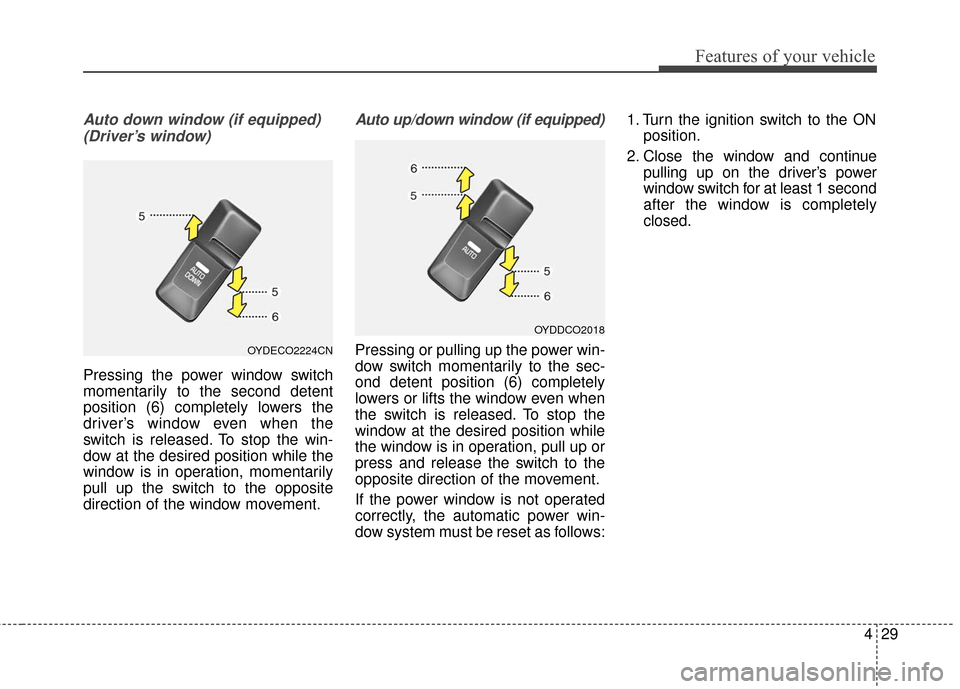
Auto down window (if equipped) (Driver’s window)
Pressing the power window switch
momentarily to the second detent
position (6) completely lowers the
driver’s window even when the
switch is released. To stop the win-
dow at the desired position while the
window is in operation, momentarily
pull up the switch to the opposite
direction of the window movement.
Auto up/down window (if equipped)
Pressing or pulling up the power win-
dow switch momentarily to the sec-
ond detent position (6) completely
lowers or lifts the window even when
the switch is released. To stop the
window at the desired position while
the window is in operation, pull up or
press and release the switch to the
opposite direction of the movement.
If the power window is not operated
correctly, the automatic power win-
dow system must be reset as follows: 1. Turn the ignition switch to the ON
position.
2. Close the window and continue pulling up on the driver’s power
window switch for at least 1 second
after the window is completely
closed.OYDECO2224CN
OYDDCO2018
Page 101 of 501
Features of your vehicle
30
4
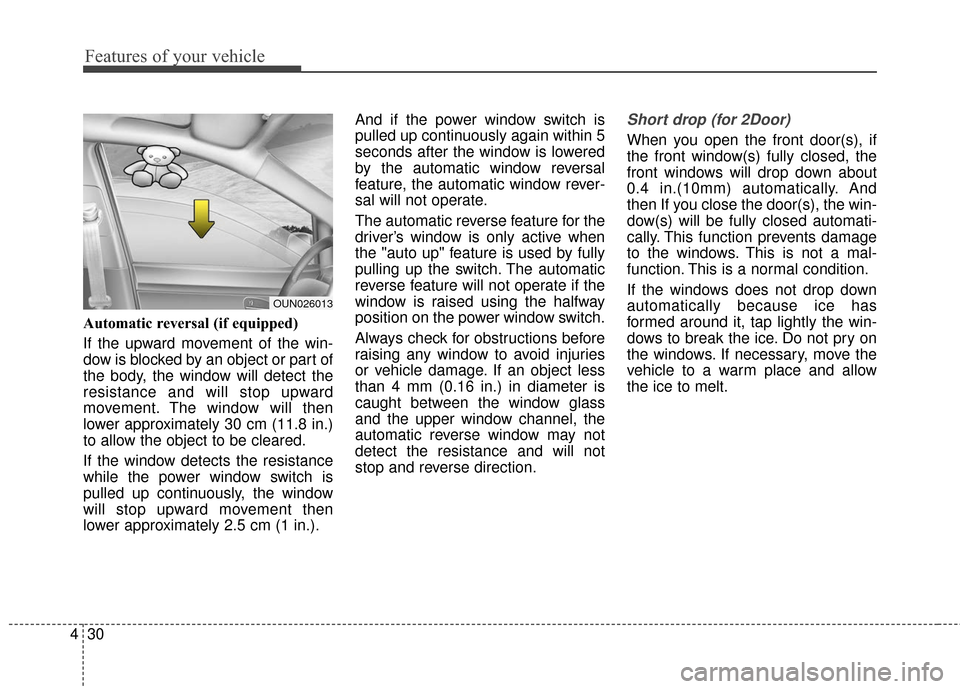
Automatic reversal (if equipped)
If the upward movement of the win-
dow is blocked by an object or part of
the body, the window will detect the
resistance and will stop upward
movement. The window will then
lower approximately 30 cm (11.8 in.)
to allow the object to be cleared.
If the window detects the resistance
while the power window switch is
pulled up continuously, the window
will stop upward movement then
lower approximately 2.5 cm (1 in.). And if the power window switch is
pulled up continuously again within 5
seconds after the window is lowered
by the automatic window reversal
feature, the automatic window rever-
sal will not operate.
The automatic reverse feature for the
driver’s window is only active when
the "auto up" feature is used by fully
pulling up the switch. The automatic
reverse feature will not operate if the
window is raised using the halfway
position on the power window switch.
Always check for obstructions before
raising any window to avoid injuries
or vehicle damage. If an object less
than 4 mm (0.16 in.) in diameter is
caught between the window glass
and the upper window channel, the
automatic reverse window may not
detect the resistance and will not
stop and reverse direction.
Short drop (for 2Door)
When you open the front door(s), if
the front window(s) fully closed, the
front windows will drop down about
0.4 in.(10mm) automatically. And
then If you close the door(s), the win-
dow(s) will be fully closed automati-
cally. This function prevents damage
to the windows. This is not a mal-
function. This is a normal condition.
If the windows does not drop down
automatically because ice has
formed around it, tap lightly the win-
dows to break the ice. Do not pry on
the windows. If necessary, move the
vehicle to a warm place and allow
the ice to melt.
OUN026013
Page 103 of 501
Features of your vehicle
32
4
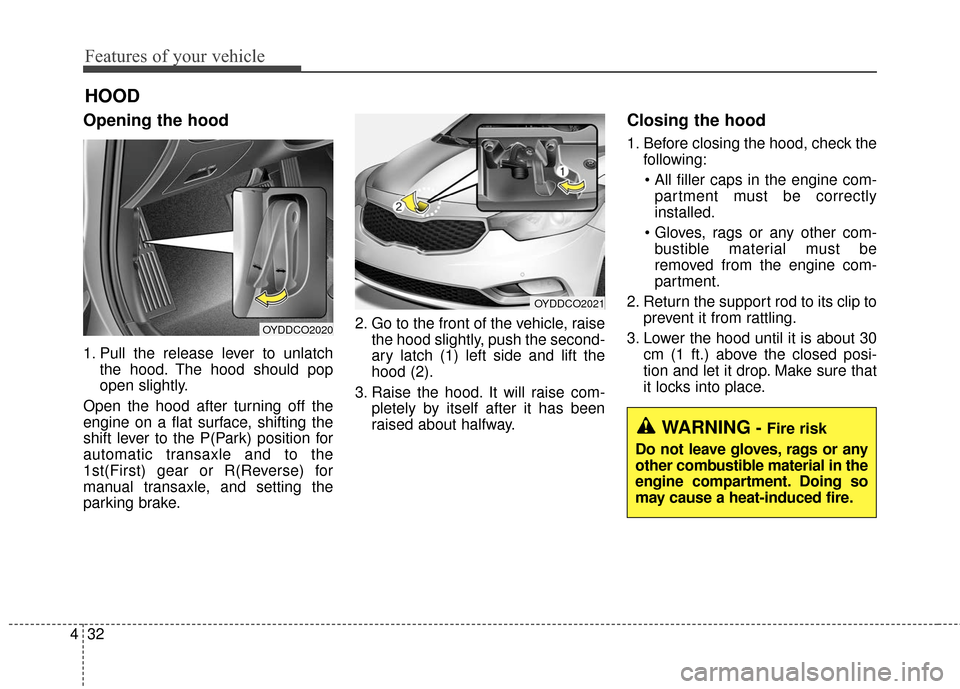
Opening the hood
1. Pull the release lever to unlatch
the hood. The hood should pop
open slightly.
Open the hood after turning off the
engine on a flat surface, shifting the
shift lever to the P(Park) position for
automatic transaxle and to the
1st(First) gear or R(Reverse) for
manual transaxle, and setting the
parking brake. 2. Go to the front of the vehicle, raise
the hood slightly, push the second-
ary latch (1) left side and lift the
hood (2).
3. Raise the hood. It will raise com- pletely by itself after it has been
raised about halfway.
Closing the hood
1. Before closing the hood, check thefollowing:
partment must be correctly
installed.
bustible material must be
removed from the engine com-
partment.
2. Return the support rod to its clip to prevent it from rattling.
3. Lower the hood until it is about 30 cm (1 ft.) above the closed posi-
tion and let it drop. Make sure that
it locks into place.
HOOD
OYDDCO2020
OYDDCO2021
WARNING- Fire risk
Do not leave gloves, rags or any
other combustible material in the
engine compartment. Doing so
may cause a heat-induced fire.