Battery din KIA Cerato 2016 2.G Owner's Manual
[x] Cancel search | Manufacturer: KIA, Model Year: 2016, Model line: Cerato, Model: KIA Cerato 2016 2.GPages: 501, PDF Size: 14.8 MB
Page 81 of 501
Features of your vehicle
10
4
Trunk open (3) (if equipped)
The trunk is opened if the button is
pressed for more than 1 second.
Once the trunk is opened and then
closed, the trunk will lock automatically.
Alarm (4)
The horn sounds and the hazard
warning lights blink for about 30 sec-
onds if this button is pressed for
more than 0.5 seconds. To stop the
horn and lights, press any button on
the transmitter.
Transmitter precautions
The transmitter (or smart key) will not
work if any of following occurs:
The ignition key is in the ignition
switch.
You exceed the operating distance limit (about 30 m [90 feet]).
The battery in the transmitter (or smart key) is weak.
Other vehicles or objects may be blocking the signal.
The weather is extremely cold.
The transmitter (or smart key) is close to a radio transmitter such as
a radio station or an airport which
can interfere with normal operation
of the transmitter.
When the transmitter (or smart key)
does not work properly, open and
close the door with the ignition key. If
you have a problem with the trans-
mitter (or smart key), contact an
authorized Kia dealer. If the transmitter is in close proximi-
ty to your cell phone or smart phone,
the signal from the transmitter could
be blocked by normal operation of
your cell phone or smart phone. This
is especially important when the
phone is active such as making call,
receiving calls, text messaging,
and/or sending/receiving emails.
Avoid placing the transmitter and
your cell phone or smart phone in
the same pants or jacket pocket and
maintain adequate distance
between the two devices.
Page 82 of 501
411
Features of your vehicle
This device complies with Industry
Canada Standard RSS-210.
Operation is subject to the following
two conditions:
1. This device may not cause harm-ful interference, and
2. This device must accept any inter- ference received, including inter-
ference that may cause undesired
operation.
✽ ✽NOTICE
Changes or modifications not
expressly approved by the party
responsible for compliance could void
the user’s authority to operate the
equipment. If the keyless entry sys-
tem is inoperative due to changes or
modifications not expressly approved
by the party responsible for compli-
ance, it will not be covered by your
manufacturer’s vehicle warranty.
Battery replacement
A battery should last for several years,
but if the transmitter or smart key is
not working properly, try replacing the
battery with a new one. If you are
unsure how to use or replace the bat-
tery, contact an authorized Kia dealer.
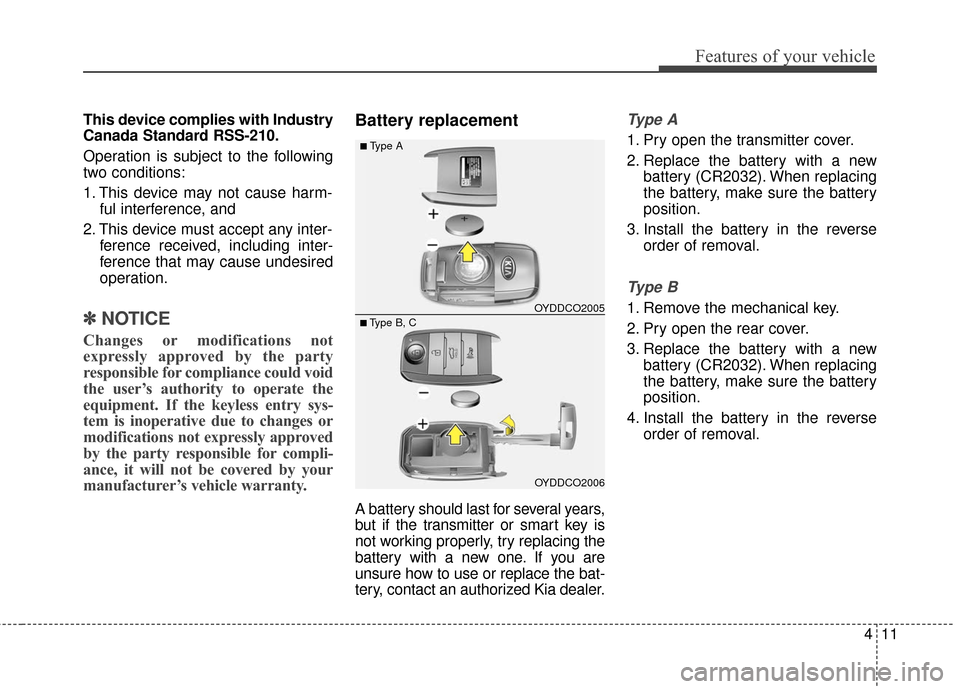
Ty p e A
1. Pry open the transmitter cover.
2. Replace the battery with a new
battery (CR2032). When replacing
the battery, make sure the battery
position.
3. Install the battery in the reverse order of removal.
Ty p e B
1. Remove the mechanical key.
2. Pry open the rear cover.
3. Replace the battery with a newbattery (CR2032). When replacing
the battery, make sure the battery
position.
4. Install the battery in the reverse order of removal.■Type B, C OYDDCO2005
■Type A
OYDDCO2006
Page 83 of 501
Features of your vehicle
12
4
The transmitter or smart key is
designed to give you years of trou-
ble-free use, however it can mal-
function if exposed to moisture or
static electricity. If you are unsure
how to use or replace the battery,
contact an authorized Kia dealer.
Using the wrong battery can cause the transmitter or smart key to mal-
function. Be sure to use the correct
battery.
An inappropriately dis- posed battery can be harm-
ful to the environment and
human health. Dispose the
battery according to your
local law(s) or regulation.Immobilizer system
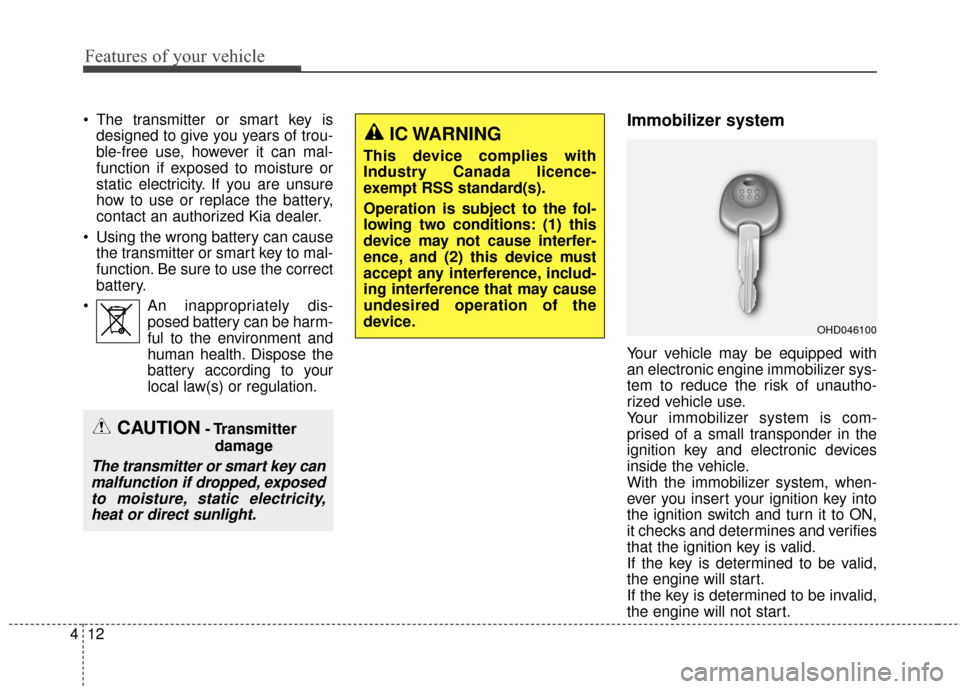
Your vehicle may be equipped with
an electronic engine immobilizer sys-
tem to reduce the risk of unautho-
rized vehicle use.
Your immobilizer system is com-
prised of a small transponder in the
ignition key and electronic devices
inside the vehicle.
With the immobilizer system, when-
ever you insert your ignition key into
the ignition switch and turn it to ON,
it checks and determines and verifies
that the ignition key is valid.
If the key is determined to be valid,
the engine will start.
If the key is determined to be invalid,
the engine will not start.
OHD046100
IC WARNING
This device complies with
Industry Canada licence-
exempt RSS standard(s).
Operation is subject to the fol-
lowing two conditions: (1) this
device may not cause interfer-
ence, and (2) this device must
accept any interference, includ-
ing interference that may cause
undesired operation of the
device.
CAUTION- Transmitter
damage
The transmitter or smart key canmalfunction if dropped, exposedto moisture, static electricity,heat or direct sunlight.
Page 124 of 501
453
Features of your vehicle
Folding the outside rearview mirror
Electric type
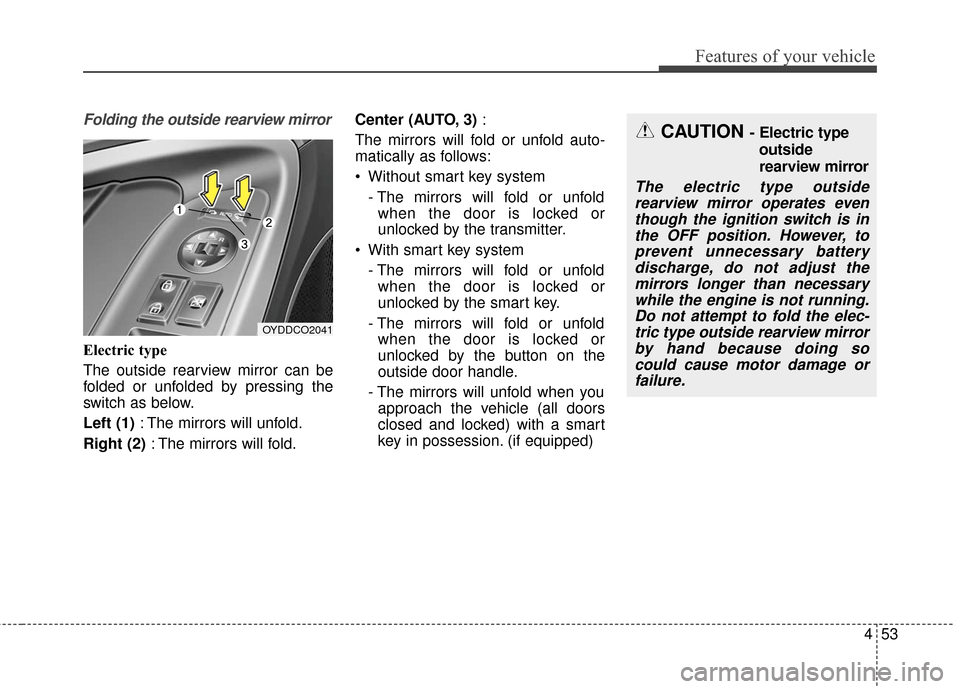
The outside rearview mirror can be
folded or unfolded by pressing the
switch as below.
Left (1): The mirrors will unfold.
Right (2) : The mirrors will fold. Center (AUTO, 3)
:
The mirrors will fold or unfold auto-
matically as follows:
Without smart key system - The mirrors will fold or unfoldwhen the door is locked or
unlocked by the transmitter.
With smart key system - The mirrors will fold or unfoldwhen the door is locked or
unlocked by the smart key.
- The mirrors will fold or unfold when the door is locked or
unlocked by the button on the
outside door handle.
- The mirrors will unfold when you approach the vehicle (all doors
closed and locked) with a smart
key in possession. (if equipped)
OYDDCO2041
CAUTION - Electric type
outside
rearview mirror
The electric type outsiderearview mirror operates eventhough the ignition switch is inthe OFF position. However, toprevent unnecessary batterydischarge, do not adjust themirrors longer than necessarywhile the engine is not running.Do not attempt to fold the elec-tric type outside rearview mirrorby hand because doing socould cause motor damage orfailure.
Page 133 of 501
Features of your vehicle
62
4
Service Mode
Service Interval
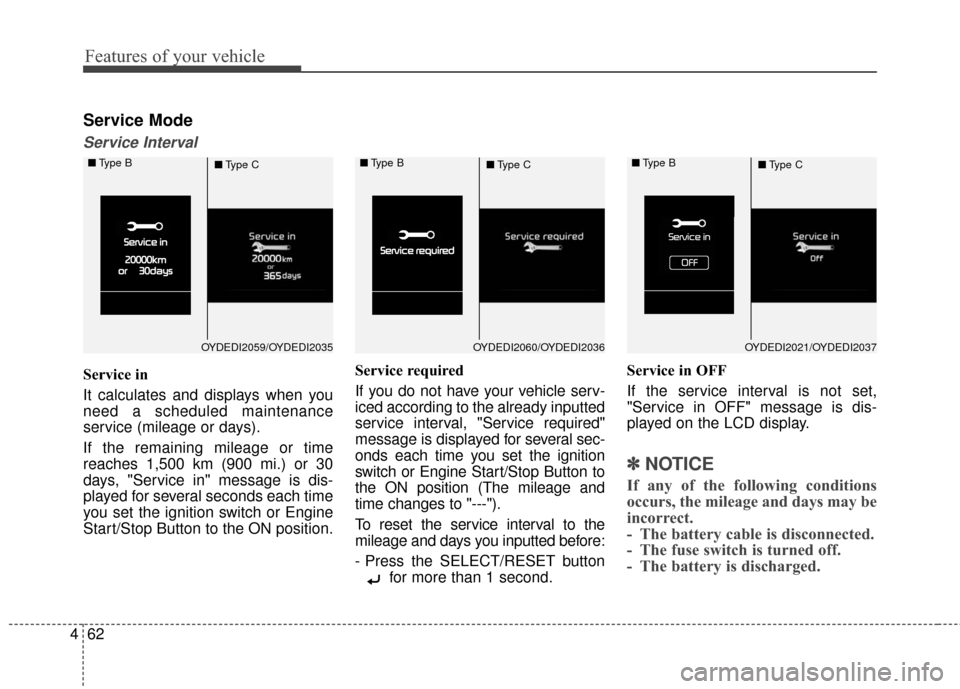
Service in
It calculates and displays when you
need a scheduled maintenance
service (mileage or days).
If the remaining mileage or time
reaches 1,500 km (900 mi.) or 30
days, "Service in" message is dis-
played for several seconds each time
you set the ignition switch or Engine
Start/Stop Button to the ON position. Service required
If you do not have your vehicle serv-
iced according to the already inputted
service interval, "Service required"
message is displayed for several sec-
onds each time you set the ignition
switch or Engine Start/Stop Button to
the ON position (The mileage and
time changes to "---").
To reset the service interval to the
mileage and days you inputted before:
- Press the SELECT/RESET button
for more than 1 second. Service in OFF
If the service interval is not set,
"Service in OFF" message is dis-
played on the LCD display.
✽ ✽
NOTICE
If any of the following conditions
occurs, the mileage and days may be
incorrect.
- The battery cable is disconnected.
- The fuse switch is turned off.
- The battery is discharged.
OYDEDI2059/OYDEDI2035
■
Type B
■Type COYDEDI2060/OYDEDI2036
■
Type B
■Type COYDEDI2021/OYDEDI2037
■
Type B
■Type C
Page 203 of 501
Features of your vehicle
132
4
Defogging Logic
To reduce the probability of fogging
up inside of the windshield, the air
intake or air conditioning are con-
trolled automatically according to
certain conditions such as or
position. Logic can be disabled and
enabled by doing following :
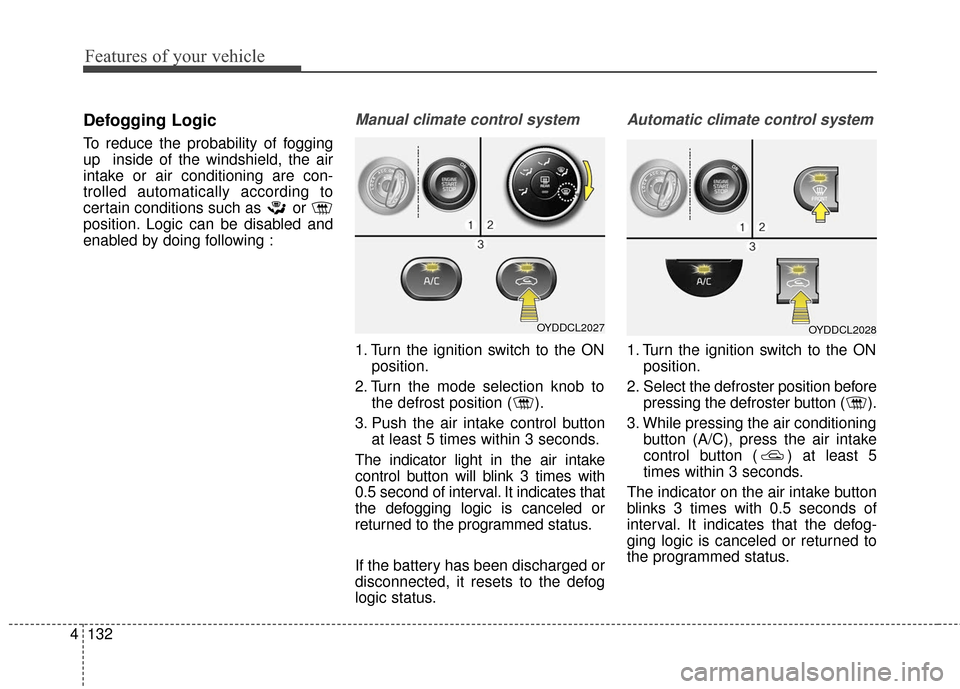
Manual climate control system
1. Turn the ignition switch to the ON
position.
2. Turn the mode selection knob to the defrost position ( ).
3. Push the air intake control button at least 5 times within 3 seconds.
The indicator light in the air intake
control button will blink 3 times with
0.5 second of interval. It indicates that
the defogging logic is canceled or
returned to the programmed status.
If the battery has been discharged or
disconnected, it resets to the defog
logic status.
Automatic climate control system
1. Turn the ignition switch to the ON position.
2. Select the defroster position before pressing the defroster button ( ).
3. While pressing the air conditioning button (A/C), press the air intake
control button ( ) at least 5
times within 3 seconds.
The indicator on the air intake button
blinks 3 times with 0.5 seconds of
interval. It indicates that the defog-
ging logic is canceled or returned to
the programmed status.
OYDDCL2027OYDDCL2028
Page 231 of 501
Features of your vehicle
160
4
(Continued)
Park the vehicle when connect-
ing the head unit with the mobile
phone.
Bluetooth®connection may
become intermittently discon-
nected in some mobile phones.
Follow these steps to try again.
1. Within the mobile phone, turn
the
Bluetooth®function off/on
and try again.
2. Turn the mobile phone power Off/On and try again.
3. Completely remove the mobile phone battery, reboot, and then
again.
4. Reboot the Audio Video Navigation System and try
again.
5. Delete all paired devices, pair and try again.
Handsfree call quality and volume may differ depending on the model
of your mobile phone.
Voice Recognition
When using the voice recognitionfeature, only commands listed
within the user's manual are sup-
ported.
Be aware that during the operation of the voice recognition system,
pressing any key other than the key terminate voice recogni-
tion mode.
For superior voice recognition per- formance, position the microphone
used for voice recognition above
the head of the driver’s seat and
maintain a proper position when
saying commands.
Within the following situations, voice recognition may not function
properly due to external sound.
- When the windows and sunroofare open
- When the wind of the cooling / heating device is strong
- When entering and passing through tunnels
(Continued)(Continued)
- When driving on rugged anduneven roads
- During severe rain (heavy rains, windstorms)
Phone related voice commands can be used only when a
Bluetooth®Wireless Technology
device is connected.
When making calls by stating a name, the corresponding contact
must be downloaded and stored
within the audio system.
After downloading the
Bluetooth®
Wireless Technology phone book,
it takes some times to convert the
phone book data into voice infor-
mation. During this time, voice
recognition may not properly oper-
ate.
Pronounce the voice commands naturally and clearly as if in a nor-
mal conversation.
Page 338 of 501
Driving your vehicle
16
5
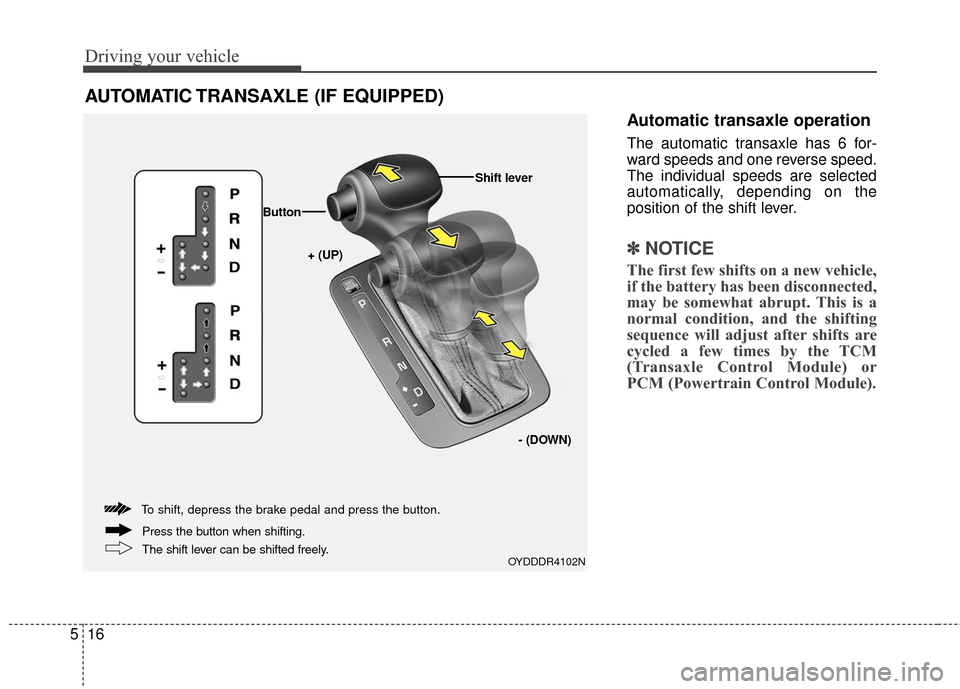
Automatic transaxle operation
The automatic transaxle has 6 for-
ward speeds and one reverse speed.
The individual speeds are selected
automatically, depending on the
position of the shift lever.
✽ ✽
NOTICE
The first few shifts on a new vehicle,
if the battery has been disconnected,
may be somewhat abrupt. This is a
normal condition, and the shifting
sequence will adjust after shifts are
cycled a few times by the TCM
(Transaxle Control Module) or
PCM (Powertrain Control Module).
AUTOMATIC TRANSAXLE (IF EQUIPPED)
OYDDDR4102N
+ (UP)
Button
Shift lever
- (DOWN)
To shift, depress the brake pedal and press the button.
The shift lever can be shifted freely. Press the button when shifting.
Page 349 of 501
527
Driving your vehicle
When you drive on a road withpoor traction, such as an icy road,
and operated your brakes continu-
ously, the ABS will be active con-
tinuously and the ABS warning
light may illuminate. Pull your vehi-
cle over to a safe place and stop
the engine.
Restart the engine. If the ABS warning light is off, then your ABS
is normal. Otherwise, you may
have a problem with the ABS.
Contact an authorized Kia dealer
as soon as possible.
✽ ✽ NOTICE
When you jump start your vehicle
because of a drained battery, the
engine may not run as smoothly and
the ABS warning light may turn on
at the same time. This happens
because of the low battery voltage. It
does not mean your ABS has mal-
functioned.
• Do not pump your brakes!
• Have the battery recharged before
driving the vehicle.
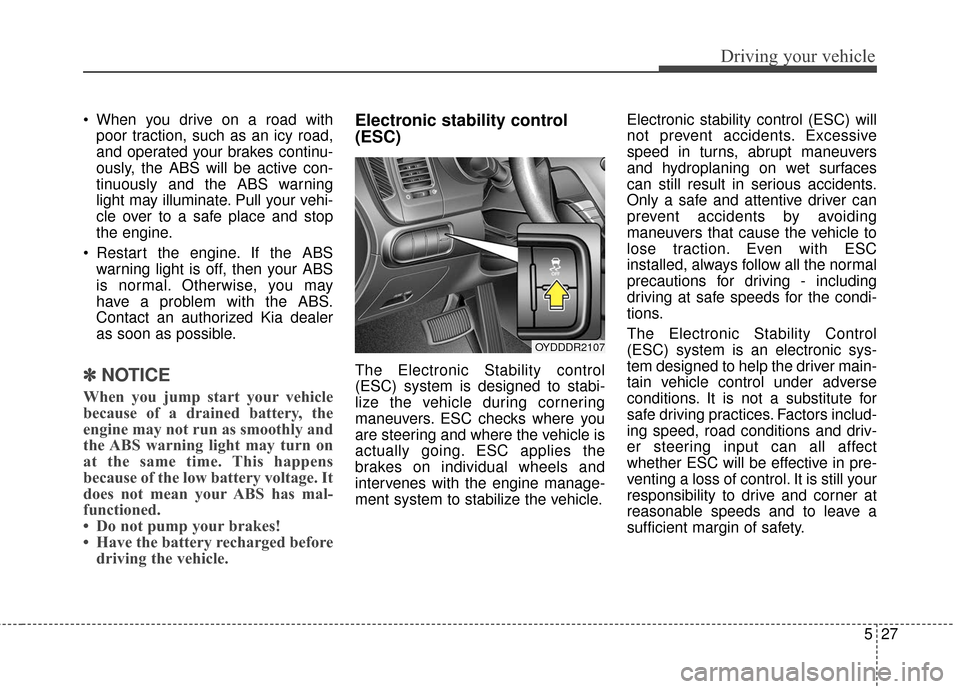
Electronic stability control
(ESC)
The Electronic Stability control
(ESC) system is designed to stabi-
lize the vehicle during cornering
maneuvers. ESC checks where you
are steering and where the vehicle is
actually going. ESC applies the
brakes on individual wheels and
intervenes with the engine manage-
ment system to stabilize the vehicle. Electronic stability control (ESC) will
not prevent accidents. Excessive
speed in turns, abrupt maneuvers
and hydroplaning on wet surfaces
can still result in serious accidents.
Only a safe and attentive driver can
prevent accidents by avoiding
maneuvers that cause the vehicle to
lose traction. Even with ESC
installed, always follow all the normal
precautions for driving - including
driving at safe speeds for the condi-
tions.
The Electronic Stability Control
(ESC) system is an electronic sys-
tem designed to help the driver main-
tain vehicle control under adverse
conditions. It is not a substitute for
safe driving practices. Factors includ-
ing speed, road conditions and driv-
er steering input can all affect
whether ESC will be effective in pre-
venting a loss of control. It is still your
responsibility to drive and corner at
reasonable speeds and to leave a
sufficient margin of safety.
OYDDDR2107
Page 405 of 501

Fuses . . . . . . . . . . . . . . . . . . . . . . . . . . . . . . . . . . . . \
7-58
• Instrument panel fuse replacement . . . . . . . . . . . . . . 7-59
• Engine compartment fuse replacement. . . . . . . . . . . 7-61
• Fuse/relay panel description. . . . . . . . . . . . . . . . . . . . 7-63
• Engine compartment fuse panel . . . . . . . . . . . . . . . . 7-64
• Engine room (Battery terminal cover) . . . . . . . . . . . 7-65
Appearance care . . . . . . . . . . . . . . . . . . . . . . . . . . . 7-71
• Exterior care . . . . . . . . . . . . . . . . . . . . . . . . . . . . . . . . 7-71
• Interior care . . . . . . . . . . . . . . . . . . . . . . . . . . . . . . . . . 7-76
Emission control system . . . . . . . . . . . . . . . . . . . . 7-78
• Crankcase emission control system . . . . . . . . . . . . . . 7-78
• Evaporative emission control
(including ORVR: Onboard Refueling Vapor
Recovery) system . . . . . . . . . . . . . . . . . . . . . . . . . . . 7-78
• Exhaust emission control system . . . . . . . . . . . . . . . . 7-79
7