ECU KIA Forte 2010 1.G Owner's Guide
[x] Cancel search | Manufacturer: KIA, Model Year: 2010, Model line: Forte, Model: KIA Forte 2010 1.GPages: 321, PDF Size: 6.3 MB
Page 117 of 321
Features of your vehicle52
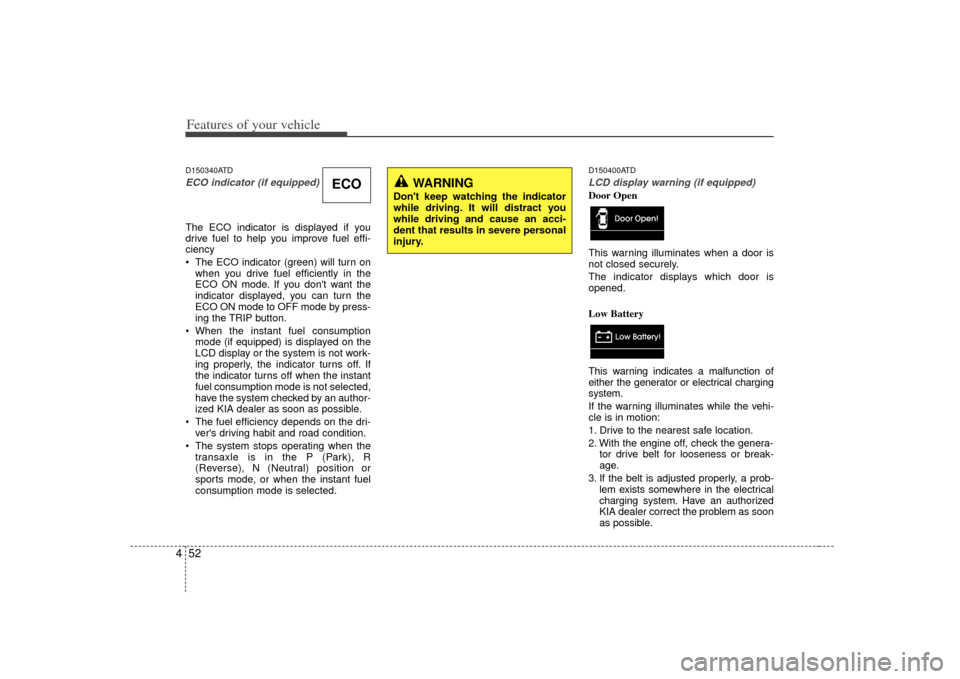
4D150340ATDECO indicator (if equipped)The ECO indicator is displayed if you
drive fuel to help you improve fuel effi-
ciency
The ECO indicator (green) will turn on
when you drive fuel efficiently in the
ECO ON mode. If you don't want the
indicator displayed, you can turn the
ECO ON mode to OFF mode by press-
ing the TRIP button.
When the instant fuel consumption mode (if equipped) is displayed on the
LCD display or the system is not work-
ing properly, the indicator turns off. If
the indicator turns off when the instant
fuel consumption mode is not selected,
have the system checked by an author-
ized KIA dealer as soon as possible.
The fuel efficiency depends on the dri- ver's driving habit and road condition.
The system stops operating when the transaxle is in the P (Park), R
(Reverse), N (Neutral) position or
sports mode, or when the instant fuel
consumption mode is selected.
D150400ATDLCD display warning (if equipped)Door Open
This warning illuminates when a door is
not closed securely.
The indicator displays which door is
opened.
Low Battery
This warning indicates a malfunction of
either the generator or electrical charging
system.
If the warning illuminates while the vehi-
cle is in motion:
1. Drive to the nearest safe location.
2. With the engine off, check the genera- tor drive belt for looseness or break-
age.
3. If the belt is adjusted properly, a prob- lem exists somewhere in the electrical
charging system. Have an authorized
KIA dealer correct the problem as soon
as possible.
ECO
WARNING
Don't keep watching the indicator
while driving. It will distract you
while driving and cause an acci-
dent that results in severe personal
injury.
Page 148 of 321
483
Features of your vehicle
D270000AHMThese compartments can be used to
store small items.
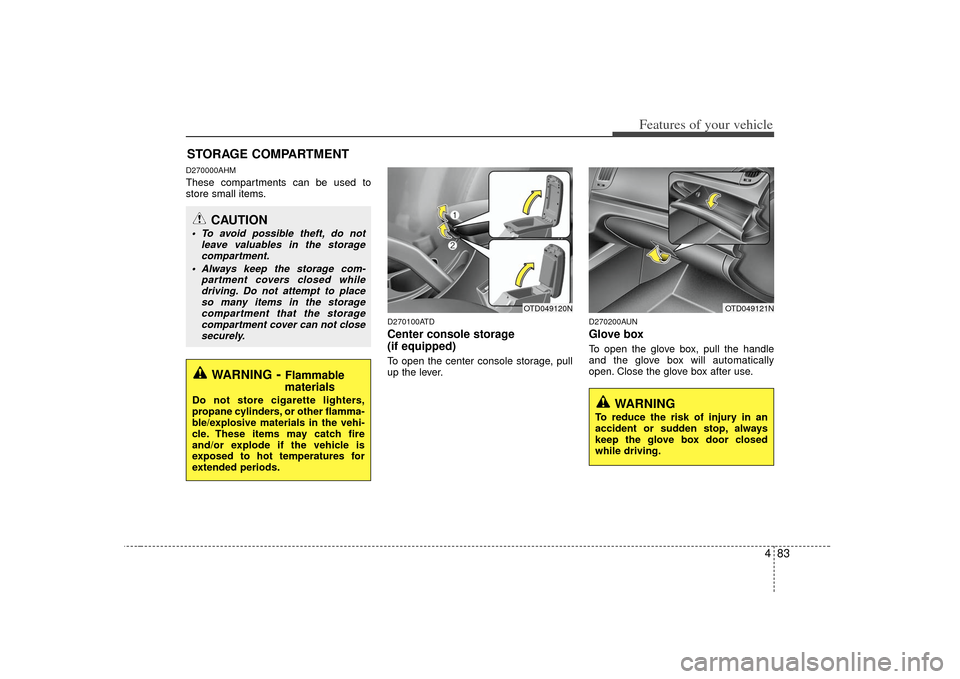
D270100ATDCenter console storage
(if equipped)To open the center console storage, pull
up the lever.
D270200AUNGlove boxTo open the glove box, pull the handle
and the glove box will automatically
open. Close the glove box after use.
STORAGE COMPARTMENT
WARNING
- Flammable
materials
Do not store cigarette lighters,
propane cylinders, or other flamma-
ble/explosive materials in the vehi-
cle. These items may catch fire
and/or explode if the vehicle is
exposed to hot temperatures for
extended periods.
CAUTION
To avoid possible theft, do not
leave valuables in the storagecompartment.
Always keep the storage com- partment covers closed whiledriving. Do not attempt to placeso many items in the storage compartment that the storagecompartment cover can not closesecurely.
OTD049120N
OTD049121N
WARNING
To reduce the risk of injury in an
accident or sudden stop, always
keep the glove box door closed
while driving.
Page 150 of 321
485
Features of your vehicle
D280300ATDCup holder
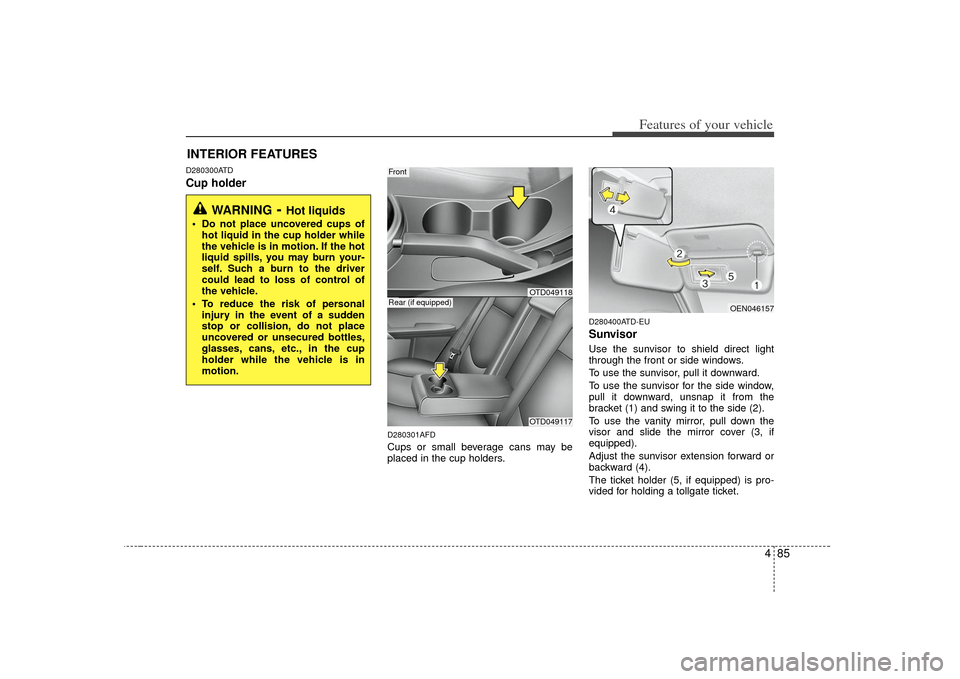
D280301AFDCups or small beverage cans may be
placed in the cup holders.
D280400ATD-EUSunvisorUse the sunvisor to shield direct light
through the front or side windows.
To use the sunvisor, pull it downward.
To use the sunvisor for the side window,
pull it downward, unsnap it from the
bracket (1) and swing it to the side (2).
To use the vanity mirror, pull down the
visor and slide the mirror cover (3, if
equipped).
Adjust the sunvisor extension forward or
backward (4).
The ticket holder (5, if equipped) is pro-
vided for holding a tollgate ticket.
INTERIOR FEATURES
WARNING
- Hot liquids
Do not place uncovered cups ofhot liquid in the cup holder while
the vehicle is in motion. If the hot
liquid spills, you may burn your-
self. Such a burn to the driver
could lead to loss of control of
the vehicle.
To reduce the risk of personal injury in the event of a sudden
stop or collision, do not place
uncovered or unsecured bottles,
glasses, cans, etc., in the cup
holder while the vehicle is in
motion.
Front
OTD049117
Rear (if equipped)
OEN046157
OTD049118
Page 179 of 321
Features of your vehicle114
4BLUETOOTH PHONE OPERATION
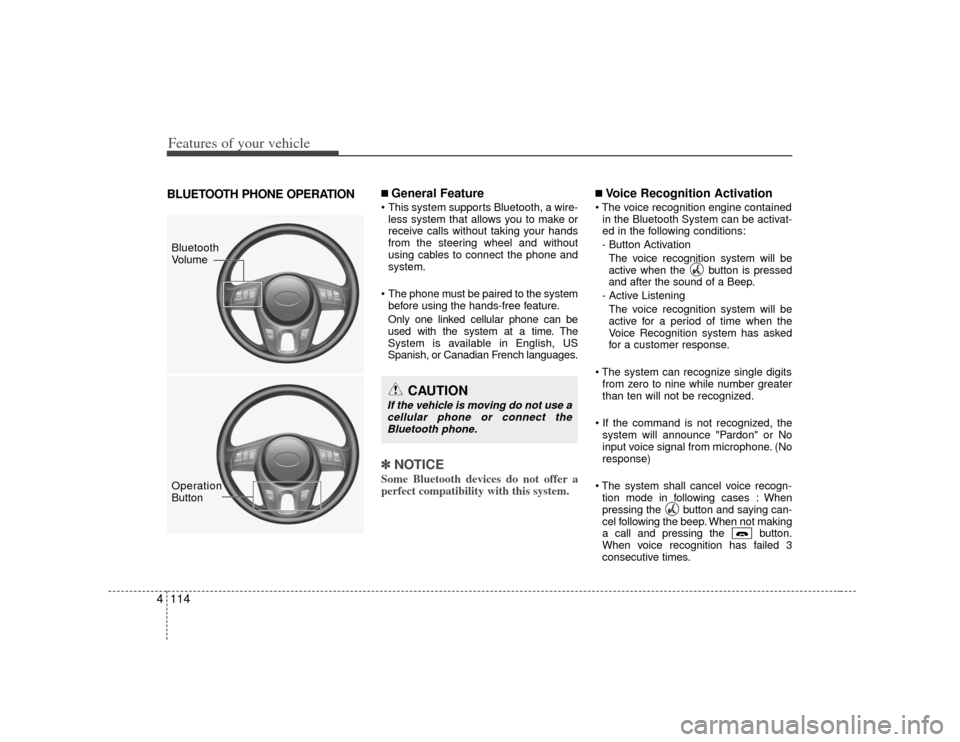
■ General Feature This system supports Bluetooth, a wire-
less system that allows you to make or
receive calls without taking your hands
from the steering wheel and without
using cables to connect the phone and
system.
The phone must be paired to the system before using the hands-free feature.
Only one linked cellular phone can be
used with the system at a time. The
System is available in English, US
Spanish, or Canadian French languages.✽ ✽ NOTICESome Bluetooth devices do not offer a
perfect compatibility with this system.
■Voice Recognition Activation
in the Bluetooth System can be activat-
ed in the following conditions:
- Button Activation The voice recognition system will be
active when the button is pressed
and after the sound of a Beep.
- Active Listening The voice recognition system will be
active for a period of time when the
Voice Recognition system has asked
for a customer response.
from zero to nine while number greater
than ten will not be recognized.
system will announce "Pardon" or No
input voice signal from microphone. (No
response)
tion mode in following cases : When
pressing the button and saying can-
cel following the beep. When not making
a call and pressing the button.
When voice recognition has failed 3
consecutive times.
CAUTION
If the vehicle is moving do not use acellular phone or connect theBluetooth phone.
Bluetooth
Volume
Operation
Button
Page 202 of 321
Driving your vehicle18
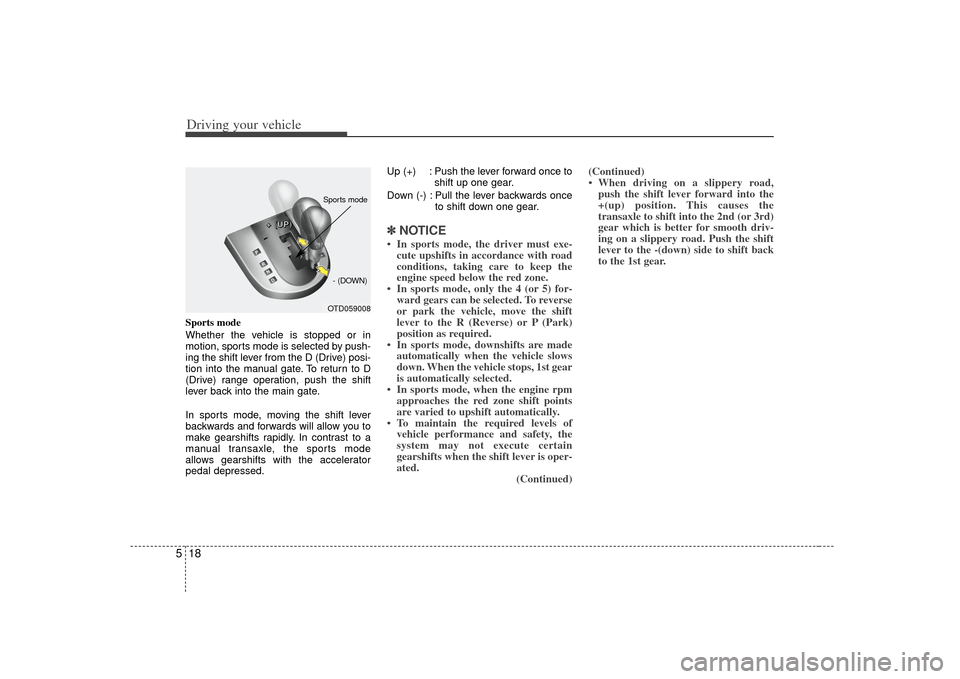
5Sports mode
Whether the vehicle is stopped or in
motion, sports mode is selected by push-
ing the shift lever from the D (Drive) posi-
tion into the manual gate. To return to D
(Drive) range operation, push the shift
lever back into the main gate.
In sports mode, moving the shift lever
backwards and forwards will allow you to
make gearshifts rapidly. In contrast to a
manual transaxle, the sports mode
allows gearshifts with the accelerator
pedal depressed. Up (+) : Push the lever forward once to
shift up one gear.
Down (-) : Pull the lever backwards once to shift down one gear.
✽ ✽NOTICE• In sports mode, the driver must exe-
cute upshifts in accordance with road
conditions, taking care to keep the
engine speed below the red zone.
• In sports mode, only the 4 (or 5) for- ward gears can be selected. To reverse
or park the vehicle, move the shift
lever to the R (Reverse) or P (Park)
position as required.
• In sports mode, downshifts are made automatically when the vehicle slows
down. When the vehicle stops, 1st gear
is automatically selected.
• In sports mode, when the engine rpm approaches the red zone shift points
are varied to upshift automatically.
• To maintain the required levels of vehicle performance and safety, the
system may not execute certain
gearshifts when the shift lever is oper-
ated. (Continued)(Continued)
• When driving on a slippery road,
push the shift lever forward into the
+(up) position. This causes the
transaxle to shift into the 2nd (or 3rd)
gear which is better for smooth driv-
ing on a slippery road. Push the shift
lever to the -(down) side to shift back
to the 1st gear.
OTD059008
+
+
+
+
(
(
(
(
U
U
U
U
P
P
P
P
)
)
)
)
- (DOWN)Sports mode
Page 208 of 321

Driving your vehicle24
5E070202APBReleasing the parking brakeTo release the parking brake, first apply
the foot brake and pull up the parking
brake lever slightly. Secondly, press the
release button (1) and lower the parking
brake lever (2) while holding the button. Check the brake warning light by turning
the ignition switch ON (do not start the
engine). This light will illuminate when the
parking brake is applied with the ignition
switch in the START or ON position.
Before driving, be sure the parking brake
is fully released and the brake warning
light is off.
If the brake warning light remains on
after the parking brake is released while
the engine is running, there may be a
malfunction in the brake system.
Immediate attention is necessary.
If at all possible, stop driving the vehicle
immediately. If that is not possible, use
extreme caution while operating the vehi-
cle and only continue to drive the vehicle
until you can reach a safe location or
repair shop.
WARNING
To prevent unintentional move-
ment when stopped and leaving
the vehicle, do not use the shift
lever instead of the parking
brake. Set the parking brake AND
make sure the shift lever is
securely positioned in 1st (First)
gear or R (Reverse) for manual
transaxle equipped vehicles and
in P (Park) for automatic
transaxle equipped vehicles.
Never allow anyone who is unfa- miliar with the vehicle to touch
the parking brake. If the parking
brake is released unintentionally,
serious injury may occur.
All vehicles should always have the parking brake fully engaged
when parking to avoid inadver-
tent movement of the vehicle
which can injure occupants or
pedestrians.
OTD059011
W-75
Page 233 of 321
549
Driving your vehicle
WARNING
Overloading your vehicle cancause heat buildup in your
vehicle's tires and possible
tire failure that could lead to a
crash.
Overloading your vehicle can cause increased stopping dis-
tances that could lead to a
crash.
A crash resulting from poor handling vehicle damage, tire
failure, or increased stopping
distances could result in seri-
ous injury or death.
WARNING
- Loose cargo
Items you carry inside your
vehicle can strike and injure
occupants in a sudden stop or
turn, or in a crash.
Put items in the cargo area of your vehicle. Try to spread the
weight evenly.
Never stack items, like suit- cases, inside the vehicle
above the tops of the seats.
Do not leave an unsecured child restraint in your vehicle.
When you carry something inside the vehicle, secure it.
Do not drive with a seat folded down unless necessary.
CAUTION
Overloading your vehicle may cause damage. Repairs wouldnot be covered by your war-ranty. Do not overload yourvehicle.
Using heavier suspension components to get addeddurability might not changeyour weight ratings. Ask yourdealer to help you load yourvehicle the right way.
Page 237 of 321
63
What to do in an emergency
3. Have all passengers get out of thevehicle. Be sure they all get out on the
side of the vehicle that is away from
traffic.
4. When changing a flat tire, follow the instruction provided later in this sec-
tion.F020300AHMIf engine stalls while driving1. Reduce your speed gradually, keeping a straight line. Move cautiously off the
road to a safe place.
2. Turn on your emergency flashers.
3. Try to start the engine again. If your vehicle will not start, contact an
authorized KIA dealer or seek other
qualified assistance.
F030100APBIf the engine doesn't turn over or
turns over slowly1. If your vehicle has an automatictransaxle, be sure the shift lever is in N
(Neutral) or P (Park) and the emer-
gency brake is set.
2. Check the battery connections to be sure they are clean and tight.
3. Turn on the interior light. If the light dims or goes out when you operate the
starter, the battery is discharged.
4. Check the starter connections to be sure they are securely tightened.
5. Do not push or pull the vehicle to start it. See instructions for "Jump starting".
F030200AHMIf engine turns over normally but
does not start1. Check fuel level.
2. With the ignition switch in the LOCKposition, check all connectors at the
ignition coil and spark plugs.
Reconnect any that may be discon-
nected or loose.
3. Check the fuel line in the engine com- partment.
4. If the engine still does not start, call an authorized KIA dealer or seek other
qualified assistance.
IF THE ENGINE WILL NOT START
WARNING
If the engine will not start, do not
push or pull the vehicle to start it.
This could result in a collision or
cause other damage. In addition,
push or pull starting may cause the
catalytic converter to overload and
create a fire hazard.
Page 242 of 321
What to do in an emergency86
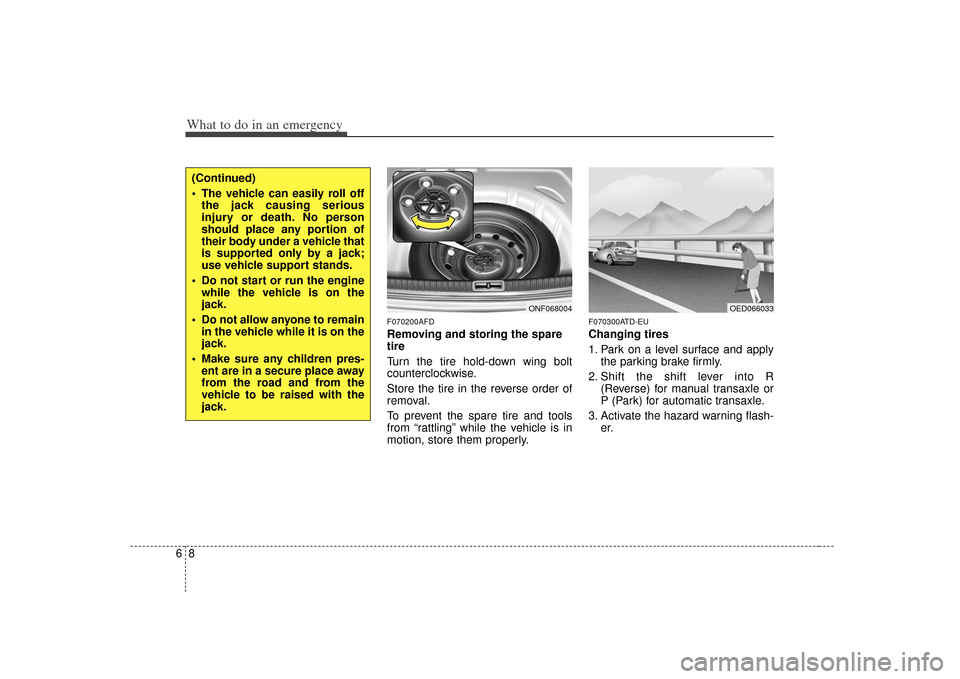
F070200AFDRemoving and storing the spare
tire
Turn the tire hold-down wing bolt
counterclockwise.
Store the tire in the reverse order of
removal.
To prevent the spare tire and tools
from “rattling” while the vehicle is in
motion, store them properly.
F070300ATD-EUChanging tires
1. Park on a level surface and applythe parking brake firmly.
2. Shift the shift lever into R (Reverse) for manual transaxle or
P (Park) for automatic transaxle.
3. Activate the hazard warning flash- er.
ONF068004
(Continued)
The vehicle can easily roll offthe jack causing serious
injury or death. No person
should place any portion of
their body under a vehicle that
is supported only by a jack;
use vehicle support stands.
Do not start or run the engine while the vehicle is on the
jack.
Do not allow anyone to remain in the vehicle while it is on the
jack.
Make sure any children pres- ent are in a secure place away
from the road and from the
vehicle to be raised with the
jack.
OED066033
Page 246 of 321
What to do in an emergency12
6If you have a tire gauge, remove the
valve cap and check the air pressure.
If the pressure is lower than recom-
mended, drive slowly to the nearest
service station and inflate to the cor-
rect pressure. If it is too high, adjust
it until it is correct. Always reinstall
the valve cap after checking or
adjusting the tire pressure. If the cap
is not replaced, air may leak from the
tire. If you lose a valve cap, buy
another and install it as soon as pos-
sible.
After you have changed wheels,
always secure the flat tire in its place
and return the jack and tools to their
proper storage locations. To prevent the jack, jack handle,
wheel lug nut wrench and spare tire
from rattling while the vehicle is in
motion, store them properly.
CAUTION
Your vehicle has metric threads
on the wheel studs and nuts.Make certain during wheelremoval that the same nuts thatwere removed are reinstalled -or, if replaced, that nuts withmetric threads and the samechamfer configuration are used.Installation of a non-metricthread nut on a metric stud orvice-versa will not secure thewheel to the hub properly andwill damage the stud so that itmust be replaced.
Note that most lug nuts do nothave metric threads. Be sure touse extreme care in checkingfor thread style before installingaftermarket lug nuts or wheels.If in doubt, consult an author-ized KIA dealer.
WARNING
- Wheel studs
If the studs are damaged, they
may lose their ability to retain
the wheel. This could lead to the
loss of the wheel and a collision
resulting in serious injuries.
WARNING -
Inadequate
spare tire pressure
Check the inflation pressures as
soon as possible after installing
the spare tire. Adjust it to the
specified pressure, if necessary.
Refer to “Tires and wheels” in
section 8.