wheel KIA FORTE 2017 User Guide
[x] Cancel search | Manufacturer: KIA, Model Year: 2017, Model line: FORTE, Model: KIA FORTE 2017Pages: 595, PDF Size: 11.5 MB
Page 64 of 595
Safety features of your vehicle
50 3
The side air bag is supplemental to
the driver's and the passenger's seat
belt systems and is not a substitute
for them. Therefore your seat belts
must be worn at all times while the
vehicle is in operation.
For best protection from the side air
bag system and to avoid being
injured by the deploying side air bag,
both front seat occupants should sit
in an upright position with the seat
belt properly fastened. The driver's
hands should be placed on the steer-
ing wheel at the 9:00 and 3:00 posi-
tions. The passenger's arms and
hands should be placed on their laps.If seat or seat cover is damaged,
have the vehicle checked and
repaired by an authorized Kia dealer.
Inform that your vehicle is equipped
with side air bags and an occupant
detection system.
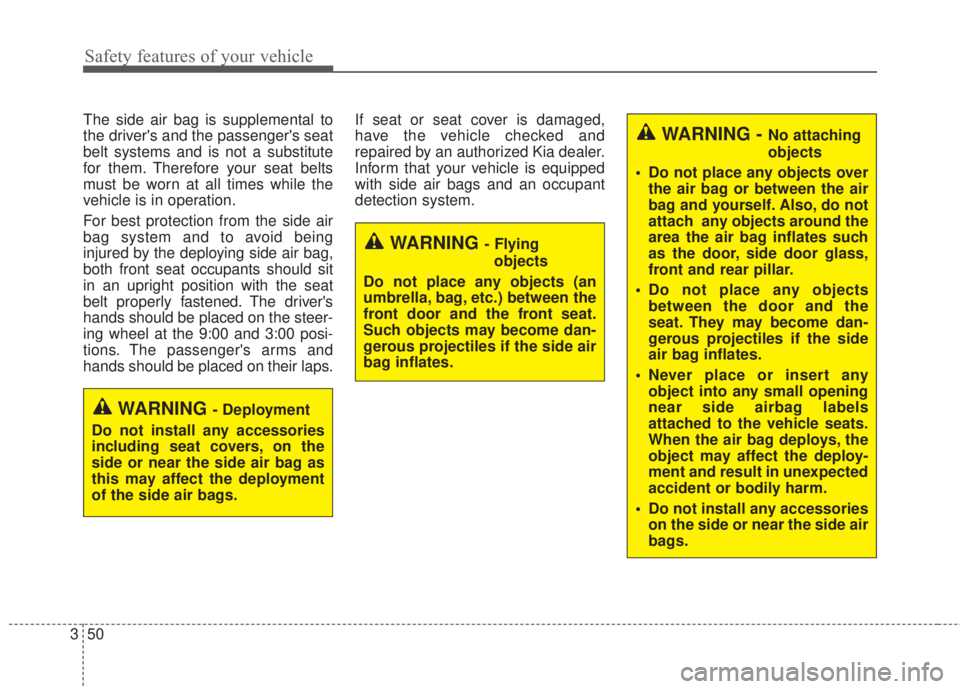
WARNING - Deployment
Do not install any accessories
including seat covers, on the
side or near the side air bag as
this may affect the deployment
of the side air bags.
WARNING - Flying
objects
Do not place any objects (an
umbrella, bag, etc.) between the
front door and the front seat.
Such objects may become dan-
gerous projectiles if the side air
bag inflates.
WARNING - No attaching
objects
• Do not place any objects over
the air bag or between the air
bag and yourself. Also, do not
attach any objects around the
area the air bag inflates such
as the door, side door glass,
front and rear pillar.
• Do not place any objects
between the door and the
seat. They may become dan-
gerous projectiles if the side
air bag inflates.
• Never place or insert any
object into any small opening
near side airbag labels
attached to the vehicle seats.
When the air bag deploys, the
object may affect the deploy-
ment and result in unexpected
accident or bodily harm.
• Do not install any accessories
on the side or near the side air
bags.
Page 71 of 595
357
Safety features of your vehicle
SRS Care
The SRS is virtually maintenance-free
and there are no parts you can safely
service by yourself. If the SRS air bag
warning light does not illuminate, or
continuously remains on, have your
vehicle immediately inspected by an
authorized Kia dealer.
Any work on the SRS system, such
as removing, installing, repairing, or
any work on the steering wheel must
be performed by an authorized Kia
dealer. Improper handling of the SRS
system may result in serious person-
al injury.
For cleaning the air bag pad covers,
use only a soft, dry cloth or one which
has been moistened with plain water.
Solvents or cleaners could adversely
affect the air bag covers and proper
deployment of the system.If components of the air bag system
must be discarded, or if the vehicle
must be scrapped, certain safety
precautions must be observed. An
authorized Kia dealer knows these
precautions and can give you the
necessary information. Failure to fol-
low these precautions and proce-
dures could increase the risk of per-
sonal injury.
Adding equipment to or modi-
fying your air bag-equipped
vehicle
If you modify your vehicle by chang-
ing your vehicle's frame, bumper sys-
tem, front end or side sheet metal or
ride height, this may affect the opera-
tion of your vehicle's air bag system.
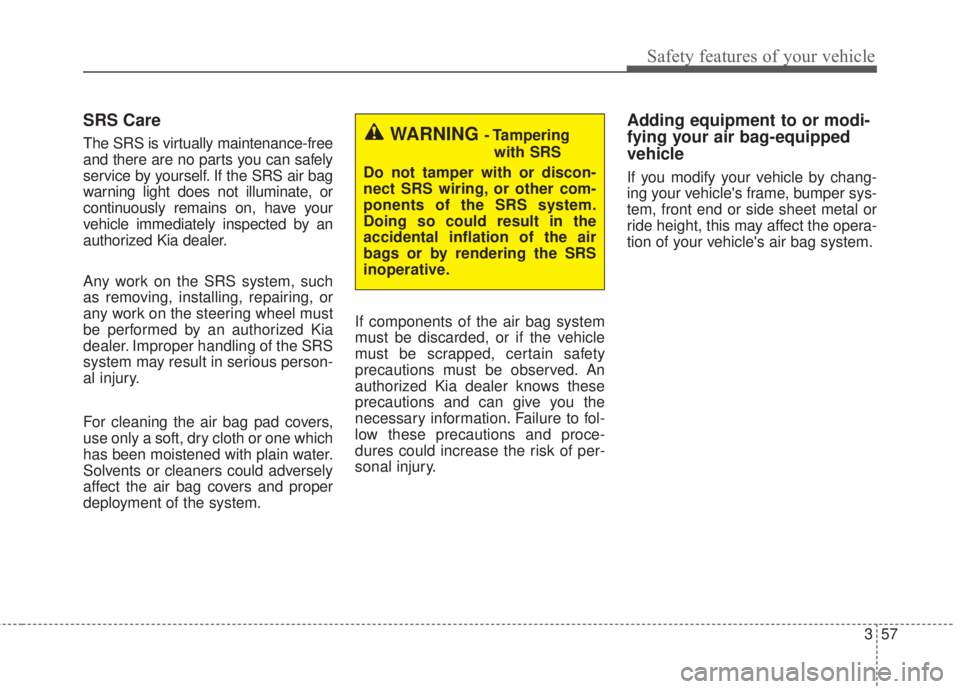
WARNING - Tampering
with SRS
Do not tamper with or discon-
nect SRS wiring, or other com-
ponents of the SRS system.
Doing so could result in the
accidental inflation of the air
bags or by rendering the SRS
inoperative.
Page 73 of 595
Features of your vehicle
Keys . . . . . . . . . . . . . . . . . . . . . . . . . . . . . . . . . . . . . . 4-4
• Record your key number . . . . . . . . . . . . . . . . . . . . . . . 4-4
• Key operations . . . . . . . . . . . . . . . . . . . . . . . . . . . . . . . . 4-4
Smart key . . . . . . . . . . . . . . . . . . . . . . . . . . . . . . . . . 4-6
• Smart key functions . . . . . . . . . . . . . . . . . . . . . . . . . . . 4-6
• Smart key precautions . . . . . . . . . . . . . . . . . . . . . . . . . 4-7
Remote keyless entry . . . . . . . . . . . . . . . . . . . . . . . . 4-9
• Remote keyless entry system operations . . . . . . . . . . . 4-9
• Transmitter precautions . . . . . . . . . . . . . . . . . . . . . . . 4-10
• Battery replacement . . . . . . . . . . . . . . . . . . . . . . . . . . 4-11
• Immobilizer system . . . . . . . . . . . . . . . . . . . . . . . . . . . 4-12
Theft-alarm system . . . . . . . . . . . . . . . . . . . . . . . . 4-15
• Armed stage . . . . . . . . . . . . . . . . . . . . . . . . . . . . . . . . . 4-15
• Theft-alarm stage . . . . . . . . . . . . . . . . . . . . . . . . . . . . 4-16
• Disarmed stage. . . . . . . . . . . . . . . . . . . . . . . . . . . . . . . 4-16
Door locks . . . . . . . . . . . . . . . . . . . . . . . . . . . . . . . . 4-17
• Operating door locks from outside the vehicle . . . . 4-17
• Operating door locks from inside the vehicle. . . . . . 4-17
• Impact sensing door unlock system . . . . . . . . . . . . . . 4-19
• Auto door lock/unlock feature . . . . . . . . . . . . . . . . . . 4-19
• Child-protector rear door lock . . . . . . . . . . . . . . . . . 4-20
Trunk (4 Door, 2 Door) . . . . . . . . . . . . . . . . . . . . . 4-21
• Opening the trunk . . . . . . . . . . . . . . . . . . . . . . . . . . . . 4-21
• Closing the trunk . . . . . . . . . . . . . . . . . . . . . . . . . . . . . 4-22
• Emergency trunk safety release . . . . . . . . . . . . . . . . . 4-22
Smart trunk . . . . . . . . . . . . . . . . . . . . . . . . . . . . . . 4-23
Liftgate (5 Door) . . . . . . . . . . . . . . . . . . . . . . . . . . . 4-27
• Opening the liftgate . . . . . . . . . . . . . . . . . . . . . . . . . . . 4-27
• Closing the liftgate. . . . . . . . . . . . . . . . . . . . . . . . . . . . 4-27
• Emergency liftgate safety release. . . . . . . . . . . . . . . . 4-28
Windows . . . . . . . . . . . . . . . . . . . . . . . . . . . . . . . . . 4-30
• Power windows . . . . . . . . . . . . . . . . . . . . . . . . . . . . . . 4-31
Hood. . . . . . . . . . . . . . . . . . . . . . . . . . . . . . . . . . . . . 4-35
• Opening the hood . . . . . . . . . . . . . . . . . . . . . . . . . . . . 4-35
• Closing the hood . . . . . . . . . . . . . . . . . . . . . . . . . . . . . 4-36
Fuel filler lid . . . . . . . . . . . . . . . . . . . . . . . . . . . . . . 4-37
• Opening the fuel filler lid . . . . . . . . . . . . . . . . . . . . . . 4-37
• Closing the fuel filler lid . . . . . . . . . . . . . . . . . . . . . . . 4-37
Sunroof . . . . . . . . . . . . . . . . . . . . . . . . . . . . . . . . . . 4-39
• Sunroof open warning. . . . . . . . . . . . . . . . . . . . . . . . . 4-40
• Sliding the sunroof . . . . . . . . . . . . . . . . . . . . . . . . . . . 4-41
• Tilting the sunroof . . . . . . . . . . . . . . . . . . . . . . . . . . . . 4-42
• Sunshade . . . . . . . . . . . . . . . . . . . . . . . . . . . . . . . . . . . 4-43
• Resetting the sunroof . . . . . . . . . . . . . . . . . . . . . . . . . 4-43
Steering wheel . . . . . . . . . . . . . . . . . . . . . . . . . . . . . 4-44
• Electric power steering (EPS) . . . . . . . . . . . . . . . . . . 4-44
• Tilt and telescoping steering. . . . . . . . . . . . . . . . . . . . 4-45
• Horn . . . . . . . . . . . . . . . . . . . . . . . . . . . . . . . . . . . . . . . 4-45
• Heated steering wheel . . . . . . . . . . . . . . . . . . . . . . . . . 4-46
• Flex steer(5 Door) . . . . . . . . . . . . . . . . . . . . . . . . . . . . 4-47
4
Page 75 of 595
• Checking the amount of air conditioner
refrigerant and compressor lubricant . . . . . . . . . . 4-123
• Air conditioning refrigerant label . . . . . . . . . . . . . . 4-123
Automatic climate control system. . . . . . . . . . . . 4-124
• Automatic heating and air conditioning . . . . . . . . . 4-125
• Manual heating and air conditioning . . . . . . . . . . . 4-126
• System operation . . . . . . . . . . . . . . . . . . . . . . . . . . . . 4-132
Windshield defrosting and defogging . . . . . . . . . 4-134
• Manual climate control system . . . . . . . . . . . . . . . . 4-134
• Automatic climate control system . . . . . . . . . . . . . . 4-135
• Defogging logic. . . . . . . . . . . . . . . . . . . . . . . . . . . . . . 4-136
Clean air . . . . . . . . . . . . . . . . . . . . . . . . . . . . . . . . 4-138
Storage compartment. . . . . . . . . . . . . . . . . . . . . . 4-139
• Center console storage . . . . . . . . . . . . . . . . . . . . . . . 4-139
• Glove box . . . . . . . . . . . . . . . . . . . . . . . . . . . . . . . . . . 4-139
• Sunglass holder . . . . . . . . . . . . . . . . . . . . . . . . . . . . . 4-140
• Luggage tray (5 Door). . . . . . . . . . . . . . . . . . . . . . . . 4-140
Interior features . . . . . . . . . . . . . . . . . . . . . . . . . . 4-141
• Cigarette lighter. . . . . . . . . . . . . . . . . . . . . . . . . . . . . 4-141
• Ashtray . . . . . . . . . . . . . . . . . . . . . . . . . . . . . . . . . . . . 4-141
• Cup holder . . . . . . . . . . . . . . . . . . . . . . . . . . . . . . . . . 4-142
• Sliding armrest . . . . . . . . . . . . . . . . . . . . . . . . . . . . . 4-142
• Sunvisor . . . . . . . . . . . . . . . . . . . . . . . . . . . . . . . . . . . 4-143
• Seat warmer . . . . . . . . . . . . . . . . . . . . . . . . . . . . . . . . 4-143
• Climate control seat . . . . . . . . . . . . . . . . . . . . . . . . . 4-145• Power outlet . . . . . . . . . . . . . . . . . . . . . . . . . . . . . . . . 4-146
• LCD monitor (Clock) . . . . . . . . . . . . . . . . . . . . . . . . 4-147
• Coat hook . . . . . . . . . . . . . . . . . . . . . . . . . . . . . . . . . . 4-148
• Floor mat anchor(s). . . . . . . . . . . . . . . . . . . . . . . . . . 4-148
• Luggage net (Holder) . . . . . . . . . . . . . . . . . . . . . . . . 4-149
• Covering shelf (5 Door). . . . . . . . . . . . . . . . . . . . . . . 4-150
• Navigation system . . . . . . . . . . . . . . . . . . . . . . . . . . . 4-151
Audio system . . . . . . . . . . . . . . . . . . . . . . . . . . . . . 4-152
• Glass antenna . . . . . . . . . . . . . . . . . . . . . . . . . . . . . . . 4-152
• Steering wheel audio controls . . . . . . . . . . . . . . . . . 4-153
• AUX, USB and iPod
®port . . . . . . . . . . . . . . . . . . . . 4-1544
Page 116 of 595
Features of your vehicle
44 4
Electric power steering (EPS)
Power steering uses the motor to
assist you in steering the vehicle. If
the engine is off or if the power steer-
ing system becomes inoperative, the
vehicle may still be steered, but it will
require increased steering effort.
The electric power steering is con-
trolled by the power steering control
unit which senses the steering wheel
torque and vehicle speed to com-
mand the motor.
The steering wheel becomes heavier
as the vehicle’s speed increases and
becomes lighter as the vehicle’s
speed decreases for better control of
the steering wheel.
Should you notice any change in the
effort required to steer during normal
vehicle operation, have the power
steering checked by an authorized
Kia dealer.
✽NOTICE
The following symptoms may occur
during normal vehicle operation:
• The steering effort is increased
immediately after turning the igni-
tion switch on. This happens as the
system performs the EPS system
diagnostics. When the diagnostics
are completed, the steering wheel
will return to its normal condition
• A click noise may be heard from
the EPS relay after the ignition
switch is turned to the ON or
LOCK position.
• Motor noise may be heard when
the vehicle is at a stop or at a low
driving speed.
• The steering effort increases if the
steering wheel is rotated continu-
ously when the vehicle is not in
motion. However, after a few min-
utes, it will return to its normal
condition.
• When you operate the steering
wheel in low temperature, noise
may occur. If the temperature
rises, the noise will likely disap-
pear. This is a normal condition.
(Continued)(Continued)
• When the charging system warn-
ing light comes on or the battery
voltage is low (when the alternator
or battery does not operate nor-
mally), the steering wheel may get
heavy and become difficult to con-
trol operate abnormally.
If the Electric Power Steering System
does not operate normally, the warn-
ing light will illuminate on the instru-
ment cluster. The steering wheel may
require increased steering effort.
Take your vehicle to an authorized
Kia dealer and have the vehicle
checked as soon as possible.
STEERING WHEEL
Page 117 of 595
445
Features of your vehicle
Tilt and telescoping steering
Tilt steering allows you to adjust the
steering wheel before you drive. You
can also raise it to give your legs
more room when you exit and enter
the vehicle.
The steering wheel should be posi-
tioned so that it is comfortable for
you to drive, while permitting you to
see the instrument panel warning
lights and gauges.
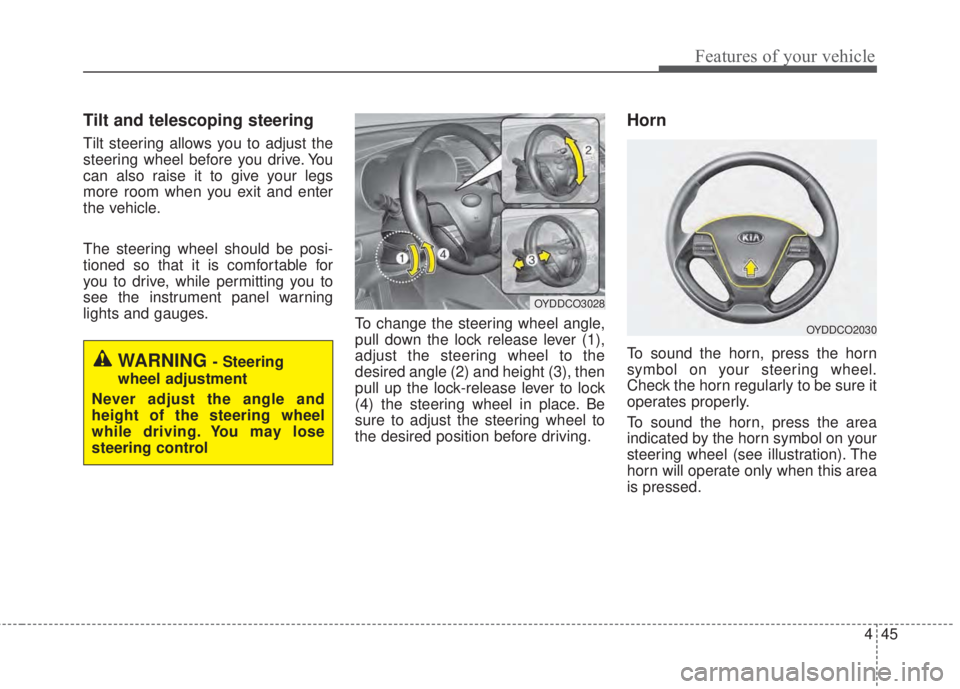
To change the steering wheel angle,
pull down the lock release lever (1),
adjust the steering wheel to the
desired angle (2) and height (3), then
pull up the lock-release lever to lock
(4) the steering wheel in place. Be
sure to adjust the steering wheel to
the desired position before driving.
Horn
To sound the horn, press the horn
symbol on your steering wheel.
Check the horn regularly to be sure it
operates properly.
To sound the horn, press the area
indicated by the horn symbol on your
steering wheel (see illustration). The
horn will operate only when this area
is pressed.WARNING - Steering
wheel adjustment
Never adjust the angle and
height of the steering wheel
while driving. You may lose
steering control
OYDDCO3028
OYDDCO2030
Page 118 of 595
Features of your vehicle
46 4
Heated steering wheel
(if equipped)
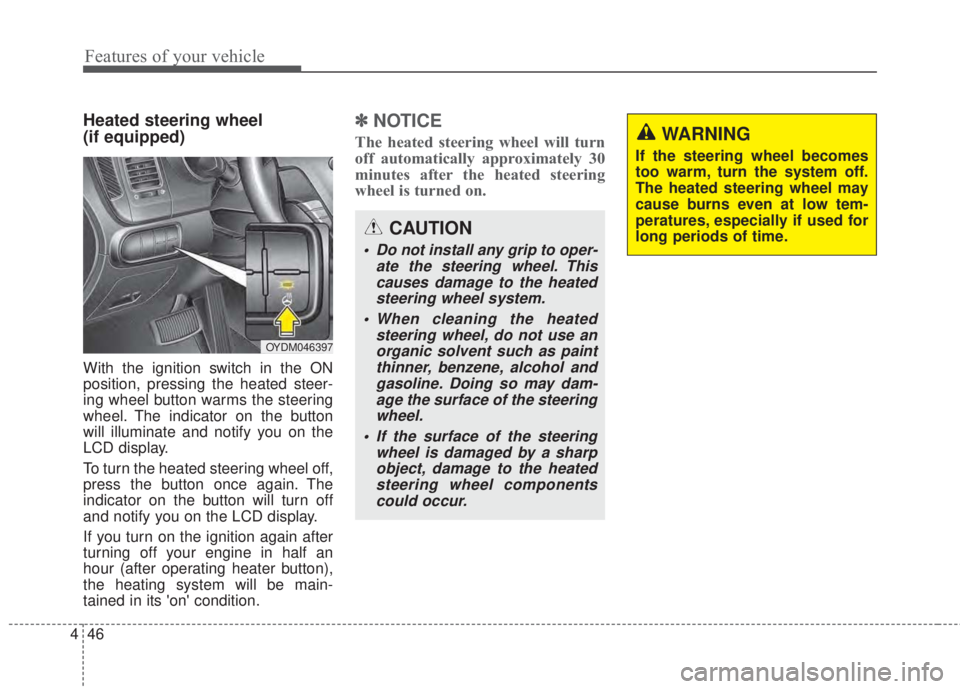
With the ignition switch in the ON
position, pressing the heated steer-
ing wheel button warms the steering
wheel. The indicator on the button
will illuminate and notify you on the
LCD display.
To turn the heated steering wheel off,
press the button once again. The
indicator on the button will turn off
and notify you on the LCD display.
If you turn on the ignition again after
turning off your engine in half an
hour (after operating heater button),
the heating system will be main-
tained in its 'on' condition.
✽NOTICE
The heated steering wheel will turn
off automatically approximately 30
minutes after the heated steering
wheel is turned on.
CAUTION
• Do not install any grip to oper-
ate the steering wheel. This
causes damage to the heated
steering wheel system.
• When cleaning the heated
steering wheel, do not use an
organic solvent such as paint
thinner, benzene, alcohol and
gasoline. Doing so may dam-
age the surface of the steering
wheel.
• If the surface of the steering
wheel is damaged by a sharp
object, damage to the heated
steering wheel components
could occur.
OYDM046397
WARNING
If the steering wheel becomes
too warm, turn the system off.
The heated steering wheel may
cause burns even at low tem-
peratures, especially if used for
long periods of time.
Page 120 of 595
Features of your vehicle
48 4
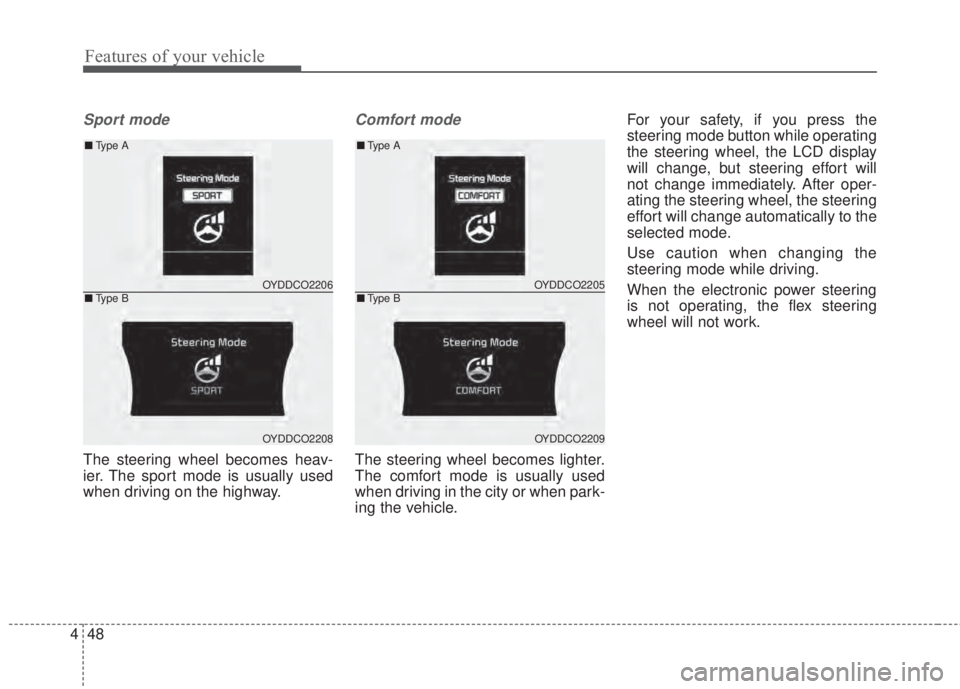
Sport mode
The steering wheel becomes heav-
ier. The sport mode is usually used
when driving on the highway.
Comfort mode
The steering wheel becomes lighter.
The comfort mode is usually used
when driving in the city or when park-
ing the vehicle.For your safety, if you press the
steering mode button while operating
the steering wheel, the LCD display
will change, but steering effort will
not change immediately. After oper-
ating the steering wheel, the steering
effort will change automatically to the
selected mode.
Use caution when changing the
steering mode while driving.
When the electronic power steering
is not operating, the flex steering
wheel will not work.
OYDDCO2205
OYDDCO2209
■Type A
■Type BOYDDCO2206
OYDDCO2208
■Type A
■Type B
Page 131 of 595
459
Features of your vehicle
Instrument Cluster Control
Adjusting Instrument Cluster
Illumination
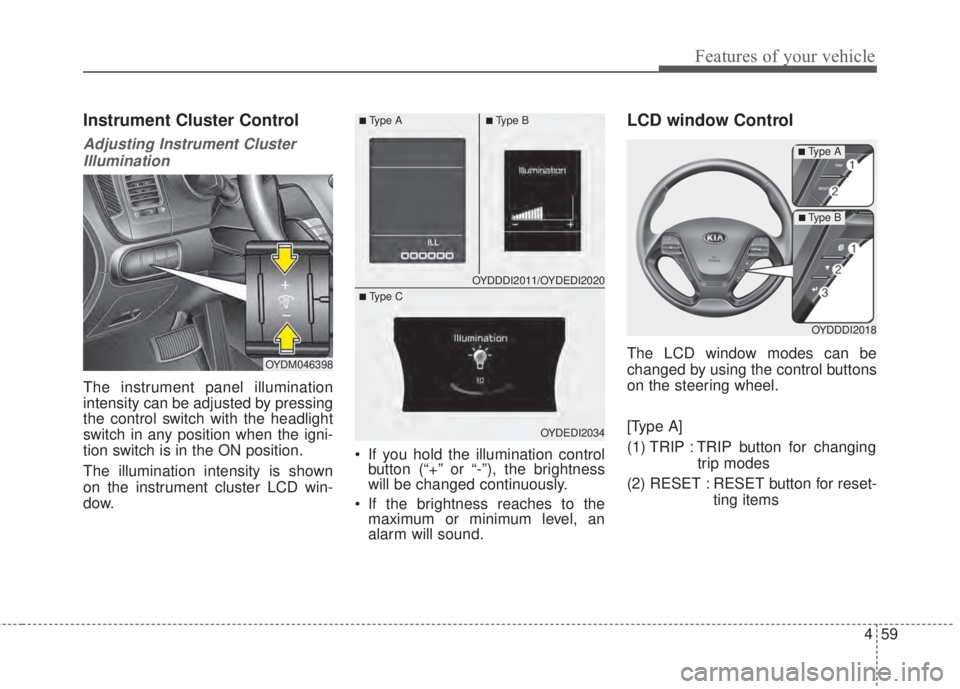
The instrument panel illumination
intensity can be adjusted by pressing
the control switch with the headlight
switch in any position when the igni-
tion switch is in the ON position.
The illumination intensity is shown
on the instrument cluster LCD win-
dow.• If you hold the illumination control
button (“+” or “-”), the brightness
will be changed continuously.
• If the brightness reaches to the
maximum or minimum level, an
alarm will sound.
LCD window Control
The LCD window modes can be
changed by using the control buttons
on the steering wheel.
[Type A]
(1) TRIP : TRIP button for changing
trip modes
(2) RESET : RESET button for reset-
ting itemsOYDM046398
OYDDDI2011/OYDEDI2020
OYDEDI2034
■Ty p e A■Ty p e B
■ Type C
OYDDDI2018
■Ty p e A
■Ty p e B
Page 138 of 595
Features of your vehicle
66 4
Average Fuel Economy (2)
• The average fuel economy is cal-
culated by the total driving dis-
tance and fuel consumption since
the last average fuel economy
reset.
- Fuel economy range: 0.0 ~ 99.9
L/100km or MPG
• The average fuel economy can be
reset both manually and automati-
cally.
Manual reset
To clear the average fuel economy
manually, press the RESET button
(Type A : RESET, Type B, C : ) on
the steering wheel for more than 1
second when the average fuel econo-
my is displayed.Automatic reset
To make the average fuel economy
be reset automatically whenever refu-
eling, select the “Auto Reset” mode in
User Setting menu of the LCD win-
dow (Refer to “LCD window”).
Under “Auto Reset” mode, the aver-
age fuel economy will be cleared to
zero (---) when the vehicle speed
exceeds 1.6 km/h (1 mph) after refu-
eling more than 6 liters (1.6 gallons).
✽NOTICE
The average fuel economy is not dis-
played for more accurate calculation
if the vehicle does not drive more
than 10 seconds or 50 meters (0.03
miles) since the ignition switch or
Engine Start/Stop button is turned
to ON.
Instant Fuel Economy (3)
• This mode displays the instant fuel
economy during the last few sec-
onds when the vehicle speed is
more than 10 km/h (6.2 MPH).
- Fuel economy range: 0.0 ~ 99.9
L/100km or 0.0 ~ 99.9 MPG
(Type A), 0.0 ~ 30.0 L/100km or
0.0 ~ 50.0 MPG (Type B, C)