adjust KIA FORTE 2017 Workshop Manual
[x] Cancel search | Manufacturer: KIA, Model Year: 2017, Model line: FORTE, Model: KIA FORTE 2017Pages: 595, PDF Size: 11.5 MB
Page 339 of 595
267 4
Features of your vehicle
✽NOTICE - Before
Downloading
Contacts
• Only contacts within connected
phones can be downloaded. Also
check to see that your mobile
phone supports the download fea-
ture.
• To learn more about whether your
mobile phone supports contact
downloads, refer to your mobile
phone user’s manual.
• The contacts for only the connect-
ed phone can be downloaded.
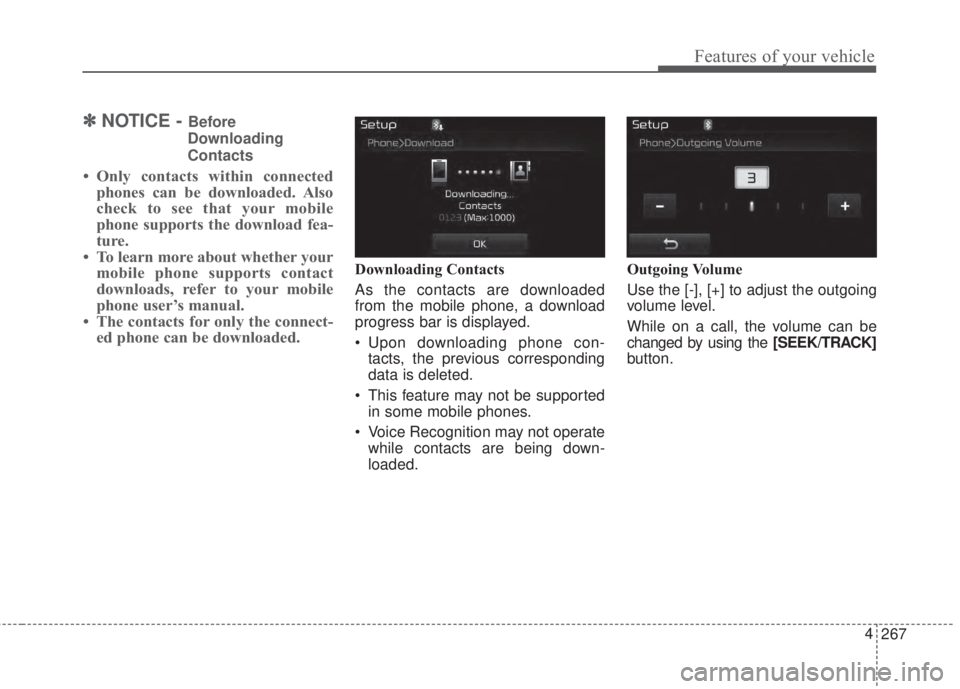
Downloading Contacts
As the contacts are downloaded
from the mobile phone, a download
progress bar is displayed.
• Upon downloading phone con-
tacts, the previous corresponding
data is deleted.
• This feature may not be supported
in some mobile phones.
• Voice Recognition may not operate
while contacts are being down-
loaded.Outgoing Volume
Use the [-], [+] to adjust the outgoing
volume level.
While on a call, the volume can be
changed by using the [SEEK/TRACK]
button.
Page 347 of 595
Driving your vehicle
4 5
Before entering vehicle
• Be sure that all windows, outside
mirror(s), and outside lights are
clean.
• Check the condition of the tires.
• Check under the vehicle for any
sign of leaks.
• Be sure there are no obstacles
behind you if you intend to back up.
Necessary inspections
Fluid levels, such as engine oil,
engine coolant, brake fluid, and
washer fluid should be checked on a
regular basis, with the exact interval
depending on the fluid. Further
details are provided in Chapter 7,
“Maintenance”.
Before starting
• Close and lock all doors.
• Position the seat so that all con-
trols are easily reached.
• Buckle your seat belt.
• Adjust the inside and outside
rearview mirrors.
• Be sure that all lights work.
• Check all gauges.
• Check the operation of warning
lights when the ignition switch is
turned to the ON position.
• Release the parking brake and
make sure the brake warning light
goes off.
For safe operation, be sure you are
familiar with your vehicle and its
equipment.
BEFORE DRIVING
WARNING- Distracted
driving
Focus on the road while driving.
The driver's primary responsi-
bility is in the safe and legal
operation of the vehicle. Use of
any hand held devices, other
equipment or vehicle systems
that distract the driver should
not be used during vehicle
operation.
Page 360 of 595
517
Driving your vehicle
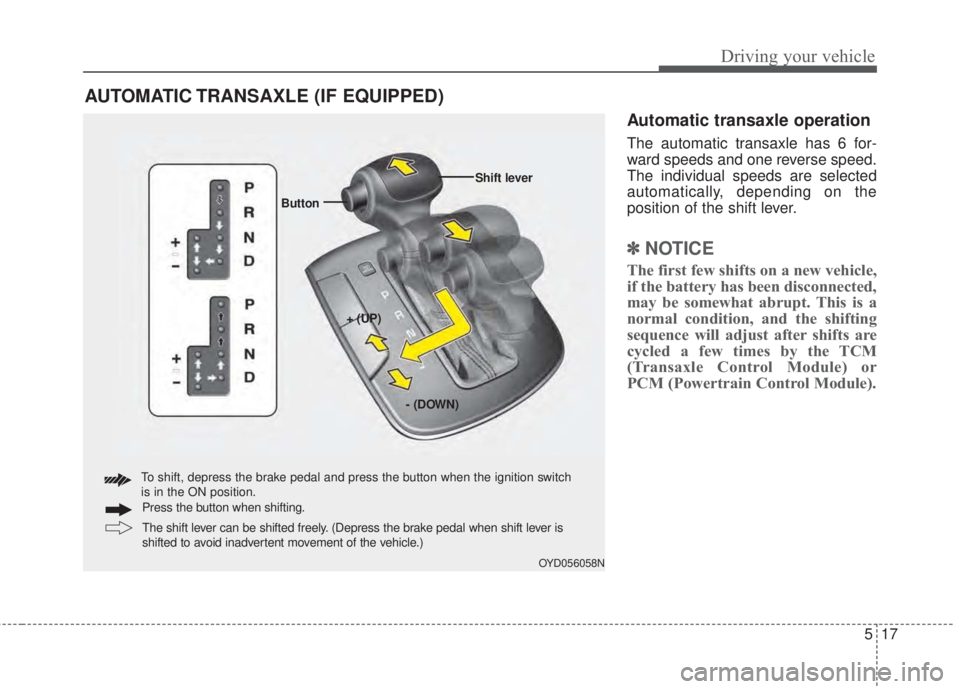
Automatic transaxle operation
The automatic transaxle has 6 for-
ward speeds and one reverse speed.
The individual speeds are selected
automatically, depending on the
position of the shift lever.
✽NOTICE
The first few shifts on a new vehicle,
if the battery has been disconnected,
may be somewhat abrupt. This is a
normal condition, and the shifting
sequence will adjust after shifts are
cycled a few times by the TCM
(Transaxle Control Module) or
PCM (Powertrain Control Module).
AUTOMATIC TRANSAXLE (IF EQUIPPED)
OYD056058N
+ (UP) ButtonShift lever
- (DOWN)
To shift, depress the brake pedal and press the button when the ignition switch
is in the ON position.
The shift lever can be shifted freely. (Depress the brake pedal when shift lever is
shifted to avoid inadvertent movement of the vehicle.) Press the button when shifting.
Page 375 of 595
Driving your vehicle
32 5
Power brakes
Your vehicle has power-assisted
brakes that adjust automatically
through normal usage.
In the event that the power-assisted
brakes lose power because of a
stalled engine or some other reason,
you can still stop your vehicle by
applying greater force to the brake
pedal than you normally would. The
stopping distance, however, will be
longer.
When the engine is not running, the
reserve brake power is partially
depleted each time the brake pedal
is applied. Do not pump the brake
pedal when the power assist has
been interrupted.
Pump the brake pedal only when
necessary to maintain steering con-
trol on slippery surfaces.
Wet brakes may impair the vehicle’s
ability to safely slow down; the vehi-
cle may also pull to one side when
the brakes are applied. Applying the
brakes lightly will indicate whether
they have been affected in this way.To dry the brakes, apply them lightly
while maintaining a safe forward
speed until brake performance
returns to normal.
In the event of brake failure
If service brakes fail to operate while
the vehicle is in motion, you can
make an emergency stop with the
parking brake. The stopping dis-
tance, however, will be much greater
than normal.
BRAKE SYSTEM
WARNING- Parking brake
Avoid applying the parking
brake to stop the vehicle while it
is moving except in an emer-
gency situation. Applying the
parking brake while the vehicle
is moving at normal speeds can
cause a sudden loss of control
of the vehicle. If you must use
the parking brake to stop the
vehicle, use great caution in
applying the brake.
WARNING- Steep hill
braking
Avoid continuous application of
the brakes when descending a
long or steep hill by shifting to a
lower gear. Continuous brake
application will cause the
brakes to overheat and could
result in a temporary loss of
braking performance.
CAUTION- Brake pedal
Do not drive with your foot rest-
ing on the brake pedal. This will
create abnormally high brake
temperatures which can cause
excessive brake lining and pad
wear.
Page 405 of 595
Driving your vehicle
62 5
When Active ECO is activated:
• The acceleration may slightly be
reduced even though you depress
the accelerator fully.
• The air conditioner performance
may be limited
• The shift pattern of the automatic
transaxle may change.
• The engine noise may get louder.
The above situations are normal
conditions when the Active Eco
System is activated to improve fuel
efficiency.Limitation of Active ECO opera-
tion:
If the following conditions occur while
Active ECO is operating, the system
operation is limited even though
there is no change in the ECO indi-
cator.
• When the coolant temperature is
low:
The system will be limited until
engine performance becomes nor-
mal.
• When driving up a hill:
The system will be limited to gain
power when driving uphill because
the engine torque is restricted.
• When using manual mode:
The system will be limited accord-
ing to the shift location.
• When the accelerator pedal is
deeply depressed for a few sec-
onds:
The system will be limited, judging
that the driver wants to speed up.SPORT mode
SPORT mode focuses on
dynamic driving by auto-
matically adjusting the
steering wheel, engine
and transaxle system.
• When the DRIVE MODE
button is pressed and
the SPORT mode is
selected, the SPORT
indicator (yellow) will illu-
minate.
• When the SPORT mode
is activated, and the
engine start/stop button
is turned off and on it will
change to NORMAL
mode. To turn on the
SPORT mode press
DRIVE MODE button
again.
SPORT
Page 407 of 595
Driving your vehicle
64 5
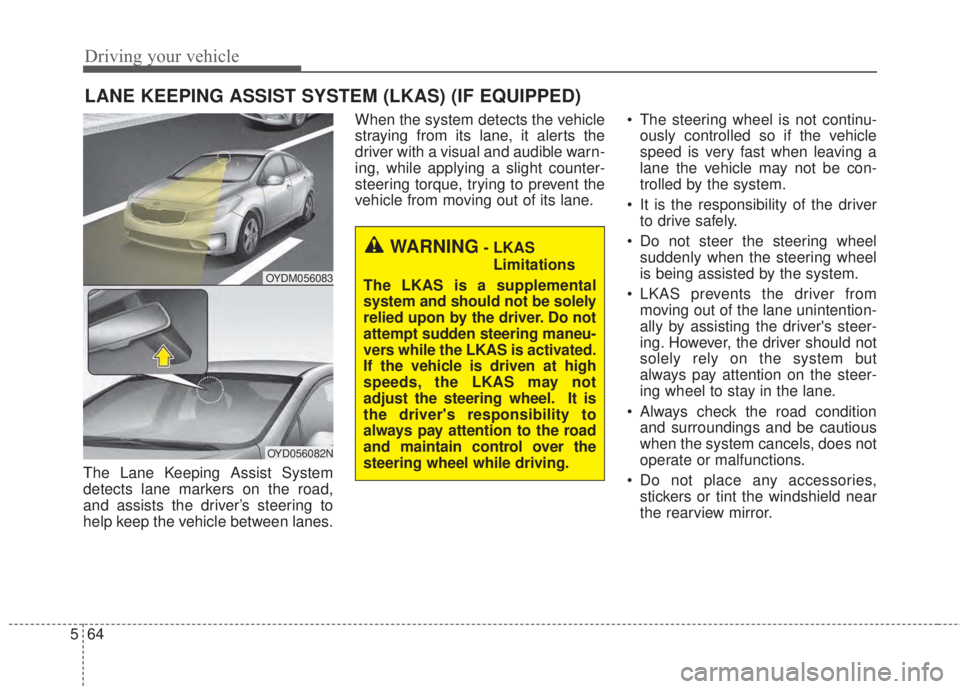
The Lane Keeping Assist System
detects lane markers on the road,
and assists the driver’s steering to
help keep the vehicle between lanes.When the system detects the vehicle
straying from its lane, it alerts the
driver with a visual and audible warn-
ing, while applying a slight counter-
steering torque, trying to prevent the
vehicle from moving out of its lane.• The steering wheel is not continu-
ously controlled so if the vehicle
speed is very fast when leaving a
lane the vehicle may not be con-
trolled by the system.
• It is the responsibility of the driver
to drive safely.
• Do not steer the steering wheel
suddenly when the steering wheel
is being assisted by the system.
• LKAS prevents the driver from
moving out of the lane unintention-
ally by assisting the driver's steer-
ing. However, the driver should not
solely rely on the system but
always pay attention on the steer-
ing wheel to stay in the lane.
• Always check the road condition
and surroundings and be cautious
when the system cancels, does not
operate or malfunctions.
• Do not place any accessories,
stickers or tint the windshield near
the rearview mirror.
LANE KEEPING ASSIST SYSTEM (LKAS) (IF EQUIPPED)
OYDM056083
OYD056082N
WARNING- LKAS
Limitations
The LKAS is a supplemental
system and should not be solely
relied upon by the driver. Do not
attempt sudden steering maneu-
vers while the LKAS is activated.
If the vehicle is driven at high
speeds, the LKAS may not
adjust the steering wheel. It is
the driver's responsibility to
always pay attention to the road
and maintain control over the
steering wheel while driving.
Page 423 of 595
Driving your vehicle
80 5
Your vehicle's fuel economy depends
mainly on your style of driving, where
you drive and when you drive.
Each of these factors affects how
many kilometers (miles) you can get
from a liter (gallon) of fuel. To operate
your vehicle as economically as pos-
sible, use the following driving sug-
gestions to help save money in both
fuel and repairs:
• Drive smoothly. Accelerate at a
moderate rate. Don't make "jack-
rabbit" starts or full-throttle shifts
and maintain a steady cruising
speed. Don't race between stop-
lights. Try to adjust your speed to
the traffic so you don't have to
change speeds unnecessarily.
Avoid heavy traffic whenever pos-
sible. Always maintain a safe dis-
tance from other vehicles so you
can avoid unnecessary braking.
This also reduces brake wear.
• Drive at a moderate speed. The
faster you drive, the more fuel your
vehicle uses. Driving at a moderate
speed, especially on the highway,
is one of the most effective ways to
reduce fuel consumption.• Don't "ride" the brake pedal. This
can increase fuel consumption and
also increase wear on these com-
ponents. In addition, driving with
your foot resting on the brake pedal
may cause the brakes to overheat,
which reduces their effectiveness
and may lead to more serious con-
sequences.
• Take care of your tires. Keep them
inflated to the recommended pres-
sure. Incorrect inflation, either too
much or too little, results in unnec-
essary tire wear. Check the tire
pressures at least once a month.
• Be sure that the wheels are
aligned correctly. Improper align-
ment can result from hitting curbs
or driving too fast over irregular
surfaces. Poor alignment causes
faster tire wear and may also result
in other problems as well as
greater fuel consumption.• Keep your vehicle in good condi-
tion. For better fuel economy and
reduced maintenance costs, main-
tain your vehicle in accordance
with the maintenance schedule in
section 7. If you drive your vehicle
in severe conditions, more frequent
maintenance is required (see sec-
tion 7 for details).
• Keep your vehicle clean. For maxi-
mum service, your vehicle should
be kept clean and free of corrosive
materials. It is especially important
that mud, dirt, ice, etc. not be
allowed to accumulate on the
underside of the vehicle. This extra
weight can result in increased fuel
consumption and also contribute to
corrosion.
• Travel lightly. Don't carry unneces-
sary weight in your vehicle. Weight
reduces fuel economy.
• Don't let the engine idle longer
than necessary. If you are waiting
(and not in traffic), turn off your
engine and restart only when
you're ready to go.
ECONOMICAL OPERATION
Page 427 of 595
Driving your vehicle
84 5
• Adjust your mirrors to reduce the
glare from other driver's head-
lights.
• Keep your headlights clean and
properly aimed on vehicles not
equipped with the automatic head-
light aiming feature. Dirty or
improperly aimed headlights will
make it much more difficult to see
at night.
• Avoid staring directly at the head-
lights of oncoming vehicles. You
could be temporarily blinded, and it
will take several seconds for your
eyes to readjust to the darkness.Driving in the rain
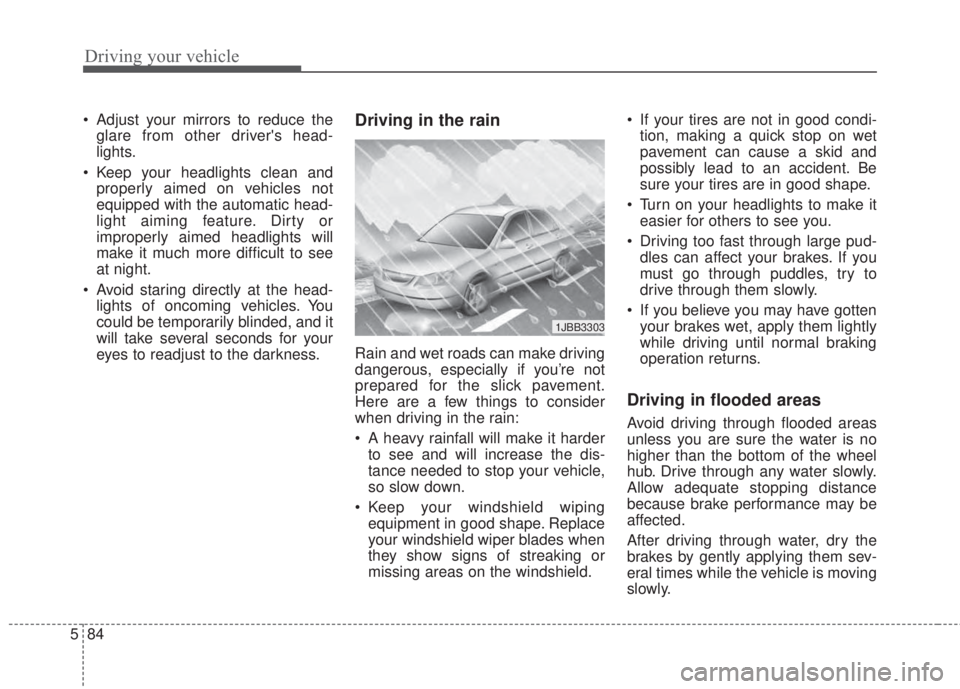
Rain and wet roads can make driving
dangerous, especially if you’re not
prepared for the slick pavement.
Here are a few things to consider
when driving in the rain:
• A heavy rainfall will make it harder
to see and will increase the dis-
tance needed to stop your vehicle,
so slow down.
• Keep your windshield wiping
equipment in good shape. Replace
your windshield wiper blades when
they show signs of streaking or
missing areas on the windshield.• If your tires are not in good condi-
tion, making a quick stop on wet
pavement can cause a skid and
possibly lead to an accident. Be
sure your tires are in good shape.
• Turn on your headlights to make it
easier for others to see you.
• Driving too fast through large pud-
dles can affect your brakes. If you
must go through puddles, try to
drive through them slowly.
• If you believe you may have gotten
your brakes wet, apply them lightly
while driving until normal braking
operation returns.
Driving in flooded areas
Avoid driving through flooded areas
unless you are sure the water is no
higher than the bottom of the wheel
hub. Drive through any water slowly.
Allow adequate stopping distance
because brake performance may be
affected.
After driving through water, dry the
brakes by gently applying them sev-
eral times while the vehicle is moving
slowly.
1JBB3303
Page 428 of 595
585
Driving your vehicle
Driving off-road
Drive carefully off-road because your
vehicle may be damaged by rocks or
roots of trees. Become familiar with
the off-road conditions where you
are going to drive before you begin
driving.
Highway driving
Tires
Adjust the tire inflation pressures to
specification. Low tire inflation pres-
sures will result in overheating and
possible failure of the tires.
Avoid using worn or damaged tires
which may result in reduced traction
or tire failure.
Never exceed the maximum tire
inflation pressure shown on the tires.
Fuel, engine coolant and engine
oil
High speed travel consumes more
fuel than urban motoring. Do not for-
get to check both the engine coolant
and engine oil.
Drive belt
A loose or damaged drive belt may
overheat the engine.
WARNING- Tire tread
Always check the tire tread
before driving your vehicle.
Worn-out tires can result in loss
of vehicle control. Worn-out
tires should be replaced as
soon as possible. For further
information and tread limits,
refer to "Tires and wheels" in
section 7.
WARNING- Under/Over
Inflated Tires
Always check the tires for prop-
er inflation before driving.
Underinflated or overinflated
tires can cause poor handling,
loss of vehicle control, and sud-
den tire failure leading to acci-
dents, injuries, and even death.
Page 448 of 595
611
What to do in an emergency
Distributing the sealant
11. Immediately drive approximately
7~10 km (4~6 miles or, about 10
min) to evenly distribute the
sealant in the tire.
Do not exceed a speed of 80 km/h
(50 mph). If possible, do not fall
below a speed of 20 km/h (12 mph).
While driving, if you experience any
unusual vibration, ride disturbance or
noise, reduce your speed and drive
with caution until you can safely pull
off of the side of the road.
Call for road side service or towing.
When you use the Tire Mobility Kit,
the tire pressure sensors and wheel
may be stained by sealant.
Therefore, remove the tire pressure
sensors and wheel stained by
sealant and we recommend that
inspect at an authorized Kia dealer.
Checking the tire inflation
pressure
1.After driving approximately 7 ~ 10
km (4 ~ 6 miles or about 10 min),
stop at a safe location.
2.Connect connection hose (9) of the
compressor directly to the tire
valve.
3.Plug the compressor power cord
into the vehicle power outlet.
4.Adjust the tire inflation pressure to
the recomended tire inflation.
With the ignition switch on, pro-
ceed as follows.
- To increase the inflation pres-
sure :Switch on the compressor,
position I. To check the current
inflation pressure setting, briefly
switch off the compressor.
✽NOTICE
The pressure gauge may show high-
er than actual reading when the
compressor is running. To get an
accurate tire reading, the compres-
sor needs to be turned off.
- To reduce the inflation pres-
sure:Press the button 8 on the
compressor.