brake KIA FORTE 2017 Workshop Manual
[x] Cancel search | Manufacturer: KIA, Model Year: 2017, Model line: FORTE, Model: KIA FORTE 2017Pages: 595, PDF Size: 11.5 MB
Page 391 of 595
Driving your vehicle
48 5
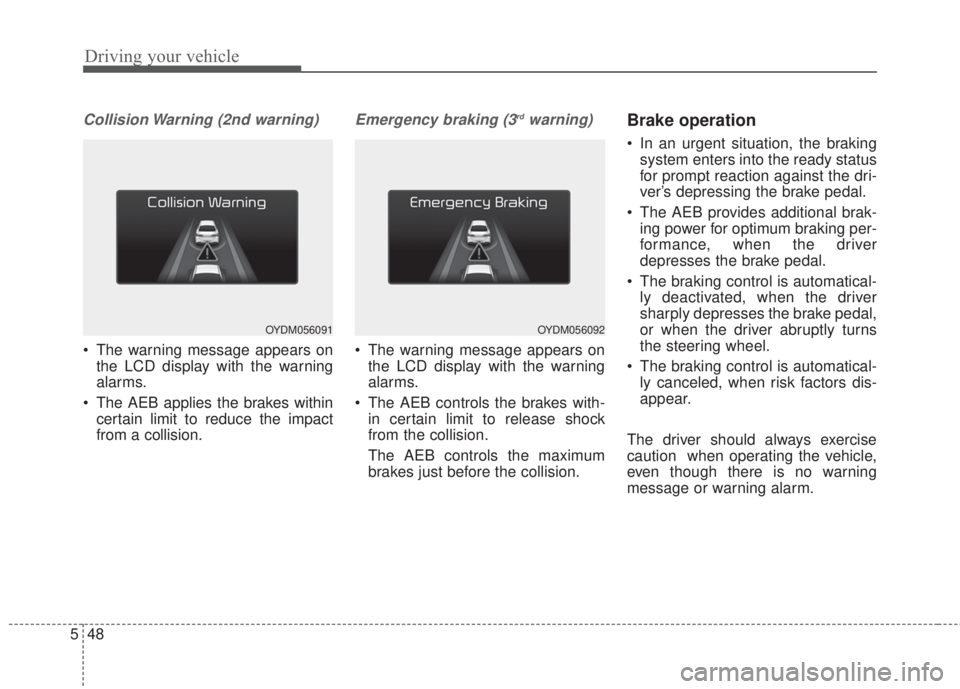
Collision Warning (2nd warning)
• The warning message appears on
the LCD display with the warning
alarms.
• The AEB applies the brakes within
certain limit to reduce the impact
from a collision.
Emergency braking (3rdwarning)
• The warning message appears on
the LCD display with the warning
alarms.
• The AEB controls the brakes with-
in certain limit to release shock
from the collision.
The AEB controls the maximum
brakes just before the collision.
Brake operation
• In an urgent situation, the braking
system enters into the ready status
for prompt reaction against the dri-
ver’s depressing the brake pedal.
• The AEB provides additional brak-
ing power for optimum braking per-
formance, when the driver
depresses the brake pedal.
• The braking control is automatical-
ly deactivated, when the driver
sharply depresses the brake pedal,
or when the driver abruptly turns
the steering wheel.
• The braking control is automatical-
ly canceled, when risk factors dis-
appear.
The driver should always exercise
caution when operating the vehicle,
even though there is no warning
message or warning alarm.
OYDM056091OYDM056092
Page 393 of 595
Driving your vehicle
50 5
✽NOTICE
• Do not install any accessories, such
as a license plate bracket or
bumper sticker near the sensor
area. Do not replace the bumper
by yourself. Doing so may adverse-
ly affect the sensing performance.
• Always keep the sensor/bumper
area clean.
• Use only a soft cloth to wash the
vehicle. Also, do not spray highly
pressurized water on the sensor
installed on the bumper.
• Be careful not to apply unneces-
sary force on the frontal sensor
area. When the sensor moves out
of the correct position due to
external force, the system may not
operate correctly even without the
warning light or message. In this
case, we recommend you to have
the vehicle inspected by an
authorized Kia dealer.
• Use only the genuine Kia sensor
cover. Do not arbitrarily apply
paint on the sensor cover.
System malfunction
• When the AEB is not working prop-
erly, the AEB warning light ( ) will
illuminate and the warning mes-
sage (“Check AEB system”) will
appear for a few seconds. After the
message disappears, the master
warning light ( ) will illuminate. In
this case, we recommend you to
have the vehicle inspected by an
authorized Kia dealer.
• The AEB warning message may
appear along with the illumination
of the ESC warning light.WARNING
The AEB is only a supplemental
system for the driver’s conven-
ience.
The driver still maintains
responsibility to control the
vehicle. Do not solely depend
on the AEB system. Rather,
maintain a safe braking dis-
tance, and, if necessary,
depress the brake pedal to
lower the driving speed.
Page 395 of 595
Driving your vehicle
52 5
The vehicle in front does not turn
ON the rear lights, does not have
rear lights, has asymmetric rear
lights, or has rear lights out of angle.
- The outside brightness is greatly
changed, such as entering/exiting
the tunnel.
- The vehicle driving is unstable.
- The radar/camera sensor recogni-
tion is limited.
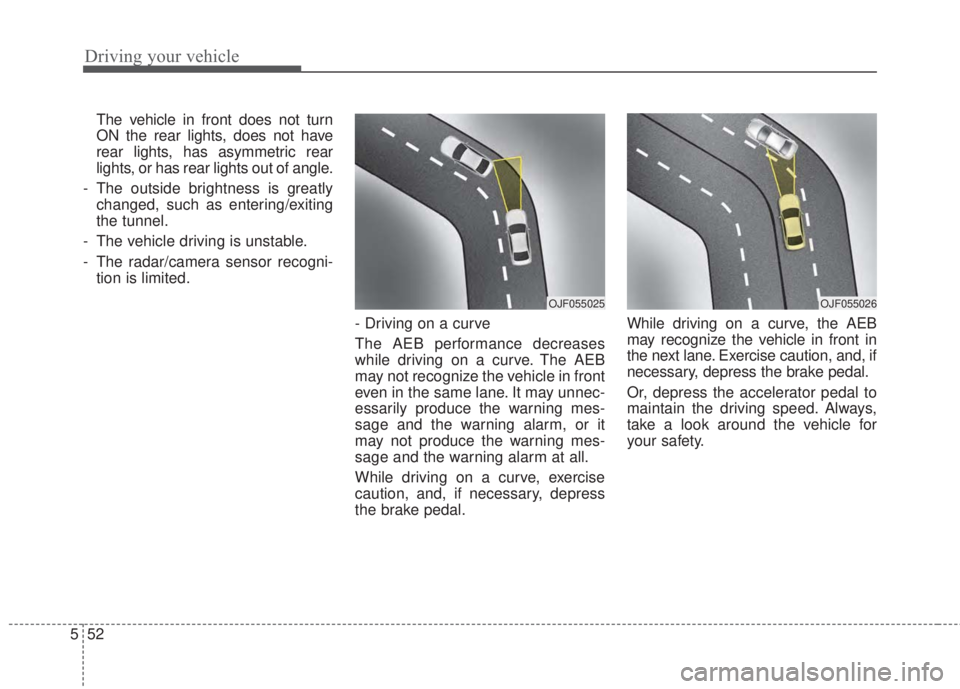
- Driving on a curve
The AEB performance decreases
while driving on a curve. The AEB
may not recognize the vehicle in front
even in the same lane. It may unnec-
essarily produce the warning mes-
sage and the warning alarm, or it
may not produce the warning mes-
sage and the warning alarm at all.
While driving on a curve, exercise
caution, and, if necessary, depress
the brake pedal.While driving on a curve, the AEB
may recognize the vehicle in front in
the next lane. Exercise caution, and, if
necessary, depress the brake pedal.
Or, depress the accelerator pedal to
maintain the driving speed. Always,
take a look around the vehicle for
your safety.
OJF055026OJF055025
Page 396 of 595
553
Driving your vehicle
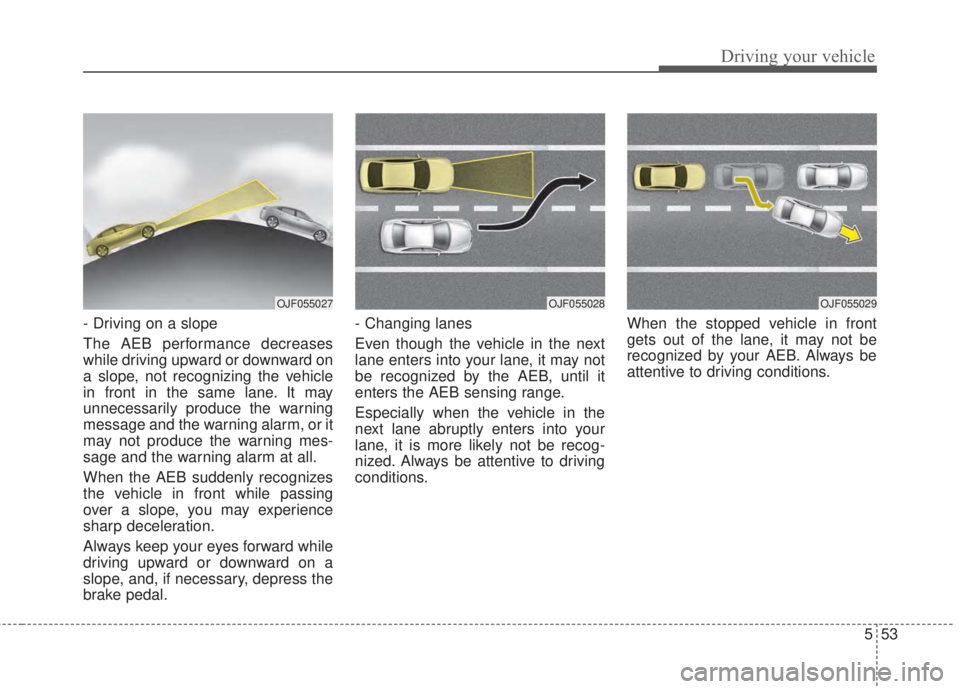
- Driving on a slope
The AEB performance decreases
while driving upward or downward on
a slope, not recognizing the vehicle
in front in the same lane. It may
unnecessarily produce the warning
message and the warning alarm, or it
may not produce the warning mes-
sage and the warning alarm at all.
When the AEB suddenly recognizes
the vehicle in front while passing
over a slope, you may experience
sharp deceleration.
Always keep your eyes forward while
driving upward or downward on a
slope, and, if necessary, depress the
brake pedal.- Changing lanes
Even though the vehicle in the next
lane enters into your lane, it may not
be recognized by the AEB, until it
enters the AEB sensing range.
Especially when the vehicle in the
next lane abruptly enters into your
lane, it is more likely not be recog-
nized. Always be attentive to driving
conditions.When the stopped vehicle in front
gets out of the lane, it may not be
recognized by your AEB. Always be
attentive to driving conditions.
OJF055027OJF055029OJF055028
Page 397 of 595
Driving your vehicle
54 5
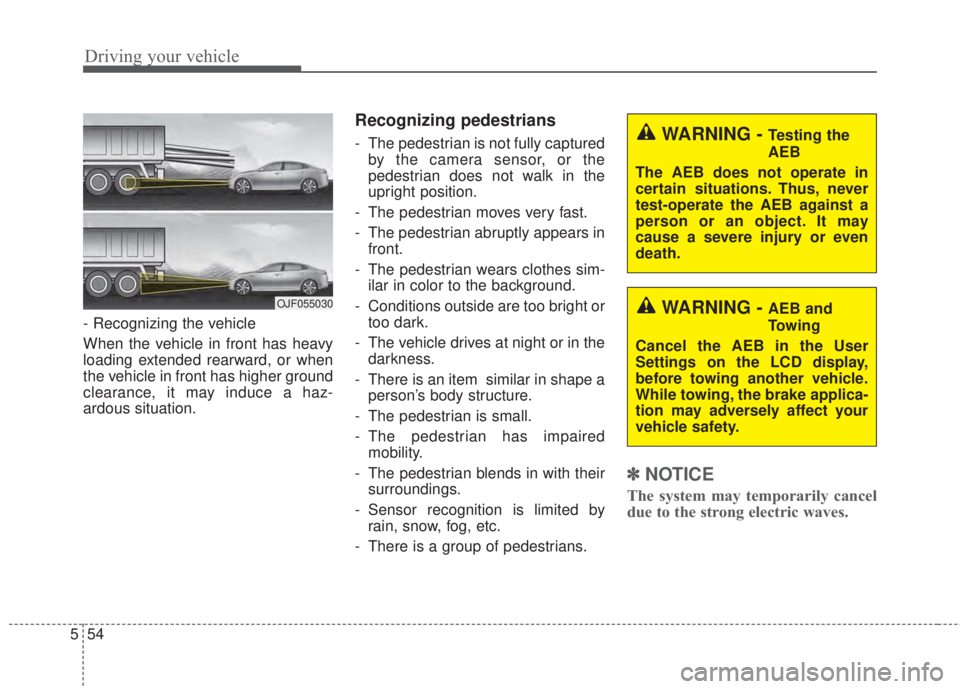
- Recognizing the vehicle
When the vehicle in front has heavy
loading extended rearward, or when
the vehicle in front has higher ground
clearance, it may induce a haz-
ardous situation.
Recognizing pedestrians
- The pedestrian is not fully captured
by the camera sensor, or the
pedestrian does not walk in the
upright position.
- The pedestrian moves very fast.
- The pedestrian abruptly appears in
front.
- The pedestrian wears clothes sim-
ilar in color to the background.
- Conditions outside are too bright or
too dark.
- The vehicle drives at night or in the
darkness.
- There is an item similar in shape a
person’s body structure.
- The pedestrian is small.
- The pedestrian has impaired
mobility.
- The pedestrian blends in with their
surroundings.
- Sensor recognition is limited by
rain, snow, fog, etc.
- There is a group of pedestrians.
✽NOTICE
The system may temporarily cancel
due to the strong electric waves.
OJF055030
WARNING - Testing the
AEB
The AEB does not operate in
certain situations. Thus, never
test-operate the AEB against a
person or an object. It may
cause a severe injury or even
death.
WARNING - AEB and
Towing
Cancel the AEB in the User
Settings on the LCD display,
before towing another vehicle.
While towing, the brake applica-
tion may adversely affect your
vehicle safety.
Page 399 of 595
Driving your vehicle
56 5
The cruise control system allows you
to program the vehicle to maintain a
constant speed without depressing
the accelerator pedal.
This system is designed to function
above approximately 40 km/h (25
mph).
If the cruise control is left on,
(CRUISE indicator light in the instru-
ment cluster illuminated) the cruise
control can be switched on acciden-
tally. Keep the cruise control system
off (CRUISE indicator light OFF)
when the cruise control is not in use,
to avoid inadvertently setting a
speed.
Use the cruise control system only
when traveling on open highways in
good weather.
Do not use the cruise control when
driving in heavy or varying traffic, or
on slippery (rainy, icy or snow-cov-
ered) or winding roads or over 6%
up-hill or down-hill roads.✽NOTICE
• During normal cruise control
operation, when the SET switch is
activated or reactivated after
applying the brakes, the cruise
control will energize after approx-
imately 3 seconds. This delay is
normal.
• To activate cruise control, depress
the brake pedal at least once after
turning the ignition switch to the
ON position or starting the engine.
This is to check if the brake switch
which is important part to cancel
cruise control is in normal condi-
tion.
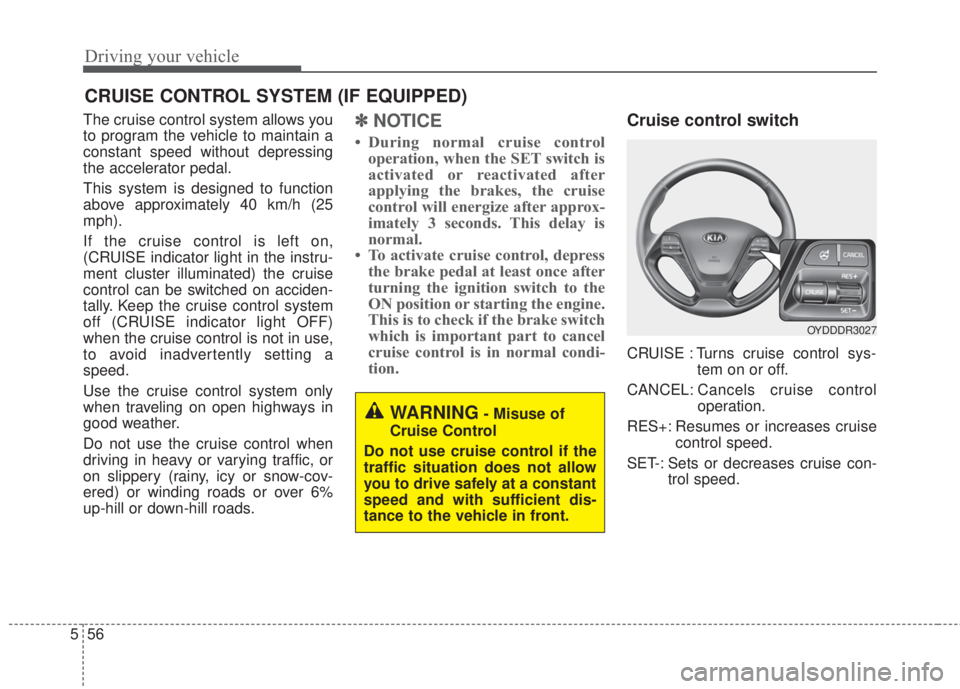
Cruise control switch
CRUISE : Turns cruise control sys-
tem on or off.
CANCEL: Cancels cruise control
operation.
RES+: Resumes or increases cruise
control speed.
SET-: Sets or decreases cruise con-
trol speed.
CRUISE CONTROL SYSTEM (IF EQUIPPED)
WARNING- Misuse of
Cruise Control
Do not use cruise control if the
traffic situation does not allow
you to drive safely at a constant
speed and with sufficient dis-
tance to the vehicle in front.
OYDDDR3027
Page 400 of 595
557
Driving your vehicle
To set cruise control speed:
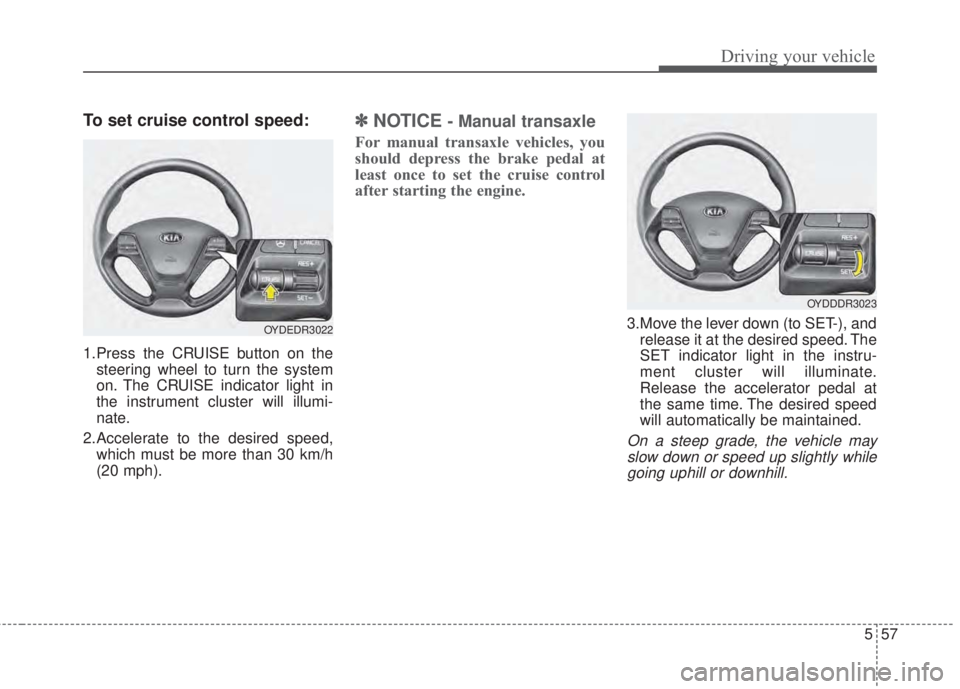
1.Press the CRUISE button on the
steering wheel to turn the system
on. The CRUISE indicator light in
the instrument cluster will illumi-
nate.
2.Accelerate to the desired speed,
which must be more than 30 km/h
(20 mph).
✽NOTICE- Manual transaxle
For manual transaxle vehicles, you
should depress the brake pedal at
least once to set the cruise control
after starting the engine.
3.Move the lever down (to SET-), and
release it at the desired speed. The
SET indicator light in the instru-
ment cluster will illuminate.
Release the accelerator pedal at
the same time. The desired speed
will automatically be maintained.
On a steep grade, the vehicle may
slow down or speed up slightly while
going uphill or downhill.
OYDEDR3022
OYDDDR3023
Page 402 of 595
559
Driving your vehicle
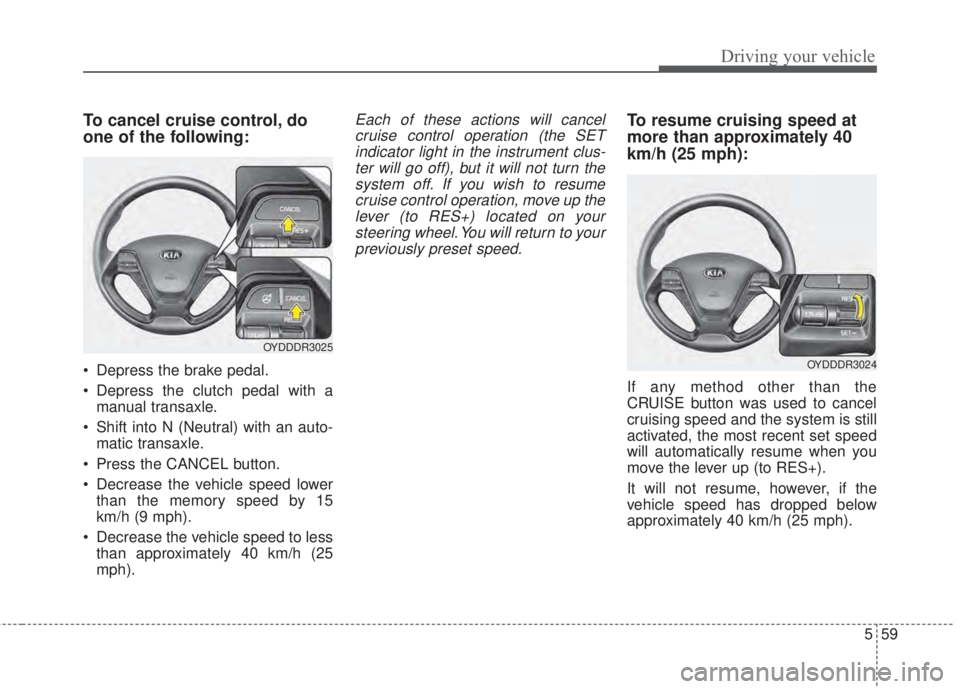
To cancel cruise control, do
one of the following:
• Depress the brake pedal.
• Depress the clutch pedal with a
manual transaxle.
• Shift into N (Neutral) with an auto-
matic transaxle.
• Press the CANCEL button.
• Decrease the vehicle speed lower
than the memory speed by 15
km/h (9 mph).
• Decrease the vehicle speed to less
than approximately 40 km/h (25
mph).
Each of these actions will cancel
cruise control operation (the SET
indicator light in the instrument clus-
ter will go off), but it will not turn the
system off. If you wish to resume
cruise control operation, move up the
lever (to RES+) located on your
steering wheel. You will return to your
previously preset speed.To resume cruising speed at
more than approximately 40
km/h (25 mph):
If any method other than the
CRUISE button was used to cancel
cruising speed and the system is still
activated, the most recent set speed
will automatically resume when you
move the lever up (to RES+).
It will not resume, however, if the
vehicle speed has dropped below
approximately 40 km/h (25 mph).
OYDDDR3025
OYDDDR3024
Page 411 of 595
Driving your vehicle
68 5
If the driver still does not have one’s
hand on the steering wheel after sev-
eral seconds, LKAS does not acti-
vate.
While LKAS deactivation, if the driv-
er have one’s hand on the steering
wheel, LKAS activate again.
✽NOTICE
• The driver is responsible for accu-
rate steering.
• Turn off the system and drive the
vehicle personally in below situa-
tions.
- In bad weather
- In bad road condition
- When the steering wheel needs to
be controlled by the driver fre-
quently.
✽NOTICE
• Even though the steering is assist-
ed by the system, the driver may
control the steering.
• The steering wheel may feel heav-
ier when the steering wheel is
assisted by the system than when it
is not.
The system will be cancelled when:
• Vehicle speed is below 56 km/h (35
mph) and over 177 km/h (110 mph).
• Only one lane is detected.
• Always turn on the turn signal to
change lanes. If you change lanes
without the turn signal on, the
steering wheel might be controlled.
• The hazard warning light is on.
• The width of the lane is below 2.6 m
and over 4.5 m.
• ESC(Electronic Stability Control)
and VSM(Vehicle stability manage-
ment) are activated.
• When the system is on or after
changing a lane, drive in the mid-
dle of the lane. If not, the system
will not provide the steering assist
function.
• The steering will not be assisted
when you drive fast on a sharp
curve.
• The steering will not be assisted
when you change lanes fast.
• The steering will not be assisted
when you brake suddenly.
Page 423 of 595
Driving your vehicle
80 5
Your vehicle's fuel economy depends
mainly on your style of driving, where
you drive and when you drive.
Each of these factors affects how
many kilometers (miles) you can get
from a liter (gallon) of fuel. To operate
your vehicle as economically as pos-
sible, use the following driving sug-
gestions to help save money in both
fuel and repairs:
• Drive smoothly. Accelerate at a
moderate rate. Don't make "jack-
rabbit" starts or full-throttle shifts
and maintain a steady cruising
speed. Don't race between stop-
lights. Try to adjust your speed to
the traffic so you don't have to
change speeds unnecessarily.
Avoid heavy traffic whenever pos-
sible. Always maintain a safe dis-
tance from other vehicles so you
can avoid unnecessary braking.
This also reduces brake wear.
• Drive at a moderate speed. The
faster you drive, the more fuel your
vehicle uses. Driving at a moderate
speed, especially on the highway,
is one of the most effective ways to
reduce fuel consumption.• Don't "ride" the brake pedal. This
can increase fuel consumption and
also increase wear on these com-
ponents. In addition, driving with
your foot resting on the brake pedal
may cause the brakes to overheat,
which reduces their effectiveness
and may lead to more serious con-
sequences.
• Take care of your tires. Keep them
inflated to the recommended pres-
sure. Incorrect inflation, either too
much or too little, results in unnec-
essary tire wear. Check the tire
pressures at least once a month.
• Be sure that the wheels are
aligned correctly. Improper align-
ment can result from hitting curbs
or driving too fast over irregular
surfaces. Poor alignment causes
faster tire wear and may also result
in other problems as well as
greater fuel consumption.• Keep your vehicle in good condi-
tion. For better fuel economy and
reduced maintenance costs, main-
tain your vehicle in accordance
with the maintenance schedule in
section 7. If you drive your vehicle
in severe conditions, more frequent
maintenance is required (see sec-
tion 7 for details).
• Keep your vehicle clean. For maxi-
mum service, your vehicle should
be kept clean and free of corrosive
materials. It is especially important
that mud, dirt, ice, etc. not be
allowed to accumulate on the
underside of the vehicle. This extra
weight can result in increased fuel
consumption and also contribute to
corrosion.
• Travel lightly. Don't carry unneces-
sary weight in your vehicle. Weight
reduces fuel economy.
• Don't let the engine idle longer
than necessary. If you are waiting
(and not in traffic), turn off your
engine and restart only when
you're ready to go.
ECONOMICAL OPERATION