drive mode KIA FORTE 2018 Owner's Manual
[x] Cancel search | Manufacturer: KIA, Model Year: 2018, Model line: FORTE, Model: KIA FORTE 2018Pages: 584, PDF Size: 15.14 MB
Page 250 of 584
175
4
Features of your vehicle
✽ ✽
NOTICE - Using Voice
Recognition
• When using the voice recognition
feature, only commands listed
within the user's manual are sup-
ported.
• Be aware that during the opera- tion of the voice recognition sys-
tem, pressing any button other
than the button terminates the
voice recognition mode.
• For optimal voice recognition per- formance, position your head
below the microphone above the
driver’s seat and maintain proper
position when speaking voice com-
mands.
• Within the following situations, voice recognition may not function
properly due to external sound.
- When the windows and sunroofare open
- When the blower AC/heater is set to high
- When entering and passing through tunnels
- When driving on rugged and uneven roads
- During severe rain (heavy rains, windstorms) (Continued)(Continued)
• Phone related voice commands can
be used only when a Bluetooth®
Wireless Technology device is con-
nected.
• When making calls by stating a name, the corresponding contact
must be downloaded and stored
within the audio system.
• After downloading the Bluetooth
®
Wireless Technology phone book,
it takes some times to convert the
phone book data into voice infor-
mation. During this time, voice
recognition may not properly
operate.
• Pronounce the voice commands naturally and clearly as if in a nor-
mal conversation.
Page 295 of 584
4 220
Features of your vehicle
(Continued)
• Phone contact names should besaved in English or they may not
be displayed correctly.
• The Handsfree call volume and quality may differ depending on
the mobile phone.
• Only one Bluetooth
®Wireless
Technology device can be connect-
ed at a time.
• In some mobile phones, starting the ignition while talking through
Bluetooth
®Wireless Technology
enabled handsfree call will result
in the call becoming disconnected.
(Switch the call back to your
mobile phone when starting the
ignition.)
• If the mobile phone is not paired or connected, it is not possible to
enter Phone mode. Once a phone
is paired or connected, the guid-
ance screen will be displayed.
• Bluetooth
®Handsfree may not be
supported in some mobile phones.
✽ ✽ NOTICE
•Bluetooth®Wireless Technology
Handsfree is a feature that enables
drivers to practice safe driving.
Connecting the car audio system
with a Bluetooth
®Wireless
Technology phone allows the user
to conveniently make calls, receive
calls, and manage the phone book.
Before using the Bluetooth
®
Wireless Technology, carefully
read the contents of this user’s
manual.
WARNING
Excessive use or operations
while driving may lead to neg-
ligent driving practices and be
the cause of accidents.
Do not operate the device excessively while driving.
Viewing the screen for pro- longed periods of time while
driving is dangerous and may
lead to accidents.
Page 296 of 584
221
4
Features of your vehicle
✽ ✽
NOTICE - Using Voice
Recognition
• When using the voice recognition
feature, only commands listed
within the user's manual are sup-
ported.
• Be aware that during the opera- tion of the voice recognition sys-
tem, pressing any button other
than the button will terminate
the voice recognition mode.
• For optimal voice recognition per- formance, position your head
below the microphone above the
driver’s seat and maintain proper
position when speaking voice com-
mands.
• Within the following situations, voice recognition may not function
properly due to external sound.
- When the windows and sunroofare open
- When the blower AC/heater is set to high
- When entering and passing through tunnels
- When driving on rugged and uneven roads
- During severe rain (heavy rains, windstorms) (Continued)(Continued)
• Phone related voice commands can
be used only when a Bluetooth®
Wireless Technology device is con-
nected.
• When making calls by stating a name, the corresponding contact
must be downloaded and stored
within the audio system.
• After downloading the Bluetooth
®
Wireless Technology phone book,
it takes some time to convert the
phone book data into voice infor-
mation. During this time, voice
recognition may not properly
operate.
• Pronounce the voice commands naturally and clearly as if in a nor-
mal conversation..
Page 343 of 584
• To resume cruising speed at more thanapproximately 40 km/h (25 mph) . . . . . . . . . . . . . . 5-61
• To turn cruise control off . . . . . . . . . . . . . . . . . . . . . . 5-62
Drive mode integrated control system . . . . . . . . . 5-63
• DRIVE mode . . . . . . . . . . . . . . . . . . . . . . . . . . . . . . . . 5-63
Lane Keeping Assist System (LKAS) . . . . . . . . . . 5-66
• LKAS operation. . . . . . . . . . . . . . . . . . . . . . . . . . . . . . 5-6\
7
• LKAS malfunction . . . . . . . . . . . . . . . . . . . . . . . . . . . 5-72
• LKAS function change . . . . . . . . . . . . . . . . . . . . . . . . 5-73
Blind spot detection system (BSD) . . . . . . . . . . . . 5-74
• BSD (Blind Spot Detection) / LCA (Lane Change Assist) . . . . . . . . . . . . . . . . . . . . 5-75
• RCTA (Rear Cross Traffic Alert) . . . . . . . . . . . . . . . . 5-78
• Limitations condition . . . . . . . . . . . . . . . . . . . . . . . . . 5-79
Economical operation . . . . . . . . . . . . . . . . . . . . . . 5-82
Special driving conditions . . . . . . . . . . . . . . . . . . . 5-84
• Hazardous driving conditions . . . . . . . . . . . . . . . . . . 5-84
• Rocking the vehicle . . . . . . . . . . . . . . . . . . . . . . . . . . . 5-84
• Smooth cornering . . . . . . . . . . . . . . . . . . . . . . . . . . . . 5-85
• Driving at night . . . . . . . . . . . . . . . . . . . . . . . . . . . . . . 5-85
• Driving in the rain . . . . . . . . . . . . . . . . . . . . . . . . . . . . 5-86
• Driving in flooded areas . . . . . . . . . . . . . . . . . . . . . . . 5-86
• Driving off-road . . . . . . . . . . . . . . . . . . . . . . . . . . . . . . 5-87
• Highway driving . . . . . . . . . . . . . . . . . . . . . . . . . . . . . 5-87
Winter driving . . . . . . . . . . . . . . . . . . . . . . . . . . . . 5-88
• Snowy or Icy conditions . . . . . . . . . . . . . . . . . . . . . . . 5-88
• Use high quality ethylene glycol coolant . . . . . . . . . . 5-89
• Check battery and cables . . . . . . . . . . . . . . . . . . . . . . 5-89
• Change to "winter weight" oil if necessary . . . . . . . 5-89
• Check spark plugs and ignition system. . . . . . . . . . . 5-89
• To keep locks from freezing . . . . . . . . . . . . . . . . . . . . 5-89
• Use approved window washer anti-freeze in system . . 5-89
• Don't let your parking brake freeze . . . . . . . . . . . . . 5-90
• Don't let ice and snow accumulate underneath . . . . 5-90
• Carry emergency equipment . . . . . . . . . . . . . . . . . . . 5-90
Vehicle load limit . . . . . . . . . . . . . . . . . . . . . . . . . . 5-91
• Tire and loading information label . . . . . . . . . . . . . . 5-91
• Certification label . . . . . . . . . . . . . . . . . . . . . . . . . . . . 5-94
Vehicle weight . . . . . . . . . . . . . . . . . . . . . . . . . . . . . 5-96
• Base curb weight . . . . . . . . . . . . . . . . . . . . . . . . . . . . 5-96
• Vehicle curb weight . . . . . . . . . . . . . . . . . . . . . . . . . . . 5-96
• Cargo weight . . . . . . . . . . . . . . . . . . . . . . . . . . . . . . . . 5-96
• GAW (Gross axle weight) . . . . . . . . . . . . . . . . . . . . . . 5-96
• GAWR (Gross axle weight rating) . . . . . . . . . . . . . . . 5-96
• GVW (Gross vehicle weight) . . . . . . . . . . . . . . . . . . . 5-96
• GVWR (Gross vehicle weight rating) . . . . . . . . . . . . 5-96
5
Page 362 of 584
521
Driving your vehicle
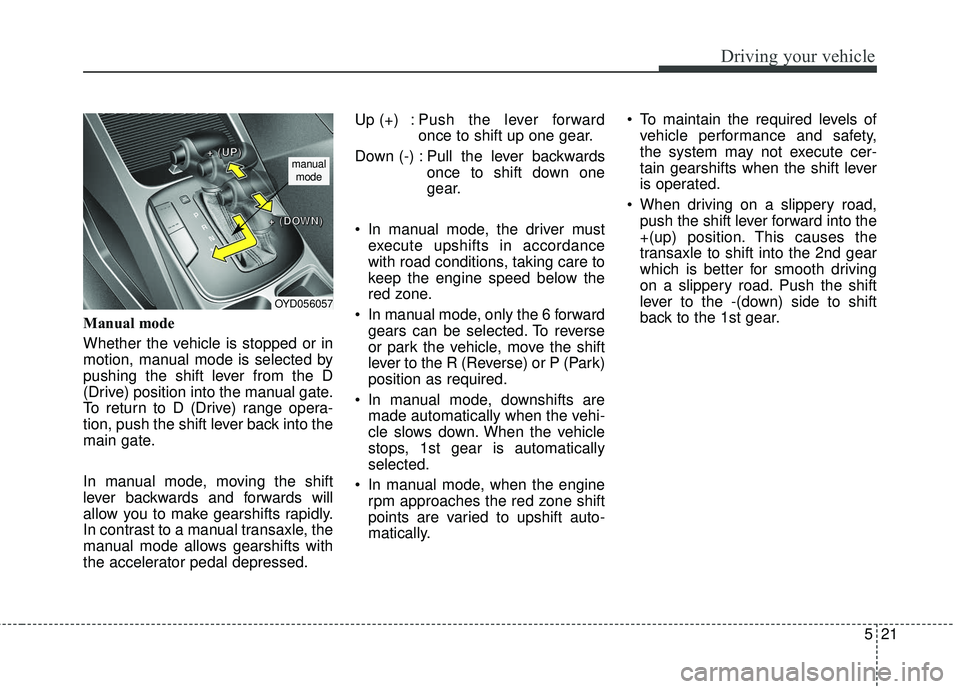
Manual mode
Whether the vehicle is stopped or in
motion, manual mode is selected by
pushing the shift lever from the D
(Drive) position into the manual gate.
To return to D (Drive) range opera-
tion, push the shift lever back into the
main gate.
In manual mode, moving the shift
lever backwards and forwards will
allow you to make gearshifts rapidly.
In contrast to a manual transaxle, the
manual mode allows gearshifts with
the accelerator pedal depressed.Up (+) : Push the lever forward
once to shift up one gear.
Down (-) : Pull the lever backwards once to shift down one
gear.
In manual mode, the driver must execute upshifts in accordance
with road conditions, taking care to
keep the engine speed below the
red zone.
In manual mode, only the 6 forward gears can be selected. To reverse
or park the vehicle, move the shift
lever to the R (Reverse) or P (Park)
position as required.
In manual mode, downshifts are made automatically when the vehi-
cle slows down. When the vehicle
stops, 1st gear is automatically
selected.
In manual mode, when the engine rpm approaches the red zone shift
points are varied to upshift auto-
matically. To maintain the required levels of
vehicle performance and safety,
the system may not execute cer-
tain gearshifts when the shift lever
is operated.
When driving on a slippery road, push the shift lever forward into the
+(up) position. This causes the
transaxle to shift into the 2nd gear
which is better for smooth driving
on a slippery road. Push the shift
lever to the -(down) side to shift
back to the 1st gear.
OYD056057
+ +
+ +
( (
( (
U U
U U
P P
P P
) )
) )
+ +
+ +
( (
( (
D D
D D
O O
O O
W W
W W
N N
N N
) )
) )
manual
mode
Page 367 of 584
Driving your vehicle
26
5
When rapidly accelerating at low
vehicle speed, engine could rev at
high rpm depending on vehicle
drive condition.
For smooth launch uphill, press down the accelerator pedal
smoothly depending on the current
conditions.
If you release your foot from the accelerator pedal at low vehicle
speed, you may feel strong engine
brake, which is similar to manual
transmission.
When driving downhill, you may use Manual Mode and press the
paddle shifters to downshift to a
lower gear in order to control your
speed without using the brake
pedal excessively.
When you turn the engine on and off, you may hear clicking sounds
as the system goes through a self
test. This is a normal sound for the
Dual Clutch Transmission.✽ ✽ NOTICE
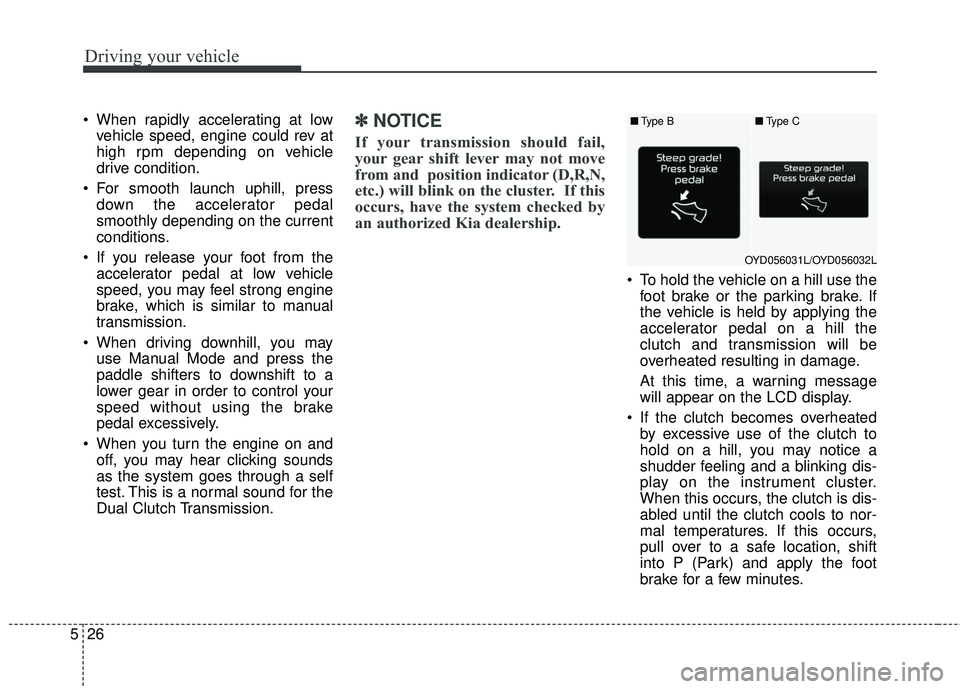
If your transmission should fail,
your gear shift lever may not move
from and position indicator (D,R,N,
etc.) will blink on the cluster. If this
occurs, have the system checked by
an authorized Kia dealership.
To hold the vehicle on a hill use the
foot brake or the parking brake. If
the vehicle is held by applying the
accelerator pedal on a hill the
clutch and transmission will be
overheated resulting in damage.
At this time, a warning message
will appear on the LCD display.
If the clutch becomes overheated by excessive use of the clutch to
hold on a hill, you may notice a
shudder feeling and a blinking dis-
play on the instrument cluster.
When this occurs, the clutch is dis-
abled until the clutch cools to nor-
mal temperatures. If this occurs,
pull over to a safe location, shift
into P (Park) and apply the foot
brake for a few minutes.
■ Type B
OYD056031L/OYD056032L■
Type C
Page 370 of 584
529
Driving your vehicle
N (Neutral)
The wheels and transmission are not
engaged.
Use N (Neutral) if you need to restart
a stalled engine, or if it is necessary
to stop with the engine ON. Shift into
P (Park) if you need to leave your
vehicle for any reason.
Always depress the brake pedal
when you are shifting from N
(Neutral) to another gear.
D (Drive)
This is the normal forward driving
position. The transaxle will automati-
cally shift through a seven-gear
sequence, providing the best fuel
economy and power.
For extra power when passing anoth-
er vehicle or driving uphill, depress
the accelerator further and the
transaxle will automatically downshift
to the next lower gear (or gears, as
appropriate).
The DRIVE MODE switch, located
on the shift lever console, allows the
driver to switch from NORMAL mode
to SPORT or ECO mode. (if
equipped)For more information, refer to "Drive
Mode Integrated Control System"
later in this chapter.
✽ ✽
NOTICE
Always ensure vehicle is stationary,
at a complete stop, before selecting
D (Drive).
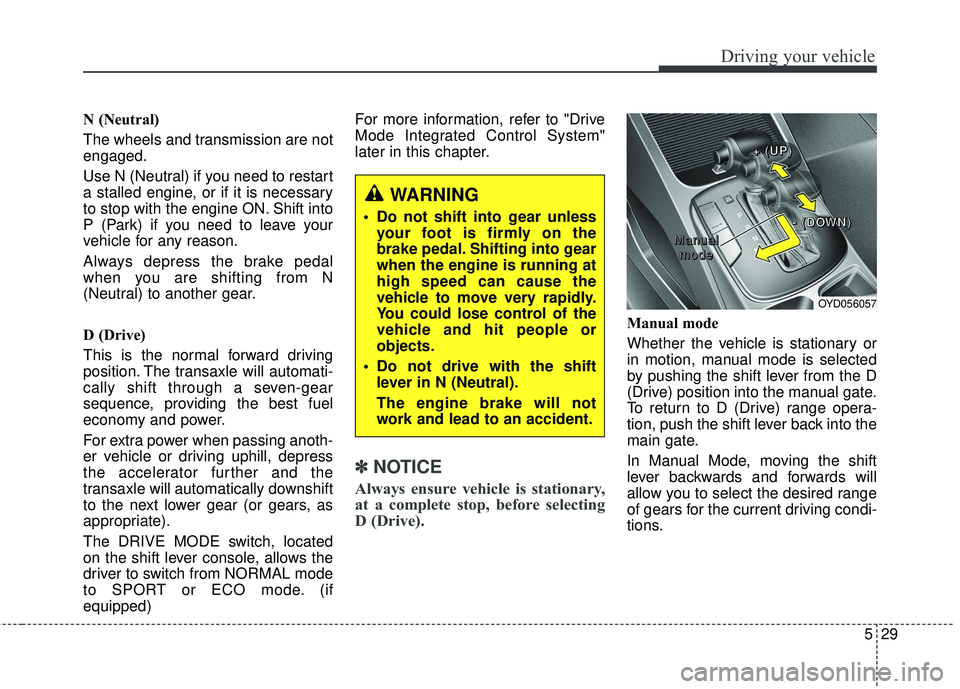
Manual mode
Whether the vehicle is stationary or
in motion, manual mode is selected
by pushing the shift lever from the D
(Drive) position into the manual gate.
To return to D (Drive) range opera-
tion, push the shift lever back into the
main gate.
In Manual Mode, moving the shift
lever backwards and forwards will
allow you to select the desired range
of gears for the current driving condi-
tions.
WARNING
Do not shift into gear unless
your foot is firmly on the
brake pedal. Shifting into gear
when the engine is running at
high speed can cause the
vehicle to move very rapidly.
You could lose control of the
vehicle and hit people or
objects.
Do not drive with the shift lever in N (Neutral).
The engine brake will not
work and lead to an accident.
OYD056057
M M
M M
a a
a a
n n
n n
u u
u u
a a
a a
l l
l l
m m
m m
o o
o o
d d
d d
e e
e e + +
+ +
( (
( (
U U
U U
P P
P P
) )
) )
- -
- -
( (
( (
D D
D D
O O
O O
W W
W W
N N
N N
) )
) )
Page 371 of 584
Driving your vehicle
30
5
+ (Up) : Push the lever forward once
to shift up one gear.
- (Down) : Pull the lever backwards once to shift down one
gear.
✽ ✽NOTICE
• Only the seven forward gears can
be selected. To reverse or park the
vehicle, move the shift lever to the
R (Reverse) or P (Park) position as
required.
• Downshifts are made automatical- ly when the vehicle slows down.
When the vehicle stops, 1st gear is
automatically selected.
• When the engine rpm approaches the red zone the transmission will
upshift automatically.
• If the driver presses the lever to + (Up) or - (Down) position, the trans-
mission may not make the request-
ed gear change if the next gear is
outside of the allowable engine rpm
range. The driver must execute
upshifts in accordance with road
conditions, taking care to keep the
engine rpms below the red zone.
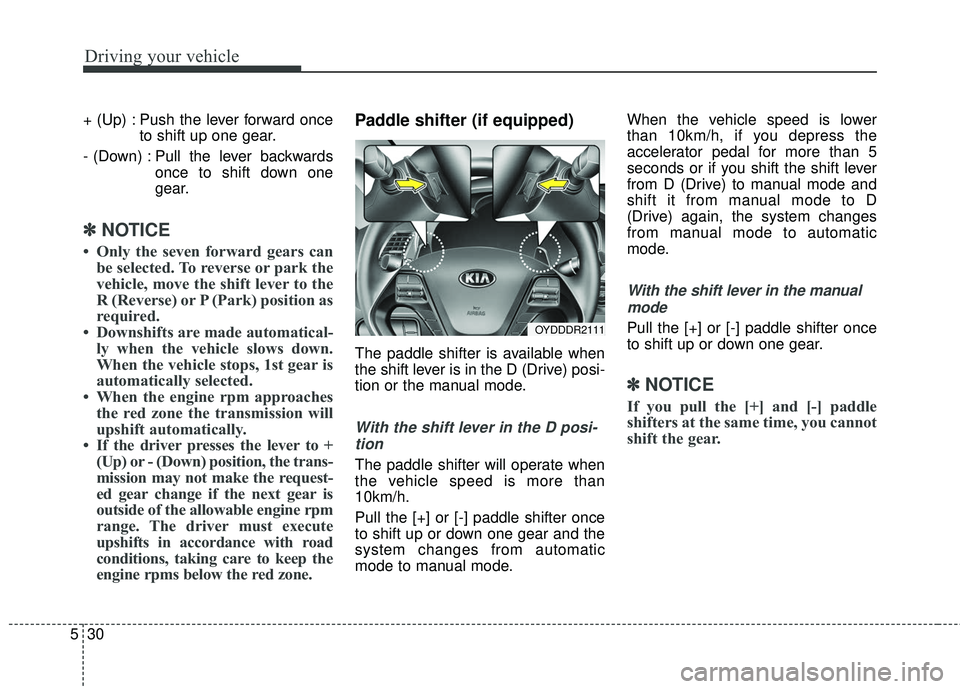
Paddle shifter (if equipped)
The paddle shifter is available when
the shift lever is in the D (Drive) posi-
tion or the manual mode.
With the shift lever in the D posi-
tion
The paddle shifter will operate when
the vehicle speed is more than
10km/h.
Pull the [+] or [-] paddle shifter once
to shift up or down one gear and the
system changes from automatic
mode to manual mode. When the vehicle speed is lower
than 10km/h, if you depress the
accelerator pedal for more than 5
seconds or if you shift the shift lever
from D (Drive) to manual mode and
shift it from manual mode to D
(Drive) again, the system changes
from manual mode to automatic
mode.
With the shift lever in the manual
mode
Pull the [+] or [-] paddle shifter once
to shift up or down one gear.
✽ ✽ NOTICE
If you pull the [+] and [-] paddle
shifters at the same time, you cannot
shift the gear.
OYDDDR2111
Page 404 of 584
563
Driving your vehicle
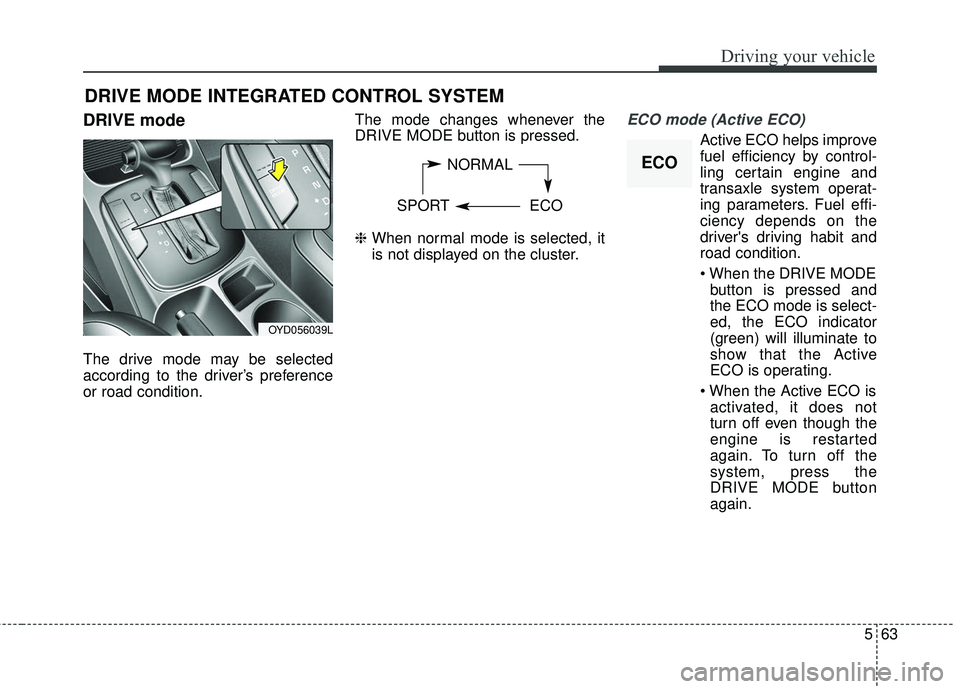
DRIVE mode
The drive mode may be selected
according to the driver’s preference
or road condition.The mode changes whenever the
DRIVE MODE button is pressed.
❈
When normal mode is selected, it
is not displayed on the cluster.
ECO mode (Active ECO)
Active ECO helps improve
fuel efficiency by control-
ling certain engine and
transaxle system operat-
ing parameters. Fuel effi-
ciency depends on the
driver's driving habit and
road condition.
button is pressed and
the ECO mode is select-
ed, the ECO indicator
(green) will illuminate to
show that the Active
ECO is operating.
activated, it does not
turn off even though the
engine is restarted
again. To turn off the
system, press the
DRIVE MODE button
again.
DRIVE MODE INTEGRATED CONTROL SYSTEM
NORMAL
SPORT ECO
OYD056039L
ECO
Page 405 of 584
Driving your vehicle
64
5
When Active ECO is activated:
The acceleration may slightly be
reduced even though you depress
the accelerator fully.
The air conditioner performance may be limited
The shift pattern of the automatic transaxle may change.
The engine noise may get louder.
The above situations are normal
conditions when the Active Eco
System is activated to improve fuel
efficiency. Limitation of Active ECO opera-
tion:
If the following conditions occur while
Active ECO is operating, the system
operation is limited even though
there is no change in the ECO indi-
cator.
When the coolant temperature is
low:
The system will be limited until
engine performance becomes nor-
mal.
When driving up a hill: The system will be limited to gain
power when driving uphill because
the engine torque is restricted.
When using manual mode: The system will be limited accord-
ing to the shift location.
When the accelerator pedal is deeply depressed for a few sec-
onds:
The system will be limited, judging
that the driver wants to speed up.SPORT mode
SPORT mode focuses on
dynamic driving by auto-
matically adjusting the
steering wheel, engine
and transaxle system.
button is pressed and
the SPORT mode is
selected, the SPORT
indicator (yellow) will illu-
minate.
is activated, and the
engine start/stop button
is turned off and on it will
change to NORMAL
mode. To turn on the
SPORT mode press
DRIVE MODE button
again.
SPORT