lock KIA FORTE 2019 Manual PDF
[x] Cancel search | Manufacturer: KIA, Model Year: 2019, Model line: FORTE, Model: KIA FORTE 2019Pages: 550, PDF Size: 11.66 MB
Page 269 of 550
523
Driving your vehicle
For smooth operation, depress thebrake pedal when shifting from N(Neutral) to a forward or reverse gear. Transmission ranges
The indicator in the instrument clus-
ter displays the shift lever position
when the ignition switch is in the ON
position.
P (Park)
Always come to a complete stop
before shifting into P (Park). This
position locks the transmission and
prevents the front wheels from rotat-
ing.
WARNING
- Intelligent Variable
Transmission (IVT)
Always check the surrounding areas near your vehicle for
people, especially children,
before shifting a car into D
(Drive) or R (Reverse).
Before leaving the driver’s seat, always make sure the
shift lever is in the P (Park)
position; then set the parking
brake fully and shut the engine
off. Unexpected and sudden
vehicle movement can occur if
these precautions are not fol-
lowed in the order identified.
Do not use the engine brake (shifting from a high gear to
lower gear) rapidly on slip-
pery roads.
The vehicle may slip causing
an accident.
CAUTION
To avoid damage to your transmission, do not acceler-ate the engine in R (Reverse)or any forward gear positionwith the brakes on.
When stopped on an incline, do not hold the vehicle sta-tionary with engine power.Use the service brake or theparking brake.
Do not shift from N (Neutral) or P (Park) into D (Drive), or R(Reverse) when the engine isabove idle speed.
WARNING
Shifting into P (Park) while the vehicle is in motion will cause
the drive wheels to lock which
will cause you to lose control
of the vehicle.
Do not use the P (Park) posi- tion in place of the parking
brake. Always make sure the
shift lever is latched in the P
(Park) position and set the
parking brake fully.
Never leave a child unattend- ed in a vehicle.
BDm CAN (ENG) 5.QXP 7/4/2018 10:13 AM Page 23
Page 270 of 550
Driving your vehicle
24
5
R (Reverse)
Use this position to drive the vehicle
backward. N (Neutral)
The wheels and transmission are not
engaged. The vehicle will roll freely
even on the slightest incline unless
the parking brake or service brakes
are applied.
-Parking in N (Neutral) gear
Follow the steps below when parking
and you want the vehicle to move
when pushed.
1.After parking your vehicle, step on
the brake pedal and move the shift
lever to "P" with the ignition button in
"ON" or while the engine is running.
2.If the parking brake is applied unlock the parking brake.
3.While pressing the brake pedal, turn the ignition button "OFF".
- For smart key equipped vehicles,the ignition switch can be moved
to "OFF" only when the shift lever
is in "P".
4.Change the gear shift lever to "N" (Neutral) while pressing the brake
pedal and pushing "SHIFT LOCK
RELEASE" button or inserting, a
tool (e.g. flathead screw-driver) into
the "SHIFT LOCK RELEASE"
access hole at the same time. Then,
the vehicle will move when external
force is applied.
CAUTION
The transmission may be dam-aged if you shift into P (Park)while the vehicle is in motion.
CAUTION
Always come to a complete stopbefore shifting into or out of R(Reverse); you may damage thetransmission if you shift into Rwhile the vehicle is in motion,except as explained in “Rockingthe vehicle” in this section.
WARNING
Do not drive with the shift lever
in N (Neutral).
The engine brake will not work
and lead to an accident.
BDm CAN (ENG) 5.QXP 7/4/2018 10:13 AM Page 24
Page 273 of 550
527
Driving your vehicle
Shift lock system (if equipped)
For your safety, the Intelligent
Variable Transmission (IVT) has a
shift lock system which prevents
shifting the transmission from P
(Park) into R (Reverse) unless the
brake pedal is depressed.
To shift the transmission from P
(Park) into R (Reverse):
1. Depress and hold the brake pedal.
2. Start the engine or turn the ignitionswitch to the ON position.
3. Move the shift lever.
If the brake pedal is repeatedly
depressed and released with the shift
lever in the P (Park) position, a chat-
tering noise near the shift lever may
be heard. This is a normal condition.
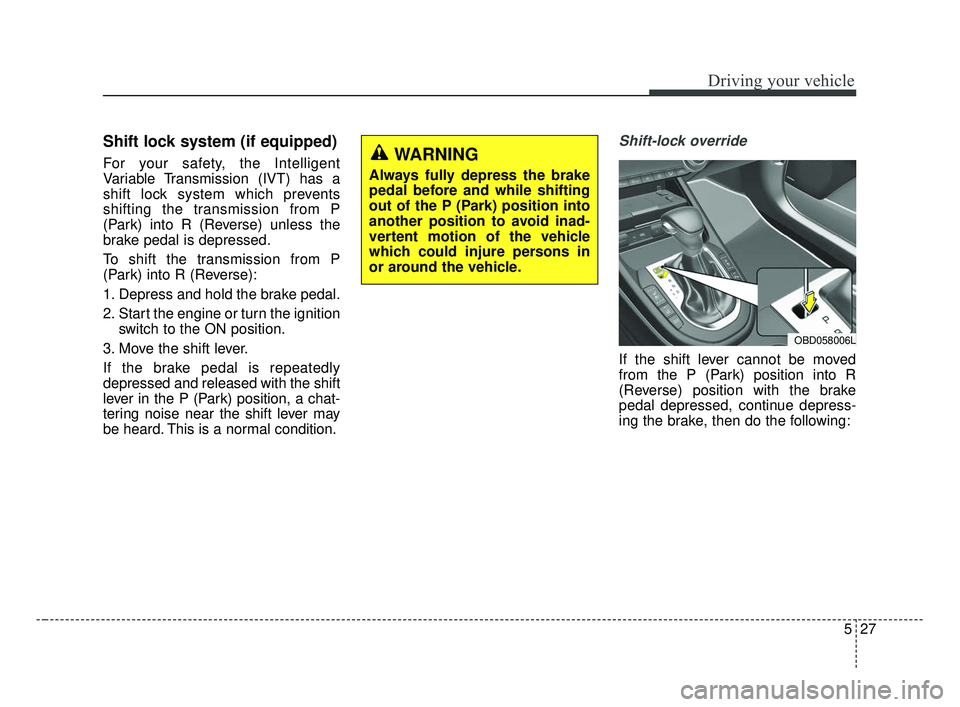
Shift-lock override
If the shift lever cannot be moved
from the P (Park) position into R
(Reverse) position with the brake
pedal depressed, continue depress-
ing the brake, then do the following:
WARNING
Always fully depress the brake
pedal before and while shifting
out of the P (Park) position into
another position to avoid inad-
vertent motion of the vehicle
which could injure persons in
or around the vehicle.
OBD058006L
BDm CAN (ENG) 5.QXP 7/4/2018 10:13 AM Page 27
Page 274 of 550
Driving your vehicle
28
5
1. Place the ignition switch in the
LOCK/OFF position.
2. Apply the parking brake.
3. Carefully remove the cap covering the shift-lock release access hole.
4. Insert a tool (e.g. flathead screw- driver) into the access hole and
press down on the tool.
5. Move the shift lever.
6. Remove the tool from the shiftlock override access hole then install
the cap.
7. Have the system inspected by a professional workshop. Kia recom-
mends to visit an authorized Kia
dealer/service partner.Ignition key interlock system
(if equipped)
The ignition key cannot be removed
unless the shift lever is in the P
(Park) position.
Good driving practices
Never move the shift lever from P (Park) or N (Neutral) to any other
position with the accelerator pedal
depressed.
Never move the shift lever into P (Park) when the vehicle is in
motion.
Be sure the vehicle is completely stopped before you attempt to shift
into R (Reverse) or D (Drive).
Never take the vehicle out of gear and coast down a hill. This may be
extremely hazardous. Always leave
the vehicle in gear when moving.
Do not "ride" the brakes. This can cause them to overheat and mal-
function. Instead, when you are
driving down a long hill, slow down
and shift to a lower gear. When you
do this, engine braking will help
slow down the vehicle.
Slow down before shifting to a lower gear. Otherwise, the lower
gear may not be engaged.
BDm CAN (ENG) 5.QXP 7/4/2018 10:13 AM Page 28
Page 280 of 550
Driving your vehicle
34
5
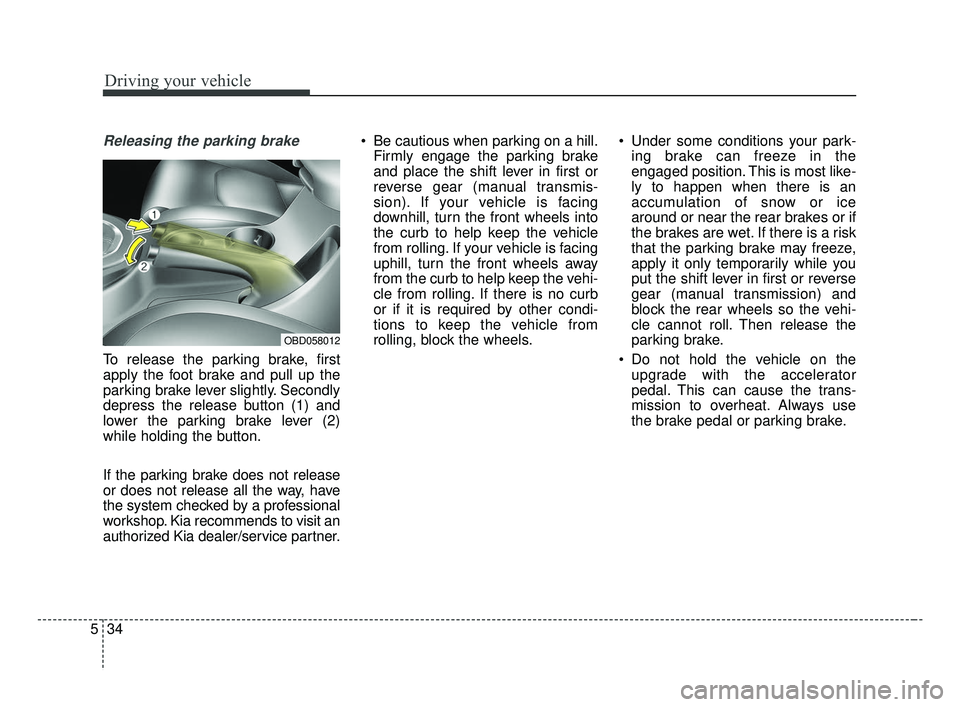
Releasing the parking brake
To release the parking brake, first
apply the foot brake and pull up the
parking brake lever slightly. Secondly
depress the release button (1) and
lower the parking brake lever (2)
while holding the button.
If the parking brake does not release
or does not release all the way, have
the system checked by a professional
workshop. Kia recommends to visit an
authorized Kia dealer/service partner. Be cautious when parking on a hill.
Firmly engage the parking brake
and place the shift lever in first or
reverse gear (manual transmis-
sion). If your vehicle is facing
downhill, turn the front wheels into
the curb to help keep the vehicle
from rolling. If your vehicle is facing
uphill, turn the front wheels away
from the curb to help keep the vehi-
cle from rolling. If there is no curb
or if it is required by other condi-
tions to keep the vehicle from
rolling, block the wheels. Under some conditions your park-
ing brake can freeze in the
engaged position. This is most like-
ly to happen when there is an
accumulation of snow or ice
around or near the rear brakes or if
the brakes are wet. If there is a risk
that the parking brake may freeze,
apply it only temporarily while you
put the shift lever in first or reverse
gear (manual transmission) and
block the rear wheels so the vehi-
cle cannot roll. Then release the
parking brake.
Do not hold the vehicle on the upgrade with the accelerator
pedal. This can cause the trans-
mission to overheat. Always use
the brake pedal or parking brake.
OBD058012
BDm CAN (ENG) 5.QXP 7/4/2018 10:13 AM Page 34
Page 282 of 550
Driving your vehicle
36
5
Anti-lock brake system (ABS)
ABS (or ESC) will not prevent acci-
dents due to improper or dangerous
driving maneuvers. Even though
vehicle control is improved during
emergency braking, always maintain
a safe distance between you and
objects ahead. Vehicle speeds
should always be reduced during
extreme road conditions. The vehicle
should be driven at reduced speeds
in the following circumstances:
When driving on rough, gravel or
snow-covered roads
When driving on roads where the road surface is pitted or has differ-
ent surface heights.
Driving in these conditions increases
the stopping distance for your vehicle. The ABS continuously senses the
speed of the wheels. If the wheels
are going to lock, the ABS system
repeatedly modulates the hydraulic
brake pressure to the wheels.
When you apply your brakes under
conditions which may lock the
wheels, you may hear a “tik-tik’’
sound from the brakes, or feel a cor-
responding sensation in the brake
pedal. This is normal and it means
your ABS is active.
In order to obtain the maximum benefit
from your ABS in an emergency situa-
tion, do not attempt to modulate your
brake pressure and do not try to pump
your brakes. Press your brake pedal as
hard as possible to allow the ABS to
control the force being delivered to the
brakes.
✽ ✽
NOTICE
A click sound may be heard in the
engine compartment when the vehi-
cle begins to move after the engine is
started. These conditions are normal
and indicate that the anti-lock brake
system is functioning properly.
Even with the anti-lock brake sys-
tem, your vehicle still requires suf-
ficient stopping distance. Always
maintain a safe distance from the
vehicle in front of you.
Always slow down when cornering. The anti-lock brake system cannot
prevent accidents resulting from
excessive speeds.
On loose or uneven road surfaces, operation of the anti-lock brake
system may result in a longer stop-
ping distance than for vehicles
equipped with a conventional
brake system.
BDm CAN (ENG) 5.QXP 7/4/2018 10:13 AM Page 36
Page 284 of 550
Driving your vehicle
38
5
Electronic stability control (ESC) will
not prevent accidents. Excessive
speed in turns, abrupt maneuvers and
hydroplaning on wet surfaces can still
result in serious accidents. Only a
safe and attentive driver can prevent
accidents by avoiding maneuvers that
cause the vehicle to lose traction.
Even with ESC installed, always fol-
low all the normal precautions for driv-
ing - including driving at safe speeds
for the conditions. The Electronic Stability Control (ESC)
system is an electronic system
designed to help the driver maintain
vehicle control under adverse condi-
tions. It is not a substitute for safe driv-
ing practices. Factors including speed,
road conditions and driver steering
input can all affect whether ESC will be
effective in preventing a loss of control.
It is still your responsibility to drive and
corner at reasonable speeds and to
leave a sufficient margin of safety.
When you apply your brakes under
conditions which may lock the wheels,
you may hear a “tik-tik’’ sound from the
brakes, or feel a corresponding sensa-
tion in the brake pedal. This is normal
and it means your ESC is active.
✽ ✽
NOTICE
A click sound may be heard in the
engine compartment when the vehi-
cle begins to move after the engine is
started. These conditions are normal
and indicate that the Electronic
Stability Control System is function-
ing properly.
ESC operation
ESC ON condition
When the ignition is turnedON, ESC and ESC OFF
indicator lights illuminate for
approximately 3 seconds,
then ESC is turned on.
ton for at least half a sec-
ond after turning the igni-
tion ON to turn ESC off.
(ESC OFF indicator will
illuminate). To turn the
ESC on, press the ESC
OFF button (ESC OFF
indicator light will go off).
you may hear a slight tick-
ing sound. This is the ESC
performing an automatic
system self-check and does
not indicate a problem.
WARNING
For maximum protection, always
wear your seat belt. No system,
no matter how advanced, can
compensate for all driver error
and/or driving conditions.
Always drive responsibly.
-
BDm CAN (ENG) 5.QXP 7/4/2018 10:13 AM Page 38
Page 291 of 550
545
Driving your vehicle
If your vehicle is facing uphill, turn
the front wheels away from the
curb to help keep the vehicle from
rolling. If there is no curb or if it is
required by other conditions to
keep the vehicle from rolling, block
the wheels.
Under some conditions your park- ing brake can freeze in the
engaged position. This is most like-
ly to happen when there is an
accumulation of snow or ice
around or near the rear brakes or if
the brakes are wet. If there is a risk
that the parking brake may freeze,
apply it only temporarily while you
put the shift lever in P (intelligent
variable transmission) and block
the rear wheels so the vehicle can-
not roll. Then release the parking
brake.
Do not hold the vehicle on an incline with the accelerator pedal.
This can cause the transmission to
overheat. Always use the brake
pedal or parking brake.
BDm CAN (ENG) 5.QXP 7/4/2018 10:13 AM Page 45
Page 297 of 550
551
Driving your vehicle
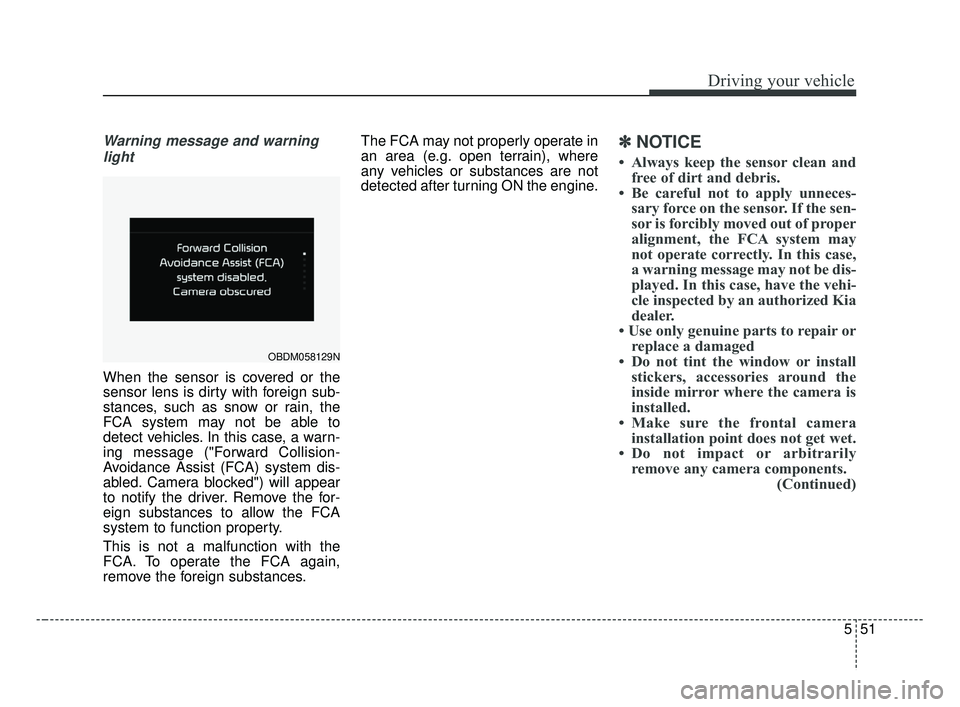
Warning message and warninglight
When the sensor is covered or the
sensor lens is dirty with foreign sub-
stances, such as snow or rain, the
FCA system may not be able to
detect vehicles. In this case, a warn-
ing message ("Forward Collision-
Avoidance Assist (FCA) system dis-
abled. Camera blocked") will appear
to notify the driver. Remove the for-
eign substances to allow the FCA
system to function property.
This is not a malfunction with the
FCA. To operate the FCA again,
remove the foreign substances. The FCA may not properly operate in
an area (e.g. open terrain), where
any vehicles or substances are not
detected after turning ON the engine.
✽ ✽
NOTICE
• Always keep the sensor clean and
free of dirt and debris.
• Be careful not to apply unneces- sary force on the sensor. If the sen-
sor is forcibly moved out of proper
alignment, the FCA system may
not operate correctly. In this case,
a warning message may not be dis-
played. In this case, have the vehi-
cle inspected by an authorized Kia
dealer.
• Use only genuine parts to repair or replace a damaged
• Do not tint the window or install stickers, accessories around the
inside mirror where the camera is
installed.
• Make sure the frontal camera installation point does not get wet.
• Do not impact or arbitrarily remove any camera components. (Continued)
OBDM058129N
BDm CAN (ENG) 5.QXP 7/4/2018 10:14 AM Page 51
Page 310 of 550
Driving your vehicle
64
5
By detecting the vehicle or pedestri-
an ahead the vehicle, the sensor
helps to operate the Forward
Collision-Avoidance Assist when the
vehicle is at risk of a collision.
In order for the FCA system to oper-
ate properly, always make sure the
sensor or sensor cover is clean and
free of dirt, snow, and debris. Dirt,
snow, or foreign substances on the
lens may adversely affect the sens-
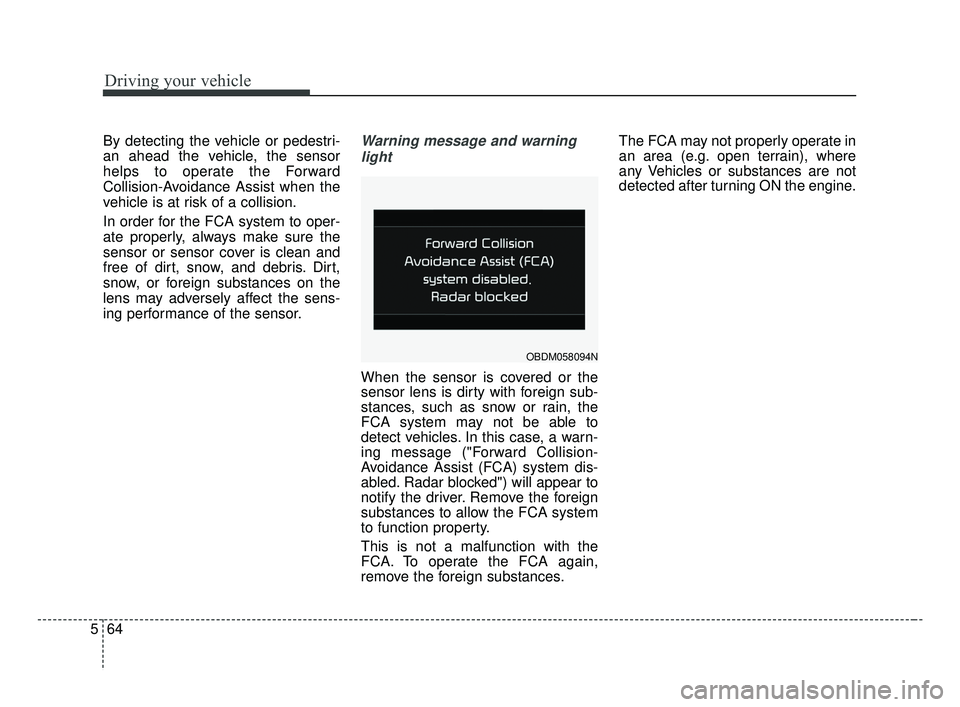
ing performance of the sensor.Warning message and warning
light
When the sensor is covered or the
sensor lens is dirty with foreign sub-
stances, such as snow or rain, the
FCA system may not be able to
detect vehicles. In this case, a warn-
ing message ("Forward Collision-
Avoidance Assist (FCA) system dis-
abled. Radar blocked") will appear to
notify the driver. Remove the foreign
substances to allow the FCA system
to function property.
This is not a malfunction with the
FCA. To operate the FCA again,
remove the foreign substances. The FCA may not properly operate in
an area (e.g. open terrain), where
any Vehicles or substances are not
detected after turning ON the engine.
OBDM058094N
BDm CAN (ENG) 5.QXP 7/4/2018 1:40 PM Page 64