rear window KIA FORTE 2020 User Guide
[x] Cancel search | Manufacturer: KIA, Model Year: 2020, Model line: FORTE, Model: KIA FORTE 2020Pages: 568, PDF Size: 8.58 MB
Page 199 of 568

Features of your vehicle
114
4
If you want to defrost and defog the
front windshield, refer to “Windshield
defrosting and defogging” in this sec-
tion.
Rear window defroster
The defroster heats the window to
remove frost, fog and thin ice from
the rear window, while the engine is
running.
To activate the rear window
defroster, press the rear window
defroster button located in the center
facia switch panel. The indicator on
the rear window defroster button illu-
minates when the defroster is ON.
If there is heavy accumulation of
snow on the rear window, brush it off
before operating the rear defroster. The rear window defroster automati-
cally turns off after approximately 20
minutes or when the ignition switch is
turned off. To turn off the defroster,
press the rear window defroster button
again.
Outside rearview mirror defroster
If your vehicle is equipped with the
outside rearview mirror defrosters,
they will operate at the same time you
turn on the rear window defroster.
DEFROSTER
CAUTION - Conductors
To prevent damage to the con-
ductors bonded to the insidesurface of the rear window,never use sharp instruments orwindow cleaners containingabrasives to clean the window.
OBD048335
■Type A
■ Type B
Page 200 of 568
4115
Features of your vehicle
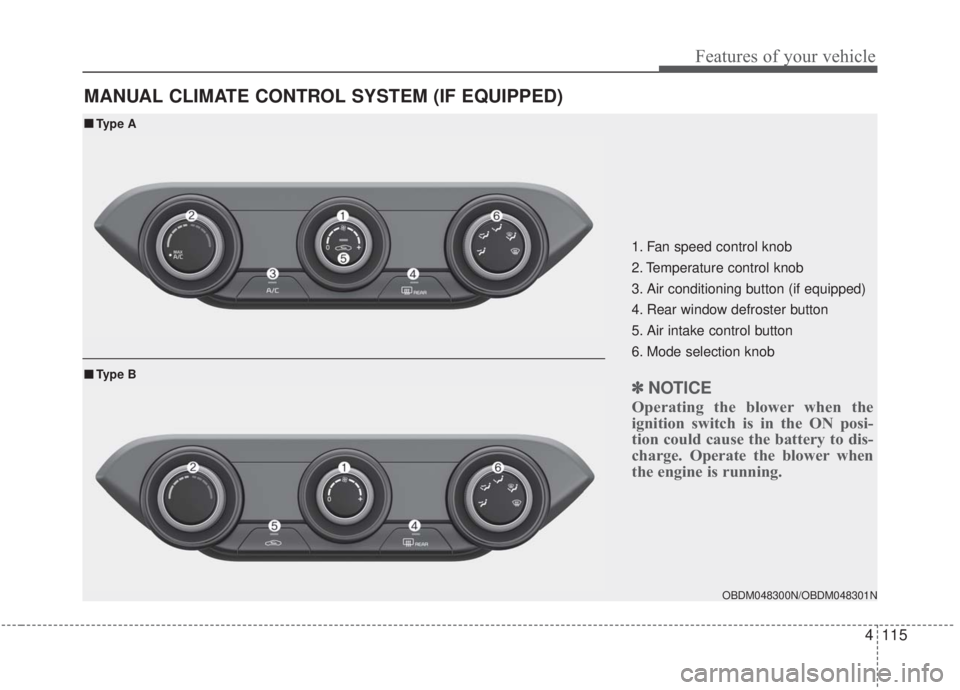
MANUAL CLIMATE CONTROL SYSTEM (IF EQUIPPED)
OBDM048300N/OBDM048301N
■ ■Type A
■ ■Type B
1. Fan speed control knob
2. Temperature control knob
3. Air conditioning button (if equipped)
4. Rear window defroster button
5. Air intake control button
6. Mode selection knob
✽ ✽ NOTICE
Operating the blower when the
ignition switch is in the ON posi-
tion could cause the battery to dis-
charge. Operate the blower when
the engine is running.
Page 210 of 568

4125
Features of your vehicle
AUTOMATIC CLIMATE CONTROL SYSTEM (IF EQUIPPED)
OBD048312
1. Driver`s temperature control knob
2. AUTO (automatic control) button
3. Front windshield defroster button
4. Rear window defroster button
5. Air conditioning button
6. Air intake control button
7. Blower OFF button
8. Fan speed control button
9. Mode selection button
10. Passenger`s temperature control knob
11. SYNC button
12. A/C display
✽ ✽NOTICE
Operating the blower when the
ignition switch is in the ON posi-
tion could cause the battery to dis-
charge. Operate the blower when
the engine is running.
Page 222 of 568

4137
Features of your vehicle
For maximum defrosting, set thetemperature control all the way to
the right/hot position and the fan
speed control to the highest speed.
If warm air to the floor is desired while defrosting or defogging, set
the mode to the floor-defrost posi-
tion.
Before driving, clear all snow and ice from the windshield, rear win-
dow, outside rear view mirrors, and
all side windows.
Clear all snow and ice from the hood and air inlet in the cowl grill to
improve heater and defroster effi-
ciency and to reduce the probabili-
ty of fogging up the inside of the
windshield.Manual climate control system
To defog inside windshield
1. Set the fan speed to the desired position.
2. Select desired temperature.
3. Select the or position.
4. The outside (fresh) air and air con- ditioning will be selected automat-
ically.
If the air conditioning and/or outside
(fresh) air position are not selected
automatically, press the correspon-
ding button manually.
WINDSHIELD DEFROSTING AND DEFOGGING
WARNING - Windshield
heating
Do not use the or posi-
tion during cooling operation in
extremely humid weather. The
difference between the temper-
ature of the outside air and the
windshield could cause the
outer surface of the windshield
to fog up, causing loss of visi-
bility. In this situation, set the
mode selection to the posi-
tion and fan speed control to a
lower speed.
OBDM048323N
Page 240 of 568

4155
Features of your vehicle
✽ ✽NOTICE
If you install an after market HID
head lamp, your vehicle’s audio and
electronic device may malfunction.
❈ If your vehicle is equipped with an
Infotainment (Audio, Video and
Navigation) system, refer to the
separately supplied manual for
detailed information.
Antenna
Glass antenna
Your vehicle uses a glass antenna to
receive both AM and FM signals.
Shark fin antenna (if equipped)
The shark fin antenna will receive
transmitted data.
AUDIO SYSTEM
OBD048027
CAUTION
Do not clean the inside of the
rear window glass or quarterglass with a cleaner or use ascraper to remove any foreigndeposits as this may causedamage to the antenna ele-ments.
Avoid adding any metallic coating such as Ni, Cd, and soon. These can interfere withAM/FM reception.
To prevent damage to the rear glass antenna, never use sharpinstruments or window cleanercontaining abrasives to cleanthe window. Clean the insidesurface of the rear glass win-dow with a piece of soft cloth.
When putting a sticker on the inside surface of the rear win-dow, be careful not to damagethe rear glass antenna.
Do not put sharp instruments nearby the rear glass antenna.
A tinted rear window may affect the proper functioningof the antenna.
Page 251 of 568

55
Driving your vehicle
Before entering vehicle
• Be sure that all windows, outsidemirror(s), and outside lights are
clean.
Check the condition of the tires.
Check under the vehicle for any sign of leaks.
Be sure there are no obstacles behind you if you intend to back up.
Necessary inspections
Fluid levels, such as engine oil,
engine coolant, brake fluid, and
washer fluid should be checked on a
regular basis, at the exact interval
depending on the fluid. Further
details are provided in chapter 7,
“Maintenance”.
Before starting
Close and lock all doors.
Position the seat so that all con-trols are easily reached.
Buckle your seat belt.
Adjust the inside and outside rearview mirrors.
Be sure that all lights work.
Check all gauges.
Check the operation of warning lights when the ignition switch is
turned to the ON position.
Release the parking brake and make sure the brake warning light
goes out.
For safe operation, be sure you are
familiar with your vehicle and its
equipment.
BEFORE DRIVING
WARNING - Distracted driving
Focus on the road while driving.
The driver's primary responsi-
bility is in the safe and legal
operation of the vehicle. Use of
any handled devices, other
equipment or vehicle systems
that distract the driver should
not be used during vehicle
operation.
Page 369 of 568

5123
Driving your vehicle
Non-operating condition
The outside rearview mirror may not
alert the driver when:
- The outside rearview mirror housingis damaged or covered with debris.
- The mirror is covered with dirt, snow, or debris.
- The window is covered with debris.
- The windows are darkly tinted.
Driver's Attention
The driver must be cautious in the
situations below, because the sys-
tem may not detect other vehicles
or objects in certain circumstances.
- When a trailer or carrier is installed.
- The vehicle drives in inclement weather such as heavy rain or
snow.
- The sensor is polluted with rain, snow, mud, etc.
- The rear bumper where the sen- sor is located is covered with a
foreign object such as a bumper
sticker, a bumper guard, a bike
rack, etc.
- The rear bumper is damaged, or the sensor is out of the original
default position.
- The vehicle height gets lower or higher due to heavy loading in
the luggage compartment,
abnormal tire pressure, etc.
- When the temperature near the rear bumper area is high or low.
(Continued)(Continued)
- When the sensors are blocked
by other vehicles, walls or park-
ing-lot pillars.
- The vehicle drives on a curved road or through a tollgate.
- The vehicle is driven near areas containing metal substances
such as a construction zone,
railroad, etc.
- There is a fixed object near the vehicle, such as a guardrail, per-
son, animal, etc.
- While going down or up a steep road where the height of the lane
is different.
- When driving through a narrow road with many trees or bushes.
- When driving on wet surfaces.
- When driving through a large area with few vehicles or struc-
tures around, such as a desert,
rural area, etc.
- A large vehicle, such as a bus or truck, is nearby.
(Continued)
Page 393 of 568
5147
Driving your vehicle
Don’t let your parking brake
freeze
Under some conditions, your parking
brake can freeze in the engaged
position. This is most likely to happen
when there is an accumulation of
snow or ice around or near the rear
brakes or if the brakes are wet. If
there is a risk the parking brake may
freeze, apply it only temporarily while
you put the gear shift lever in P
(Park, Intelligent variable transmis-
sion / Dual clutch transmission) and
chock the rear wheels so the vehicle
cannot roll. Then release the parking
brake.
Don't let ice and snow accu-
mulate underneath
Under some conditions, snow and
ice can build up under the fenders
and interfere with the steering. When
driving in severe winter conditions
where this may happen, you should
periodically check underneath the
vehicle to be sure the movement of
the front wheels and the steering
components are not obstructed.
Carry emergency equipment
Depending on the severity of the
weather, you should carry appropri-
ate emergency equipment. Some of
the items you may want to carry
include tow straps or chains, flash-
light, emergency flares, sand, shov-
el, jumper cables, window scraper,
gloves, ground cloth, coveralls, blan-
ket, etc.
TRAILER TOWING
We do not recommend using this
vehicle for trailer towing.
Page 505 of 568

Maintenance
68
7
Fuse NameFuse ratingCircuit Protected
MEMORY 110ADriver IMS (Integrated memory system) Module,Air Conditioner Control Module, Instrument Cluster
MODULE 110AKey Interlock Switch,Data Link Connector, Hazard Switch, Driver/Passenger Smart Key Outside Handle,
ICM (Integrated Circuit Module) Relay Box (Outside Mirror Folding/Unfolding Relay), Mood_LP_Unit
TRUNK10ATrunk Relay
POWER
WINDOW RH25APower Window Right Handle side Relay
POWER
WINDOW LH25APower Window Left Handle side Relay, Driver Safety Power Window Module
POWER SEAT DRIVER25ADriver Seat Manual Switch
MODULE 47.5ALane Keeping Assist Unit, IBU (Integrated Body Control Unit), Forward Collision Avoidance Assist Unit,
Blind-Spot Collision Warning Unit Left Handle side/Right Handle side
SEAT HEATER REAR15ARear Seat Warmer Control Module
HEATED MIRROR10ADriver/Passenger Power Outside Mirror, Air Conditioner Control Module, ECM (Engine Control
Module)/PCM (Power train Control Module)
SEAT HEATERFRONT20AFront Seat Warmer Control Module, Front Air Ventilation Seat Control Module
AMP25AAMP (Amplifier)
MULTI MEDIA15AAudio/Video & Navigation Head Unit
Instrument panel (Driver’s side fuse panel)
Page 509 of 568

Maintenance
72
7
Engine room compartment fuse panel
Fuse Name Fuse ratingCircuit Protected
MULTI
FUSE-1ALTERNATOR
200A
(NU 2.0L AKS) 150A
(GAMMA 1.6L T-GDI)
Fuse : BURGLAR ALARM, ABS1, ABS2, POWER OUTLET1, Alternator
MDPS80AMDPS (Motor Driven Power Steering) Unit
MULTI
FUSE-2
B+560AFuse : ECU 3, ECU 4, HORN, WIPER, A/C, Engine Control Relay
B+260AInstrument Panel Junction Block
B+360AInstrument Panel Junction Block
B+450AInstrument Panel Junction Block (Fuse : POWER WINDOW LH, POWER WINDOW RH,
TRUNK, SUNROOF 1, SEAT HEATER FRONT, AMP, POWER SEAT DRIVER)
COOLING FAN 160A[GAMMA 1.6L T-GDI] Cooling Fan 1 Relay
REAR HEATED40ARear Heated Relay
BLOWER40ABLOWER Relay
IG140AIgnition Switch, PDM #2 (ACC) Relay, PDM #3 (IG1) Relay
IG240AIgnition Switch, PDM #4 (IG2) Relay, START Relay
MULTI
FUSE-3PTC HEATER50APTC Heater Relay