clutch KIA FORTE 2020 Owner's Manual
[x] Cancel search | Manufacturer: KIA, Model Year: 2020, Model line: FORTE, Model: KIA FORTE 2020Pages: 568, PDF Size: 8.58 MB
Page 270 of 568

Driving your vehicle
24
5
LCD display for transmission
temperature and warning mes-
sage
Transmission temperature Gauge
Select trip computer mode on the
LCD display and move to the trans-
mission temperature screen to see
the temperature of the dual clutch
transmission.
WARNING
In the case of a transmission
failure, the vehicle may not
move and the position indicator
(D, R) will blink on the cluster. In
this situation, have the system
checked by a professional
workshop. Kia recommends to
visit an authorized Kia
dealer/service partner.
OBDM059141L
OBDM059142L
■ Type A
■Type B
OBDM059147L
OBDM059148L
■Type A
■Type B
Page 271 of 568
525
Driving your vehicle
Try to drive so that the temperaturegauge does not indicate a high
temperature/overheating. When
the transmission is overheated, the
warning message will display on
the LCD. Follow the displayed mes-
sage.
The transmission temperature is displayed in three colors (white,
orange and red) as the tempera-
ture increases (if equipped with the
color type cluster). The tempera-
ture gauge is displayed in one
color (white) if equipped with the
mono type cluster.
An orange temperature gauge is dis-played right before the warning
message appears on the LCD dis-
play. (if equipped)
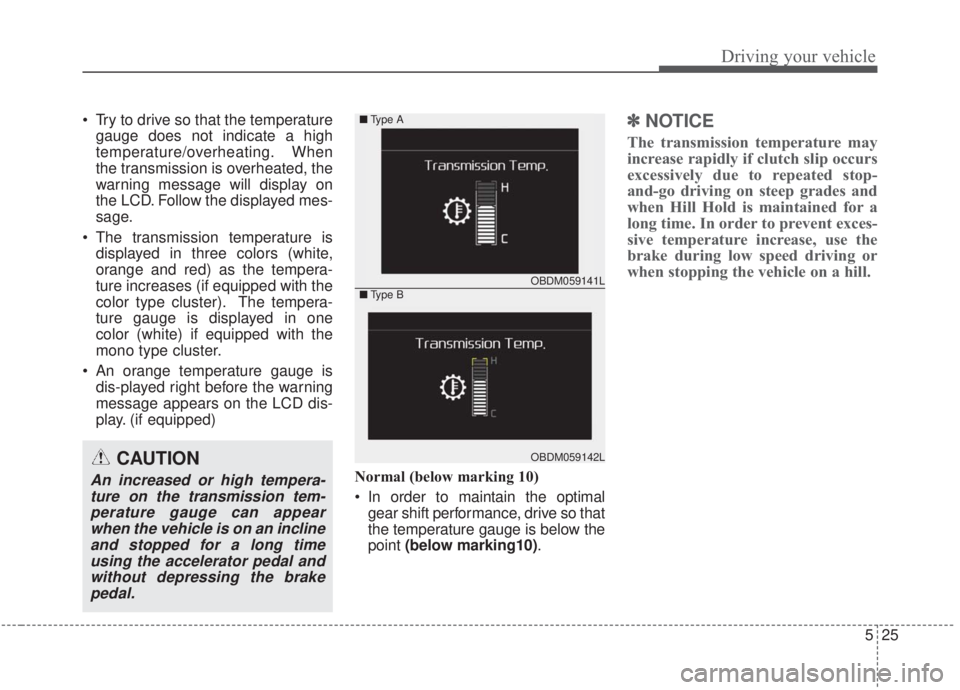
Normal (below marking 10)
In order to maintain the optimalgear shift performance, drive so that
the temperature gauge is below the
point (below marking10) .✽ ✽
NOTICE
The transmission temperature may
increase rapidly if clutch slip occurs
excessively due to repeated stop-
and-go driving on steep grades and
when Hill Hold is maintained for a
long time. In order to prevent exces-
sive temperature increase, use the
brake during low speed driving or
when stopping the vehicle on a hill.
CAUTION
An increased or high tempera-
ture on the transmission tem-perature gauge can appearwhen the vehicle is on an inclineand stopped for a long timeusing the accelerator pedal andwithout depressing the brakepedal.
OBDM059141L
OBDM059142L
■ Type A
■Type B
Page 272 of 568
Driving your vehicle
26
5
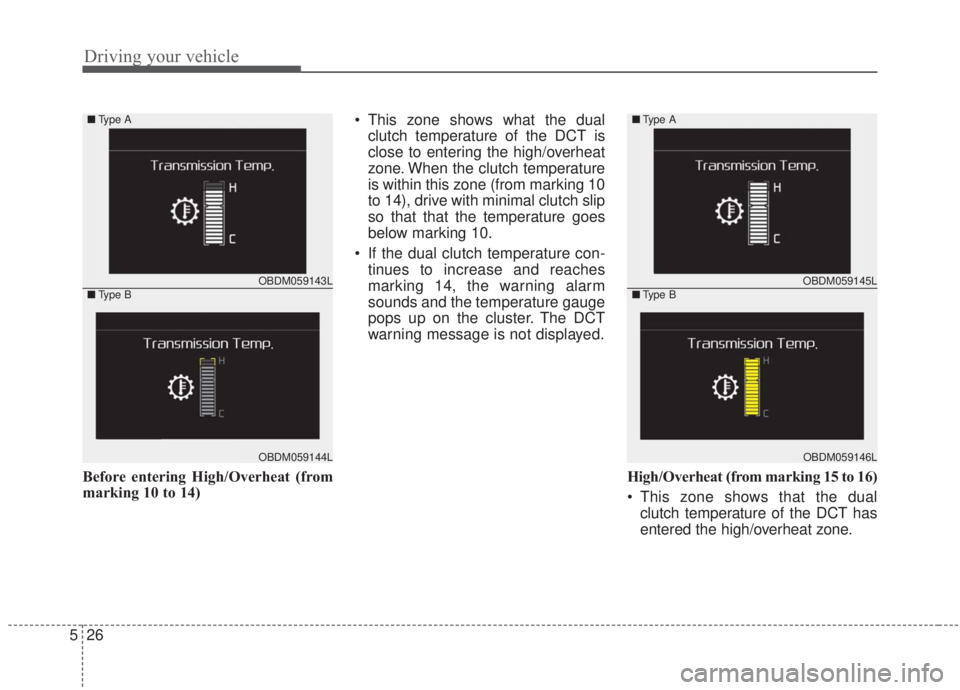
Before entering High/Overheat (from
marking 10 to 14) This zone shows what the dual
clutch temperature of the DCT is
close to entering the high/overheat
zone. When the clutch temperature
is within this zone (from marking 10
to 14), drive with minimal clutch slip
so that that the temperature goes
below marking 10.
If the dual clutch temperature con- tinues to increase and reaches
marking 14, the warning alarm
sounds and the temperature gauge
pops up on the cluster. The DCT
warning message is not displayed.
High/Overheat (from marking 15 to 16)
This zone shows that the dualclutch temperature of the DCT has
entered the high/overheat zone.
OBDM059143L
OBDM059144L
■ Type A
■Type BOBDM059145L
OBDM059146L
■Type A
■Type B
Page 273 of 568
527
Driving your vehicle
The DCT warning alarm sounds,
the warning message is displayed
on the cluster and the temperature
gauge disappears from the cluster.
Follow the displayed warning
message.
To check the temperature status of the dual clutch when overheated,
move to the temperature gauge
screen by selecting the trip com-
puter mode. Then, you can check
the temperature status of the dual
clutch.DCT warning messages
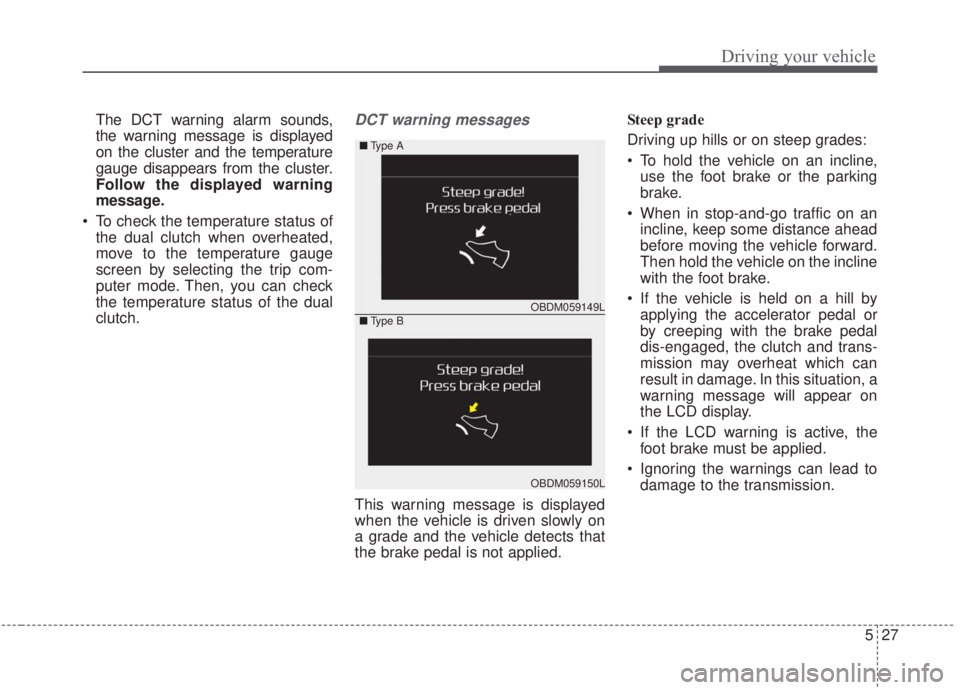
This warning message is displayed
when the vehicle is driven slowly on
a grade and the vehicle detects that
the brake pedal is not applied. Steep grade
Driving up hills or on steep grades:
To hold the vehicle on an incline,
use the foot brake or the parking
brake.
When in stop-and-go traffic on an incline, keep some distance ahead
before moving the vehicle forward.
Then hold the vehicle on the incline
with the foot brake.
If the vehicle is held on a hill by applying the accelerator pedal or
by creeping with the brake pedal
dis-engaged, the clutch and trans-
mission may overheat which can
result in damage. In this situation, a
warning message will appear on
the LCD display.
If the LCD warning is active, the foot brake must be applied.
Ignoring the warnings can lead to damage to the transmission.
OBDM059149L
OBDM059150L
■ Type A
■Type B
Page 274 of 568
Driving your vehicle
28
5
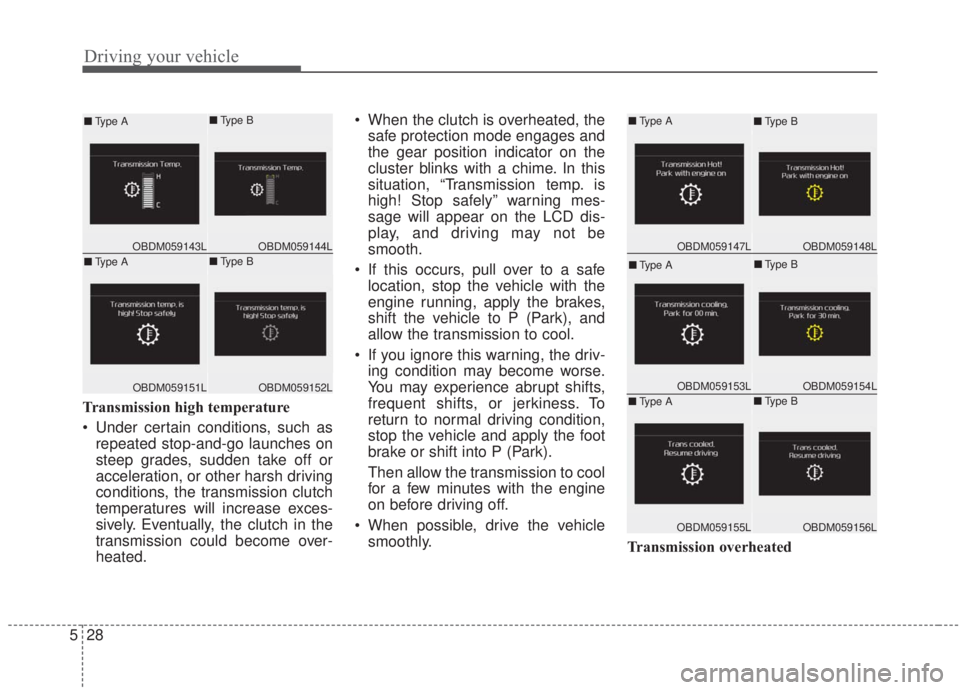
Transmission high temperature
Under certain conditions, such as
repeated stop-and-go launches on
steep grades, sudden take off or
acceleration, or other harsh driving
conditions, the transmission clutch
temperatures will increase exces-
sively. Eventually, the clutch in the
transmission could become over-
heated. When the clutch is overheated, the
safe protection mode engages and
the gear position indicator on the
cluster blinks with a chime. In this
situation, “Transmission temp. is
high! Stop safely” warning mes-
sage will appear on the LCD dis-
play, and driving may not be
smooth.
If this occurs, pull over to a safe location, stop the vehicle with the
engine running, apply the brakes,
shift the vehicle to P (Park), and
allow the transmission to cool.
If you ignore this warning, the driv- ing condition may become worse.
You may experience abrupt shifts,
frequent shifts, or jerkiness. To
return to normal driving condition,
stop the vehicle and apply the foot
brake or shift into P (Park).
Then allow the transmission to cool
for a few minutes with the engine
on before driving off.
When possible, drive the vehicle smoothly. Transmission overheated
OBDM059144LOBDM059143L
■Type A■Type B
OBDM059152LOBDM059151L
■Type A■Type BOBDM059148LOBDM059147L
■Type A■Type B
OBDM059154LOBDM059153L
■Type A■Type B
OBDM059156LOBDM059155L
■Type A■Type B
Page 275 of 568
529
Driving your vehicle
If the vehicle continues to be driv-en and the clutch temperatures
reach the maximum temperature
limit, the “Transmission Hot! Park
with engine on” warning will be dis-
played. When this occurs, the
clutch is disabled until the clutch
cools to normal temperatures.
The warning will display a time to wait for the transmission to cool.
If this occurs, pull over to a safe location, stop the vehicle with the
engine running, apply the brakes,
shift the vehicle to P (Park), and
allow the transmission to cool.
When the message “Trans cooled. Resume driving.” appears, you can
continue to drive your vehicle.
When possible, drive the vehicle smoothly.
If any of the warning messages in
the LCD display continue to blink, for
your safety, we recommend having
the system checked by an authorized
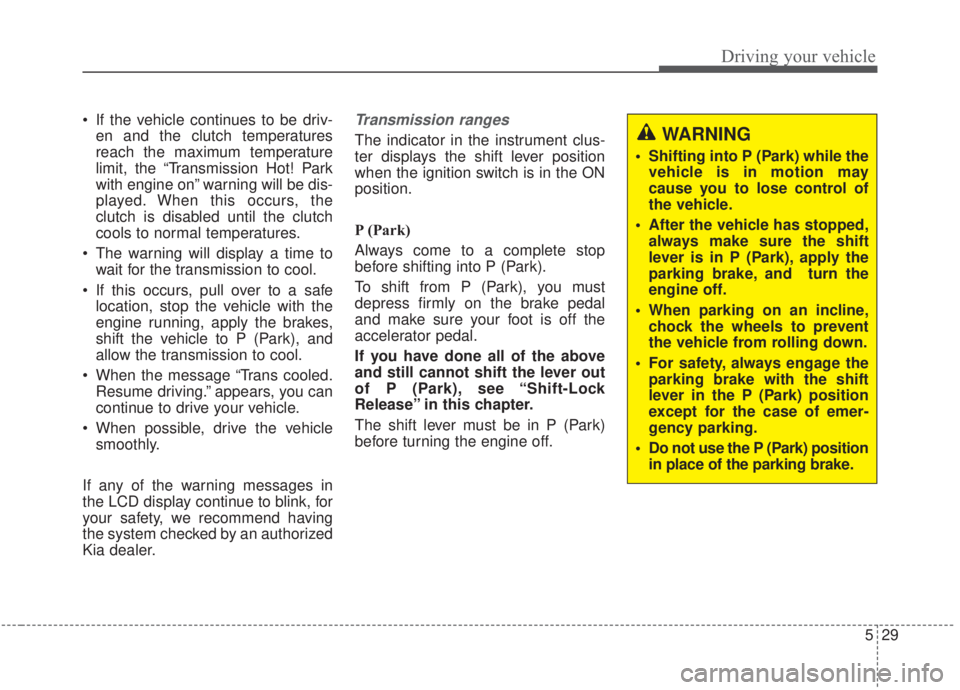
Kia dealer.Transmission ranges
The indicator in the instrument clus-
ter displays the shift lever position
when the ignition switch is in the ON
position.
P (Park)
Always come to a complete stop
before shifting into P (Park).
To shift from P (Park), you must
depress firmly on the brake pedal
and make sure your foot is off the
accelerator pedal.
If you have done all of the above
and still cannot shift the lever out
of P (Park), see “Shift-Lock
Release” in this chapter.
The shift lever must be in P (Park)
before turning the engine off.WARNING
Shifting into P (Park) while the vehicle is in motion may
cause you to lose control of
the vehicle.
After the vehicle has stopped, always make sure the shift
lever is in P (Park), apply the
parking brake, and turn the
engine off.
When parking on an incline, chock the wheels to prevent
the vehicle from rolling down.
For safety, always engage the parking brake with the shift
lever in the P (Park) position
except for the case of emer-
gency parking.
Do not use the P (Park) position in place of the parking brake.
Page 303 of 568

557
Driving your vehicle
Hill-start assist control (HAC)
A vehicle has the tendency to roll
back on a steep hill when it starts to
go after stopping. The Hill-start
Assist Control (HAC) prevents the
vehicle from rolling back by applying
the brakes automatically for about 2
seconds. The brakes are released
when the accelerator pedal is
depressed or after about 2 seconds.
The HAC is activated only for about 2
seconds, so when the vehicle begins
to roll, always depress the accelera-
tor pedal.
Good braking practices
Check to be sure the parking brakeis not engaged and the parking
brake indicator light is out before
driving away.
Driving through water may get the brakes wet. They can also get wet
when the vehicle is washed. Wet
brakes can be dangerous! Your
vehicle will not stop as quickly if the
brakes are wet. Wet brakes may
cause the vehicle to pull to one side.
To dry the brakes, apply the brakes
lightly until the braking action
returns to normal, taking care to
keep the vehicle under control at all
times. If the braking action does not
return to normal, stop as soon as it
is safe to do so and call an author-
ized Kia dealer for assistance.
Don't coast down hills with the vehicle out of gear. This is extreme-
ly hazardous. Keep the vehicle in
gear at all times, use the brakes to
slow down, then shift to a lower
gear so that engine braking will
help you maintain a safe speed. Don't "ride" the brake pedal.
Resting your foot on the brake
pedal while driving can be danger-
ous because the brakes might
overheat and lose their effective-
ness. It also increases the wear of
the brake components.
If a tire goes flat while you are driv- ing, apply the brakes gently and
keep the vehicle pointed straight
ahead while you slow down. When
you are moving slowly enough for it
to be safe to do so, pull off the road
and stop in a safe place.
If your vehicle is equipped with an Intelligent Variable Transmission /
Dual clutch transmission, don't let
your vehicle creep forward. To
avoid creeping forward, keep your
foot firmly on the brake pedal when
the vehicle is stopped.
Be cautious when parking on a hill. Firmly engage the parking brake
and place the shift lever in P (intel-
ligent variable transmission). If
your vehicle is facing downhill, turn
the front wheels into the curb to
help keep the vehicle from rolling.
WARNING- Maintaining
Brake Pressure on Incline
HAC does not replace the need
to apply brakes while stopped on
an incline. While stopped, make
sure you maintain brake pres-
sure sufficient to prevent your
vehicle from rolling backward
and causing an accident. Don’t
release the brake pedal until you
are ready to accelerate forward.
Page 334 of 568
Driving your vehicle
88
5
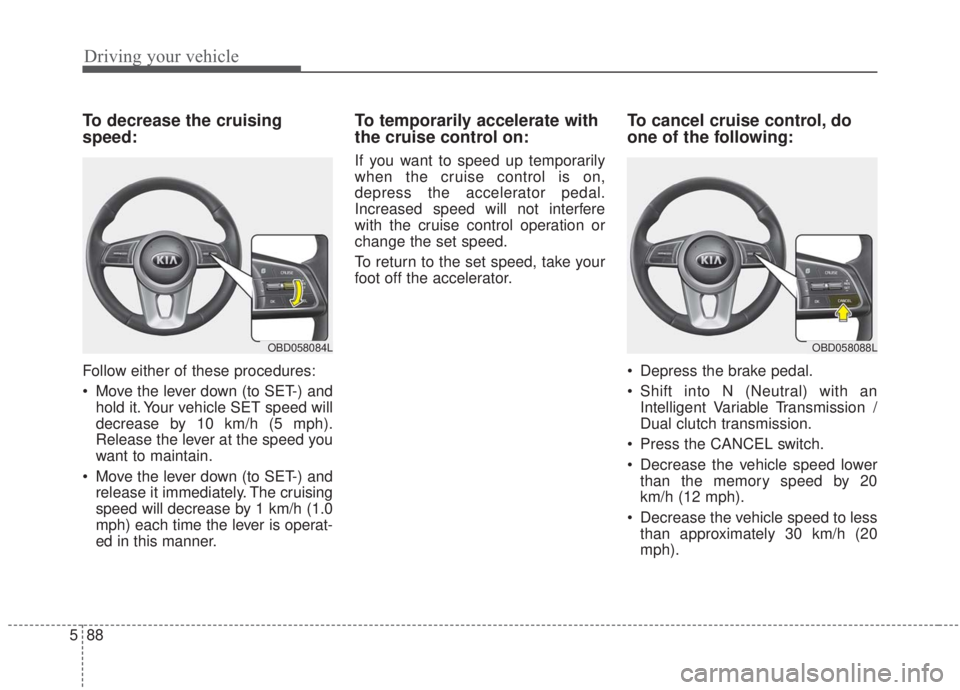
To decrease the cruising
speed:
Follow either of these procedures:
Move the lever down (to SET-) and
hold it. Your vehicle SET speed will
decrease by 10 km/h (5 mph).
Release the lever at the speed you
want to maintain.
Move the lever down (to SET-) and release it immediately. The cruising
speed will decrease by 1 km/h (1.0
mph) each time the lever is operat-
ed in this manner.
To temporarily accelerate with
the cruise control on:
If you want to speed up temporarily
when the cruise control is on,
depress the accelerator pedal.
Increased speed will not interfere
with the cruise control operation or
change the set speed.
To return to the set speed, take your
foot off the accelerator.
To cancel cruise control, do
one of the following:
Depress the brake pedal.
Shift into N (Neutral) with an Intelligent Variable Transmission /
Dual clutch transmission.
Press the CANCEL switch.
Decrease the vehicle speed lower than the memory speed by 20
km/h (12 mph).
Decrease the vehicle speed to less than approximately 30 km/h (20
mph).
OBD058088LOBD058084L
Page 387 of 568
5141
Driving your vehicle
Hazardous driving conditions
When hazardous driving conditions
are encountered such as water,
snow, ice, mud, sand, or similar haz-
ards, follow these suggestions:
Drive cautiously and allow extradistance for braking.
Avoid sudden braking or steering.
When braking with non-ABS brakes, pump the brake pedal with
a light up-and-down motion until
the vehicle is stopped.
Do not pump the brake pedal on a
vehicle equipped with ABS. If stalled in snow, mud, or sand,
use the second gear. Accelerate
slowly to avoid spinning the drive
wheels.
Use sand, rock salt, or other non- slip material under the drive
wheels to provide traction when
stalled in ice, snow, or mud.
Rocking the vehicle
If it is necessary to rock the vehicle
to free it from snow, sand, or mud,
first turn the steering wheel right and
left to clear the area around your
front wheels. Then, shift back and
forth between R (Reverse) and any
forward gear in vehicles equipped
with an Intelligent Variable
Transmission / Dual clutch transmis-
sion. Do not race the engine, and
spin the wheels as little as possible.
If you are still stuck after a few tries,
have the vehicle pulled out by a tow
vehicle to avoid engine overheating
and possible damage to the trans-
mission.
SPECIAL DRIVING CONDITIONS
WARNING- Downshifting
Do not downshift with an intelli-
gent variable transmission
while driving on slippery sur-
faces. The sudden change in
tire speed could cause the tires
to skid and result in an acci-
dent.
WARNING- Sudden
Vehicle Movement
Do not attempt to rock the vehi-
cle if people or objects are near-
by. The vehicle may suddenly
move forward or backwards as it
becomes unstuck.
Page 393 of 568
5147
Driving your vehicle
Don’t let your parking brake
freeze
Under some conditions, your parking
brake can freeze in the engaged
position. This is most likely to happen
when there is an accumulation of
snow or ice around or near the rear
brakes or if the brakes are wet. If
there is a risk the parking brake may
freeze, apply it only temporarily while
you put the gear shift lever in P
(Park, Intelligent variable transmis-
sion / Dual clutch transmission) and
chock the rear wheels so the vehicle
cannot roll. Then release the parking
brake.
Don't let ice and snow accu-
mulate underneath
Under some conditions, snow and
ice can build up under the fenders
and interfere with the steering. When
driving in severe winter conditions
where this may happen, you should
periodically check underneath the
vehicle to be sure the movement of
the front wheels and the steering
components are not obstructed.
Carry emergency equipment
Depending on the severity of the
weather, you should carry appropri-
ate emergency equipment. Some of
the items you may want to carry
include tow straps or chains, flash-
light, emergency flares, sand, shov-
el, jumper cables, window scraper,
gloves, ground cloth, coveralls, blan-
ket, etc.
TRAILER TOWING
We do not recommend using this
vehicle for trailer towing.