light KIA K5 2023 Features and Functions Guide
[x] Cancel search | Manufacturer: KIA, Model Year: 2023, Model line: K5, Model: KIA K5 2023Pages: 56, PDF Size: 4.98 MB
Page 18 of 56

†LEGAL DISCL AIMERS ON BACK INSIDE COVER | *IF EQUIPPED16K5 FEATURES & FUNCTIONS GUIDE
ADVANCED DRIVER ASSISTANCE SYSTEMS (ADAS)
Smart Cruise Control (SCC)*†3
Smart Cruise Control is designed to maintain a predetermined distance from vehicles detected ahead by automatically adjusting the driving speed as needed. When traffic is detected, the vehicle will automatically slow to maintain a set distance from traffic without depressing the accelerator or brake pedal.
With SCC on and activated, and the vehicle distance set, when SCC detects a vehicle slowing or stopping, it can bring the vehicle to a complete stop. When the vehicle ahead starts to move forward, the SCC system re-engages. If the vehicle ahead stops for more than three seconds, press the accelerator pedal or press the + - button on the Steering Wheel to start moving the vehicle.
Smart Cruise Control will adjust acceleration based on the drive mode selected in the Drive Mode Integrated Control system.
To set/adjust the SCC speed:
•Press the Driving Assist button* A on the Steering Wheel to activate and the speed will be set to the current vehicle speed. SCC may decrease the speed to maintain the distance with the vehicle in front.
•Accelerate/decelerate to the desired speed
•Push the Driving Assist button* A to turn SCC on and set speed. The CRUISE indicator will illuminate on the instrument cluster and the set speed will automatically activate at the vehicle’s current speed
•Press the + - button B inward to pause/resume the cruise control
•Press the + - button* B up/down to increase/decrease the set speed. The SET indicator light, set speed and vehicle distance will illuminate on the instrument cluster ’s LCD screen
To set the vehicle distance: Press the Vehicle Distance button C on the steering wheel. The image on the LCD screen will change when scrolling through the settings. Each time the button is pressed, the
vehicle distance changes D.
To pause/resume SCC operation: Depress the brake pedal or press the Pause/Resume + - but ton* B. The cruise indicator on the instrument cluster will change.
To turn SCC off: Press the Driving Assist button A. The cruise indicator on the instrument cluster will turn OFF.
REMINDERS:
•
If SCC is left on, it can be activated inadver tently. Keep the system off when not in use to avoid set ting a speed which the driver is not aware of
•
SCC is also canceled when the driver ’s door is opened, gear shift is changed out of D (Drive), EPB is activated and various other conditions. See Owner ’s Manual for other conditions
Refer to the inside front cover for more information on QR codes.www.youtube.com/KiaFeatureVideos
Smart Cruise Control with Overtaking Acceleration Assist Video
QR CODE
•Pressing the brake pedal cancels the SCC operation
•For SCC to operate:
-When no vehicle is in front, you must be traveling at a minimum speed of 5 mph
-When following a vehicle, there is no minimum speed requirement
QUICK TIPS
60mphCRUISESmart Cruise ControlModeCruise Control Mode
The distance set tings are approximations and may var y depending on the vehicle speed at the time. See Owner ’s Manual for more information.
172ft130ft
82ft
106ft
(Type B Steering Wheel shown; but tons located on right side of Steering Wheel)
DA
C
E
FB
When engaged, SCC and Cruise Control are supplemental systems and are not substitutes for safe driving. It is the responsibilit y of the driver to always check the speed and distance to the vehicle ahead.
Refer to section 5 in the Owner ’s Manual for more information.
Images are for illustrative purposes only and may not reflect actual feature or operation.
ADAS
Page 21 of 56

†LEGAL DISCL AIMERS ON BACK INSIDE COVER | *IF EQUIPPEDALWAYS CHECK THE OWNER ’S MANUAL FOR COMPLETE OPER ATING INFORMATION AND SAFET Y WARNINGS.
ADVANCED DRIVER ASSISTANCE SYSTEMS (ADAS)
19
Images are for illustrative purposes only and may not reflect actual feature or operation.
60mph
Highway Driving Assist (HDA)*†3
Highway Driving Assist (HDA) is designed to adjust the speed of the vehicle when driving on limited/controlled access highways. The system can adjust the vehicle’s speed based on available highway speed information. The automatic speed setting mode is designed to set the speed automatically by adjusting to the current speed limits of the highway vehicle is traveling on.
When HDA is activated and the conditions are met, the Instrument Cluster indicator A will illuminate green. If the conditions are not met, HDA will be in standby mode and the indicator light A will illuminate white. When in operation, and if both lanes are recognized, the Instrument Cluster will show the lanes illuminated white and the HDA indicator illuminated green A.
If HDA is activated, conditions are met and the SCC speed is set by the driver (at the posted highway speed limit or slower), HDA will enter the automatic speed setting mode. The set speed and AUTO will be displayed B in green and an audible alert will sound.
Hands-off Warning - If the driver takes their hands off the Steering Wheel for several seconds, a warning message will appear on the Instrument Cluster, and an audible warning will sound. If hands on the Steering Wheel is not detected, HDA will cancel.
HDA settings:
•HDA can be turned on/off by going to the User Settings* in the Instrument Cluster or the Vehicle Settings* in the Infotainment System
•Only adjust settings when the vehicle is at a standstill, gear shift is in Park and the ignition is on or the Engine Start/Stop button* in the on position
•To access User settings* in the Instrument Cluster - Press the Mode button C on the Steering Wheel to toggle to User Settings . Press the OK D up/down to toggle to Driver Assistance, then Driving Assist. Select Highway Driving Assist and press the OK button D
•To access Vehicle settings* in the Infotainment System – Press the SETUP key or the onscreen SETUP button. Press VEHICLE to enter Vehicle Settings. Select Driver Assistance, then Driver Convenience. Select Highway Driving Assist to activate
REMINDERS:
•
Current highway speeds and controlled or limited access roads information may var y. Future navigation updates may change this information. See owner ’s manual for more information
•When the ignition is cycled, the system returns to its previous state, on or off
•If the driver changes the speed while in automatic speed set ting mode, it deactivates and enters a manual mode
When engaged, Highway Driving Assist is not a substitute for safe driving, may not detect all objects around the vehicle, and only functions on cer tain federal highways. Always drive safely and use caution. Refer to section 5 in the Owner ’s Manual for more detailed information, limitations and conditions.
(Type B Steering Wheel controls)
C
D
BA
Refer to the inside front cover for more information on QR codes.www.youtube.com/KiaFeatureVideos
Highway Driving Assist (HDA) Video
QR CODE
ADAS
Page 25 of 56

†LEGAL DISCL AIMERS ON BACK INSIDE COVER | *IF EQUIPPEDALWAYS CHECK THE OWNER ’S MANUAL FOR COMPLETE OPER ATING INFORMATION AND SAFET Y WARNINGS. 23
Electronic Stability Control (ESC)†5
ESC is designed to help stabilize the vehicle during certain cornering maneuvers. It is a good idea to keep ESC turned ON for daily driving whenever possible.
Press ESC OFF button B to disable Traction Control in ESC (ESC OFF indicator will illuminate).
To turn both Traction Control and Stability Control off, press and hold ESC OFF button B (ESC OFF indicator will illuminate, and an alert sounds).
REMINDERS:
•
ESC is active by default at vehicle star tup. When ignition is cycled, ESC will turn ON again
•
The ESC Indicator Light in the Instrument Cluster will illuminate whenever ESC is in operation
Refer to section 5 in the Owner ’s Manual for more information.
For illustrative purposes only. Your actual display, but tons and/or features may var y.
Hill-start Assist Control (HAC)†5
HAC can help prevent the vehicle from rolling backward, for two seconds, when accelerating from a stop while on a steep incline.
HAC automatically activates whether the ESC is OFF or ON but does NOT activate when the ESC has malfunctioned.
(But ton panel located left of Steering Wheel)
Instrument Cluster Illumination Control*
Press left/right side of switch A to adjust the display brightness of the instrument panel illumination.
REMINDER: Instrument Cluster Control does not adjust brightness on the Infotainment System screens. Use the display set tings in the Setup menu to adjust the brightness on the screen.
Refer to section 5 in the Owner ’s Manual for more information.
DRIVER’S PANEL
AB
•When HAC is active (e.g., accelerating from a stop on an incline), you may notice that the brakes will momentarily remain engaged after you depress the accelerator
•HAC provides a t wo-second delay before the vehicle may star t rolling backward
QUICK TIPS
REMINDERS:
•
HAC does not operate when the gear shift is in the P (Park) or the N (Neutral) position
•
In the event of HAC system malfunction, see an authorized Kia dealer for ser vice
•
HAC does not replace the need to apply brakes while the vehicle is stopped on an incline
Refer to section 5 in the Owner ’s Manual for more information.
DRIVER’S PANEL
Page 27 of 56
LRLRLRLR
*IF EQUIPPEDALWAYS CHECK THE OWNER ’S MANUAL FOR COMPLETE OPER ATING INFORMATION AND SAFET Y WARNINGS. 25
DRIVER’S PANEL
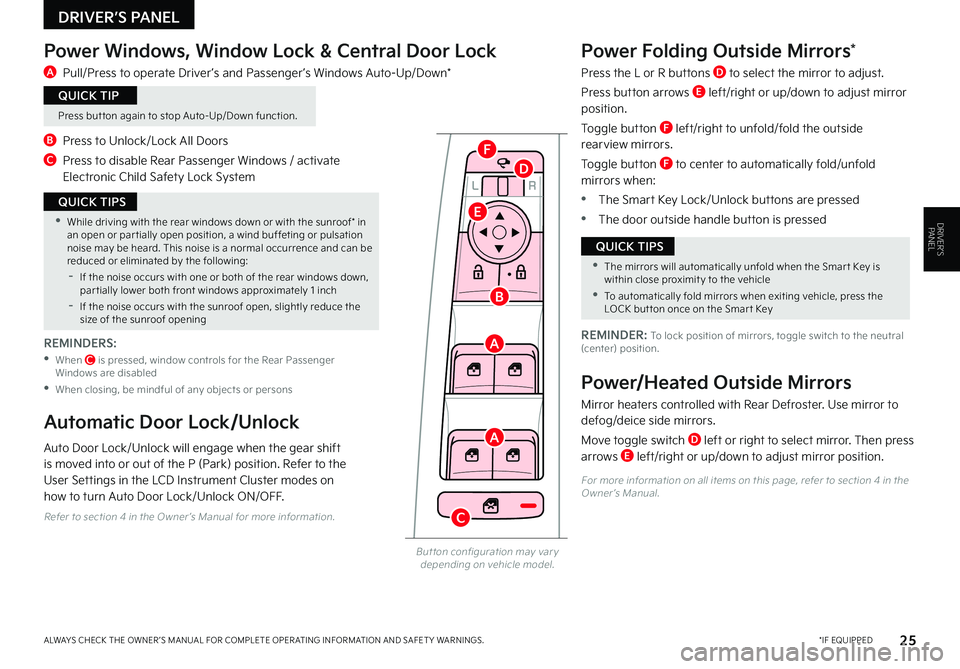
Power Windows, Window Lock & Central Door Lock
A Pull/Press to operate Driver ’s and Passenger ’s Windows Auto-Up/Down*
B Press to Unlock/Lock All Doors
C Press to disable Rear Passenger Windows / activate Electronic Child Safety Lock System
Power Folding Outside Mirrors*
Press the L or R buttons D to select the mirror to adjust.
Press button arrows E left/right or up/down to adjust mirror position.
Toggle button F left/right to unfold/fold the outside rearview mirrors.
Toggle button F to center to automatically fold/unfold mirrors when:
•The Smart Key Lock/Unlock buttons are pressed
•The door outside handle button is pressed
But ton configuration may var y depending on vehicle model.
A
A
B
C
D
E
F
•While driving with the rear windows down or with the sunroof* in an open or par tially open position, a wind buffeting or pulsation noise may be heard. This noise is a normal occurrence and can be reduced or eliminated by the following:
-If the noise occurs with one or both of the rear windows down, par tially lower both front windows approximately 1 inch
-If the noise occurs with the sunroof open, slightly reduce the size of the sunroof opening
QUICK TIPS
•The mirrors will automatically unfold when the Smar t Key is within close proximit y to the vehicle
•To automatically fold mirrors when exiting vehicle, press the LOCK but ton once on the Smar t Key
QUICK TIPS
REMINDER: To lock position of mirrors, toggle switch to the neutral (center) position.
Power/Heated Outside Mirrors
Mirror heaters controlled with Rear Defroster. Use mirror to defog/deice side mirrors.
Move toggle switch D left or right to select mirror. Then press arrows E left/right or up/down to adjust mirror position.
Automatic Door Lock/Unlock
Auto Door Lock/Unlock will engage when the gear shift is moved into or out of the P (Park) position. Refer to the User Settings in the LCD Instrument Cluster modes on how to turn Auto Door Lock/Unlock ON/OFF.
Press but ton again to stop Auto-Up/Down function.
QUICK TIP
For more information on all items on this page, refer to section 4 in the Owner ’s Manual.
Refer to section 4 in the Owner ’s Manual for more information.
REMINDERS:
• When C is pressed, window controls for the Rear Passenger Windows are disabled
•When closing, be mindful of any objects or persons
DRIVER’S PANEL
Page 28 of 56
*IF EQUIPPED26K5 FEATURES & FUNCTIONS GUIDE
STEERING WHEEL CONTROLS
Refer to section 4 in the Owner ’s Manual for more information.
Refer to the inside front cover for more information on QR codes.www.youtube.com/KiaFeatureVideos
High Beam Assist (HBA) Video
QR CODE
OFF
OFFAUTO
AUTO
OFF
OFFAUTO
AUTO
A
B
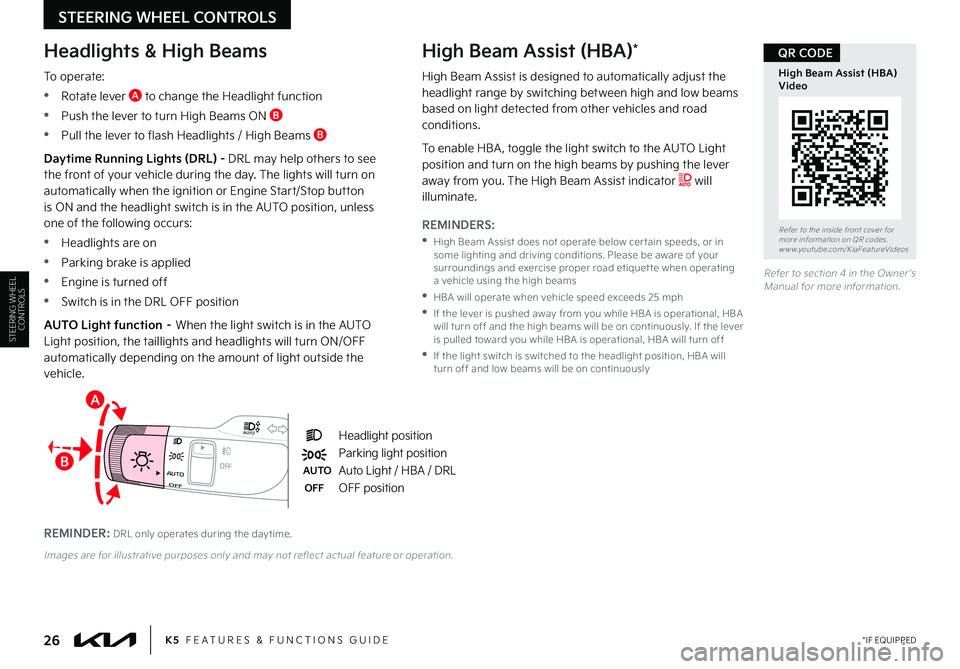
Headlight position
Parking light position
AUTOAuto Light / HBA / DRL
OFFOFF position
Headlights & High Beams
To operate:
•Rotate lever A to change the Headlight function
•Push the lever to turn High Beams ON B
•Pull the lever to flash Headlights / High Beams B
High Beam Assist (HBA)*
Daytime Running Lights (DRL) - DRL may help others to see the front of your vehicle during the day. The lights will turn on automatically when the ignition or Engine Start/Stop button is ON and the headlight switch is in the AUTO position, unless one of the following occurs:
•Headlights are on
•Parking brake is applied
•Engine is turned off
•Switch is in the DRL OFF position
AUTO Light function – When the light switch is in the AUTO Light position, the taillights and headlights will turn ON/OFF automatically depending on the amount of light outside the vehicle.
REMINDER: DRL only operates during the day time.
Images are for illustrative purposes only and may not reflect actual feature or operation.
STEERING WHEEL CONTROLS
High Beam Assist is designed to automatically adjust the headlight range by switching between high and low beams based on light detected from other vehicles and road conditions.
To enable HBA , toggle the light switch to the AUTO Light position and turn on the high beams by pushing the lever away from you. The High Beam Assist indicator will illuminate.
REMINDERS:
•
High Beam Assist does not operate below cer tain speeds, or in some lighting and driving conditions. Please be aware of your surroundings and exercise proper road etiquet te when operating a vehicle using the high beams
•HBA will operate when vehicle speed exceeds 25 mph
•
If the lever is pushed away from you while HBA is operational, HBA will turn off and the high beams will be on continuously. If the lever is pulled toward you while HBA is operational, HBA will turn off
•
If the light switch is switched to the headlight position, HBA will turn off and low beams will be on continuously
Page 29 of 56
OFFOFFAUTO
AUTO
OFFOFFAUTO
AUTO
*IF EQUIPPEDALWAYS CHECK THE OWNER ’S MANUAL FOR COMPLETE OPER ATING INFORMATION AND SAFET Y WARNINGS. 27
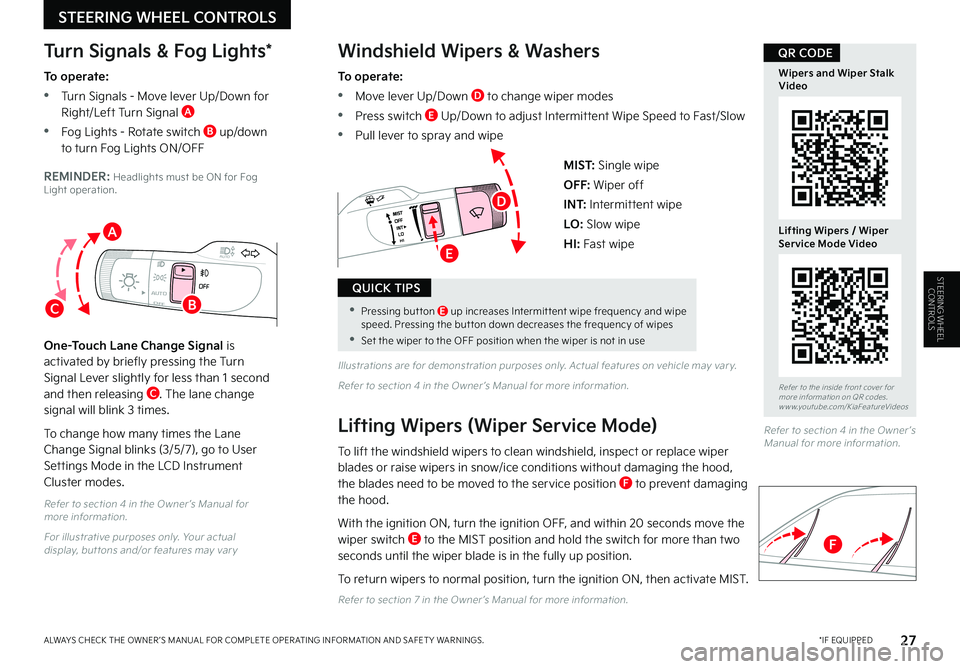
MIST: Single wipe
OFF: Wiper off
I N T: Intermittent wipe
LO: Slow wipe
HI: Fast wipe
Refer to section 4 in the Owner ’s Manual for more information.
For illustrative purposes only. Your actual display, but tons and/or features may var y
Illustrations are for demonstration purposes only. Actual features on vehicle may var y.
Refer to section 4 in the Owner ’s Manual for more information.
Windshield Wipers & Washers
To operate:
•Move lever Up/Down D to change wiper modes
•Press switch E Up/Down to adjust Intermittent Wipe Speed to Fast/Slow
•Pull lever to spray and wipe
Lifting Wipers (Wiper Service Mode)
To lift the windshield wipers to clean windshield, inspect or replace wiper blades or raise wipers in snow/ice conditions without damaging the hood, the blades need to be moved to the service position F to prevent damaging the hood.
With the ignition ON, turn the ignition OFF, and within 20 seconds move the wiper switch E to the MIST position and hold the switch for more than two seconds until the wiper blade is in the fully up position.
To return wipers to normal position, turn the ignition ON, then activate MIST.
Refer to section 7 in the Owner ’s Manual for more information.
Turn Signals & Fog Lights*
To operate:
•Turn Signals - Move lever Up/Down for Right/Left Turn Signal A
•Fog Lights - Rotate switch B up/down to turn Fog Lights ON/OFF
REMINDER: Headlights must be ON for Fog Light operation.
One-Touch Lane Change Signal is activated by briefly pressing the Turn Signal Lever slightly for less than 1 second and then releasing C. The lane change signal will blink 3 times.
To change how many times the Lane Change Signal blinks (3/5/7), go to User
Settings Mode in the LCD Instrument Cluster modes.
STEERING WHEEL CONTROLS
Refer to section 4 in the Owner ’s Manual for more information.
•Pressing but ton E up increases Intermit tent wipe frequency and wipe speed. Pressing the but ton down decreases the frequency of wipes
•Set the wiper to the OFF position when the wiper is not in use
QUICK TIPS
C
A
B
Refer to the inside front cover for more information on QR codes.www.youtube.com/KiaFeatureVideos
Wipers and Wiper Stalk Video
Lifting Wipers / Wiper Service Mode Video
QR CODE
D
E
F
STEERING WHEEL CONTROLS
Page 39 of 56

*IF EQUIPPEDALWAYS CHECK THE OWNER ’S MANUAL FOR COMPLETE OPER ATING INFORMATION AND SAFET Y WARNINGS. 37
CENTER PANEL
REMINDERS:
•
Using the power outlet (accessor y plug) for prolonged periods of time with the Engine Star t/Stop but ton in the ACC position (Engine OFF) and AC Inver ter for prolonged periods of time with the Engine Star t/Stop but ton in the IGN Position (Engine OFF) could cause the bat ter y to discharge
•
Kia recommends that you only use USB cables made by your device’s manufacturer. Third-par t y USB cables may cause damage to your device
•
The USB data por t (Multimedia USB por t) is located near the Power Outlets. The USB Charger por ts do not suppor t data transfer
•
The Multimedia USB Por t in the center panel charges slower than the USB Charger Por ts throughout the vehicle
Refer to section 4 in the Owner ’s Manual for more information.
REMINDER: When needed, Daylight Savings must be enabled in the Clock Set tings screen.
For more information, refer to the Car Infotainment System Quick Reference Guide.
The power outlets are inactive when ignition is in the OFF position.
QUICK TIP
REMINDER: The USB Charger Por ts do not suppor t data transfer.
Refer to section 4 in the Owner ’s Manual for more information.
For illustrative purposes only. Your actual display, but tons and/or features may var y.
A Multimedia USB Port: Use the Multimedia USB Port to connect USB audio and smartphone devices
B Power Outlet: Use the power outlets for mobile phones and other devices designed to operate on a 12V (180W max) power outlet
Digital Clock (Infotainment System)
Press the SETUP key, then select General. Press the onscreen Date/Time button to enter the clock settings. Then use the onscreen buttons to navigate through setup. To access the manual date and time setting, turn GPS time OFF in the Clock Settings (Kia Connect with Navigation*).
Multimedia USB Port & Power OutletsUSB Charger Ports*
The USB Charger Ports are located on the Center Panel and inside the Center Console C and on the rear of the Center Console D.
12VUSB180W
AUTO
OFF SYNC
FRONT
REAR
180W12V
180W12V
C
C
BA
D
CENTERPANEL
Refer to the inside front cover for more information on QR codes.www.youtube.com/KiaFeatureVideos
Multimedia USB Port, Power Outlets & USB Charger Port Video
QR CODE
Page 41 of 56

*IF EQUIPPEDALWAYS CHECK THE OWNER ’S MANUAL FOR COMPLETE OPER ATING INFORMATION AND SAFET Y WARNINGS. 39
CENTER PANEL
(Located behind Gear Shift. Qi-enabled smar tphone shown is for representation only, and is not to scale.)
Wireless Smartphone Charging System*†2 1
Charge a compatible Qi Certified smartphone wirelessly by placing it on the charging pad/slot A at the front of the console, near the Multimedia USB ports and the charging indicator, while the ignition is on.
1. Enable Wireless Charging in the User Settings* in the Instrument Cluster LCD or the Vehicle Settings* in the infotainment system, select Convenience, then Wireless Charging System
2. Place compatible smartphone on the center of the charging pad
3. Indicator light B may change to amber once the wireless charging begins
4. Once charging is complete, the amber light may change to green
AUTO
HOLD
DRIVE
MODE
OFF
VIEW
SHIFT
LOCK
RELEASE
P
R
N D
+
_
•For the wireless charging to occur, all doors (excluding rear hatch) must be closed & the Smar t Key Fob must be detected inside the vehicle
•For best results, place the smar tphone on the center of the charging pad
•If wireless charging does not work, move smar tphone around the pad until the charging indicator turns amber
•Avoid placing other metal items in the bin while charging as to not impede the charging area
QUICK TIPS
REMINDERS:
•
The smar tphone must be a compatible Qi cer tified phone with Qi function available. Some smar tphone models are not QI cer tified, which may affect the availabilit y, speed or per formance of the wireless charging
•If driver door is opened, charging will be disabled
•
Avoid placing other metal items in the bin while charging as to not impede the charging area
•
Wireless charging technology allows for a device to be charged using inductive charging; however, device compatibilit y varies. See your Owner ’s Manual for more detailed information and the back page for legal disclaimers
•
Inductive charging systems are less ef ficient than conventional charging through cable. As a result, higher device operating temperatures may be experienced during use
•
Charging Per formance – Device position on the wireless charging system can affect charging per formance. Other factors that may affect the charging rate include foreign objects, such as coins or pens, and phone case thickness
Refer to section 4 in the Owner ’s Manual for more information.
For illustrative purposes only. Your actual display, but tons and/or features may var y.
a
Refer to the inside front cover for more information on QR codes.www.youtube.com/KiaFeatureVideos
Wireless Smartphone Charging Video
QR CODE
A
B
CENTERPANEL
Page 43 of 56
Auto Hold
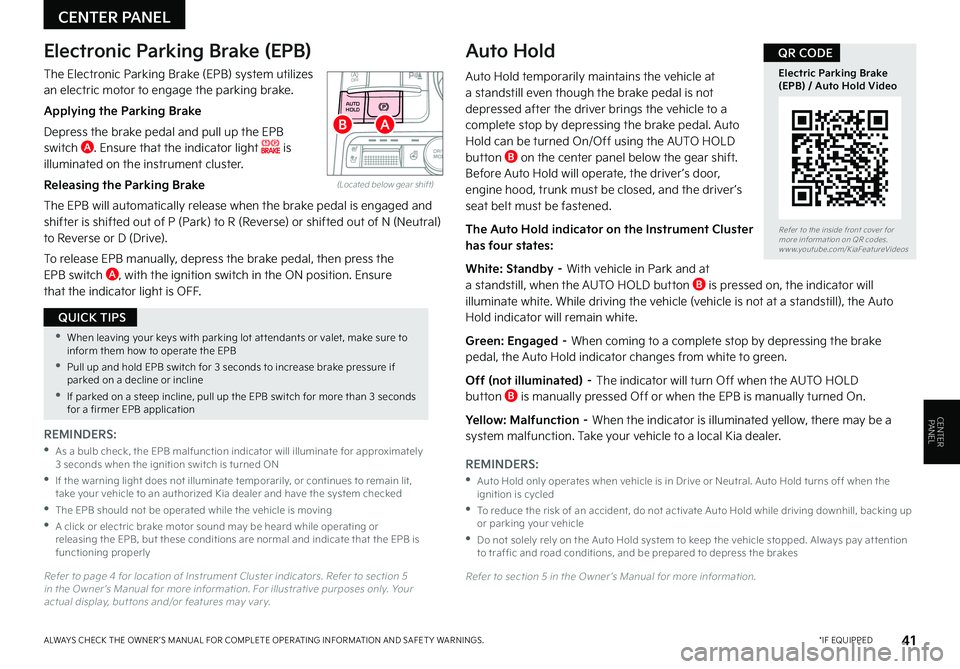
Auto Hold temporarily maintains the vehicle at a standstill even though the brake pedal is not depressed after the driver brings the vehicle to a complete stop by depressing the brake pedal. Auto Hold can be turned On/Off using the AUTO HOLD button B on the center panel below the gear shift. Before Auto Hold will operate, the driver ’s door, engine hood, trunk must be closed, and the driver ’s seat belt must be fastened.
The Auto Hold indicator on the Instrument Cluster has four states:
White: Standby – With vehicle in Park and at a standstill, when the AUTO HOLD button B is pressed on, the indicator will illuminate white. While driving the vehicle (vehicle is not at a standstill), the Auto Hold indicator will remain white.
Green: Engaged – When coming to a complete stop by depressing the brake pedal, the Auto Hold indicator changes from white to green.
Off (not illuminated) – The indicator will turn Off when the AUTO HOLD button B is manually pressed Off or when the EPB is manually turned On.
Yellow: Malfunction – When the indicator is illuminated yellow, there may be a system malfunction. Take your vehicle to a local Kia dealer.
REMINDERS:
•
Auto Hold only operates when vehicle is in Drive or Neutral. Auto Hold turns off when the ignition is cycled
•
To reduce the risk of an accident, do not activate Auto Hold while driving downhill, backing up or parking your vehicle
•
Do not solely rely on the Auto Hold system to keep the vehicle stopped. Always pay at tention to traf fic and road conditions, and be prepared to depress the brakes
Refer to section 5 in the Owner ’s Manual for more information.
*IF EQUIPPEDALWAYS CHECK THE OWNER ’S MANUAL FOR COMPLETE OPER ATING INFORMATION AND SAFET Y WARNINGS. 41
CENTER PANEL
REMINDERS:
•
As a bulb check, the EPB malfunction indicator will illuminate for approximately 3 seconds when the ignition switch is turned ON
•
If the warning light does not illuminate temporarily, or continues to remain lit, take your vehicle to an authorized Kia dealer and have the system checked
•The EPB should not be operated while the vehicle is moving
•
A click or electric brake motor sound may be heard while operating or releasing the EPB, but these conditions are normal and indicate that the EPB is functioning properly
Refer to page 4 for location of Instrument Cluster indicators. Refer to section 5 in the Owner ’s Manual for more information. For illustrative purposes only. Your actual display, but tons and/or features may var y.
•When leaving your keys with parking lot at tendants or valet, make sure to inform them how to operate the EPB
•Pull up and hold EPB switch for 3 seconds to increase brake pressure if parked on a decline or incline
•If parked on a steep incline, pull up the EPB switch for more than 3 seconds for a firmer EPB application
QUICK TIPS
Refer to the inside front cover for more information on QR codes.www.youtube.com/KiaFeatureVideos
Electric Parking Brake (EPB) / Auto Hold Video
QR CODE
AUTO
HOLD
OFF
SHIFT
LOCK
RELEASEP
R
N D
+
_
DRIVE
MODE
(Located below gear shift)
Electronic Parking Brake (EPB)
The Electronic Parking Brake (EPB) system utilizes an electric motor to engage the parking brake.
Applying the Parking Brake
Depress the brake pedal and pull up the EPB switch A. Ensure that the indicator light is illuminated on the instrument cluster.
Releasing the Parking Brake
The EPB will automatically release when the brake pedal is engaged and shifter is shifted out of P (Park) to R (Reverse) or shifted out of N (Neutral) to Reverse or D (Drive).
To release EPB manually, depress the brake pedal, then press the EPB switch A, with the ignition switch in the ON position. Ensure that the indicator light is OFF.
AB
CENTERPANEL
Page 45 of 56
†LEGAL DISCL AIMERS ON BACK INSIDE COVER | *IF EQUIPPEDALWAYS CHECK THE OWNER ’S MANUAL FOR COMPLETE OPER ATING INFORMATION AND SAFET Y WARNINGS. 43
CENTER PANEL
Refer to the inside front cover for more information on QR codes.www.youtube.com/KiaFeatureVideos
Dual Clutch Transmission (DCT) Video
Seat Warmers/Ventilated Seats Video
QR CODESeat Warmers*†1 5
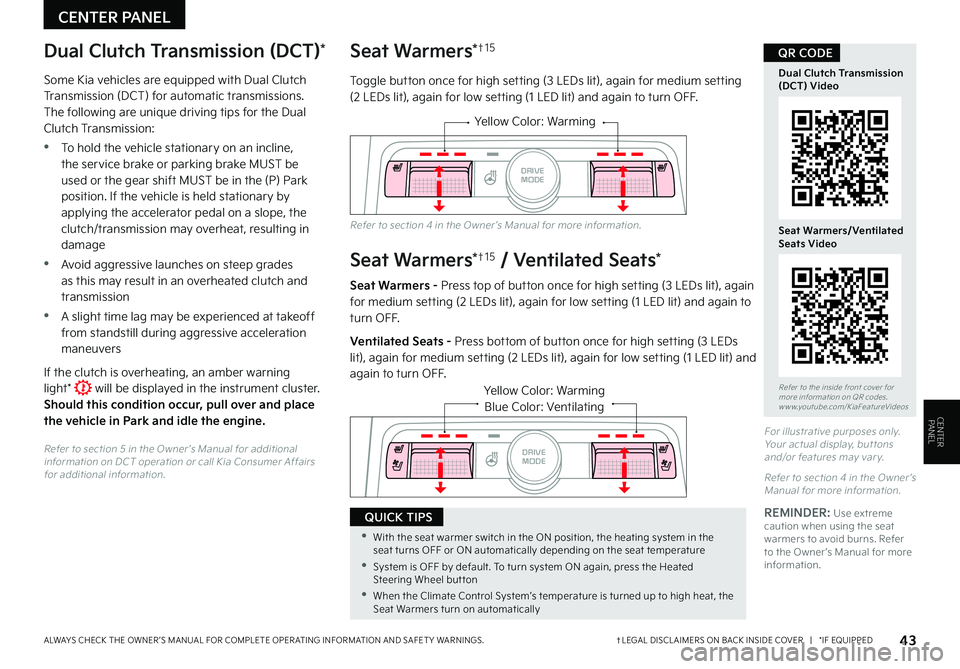
Toggle button once for high setting (3 LEDs lit), again for medium setting (2 LEDs lit), again for low setting (1 LED lit) and again to turn OFF.
Seat Warmers*†1 5 / Ventilated Seats*
Seat Warmers - Press top of button once for high setting (3 LEDs lit), again for medium setting (2 LEDs lit), again for low setting (1 LED lit) and again to turn OFF.
Ventilated Seats - Press bottom of button once for high setting (3 LEDs lit), again for medium set ting (2 LEDs lit), again for low set ting (1 LED lit) and again to turn OFF.
Yellow Color: Warming
AUTO
HOLD
DRIVE
MODE
OFF
VIEW
SHIFT
LOCK
RELEASE
P
R
N D
+
_
Yellow Color: WarmingBlue Color: Ventilating
AUTO
HOLD
OFF
VIEW
SHIFT
LOCK
RELEASE
P
R
N D
+
_
DRIVE
MODE
For illustrative purposes only. Your actual display, but tons and/or features may var y.
Refer to section 4 in the Owner ’s Manual for more information.
Refer to section 4 in the Owner ’s Manual for more information.
Dual Clutch Transmission (DCT)*
Some Kia vehicles are equipped with Dual Clutch Transmission (DCT) for automatic transmissions. The following are unique driving tips for the Dual Clutch Transmission:
•To hold the vehicle stationary on an incline, the service brake or parking brake MUST be used or the gear shift MUST be in the (P) Park position. If the vehicle is held stationary by applying the accelerator pedal on a slope, the clutch/transmission may overheat, resulting in damage
•Avoid aggressive launches on steep grades as this may result in an overheated clutch and transmission
•A slight time lag may be experienced at takeoff from standstill during aggressive acceleration maneuvers
If the clutch is overheating, an amber warning light* will be displayed in the instrument cluster. Should this condition occur, pull over and place the vehicle in Park and idle the engine.
Refer to section 5 in the Owner ’s Manual for additional information on DCT operation or call Kia Consumer Affairs for additional information.
•With the seat warmer switch in the ON position, the heating system in the seat turns OFF or ON automatically depending on the seat temperature
•System is OFF by default. To turn system ON again, press the Heated Steering Wheel but ton
•When the Climate Control System’s temperature is turned up to high heat, the Seat Warmers turn on automatically
QUICK TIPSREMINDER: Use extreme caution when using the seat warmers to avoid burns. Refer to the Owner ’s Manual for more information.
CENTERPANEL