display KIA K5 2023 Navigation System Quick Reference Guide
[x] Cancel search | Manufacturer: KIA, Model Year: 2023, Model line: K5, Model: KIA K5 2023Pages: 316, PDF Size: 10.72 MB
Page 149 of 316

6-19
Bluetooth message screen
b
a
d
e
c
a a Returns to the previous step.
b b View the list of received messages.
c c Can text a message by using the voice recognition. > See "Sending a text by using the voice
recognition."
d d Find and connect other Bluetooth devices.
e e The list of menu items appears.
• Display Off: Turns off the screen. To switch the screen back on, press the screen or
briefly press the power button.
•Privacy Mode: Activate privacy mode to protect personal data. The data downloaded
from the mobile phone stays hidden while this mode is on.
•Change Device: Find and connect other Bluetooth devices.
•Device Connections Settings or Bluetooth Settings: Can change the Bluetooth
settings.
•User's Manual on Web (QR Code): Displays the QR code that provides access to the
online user manual for the system.
•Split Screen: Can turn on or off the split screen mode.
A
The displayed name may differ depending on the vehicle model and specifications.
Checking a new message from the list
1 Perform any of the following methods:
•On the All Menus screen, press Phone.
•On the steering wheel, press the Call button.
2 On the Bluetooth Call screen, press .
3 Select a message from the list.
Page 150 of 316
6-20
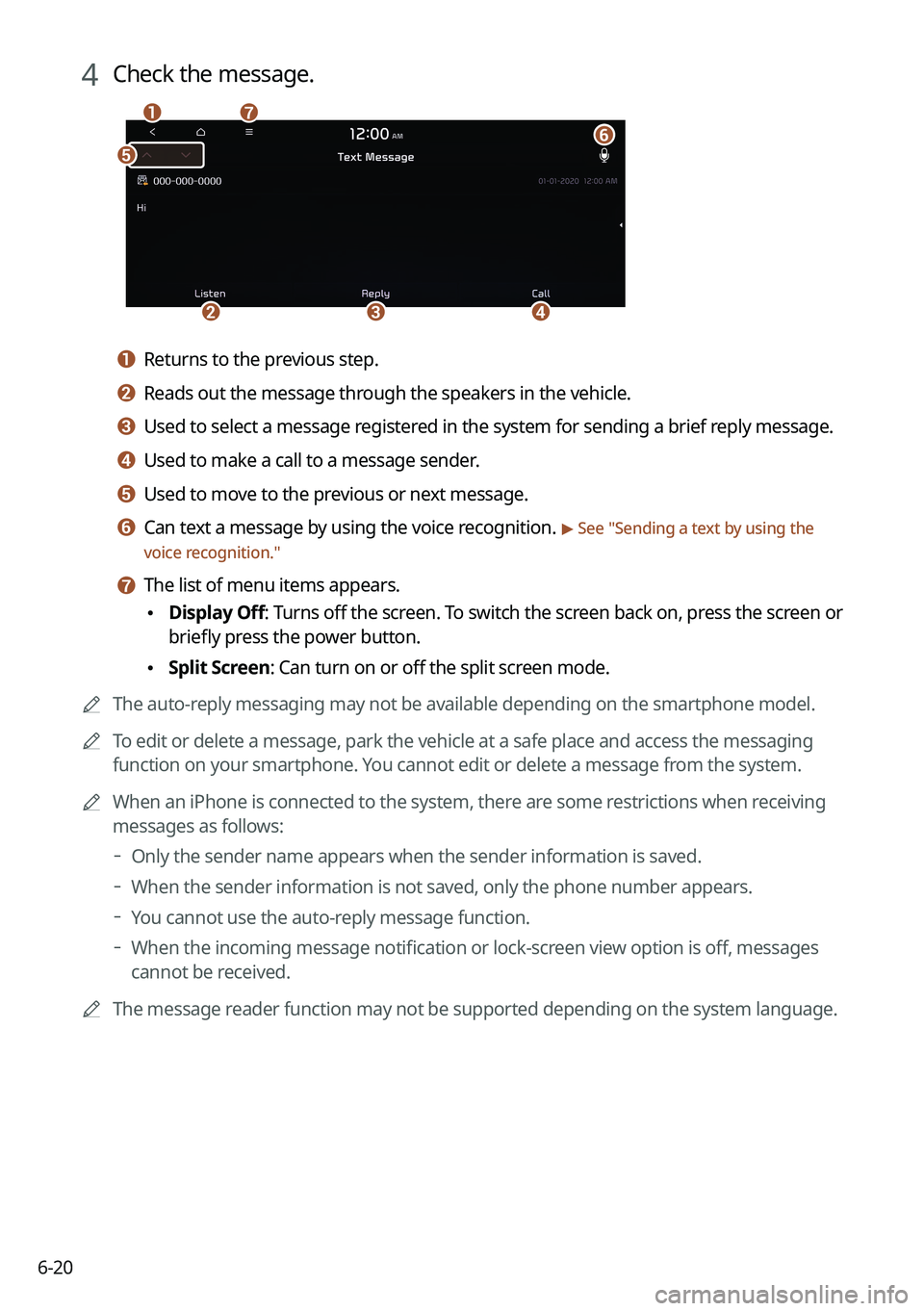
4 Check the message.
b
a
e
g
cd
f
a a Returns to the previous step.
b b Reads out the message through the speakers in the vehicle.
c c Used to select a message registered in the system for sending a brief reply message.
d d Used to make a call to a message sender.
e e Used to move to the previous or next message.
f f Can text a message by using the voice recognition. > See "Sending a text by using the
voice recognition."
g g The list of menu items appears.
• Display Off
: Turns off the screen. To switch the screen back on, press the screen or
briefly press the power button.
• Split Screen: Can turn on or off the split screen mode.
A
The auto-reply messaging may not be available depending on the smartphone model.
A
To edit or delete a message, park the vehicle at a safe place and access \
the messaging
function on your smartphone. You cannot edit or delete a message from the system.
A
When an iPhone is connected to the system, there are some restrictions when receiving
messages as follows:
Only the sender name appears when the sender information is saved.
When the sender information is not saved, only the phone number appears.\
You cannot use the auto-reply message function.
When the incoming message notification or lock-screen view option is off, messages
cannot be received.
A
The message reader function may not be supported depending on the system language.
Page 156 of 316
7-4
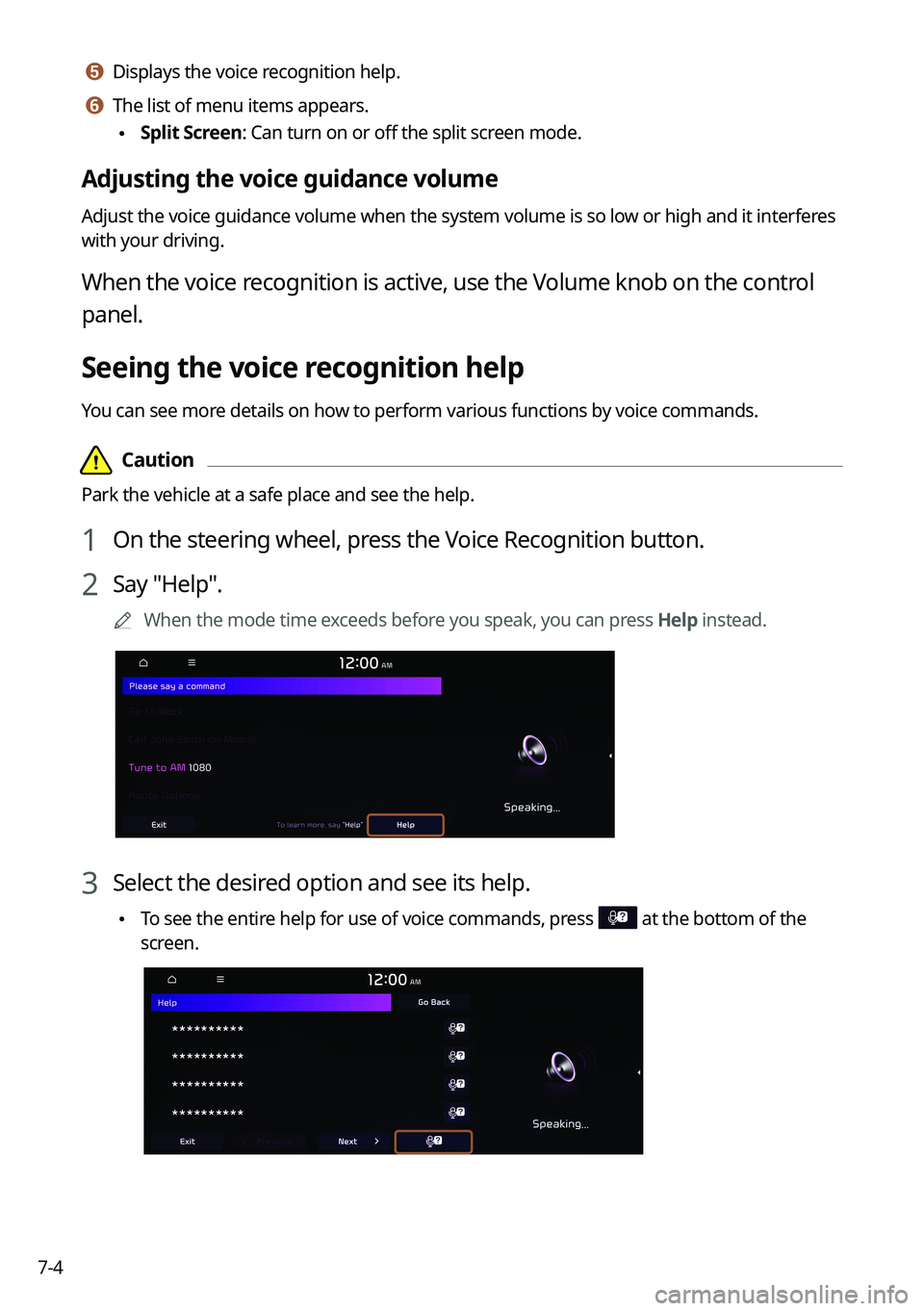
e e Displays the voice recognition help.
f f The list of menu items appears.
•Split Screen: Can turn on or off the split screen mode.
Adjusting the voice guidance volume
Adjust the voice guidance volume when the system volume is so low or high and it interferes
with your driving.
When the voice recognition is active, use the Volume knob on the control
panel.
Seeing the voice recognition help
You can see more details on how to perform various functions by voice commands.
Page 162 of 316

Com")
7-10
A
Vehicle control commands are recognizable in English only.
A
Some commands may not be supported, depending on the vehicle model and f\
unctions.
Rear-seat function commands (if equipped)
Command Function
Passenger Talk Turn on the Passenger Talk.
Quiet Mode
Turn off Quiet Mode Turn on or off the Quiet Mode.
A
Some commands may not be supported, depending on the vehicle model and f\
unctions.
Search commands
Command Function
Search settings for
For example, say "Search settings for Bluetooth" or "Search
settings for Display."
> See "Configuring system settings."
Other commands
Command
Function
Help Move to the help screen.
Line <1 to 4>* Select an item with the designated number on a list. Simple
numbers, such as "One" or "Two," can be recognized.
Yes * Accept a notification asking for your confirmation in an
exceptional situation.
No * Deny a notification asking for your confirmation in an
exceptional situation.
Next * If there are more than five items on a list, scroll to the next page.
Previous * If you scroll to the next page of a list, scroll back to the previous
page.
Manual Input* When using the Dial Number command, open the keypad to
enter a phone number manually.
Go Back * Returns to the previous step.
Exit End voice recognition.
* These commands are available only in certain situations.
Page 174 of 316
7-22
Voice Memo
You can use the microphone on the vehicle to record and play voice memos.
Using the voice memos
On the All Menus screen, press Voice Memo.
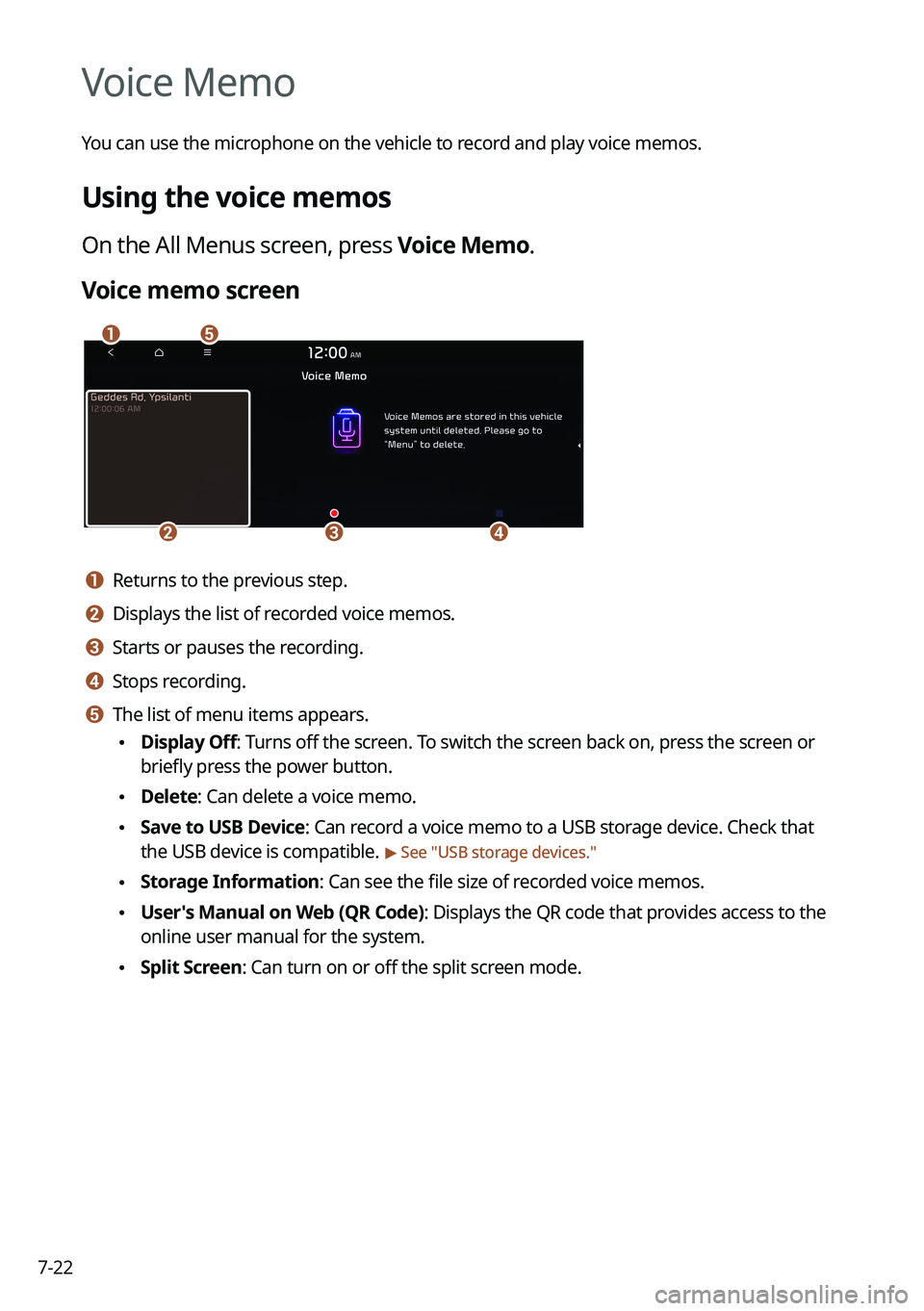
Voice memo screen
ae
cdb
a a Returns to the previous step.
b b Displays the list of recorded voice memos.
c c Starts or pauses the recording.
d d Stops recording.
e e The list of menu items appears.
•Display Off: Turns off the screen. To switch the screen back on, press the screen or
briefly press the power button.
•Delete: Can delete a voice memo.
•Save to USB Device: Can record a voice memo to a USB storage device. Check that
the USB device is compatible.
> See "USB storage devices."
•Storage Information: Can see the file size of recorded voice memos.
•User's Manual on Web (QR Code): Displays the QR code that provides access to the
online user manual for the system.
•Split Screen: Can turn on or off the split screen mode.
Page 180 of 316
8-4
Running the UVO
You can run the UVO in the system to use the service.
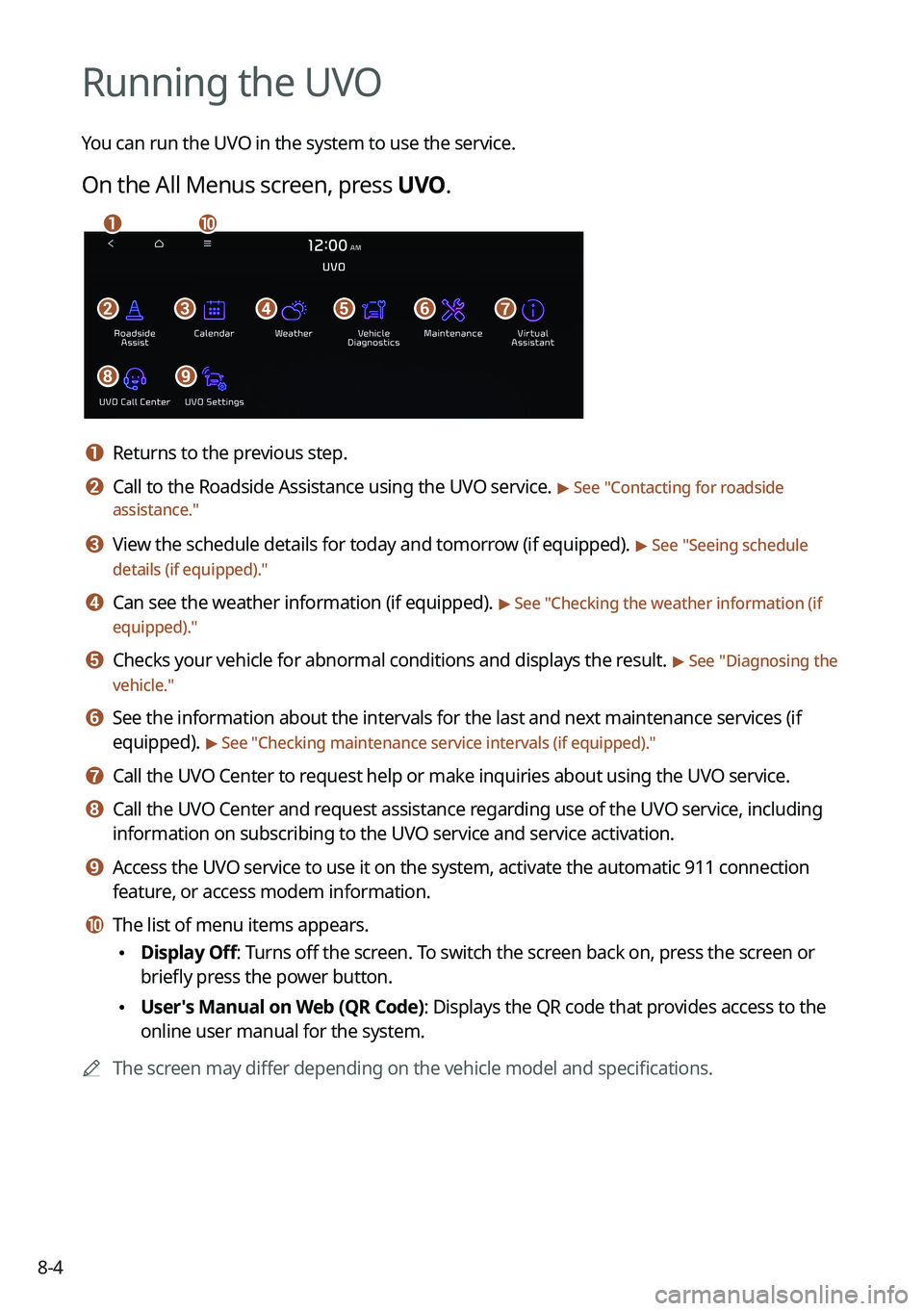
On the All Menus screen, press UVO.
bfgdec
aj
hi
a a Returns to the previous step.
b b Call to the Roadside Assistance using the UVO service. > See "Contacting for roadside
assistance."
c c View the schedule details for today and tomorrow (if equipped). > See " Seeing schedule
details (if equipped)."
d d Can see the weather information (if equipped). > See "Checking the weather information (if
equipped)."
e e Checks your vehicle for abnormal conditions and displays the result. > See " Diagnosing the
vehicle."
f f See the information about the intervals for the last and next maintenance services (if
equipped).
> See "Checking maintenance service intervals (if equipped) ."
g g Call the UVO Center to request help or make inquiries about using the UVO service.
h h Call the UVO Center and request assistance regarding use of the UVO service, including
information on subscribing to the UVO service and service activation.
i i Access the UVO service to use it on the system, activate the automatic 911 connection\
feature, or access modem information.
j j The list of menu items appears.
•Display Off: Turns off the screen. To switch the screen back on, press the screen or
briefly press the power button.
•User's Manual on Web (QR Code): Displays the QR code that provides access to the
online user manual for the system.
A
The screen may differ depending on the vehicle model and specifications.
Page 182 of 316
8-6
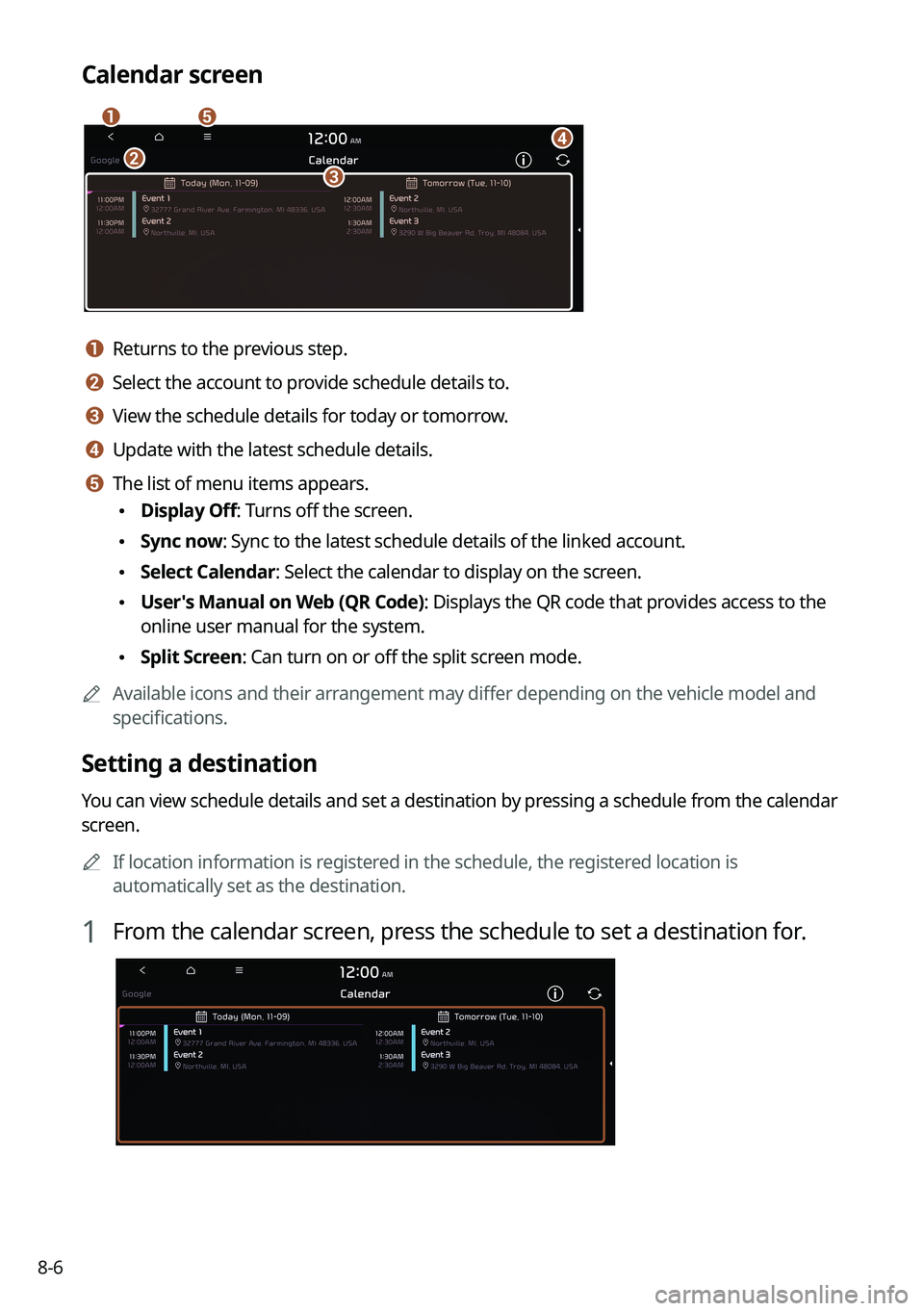
Calendar screen
eadbc
a a Returns to the previous step.
b b Select the account to provide schedule details to.
c c View the schedule details for today or tomorrow.
d d Update with the latest schedule details.
e e The list of menu items appears.
•Display Off: Turns off the screen.
•Sync now: Sync to the latest schedule details of the linked account.
•Select Calendar: Select the calendar to display on the screen.
•User's Manual on Web (QR Code): Displays the QR code that provides access to the
online user manual for the system.
•Split Screen: Can turn on or off the split screen mode.
A
Available icons and their arrangement may differ depending on the vehicle model and
specifications.
Setting a destination
You can view schedule details and set a destination by pressing a schedule from the calendar
screen.
A
If location information is registered in the schedule, the registered location is
automatically set as the destination.
1 From the calendar screen, press the schedule to set a destination for.
Page 184 of 316
8-8
Schedule reminder
A schedule notification pops up at a specified time.
A
To view schedule details, press Details.
Checking the weather information (if equipped)
You can see the weather information (temperature, humidity, amount/probability of
precipitation, etc.) for today or the next 3 days.
A
The weather information is accessible only when the system is connected \
to the network.
On the All Menus screen, press UVO >
Weather.
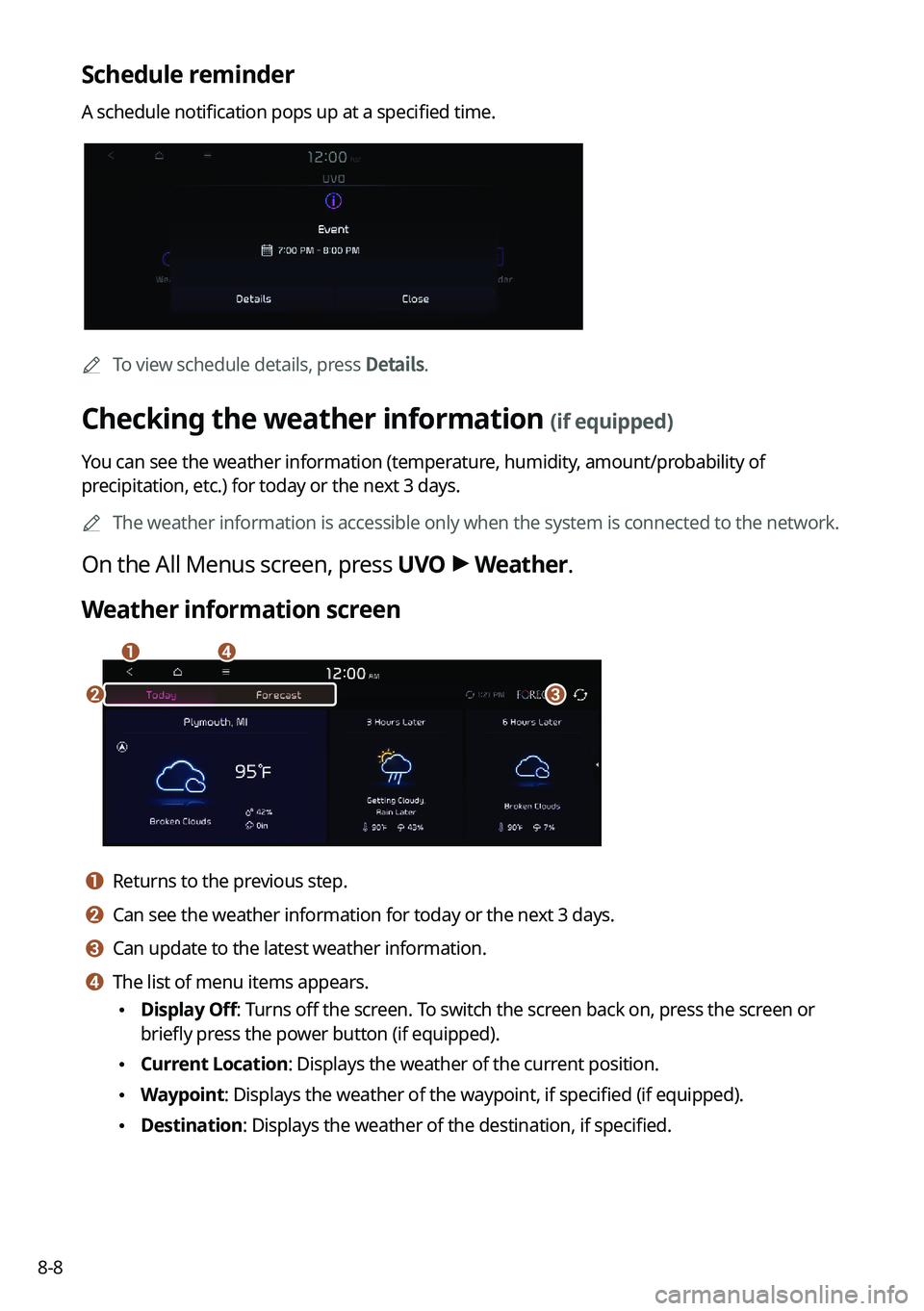
Weather information screen
da
cb
a a Returns to the previous step.
b b Can see the weather information for today or the next 3 days.
c c Can update to the latest weather information.
d d The list of menu items appears.
• Display Off: Turns off the screen. To switch the screen back on, press the screen or
briefly press the power button (if equipped).
•Current Location: Displays the weather of the current position.
•Waypoint: Displays the weather of the waypoint, if specified (if equipped).
•Destination: Displays the weather of the destination, if specified.
Page 185 of 316

8-9
•Search: Can see the weather information by searching for an address.
•Forecast: Can see the weather information for today or the next 3 days.
•User's Manual on Web (QR Code): Displays the QR code that provides access to the
online user manual for the system.
•Split Screen: Can turn on or off the split screen mode.
Diagnosing the vehicle
If you are curious about whether or not there is a problem with your vehicle, you can
diagnose your vehicle. With the diagnosis result, you can also reserve a maintenance service.
1 Park your vehicle in a safe location.
A
The vehicle must be stationary because some components cannot be diagnos\
ed
while driving.
2 On the All Menus screen, press UVO >
Vehicle Diagnostics.
Remote vehicle diagnosis starts.
A
Keep the screen on until the diagnosed result appears. When you switch to another
screen during diagnosis, the diagnosis service is canceled.
3 See the diagnosis results and perform a required function, as follows:
•To schedule a maintenance service at a preferred Kia dealership or the nearest one,
press
Schedule Service.
•To call the UVO center for roadside assistance, press Roadside Assist.
A
A diagnosis result provided by this service is only an estimated result based on the signals
from your vehicle. Visit a Kia dealership for a detailed diagnosis.
A
When a critical diagnostics issue is detected on your vehicle, an automa\
tic diagnosis
starts when a warning light illuminates on the instrument cluster. You are notified of the
diagnosis result.
A
Your preferred dealership must be registered on owners.kia.com for you to schedule a
maintenance service with it.
Page 186 of 316

8-10
Checking maintenance service intervals (if equipped)
You can see information about the intervals for the last and next maintenance services. This
feature can help you maintain your vehicle on a regular basis.
1 On the All Menus screen, press UVO >
Maintenance.
2 Check the maintenance information.
A
You can see the distance driven and the number of days remaining before the
vehicle should receive maintenance again. Use the information to determine when to
perform the next maintenance service.
A
To reset the information, press Reset Service Intervals.
A
To access the online user's manual on the Maintenance screen, press >
User's
Manual on Web (QR Code) and then scan the displayed QR code.
Contacting the UVO Center
You can contact a UVO Center representative directly to request help or make inquiries about
using the UVO services.
Perform any of the following methods:
• On the All Menus screen, press UVO
>
Virtual Assistant.
• Press the [] button on the vehicle.
A
To end the call, press End on the screen or press the [
] button.
A
This feature is not available during a Bluetooth call.