navigation KIA K900 2015 1.G User Guide
[x] Cancel search | Manufacturer: KIA, Model Year: 2015, Model line: K900, Model: KIA K900 2015 1.GPages: 522, PDF Size: 7.92 MB
Page 243 of 522
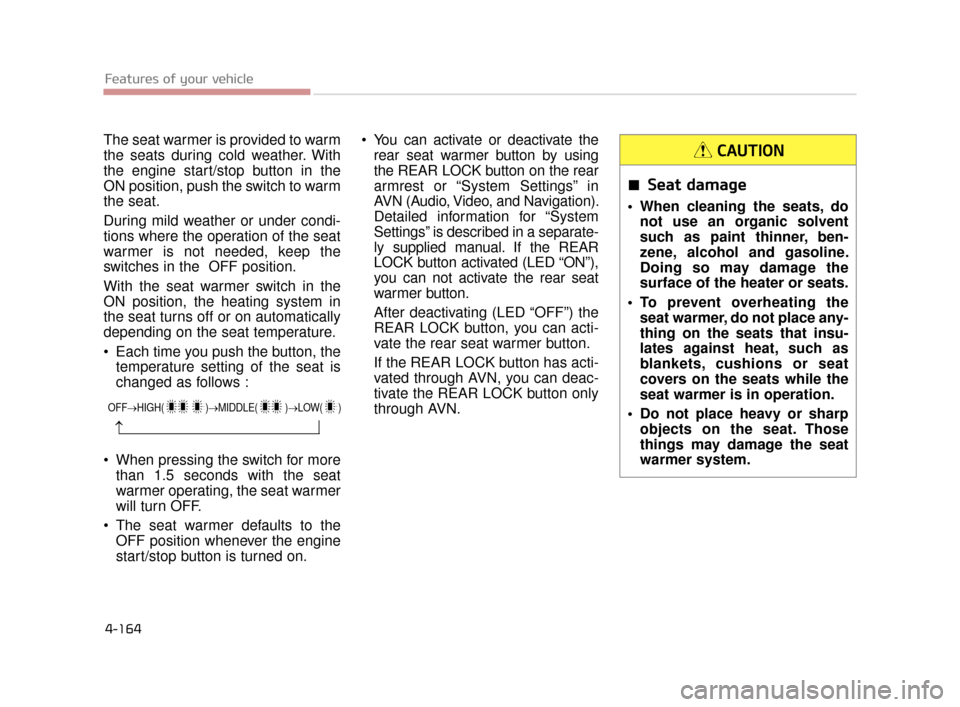
The seat warmer is provided to warm
the seats during cold weather. With
the engine start/stop button in the
ON position, push the switch to warm
the seat.
During mild weather or under condi-
tions where the operation of the seat
warmer is not needed, keep the
switches in the OFF position.
With the seat warmer switch in the
ON position, the heating system in
the seat turns off or on automatically
depending on the seat temperature.
Each time you push the button, thetemperature setting of the seat is
changed as follows :
When pressing the switch for more than 1.5 seconds with the seat
warmer operating, the seat warmer
will turn OFF.
The seat warmer defaults to the OFF position whenever the engine
start/stop button is turned on. You can activate or deactivate the
rear seat warmer button by using
the REAR LOCK button on the rear
armrest or “System Settings” in
AVN (Audio, Video, and Navigation).
Detailed information for “System
Settings” is described in a separate-
ly supplied manual. If the REAR
LOCK button activated (LED “ON”),
you can not activate the rear seat
warmer button.
After deactivating (LED “OFF”) the
REAR LOCK button, you can acti-
vate the rear seat warmer button.
If the REAR LOCK button has acti-
vated through AVN, you can deac-
tivate the REAR LOCK button only
through AVN.
Features of your vehicle
4-164
OFF→ HIGH( )→ MIDDLE( )→LOW( )
→
Seat damage
When cleaning the seats, do
not use an organic solvent
such as paint thinner, ben-
zene, alcohol and gasoline.
Doing so may damage the
surface of the heater or seats.
To prevent overheating the seat warmer, do not place any-
thing on the seats that insu-
lates against heat, such as
blankets, cushions or seat
covers on the seats while the
seat warmer is in operation.
Do not place heavy or sharp objects on the seat. Those
things may damage the seat
warmer system.
CAUTION
KH CAN (ENG) 4:2015 3/26/2015 10:47 AM Page 164
Page 245 of 522
Features of your vehicle
4-166
You can activate or deactivate therear air ventilation button by using
the REAR LOCK button on the rear
armrest or “System Settings” in
AVN (Audio, Video, and
Navigation). Detailed information
for “System Settings” is described
in a separately supplied manual. If
the REAR LOCK button activated
(LED “ON”), you can not activate
the rear air ventilation button.
After deactivating (LED “OFF”) the
REAR LOCK button, you can acti-
vate the rear air ventilation button.
If the REAR LOCK button has acti-
vated through AVN, you can deacti-
vate the REAR LOCK button only
through AVN.
The air ventilation seat is a supple- mentary cooling/heating system.
Use the air ventilation seat when
the climate control system is on.
Using the air ventilation seat for
prolonged periods of time with the
climate control system off could
cause the air ventilation seat per-
formance to impair. Do not place materials such as
plastic bags or newspapers under
the seats. The air vent may not
work properly as the air intake can
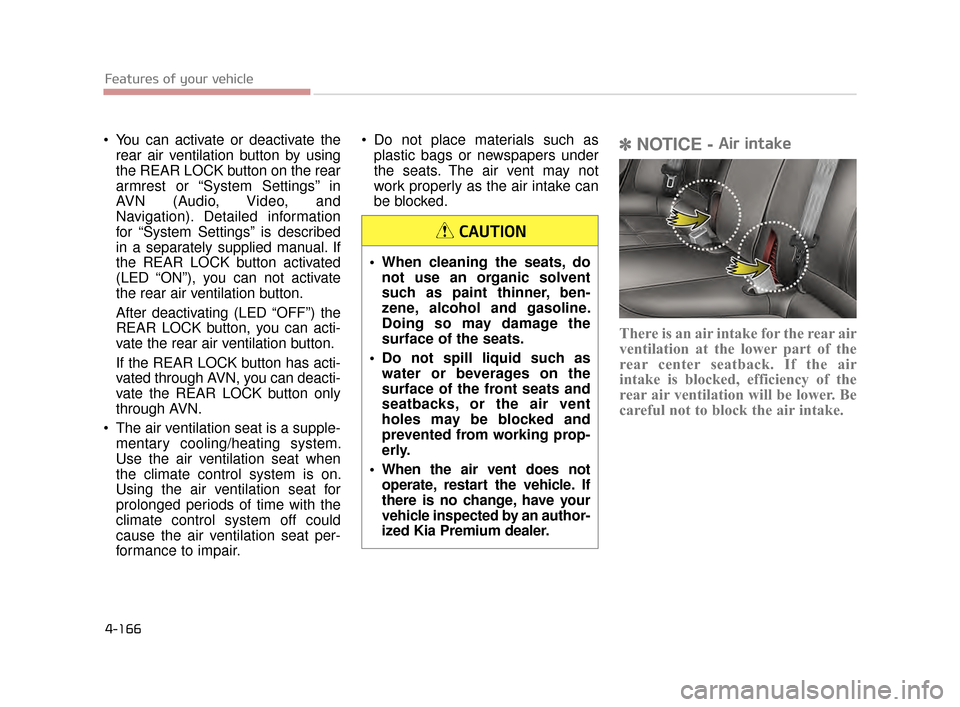
be blocked.✽ NOTICE - Air intake
There is an air intake for the rear air
ventilation at the lower part of the
rear center seatback. If the air
intake is blocked, efficiency of the
rear air ventilation will be lower. Be
careful not to block the air intake.
When cleaning the seats, do
not use an organic solvent
such as paint thinner, ben-
zene, alcohol and gasoline.
Doing so may damage the
surface of the seats.
Do not spill liquid such as water or beverages on the
surface of the front seats and
seatbacks, or the air vent
holes may be blocked and
prevented from working prop-
erly.
When the air vent does not operate, restart the vehicle. If
there is no change, have your
vehicle inspected by an author-
ized Kia Premium dealer.
CAUTION
KH CAN (ENG) 4:2015 3/26/2015 10:47 AM Page 166
Page 246 of 522
Features of your vehicle
4
4-167
Clock
Whenever the battery terminals or
related fuses are disconnected, you
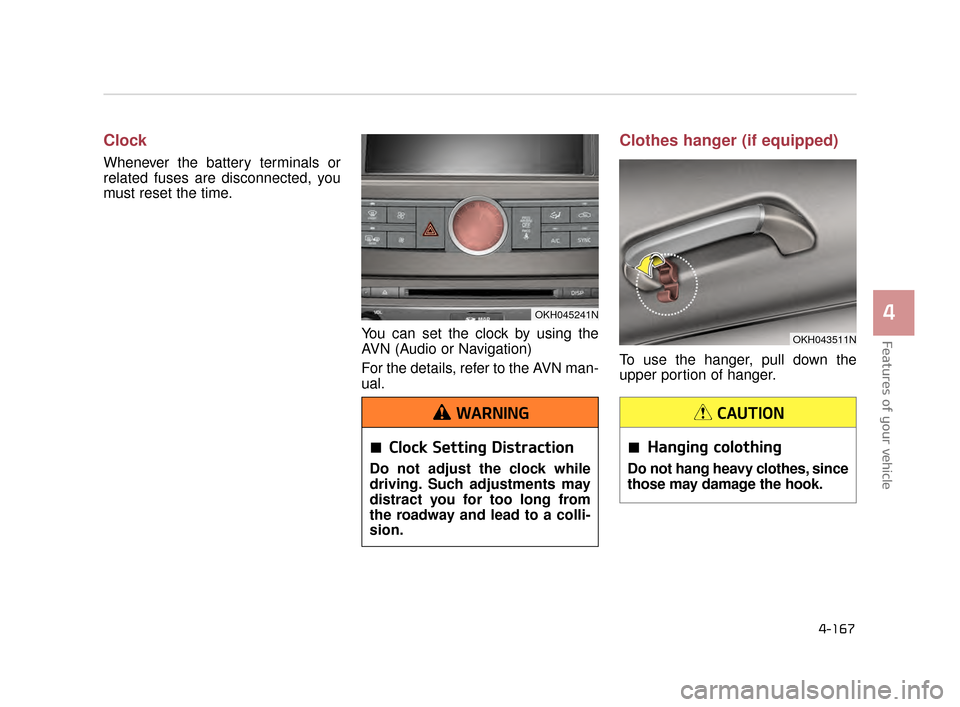
must reset the time.You can set the clock by using the
AVN (Audio or Navigation)
For the details, refer to the AVN man-
ual.
Clothes hanger (if equipped)
To use the hanger, pull down the
upper portion of hanger.
OKH045241N
Clock Setting Distraction
Do not adjust the clock while
driving. Such adjustments may
distract you for too long from
the roadway and lead to a colli-
sion.
WARNING
OKH043511N
Hanging colothing
Do not hang heavy clothes, since
those may damage the hook.
CAUTION
KH CAN (ENG) 4:2015 3/26/2015 10:48 AM Page 167
Page 249 of 522
Features of your vehicle
4-170
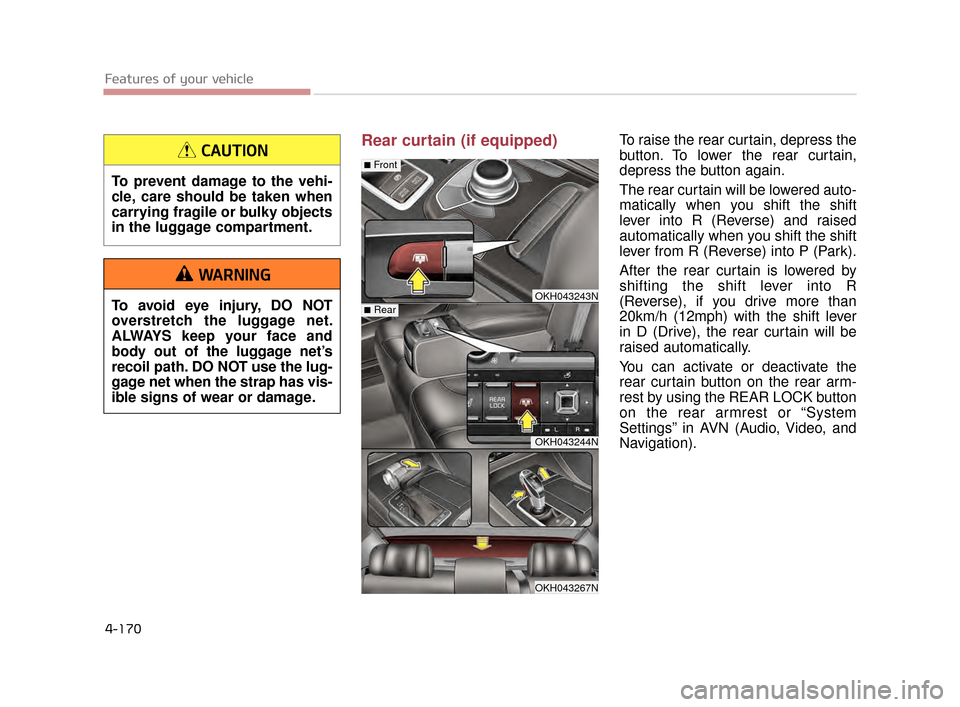
Rear curtain (if equipped)To raise the rear curtain, depress the
button. To lower the rear curtain,
depress the button again.
The rear curtain will be lowered auto-
matically when you shift the shift
lever into R (Reverse) and raised
automatically when you shift the shift
lever from R (Reverse) into P (Park).
After the rear curtain is lowered by
shifting the shift lever into R
(Reverse), if you drive more than
20km/h (12mph) with the shift lever
in D (Drive), the rear curtain will be
raised automatically.
You can activate or deactivate the
rear curtain button on the rear arm-
rest by using the REAR LOCK button
on the rear armrest or “System
Settings” in AVN (Audio, Video, and
Navigation).
OKH043243N
OKH043244N
OKH043267N
■Rear
■Front
To prevent damage to the vehi-
cle, care should be taken when
carrying fragile or bulky objects
in the luggage compartment.
CAUTION
To avoid eye injury, DO NOT
overstretch the luggage net.
ALWAYS keep your face and
body out of the luggage net’s
recoil path. DO NOT use the lug-
gage net when the strap has vis-
ible signs of wear or damage.
WARNING
KH CAN (ENG) 4:2015 3/26/2015 10:48 AM Page 170
Page 252 of 522
Features of your vehicle
4
4-173
Some devices are not supportedfor fast charging but will be
charged with normal speed.
Use the USB charger when the engine is running to prevent bat-
tery discharge.
Only devices that fits the USB port can be used.
The USB charger can be used only for battery charging purposes.
Battery chargers cannot be charged. Audio / Video / Navigation sys-
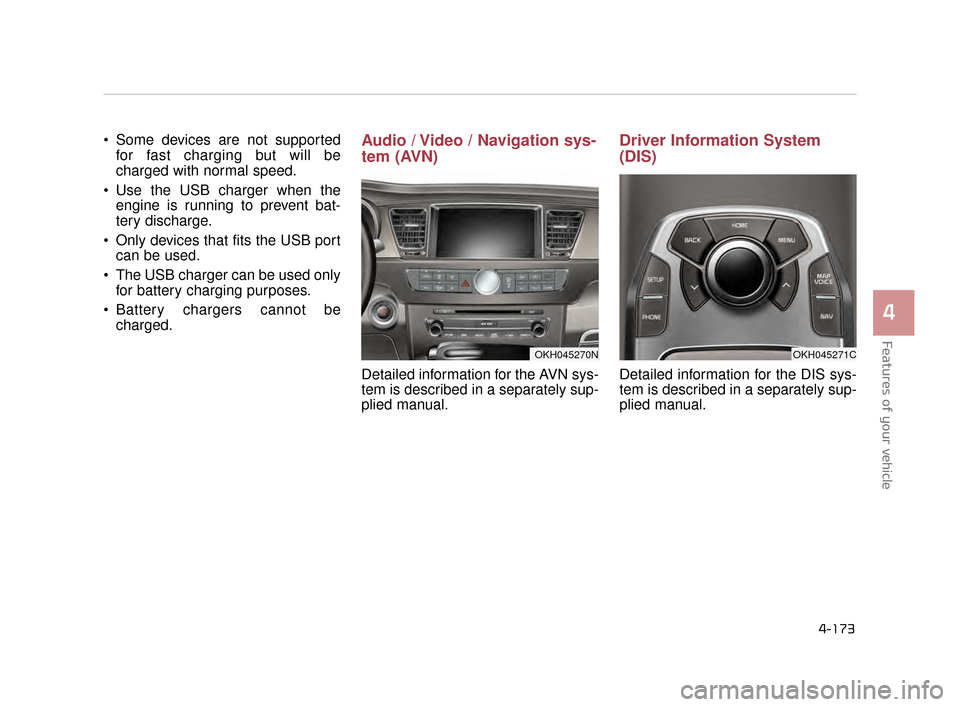
tem (AVN)
Detailed information for the AVN sys-
tem is described in a separately sup-
plied manual.
Driver Information System
(DIS)
Detailed information for the DIS sys-
tem is described in a separately sup-
plied manual.
OKH045271COKH045270N
KH CAN (ENG) 4:2015 3/26/2015 10:48 AM Page 173
Page 377 of 522
6-14
What to do in an emergency
The tire pressure displayed on theinstrument panel may be different
from the tire pressure measured by
a tire pressure gauge.TPMS (Tire Pressure
Monitoring System)
malfunction indicator
The TPMS malfunction indicator will
illuminate after it blinks for approxi-
mately one minute when there is a
problem with the Tire Pressure
Monitoring System.
Have the system checked by an
authorized Kia Premium dealer as
soon as possible to determine the
cause of the problem.
✽ NOTICE
If there is a malfunction with the
TPMS, the low tire pressure position
telltale will not be displayed even
though the vehicle has an under-
inflated tire.
The TPMS malfunction indicator
may blink for approximately 1
minute and then remain continu-
ously illuminated if the vehicle is
moving around electric power sup-
ply cables or radio transmitter such
as at police stations, government
and public offices, broadcasting
stations, military installations, air-
ports, or transmitting towers, etc.
This can interfere with normal
operation of the Tire Pressure
Monitoring System (TPMS).
The TPMS malfunction indicator may blink for approximately 1
minute and then remain continu-
ously illuminated if the snow chains
are used or some separate elec-
tronic devices such as notebook
computer, mobile charger, remote
starter or navigation etc., are used
in the vehicle. This can interfere
with normal operation of the Tire
Pressure Monitoring System
(TPMS).
Low pressure damage
Significantly low tire pressure
makes the vehicle unstable and
can contribute to loss of vehicle
control and increased braking
distances.
Continued driving on low pres-
sure tires can cause the tires to
overheat and fail.
WARNING
KH CAN (ENG) 6:2015 3/26/2015 6:35 AM Page 14
Page 473 of 522
Maintenance
7
7-77
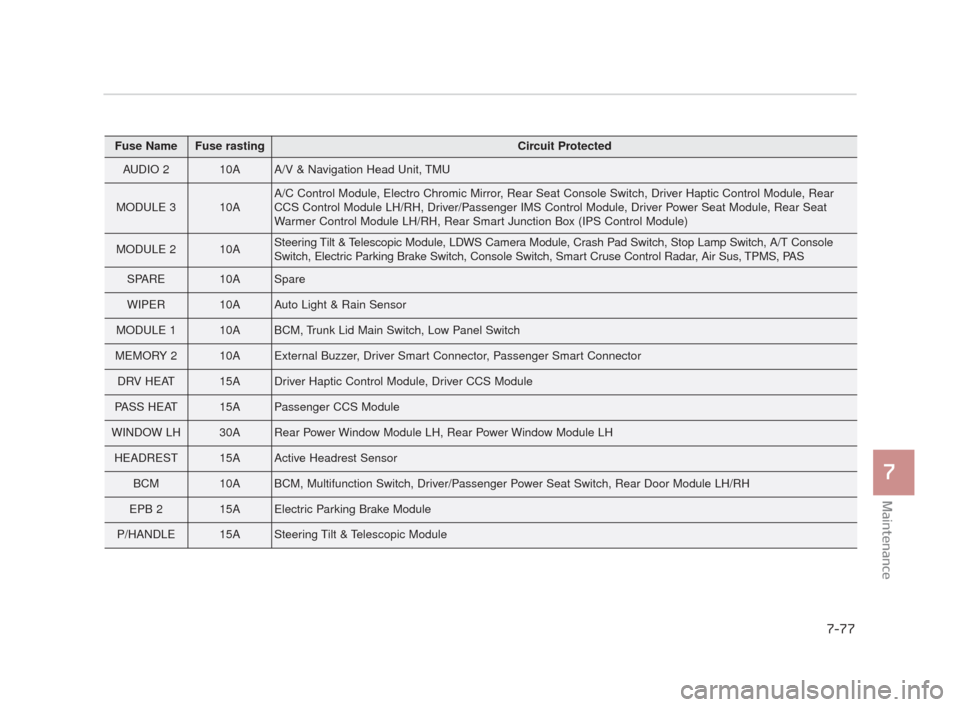
Fuse NameFuse rastingCircuit Protected
AUDIO 210AA/V & Navigation Head Unit, TMU
MODULE 310AA/C Control Module, Electro Chromic Mirror, Rear Seat Console Switch, Driver Haptic Control Module, Rear
CCS Control Module LH/RH, Driver/Passenger IMS Control Module, Driver Power Seat Module, Rear Seat
Warmer Control Module LH/RH, Rear Smart Junction Box (IPS Control Module)
MODULE 210ASteering Tilt & Telescopic Module, LDWS Camera Module, Crash Pad Switch, Stop Lamp Switch, A/T Console
Switch, Electric Parking Brake Switch, Console Switch, Smart Cruse Control Radar, Air Sus, TPMS, PAS
SPARE10ASpare
WIPER10AAuto Light & Rain Sensor
MODULE 110ABCM, Trunk Lid Main Switch, Low Panel Switch
MEMORY 210AExternal Buzzer, Driver Smart Connector, Passenger Smart Connector
DRV HEAT15ADriver Haptic Control Module, Driver CCS Module
PASS HEAT15APassenger CCS Module
WINDOW LH30ARear Power Window Module LH, Rear Power Window Module LH
HEADREST15AActive Headrest Sensor
BCM10ABCM, Multifunction Switch, Driver/Passenger Power Seat Switch, Rear Door Module LH/RH
EPB 215AElectric Parking Brake Module
P/HANDLE15ASteering Tilt & Telescopic Module
KH CAN (ENG) 7:2015 3/26/2015 6:41 AM Page 77
Page 475 of 522
Maintenance
7
7-79
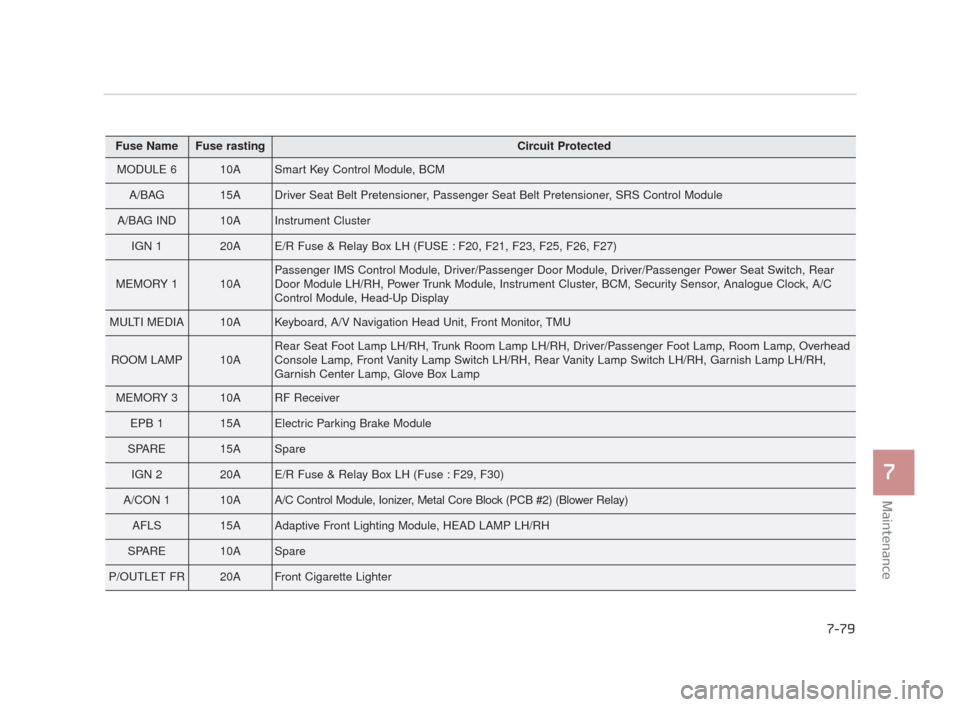
Fuse NameFuse rastingCircuit Protected
MODULE 610ASmart Key Control Module, BCM
A/BAG15ADriver Seat Belt Pretensioner, Passenger Seat Belt Pretensioner, SRS Control Module
A/BAG IND10AInstrument Cluster
IGN 120AE/R Fuse & Relay Box LH (FUSE : F20, F21, F23, F25, F26, F27)
MEMORY 110APassenger IMS Control Module, Driver/Passenger Door Module, Driver/Passenger Power Seat Switch, Rear
Door Module LH/RH, Power Trunk Module, Instrument Cluster, BCM, Security Sensor, Analogue Clock, A/C
Control Module, Head-Up Display
MULTI MEDIA10AKeyboard, A/V Navigation Head Unit, Front Monitor, TMU
ROOM LAMP10ARear Seat Foot Lamp LH/RH, Trunk Room Lamp LH/RH, Driver/Passenger Foot Lamp, Room Lamp, Overhead
Console Lamp, Front Vanity Lamp Switch LH/RH, Rear Vanity Lamp Switch LH/RH, Garnish Lamp LH/RH,
Garnish Center Lamp, Glove Box Lamp
MEMORY 310ARF Receiver
EPB 115AElectric Parking Brake Module
SPARE15ASpare
IGN 220AE/R Fuse & Relay Box LH (Fuse : F29, F30)
A/CON 110AA/C Control Module, Ionizer, Metal Core Block (PCB #2) (Blower Relay)
AFLS15AAdaptive Front Lighting Module, HEAD LAMP LH/RH
SPARE10ASpare
P/OUTLET FR20AFront Cigarette Lighter
KH CAN (ENG) 7:2015 3/26/2015 6:41 AM Page 79
Page 476 of 522
7-80
Maintenance
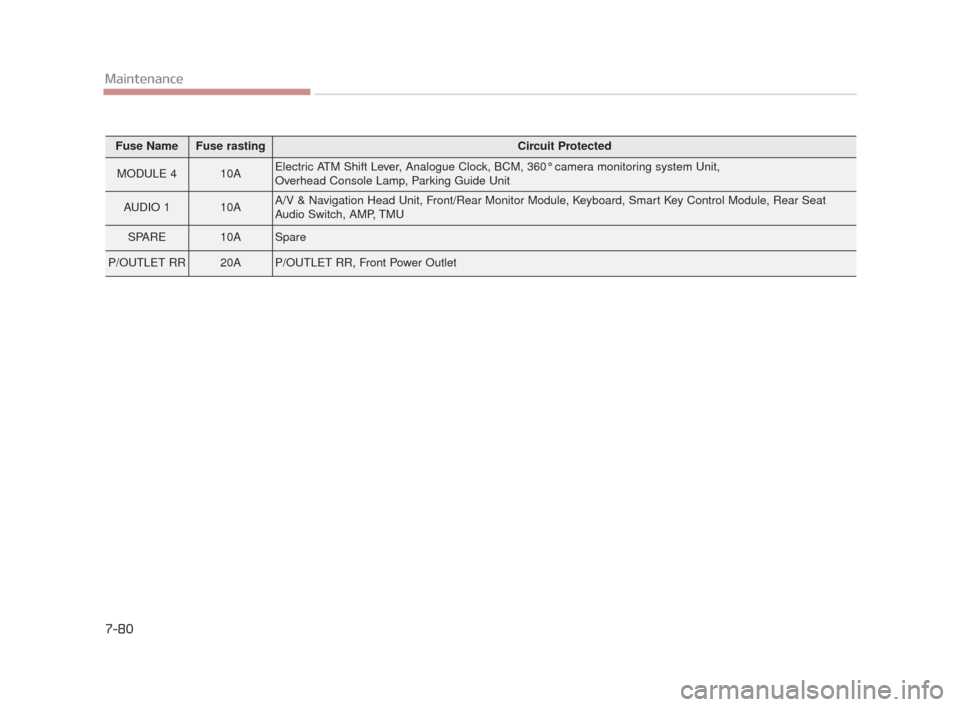
Fuse NameFuse rastingCircuit Protected
MODULE 410AElectric ATM Shift Lever, Analogue Clock, BCM, 360° camera monitoring system Unit,
Overhead Console Lamp, Parking Guide Unit
AUDIO 110AA/V & Navigation Head Unit, Front/Rear Monitor Module, Keyboard, Smart Key Control Module, Rear Seat
Audio Switch, AMP, TMU
SPARE10ASpare
P/OUTLET RR20AP/OUTLET RR, Front Power Outlet
KH CAN (ENG) 7:2015 3/26/2015 6:41 AM Page 80
Page 479 of 522
Maintenance
7
7-83
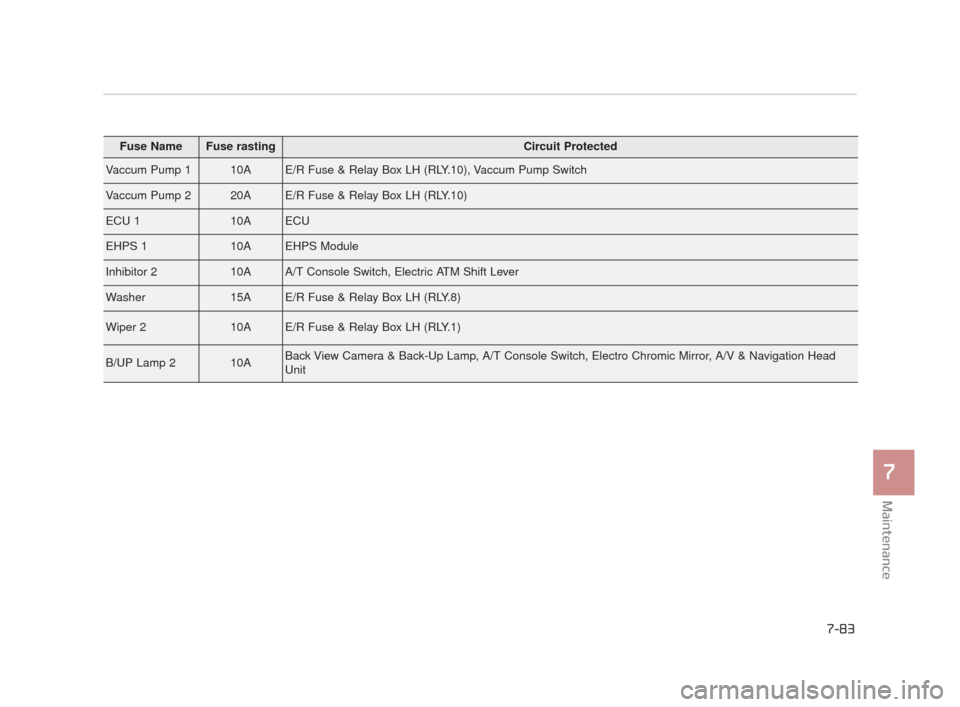
Fuse NameFuse rastingCircuit Protected
Vaccum Pump 110AE/R Fuse & Relay Box LH (RLY.10), Vaccum Pump Switch
Vaccum Pump 220AE/R Fuse & Relay Box LH (RLY.10)
ECU 110AECU
EHPS 110AEHPS Module
Inhibitor 210AA/T Console Switch, Electric ATM Shift Lever
Washer15AE/R Fuse & Relay Box LH (RLY.8)
Wiper 210AE/R Fuse & Relay Box LH (RLY.1)
B/UP Lamp 210ABack View Camera & Back-Up Lamp, A/T Console Switch, Electro Chromic Mirror, A/V & Navigation Head
Unit
KH CAN (ENG) 7:2015 3/26/2015 6:41 AM Page 83