steering wheel KIA K900 2015 1.G Owner's Guide
[x] Cancel search | Manufacturer: KIA, Model Year: 2015, Model line: K900, Model: KIA K900 2015 1.GPages: 522, PDF Size: 7.92 MB
Page 171 of 522
Features of your vehicle
4-92
Elapsed Time (3)
The elapsed time is the total driv-ing time since the last elapsed time
reset.
- Time range (hh:mm): 00:00 ~ 99:59
To reset the elapsed time, press the OK (RESET) button on the steering
wheel for more than 1 second when
the elapsed time is displayed.
✽ NOTICE
Even if the vehicle is not in motion,
the elapsed time keeps going while
the engine is running.
One time driving information mode
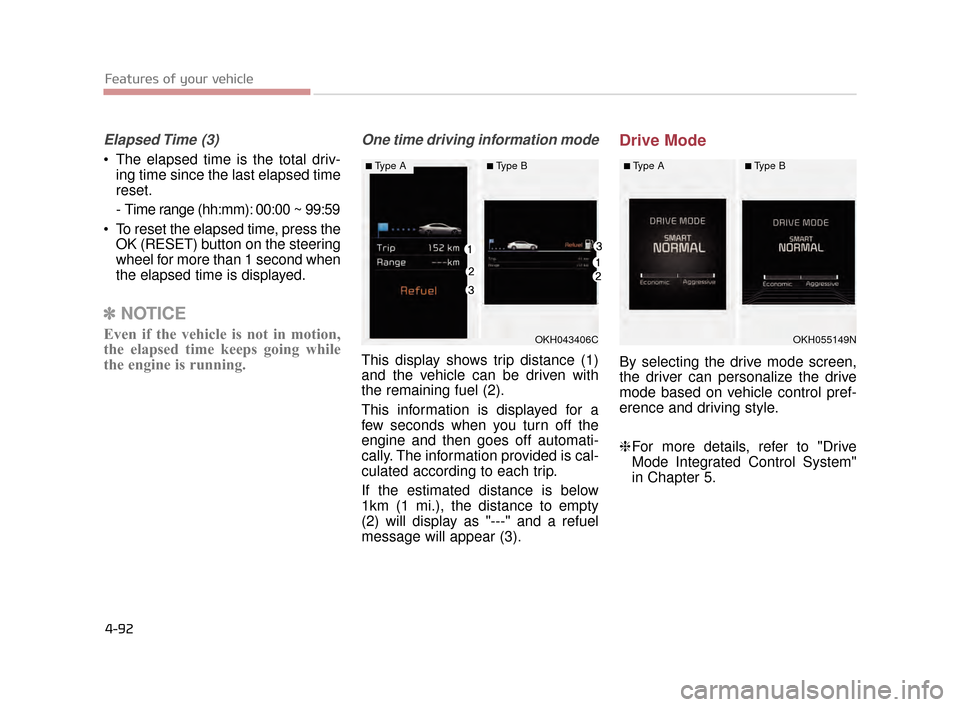
This display shows trip distance (1)
and the vehicle can be driven with
the remaining fuel (2).
This information is displayed for a
few seconds when you turn off the
engine and then goes off automati-
cally. The information provided is cal-
culated according to each trip.
If the estimated distance is below
1km (1 mi.), the distance to empty
(2) will display as "---" and a refuel
message will appear (3).
Drive Mode
By selecting the drive mode screen,
the driver can personalize the drive
mode based on vehicle control pref-
erence and driving style.
❈For more details, refer to "Drive
Mode Integrated Control System"
in Chapter 5.
OKH043406C
■Type A■Type B
OKH055149N
■Type A■Type B
KH CAN (ENG) 4:2015 3/26/2015 10:41 AM Page 92
Page 254 of 522
Features of your vehicle
4
4-175
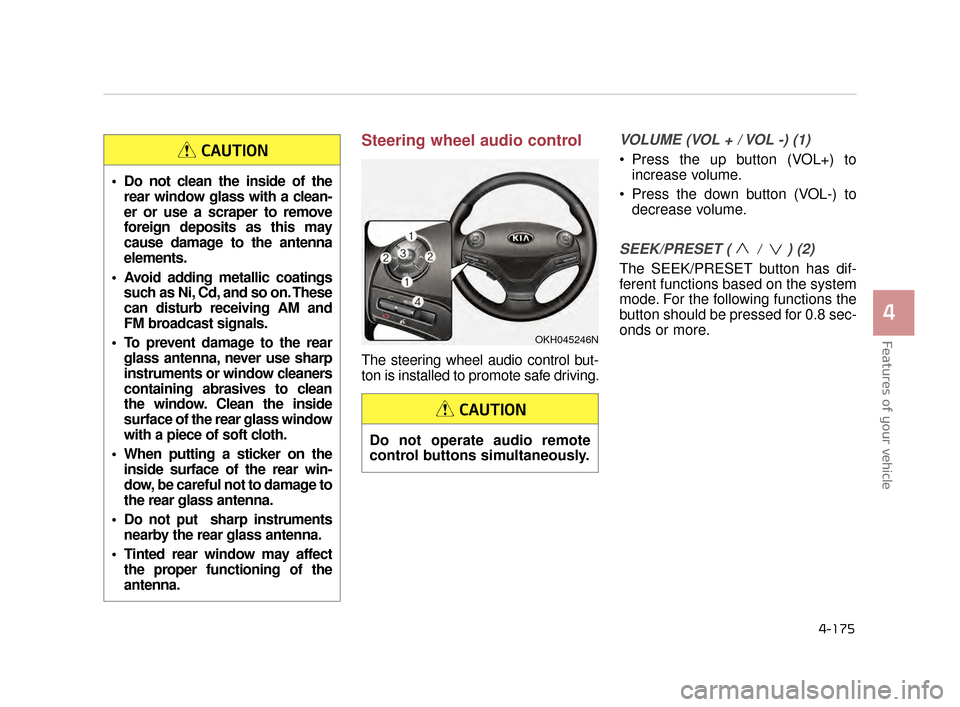
Steering wheel audio control
The steering wheel audio control but-
ton is installed to promote safe driving.
VOLUME (VOL + / VOL -) (1)
Press the up button (VOL+) toincrease volume.
Press the down button (VOL-) to decrease volume.
SEEK/PRESET ( / ) (2)
The SEEK/PRESET button has dif-
ferent functions based on the system
mode. For the following functions the
button should be pressed for 0.8 sec-
onds or more.
Do not clean the inside of therear window glass with a clean-
er or use a scraper to remove
foreign deposits as this may
cause damage to the antenna
elements.
Avoid adding metallic coatings such as Ni, Cd, and so on. These
can disturb receiving AM and
FM broadcast signals.
To prevent damage to the rear glass antenna, never use sharp
instruments or window cleaners
containing abrasives to clean
the window. Clean the inside
surface of the rear glass window
with a piece of soft cloth.
When putting a sticker on the inside surface of the rear win-
dow, be careful not to damage to
the rear glass antenna.
Do not put sharp instruments nearby the rear glass antenna.
Tinted rear window may affect the proper functioning of the
antenna.
CAUTION
Do not operate audio remote
control buttons simultaneously.
CAUTION
OKH045246N
KH CAN (ENG) 4:2015 3/26/2015 10:49 AM Page 175
Page 260 of 522
Driving your vehicle
5
5-5
Check surrounding
Always check the surrounding
areas near your vehicle for peo-
ple, especially children, before
putting a vehicle into D (Drive)
or R (Reverse).
WARNING
Driving while intoxicated
Do not drive while intoxicated.
Drinking and driving is danger-
ous. Even a small amount of
alcohol will affect your reflexes,
perceptions and judgment.
Driving while under the influ-
ence of drugs is as dangerous
as or more dangerous than driv-
ing drunk.
WARNING
Loose object
Securely store items in your
vehicle. When you make a sud-
den stop or turn the steering
wheel rapidly, loose objects
may drop on the floor and it
could interfere with the opera-
tion of the foot pedals, possibly
causing an accident.
WARNING
Fire risk
When you intend to park or stop
the vehicle with the engine on,
be careful not to depress the
accelerator pedal for a long
period of time. It may overheat
the engine or exhaust system
and cause a fire.
WARNING
KH CAN (ENG) 5:2015 3/25/2015 10:50 AM Page 5
Page 262 of 522
Driving your vehicle
5
5-7
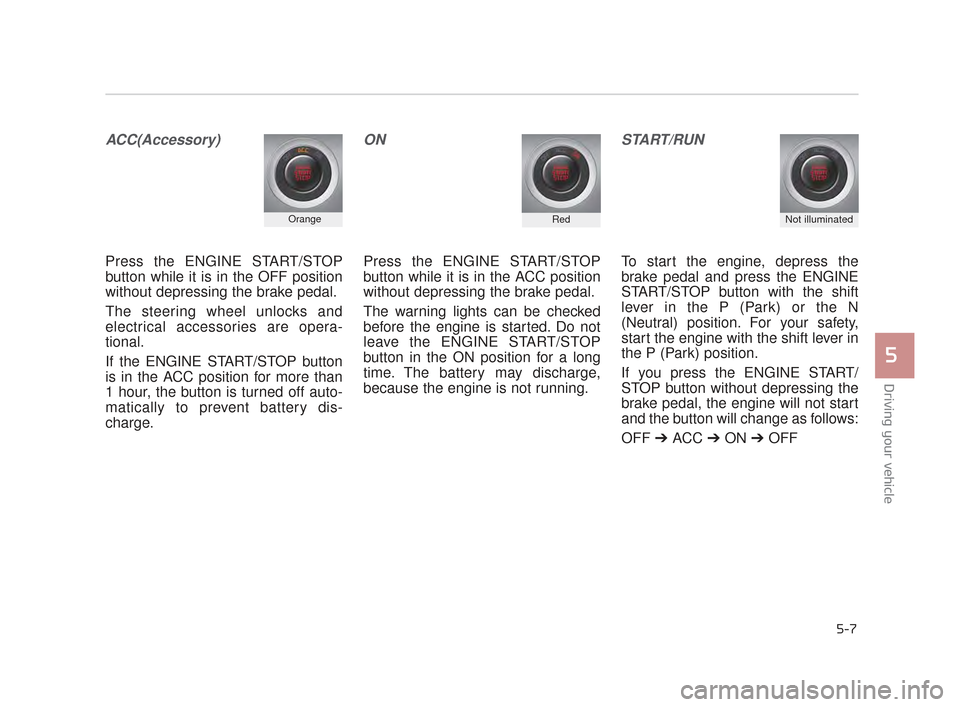
ACC(Accessory)
Press the ENGINE START/STOP
button while it is in the OFF position
without depressing the brake pedal.
The steering wheel unlocks and
electrical accessories are opera-
tional.
If the ENGINE START/STOP button
is in the ACC position for more than
1 hour, the button is turned off auto-
matically to prevent battery dis-
charge.
ON
Press the ENGINE START/STOP
button while it is in the ACC position
without depressing the brake pedal.
The warning lights can be checked
before the engine is started. Do not
leave the ENGINE START/STOP
button in the ON position for a long
time. The battery may discharge,
because the engine is not running.
START/RUN
To start the engine, depress the
brake pedal and press the ENGINE
START/STOP button with the shift
lever in the P (Park) or the N
(Neutral) position. For your safety,
start the engine with the shift lever in
the P (Park) position.
If you press the ENGINE START/
STOP button without depressing the
brake pedal, the engine will not start
and the button will change as follows:
OFF ➔ ACC ➔ON ➔OFF
OrangeRedNot illuminated
KH CAN (ENG) 5:2015 3/25/2015 10:50 AM Page 7
Page 298 of 522
Driving your vehicle
5
5-43
✽NOTICE
When you jump start your vehicle
because of a drained battery, the
engine may not run as smoothly and
the ABS warning light may turn on
at the same time. This happens
because of the low battery voltage. It
does not mean your ABS has mal-
functioned.
• Do not pump your brakes!
• Have the battery recharged before
driving the vehicle.
Electronic stability control
(ESC)
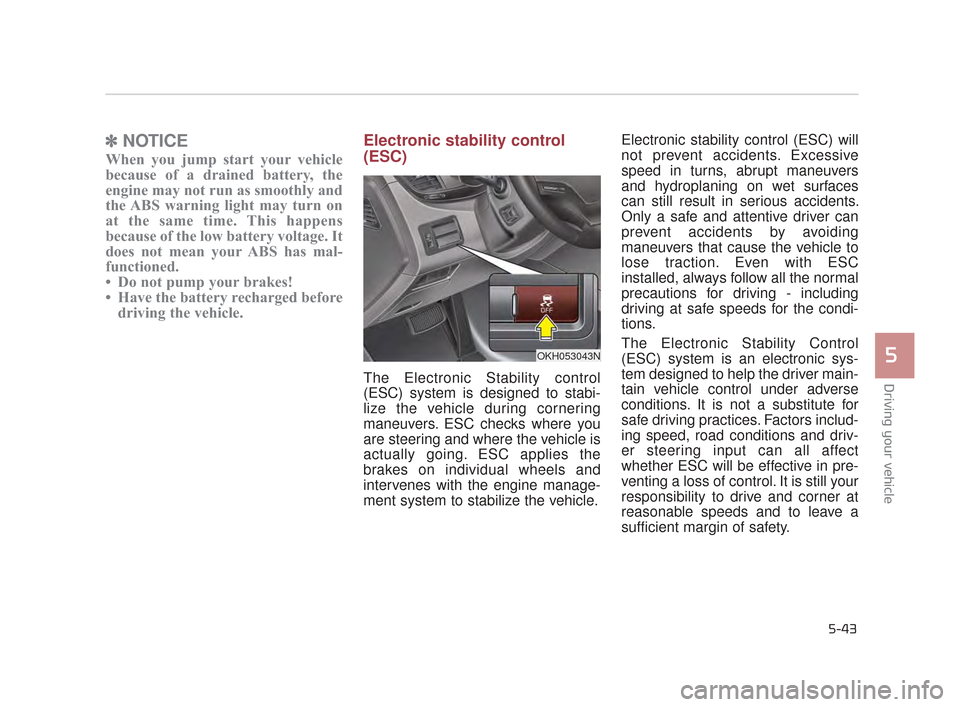
The Electronic Stability control
(ESC) system is designed to stabi-
lize the vehicle during cornering
maneuvers. ESC checks where you
are steering and where the vehicle is
actually going. ESC applies the
brakes on individual wheels and
intervenes with the engine manage-
ment system to stabilize the vehicle. Electronic stability control (ESC) will
not prevent accidents. Excessive
speed in turns, abrupt maneuvers
and hydroplaning on wet surfaces
can still result in serious accidents.
Only a safe and attentive driver can
prevent accidents by avoiding
maneuvers that cause the vehicle to
lose traction. Even with ESC
installed, always follow all the normal
precautions for driving - including
driving at safe speeds for the condi-
tions.
The Electronic Stability Control
(ESC) system is an electronic sys-
tem designed to help the driver main-
tain vehicle control under adverse
conditions. It is not a substitute for
safe driving practices. Factors includ-
ing speed, road conditions and driv-
er steering input can all affect
whether ESC will be effective in pre-
venting a loss of control. It is still your
responsibility to drive and corner at
reasonable speeds and to leave a
sufficient margin of safety.
OKH053043N
KH CAN (ENG) 5:2015 3/25/2015 10:51 AM Page 43
Page 305 of 522
5-50
Driving your vehicle
A warning message and chime will
sound when you need to use the
brake pedal or steering wheel due to
a sudden stop or lack of distance
with the vehicle ahead. The warning
messages will vary according to the
severity of the situation. Immediately
reduce your speed to prevent a colli-
sion.Brake operation
In a critical situation:
The brake assist system entersstandby mode to react promptly
when the driver operates the brake
pedal.
The vehicle automatically reduces speed according to the severity of
the situation.
- Rapidly reduces speed when vehicle speed is under 80 km/h
(50 mph)
- Slowly reduces speed when vehicle speed is over 80 km/h
(50 mph)
If the driver uses the brake pedal to reduce vehicle speed, the brake
assist system operates to increase
braking efficiency.
If the driver presses down hard on the accelerator pedal or sharply
turns the steering wheel, the brake
assist system is canceled.
Seat belt operation
The driver's and passenger's seat
belt may tighten if the system detects
that a vehicle or object is close.
KH CAN (ENG) 5:2015 3/25/2015 10:52 AM Page 50
Page 312 of 522
SMART MODE
SMART MODE is an intelligentdriving mode which automatically
selects the most appropriate drive
mode (Economic Ö Aggressive) by
measuring usage of steering
wheel, and accelerator pedal.
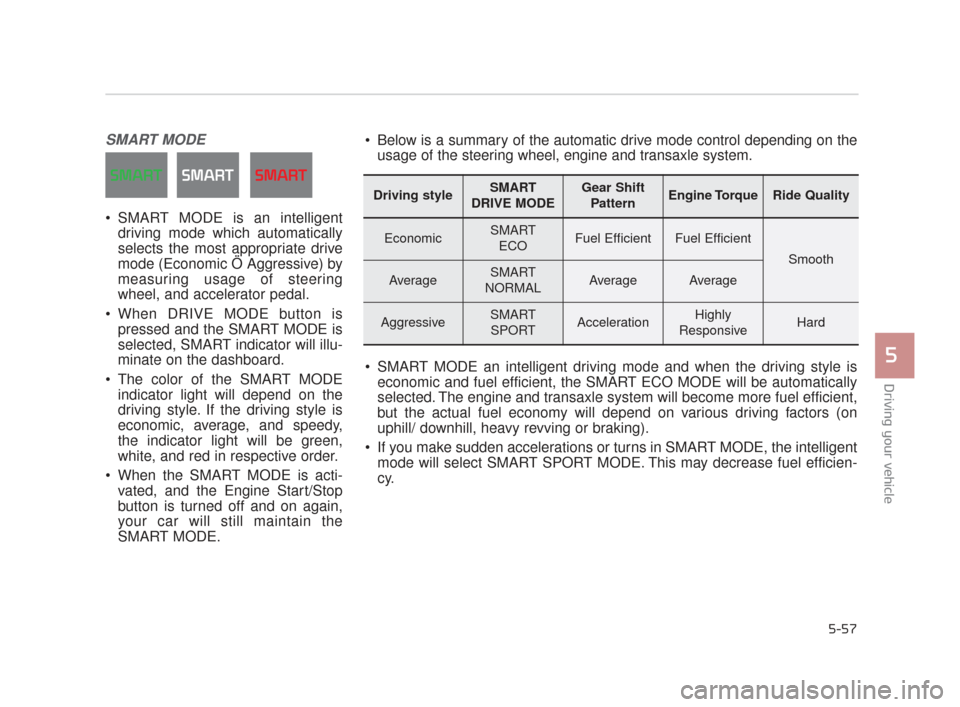
When DRIVE MODE button is pressed and the SMART MODE is
selected, SMART indicator will illu-
minate on the dashboard.
The color of the SMART MODE indicator light will depend on the
driving style. If the driving style is
economic, average, and speedy,
the indicator light will be green,
white, and red in respective order.
When the SMART MODE is acti- vated, and the Engine Start/Stop
button is turned off and on again,
your car will still maintain the
SMART MODE.
Driving your vehicle
5
5-57
Driving styleSMART
DRIVE MODEGear Shift PatternEngine TorqueRide Quality
EconomicSMART ECOFuel EfficientFuel Efficient
Smooth
AverageSMART
NORMALAverageAverage
AggressiveSMART SPORTAccelerationHighly
ResponsiveHard
Below is a summary of the automatic drive mode control depending on the usage of the steering wheel, engine and transaxle system.
SMART MODE an intelligent driving mode and when the driving style is economic and fuel efficient, the SMART ECO MODE will be automatically
selected. The engine and transaxle system will become more fuel efficient,
but the actual fuel economy will depend on various driving factors (on
uphill/ downhill, heavy revving or braking).
If you make sudden accelerations or turns in SMART MODE, the intelligent mode will select SMART SPORT MODE. This may decrease fuel efficien-
cy.
KH CAN (ENG) 5:2015 3/25/2015 10:52 AM Page 57
Page 313 of 522
DRIVE MODE Indicator Screen
The DRIVE MODE indicator screen
can be displayed by using the trip com-
puter button on the steering wheel.
DRIVE MODE indicator screen dis-
plays status of current drive mode.
DRIVE MODE button is located onthe lower part of the transmission
lever for selecting drive mode.
If drive mode is selected manually
by the user, the drive mode indica-
tor screen will show user-selected
drive mode. (NORMAL, ECO, or
SPORT)
If SMART MODE is selected by
DRIVE MODE button, the drive
mode indicator screen will show
current drive mode automatically
selected by SMART MODE sys-
tem. (SMART NORMAL, SMART
ECO, or SMART SPORT) When the trip computer mode is
selected to show DRIVE MODE
and the SMART MODE is in oper-
ation, an automatically selected
driving mode SMART ECO,
SMART NORMAL, or SMART
SPORT, will be selected on the
cluster's center.
And right below is the horizontal
driving style gauge which reflects
the driving style in real time.
If you drive carefully and slowly in SMART MODE, the left side of the
driving style gauge will illuminate,
and be automatically shifted to the
SMART ECO MODE.
When the driver accelerates more
frequently, the right side of the driv-
ing style gauge will fill up, and shift
to SMART NORMAL MODE.
In addition, if the rate of accelera-
tion and speed is high, drive mode
will change to SMART SPORT
MODE. If the auto cruise control function is
operated or the transmission is
shifted to manual mode while
SMART MODE is on, the SMART
MODE will stop temporarily, and
the DRIVE MODE will be displayed
as OFF. The driving style gauge
light will be turned off accordingly.
If the trip computer is not set to show DRIVE MODE indicator
screen, and you want to know the
on/off status of the SMART MODE,
simply check whether the letters
'SMART' is lighten up on the
screen or not (green - ECO MODE,
white - NORMAL MODE, red -
SPORT MODE).
5-58
Driving your vehicle
KH CAN (ENG) 5:2015 3/25/2015 10:52 AM Page 58
Page 314 of 522
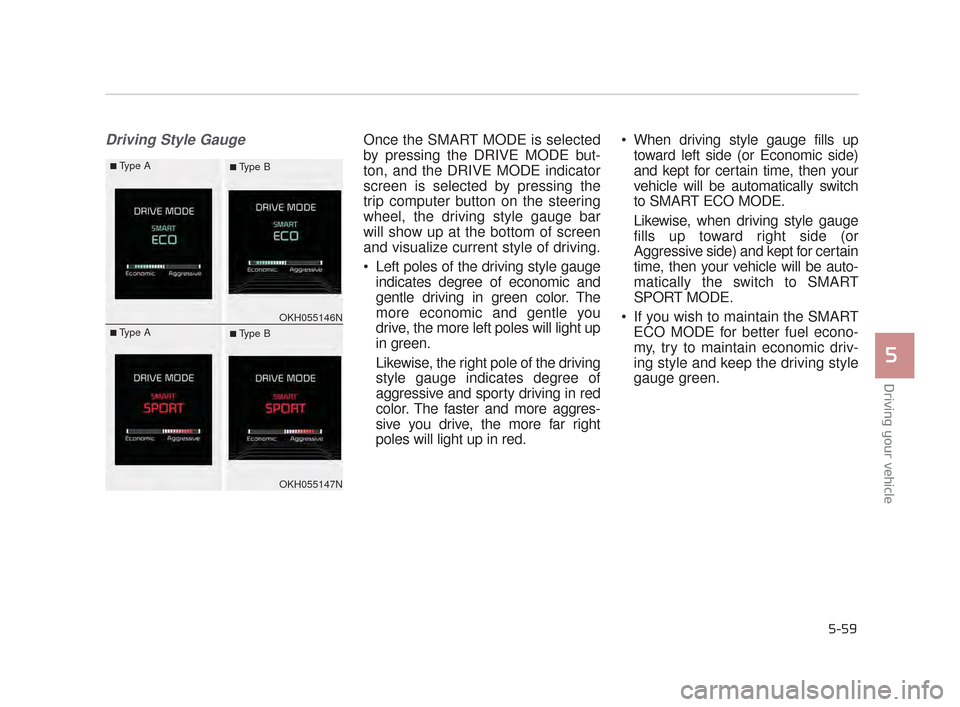
Driving Style GaugeOnce the SMART MODE is selected
by pressing the DRIVE MODE but-
ton, and the DRIVE MODE indicator
screen is selected by pressing the
trip computer button on the steering
wheel, the driving style gauge bar
will show up at the bottom of screen
and visualize current style of driving.
Left poles of the driving style gaugeindicates degree of economic and
gentle driving in green color. The
more economic and gentle you
drive, the more left poles will light up
in green.
Likewise, the right pole of the driving
style gauge indicates degree of
aggressive and sporty driving in red
color. The faster and more aggres-
sive you drive, the more far right
poles will light up in red. When driving style gauge fills up
toward left side (or Economic side)
and kept for certain time, then your
vehicle will be automatically switch
to SMART ECO MODE.
Likewise, when driving style gauge
fills up toward right side (or
Aggressive side) and kept for certain
time, then your vehicle will be auto-
matically the switch to SMART
SPORT MODE.
If you wish to maintain the SMART ECO MODE for better fuel econo-
my, try to maintain economic driv-
ing style and keep the driving style
gauge green.
Driving your vehicle
5
5-59
OKH055146N
OKH055147N
■Type A■ Type B
■Type A■ Type B
KH CAN (ENG) 5:2015 3/25/2015 10:52 AM Page 59
Page 320 of 522
Driving your vehicle
5
5-65
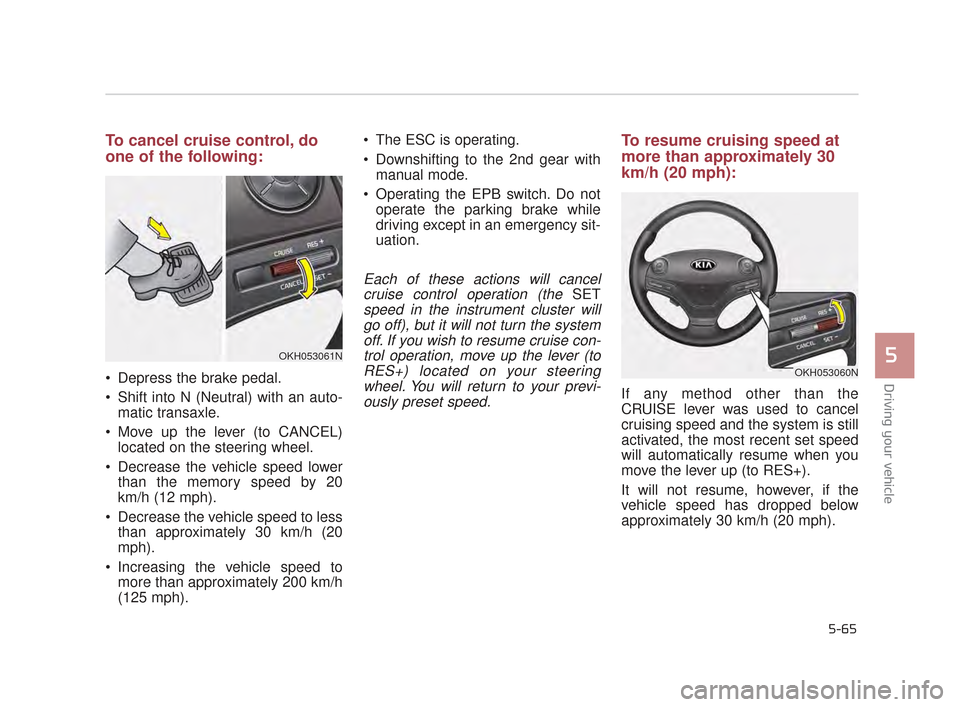
To cancel cruise control, do
one of the following:
Depress the brake pedal.
Shift into N (Neutral) with an auto-matic transaxle.
Move up the lever (to CANCEL) located on the steering wheel.
Decrease the vehicle speed lower than the memory speed by 20
km/h (12 mph).
Decrease the vehicle speed to less than approximately 30 km/h (20
mph).
Increasing the vehicle speed to more than approximately 200 km/h
(125 mph). The ESC is operating.
Downshifting to the 2nd gear with
manual mode.
Operating the EPB switch. Do not operate the parking brake while
driving except in an emergency sit-
uation.
Each of these actions will cancelcruise control operation (the
SET
speed in the instrument cluster willgo off), but it will not turn the systemoff. If you wish to resume cruise con-trol operation, move up the lever (toRES+) located on your steeringwheel. You will return to your previ-ously preset speed.
To resume cruising speed at
more than approximately 30
km/h (20 mph):
If any method other than the
CRUISE lever was used to cancel
cruising speed and the system is still
activated, the most recent set speed
will automatically resume when you
move the lever up (to RES+).
It will not resume, however, if the
vehicle speed has dropped below
approximately 30 km/h (20 mph).
OKH053061N
OKH053060N
KH CAN (ENG) 5:2015 3/25/2015 10:52 AM Page 65