Eco KIA K900 2017 Owners Manual
[x] Cancel search | Manufacturer: KIA, Model Year: 2017, Model line: K900, Model: KIA K900 2017Pages: 542, PDF Size: 14.89 MB
Page 240 of 542
Features of your vehicle
4-160
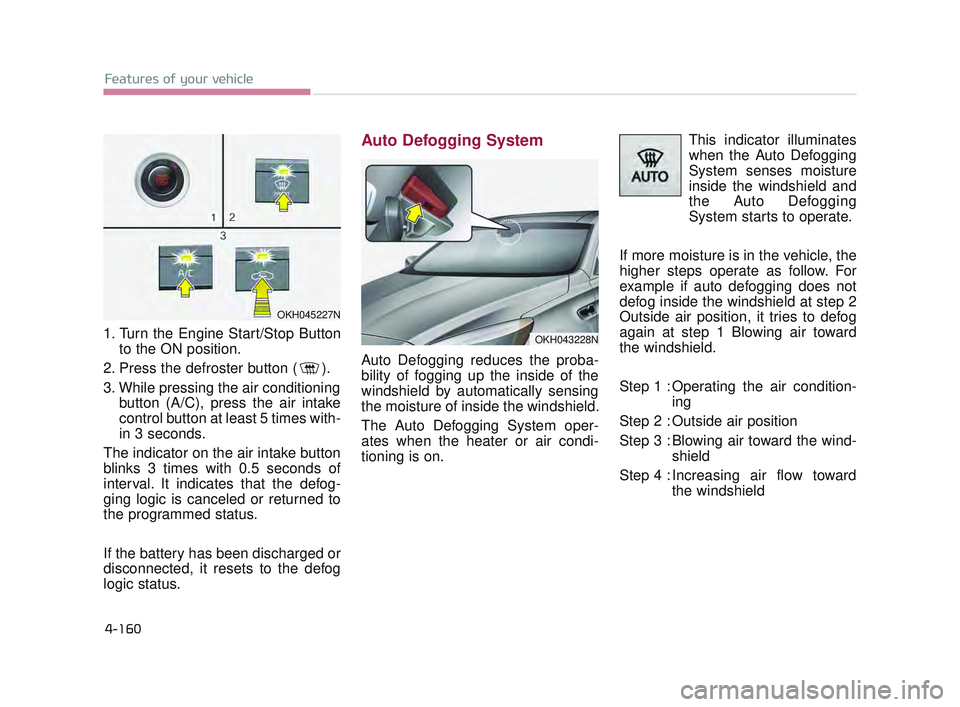
1. Turn the Engine Start/Stop Buttonto the ON position.
2. Press the defroster button ( ).
3. While pressing the air conditioning button (A/C), press the air intake
control button at least 5 times with-
in 3 seconds.
The indicator on the air intake button
blinks 3 times with 0.5 seconds of
interval. It indicates that the defog-
ging logic is canceled or returned to
the programmed status.
If the battery has been discharged or
disconnected, it resets to the defog
logic status.
Auto Defogging System
Auto Defogging reduces the proba-
bility of fogging up the inside of the
windshield by automatically sensing
the moisture of inside the windshield.
The Auto Defogging System oper-
ates when the heater or air condi-
tioning is on. This indicator illuminates
when the Auto Defogging
System senses moisture
inside the windshield and
the Auto Defogging
System starts to operate.
If more moisture is in the vehicle, the
higher steps operate as follow. For
example if auto defogging does not
defog inside the windshield at step 2
Outside air position, it tries to defog
again at step 1 Blowing air toward
the windshield.
Step 1 : Operating the air condition- ing
Step 2 : Outside air position
Step 3 : Blowing air toward the wind- shield
Step 4 : Increasing air flow toward the windshield
OKH043228N
OKH045227N
KH USA 4:2015 12/2/2016 10:30 AM Page 160
Page 241 of 542
Features of your vehicle
4
4-161
To cancel or reset the Auto Defogging
System
Press the front windshield defroster
button for 3 seconds when the
Engine Start/Stop button is in the ON
position. When the Auto Defogging
System is canceled, Front defroster
button will blink 6 times.
When the Auto Defogging System is
reset, Front defroster button will blink
3 times without a signal.✽NOTICE
If the A/C off or recirculated air
position is manually selected while
the auto defogging system is on, the
auto defogging indicator will blink 3
times to give notice that manual
operation is canceled.
Do not remove the sensor cover
located on the upper end of the
driver side windshield glass.
Damage to the system parts
could occur and may not be cov-
ered by your vehicle warranty.
CAUTION
KH USA 4:2015 12/2/2016 10:30 AM Page 161
Page 243 of 542
Features of your vehicle
4
4-163
Cluster ionizer
When the Engine Start/Stop button
is in the ON position, the clean air
function turns on automatically.
Also, the clean air function turns off
automatically, when the Engine
Start/Stop button is in the OFF posi-
tion.
Smart ventilation
When driving and the heater and air
conditioning system is off, the smart
ventilation system maintains pleas-
ant indoor aerial environment by
controlling the temperature, humidity
and CO2 of interior.
“SMART VENTILATION ON” mes-
sage is displayed on the AVN climate
monitor for 5 seconds when the
smart ventilation system operates.
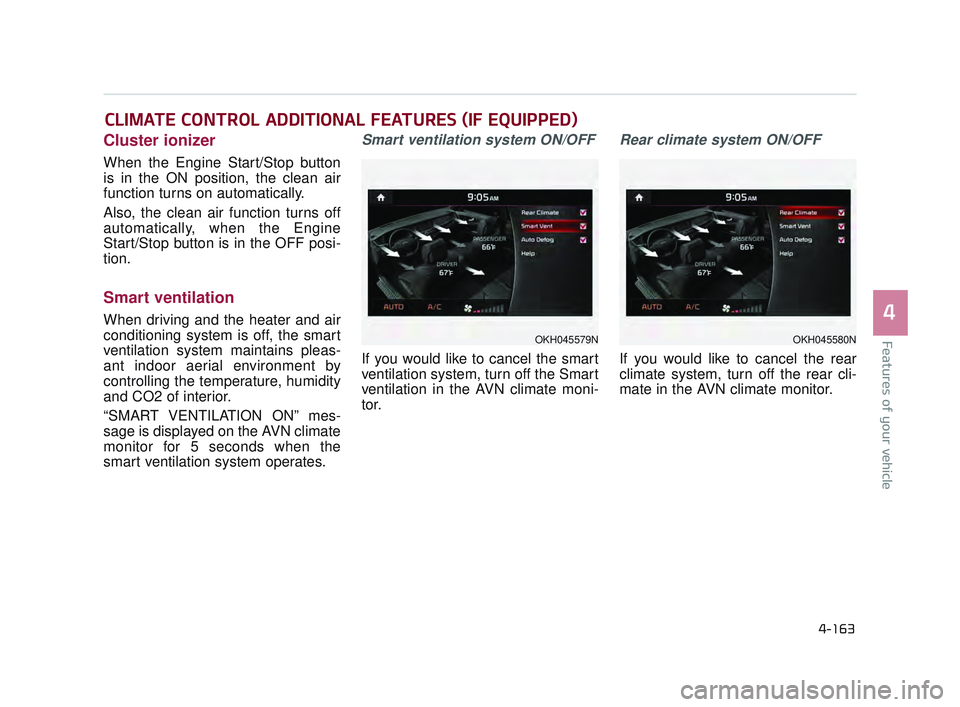
Smart ventilation system ON/OFF
If you would like to cancel the smart
ventilation system, turn off the Smart
ventilation in the AVN climate moni-
tor.
Rear climate system ON/OFF
If you would like to cancel the rear
climate system, turn off the rear cli-
mate in the AVN climate monitor.
CLIMATE CONTROL ADDITIONAL FEATURES (IF EQUIPPED)
OKH045579NOKH045580N
KH USA 4:2015 12/2/2016 10:30 AM Page 163
Page 251 of 542
Features of your vehicle
4
4-171
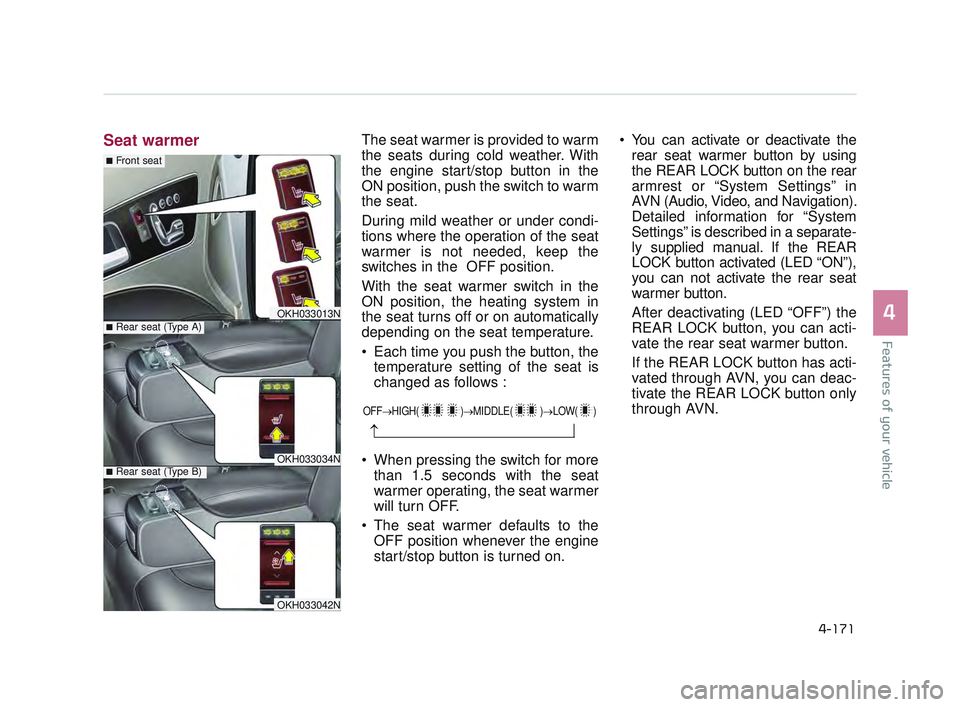
Seat warmerThe seat warmer is provided to warm
the seats during cold weather. With
the engine start/stop button in the
ON position, push the switch to warm
the seat.
During mild weather or under condi-
tions where the operation of the seat
warmer is not needed, keep the
switches in the OFF position.
With the seat warmer switch in the
ON position, the heating system in
the seat turns off or on automatically
depending on the seat temperature.
Each time you push the button, thetemperature setting of the seat is
changed as follows :
When pressing the switch for more than 1.5 seconds with the seat
warmer operating, the seat warmer
will turn OFF.
The seat warmer defaults to the OFF position whenever the engine
start/stop button is turned on. You can activate or deactivate the
rear seat warmer button by using
the REAR LOCK button on the rear
armrest or “System Settings” in
AVN (Audio, Video, and Navigation).
Detailed information for “System
Settings” is described in a separate-
ly supplied manual. If the REAR
LOCK button activated (LED “ON”),
you can not activate the rear seat
warmer button.
After deactivating (LED “OFF”) the
REAR LOCK button, you can acti-
vate the rear seat warmer button.
If the REAR LOCK button has acti-
vated through AVN, you can deac-
tivate the REAR LOCK button only
through AVN.
OFF→ HIGH( )→ MIDDLE( )→LOW( )
→
OKH033013N
OKH033034N
■Rear seat (Type A)
■Rear seat (Type B)
■Front seat
OKH033042N
KH USA 4:2015 12/2/2016 10:31 AM Page 171
Page 253 of 542
Features of your vehicle
4
4-173
When the operation of the air ventila-
tion is not needed, keep the switches
in the OFF position.
Each time you press the switch,the airflow will change as follows:
When pressing the switch for more than 1.5 seconds with the seat
cooler operating, the seat cooler
will turn OFF.
When the air ventilation seat is turned on, the seat may get cooler
after about 5 minutes.
Because the air ventilation uses the air in the vehicle, cooling effi-
ciency depends on the tempera-
ture of the air. In order to improve
cooling efficiency, use the air con-
ditioning system together.
The air ventilation seat defaults to the OFF position whenever the
Engine Start/Stop Button is turned
to the ON position. You can activate or deactivate the
rear air ventilation button by using
the REAR LOCK button on the rear
armrest or “System Settings” in
AVN (Audio, Video, and
Navigation). Detailed information
for “System Settings” is described
in a separately supplied manual. If
the REAR LOCK button activated
(LED “ON”), you can not activate
the rear air ventilation button.
After deactivating (LED “OFF”) the
REAR LOCK button, you can acti-
vate the rear air ventilation button.
If the REAR LOCK button has acti-
vated through AVN, you can deacti-
vate the REAR LOCK button only
through AVN.
The air ventilation seat is a supple- mentary cooling/heating system.
Use the air ventilation seat when
the climate control system is on.
Using the air ventilation seat for
prolonged periods of time with the
climate control system off could
cause the air ventilation seat per-
formance to impair. Do not place materials such as
plastic bags or newspapers under
the seats. The air vent may not
work properly as the air intake can
be blocked.
✽ NOTICE
When the air vent does not operate,
restart the vehicle. If there is no
change, have your vehicle inspected
by an authorized K900 Kia dealer.
OFF→ HIGH( )→ MIDDLE( )→LOW( )
→ When cleaning the seats, do
not use an organic solvent
such as paint thinner, ben-
zene, alcohol and gasoline.
Doing so may damage the
surface of the seats.
Do not spill liquid such as water or beverages on the
surface of the front seats and
seatbacks, or the air vent
holes may be blocked and
prevented from working prop-
erly.
CAUTION
KH USA 4:2015 12/2/2016 10:31 AM Page 173
Page 256 of 542
Features of your vehicle
4-176
The following must be observed
when installing ANY floor mat in the
vehicle.
Ensure that the floor mats aresecurely attached to the vehicle's
floor mat anchor(s) before driving
the vehicle.
Do not use ANY floor mat that can- not be firmly attached to the vehi-
cle's floor mat anchors.
Do not stack floor mats on top of one another (e.g. ,all-weather rub-
ber mat on top of a carpeted floor
mat). Only a single floor mat should
be installed in each position.
IMPORTANT - Your vehicle was
manufactured with driver's side floor
mat anchors that are designed to
securely hold the floor mat in place.
To avoid any interference with pedal
operation, Kia recommends that only
the Kia floor mat designed for use in
your vehicle be installed.Rear vanity mirror (if equipped)
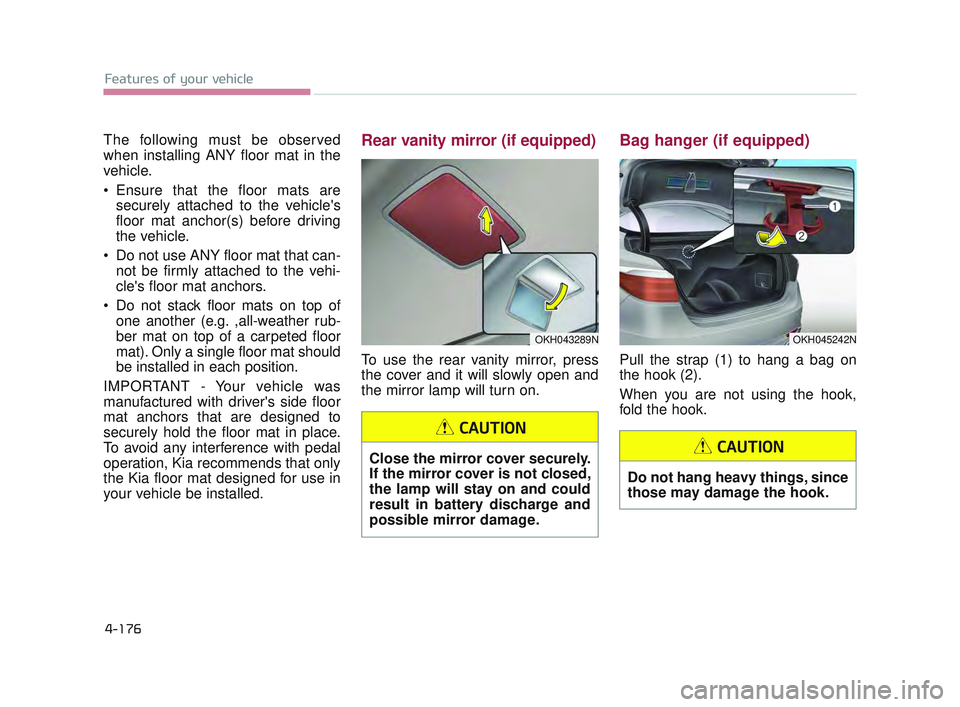
To use the rear vanity mirror, press
the cover and it will slowly open and
the mirror lamp will turn on.
Bag hanger (if equipped)
Pull the strap (1) to hang a bag on
the hook (2).
When you are not using the hook,
fold the hook.
OKH043289NOKH045242N
Close the mirror cover securely.
If the mirror cover is not closed,
the lamp will stay on and could
result in battery discharge and
possible mirror damage.
CAUTION
Do not hang heavy things, since
those may damage the hook.
CAUTION
KH USA 4:2015 12/2/2016 10:31 AM Page 176
Page 257 of 542
Features of your vehicle
4
4-177
Luggage net (holder)
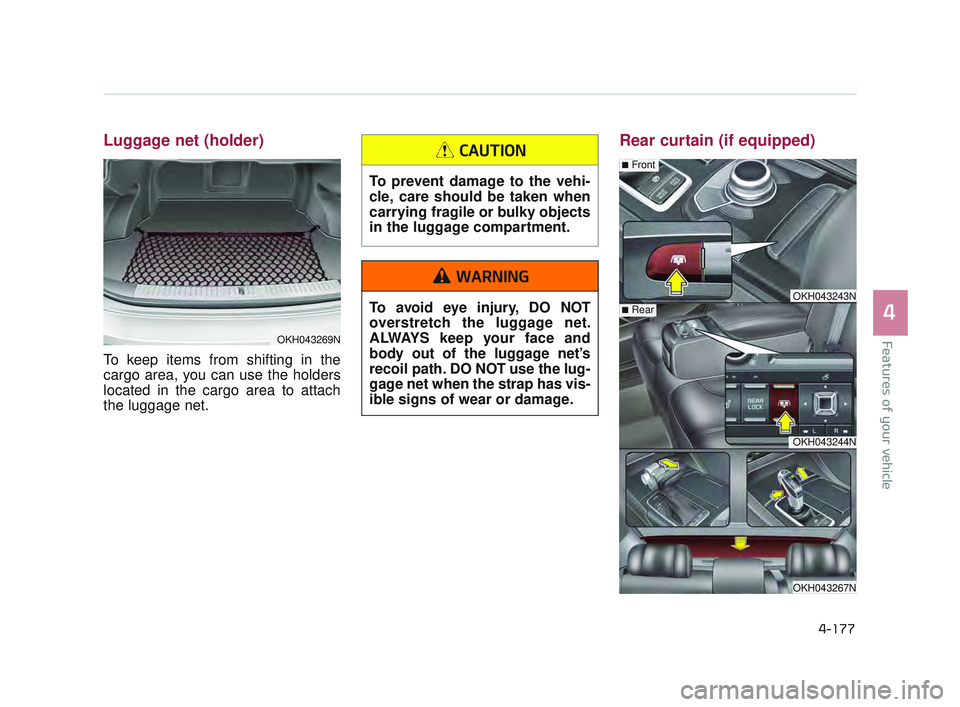
To keep items from shifting in the
cargo area, you can use the holders
located in the cargo area to attach
the luggage net.
Rear curtain (if equipped)
OKH043243N
OKH043244N
OKH043267N
■Rear
■Front
OKH043269N
To prevent damage to the vehi-
cle, care should be taken when
carrying fragile or bulky objects
in the luggage compartment.
CAUTION
To avoid eye injury, DO NOT
overstretch the luggage net.
ALWAYS keep your face and
body out of the luggage net’s
recoil path. DO NOT use the lug-
gage net when the strap has vis-
ible signs of wear or damage.
WARNING
KH USA 4:2015 12/2/2016 10:31 AM Page 177
Page 263 of 542
Features of your vehicle
4
4-183
RADIO mode
It will function as the AUTO SEEK
select button.
CD/USB/iPod
®mode
It will function as the FF/REW button.
If the SEEK/PRESET button is
pressed for less than 0.8 seconds, it
will work as follows in each mode.
RADIO mode
It will function as the PRESET STA-
TION buttons.
CD/USB/iPod
®mode
It will function as TRACK UP/DOWN
button.
MODE (3)
Press the MODE button to select
Radio, DISC, USB or AUX.
When the AV is OFF and the MODE
button is pressed for less than 0.8
second, the AV will turn on.
When the AV is ON and the MODE
button is press for more than 0.8 sec-
ond, the AV will turn off.
MUTE (4)
Move the MUTE lever up to cancel the sound.
Move the MUTE lever up again to activate the sound.
Detailed information is described in a
separately supplied manual.
4
KH USA 4:2015 12/2/2016 10:32 AM Page 183
Page 265 of 542
Blind Spot Detection System (BSD) .................5-86
LCA (Lane Change Assist) .................................5-87
..............................5-90
........................................5-92
Economical operation .......................................5-94
Special driving conditions .................................5-96
................................5-96
...............................................5-96
..................................................5-97
......................................................5-97
..................................................5-98
........................................5-98
.....................................................5-99
Winter driving ..................................................5-100
......................................5-100
.............5-102
...................................5-102
..........5-103
..............5-103
................................5-103
Use approved window washer anti-freeze
in system ............................................................5-103
.....................5-103
..5-103
Trailer Towing ..................................................5-104
Vehicle load limit .............................................5-105
.......................5-105
Vehicle weight .................................................5-110
5
KH USA 5:2016 12/1/2016 10:53 PM Page 2
Page 269 of 542
5-6
Driving your vehicle
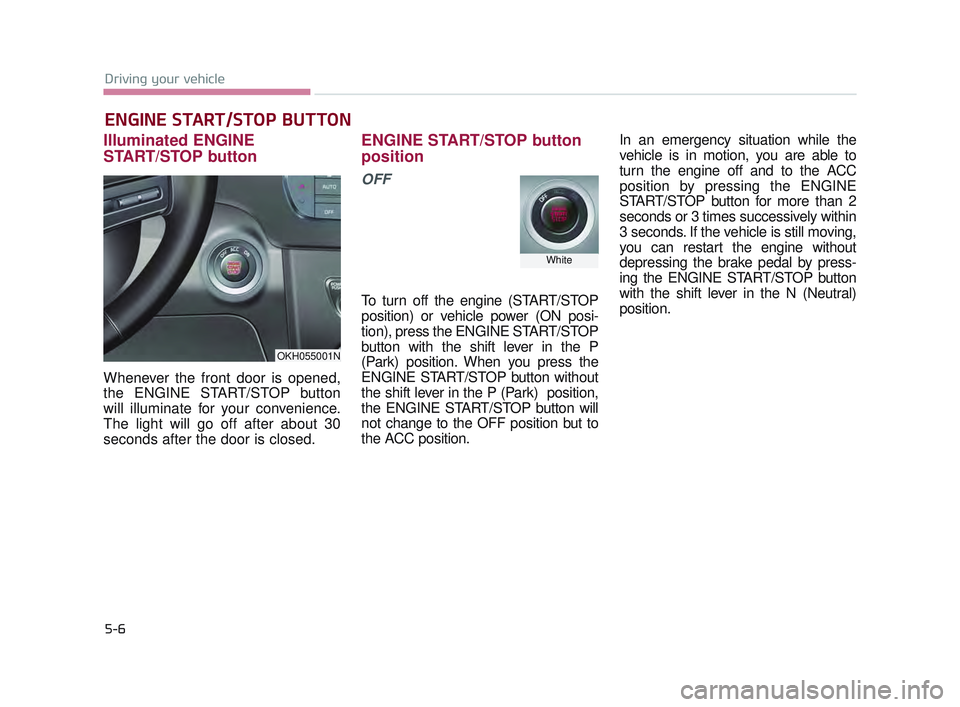
Illuminated ENGINE
START/STOP button
Whenever the front door is opened,
the ENGINE START/STOP button
will illuminate for your convenience.
The light will go off after about 30
seconds after the door is closed.
ENGINE START/STOP button
position
OFF
To turn off the engine (START/STOP
position) or vehicle power (ON posi-
tion), press the ENGINE START/STOP
button with the shift lever in the P
(Park) position. When you press the
ENGINE START/STOP button without
the shift lever in the P (Park) position,
the ENGINE START/STOP button will
not change to the OFF position but to
the ACC position.In an emergency situation while the
vehicle is in motion, you are able to
turn the engine off and to the ACC
position by pressing the ENGINE
START/STOP button for more than 2
seconds or 3 times successively within
3 seconds. If the vehicle is still moving,
you can restart the engine without
depressing the brake pedal by press-
ing the ENGINE START/STOP button
with the shift lever in the N (Neutral)
position.
ENGINE START/STOP BUTTON
OKH055001N
White
KH USA 5:2016 12/1/2016 10:54 PM Page 6