fuel KIA K900 2017 User Guide
[x] Cancel search | Manufacturer: KIA, Model Year: 2017, Model line: K900, Model: KIA K900 2017Pages: 542, PDF Size: 14.89 MB
Page 119 of 542
Features of your vehicle
4
4-39
Make sure to refuel your vehicle
according to the "Fuel requirements"
suggested in chapter 1.
If the fuel filler cap requires replace-
ment, use only a genuine Kia cap or
the equivalent specified for your vehi-
cle. An incorrect fuel filler cap can
result in a serious malfunction of the
fuel system or emission control sys-
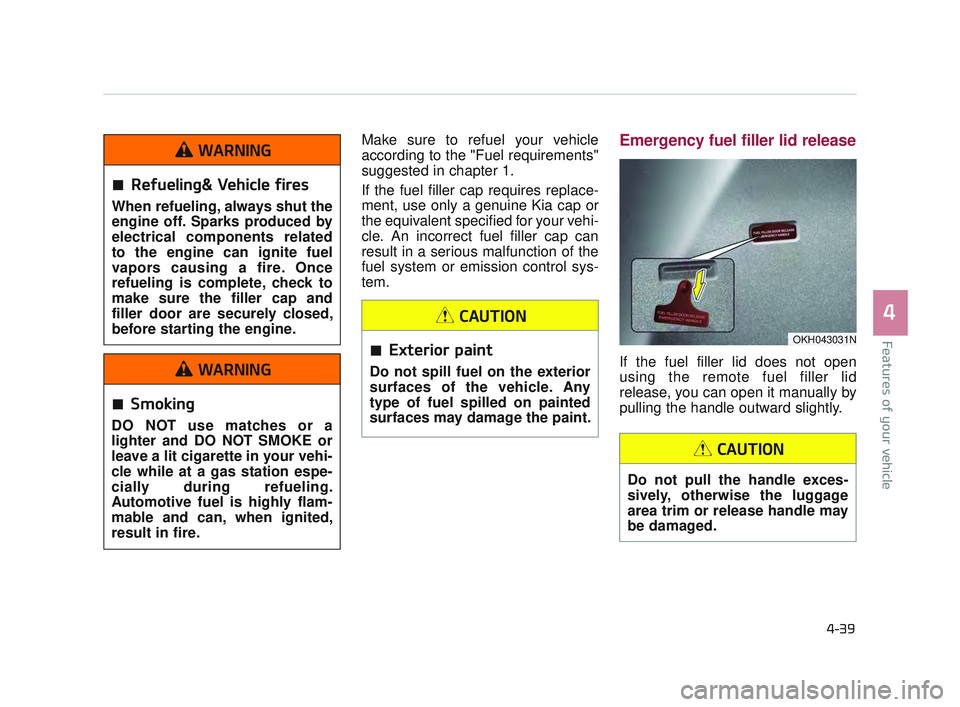
tem.Emergency fuel filler lid release
If the fuel filler lid does not open
using the remote fuel filler lid
release, you can open it manually by
pulling the handle outward slightly.
OKH043031N
Refueling& Vehicle fires
When refueling, always shut the
engine off. Sparks produced by
electrical components related
to the engine can ignite fuel
vapors causing a fire. Once
refueling is complete, check to
make sure the filler cap and
filler door are securely closed,
before starting the engine.
WARNING
Smoking
DO NOT use matches or a
lighter and DO NOT SMOKE or
leave a lit cigarette in your vehi-
cle while at a gas station espe-
cially during refueling.
Automotive fuel is highly flam-
mable and can, when ignited,
result in fire.
WARNING
Exterior paint
Do not spill fuel on the exterior
surfaces of the vehicle. Any
type of fuel spilled on painted
surfaces may damage the paint.
CAUTION
Do not pull the handle exces-
sively, otherwise the luggage
area trim or release handle may
be damaged.
CAUTION
KH USA 4:2015 12/2/2016 10:23 AM Page 39
Page 147 of 542
Features of your vehicle
4
4-67
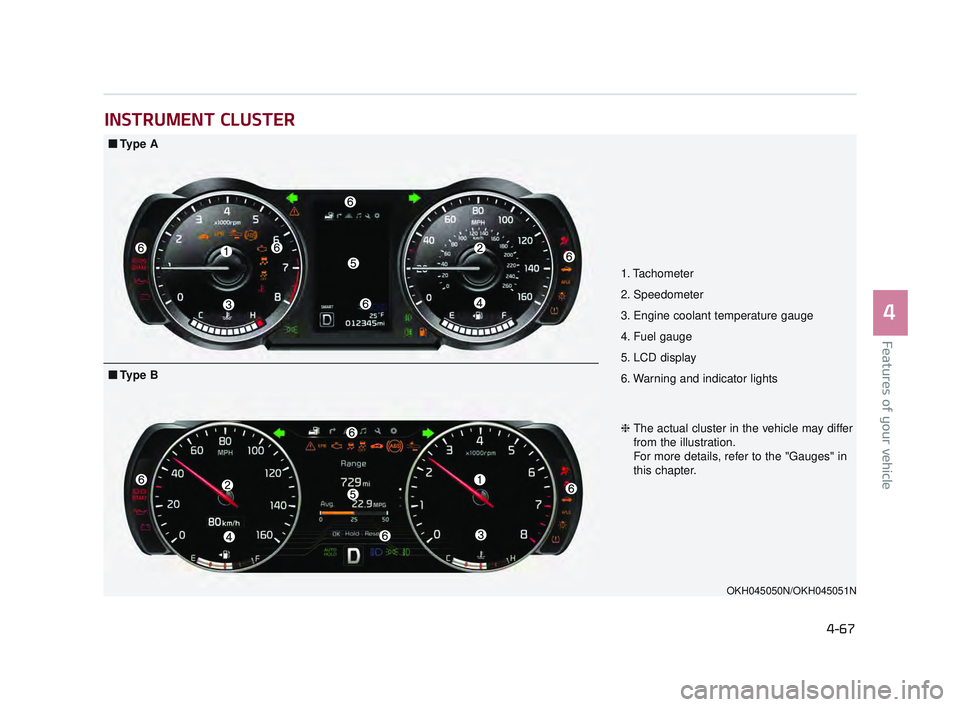
INSTRUMENT CLUSTER
1. Tachometer
2. Speedometer
3. Engine coolant temperature gauge
4. Fuel gauge
5. LCD display
6. Warning and indicator lights
OKH045050N/OKH045051N
■Ty p e A
❈The actual cluster in the vehicle may differ
from the illustration.
For more details, refer to the "Gauges" in
this chapter.
■Ty p e B
KH USA 4:2015 12/2/2016 10:25 AM Page 67
Page 151 of 542
Features of your vehicle
4
4-71
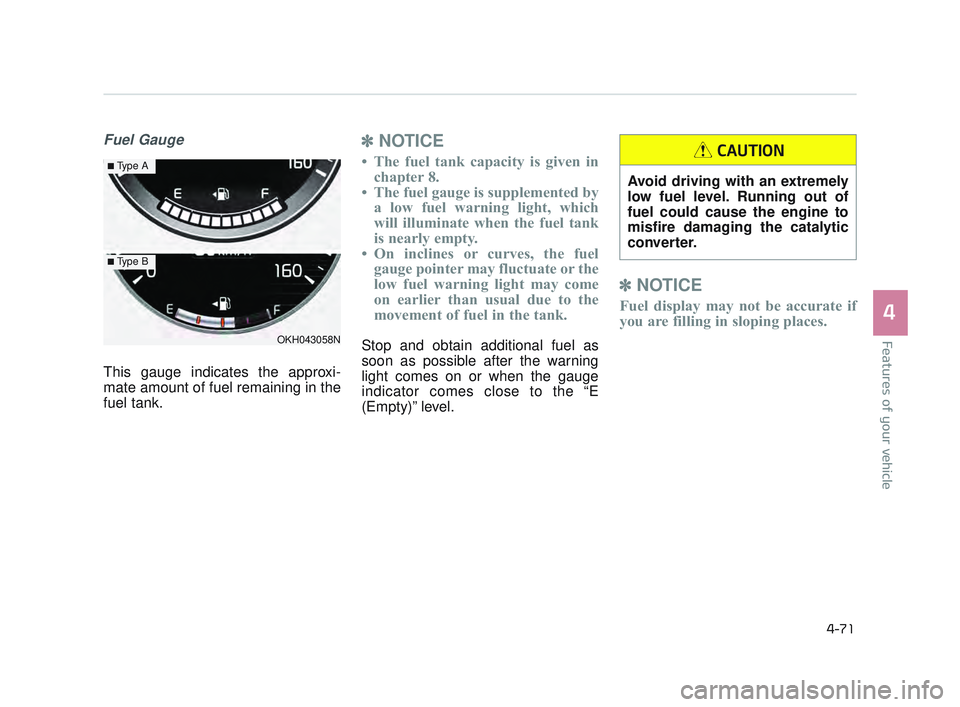
Fuel Gauge
This gauge indicates the approxi-
mate amount of fuel remaining in the
fuel tank.
✽NOTICE
• The fuel tank capacity is given in
chapter 8.
• The fuel gauge is supplemented by a low fuel warning light, which
will illuminate when the fuel tank
is nearly empty.
• On inclines or curves, the fuel gauge pointer may fluctuate or the
low fuel warning light may come
on earlier than usual due to the
movement of fuel in the tank.
Stop and obtain additional fuel as
soon as possible after the warning
light comes on or when the gauge
indicator comes close to the “E
(Empty)” level.
✽ NOTICE
Fuel display may not be accurate if
you are filling in sloping places.
OKH043058N
■Type A
■Type B
Avoid driving with an extremely
low fuel level. Running out of
fuel could cause the engine to
misfire damaging the catalytic
converter.
CAUTION
KH USA 4:2015 12/2/2016 10:25 AM Page 71
Page 153 of 542
Features of your vehicle
4
4-73
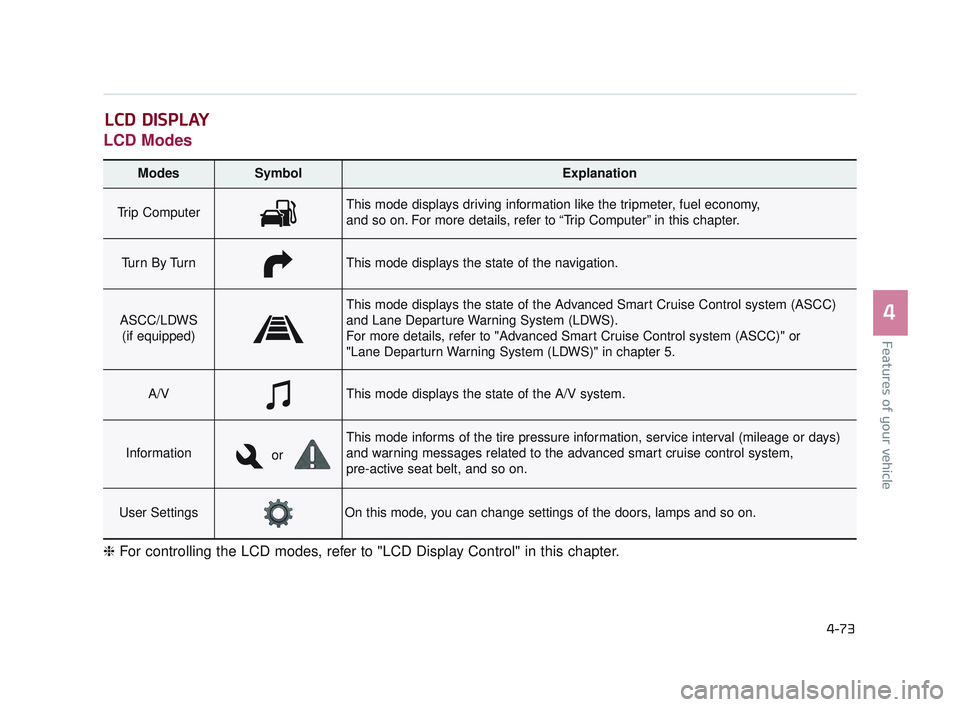
LCD Modes
LCD DISPLAY
Modes SymbolExplanation
Trip ComputerThis mode displays driving information like the tripmeter, fuel economy,
and so on. For more details, refer to “Trip Computer” in this chapter.
Tu r n B y Tu r nThis mode displays the state of the navigation.
ASCC/LDWS(if equipped)
This mode displays the state of the Advanced Smart Cruise Control system (ASCC)
and Lane Departure Warning System (LDWS).
For more details, refer to "Advanced Smart Cruise Control system (ASCC)" or
"Lane Departurn Warning System (LDWS)" in chapter 5.
A/VThis mode displays the state of the A/V system.
Information
This mode informs of the tire pressure information, service interval (mileage or days)
and warning messages related to the advanced smart cruise control system,
pre-active seat belt, and so on.
User SettingsOn this mode, you can change settings of the doors, lamps and so on.
❈ For controlling the LCD modes, refer to "LCD Display Control" in this chapter.
or
KH USA 4:2015 12/2/2016 10:25 AM Page 73
Page 154 of 542
Features of your vehicle
4-74
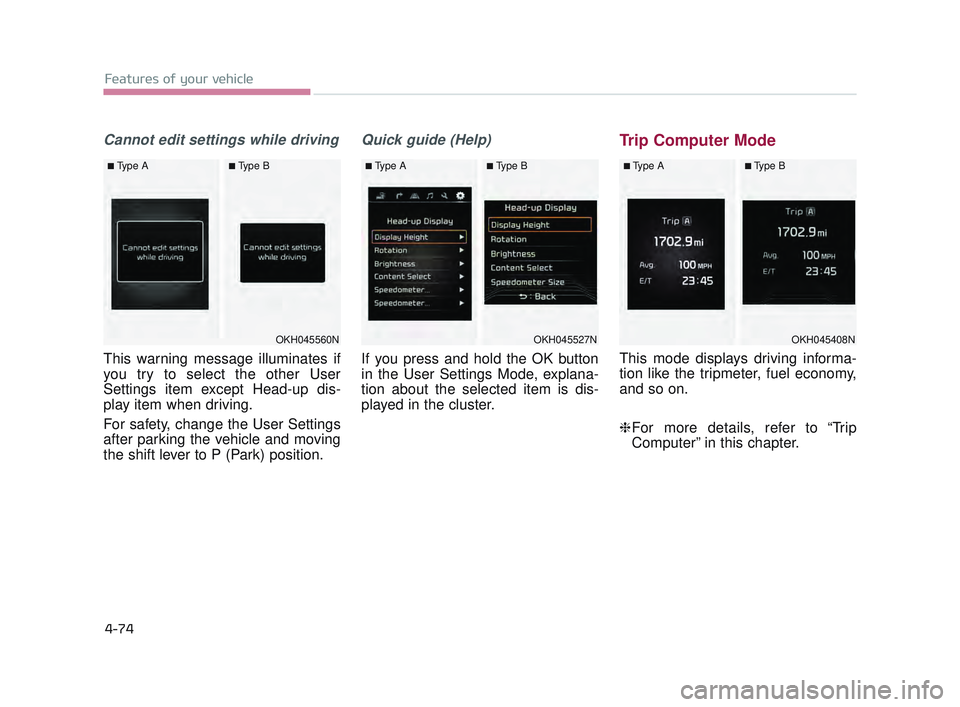
Cannot edit settings while driving
This warning message illuminates if
you try to select the other User
Settings item except Head-up dis-
play item when driving.
For safety, change the User Settings
after parking the vehicle and moving
the shift lever to P (Park) position.
Quick guide (Help)
If you press and hold the OK button
in the User Settings Mode, explana-
tion about the selected item is dis-
played in the cluster.
Trip Computer Mode
This mode displays driving informa-
tion like the tripmeter, fuel economy,
and so on.
❈For more details, refer to “Trip
Computer” in this chapter.
OKH045408N
■Type A■Type B
OKH045560N
■Type A■Type B
OKH045527N
■Type A■Type B
KH USA 4:2015 12/2/2016 10:25 AM Page 74
Page 162 of 542
Features of your vehicle
4-82
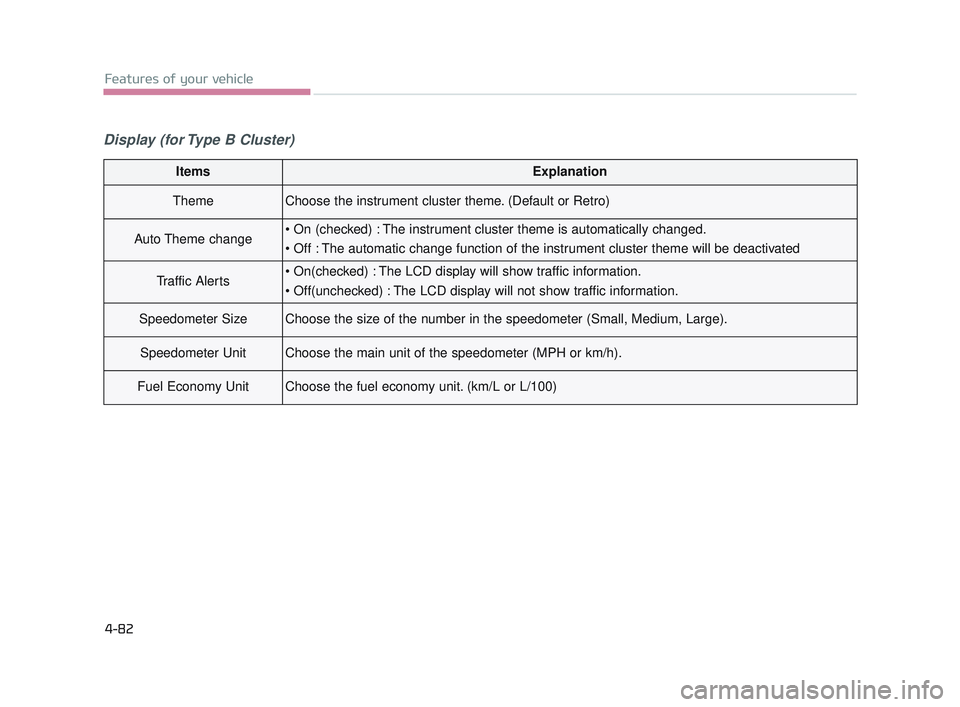
Display (for Type B Cluster)
ItemsExplanation
ThemeChoose the instrument cluster theme. (Default or Retro)
Auto Theme change
Traffic Alerts
Speedometer SizeChoose the size of the number in the speedometer (Small, Medium, Large).
Speedometer UnitChoose the main unit of the speedometer (MPH or km/h).
Fuel Economy UnitChoose the fuel economy unit. (km/L or L/100)
KH USA 4:2015 12/2/2016 10:26 AM Page 82
Page 164 of 542
Features of your vehicle
4-84
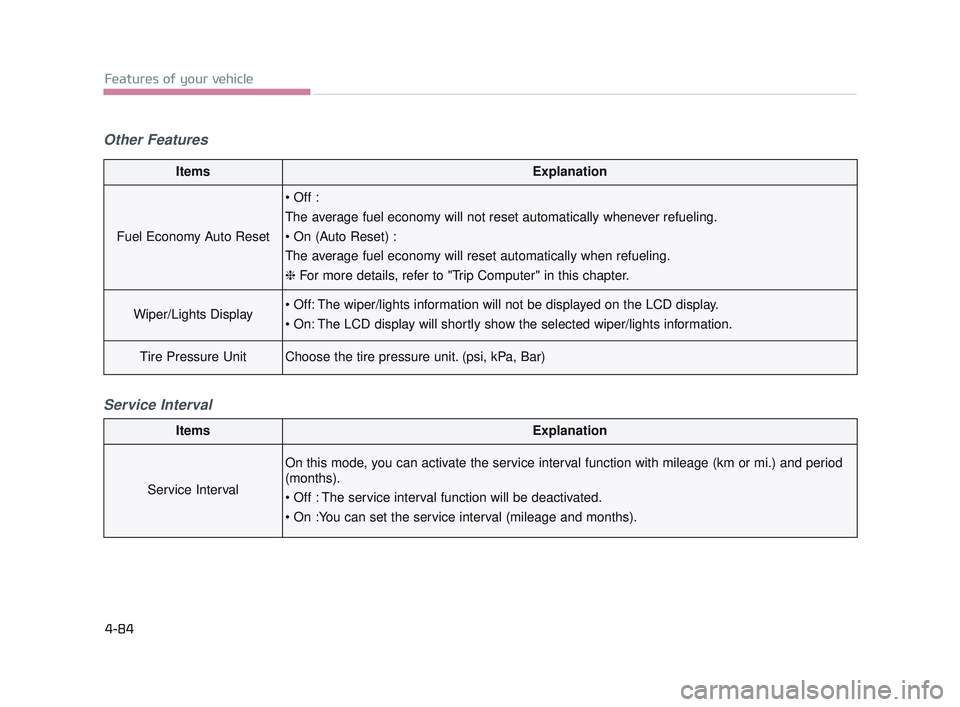
Other FeaturesService Interval
ItemsExplanation
Fuel Economy Auto Reset
The average fuel economy will not reset automatically whenever refueling.
The average fuel economy will reset automatically when refueling.
❈ For more details, refer to "Trip Computer" in this chapter.
Wiper/Lights Display
Tire Pressure UnitChoose the tire pressure unit. (psi, kPa, Bar)
ItemsExplanation
Service Interval
On this mode, you can activate the service interval function with mileage (km or mi.) and period
(months).
KH USA 4:2015 12/2/2016 10:26 AM Page 84
Page 174 of 542
Features of your vehicle
4-94
✽NOTICE
The warning message "Check
Active Air Flap System" may not be
displayed immediately in colder cli-
mates.
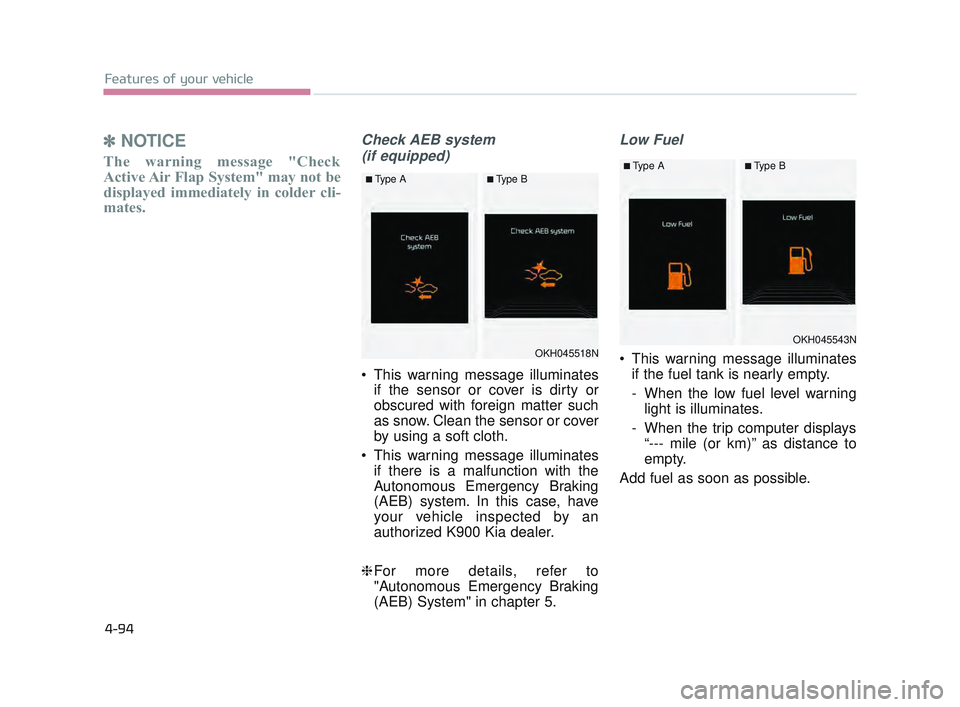
Check AEB system
(if equipped)
This warning message illuminates if the sensor or cover is dirty or
obscured with foreign matter such
as snow. Clean the sensor or cover
by using a soft cloth.
This warning message illuminates if there is a malfunction with the
Autonomous Emergency Braking
(AEB) system. In this case, have
your vehicle inspected by an
authorized K900 Kia dealer.
❈ For more details, refer to
"Autonomous Emergency Braking
(AEB) System" in chapter 5.
Low Fuel
This warning message illuminates
if the fuel tank is nearly empty.
- When the low fuel level warninglight is illuminates.
- When the trip computer displays “--- mile (or km)” as distance to
empty.
Add fuel as soon as possible.OKH045518N
■Type A■Type B
OKH045543N
■Type A■Type B
KH USA 4:2015 12/2/2016 10:26 AM Page 94
Page 176 of 542
Features of your vehicle
4-96
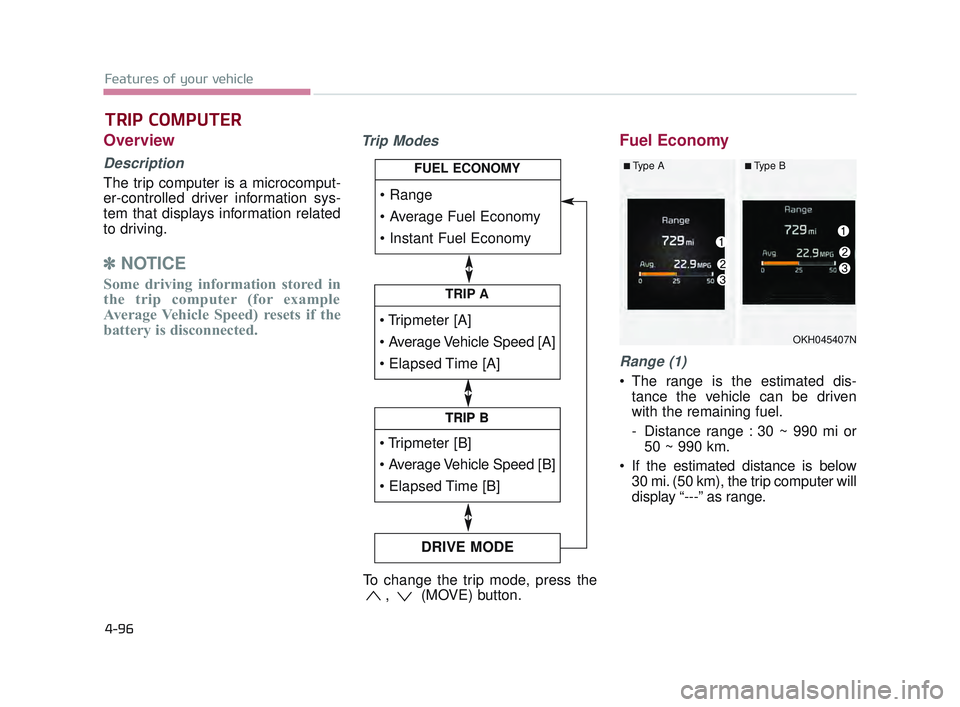
Overview
Description
The trip computer is a microcomput-
er-controlled driver information sys-
tem that displays information related
to driving.
✽NOTICE
Some driving information stored in
the trip computer (for example
Average Vehicle Speed) resets if the
battery is disconnected.
Trip ModesFuel Economy
Range (1)
The range is the estimated dis-
tance the vehicle can be driven
with the remaining fuel.
- Distance range : 30 ~ 990 mi or50 ~ 990 km.
If the estimated distance is below 30 mi. (50 km), the trip computer will
display “---” as range.
TRIP COMPUTER
TRIP A
TRIP B
DRIVE MODE
TRIP B
FUEL ECONOMY
To change the trip mode, press the , (MOVE) button.
OKH045407N
■Type A■Type B
KH USA 4:2015 12/2/2016 10:26 AM Page 96
Page 177 of 542
Features of your vehicle
4
4-97
✽NOTICE
• If the vehicle is not on level ground
or the battery power has been
interrupted, the range function
may not operate correctly.
• The range may differ from the actual driving distance as it is an
estimate of the available driving
distance.
• The trip computer may not register additional fuel if less than 1.6 gal-
lons (6 liters) of fuel are added to
the vehicle.
• The fuel economy and range may vary significantly based on driving
conditions, driving habits, and con-
dition of the vehicle.
Average Fuel Economy (2)
The average fuel economy is calcu-
lated by the total driving distance
and fuel consumption since the last
average fuel economy reset.
- Fuel economy range: 0.0 ~ 99.9MPG or L/100km
The average fuel economy can be reset both manually and automati-
cally.
Manual reset
To clear the average fuel economy
manually, press the OK (RESET) but-
ton on the steering wheel for more
than 1 second when the average fuel
economy is displayed. Automatic reset
To make the average fuel economy
be reset automatically whenever refu-
eling, select the “Auto Reset” mode in
User Setting menu of the LCD display
(Refer to “LCD Display”).
Under “Auto Reset” mode, the aver-
age fuel economy will be cleared to
zero (---) when the vehicle speed
exceeds 1 km/h after refueling more
than 1.6 gallons (6 liters).
✽
NOTICE
The average fuel economy is not dis-
played for more accurate calculation
if the vehicle does not drive more
than 0.19 miles (300 meters) since
the Engine Start/Stop button is
turned to ON.
KH USA 4:2015 12/2/2016 10:26 AM Page 97