height KIA K900 2017 User Guide
[x] Cancel search | Manufacturer: KIA, Model Year: 2017, Model line: K900, Model: KIA K900 2017Pages: 542, PDF Size: 14.89 MB
Page 51 of 542
Seat and safety features of your vehicle
3
3-33
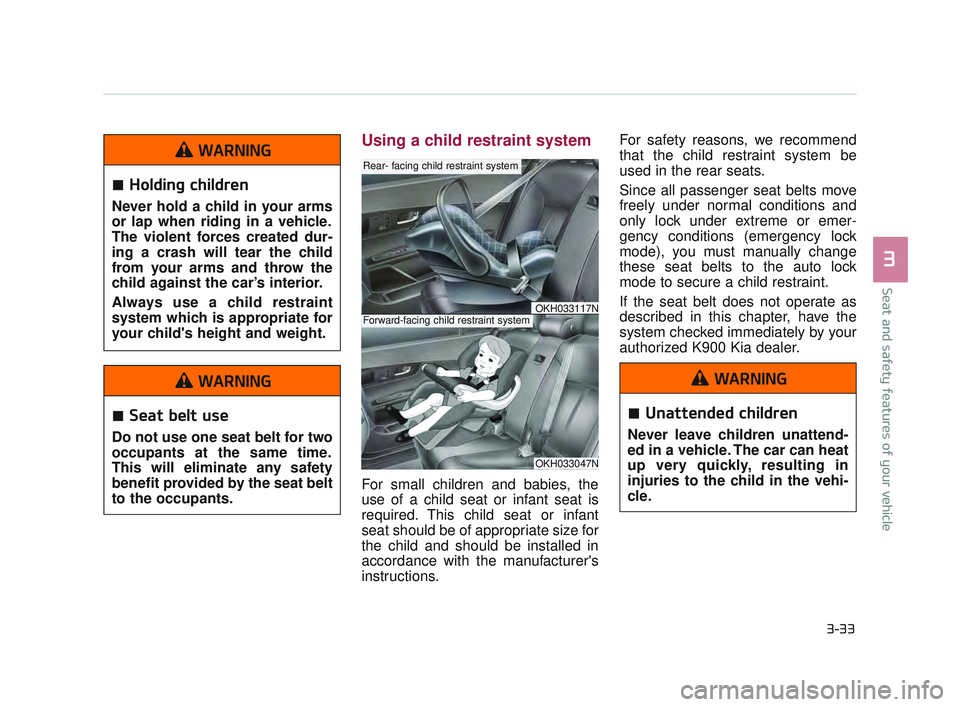
Using a child restraint system
For small children and babies, the
use of a child seat or infant seat is
required. This child seat or infant
seat should be of appropriate size for
the child and should be installed in
accordance with the manufacturer's
instructions. For safety reasons, we recommend
that the child restraint system be
used in the rear seats.
Since all passenger seat belts move
freely under normal conditions and
only lock under extreme or emer-
gency conditions (emergency lock
mode), you must manually change
these seat belts to the auto lock
mode to secure a child restraint.
If the seat belt does not operate as
described in this chapter, have the
system checked immediately by your
authorized K900 Kia dealer.
OKH033047N
Rear- facing child restraint system
Forward-facing child restraint systemOKH033117N
Holding children
Never hold a child in your arms
or lap when riding in a vehicle.
The violent forces created dur-
ing a crash will tear the child
from your arms and throw the
child against the car’s interior.
Always use a child restraint
system which is appropriate for
your child's height and weight.
WARNING
Seat belt use
Do not use one seat belt for two
occupants at the same time.
This will eliminate any safety
benefit provided by the seat belt
to the occupants.
WARNING
Unattended children
Never leave children unattend-
ed in a vehicle. The car can heat
up very quickly, resulting in
injuries to the child in the vehi-
cle.
WARNING
KH USA 3:2016 12/2/2016 10:12 AM Page 33
Page 79 of 542
Seat and safety features of your vehicle
3
3-61
SRS Care
The SRS is virtually maintenance-
free and there are no parts you can
safely service by yourself. If the SRS
air bag warning light does not illumi-
nate, or continuously remains on,
have your vehicle immediately
inspected by an authorized K900 Kia
dealer.
Any work on the SRS system, such
as removing, installing, repairing, or
any work on the steering wheel must
be performed by an authorized K900
Kia dealer. Improper handling of the
SRS system may result in serious
personal injury.
For cleaning the air bag pad covers,
use only a soft, dry cloth or one
which has been moistened with plain
water. Solvents or cleaners could
adversely affect the air bag covers
and proper deployment of the sys-
tem.If components of the air bag system
must be discarded, or if the vehicle
must be scrapped, certain safety
precautions must be observed. An
authorized K900 Kia dealer knows
these precautions and can give you
the necessary information. Failure to
follow these precautions and proce-
dures could increase the risk of per-
sonal injury.
Adding equipment to or modi-
fying your air bag-equipped
vehicle
If you modify your vehicle by changing
your vehicle's frame, bumper system,
front end or side sheet metal or ride
height, this may affect the operation of
your vehicle's air bag system.Tampering with SRS
Do not tamper with or discon-
nect SRS wiring, or other compo-
nents of the SRS system. Doing
so could result in the accidental
inflation of the air bags or by ren-
dering the SRS inoperative.
WARNING
KH USA 3:2016 12/2/2016 10:13 AM Page 61
Page 126 of 542
Features of your vehicle
4-46
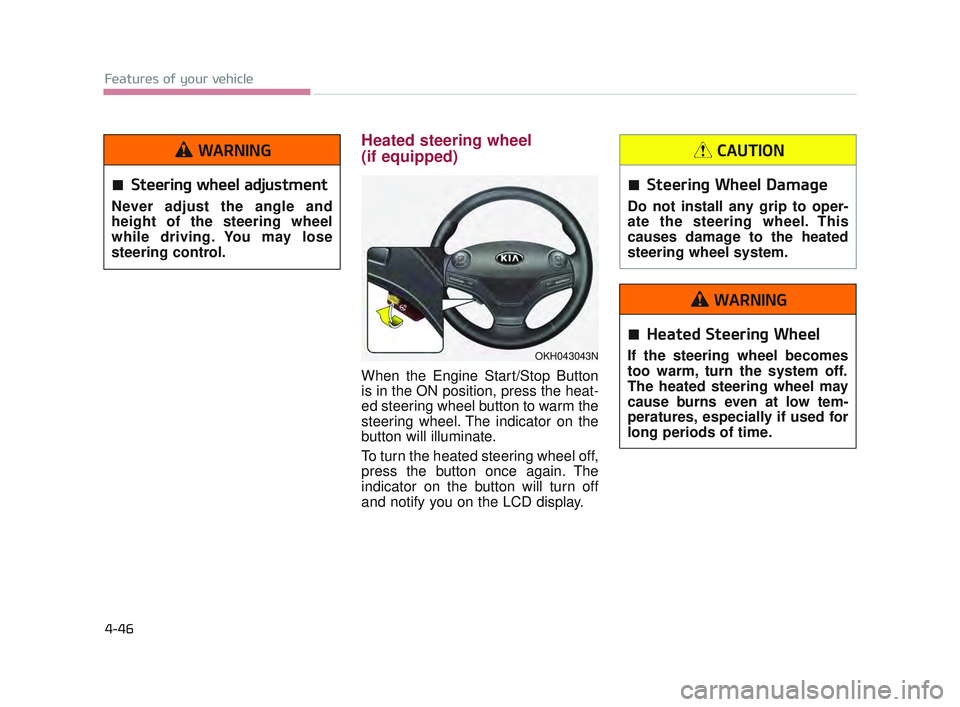
Heated steering wheel
(if equipped)
When the Engine Start/Stop Button
is in the ON position, press the heat-
ed steering wheel button to warm the
steering wheel. The indicator on the
button will illuminate.
To turn the heated steering wheel off,
press the button once again. The
indicator on the button will turn off
and notify you on the LCD display.
OKH043043N
Steering wheel adjustment
Never adjust the angle and
height of the steering wheel
while driving. You may lose
steering control.
WARNING
Steering Wheel Damage
Do not install any grip to oper-
ate the steering wheel. This
causes damage to the heated
steering wheel system.
CAUTION
Heated Steering Wheel
If the steering wheel becomes
too warm, turn the system off.
The heated steering wheel may
cause burns even at low tem-
peratures, especially if used for
long periods of time.
WARNING
KH USA 4:2015 12/2/2016 10:24 AM Page 46
Page 158 of 542
Features of your vehicle
4-78
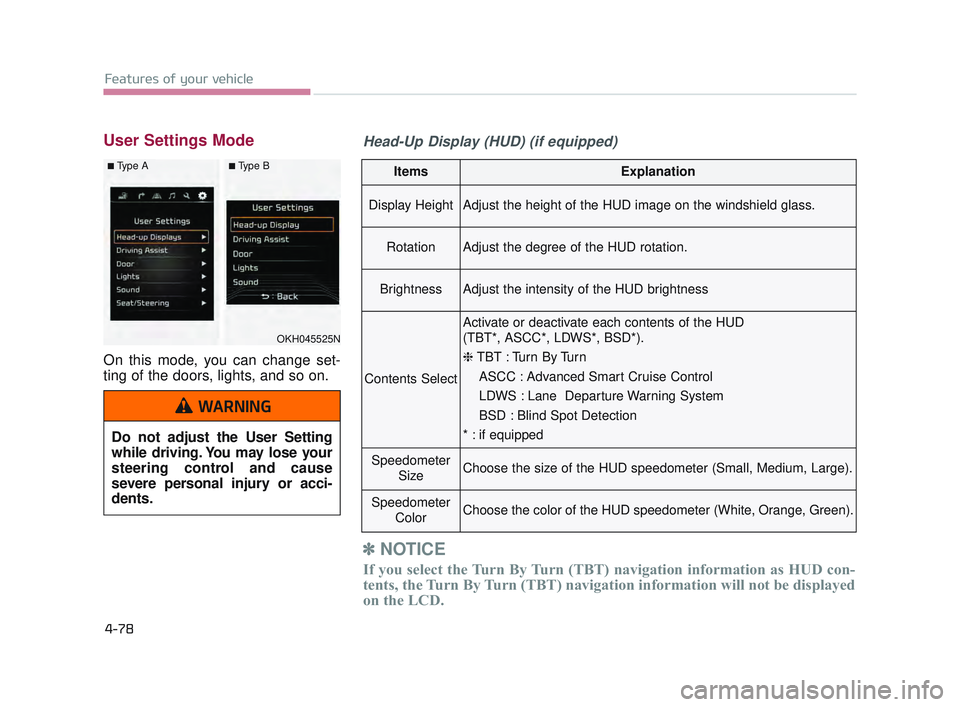
User Settings Mode
On this mode, you can change set-
ting of the doors, lights, and so on.
ItemsExplanation
Display HeightAdjust the height of the HUD image on the windshield glass.
RotationAdjust the degree of the HUD rotation.
BrightnessAdjust the intensity of the HUD brightness
Contents Select
Activate or deactivate each contents of the HUD
(TBT*, ASCC*, LDWS*, BSD*).
❈TBT : Turn By Turn
ASCC : Advanced Smart Cruise Control
LDWS : Lane Departure Warning System
BSD : Blind Spot Detection
* : if equipped
Speedometer SizeChoose the size of the HUD speedometer (Small, Medium, Large).
SpeedometerColorChoose the color of the HUD speedometer (White, Orange, Green).
✽NOTICE
If you select the Turn By Turn (TBT) navigation information as HUD con-
tents, the Turn By Turn (TBT) navigation information will not be displayed
on the LCD.
OKH045525N
■Type A■Type B
Head-Up Display (HUD) (if equipped)
Do not adjust the User Setting
while driving. You may lose your
steering control and cause
severe personal injury or acci-
dents.
WARNING
KH USA 4:2015 12/2/2016 10:26 AM Page 78
Page 195 of 542
Features of your vehicle
4
4-115
Description
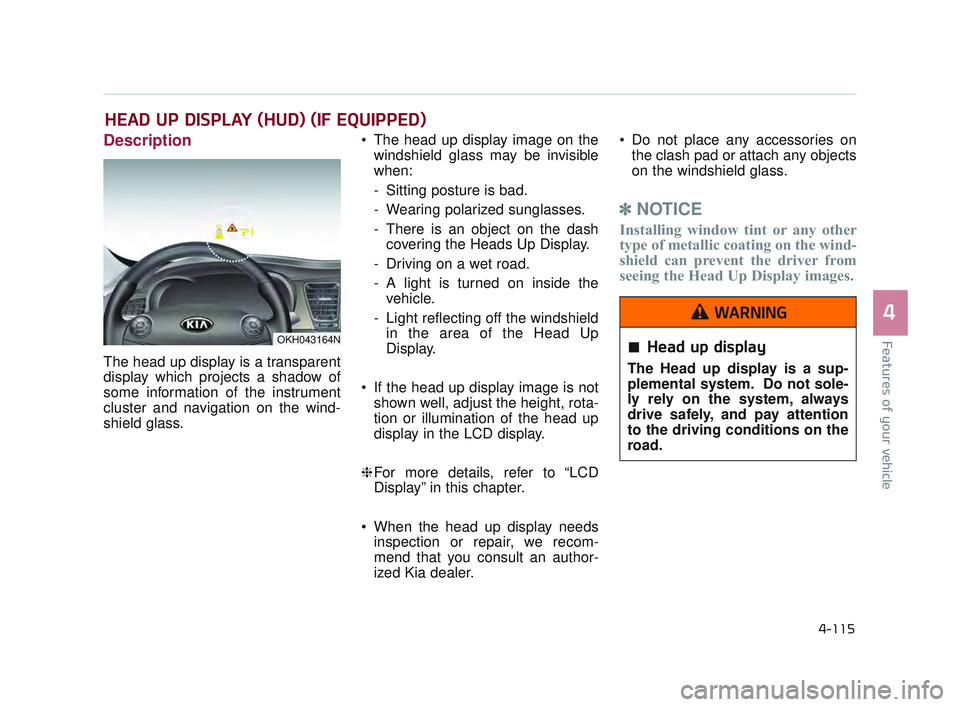
The head up display is a transparent
display which projects a shadow of
some information of the instrument
cluster and navigation on the wind-
shield glass. The head up display image on the
windshield glass may be invisible
when:
- Sitting posture is bad.
- Wearing polarized sunglasses.
- There is an object on the dashcovering the Heads Up Display.
- Driving on a wet road.
- A light is turned on inside the vehicle.
- Light reflecting off the windshield in the area of the Head Up
Display.
If the head up display image is not shown well, adjust the height, rota-
tion or illumination of the head up
display in the LCD display.
❈ For more details, refer to “LCD
Display” in this chapter.
When the head up display needs inspection or repair, we recom-
mend that you consult an author-
ized Kia dealer. Do not place any accessories on
the clash pad or attach any objects
on the windshield glass.
✽ NOTICE
Installing window tint or any other
type of metallic coating on the wind-
shield can prevent the driver from
seeing the Head Up Display images.
HEAD UP DISPLAY (HUD) (IF EQUIPPED)
OKH043164NHead up display
The Head up display is a sup-
plemental system. Do not sole-
ly rely on the system, always
drive safely, and pay attention
to the driving conditions on the
road.
WARNING
KH USA 4:2015 12/2/2016 10:27 AM Page 115
Page 197 of 542
Features of your vehicle
4
4-117
Head Up Display Setting
On the LCD display, you can change
the head up display settings as fol-
lows.
1. Display height
2. Rotation
3. Brightness
4. Contents select
5. Speedometer size
6. Speedometer color
❈For more details, refer to “LCD
Display” in this chapter.
KH USA 4:2015 12/2/2016 10:27 AM Page 117
Page 201 of 542
Features of your vehicle
4
4-121
✽NOTICE
1.The warning may not sound
sequentially depending on the
speed and shapes of the objects
detected.
2. The parking assist system may malfunction if the vehicle bumper
height or sensor installation has
been modified. Any non-factory
installed equipment or accessories
may also interfere with the sensor
performance.
3. Sensor may not recognize objects less than 12 in (30 cm) from the
sensor, or it may sense an incor-
rect distance. Use with caution.
4.When the sensor is frozen or stained with snow or water, the
sensor may be inoperative until
the stains are removed using a soft
cloth.
5. Do not push, scratch or strike the sensor with any hard objects that
could damage the surface of the
sensor. Sensor damage could occur.
✽ NOTICE
This system can only sense objects
within the range and location of the
sensors, it can not detect objects in
other areas where sensors are not
installed. Also, small or slim objects,
or objects located between sensors
may not be detected.
Always visually check in front and
behind the vehicle when driving.
Be sure to inform any drivers in the
vehicle that may be unfamiliar with
the system regarding the system’s
capabilities and limitations.
Self-diagnosis
If you don’t hear an audible warning
sound or if the buzzer sounds inter-
mittently when shifting the shift lever
into the R (Reverse) position, this
may indicate a malfunction in the
parking assist system. If this occurs,
have the system checked by an
authorized K900 Kia dealer.
✽NOTICE
Your new vehicle warranty does not
cover any accidents or damage to
the vehicle or injuries to its occu-
pants related to a parking assist sys-
tem. Always drive safely and cau-
tiously.
KH USA 4:2015 12/2/2016 10:27 AM Page 121
Page 304 of 542
![KIA K900 2017 User Guide Driving your vehicle
5
5-41
When you press the [AUTO HOLD]
switch, if the driver door, engine
hood and trunk are not closed or the
driver seat belt is not fastened, the
notice will illuminate on the L](/img/2/55061/w960_55061-303.png "KIA K900 2017 User Guide Driving your vehicle
5
5-41
When you press the [AUTO HOLD]
switch, if the driver door, engine
hood and trunk are not closed or the
driver seat belt is not fastened, the
notice will illuminate on the L")
Driving your vehicle
5
5-41
When you press the [AUTO HOLD]
switch, if the driver door, engine
hood and trunk are not closed or the
driver seat belt is not fastened, the
notice will illuminate on the LCD dis-
play. Also warning chime sounds
once. In that time, press the [AUTO
HOLD] button after closing the driver
door, engine hood and trunk and fas-
tening the seat belt.
Anti-lock brake system (ABS)
ABS (or ESC) will not prevent acci-
dents due to improper or dangerous
driving maneuvers. Even though
vehicle control is improved during
emergency braking, always maintain
a safe distance between you and
objects ahead. Vehicle speeds
should always be reduced during
extreme road conditions.
The vehicle should be driven at
reduced speeds in the following cir-
cumstances:
When driving on rough, gravel orsnow-covered roads
When driving with tire chains installed
When driving on roads where the road surface is pitted or has differ-
ent surface heights.
Driving in these conditions increases
the stopping distance for your vehi-
cle. The ABS continuously senses the
speed of the wheels. If the wheels
are going to lock, the ABS system
repeatedly modulates the hydraulic
brake pressure to the wheels.
When you apply your brakes under
conditions which may lock the
wheels, you may hear a “tik-tik’’
sound from the brakes, or feel a cor-
responding sensation in the brake
pedal. This is normal and it means
your ABS is active.
In order to obtain the maximum ben-
efit from your ABS in an emergency
situation, do not attempt to modulate
your brake pressure and do not try to
pump your brakes. Press your brake
pedal as hard as possible or as hard
as the situation allows the ABS to
control the force being delivered to
the brakes.
OKH053046N
■Type A■Type B
KH USA 5:2016 12/1/2016 10:55 PM Page 41
Page 343 of 542
5-80
Driving your vehicle
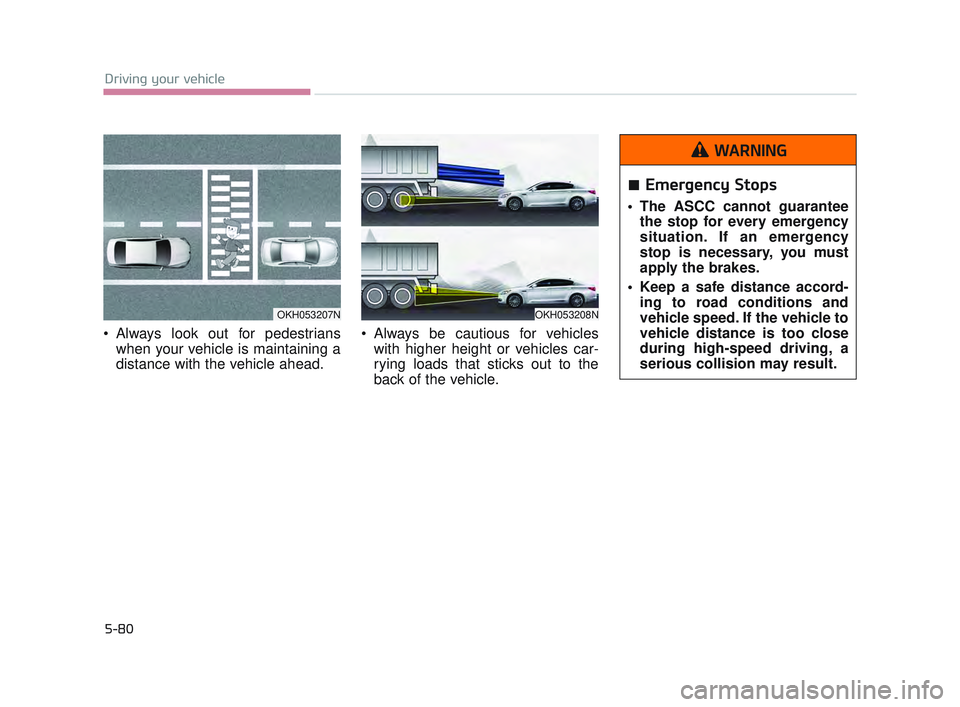
Always look out for pedestrianswhen your vehicle is maintaining a
distance with the vehicle ahead. Always be cautious for vehicles
with higher height or vehicles car-
rying loads that sticks out to the
back of the vehicle.
OKH053207NOKH053208N
Emergency Stops
The ASCC cannot guaranteethe stop for every emergency
situation. If an emergency
stop is necessary, you must
apply the brakes.
Keep a safe distance accord- ing to road conditions and
vehicle speed. If the vehicle to
vehicle distance is too close
during high-speed driving, a
serious collision may result.
WARNING
KH USA 5:2016 12/1/2016 10:56 PM Page 80
Page 355 of 542
5-92
Driving your vehicle
✽NOTICE
• The system may not work proper-
ly if the bumper has been replaced
or if repair work has been done
near the sensor.
• The detection area differs accord- ing to the roads width. If the road
is narrow the system may detect
other vehicles in the next lane.
• In addition, if the road is very wide the system may not detect
other vehicles.
• The system may turn off due to strong electromagnetic waves.
Non-operating condition
Driver's Attention
The driver must be cautious in the
below situations for the system may
not detect other vehicles or objects in
certain circumstances.
- Curved roads, tollgates, etc.
- The surrounding of the sensor is
polluted with rain, snow, mud, etc
- The rear bumper near the sensor is covered or hidden with a foreign
matter such as a sticker, bumper
guard, bicycle stand etc.
- The rear bumper is damaged or the sensor is out of place.
- The height of the vehicle is altered such as when the trunk is loaded
with heavy objects, or there is low
tire pressure etc.
- Bad weather such as heavy rain or snow. - A fixed object is near such as a
guardrail, tunnel, human and ani-
mal etc.
- Metal substances are near the vehicles such as in a construction
area.
- A big vehicle is near such as a bus or truck.
- A motorcycle or bicycle is near.
- A flat trailer like vehicle is near.
- If the vehicle has started at the same time as the vehicle next to it
and has accelerated.
- When the other vehicle passes by very fast.
- When changing lanes.
- When going down or up a steep, uneven road.
- When the other vehicle drives at the rear very nearby or drives very
close.
KH USA 5:2016 12/1/2016 10:57 PM Page 92