display KIA K900 2017 Workshop Manual
[x] Cancel search | Manufacturer: KIA, Model Year: 2017, Model line: K900, Model: KIA K900 2017Pages: 542, PDF Size: 14.89 MB
Page 314 of 542
Driving your vehicle
5
5-51
✽NOTICE
• If the AEB is canceled from the
User Settings Mode or there is a
problem with the AEB system, the
Automatic Emergency Mode will
not work.
• If the ESC is off or there is a prob- lem with the ESC system, the
Automatic Emergency Mode will
not work.
• The ESC must be on for the Automatic Emergency Mode to
control ESC in collision situations.
To cancel the AEB
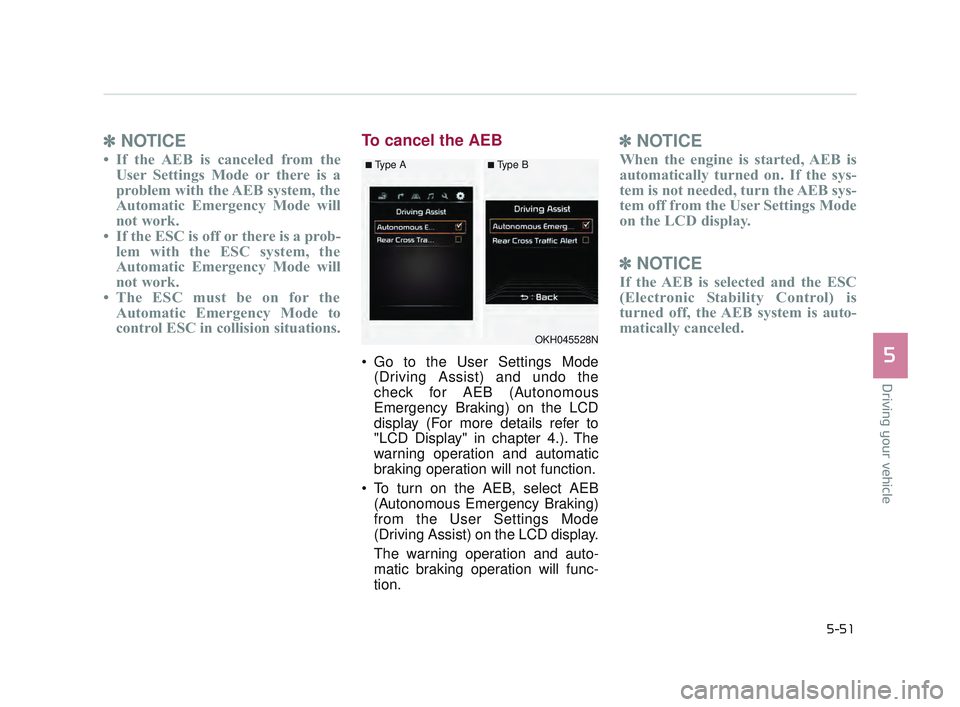
Go to the User Settings Mode
(Driving Assist) and undo the
check for AEB (Autonomous
Emergency Braking) on the LCD
display (For more details refer to
"LCD Display" in chapter 4.). The
warning operation and automatic
braking operation will not function.
To turn on the AEB, select AEB (Autonomous Emergency Braking)
from the User Settings Mode
(Driving Assist) on the LCD display.
The warning operation and auto-
matic braking operation will func-
tion.
✽ NOTICE
When the engine is started, AEB is
automatically turned on. If the sys-
tem is not needed, turn the AEB sys-
tem off from the User Settings Mode
on the LCD display.
✽NOTICE
If the AEB is selected and the ESC
(Electronic Stability Control) is
turned off, the AEB system is auto-
matically canceled.
OKH045528N
■Type A■Type B
KH USA 5:2016 12/1/2016 10:55 PM Page 51
Page 321 of 542
5-58
Driving your vehicle
DRIVE MODE Indicator Screen
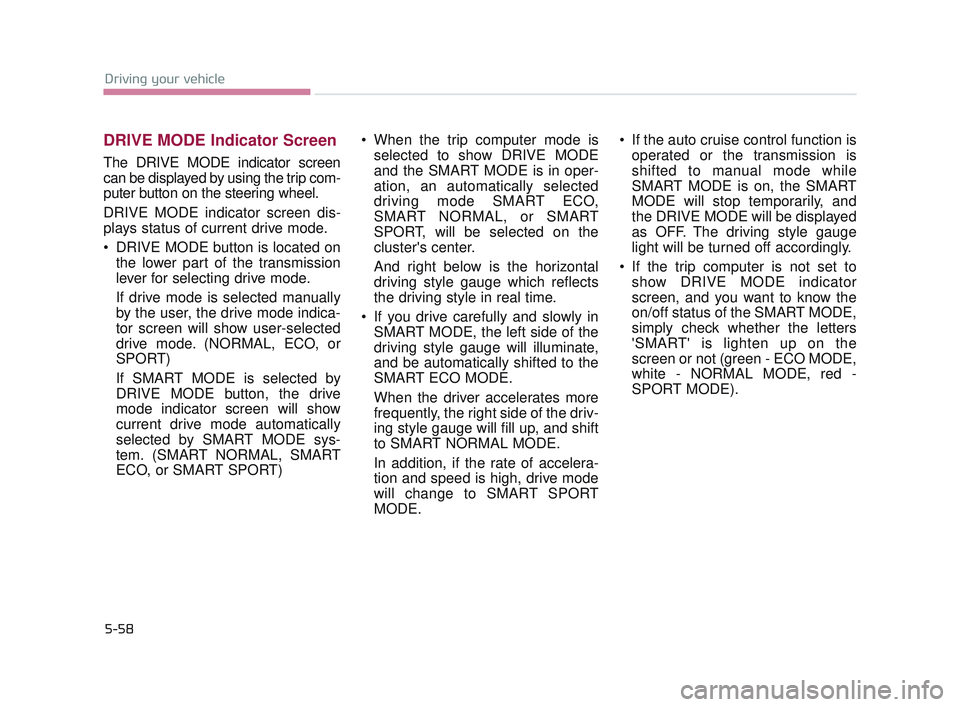
The DRIVE MODE indicator screen
can be displayed by using the trip com-
puter button on the steering wheel.
DRIVE MODE indicator screen dis-
plays status of current drive mode.
DRIVE MODE button is located onthe lower part of the transmission
lever for selecting drive mode.
If drive mode is selected manually
by the user, the drive mode indica-
tor screen will show user-selected
drive mode. (NORMAL, ECO, or
SPORT)
If SMART MODE is selected by
DRIVE MODE button, the drive
mode indicator screen will show
current drive mode automatically
selected by SMART MODE sys-
tem. (SMART NORMAL, SMART
ECO, or SMART SPORT) When the trip computer mode is
selected to show DRIVE MODE
and the SMART MODE is in oper-
ation, an automatically selected
driving mode SMART ECO,
SMART NORMAL, or SMART
SPORT, will be selected on the
cluster's center.
And right below is the horizontal
driving style gauge which reflects
the driving style in real time.
If you drive carefully and slowly in SMART MODE, the left side of the
driving style gauge will illuminate,
and be automatically shifted to the
SMART ECO MODE.
When the driver accelerates more
frequently, the right side of the driv-
ing style gauge will fill up, and shift
to SMART NORMAL MODE.
In addition, if the rate of accelera-
tion and speed is high, drive mode
will change to SMART SPORT
MODE. If the auto cruise control function is
operated or the transmission is
shifted to manual mode while
SMART MODE is on, the SMART
MODE will stop temporarily, and
the DRIVE MODE will be displayed
as OFF. The driving style gauge
light will be turned off accordingly.
If the trip computer is not set to show DRIVE MODE indicator
screen, and you want to know the
on/off status of the SMART MODE,
simply check whether the letters
'SMART' is lighten up on the
screen or not (green - ECO MODE,
white - NORMAL MODE, red -
SPORT MODE).
KH USA 5:2016 12/1/2016 10:55 PM Page 58
Page 333 of 542
5-70
Driving your vehicle
Cancelled automatically
The driver's door is opened.
The shift lever is shifted to N(Neutral), R (Reverse) or D (Drive).
The EPB (electronic parking brake) is applied.
The vehicle speed is over 120 mph (190 km/h)
The vehicle stops on a steep incline.
The ESC, TCS or ABS is operat- ing.
The ESC is turned off.
The sensor or the cover is dirty or blocked with foreign matter.
When the vehicle is stopped for over 5 minutes.
The vehicle stops and go repeat- edly for a long period of time.
The driver starts driving by pushing the lever up (RES +) or down (SET
-), approximately 3 seconds after
the vehicle is stopped by the Smart
Cruise Control System with no
other vehicle ahead. The driver starts driving by
depressing the accelerator pedal
or move up the lever (to RES+) or
down(to SET-) if a vehicle stops far
away ahead of the your vehicle.
The accelerator pedal is continu- ously depressed for more than 1
minute.
Each of these actions will cancel
the ASCC operation. (the set
speed and vehicle to vehicle dis-
tance on the LCD display will go
off.)
In a condition where the ASCC is
cancelled automatically, the ASCC
will not resume even though the
RES+ or SET- lever is moved. Also,
the EPB (electronic parking brake)
will be applied when the vehicle is
stopped.
✽ NOTICE
If the ASCC is cancelled by other
than the reasons mentioned, have the
system checked by an authorized
K900 Kia dealer.
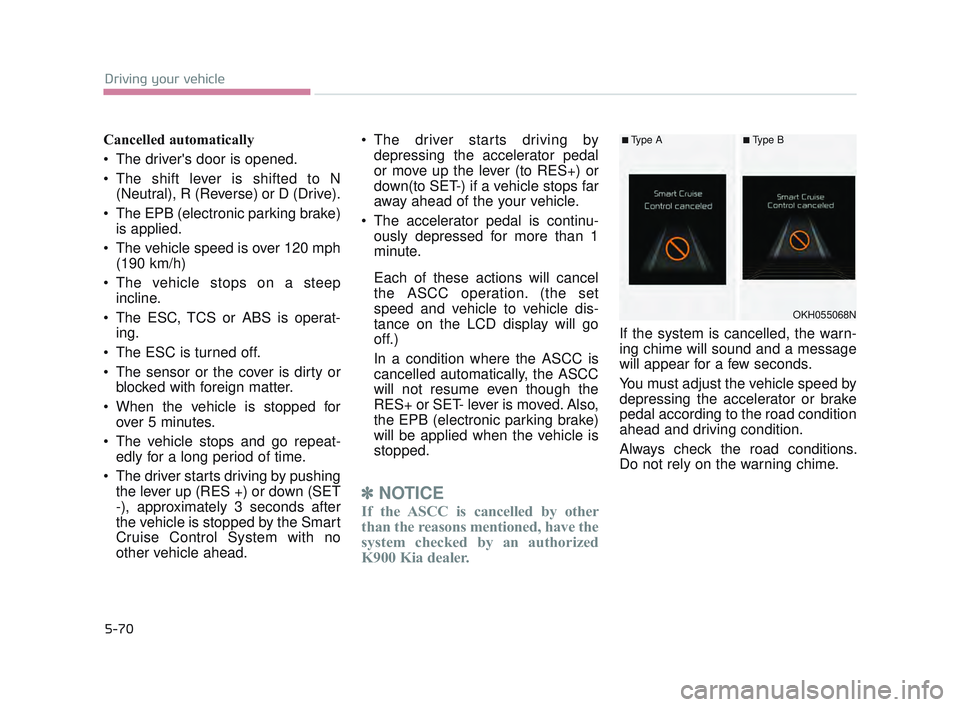
If the system is cancelled, the warn-
ing chime will sound and a message
will appear for a few seconds.
You must adjust the vehicle speed by
depressing the accelerator or brake
pedal according to the road condition
ahead and driving condition.
Always check the road conditions.
Do not rely on the warning chime.
OKH055068N
■Type A■Type B
KH USA 5:2016 12/1/2016 10:56 PM Page 70
Page 336 of 542
Driving your vehicle
5
5-73
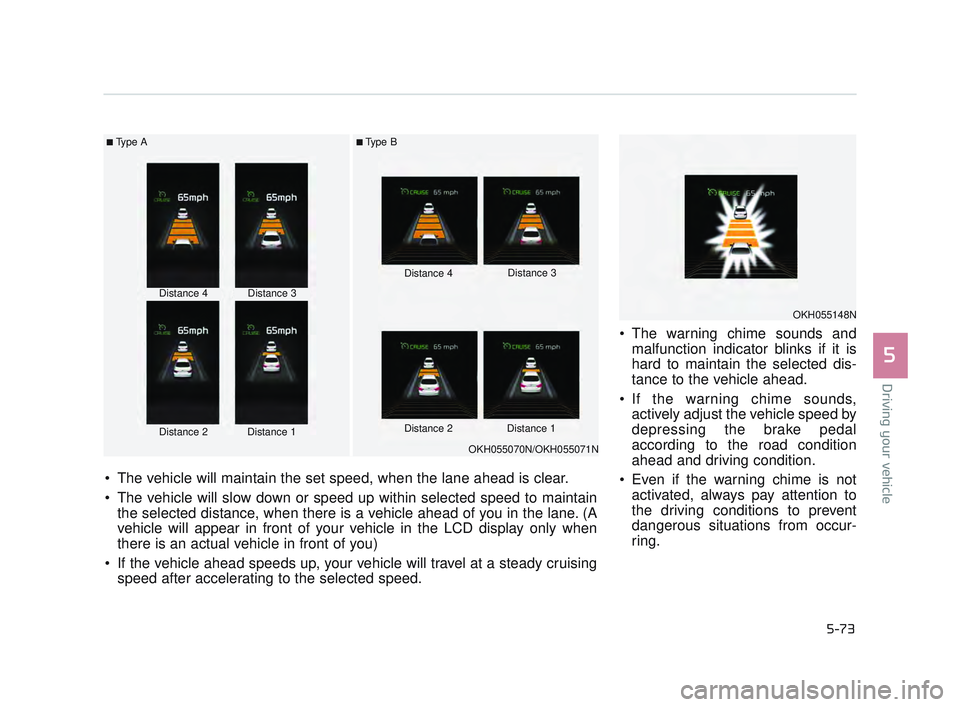
The warning chime sounds andmalfunction indicator blinks if it is
hard to maintain the selected dis-
tance to the vehicle ahead.
If the warning chime sounds, actively adjust the vehicle speed by
depressing the brake pedal
according to the road condition
ahead and driving condition.
Even if the warning chime is not activated, always pay attention to
the driving conditions to prevent
dangerous situations from occur-
ring.
■Type A■Type B
Distance 4
Distance 2Distance 1
Distance 3 Distance 4
Distance 3
Distance 2 Distance 1
The vehicle will maintain the set speed, when the lane ahead is clear.
The vehicle will slow down or speed up within selected speed to maintain the selected distance, when there is a vehicle ahead of you in the lane. (A
vehicle will appear in front of your vehicle in the LCD display only when
there is an actual vehicle in front of you)
If the vehicle ahead speeds up, your vehicle will travel at a steady cruising speed after accelerating to the selected speed.
OKH055070N/OKH055071N
OKH055148N
KH USA 5:2016 12/1/2016 10:56 PM Page 73
Page 346 of 542
Driving your vehicle
5
5-83
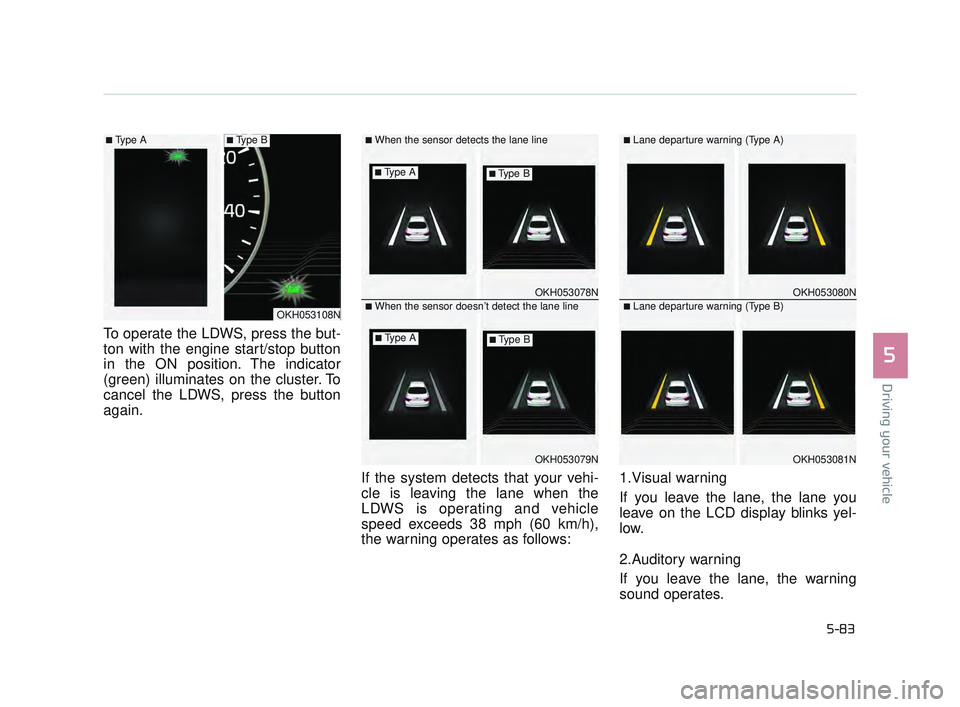
To operate the LDWS, press the but-
ton with the engine start/stop button
in the ON position. The indicator
(green) illuminates on the cluster. To
cancel the LDWS, press the button
again.If the system detects that your vehi-
cle is leaving the lane when the
LDWS is operating and vehicle
speed exceeds 38 mph (60 km/h),
the warning operates as follows:1.Visual warning
If you leave the lane, the lane you
leave on the LCD display blinks yel-
low.
2.Auditory warning
If you leave the lane, the warning
sound operates.
OKH053078N
OKH053079N
■When the sensor detects the lane line
■When the sensor doesn’t detect the lane lineOKH053080N
OKH053081N
■Lane departure warning (Type A)
■Lane departure warning (Type B)OKH053108N
■Type A■Type B
■Type A■Type B
■Type A■Type B
KH USA 5:2016 12/1/2016 10:56 PM Page 83
Page 351 of 542
5-88
Driving your vehicle
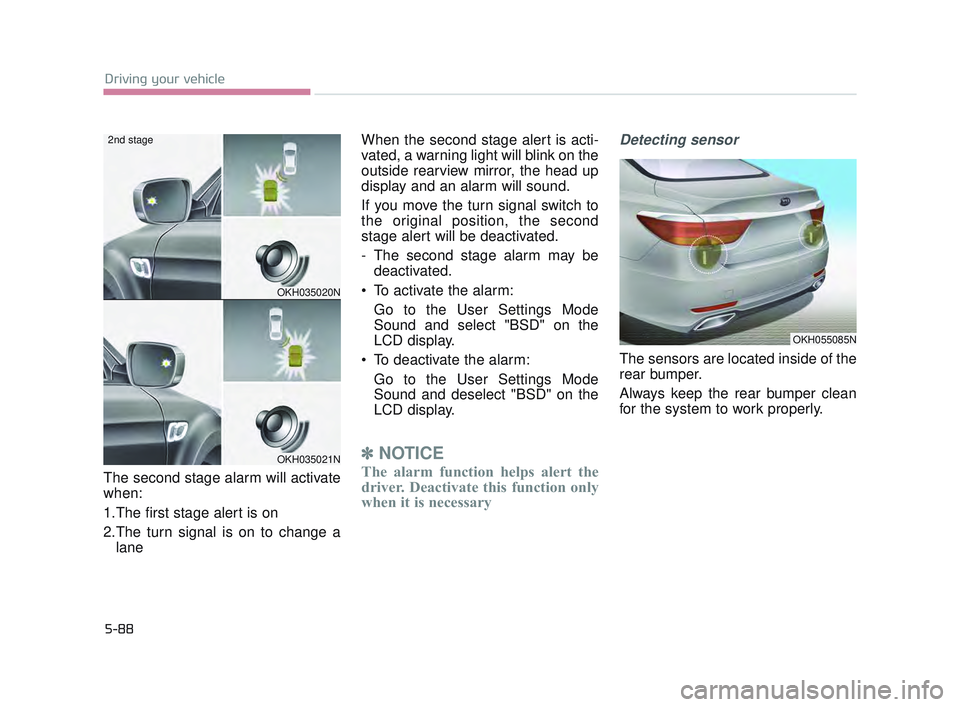
The second stage alarm will activate
when:
1.The first stage alert is on
2.The turn signal is on to change alane When the second stage alert is acti-
vated, a warning light will blink on the
outside rearview mirror, the head up
display and an alarm will sound.
If you move the turn signal switch to
the original position, the second
stage alert will be deactivated.
- The second stage alarm may be
deactivated.
To activate the alarm: Go to the User Settings Mode
Sound and select "BSD" on the
LCD display.
To deactivate the alarm: Go to the User Settings Mode
Sound and deselect "BSD" on the
LCD display.
✽ NOTICE
The alarm function helps alert the
driver. Deactivate this function only
when it is necessary
Detecting sensor
The sensors are located inside of the
rear bumper.
Always keep the rear bumper clean
for the system to work properly.
OKH035020N
OKH035021N
2nd stage
OKH055085N
KH USA 5:2016 12/1/2016 10:56 PM Page 88
Page 354 of 542
Driving your vehicle
5
5-91
Warning type
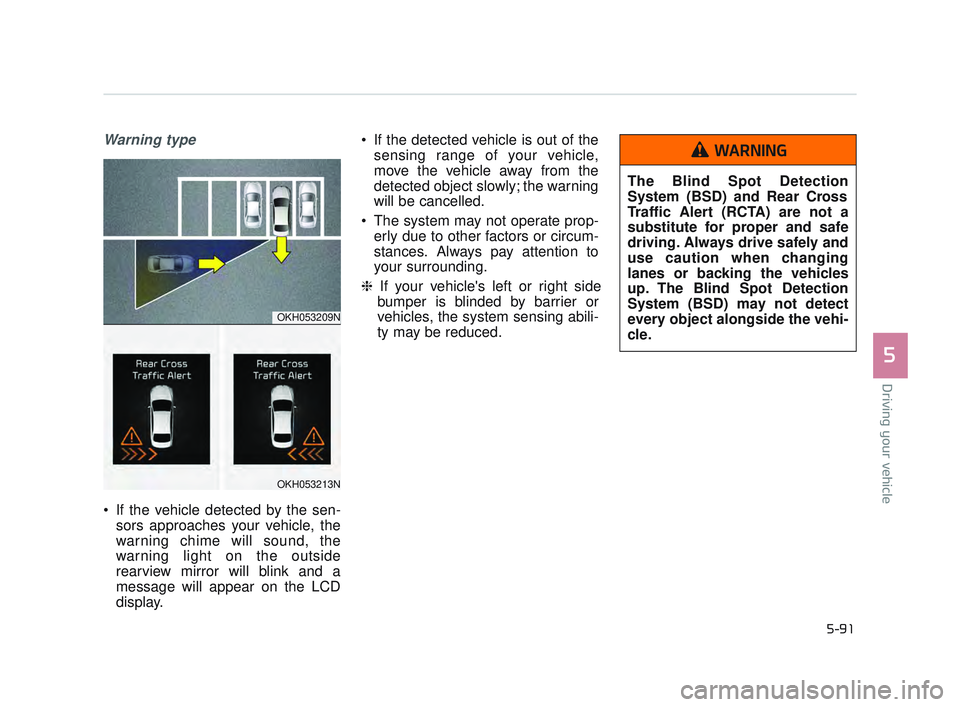
If the vehicle detected by the sen-sors approaches your vehicle, the
warning chime will sound, the
warning light on the outside
rearview mirror will blink and a
message will appear on the LCD
display. If the detected vehicle is out of the
sensing range of your vehicle,
move the vehicle away from the
detected object slowly; the warning
will be cancelled.
The system may not operate prop- erly due to other factors or circum-
stances. Always pay attention to
your surrounding.
❈ If your vehicle's left or right side
bumper is blinded by barrier or
vehicles, the system sensing abili-
ty may be reduced.
OKH053209N
OKH053213N
The Blind Spot Detection
System (BSD) and Rear Cross
Traffic Alert (RCTA) are not a
substitute for proper and safe
driving. Always drive safely and
use caution when changing
lanes or backing the vehicles
up. The Blind Spot Detection
System (BSD) may not detect
every object alongside the vehi-
cle.
WARNING
KH USA 5:2016 12/1/2016 10:57 PM Page 91
Page 384 of 542
What to do in an emergency
6
6-11
TIRE PRESSURE MONITORING SYSTEM (TPMS)
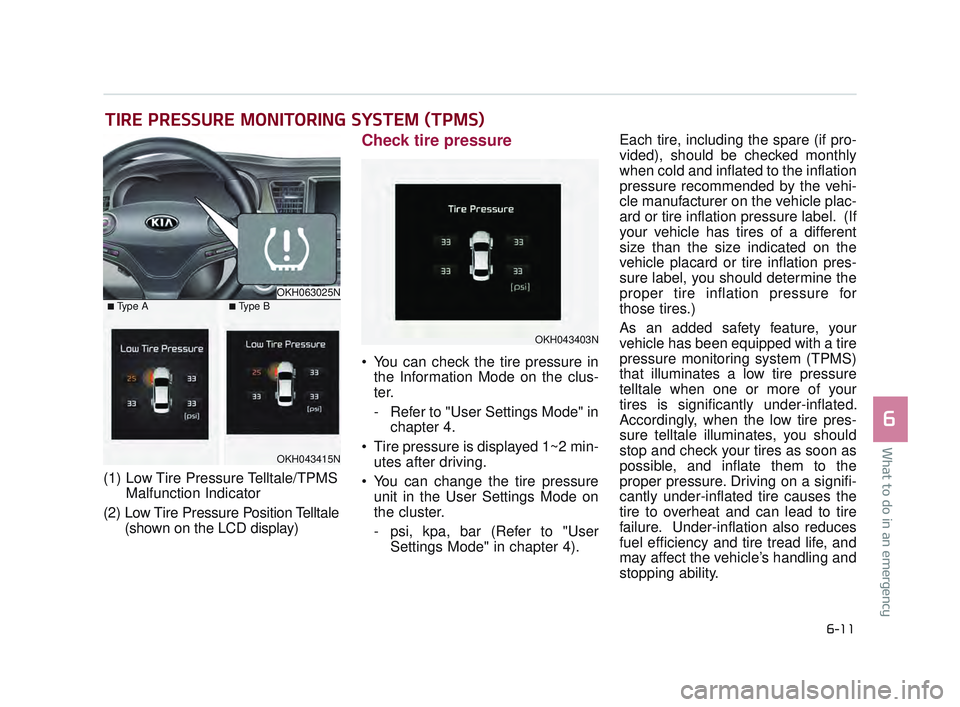
(1) Low Tire Pressure Telltale/TPMSMalfunction Indicator
(2) Low Tire Pressure Position Telltale (shown on the LCD display)
Check tire pressure
You can check the tire pressure inthe Information Mode on the clus-
ter.
- Refer to "User Settings Mode" in chapter 4.
Tire pressure is displayed 1~2 min- utes after driving.
You can change the tire pressure unit in the User Settings Mode on
the cluster.
- psi, kpa, bar (Refer to "User Settings Mode" in chapter 4). Each tire, including the spare (if pro-
vided), should be checked monthly
when cold and inflated to the inflation
pressure recommended by the vehi-
cle manufacturer on the vehicle plac-
ard or tire inflation pressure label. (If
your vehicle has tires of a different
size than the size indicated on the
vehicle placard or tire inflation pres-
sure label, you should determine the
proper tire inflation pressure for
those tires.)
As an added safety feature, your
vehicle has been equipped with a tire
pressure monitoring system (TPMS)
that illuminates a low tire pressure
telltale when one or more of your
tires is significantly under-inflated.
Accordingly, when the low tire pres-
sure telltale illuminates, you should
stop and check your tires as soon as
possible, and inflate them to the
proper pressure. Driving on a signifi-
cantly under-inflated tire causes the
tire to overheat and can lead to tire
failure. Under-inflation also reduces
fuel efficiency and tire tread life, and
may affect the vehicle’s handling and
stopping ability.
OKH063025N
OKH043415N
■Type A■Type B
OKH043403N
KH USA 6:2016 12/1/2016 11:08 PM Page 11
Page 386 of 542

What to do in an emergency
6
6-13
Low tire pressure telltale
Low tire pressure position tell-
tale
When the tire pressure monitoring
system warning indicators are illumi-
nated and warning message dis-
played on the cluster LCD display,
one or more of your tires is signifi-
cantly under-inflated. The low tire
pressure position telltale light will
indicate which tire is significantly
under-inflated by illuminating the cor-
responding position light.If either telltale illuminates, immedi-
ately reduce your speed, avoid hard
cornering and anticipate increased
stopping distances. You should stop
and check your tires as soon as pos-
sible. Inflate the tires to the proper
pressure as indicated on the vehi-
cle’s placard or tire inflation pressure
label located on the driver’s side cen-
ter pillar outer panel.
If you cannot reach a service station
or if the tire cannot hold the newly
added air, replace the low pressure
tire with the spare tire.
If you drive the vehicle for about 20
minutes at speeds above 15 mph (25
km/h) after replacing the low pres-
sure tire with the spare tire, the
below will happen:
The TPMS malfunction indicator
may blink for approximately 1 minute
and then remain continuously illumi-
nated because the TPMS sensor is
not mounted on the spare wheel.
✽ NOTICE
The spare tire is not equipped with a
tire pressure sensor.
In winter or cold weather, the low
tire pressure telltale may be illumi-
nated if the tire pressure was
adjusted to the recommended tire
inflation pressure in warm weather.
It does not mean your TPMS is
malfunctioning because the
decreased temperature leads to a
proportional lowering of tire pres-
sure.
When you drive your vehicle from a warm area to a cold area or from a
cold area to a warm area, or the
outside temperature is greatly
higher or lower, you should check
the tire inflation pressure and
adjust the tires to the recommend-
ed tire inflation pressure.
The tire pressure may vary depending on various factors
including the temperature condi-
tions of parking area, driving condi-
tions and ambient temperature,
altitude above sea level.
OKH043415N
■Type A■Type B
KH USA 6:2016 12/1/2016 11:08 PM Page 13
Page 387 of 542
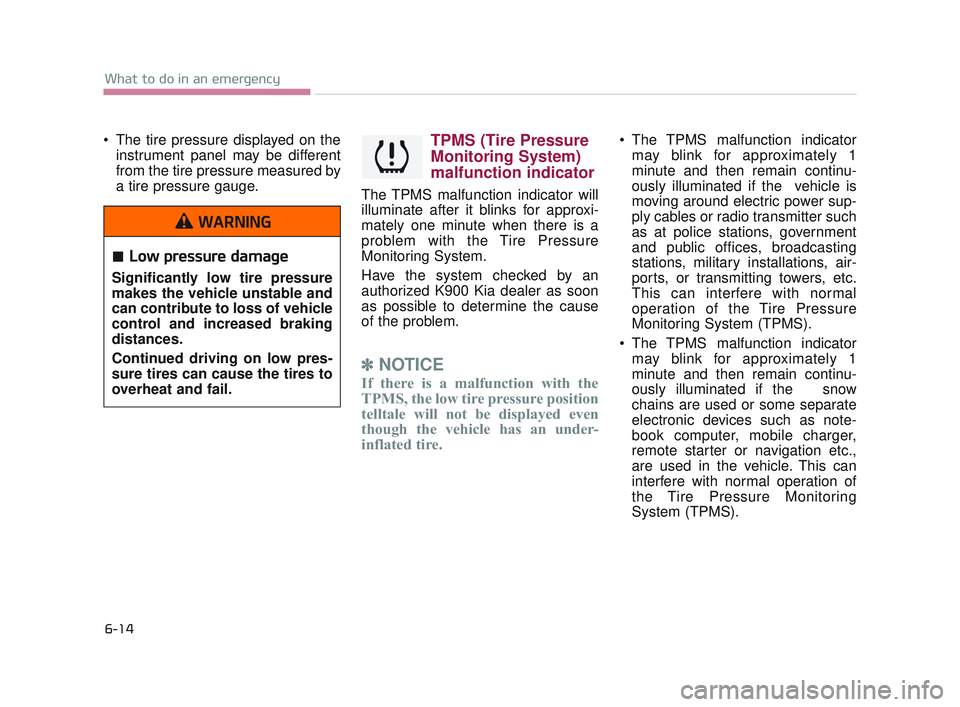
6-14
What to do in an emergency
The tire pressure displayed on theinstrument panel may be different
from the tire pressure measured by
a tire pressure gauge.TPMS (Tire Pressure
Monitoring System)
malfunction indicator
The TPMS malfunction indicator will
illuminate after it blinks for approxi-
mately one minute when there is a
problem with the Tire Pressure
Monitoring System.
Have the system checked by an
authorized K900 Kia dealer as soon
as possible to determine the cause
of the problem.
✽ NOTICE
If there is a malfunction with the
TPMS, the low tire pressure position
telltale will not be displayed even
though the vehicle has an under-
inflated tire.
The TPMS malfunction indicator
may blink for approximately 1
minute and then remain continu-
ously illuminated if the vehicle is
moving around electric power sup-
ply cables or radio transmitter such
as at police stations, government
and public offices, broadcasting
stations, military installations, air-
ports, or transmitting towers, etc.
This can interfere with normal
operation of the Tire Pressure
Monitoring System (TPMS).
The TPMS malfunction indicator may blink for approximately 1
minute and then remain continu-
ously illuminated if the snow
chains are used or some separate
electronic devices such as note-
book computer, mobile charger,
remote starter or navigation etc.,
are used in the vehicle. This can
interfere with normal operation of
the Tire Pressure Monitoring
System (TPMS).
Low pressure damage
Significantly low tire pressure
makes the vehicle unstable and
can contribute to loss of vehicle
control and increased braking
distances.
Continued driving on low pres-
sure tires can cause the tires to
overheat and fail.
WARNING
KH USA 6:2016 12/1/2016 11:08 PM Page 14