steering wheel KIA K900 2018 Owner's Manual
[x] Cancel search | Manufacturer: KIA, Model Year: 2018, Model line: K900, Model: KIA K900 2018Pages: 544, PDF Size: 14.82 MB
Page 172 of 544
Features of your vehicle
4
4-91
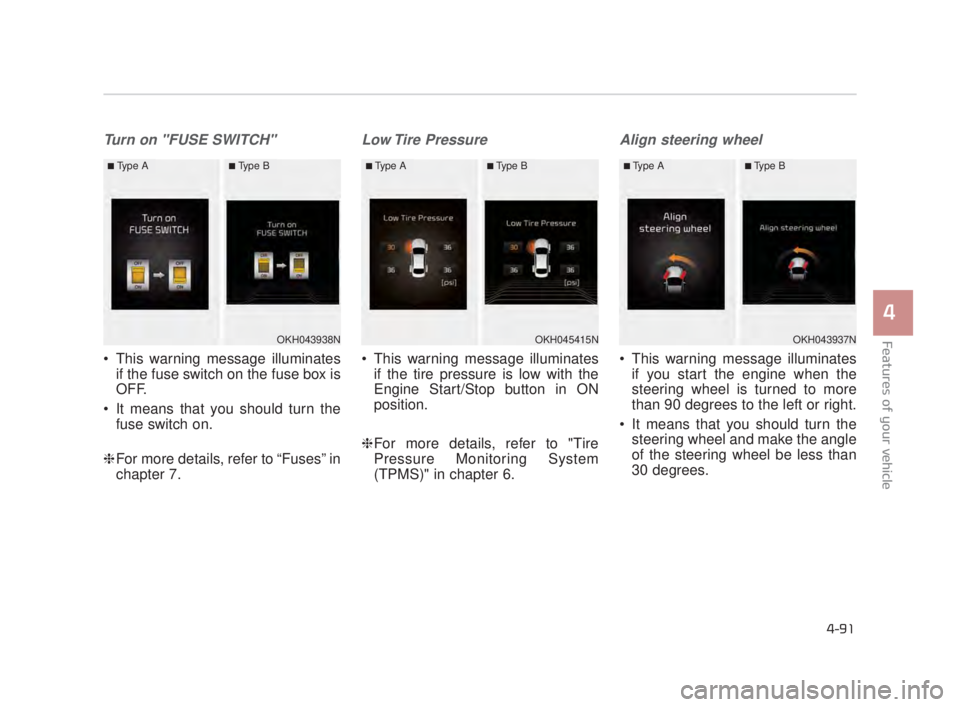
Turn on "FUSE SWITCH"
This warning message illuminatesif the fuse switch on the fuse box is
OFF.
It means that you should turn the fuse switch on.
❈ For more details, refer to “Fuses” in
chapter 7.
Low Tire Pressure
This warning message illuminates
if the tire pressure is low with the
Engine Start/Stop button in ON
position.
❈ For more details, refer to "Tire
Pressure Monitoring System
(TPMS)" in chapter 6.
Align steering wheel
This warning message illuminates
if you start the engine when the
steering wheel is turned to more
than 90 degrees to the left or right.
It means that you should turn the steering wheel and make the angle
of the steering wheel be less than
30 degrees.
OKH043938N
■Type A■Type B
OKH045415N
■Type A■Type B
OKH043937N
■Type A■Type B
KH USA 4:2018 4/18/2017 5:59 PM Page 91
Page 178 of 544
Features of your vehicle
4
4-97
✽NOTICE
• If the vehicle is not on level ground
or the battery power has been
interrupted, the range function
may not operate correctly.
• The range may differ from the actual driving distance as it is an
estimate of the available driving
distance.
• The trip computer may not register additional fuel if less than 1.6 gal-
lons (6 liters) of fuel are added to
the vehicle.
• The fuel economy and range may vary significantly based on driving
conditions, driving habits, and con-
dition of the vehicle.
Average Fuel Economy (2)
The average fuel economy is calcu-
lated by the total driving distance
and fuel consumption since the last
average fuel economy reset.
- Fuel economy range: 0.0 ~ 99.9MPG or L/100km
The average fuel economy can be reset both manually and automati-
cally.
Manual reset
To clear the average fuel economy
manually, press the OK (RESET) but-
ton on the steering wheel for more
than 1 second when the average fuel
economy is displayed. Automatic reset
To make the average fuel economy
be reset automatically whenever refu-
eling, select the “Auto Reset” mode in
User Setting menu of the LCD display
(Refer to “LCD Display”).
Under “Auto Reset” mode, the aver-
age fuel economy will be cleared to
zero (---) when the vehicle speed
exceeds 1 km/h after refueling more
than 1.6 gallons (6 liters).
✽
NOTICE
The average fuel economy is not dis-
played for more accurate calculation
if the vehicle does not drive more
than 0.19 miles (300 meters) since
the Engine Start/Stop button is
turned to ON.
KH USA 4:2018 4/18/2017 6:00 PM Page 97
Page 179 of 544
Features of your vehicle
4-98
Instant Fuel Economy (3)
This mode displays the instant fueleconomy during the last few sec-
onds when the vehicle speed is
more than 6.2 MPH (10 km/h).
- Fuel economy range : 0 ~ 50MPG or 0 ~ 30 L/100km
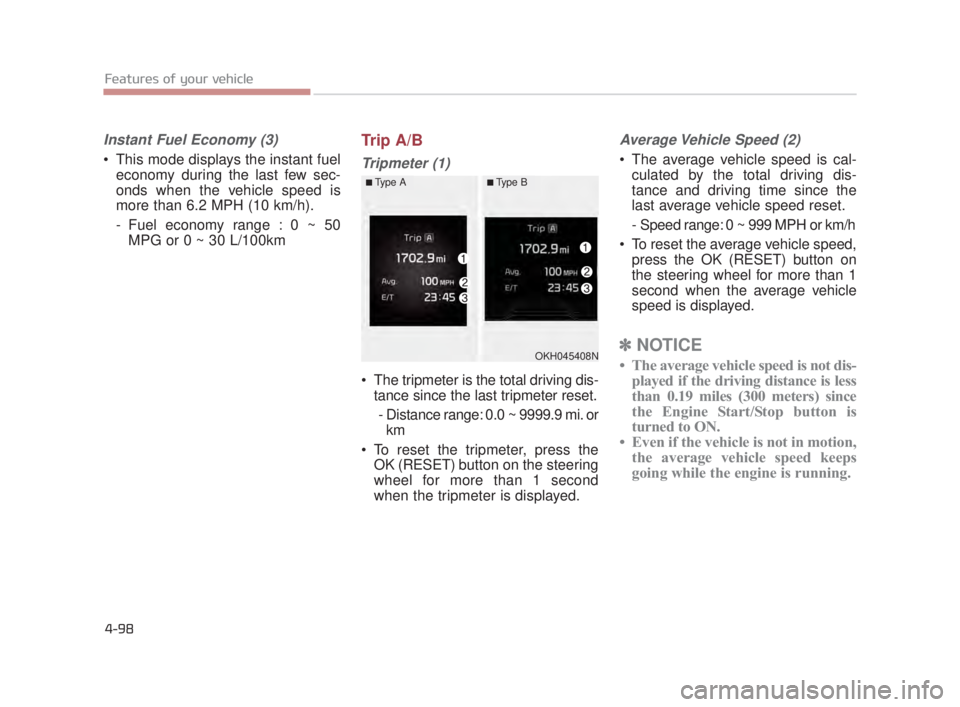
Trip A/B
Tripmeter (1)
The tripmeter is the total driving dis-tance since the last tripmeter reset.
- Distance range: 0.0 ~ 9999.9 mi. or km
To reset the tripmeter, press the OK (RESET) button on the steering
wheel for more than 1 second
when the tripmeter is displayed.
Average Vehicle Speed (2)
The average vehicle speed is cal-culated by the total driving dis-
tance and driving time since the
last average vehicle speed reset.
- Speed range: 0 ~ 999 MPH or km/h
To reset the average vehicle speed, press the OK (RESET) button on
the steering wheel for more than 1
second when the average vehicle
speed is displayed.
✽ NOTICE
• The average vehicle speed is not dis-
played if the driving distance is less
than 0.19 miles (300 meters) since
the Engine Start/Stop button is
turned to ON.
• Even if the vehicle is not in motion, the average vehicle speed keeps
going while the engine is running.OKH045408N
■Type A■Type B
KH USA 4:2018 4/18/2017 6:00 PM Page 98
Page 180 of 544
Features of your vehicle
4
4-99
Elapsed Time (3)
The elapsed time is the total driv-ing time since the last elapsed time
reset.
- Time range (hh:mm): 00:00 ~ 99:59
To reset the elapsed time, press the OK (RESET) button on the steering
wheel for more than 1 second when
the elapsed time is displayed.
✽ NOTICE
Even if the vehicle is not in motion,
the elapsed time keeps going while
the engine is running.
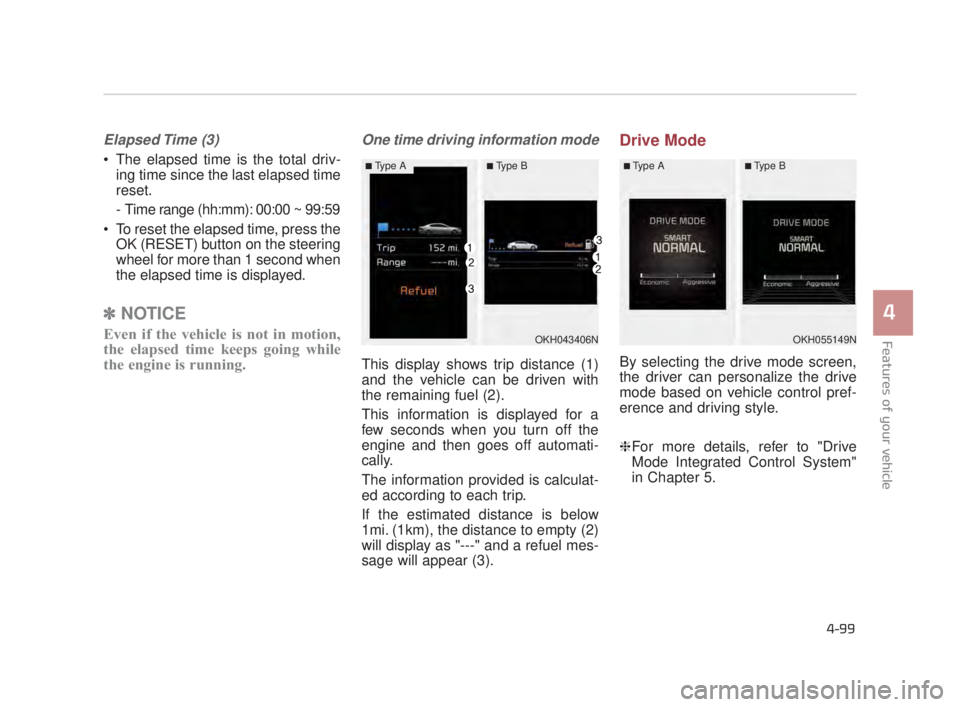
One time driving information mode
This display shows trip distance (1)
and the vehicle can be driven with
the remaining fuel (2).
This information is displayed for a
few seconds when you turn off the
engine and then goes off automati-
cally.
The information provided is calculat-
ed according to each trip.
If the estimated distance is below
1mi. (1km), the distance to empty (2)
will display as "---" and a refuel mes-
sage will appear (3).
Drive Mode
By selecting the drive mode screen,
the driver can personalize the drive
mode based on vehicle control pref-
erence and driving style.
❈For more details, refer to "Drive
Mode Integrated Control System"
in Chapter 5.
OKH043406N
■Type A■Type B
OKH055149N
■Type A■Type B
KH USA 4:2018 4/18/2017 6:00 PM Page 99
Page 264 of 544
Features of your vehicle
4
4-183
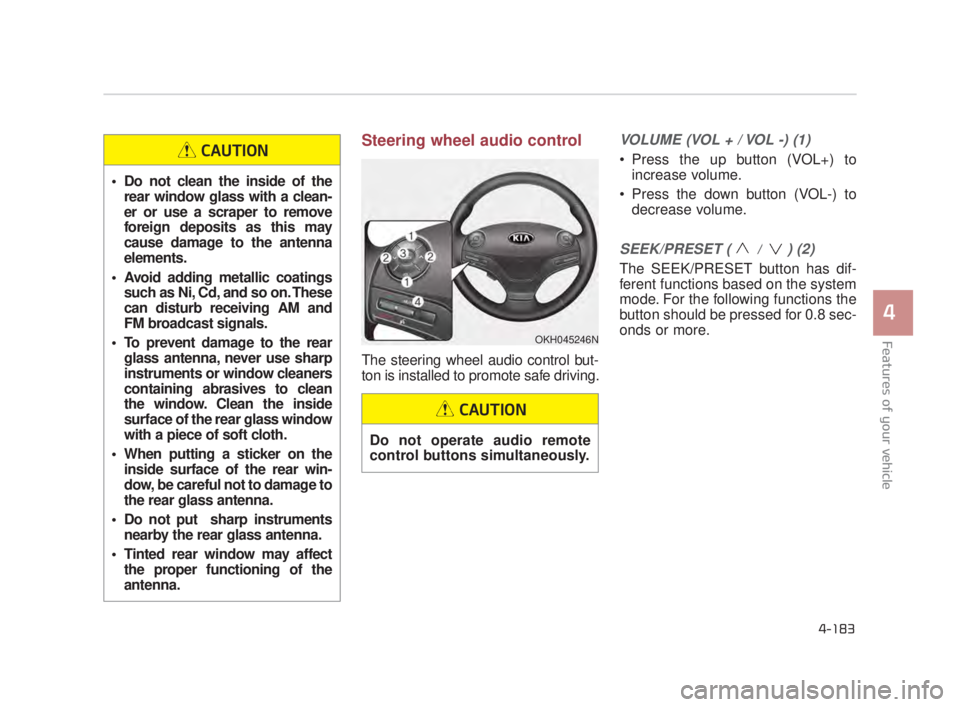
Steering wheel audio control
The steering wheel audio control but-
ton is installed to promote safe driving.
VOLUME (VOL + / VOL -) (1)
Press the up button (VOL+) toincrease volume.
Press the down button (VOL-) to decrease volume.
SEEK/PRESET ( / ) (2)
The SEEK/PRESET button has dif-
ferent functions based on the system
mode. For the following functions the
button should be pressed for 0.8 sec-
onds or more.
OKH045246N
Do not clean the inside of therear window glass with a clean-
er or use a scraper to remove
foreign deposits as this may
cause damage to the antenna
elements.
Avoid adding metallic coatings such as Ni, Cd, and so on. These
can disturb receiving AM and
FM broadcast signals.
To prevent damage to the rear glass antenna, never use sharp
instruments or window cleaners
containing abrasives to clean
the window. Clean the inside
surface of the rear glass window
with a piece of soft cloth.
When putting a sticker on the inside surface of the rear win-
dow, be careful not to damage to
the rear glass antenna.
Do not put sharp instruments nearby the rear glass antenna.
Tinted rear window may affect the proper functioning of the
antenna.
CAUTION
Do not operate audio remote
control buttons simultaneously.
CAUTION
KH USA 4:2018 4/18/2017 6:04 PM Page 183
Page 270 of 544
Driving your vehicle
5
5-5
Driving while intoxicated
Do not drive while intoxicated.
Drinking and driving is danger-
ous. Even a small amount of
alcohol will affect your reflexes,
perceptions and judgment.
Driving while under the influ-
ence of drugs is as dangerous
as or more dangerous than driv-
ing drunk.
WARNING
Loose object
Securely store items in your
vehicle. When you make a sud-
den stop or turn the steering
wheel rapidly, loose objects
may drop on the floor and it
could interfere with the opera-
tion of the foot pedals, possibly
causing an accident.
WARNING
Fire risk
When you intend to park or stop
the vehicle with the engine on,
be careful not to depress the
accelerator pedal for a long
period of time. It may overheat
the engine or exhaust system
and cause a fire.
WARNING
KH USA 5:2018 4/12/2017 9:58 AM Page 5
Page 272 of 544
Driving your vehicle
5
5-7
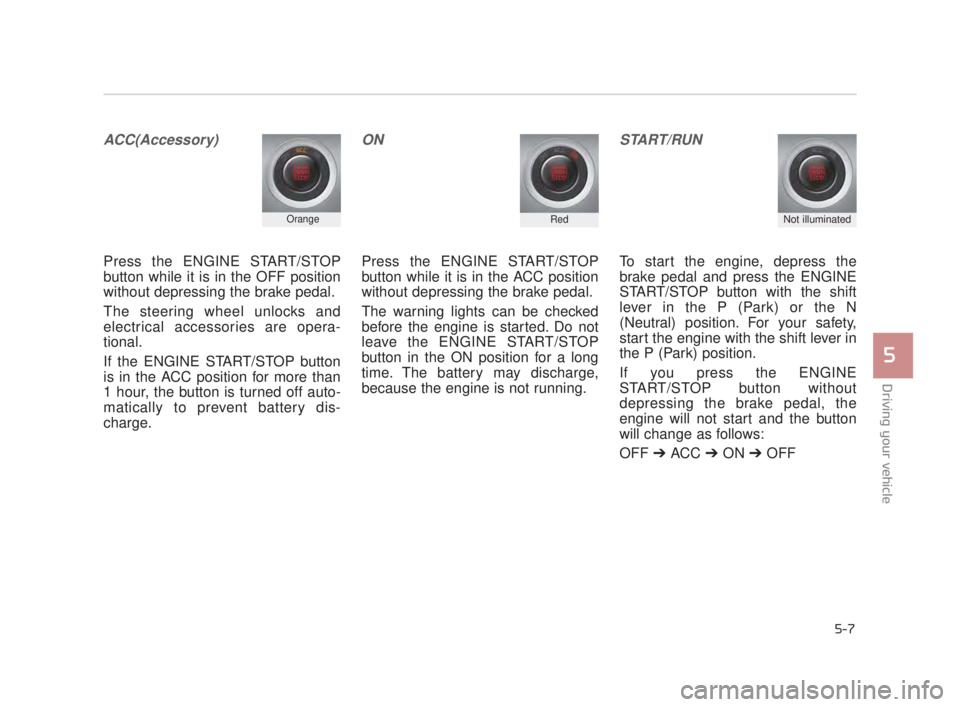
ACC(Accessory)
Press the ENGINE START/STOP
button while it is in the OFF position
without depressing the brake pedal.
The steering wheel unlocks and
electrical accessories are opera-
tional.
If the ENGINE START/STOP button
is in the ACC position for more than
1 hour, the button is turned off auto-
matically to prevent battery dis-
charge.
ON
Press the ENGINE START/STOP
button while it is in the ACC position
without depressing the brake pedal.
The warning lights can be checked
before the engine is started. Do not
leave the ENGINE START/STOP
button in the ON position for a long
time. The battery may discharge,
because the engine is not running.
START/RUN
To start the engine, depress the
brake pedal and press the ENGINE
START/STOP button with the shift
lever in the P (Park) or the N
(Neutral) position. For your safety,
start the engine with the shift lever in
the P (Park) position.
If you press the ENGINE
START/STOP button without
depressing the brake pedal, the
engine will not start and the button
will change as follows:
OFF ➔ ACC ➔ON ➔OFF
OrangeRedNot illuminated
KH USA 5:2018 4/12/2017 9:58 AM Page 7
Page 308 of 544
Driving your vehicle
5
5-43
✽NOTICE
When you jump start your vehicle
because of a drained battery, the
engine may not run as smoothly and
the ABS warning light may turn on
at the same time. This happens
because of the low battery voltage. It
does not mean your ABS has mal-
functioned.
• Do not pump your brakes!
• Have the battery recharged before
driving the vehicle.
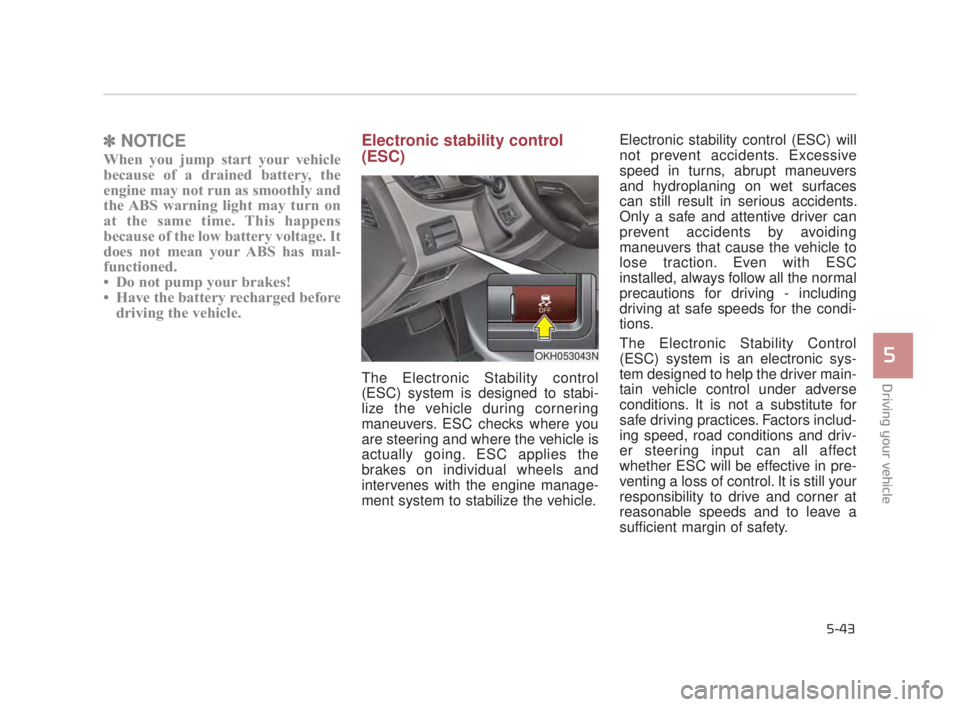
Electronic stability control
(ESC)
The Electronic Stability control
(ESC) system is designed to stabi-
lize the vehicle during cornering
maneuvers. ESC checks where you
are steering and where the vehicle is
actually going. ESC applies the
brakes on individual wheels and
intervenes with the engine manage-
ment system to stabilize the vehicle. Electronic stability control (ESC) will
not prevent accidents. Excessive
speed in turns, abrupt maneuvers
and hydroplaning on wet surfaces
can still result in serious accidents.
Only a safe and attentive driver can
prevent accidents by avoiding
maneuvers that cause the vehicle to
lose traction. Even with ESC
installed, always follow all the normal
precautions for driving - including
driving at safe speeds for the condi-
tions.
The Electronic Stability Control
(ESC) system is an electronic sys-
tem designed to help the driver main-
tain vehicle control under adverse
conditions. It is not a substitute for
safe driving practices. Factors includ-
ing speed, road conditions and driv-
er steering input can all affect
whether ESC will be effective in pre-
venting a loss of control. It is still your
responsibility to drive and corner at
reasonable speeds and to leave a
sufficient margin of safety.
OKH053043N
KH USA 5:2018 4/12/2017 9:59 AM Page 43
Page 315 of 544
5-50
Driving your vehicle
A warning message and chime will
sound when you need to use the
brake pedal or steering wheel due to
a sudden stop or lack of distance
with the vehicle ahead. The warning
messages will vary according to the
severity of the situation. Immediately
reduce your speed to prevent a colli-
sion.Brake operation
In a critical situation:
The brake assist system entersstandby mode to react promptly
when the driver operates the brake
pedal.
The vehicle automatically reduces speed according to the severity of
the situation.
- Rapidly reduces speed when vehicle speed is under 50 mph
(80 km/h)
- Slowly reduces speed when vehicle speed is over 50 mph
(80 km/h)
If the driver uses the brake pedal to reduce vehicle speed, the brake
assist system operates to increase
braking efficiency.
If the driver presses down hard on the accelerator pedal or sharply
turns the steering wheel, the brake
assist system is canceled.
Seat belt operation
The driver's and passenger's seat
belt may tighten if the system detects
that a vehicle or object is close.
KH USA 5:2018 4/12/2017 10:00 AM Page 50
Page 322 of 544
Driving your vehicle
5
5-57
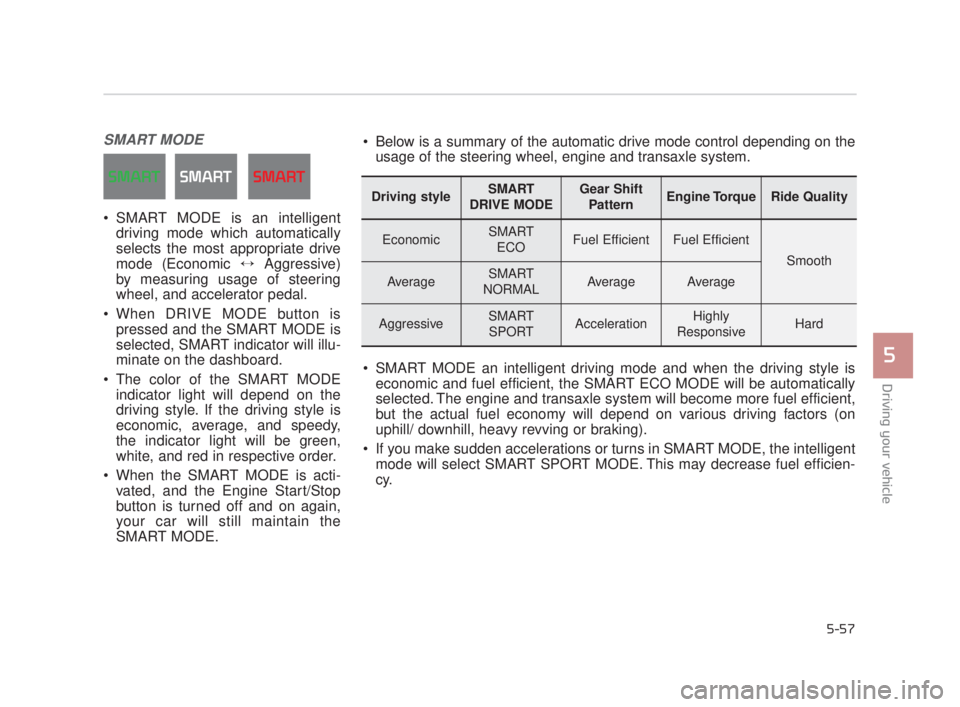
SMART MODE
SMART MODE is an intelligentdriving mode which automatically
selects the most appropriate drive
mode (Economic ↔ Aggressive)
by measuring usage of steering
wheel, and accelerator pedal.
When DRIVE MODE button is pressed and the SMART MODE is
selected, SMART indicator will illu-
minate on the dashboard.
The color of the SMART MODE indicator light will depend on the
driving style. If the driving style is
economic, average, and speedy,
the indicator light will be green,
white, and red in respective order.
When the SMART MODE is acti- vated, and the Engine Start/Stop
button is turned off and on again,
your car will still maintain the
SMART MODE.
Driving styleSMART
DRIVE MODEGear Shift PatternEngine TorqueRide Quality
EconomicSMART ECOFuel EfficientFuel Efficient
Smooth
AverageSMART
NORMALAverageAverage
AggressiveSMART SPORTAccelerationHighly
ResponsiveHard
Below is a summary of the automatic drive mode control depending on the usage of the steering wheel, engine and transaxle system.
SMART MODE an intelligent driving mode and when the driving style is economic and fuel efficient, the SMART ECO MODE will be automatically
selected. The engine and transaxle system will become more fuel efficient,
but the actual fuel economy will depend on various driving factors (on
uphill/ downhill, heavy revving or braking).
If you make sudden accelerations or turns in SMART MODE, the intelligent mode will select SMART SPORT MODE. This may decrease fuel efficien-
cy.
KH USA 5:2018 4/12/2017 10:00 AM Page 57