brake KIA K900 2018 Repair Manual
[x] Cancel search | Manufacturer: KIA, Model Year: 2018, Model line: K900, Model: KIA K900 2018Pages: 544, PDF Size: 14.82 MB
Page 312 of 544
Driving your vehicle
5
5-47
Hill-start assist control (HAC)
Hill start Assist Control is a comfort
function. The main intent is to pre-
vent the vehicle from rolling back-
wards while driving uphill on an
inclined surface. HAC holds the brak-
ing pressure builtup by driver during
stopping procedure for 2 seconds
after releasing brake pedal.
During the pressure-hold period, the
driver has enough time to press the
accelerator pedal to drive off.
The braking pressure is reduced as
soon as the system detects the dri-
ver’s intention to drive off. The HAC does not operate when
the transaxle shift lever is in the P
(Park) or N (Neutral) position.
The HAC activates even though the ESC is off but it does not acti-
vate when the ESC has malfunc-
tioned.
Good braking practices
Check to be sure the parking brakeis not engaged and that the park-
ing brake indicator light is out
before driving away.
Driving through water may get the brakes wet. They can also get wet
when the vehicle is washed. Wet
brakes can be dangerous! Your
vehicle will not stop as quickly if the
brakes are wet. Wet brakes may
cause the vehicle to pull to one
side.
To dry the brakes, apply the brakes
lightly until the braking action
returns to normal, taking care to
keep the vehicle under control at
all times. If the braking action does
not return to normal, stop as soon
as it is safe to do so and call an
authorized K900 Kia dealer for
assistance.
Don't coast down hills with the vehicle out of gear. This is extreme-
ly hazardous. Keep the vehicle in
gear at all times, use the brakes to
slow down, then shift to a lower
gear so that engine braking will
help you maintain a safe speed.
Maintaining Brake
Pressure on Incline
HAC does not replace the need
to apply brakes while stopped
on an incline. While stopped,
make sure you maintain brake
pressure sufficient to prevent
your vehicle from rolling back-
ward and causing an accident.
Don’t release the brake pedal
until you are ready to accelerate
forward.
WARNING
KH USA 5:2018 4/12/2017 10:00 AM Page 47
Page 313 of 544
5-48
Driving your vehicle
Don't "ride" the brake pedal.Resting your foot on the brake
pedal while driving can be danger-
ous because the brakes might
overheat and lose their effective-
ness. It also increases the wear of
the brake components.
If a tire goes flat while you are driv- ing, apply the brakes gently and
keep the vehicle pointed straight
ahead while you slow down. When
you are moving slowly enough for it
to be safe to do so, pull off the road
and stop in a safe place.
If your vehicle is equipped with an automatic transaxle, don't let your
vehicle creep forward. To avoid
creeping forward, keep your foot
firmly on the brake pedal when the
vehicle is stopped. Be cautious when parking on a hill.
Firmly engage the parking brake
and place the shift lever in P
(Park). If your vehicle is facing
downhill, turn the front wheels into
the curb to help keep the vehicle
from rolling. If your vehicle is facing
uphill, turn the front wheels away
from the curb to help keep the vehi-
cle from rolling. If there is no curb
or if it is required by other condi-
tions to keep the vehicle from
rolling, block the wheels.
Under some conditions your park- ing brake can freeze in the engaged
position. This is most likely to hap-
pen when there is an accumulation
of snow or ice around or near the
rear brakes or if the brakes are wet.
If there is a risk that the parking
brake may freeze, apply it only tem-
porarily while you put the shift lever
in P (Park) and block the rear
wheels so the vehicle cannot roll.
Then release the parking brake. Do not hold the vehicle on an
incline with the accelerator pedal.
This can cause the transaxle to
overheat. Always use the brake
pedal or parking brake.
KH USA 5:2018 4/12/2017 10:00 AM Page 48
Page 314 of 544
Driving your vehicle
5
5-49
The Autonomous Emergency
Braking (AEB) helps avoid accidents
by identifying critical situations early
and warning the driver.
Take the following precautions when
using the Autonomous Emergency
Braking (AEB):
This system is only a supplementalsystem and it is not intended to,
nor does it replace the need for
extreme care and attention of the
driver. The sensing range and
objects detectable by the sensors
are limited. Pay attention to the
road conditions at all times.
NEVER drive too fast for the road conditions or too quickly when cor-
nering.
Always drive cautiously to prevent unexpected and sudden situations
from occurring. AEB does not stop
the vehicle completely and does
not avoid collisions. AEB operates according to the dis-
tance from the vehicle ahead, rela-
tive velocity, and driver's operation
of the brake or accelerator pedal.
Do not drive dangerously to inten-
tionally operate the AEB.
ALWAYS check the speed and the distance to the vehicle ahead. The
AEB is not a substitute for safe
driving practices.AEB Operation
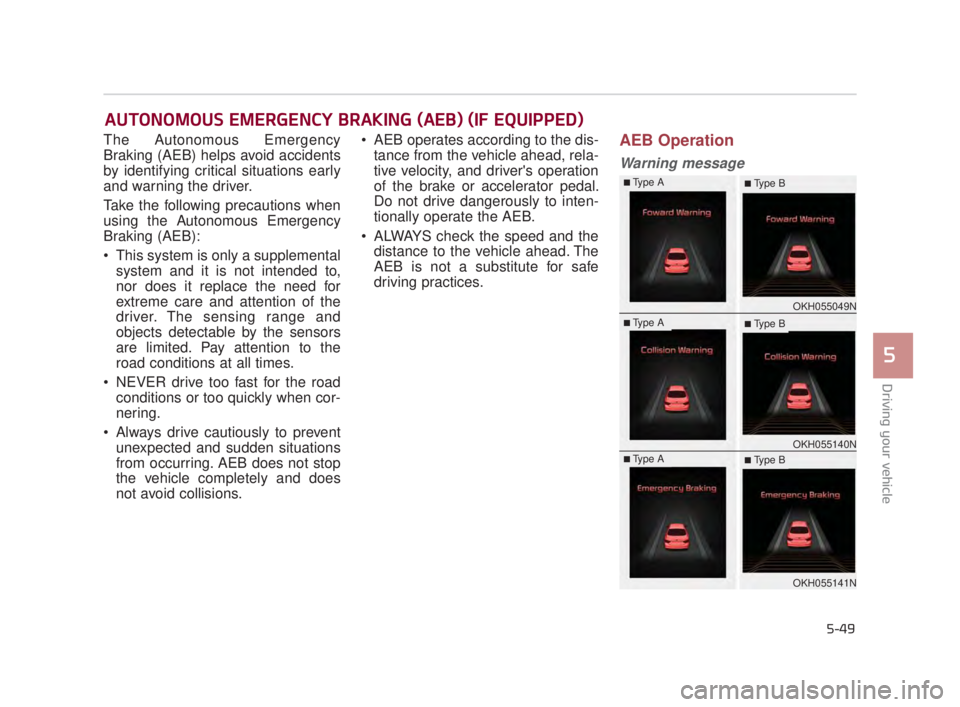
Warning message
AUTONOMOUS EMERGENCY BRAKING (AEB) (IF EQUIPPED)
OKH055049N
OKH055140N
OKH055141N
■Type A■ Type B
■Type A■ Type B
■Type A■ Type B
KH USA 5:2018 4/12/2017 10:00 AM Page 49
Page 315 of 544
5-50
Driving your vehicle
A warning message and chime will
sound when you need to use the
brake pedal or steering wheel due to
a sudden stop or lack of distance
with the vehicle ahead. The warning
messages will vary according to the
severity of the situation. Immediately
reduce your speed to prevent a colli-
sion.Brake operation
In a critical situation:
The brake assist system entersstandby mode to react promptly
when the driver operates the brake
pedal.
The vehicle automatically reduces speed according to the severity of
the situation.
- Rapidly reduces speed when vehicle speed is under 50 mph
(80 km/h)
- Slowly reduces speed when vehicle speed is over 50 mph
(80 km/h)
If the driver uses the brake pedal to reduce vehicle speed, the brake
assist system operates to increase
braking efficiency.
If the driver presses down hard on the accelerator pedal or sharply
turns the steering wheel, the brake
assist system is canceled.
Seat belt operation
The driver's and passenger's seat
belt may tighten if the system detects
that a vehicle or object is close.
KH USA 5:2018 4/12/2017 10:00 AM Page 50
Page 318 of 544
Even if there is a malfunction to thebrake operation of the AEB, when
you depress the brake pedal, the
brake operates normally. AEB
brake operation does not operate
in certain hazardous situations.
The AEB is designed to function above approximately 5 mph (8
km/h) and below approximately
110 mph (180 km/h).
The AEB does not detect: - Persons or animals.
- Oncoming vehicles in the oppo- site lane or a vehicle in an inter-
section.
- Stopped objects.
The AEB cannot detect objects, when:
- The sensors are covered with dirt.
- There is heavy rain or heavy snow.
- There is interference by electro- magnetic waves.
- There are strong radar reflec- tions.
- Driving in a curve. - Driving uphill or downhill.
- Driving in areas under construc-
tion.
- An object ahead is very narrow such as motorcycles or bicycles.
- A vehicle suddenly enters your lane.
- The camera cannot secure a clear view.
- The camera cannot catch the whole vehicle.
- An unusual shape vehicle is ahead such as a trailer, special
access vehicle or a truck with
unique shaped cargo.
- Driving at night, the tail lamp of the vehicle ahead is missing,
installed on an unusual place or
installed unevenly.
- Coming in or out a tunnel, where the illumination intensity is high.
Driving your vehicle
5
5-53
Autonomous Emergency
Braking ("AEB")
Limitations
The AEB system is a supple-
mental system and is not a sub-
stitute for safe driving prac-
tices. It is the responsibility of
the driver to always check the
speed and distance to the vehi-
cle ahead to ensure it is safety
to use the AEB system.
WARNING
KH USA 5:2018 4/12/2017 10:00 AM Page 53
Page 325 of 544
5-60
Driving your vehicle
Attributes of SMART MODE.
If the accelerator pedal is pressedgently, your vehicle will recognize it
as a economic driving style. After
some time, the system will automat-
ically shift to SMART ECO MODE.
If you press the accelerator pedal frequently and heavily in SMART
ECO MODE, the system will auto-
matically shift to SMART NORMAL
MODE.
Even when driving style has not changed from SMART ECO
MODE, if your vehicle is driven
uphill considerably, the system will
detect the gradient. Then, the
SMART system will automatically
change the setting to the SMART
NORMAL MODE temporarily.
Once your vehicle is out of the hilly
ground, your vehicle will automati-
cally return to the SMART ECO
MODE. The SMART system will recognize
sudden and repetitive acceleration
or steering as aggressive driving,
and automatically switches into the
SMART SPORT MODE.
Your vehicle will run at a lower gear
in SMART SPORT MODE com-
pared to those in SMART NOR-
MAL MODE.
The vehicle's start and stop
response rate will become faster.
To enter into SMART SPORT
MODE, accelerator pedal may be
pressed deeper than pedal detent
point.
When the SMART SPORT MODE is activated, and you take your feet
off the accelerator pedal, the vehi-
cle will remain in low gear and you
may sense engine brake. This is
due to necessary preparatory time
for the next acceleration and is
only normal.
The SMART SPORT MODE is acti- vated only when very aggressive
and high speed is detected.
Therefore, in average driving
styles, the SMART system will
select either SMART ECO or
SMART NORMAL MODE. The artificial intelligence algorithm
will instantly calculate each driver's
style of driving. So if the driver is
changed to a different person, the
algorithm will measure accordingly.
KH USA 5:2018 4/12/2017 10:00 AM Page 60
Page 327 of 544
5-62
Driving your vehicle
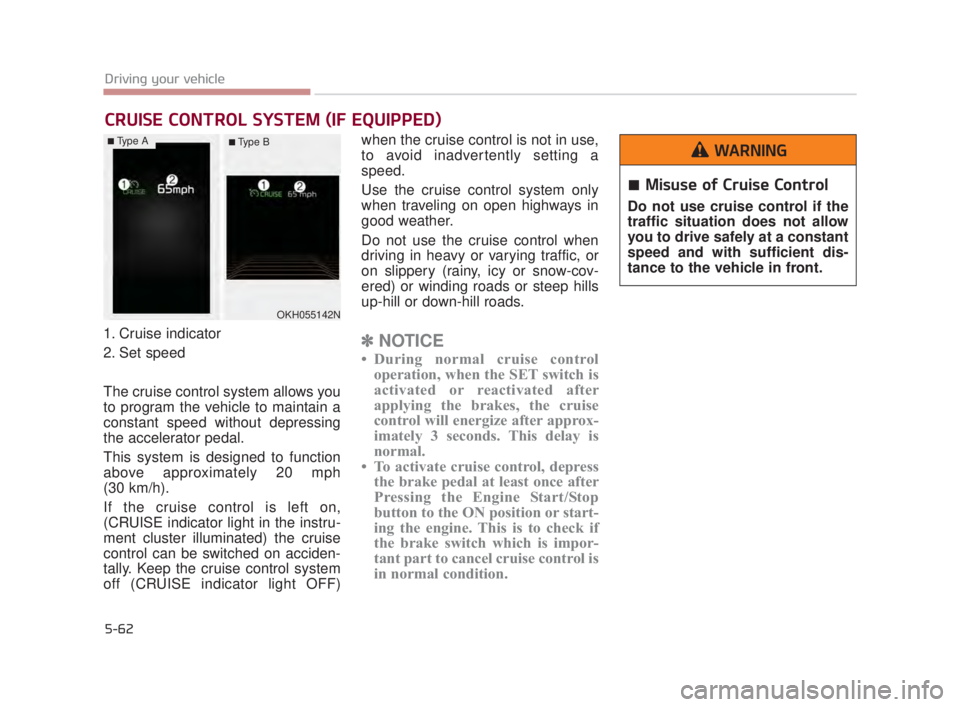
1. Cruise indicator
2. Set speed
The cruise control system allows you
to program the vehicle to maintain a
constant speed without depressing
the accelerator pedal.
This system is designed to function
above approximately 20 mph
(30 km/h).
If the cruise control is left on,
(CRUISE indicator light in the instru-
ment cluster illuminated) the cruise
control can be switched on acciden-
tally. Keep the cruise control system
off (CRUISE indicator light OFF)when the cruise control is not in use,
to avoid inadvertently setting a
speed.
Use the cruise control system only
when traveling on open highways in
good weather.
Do not use the cruise control when
driving in heavy or varying traffic, or
on slippery (rainy, icy or snow-cov-
ered) or winding roads or steep hills
up-hill or down-hill roads.✽
NOTICE
• During normal cruise control
operation, when the SET switch is
activated or reactivated after
applying the brakes, the cruise
control will energize after approx-
imately 3 seconds. This delay is
normal.
• To activate cruise control, depress the brake pedal at least once after
Pressing the Engine Start/Stop
button to the ON position or start-
ing the engine. This is to check if
the brake switch which is impor-
tant part to cancel cruise control is
in normal condition.
CRUISE CONTROL SYSTEM (IF EQUIPPED)
OKH055142N
Misuse of Cruise Control
Do not use cruise control if the
traffic situation does not allow
you to drive safely at a constant
speed and with sufficient dis-
tance to the vehicle in front.
WARNING■Type A■ Type B
KH USA 5:2018 4/12/2017 10:00 AM Page 62
Page 330 of 544
Driving your vehicle
5
5-65
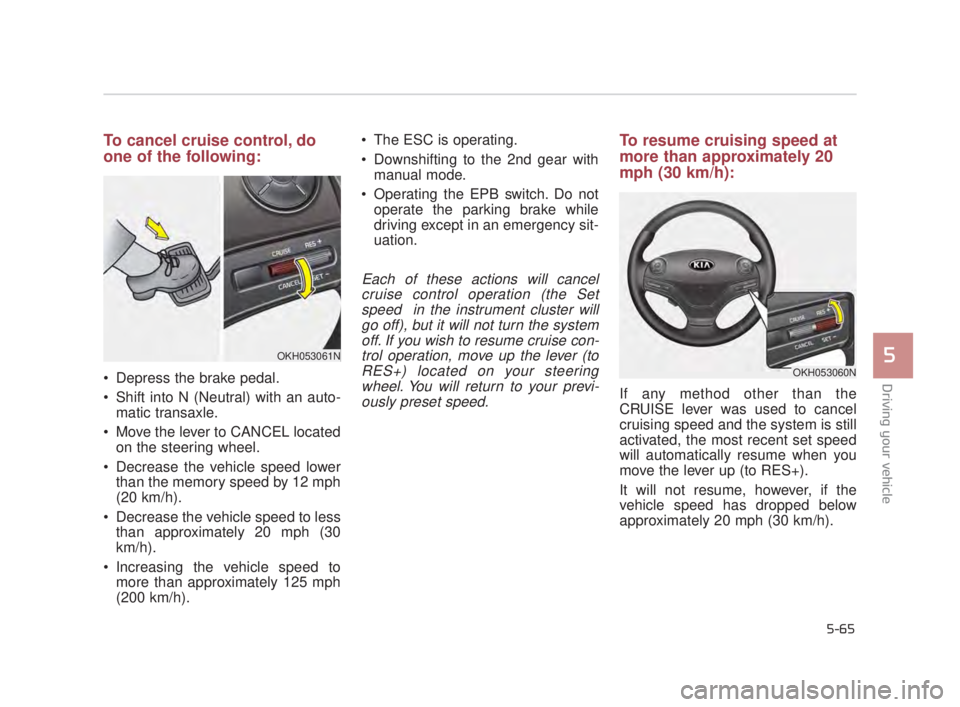
To cancel cruise control, do
one of the following:
Depress the brake pedal.
Shift into N (Neutral) with an auto-matic transaxle.
Move the lever to CANCEL located on the steering wheel.
Decrease the vehicle speed lower than the memory speed by 12 mph
(20 km/h).
Decrease the vehicle speed to less than approximately 20 mph (30
km/h).
Increasing the vehicle speed to more than approximately 125 mph
(200 km/h). The ESC is operating.
Downshifting to the 2nd gear with
manual mode.
Operating the EPB switch. Do not operate the parking brake while
driving except in an emergency sit-
uation.
Each of these actions will cancelcruise control operation (the Setspeed in the instrument cluster willgo off), but it will not turn the systemoff. If you wish to resume cruise con-trol operation, move up the lever (toRES+) located on your steeringwheel. You will return to your previ-ously preset speed.
To resume cruising speed at
more than approximately 20
mph (30 km/h):
If any method other than the
CRUISE lever was used to cancel
cruising speed and the system is still
activated, the most recent set speed
will automatically resume when you
move the lever up (to RES+).
It will not resume, however, if the
vehicle speed has dropped below
approximately 20 mph (30 km/h).
OKH053061N
OKH053060N
KH USA 5:2018 4/12/2017 10:00 AM Page 65
Page 332 of 544
Driving your vehicle
5
5-67
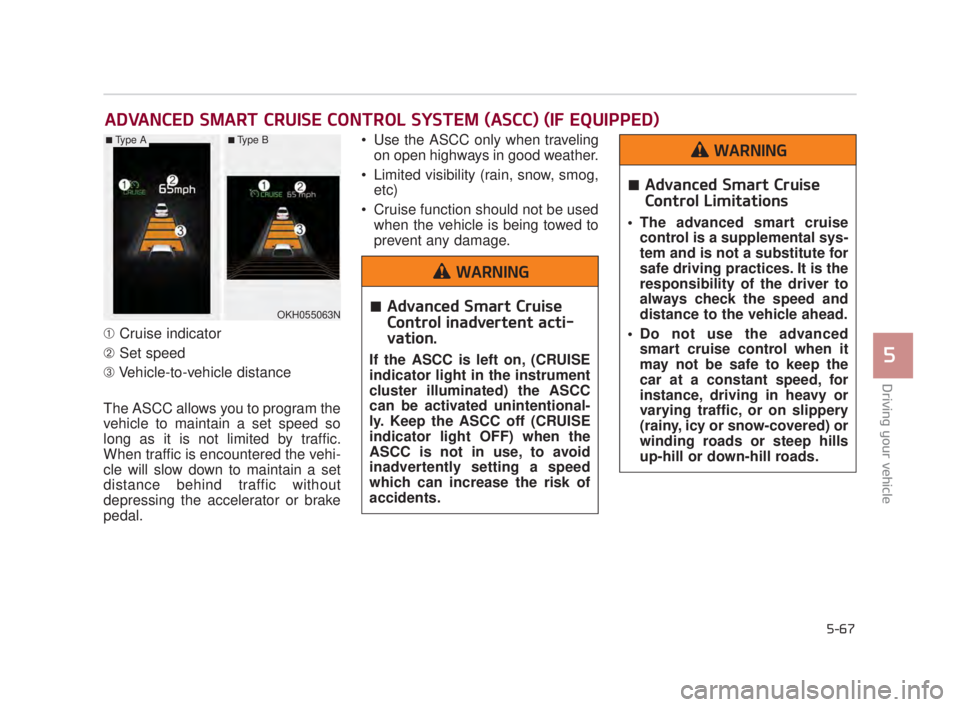
➀Cruise indicator
\b Set speed
➂ Vehicle-to-vehicle distance
The ASCC allows you to program the
vehicle to maintain a set speed so
long as it is not limited by traffic.
When traffic is encountered the vehi-
cle will slow down to maintain a set
distance behind traffic without
depressing the accelerator or brake
pedal. Use the ASCC only when traveling
on open highways in good weather.
Limited visibility (rain, snow, smog, etc)
Cruise function should not be used when the vehicle is being towed to
prevent any damage.
ADVANCED SMART CRUISE CONTROL SYSTEM (ASCC) (IF EQUIPPED)
OKH055063N
■Type A■Type B
Advanced Smart Cruise
Control inadvertent acti-
vation.
If the ASCC is left on, (CRUISE
indicator light in the instrument
cluster illuminated) the ASCC
can be activated unintentional-
ly. Keep the ASCC off (CRUISE
indicator light OFF) when the
ASCC is not in use, to avoid
inadvertently setting a speed
which can increase the risk of
accidents.
WARNING
Advanced Smart Cruise
Control Limitations
The advanced smart cruisecontrol is a supplemental sys-
tem and is not a substitute for
safe driving practices. It is the
responsibility of the driver to
always check the speed and
distance to the vehicle ahead.
Do not use the advanced smart cruise control when it
may not be safe to keep the
car at a constant speed, for
instance, driving in heavy or
varying traffic, or on slippery
(rainy, icy or snow-covered) or
winding roads or steep hills
up-hill or down-hill roads.
WARNING
KH USA 5:2018 4/12/2017 10:00 AM Page 67
Page 334 of 544
Driving your vehicle
5
5-69
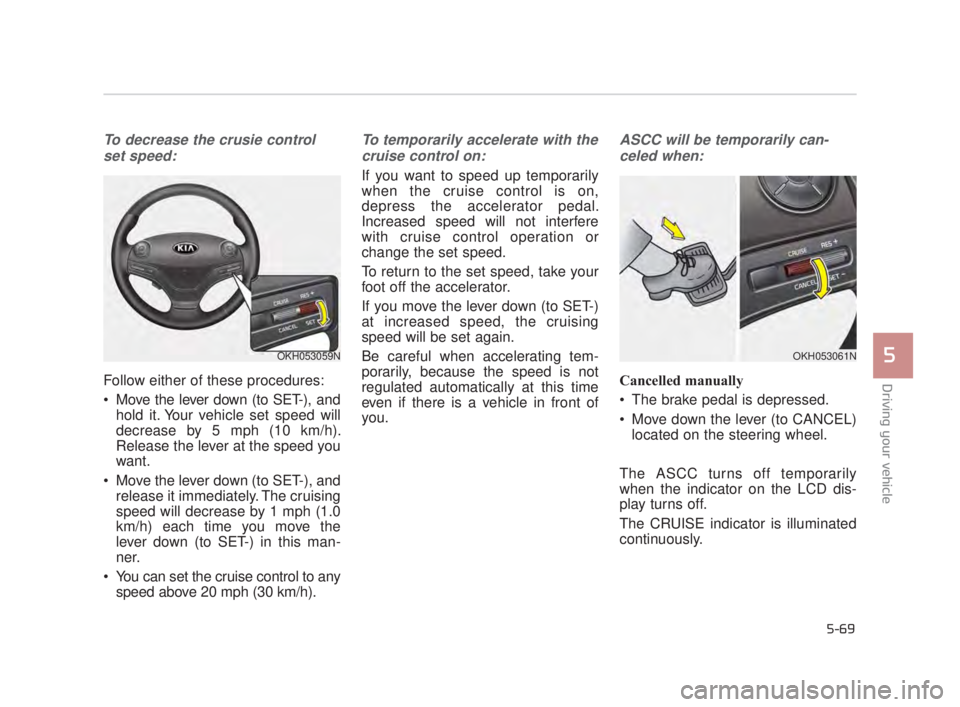
To decrease the crusie controlset speed:
Follow either of these procedures:
Move the lever down (to SET-), and hold it. Your vehicle set speed will
decrease by 5 mph (10 km/h).
Release the lever at the speed you
want.
Move the lever down (to SET-), and release it immediately. The cruising
speed will decrease by 1 mph (1.0
km/h) each time you move the
lever down (to SET-) in this man-
ner.
You can set the cruise control to any speed above 20 mph (30 km/h).
To temporarily accelerate with the
cruise control on:
If you want to speed up temporarily
when the cruise control is on,
depress the accelerator pedal.
Increased speed will not interfere
with cruise control operation or
change the set speed.
To return to the set speed, take your
foot off the accelerator.
If you move the lever down (to SET-)
at increased speed, the cruising
speed will be set again.
Be careful when accelerating tem-
porarily, because the speed is not
regulated automatically at this time
even if there is a vehicle in front of
you.
ASCC will be temporarily can-celed when:
Cancelled manually
The brake pedal is depressed.
Move down the lever (to CANCEL) located on the steering wheel.
The ASCC turns off temporarily
when the indicator on the LCD dis-
play turns off.
The CRUISE indicator is illuminated
continuously.
OKH053059NOKH053061N
KH USA 5:2018 4/12/2017 10:00 AM Page 69