audio KIA K900 2019 User Guide
[x] Cancel search | Manufacturer: KIA, Model Year: 2019, Model line: K900, Model: KIA K900 2019Pages: 580, PDF Size: 15.11 MB
Page 263 of 580
Features of your vehicle
170
4
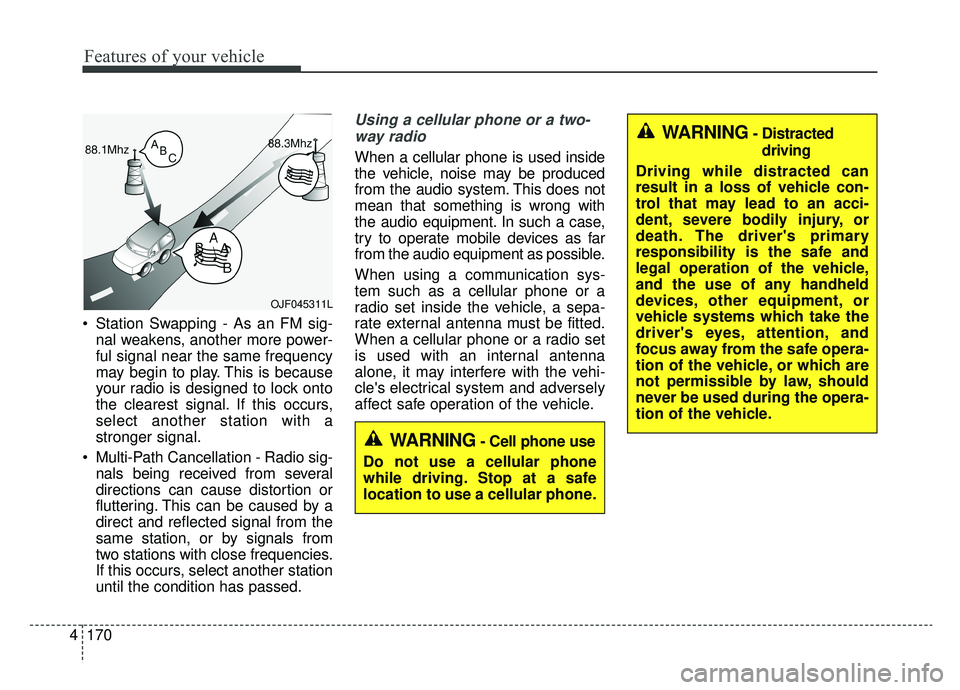
Station Swapping - As an FM sig-
nal weakens, another more power-
ful signal near the same frequency
may begin to play. This is because
your radio is designed to lock onto
the clearest signal. If this occurs,
select another station with a
stronger signal.
Multi-Path Cancellation - Radio sig- nals being received from several
directions can cause distortion or
fluttering. This can be caused by a
direct and reflected signal from the
same station, or by signals from
two stations with close frequencies.
If this occurs, select another station
until the condition has passed.
Using a cellular phone or a two-
way radio
When a cellular phone is used inside
the vehicle, noise may be produced
from the audio system. This does not
mean that something is wrong with
the audio equipment. In such a case,
try to operate mobile devices as far
from the audio equipment as possible.
When using a communication sys-
tem such as a cellular phone or a
radio set inside the vehicle, a sepa-
rate external antenna must be fitted.
When a cellular phone or a radio set
is used with an internal antenna
alone, it may interfere with the vehi-
cle's electrical system and adversely
affect safe operation of the vehicle.
OJF045311L
WARNING- Cell phone use
Do not use a cellular phone
while driving. Stop at a safe
location to use a cellular phone.
WARNING- Distracted driving
Driving while distracted can
result in a loss of vehicle con-
trol that may lead to an acci-
dent, severe bodily injury, or
death. The driver's primary
responsibility is the safe and
legal operation of the vehicle,
and the use of any handheld
devices, other equipment, or
vehicle systems which take the
driver's eyes, attention, and
focus away from the safe opera-
tion of the vehicle, or which are
not permissible by law, should
never be used during the opera-
tion of the vehicle.
Page 324 of 580
559
Driving your vehicle
(Continued)
• If the front bumper becomes dam-aged in the area around the radar
sensor, the FCA system may not
operate properly. Have the system
checked by an authorized K900
Kia dealer.
• Use only genuine parts to repair or replace a damaged sensor or sen-
sor cover. Do not apply paint to
the sensor cover.
✽ ✽ NOTICE
• NEVER install any accessories or
stickers on the front windshield,
or tint the front windshield.
• NEVER place any reflective objects (i.e. white paper, mirror)
over the dashboard. Any light
reflection may cause a malfunc-
tion of the system.
• Make sure the frontal camera does not get wet.
• NEVER disassemble the camera assembly, or apply any impact on
the camera assembly.
• Playing the vehicle audio system at high volume may prevent occu-
pants from hearing the FCA warn-
ings.
✽ ✽ NOTICE
Have the system checked by an
authorized K900 Kia dealer.
• The windshield glass is replaced.
• The radar sensor or cover gets
damaged or replaced.
Warning message and warning
light
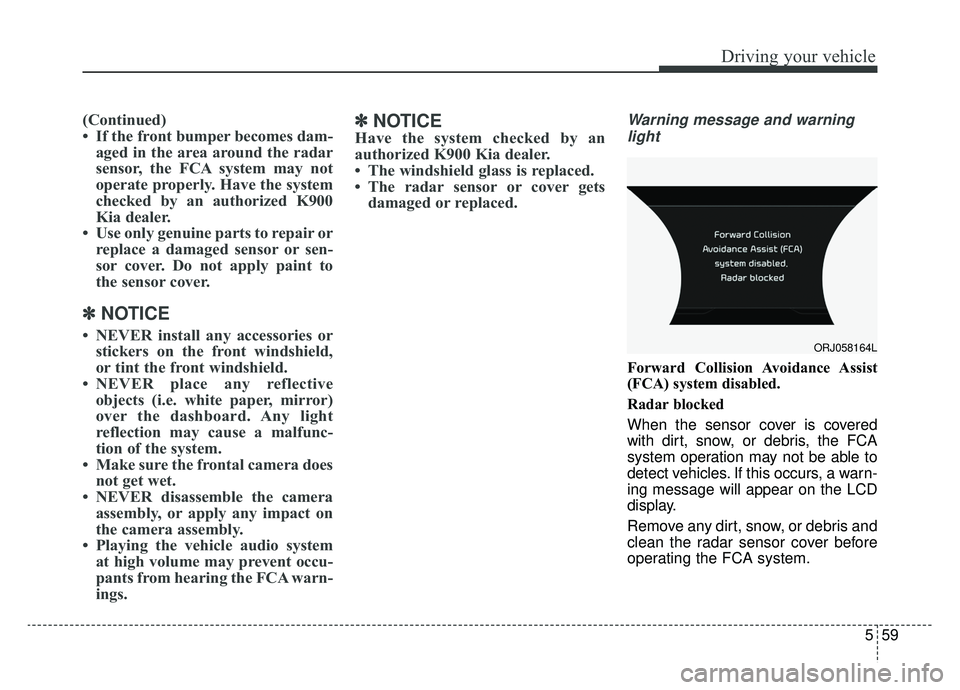
Forward Collision Avoidance Assist
(FCA) system disabled.
Radar blocked
When the sensor cover is covered
with dirt, snow, or debris, the FCA
system operation may not be able to
detect vehicles. If this occurs, a warn-
ing message will appear on the LCD
display.
Remove any dirt, snow, or debris and
clean the radar sensor cover before
operating the FCA system.
ORJ058164L
Page 343 of 580
Driving your vehicle
78
5
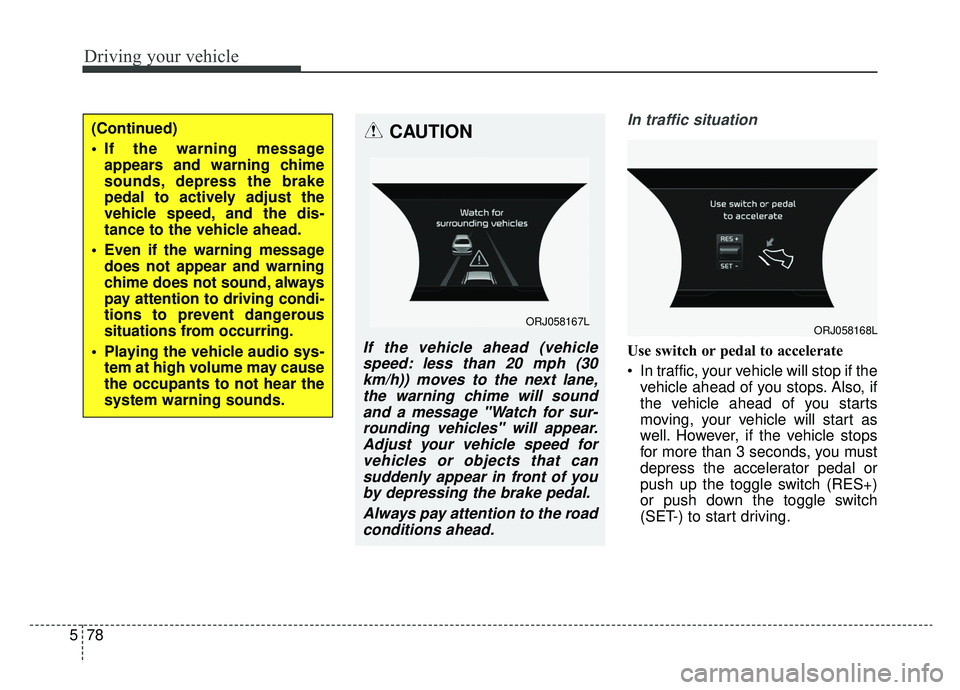
In traffic situation
Use switch or pedal to accelerate
In traffic, your vehicle will stop if the
vehicle ahead of you stops. Also, if
the vehicle ahead of you starts
moving, your vehicle will start as
well. However, if the vehicle stops
for more than 3 seconds, you must
depress the accelerator pedal or
push up the toggle switch (RES+)
or push down the toggle switch
(SET-) to start driving.
(Continued)
If the warning messageappears and warning chime
sounds, depress the brake
pedal to actively adjust the
vehicle speed, and the dis-
tance to the vehicle ahead.
Even if the warning message does not appear and warning
chime does not sound, always
pay attention to driving condi-
tions to prevent dangerous
situations from occurring.
Playing the vehicle audio sys- tem at high volume may cause
the occupants to not hear the
system warning sounds.CAUTION
If the vehicle ahead (vehiclespeed: less than 20 mph (30km/h)) moves to the next lane,the warning chime will soundand a message "Watch for sur-rounding vehicles" will appear.Adjust your vehicle speed forvehicles or objects that cansuddenly appear in front of youby depressing the brake pedal.
Always pay attention to the roadconditions ahead.
ORJ058167LORJ058168L
Page 365 of 580
![KIA K900 2019 User Guide Driving your vehicle
100
5
LFA system operation
With the ignition [ON], select or
release the setting from "AVN →
Settings →Vehicle →Driver assis-
tance →Driving assist → LFA (Lane
Foll](/img/2/55057/w960_55057-364.png "KIA K900 2019 User Guide Driving your vehicle
100
5
LFA system operation
With the ignition [ON], select or
release the setting from \"AVN →
Settings →Vehicle →Driver assis-
tance →Driving assist → LFA (Lane
Foll")
Driving your vehicle
100
5
LFA system operation
With the ignition [ON], select or
release the setting from "AVN →
Settings →Vehicle →Driver assis-
tance →Driving assist → LFA (Lane
Following Assist)".
Select the LFA system in the AVN
and meet the following conditions,
the system will operate.
- When Smart Cruise Control is in operation (Vehicle deceleration and
acceleration control)
Refer to
details.
- Driving the vehicle at 95 mph (150 km/h) and under
Once the system starts working, the
indicator light ( ) comes on the
instrument panel.
The indicator light colors according
to the system status are as follows.
- White: steering assist mode deacti- vation
- Green: steering assist mode activa- tion
(Continued)
- Depending on your surround- ings and road conditions, theLFA system could fail to rec-ognize the lane and stop work-ing. In turn, extra caution isrequired while driving withthe LFA system on.
- Be sure to check the non- operating conditions and cau-tions for the driver beforeusing the LFA system.
- Do not place reflective materi- als such as white paper ormirror on the dashboard pad.Sunlight reflections can causethe LFA system to not operateproperly.
- Loud audio volumes can pre- vent the occupants from hear-ing the alarm sounds from theLFA system
(Continued)(Continued)- Keeping your hands off the wheel while driving will triggerthe hands-off warning anddeactivate the steering-assistsystem. Put your hands backon the wheel, then the steer-ing-assist system will be re-activated.
- When driving at a high speed, the steering assist force canbecome weak and the vehiclecan drive out of its lane. Extracaution is required, and com-ply with the speed limit.
- Attaching an object to the steering wheel could detersteering assistance.
- Attaching an object to the steering wheel could deter thehands-off alarming system.
Page 371 of 580
Driving your vehicle
106
5
(Continued)
If you disassemble the cam-
era and assemble it again,
take your vehicle to an author-
ized K900 Kia dealer and have
the system checked to need a
calibration.
When you replace the wind- shield glass, front view cam-
era or related parts of the
steering, take your vehicle to
an authorized K900 Kia dealer
and have the system checked
to need a calibration.
The system is designed to detect lane markers using a
front view camera. If the lane
markers are hard to detect,
then the system may be limit-
ed. Always be cautious when
using the system.
When the lane markers are hard to detect, please refer to
“Driver’s Attention”.
(Continued)(Continued)
Do not remove or damage therelated parts of LKA system.
Do not place objects on the dashboard that reflects light
such as mirrors, white paper,
etc. This may prevent the LKA
system from functioning
properly.
You may not hear warning sound of LKA system because
of the excessive audio sound.
When other beeps such as the seat belt warning sound are in
operation and override the
LKA alarming system, LKA
beeps may not occur.
If the vehicle speed is high, steering torque for assistance
will not be enough to keep
your vehicle within the lane. If
so, the vehicle may move out
of its lane. Obey speed limit
when using LKA system.
(Continued)(Continued)
If you attach objects to thesteering wheel, the system
may not assist steering.
If you attach objects to the steering wheel, hands off
alarm may not work properly.
Page 386 of 580
5121
Driving your vehicle
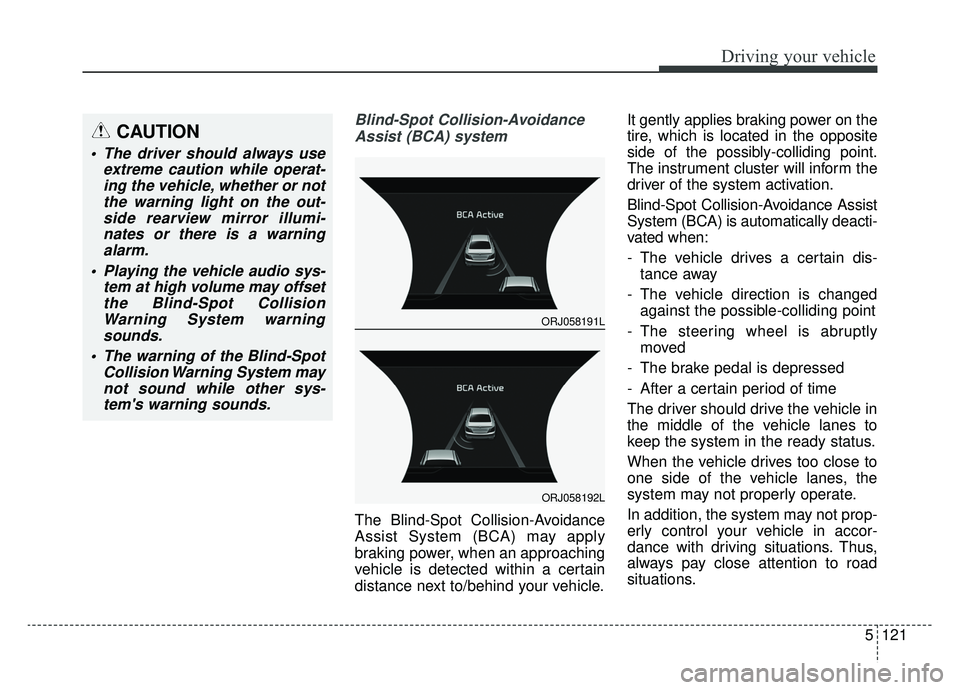
Blind-Spot Collision-AvoidanceAssist (BCA) system
The Blind-Spot Collision-Avoidance
Assist System (BCA) may apply
braking power, when an approaching
vehicle is detected within a certain
distance next to/behind your vehicle. It gently applies braking power on the
tire, which is located in the opposite
side of the possibly-colliding point.
The instrument cluster will inform the
driver of the system activation.
Blind-Spot Collision-Avoidance Assist
System (BCA) is automatically deacti-
vated when:
- The vehicle drives a certain dis-
tance away
- The vehicle direction is changed against the possible-colliding point
- The steering wheel is abruptly moved
- The brake pedal is depressed
- After a certain period of time
The driver should drive the vehicle in
the middle of the vehicle lanes to
keep the system in the ready status.
When the vehicle drives too close to
one side of the vehicle lanes, the
system may not properly operate.
In addition, the system may not prop-
erly control your vehicle in accor-
dance with driving situations. Thus,
always pay close attention to road
situations.
CAUTION
The driver should always use extreme caution while operat-ing the vehicle, whether or notthe warning light on the out-side rearview mirror illumi-nates or there is a warningalarm.
Playing the vehicle audio sys- tem at high volume may offsetthe Blind-Spot CollisionWarning System warningsounds.
The warning of the Blind-Spot Collision Warning System maynot sound while other sys-tem's warning sounds.
ORJ058191L
ORJ058192L
Page 397 of 580
Driving your vehicle
132
5
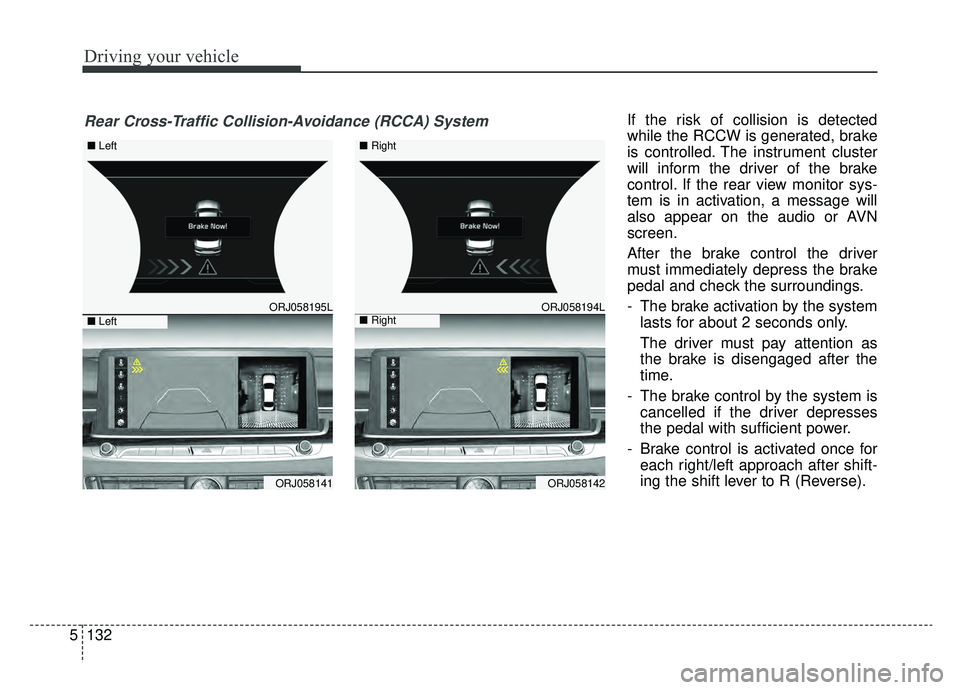
If the risk of collision is detected
while the RCCW is generated, brake
is controlled. The instrument cluster
will inform the driver of the brake
control. If the rear view monitor sys-
tem is in activation, a message will
also appear on the audio or AVN
screen.
After the brake control the driver
must immediately depress the brake
pedal and check the surroundings.
- The brake activation by the system
lasts for about 2 seconds only.
The driver must pay attention as
the brake is disengaged after the
time.
- The brake control by the system is cancelled if the driver depresses
the pedal with sufficient power.
- Brake control is activated once for each right/left approach after shift-
ing the shift lever to R (Reverse).
ORJ058195L
ORJ058141
ORJ058194L
ORJ058142
Rear Cross-Traffic Collision-Avoidance (RCCA) System
■ Left
■ Left
■ Right
■ Right
Page 398 of 580
5133
Driving your vehicle
The brake control may not operate
properly according to the status of
the ESC (Electronic Stability
Control). The same warning mes-
sage is displayed on the instrument
cluster for this case also.
- When the ESC (Electronic StabilityControl) warning light is on.
- When the ESC (Electronic Stability Control) is engaged in a different
function.CAUTION
When the operation condition of the Rear Cross-TrafficCollision Warning System issatisfied the warning willoccur every time a vehicleapproaches the side/rear ofyour stopped (0 km/h vehiclespeed) vehicle.
The system's warning or brake may not operate proper-ly if the left/right of your vehi-cle's rear bumper is blockedby a vehicle or obstacle.
The driver should always use extreme caution while operat-ing the vehicle, whether or notthe warning light on the outsiderearview mirror illuminates orthere is a warning alarm.
Playing the vehicle audio sys- tem at high volume may offsetthe system's warning sounds.
(Continued)
(Continued) The warning of the Rear Cross- Traffic Collision WarningSystem may not sound whileother system's warning sounds.
Page 410 of 580
5145
Driving your vehicle
✽ ✽NOTICE
The Driver Attention Warning sys-
tem utilizes the camera sensor on the
front windshield for its operation.
To keep the camera sensor in the
best condition, you should observe
the followings:
- Do not disassemble camera tem-
porarily for tinted window or
attaching any types of coatings and
accessories. If you disassemble a
camera and assemble it again, have
the system checked by an author-
ized K900 Kia dealer.
- Do not locate any reflective objects (i.e. white paper, mirror)
over the dashboard. Any light
reflection may cause a mal-func-
tion of the Driver Attention
Warning (DAW) system.
- Pay extreme caution to keep the camera sensor out of water.
- Do not arbitrarily disassemble the camera assembly, nor apply any
impact on the camera assembly.
• Playing the vehicle audio system at high volume may offset the
Driver Attention Warning system
warning sounds.
✽ ✽ NOTICE
The DAW system does not detect
actual driver fatigue or drowsiness.
The system monitors driving and
provides a warning if it detects inat-
tentive driving practices.
CAUTION
The Driver Attention Warning
system may not properly oper-ate with limited alerting in thefollowing situations:
The lane detection perform- ance is limited. (For moreinformation, refer to "LaneKeeping Assist (LKA) System"in this chapter.)
The vehicle is violently driven or is abruptly turned for obsta-cle avoidance (e.g. construc-tion area, other vehicles, fallenobjects, bumpy road).
Forward drivability of the vehi- cle is severely undermined(possibly due to wide varia-tion in tire pressures, uneventire wear-out, toe-in/toe-outalignment).
The vehicle drives on a curvy road.
The vehicle drives on a bumpy road.
(Continued)
(Continued) The vehicle drives through a windy area.
The vehicle is controlled by the following driving assistsystems:
- Lane Keeping Assist (LKA) System
- Forward Collision-Avoidance Assist (FCA) System
- Blind-Spot Collision- Avoidance Assist (BCA)System
- Lane Following Assist (LFA) System
- Smart Cruise Control (SCC) System
Page 491 of 580
737
Maintenance
Reset items
Items should be reset after the bat-
tery has been discharged or the bat-
tery has been disconnected.
Auto up/down window (See chapter 4)
Sunroof (See chapter 4)
Trip computer (See chapter 4)
Climate control system (See chapter 4)
Driver position memory system (See chapter 3)
Audio (See chapter 4)