instrument cluster KIA K900 2019 User Guide
[x] Cancel search | Manufacturer: KIA, Model Year: 2019, Model line: K900, Model: KIA K900 2019Pages: 580, PDF Size: 15.11 MB
Page 340 of 580
575
Driving your vehicle
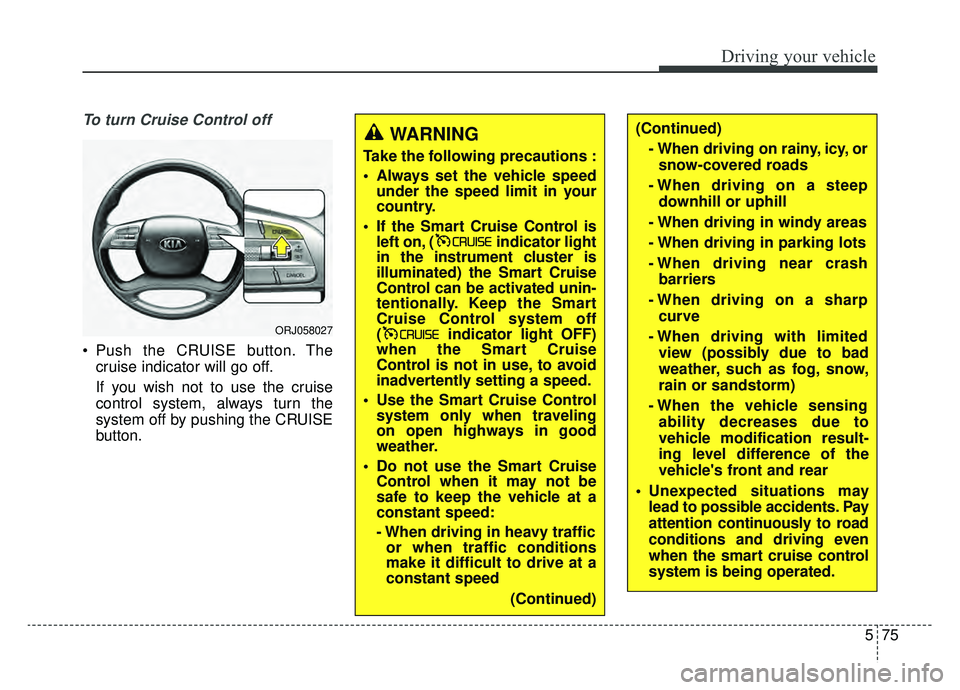
To turn Cruise Control off
Push the CRUISE button. Thecruise indicator will go off.
If you wish not to use the cruise
control system, always turn the
system off by pushing the CRUISE
button.
WARNING
Take the following precautions :
Always set the vehicle speedunder the speed limit in your
country.
If the Smart Cruise Control is left on, ( indicator light
in the instrument cluster is
illuminated) the Smart Cruise
Control can be activated unin-
tentionally. Keep the Smart
Cruise Control system off
( indicator light OFF)
when the Smart Cruise
Control is not in use, to avoid
inadvertently setting a speed.
Use the Smart Cruise Control system only when traveling
on open highways in good
weather.
Do not use the Smart Cruise Control when it may not be
safe to keep the vehicle at a
constant speed:
- When driving in heavy trafficor when traffic conditions
make it difficult to drive at a
constant speed
(Continued)
(Continued)- When driving on rainy, icy, orsnow-covered roads
- When driving on a steep downhill or uphill
- When driving in windy areas
- When driving in parking lots
- When driving near crash barriers
- When driving on a sharp curve
- When driving with limited view (possibly due to bad
weather, such as fog, snow,
rain or sandstorm)
- When the vehicle sensing ability decreases due to
vehicle modification result-
ing level difference of the
vehicle's front and rear
Unexpected situations may lead to possible accidents. Pay
attention continuously to road
conditions and driving even
when the smart cruise control
system is being operated.
ORJ058027
Page 355 of 580
Driving your vehicle
90
5
Your vehicle may be equipped with
the ISG system, which reduces fuel
consumption by automatically shut-
ting down the engine, when the vehi-
cle is at a standstill. (For example :
red light, stop sign and traffic jam)
The engine starts automatically as
soon as the starting conditions are
met.
The ISG system is ON whenever the
engine is running.
✽ ✽
NOTICE
When the engine automatically
starts by the ISG system, some
warning lights (ABS, ESC, ESC
OFF, EPS or Parking brake warn-
ing light) may turn on for a few sec-
onds.
This happens because of low battery
voltage. It does not mean the system
has malfunctioned.
Auto stop
To stop the engine in idle stop
mode
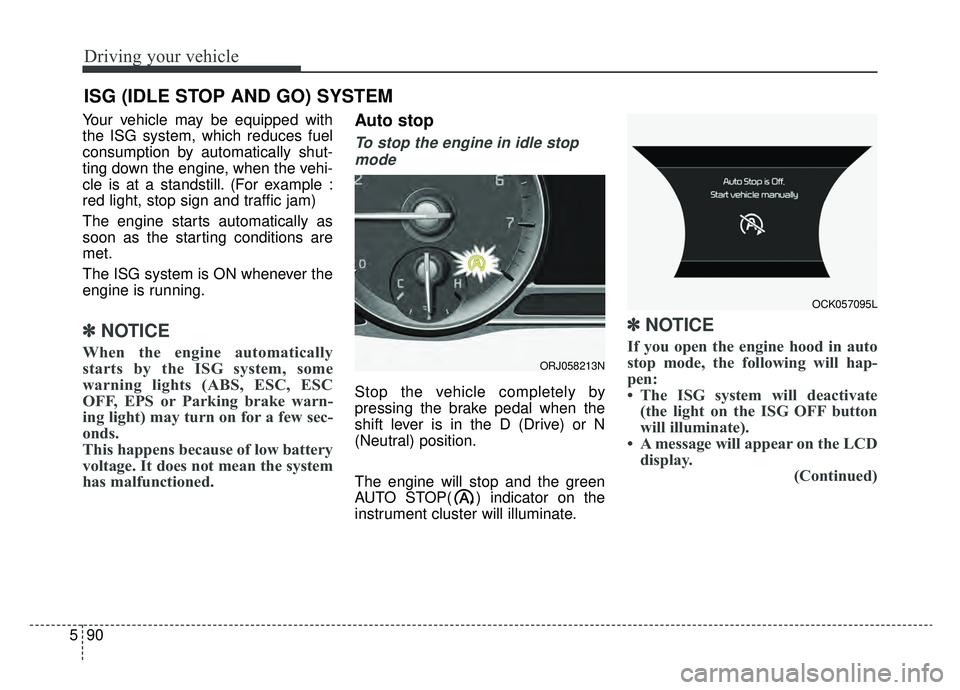
Stop the vehicle completely by
pressing the brake pedal when the
shift lever is in the D (Drive) or N
(Neutral) position.
The engine will stop and the green
AUTO STOP( ) indicator on the
instrument cluster will illuminate.
✽ ✽ NOTICE
If you open the engine hood in auto
stop mode, the following will hap-
pen:
• The ISG system will deactivate
(the light on the ISG OFF button
will illuminate).
• A message will appear on the LCD display. (Continued)
ISG (IDLE STOP AND GO) SYSTEM
ORJ058213N
OCK057095L
Page 356 of 580
591
Driving your vehicle
(Continued)
• If you move the transmission leverfrom N to D (manual mode) or R
without depressing the brake
pedal after stopping engine auto-
matically, the engine does not
restart automatically and a warn-
ing chime alarms. When this hap-
pens, press the brake pedal for
auto start.
Auto start
To restart the engine from idle
stop mode
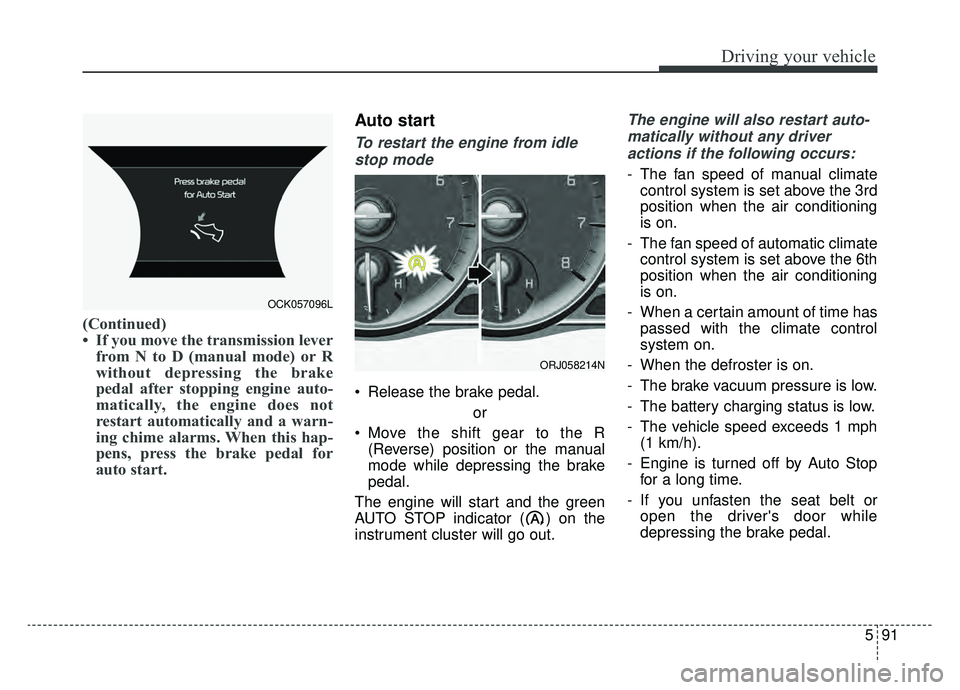
Release the brake pedal.
or
Move the shift gear to the R (Reverse) position or the manual
mode while depressing the brake
pedal.
The engine will start and the green
AUTO STOP indicator ( ) on the
instrument cluster will go out.
The engine will also restart auto- matically without any driveractions if the following occurs:
- The fan speed of manual climate control system is set above the 3rd
position when the air conditioning
is on.
- The fan speed of automatic climate control system is set above the 6th
position when the air conditioning
is on.
- When a certain amount of time has passed with the climate control
system on.
- When the defroster is on.
- The brake vacuum pressure is low.
- The battery charging status is low.
- The vehicle speed exceeds 1 mph (1 km/h).
- Engine is turned off by Auto Stop for a long time.
- If you unfasten the seat belt or open the driver's door while
depressing the brake pedal.
OCK057096L
ORJ058214N
Page 358 of 580
593
Driving your vehicle
ISG system malfunction
The system may not operate when:
The system may not operate when
an ISG related sensor or system
error occurs.
The following will happen:
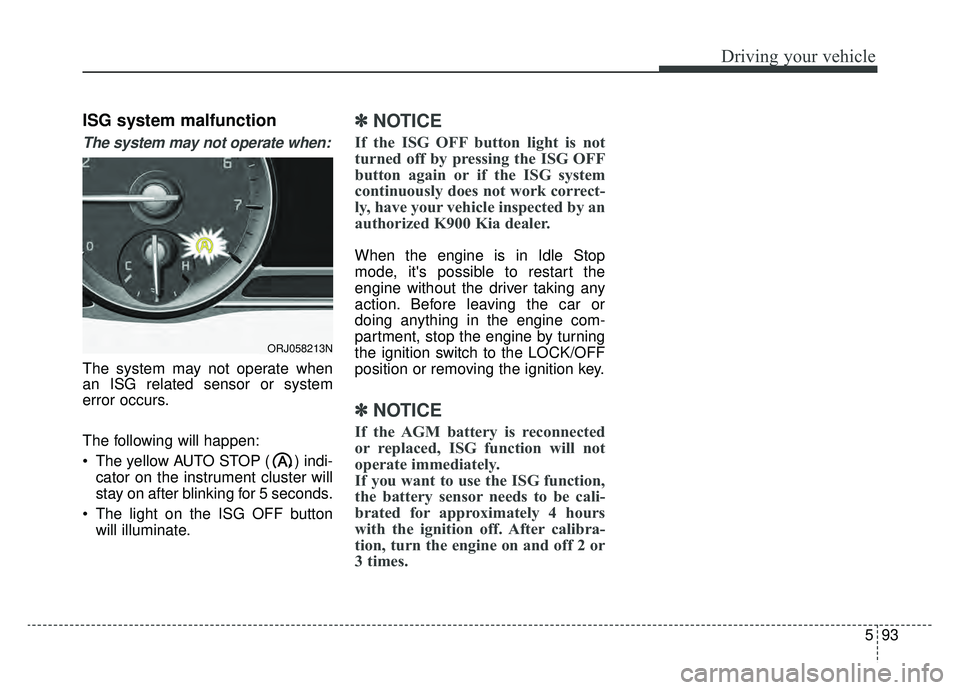
The yellow AUTO STOP ( ) indi-cator on the instrument cluster will
stay on after blinking for 5 seconds.
The light on the ISG OFF button will illuminate.
✽ ✽ NOTICE
If the ISG OFF button light is not
turned off by pressing the ISG OFF
button again or if the ISG system
continuously does not work correct-
ly, have your vehicle inspected by an
authorized K900 Kia dealer.
When the engine is in Idle Stop
mode, it's possible to restart the
engine without the driver taking any
action. Before leaving the car or
doing anything in the engine com-
partment, stop the engine by turning
the ignition switch to the LOCK/OFF
position or removing the ignition key.
✽ ✽NOTICE
If the AGM battery is reconnected
or replaced, ISG function will not
operate immediately.
If you want to use the ISG function,
the battery sensor needs to be cali-
brated for approximately 4 hours
with the ignition off. After calibra-
tion, turn the engine on and off 2 or
3 times.
ORJ058213N
Page 386 of 580
5121
Driving your vehicle
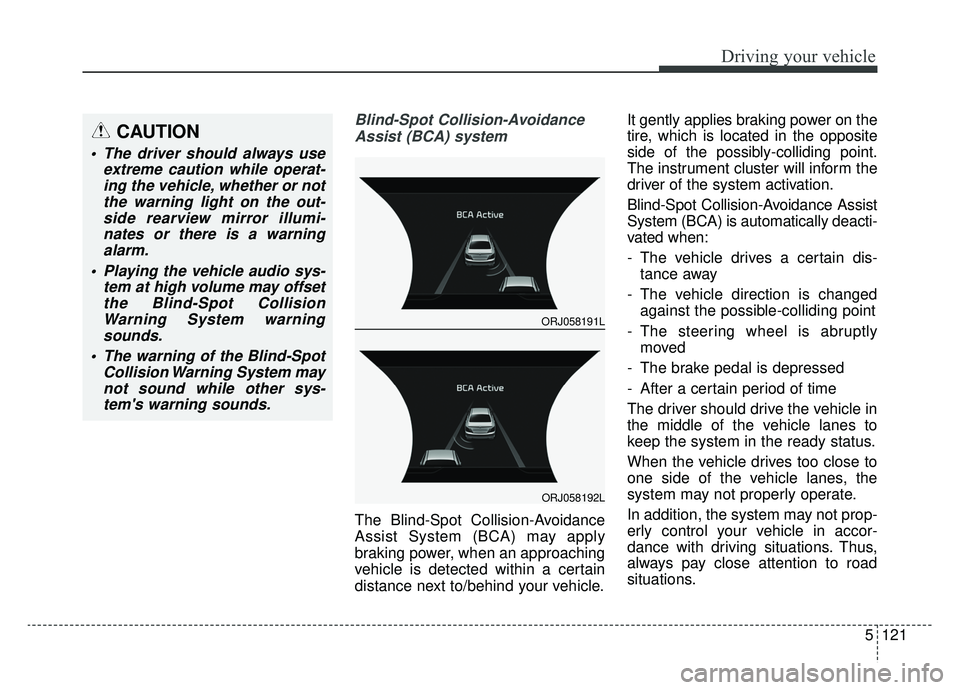
Blind-Spot Collision-AvoidanceAssist (BCA) system
The Blind-Spot Collision-Avoidance
Assist System (BCA) may apply
braking power, when an approaching
vehicle is detected within a certain
distance next to/behind your vehicle. It gently applies braking power on the
tire, which is located in the opposite
side of the possibly-colliding point.
The instrument cluster will inform the
driver of the system activation.
Blind-Spot Collision-Avoidance Assist
System (BCA) is automatically deacti-
vated when:
- The vehicle drives a certain dis-
tance away
- The vehicle direction is changed against the possible-colliding point
- The steering wheel is abruptly moved
- The brake pedal is depressed
- After a certain period of time
The driver should drive the vehicle in
the middle of the vehicle lanes to
keep the system in the ready status.
When the vehicle drives too close to
one side of the vehicle lanes, the
system may not properly operate.
In addition, the system may not prop-
erly control your vehicle in accor-
dance with driving situations. Thus,
always pay close attention to road
situations.
CAUTION
The driver should always use extreme caution while operat-ing the vehicle, whether or notthe warning light on the out-side rearview mirror illumi-nates or there is a warningalarm.
Playing the vehicle audio sys- tem at high volume may offsetthe Blind-Spot CollisionWarning System warningsounds.
The warning of the Blind-Spot Collision Warning System maynot sound while other sys-tem's warning sounds.
ORJ058191L
ORJ058192L
Page 397 of 580
Driving your vehicle
132
5
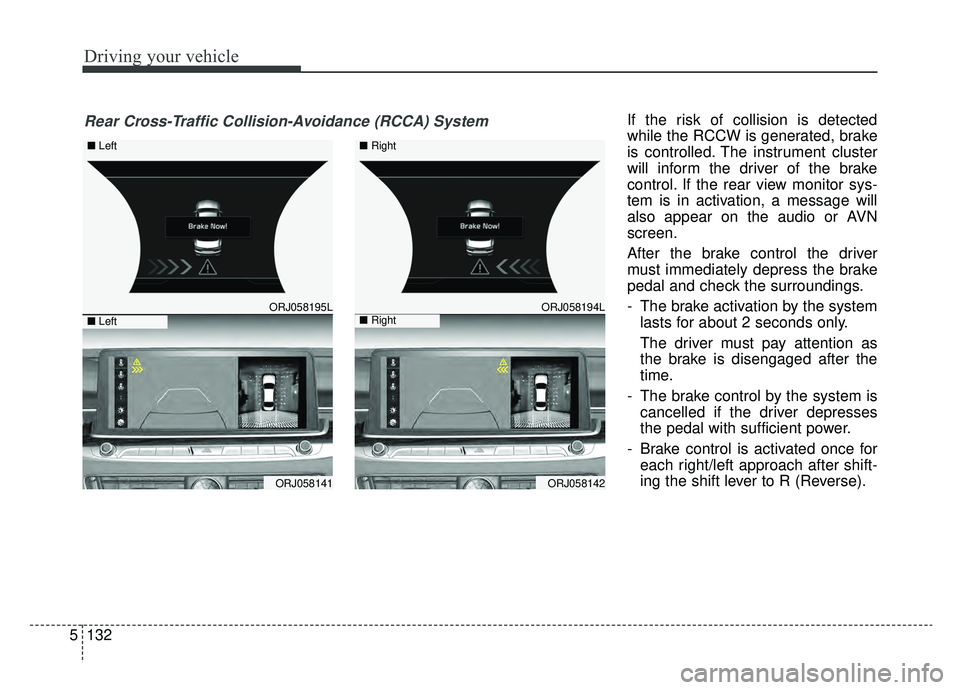
If the risk of collision is detected
while the RCCW is generated, brake
is controlled. The instrument cluster
will inform the driver of the brake
control. If the rear view monitor sys-
tem is in activation, a message will
also appear on the audio or AVN
screen.
After the brake control the driver
must immediately depress the brake
pedal and check the surroundings.
- The brake activation by the system
lasts for about 2 seconds only.
The driver must pay attention as
the brake is disengaged after the
time.
- The brake control by the system is cancelled if the driver depresses
the pedal with sufficient power.
- Brake control is activated once for each right/left approach after shift-
ing the shift lever to R (Reverse).
ORJ058195L
ORJ058141
ORJ058194L
ORJ058142
Rear Cross-Traffic Collision-Avoidance (RCCA) System
■ Left
■ Left
■ Right
■ Right
Page 398 of 580
5133
Driving your vehicle
The brake control may not operate
properly according to the status of
the ESC (Electronic Stability
Control). The same warning mes-
sage is displayed on the instrument
cluster for this case also.
- When the ESC (Electronic StabilityControl) warning light is on.
- When the ESC (Electronic Stability Control) is engaged in a different
function.CAUTION
When the operation condition of the Rear Cross-TrafficCollision Warning System issatisfied the warning willoccur every time a vehicleapproaches the side/rear ofyour stopped (0 km/h vehiclespeed) vehicle.
The system's warning or brake may not operate proper-ly if the left/right of your vehi-cle's rear bumper is blockedby a vehicle or obstacle.
The driver should always use extreme caution while operat-ing the vehicle, whether or notthe warning light on the outsiderearview mirror illuminates orthere is a warning alarm.
Playing the vehicle audio sys- tem at high volume may offsetthe system's warning sounds.
(Continued)
(Continued) The warning of the Rear Cross- Traffic Collision WarningSystem may not sound whileother system's warning sounds.
Page 510 of 580
Maintenance
56
7
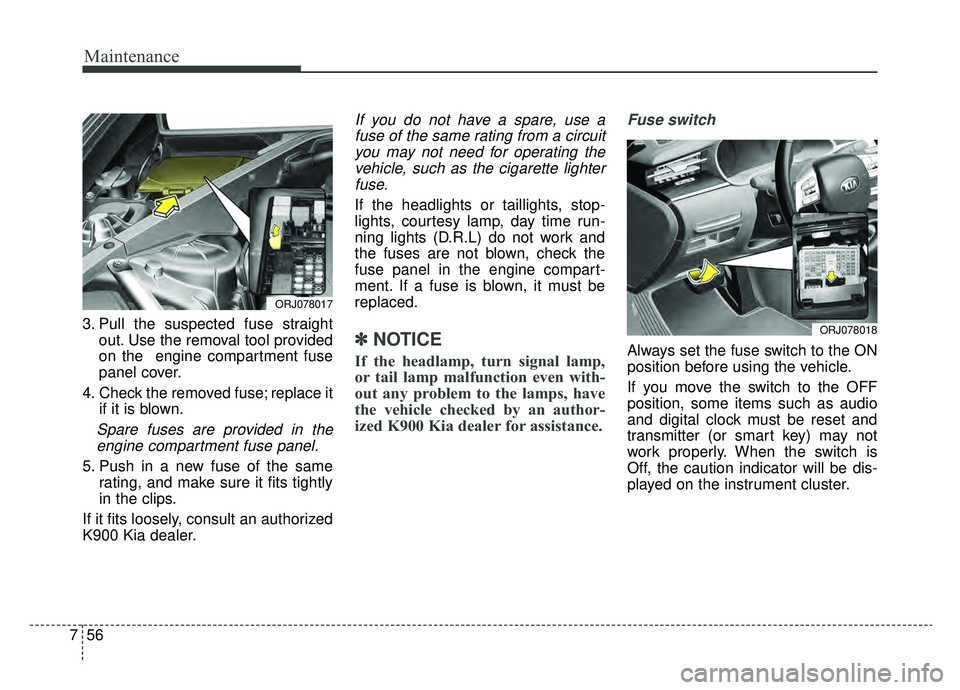
3. Pull the suspected fuse straight
out. Use the removal tool provided
on the engine compartment fuse
panel cover.
4. Check the removed fuse; replace it if it is blown.
Spare fuses are provided in theengine compartment fuse panel.
5. Push in a new fuse of the same rating, and make sure it fits tightly
in the clips.
If it fits loosely, consult an authorized
K900 Kia dealer.
If you do not have a spare, use a fuse of the same rating from a circuityou may not need for operating thevehicle, such as the cigarette lighterfuse.
If the headlights or taillights, stop-
lights, courtesy lamp, day time run-
ning lights (D.R.L) do not work and
the fuses are not blown, check the
fuse panel in the engine compart-
ment. If a fuse is blown, it must be
replaced.
✽ ✽ NOTICE
If the headlamp, turn signal lamp,
or tail lamp malfunction even with-
out any problem to the lamps, have
the vehicle checked by an author-
ized K900 Kia dealer for assistance.
Fuse switch
Always set the fuse switch to the ON
position before using the vehicle.
If you move the switch to the OFF
position, some items such as audio
and digital clock must be reset and
transmitter (or smart key) may not
work properly. When the switch is
Off, the caution indicator will be dis-
played on the instrument cluster.
ORJ078017
ORJ078018
Page 516 of 580
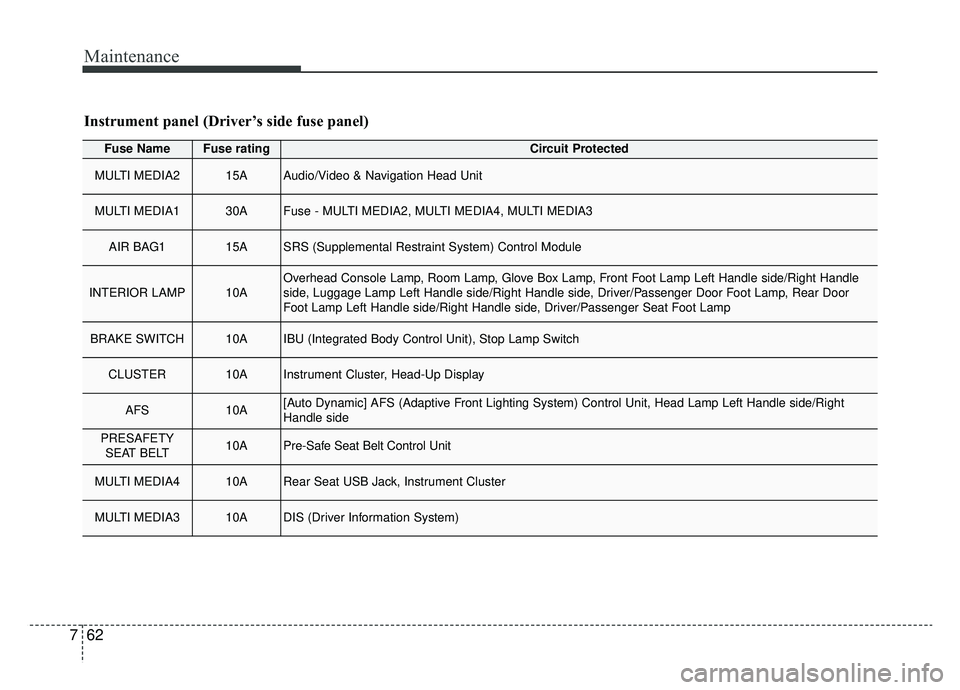
Maintenance
62
7
Fuse NameFuse ratingCircuit Protected
MULTI MEDIA215AAudio/Video & Navigation Head Unit
MULTI MEDIA130AFuse - MULTI MEDIA2, MULTI MEDIA4, MULTI MEDIA3
AIR BAG115ASRS (Supplemental Restraint System) Control Module
INTERIOR LAMP10AOverhead Console Lamp, Room Lamp, Glove Box Lamp, Front Foot Lamp Left Handle side/Right Handle
side, Luggage Lamp Left Handle side/Right Handle side, Driver/Passenger Door Foot Lamp, Rear Door
Foot Lamp Left Handle side/Right Handle side, Driver/Passenger Seat Foot Lamp
BRAKE SWITCH10AIBU (Integrated Body Control Unit), Stop Lamp Switch
CLUSTER10AInstrument Cluster, Head-Up Display
AFS10A[Auto Dynamic] AFS (Adaptive Front Lighting System) Control Unit, Head Lamp Left Handle side/Right
Handle side
PRESAFETY
SEAT BELT10APre-Safe Seat Belt Control Unit
MULTI MEDIA410ARear Seat USB Jack, Instrument Cluster
MULTI MEDIA310ADIS (Driver Information System)
Instrument panel (Driver’s side fuse panel)
Page 517 of 580
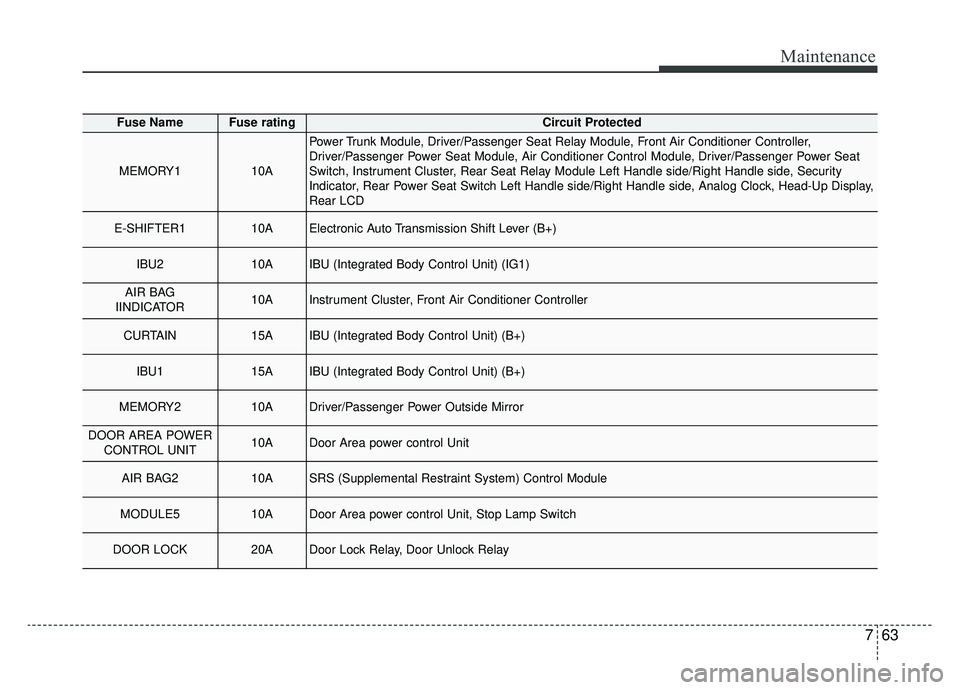
763
Maintenance
Fuse NameFuse ratingCircuit Protected
MEMORY110A
Power Trunk Module, Driver/Passenger Seat Relay Module, Front Air Conditioner Controller,
Driver/Passenger Power Seat Module, Air Conditioner Control Module, Driver/Passenger Power Seat
Switch, Instrument Cluster, Rear Seat Relay Module Left Handle side/Right Handle side, Security
Indicator, Rear Power Seat Switch Left Handle side/Right Handle side, Analog Clock, Head-Up Display,
Rear LCD
E-SHIFTER110AElectronic Auto Transmission Shift Lever (B+)
IBU210AIBU (Integrated Body Control Unit) (IG1)
AIR BAG
IINDICATOR10AInstrument Cluster, Front Air Conditioner Controller
CURTAIN15AIBU (Integrated Body Control Unit) (B+)
IBU115AIBU (Integrated Body Control Unit) (B+)
MEMORY210ADriver/Passenger Power Outside Mirror
DOOR AREA POWER CONTROL UNIT10ADoor Area power control Unit
AIR BAG210ASRS (Supplemental Restraint System) Control Module
MODULE510ADoor Area power control Unit, Stop Lamp Switch
DOOR LOCK20ADoor Lock Relay, Door Unlock Relay