light KIA K900 2020 Owners Manual
[x] Cancel search | Manufacturer: KIA, Model Year: 2020, Model line: K900, Model: KIA K900 2020Pages: 593, PDF Size: 14.99 MB
Page 395 of 593

5129
Driving your vehicle
ISG system malfunction
The system may not operate when:
The system may not operate when
an ISG related sensor or system
error occurs.
The following will happen:
The yellow AUTO STOP ( ) indi-cator on the instrument cluster will
stay on after blinking for 5 seconds.
The light on the ISG OFF button will illuminate.
✽ ✽ NOTICE
If the ISG OFF button light is not
turned off by pressing the ISG OFF
button again or if the ISG system
continuously does not work correct-
ly, have your vehicle inspected by an
authorized K900 Kia dealer.
When the engine is in Idle Stop
mode, it's possible to restart the
engine without the driver taking any
action. Before leaving the car or
doing anything in the engine com-
partment, stop the engine by turning
the ignition switch to the LOCK/OFF
position or removing the ignition key.
✽ ✽NOTICE
If the AGM battery is reconnected
or replaced, ISG function will not
operate immediately.
If you want to use the ISG function,
the battery sensor needs to be cali-
brated for approximately 4 hours
with the ignition off. After calibra-
tion, turn the engine on and off 2 or
3 times.
ORJ058213N
Page 400 of 593
Driving your vehicle
134
5
When ECO mode is activated:
The acceleration response may be
slightly reduced if the accelerator
pedal is depressed moderately.
The air conditioner performance may be limited.
The shift pattern of the automatic transmission may change.
The engine noise may get louder.
The above situations are normal
conditions when ECO mode is acti-
vated to improve fuel efficiency. Limitation of ECO mode operation:
If the following conditions occur while
ECO mode is operating, the system
operation is limited even though
there is no change in the ECO indi-
cator.
When the coolant temperature is
low:
The system will be limited until
engine performance becomes nor-
mal.
When driving up a hill: The system will be limited to gain
power when driving uphill because
engine torque is restricted.
When driving the vehicle with the automatic transmission gear shift
lever in manual mode.
The system will be limited accord-
ing to the shift location.CUSTOM mode
In CUSTOM mode, the
driver can select sepa-
rate modes and com-
bine them on the AVN
System screen.
Engine/Transmission: ECO/COM- FORT/ SPORT/SNOW
Steering wheel: COMFORT/ SPORT
Suspension: COMFORT+/COM- FORT/SPORT
All-Wheel Drive (AWD) system: ECO/COMFORT/SPORT
For more information, refer to the
separately supplied AVN System
manual.
When CUSTOM mode is selected by pressing the DRIVE MODE but-
ton, the CUSTOM mode indicator
will illuminate.
CUSTOM
Page 402 of 593
Driving your vehicle
136
5
(Continued)
Do not disassemble LFA sys-
tem camera temporarily to tint
the window or attach any
types of coatings and acces-
sories. If you disassemble the
camera and assemble it again,
we recommend that you take
your vehicle to an authorized
retailer of Kia products and
have the system checked for
calibration.
When you replace the wind- shield glass, LFA system cam-
era or related parts of the
steering wheel, take your
vehicle to an authorized retail-
er of Kia products and have
the system checked for cali-
bration.
The system helps detect lane markers and controls the
steering wheel by a camera,
therefore, if the lane markers
are hard to detect, the system
may not work properly.
(Continued)(Continued)Please refer to “Limitations of
the System”.
Do not remove or damage the related parts of LFA system.
You may not hear a warning sound of LFA system if the
audio volume is high.
Do not place objects on the dashboard that reflects light
such as mirrors, white paper,
etc. This may prevent LFA sys-
tem from functioning proper-
ly.
Always have your hands on the steering wheel while LFA
system is activated.
The steering wheel is not con- tinuously controlled so if the
vehicle speed is at a higher
rate when leaving a lane the
vehicle may not be controlled
by the system. The driver
must always follow the speed
limit when using the system.
(Continued)(Continued)
If you attach objects to thesteering wheel, the system
may not assist steering or the
hands off alarm may not work
properly.
Page 403 of 593
![KIA K900 2020 Owners Manual 5137
Driving your vehicle
LFA system operation
With the ignition [ON], select or
release the setting from “AVN →
Setup → Vehicle →Driver
Assistance →Driving Assist → LFA
(Lane Following](/img/2/55052/w960_55052-402.png "KIA K900 2020 Owners Manual 5137
Driving your vehicle
LFA system operation
With the ignition [ON], select or
release the setting from “AVN →
Setup → Vehicle →Driver
Assistance →Driving Assist → LFA
(Lane Following")
5137
Driving your vehicle
LFA system operation
With the ignition [ON], select or
release the setting from “AVN →
Setup → Vehicle →Driver
Assistance →Driving Assist → LFA
(Lane Following Assist)”.
Select the LFA system in the AVN
and meet the following conditions,
the system will operate.
- The Smart Cruise Control is oper- ating
- Vehicle speed is lower than 95 mph (153 km/h)
When the system is activated, the
indicator ( ) on the cluster will illu-
minate. The color of the indicator will
change depending on the condition
of the LFA system.
- Green : Steering assist mode is
ON
- White : Steering assist mode is
OFF
LFA system activation
If the vehicle is inside the lane with
both lanes detected by the system
(lane color changes from gray to
white), and there is no abrupt steer-
ing made by the driver, LFA system
changes to steering assist mode.
The indicator light will come on
green, and the system helps the
vehicle stay in line by controlling the
steering wheel.
When the steering wheel is not con-
trolled temporarily, the indicator light
will flash green and changes to
white.
LFA system ensures the vehicle
stays in its lane. LFA system does
not guarantee 100% safety. Make
sure you make decisions on the road
after checking the road conditions
and safety matters while driving.
Never completely rely on your LFA
system.
Warning
Keep hands on steering wheel
If the driver takes their hands off the
steering wheel for several seconds
while LFA system is activated, the
system will warn the driver.
✽ ✽
NOTICE
Hold the steering wheel tight.
Otherwise, LFA system could mis-
judge that the driver's hands are off
the steering wheel, and the above
warning may occur.
ORJ058180L
Page 407 of 593

5141
Driving your vehicle
When external condition is inter-
vened
The brightness outside changessuddenly such as when entering or
exiting a tunnel, or when passing
under a bridge.
The brightness outside is too low such as when the headlamps are
not on at night or the vehicle is
going through a tunnel.
There is a boundary structure in the roadway such as a concrete
barrier, guardrail and reflector post
that is inadvertently being detected
by the camera.
When light coming from a street light or an oncoming vehicle is
reflected on a wet road surface
such as a puddle in the road.
The field of view in front is obstructed by sun glare.
There is not enough distance between you and the vehicle in
front to be able to detect the lane
marker or the vehicle ahead is driv-
ing on the lane marker. Driving on a steep grade, over a
hill, or when driving on a curved
road.
The adverse road conditions cause excessive vehicle vibrations while
driving.
The surrounding of the inside rear view mirror temperature is high
due to direct sunlight, etc.
The sensor recognition changes suddenly when passing over a
speed bump or driving on a steep
up/down or right/left grade When front visibility is poor
The windshield or the camera lens
is covered with dirt or debris.
The windshield glass is fogged up; a clear view of the road is obstruct-
ed.
Placing objects on the dashboard, etc.
The sensor cannot detect the lane because of fog, heavy rain or snow.
Page 409 of 593
![KIA K900 2020 Owners Manual 5143
Driving your vehicle
Setting and activating HDA
system
With the ignition [ON], select or
release the setting from “AVN →
Setup →Vehicle →Driver
Assistance →Driving Assist → HDA
(Hig](/img/2/55052/w960_55052-408.png "KIA K900 2020 Owners Manual 5143
Driving your vehicle
Setting and activating HDA
system
With the ignition [ON], select or
release the setting from “AVN →
Setup →Vehicle →Driver
Assistance →Driving Assist → HDA
(Hig")
5143
Driving your vehicle
Setting and activating HDA
system
With the ignition [ON], select or
release the setting from “AVN →
Setup →Vehicle →Driver
Assistance →Driving Assist → HDA
(Highway Driving Assist)”.
Select the HDA system in the AVN,
and the system will operate if the fol-
lowing conditions are met :
Operating conditions
If you activate HDA in the AVN sys-
tem and the following conditions are
met, HDA system will be ready to
operate, and the indicator light ( ) will come on green in the clus-
ter.
When driving on the highway main line.
When Smart Cruise Control is in operation (Vehicle deceleration
and acceleration control)
- Refer to “Smart Cruise Control(SCC)” on page 5-100.
- If SCC is in standby mode (SCC is on but speed is not set), the
HDA system will be in the same
mode. The white indicator ( ) light will be turned on.
When the vehicle speed is below 95 mph (153 km/h)
HDA system operation
The speed is automatically set in
accordance with the steering control
and the highway speed limit when all
the operating conditions are met.
Page 410 of 593
Driving your vehicle
144
5
Steering control
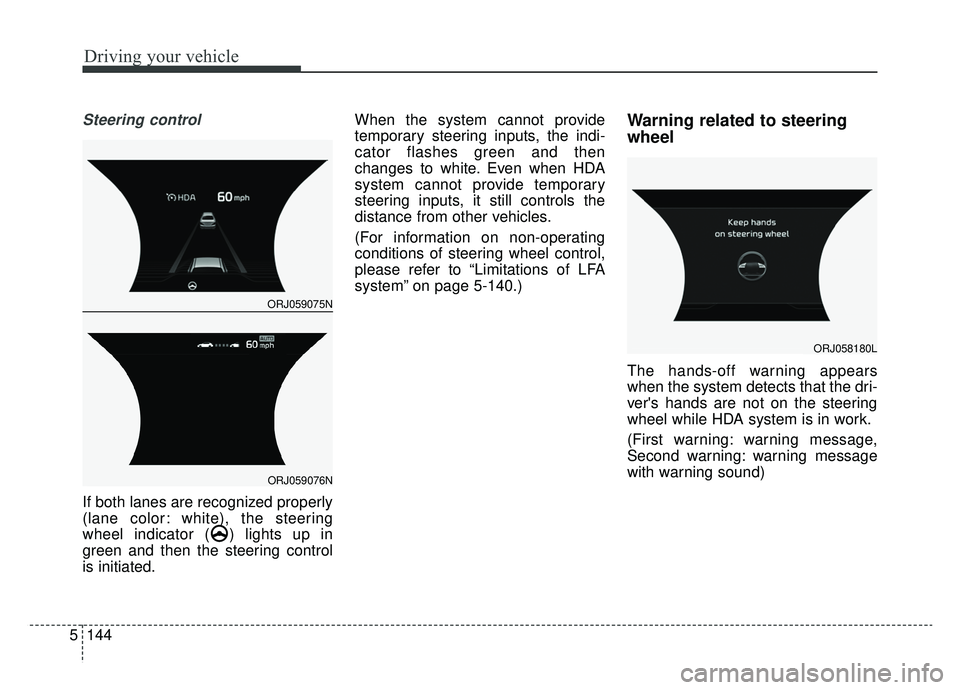
If both lanes are recognized properly
(lane color: white), the steering
wheel indicator ( ) lights up in
green and then the steering control
is initiated. When the system cannot provide
temporary steering inputs, the indi-
cator flashes green and then
changes to white. Even when HDA
system cannot provide temporary
steering inputs, it still controls the
distance from other vehicles.
(For information on non-operating
conditions of steering wheel control,
please refer to “Limitations of LFA
system” on page 5-140.)
Warning related to steering
wheel
The hands-off warning appears
when the system detects that the dri-
ver's hands are not on the steering
wheel while HDA system is in work.
(First warning: warning message,
Second warning: warning message
with warning sound)
ORJ058180L
ORJ059075N
ORJ059076N
Page 411 of 593
5145
Driving your vehicle
When the hands-off warning
lasts for a certain period of
time
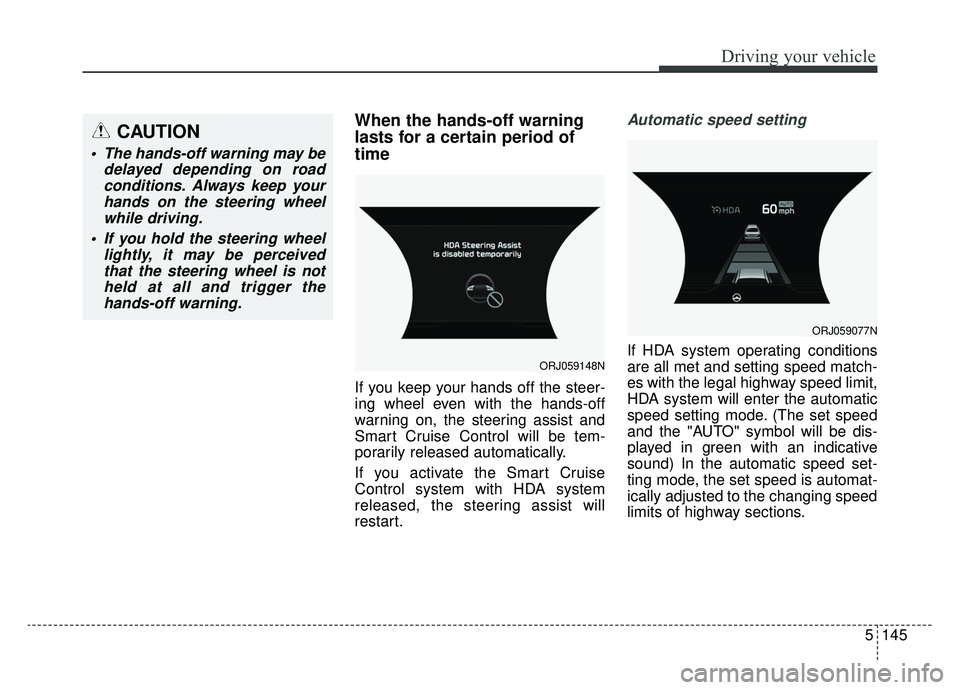
If you keep your hands off the steer-
ing wheel even with the hands-off
warning on, the steering assist and
Smart Cruise Control will be tem-
porarily released automatically.
If you activate the Smart Cruise
Control system with HDA system
released, the steering assist will
restart.
Automatic speed setting
If HDA system operating conditions
are all met and setting speed match-
es with the legal highway speed limit,
HDA system will enter the automatic
speed setting mode. (The set speed
and the "AUTO" symbol will be dis-
played in green with an indicative
sound) In the automatic speed set-
ting mode, the set speed is automat-
ically adjusted to the changing speed
limits of highway sections.ORJ059148N
ORJ059077N
CAUTION
The hands-off warning may bedelayed depending on roadconditions. Always keep yourhands on the steering wheelwhile driving.
If you hold the steering wheel lightly, it may be perceivedthat the steering wheel is notheld at all and trigger thehands-off warning.
Page 416 of 593
Driving your vehicle
150
5
System setting and activation
System setting
The driver can activate the sys-
tems by placing the ignition switch
to the ON position and by selecting
“AVN →Setup →Vehicle →Driver
Assistance →Parking Safety →
Rear Cross-Traffic Safety system”.
RCCA and RCCW system turn on
and get ready to be activated when
'Rear Cross-Traffic safety' is select-
ed.
When the engine is turned off then on again, the systems always get
ready to be activated.
When the system is initially turned on and when the engine is turned
off then on again, the warning light
will illuminate for 3 seconds on the
outside side view mirror.
The driver can select the initial warn-
ing activation time in the AVN by
selecting “AVN →Setup →Vehicle
→ Driver Assistance →Warning
Timing”. The options for the initial
Rear Cross-Traffic Collision Warning
(RCCW) system includes the follow-
ing: - Normal:
When this condition is selected, the
initial Rear Cross-Traffic Collision
Warning (RCCW) system is activat-
ed normally. If this setting feels too
sensitive change the option to ‘Later’.
The warning activation time may feel
late if the side/rear vehicle abruptly
accelerates.
- Later:
Select this warning activation time
when the traffic is light and you are
driving in a low speed. However, if
you change the warning activation
time, the warning activation time of
vehicle's other system may also
change. Check the warning activa-
tion time before changing it.
The driver can select the warning vol-
ume of the Rear Cross-Traffic
Collision Warning (RCCW) system by
selecting “AVN
→Setup →Vehicle →
Driver Assistance → Warning Volume
→ High/Medium/Low”. However, if
you change the warning volume, the
warning volume of vehicle's other
system may also change.
Operating conditions
To operate:
Go to the “AVN → Setup →Vehicle
→ Driver Assistance →Parking
Safety →Rear Cross-Traffic Safety”.
on the AVN. The system will turn on
and standby to activate.
The system will activate when vehi-
cle speed is below 6 mph (10 km/h)
and with the shift lever in R
(Reverse).
* The system will not activate when the vehicle speed exceeds 6 mph
(10 km/h). The system will activate
again when the speed is below 5
mph (8 km/h).
The system's detecting range is
approximately 1 ft ~ 65 ft (0.5 m ~ 20
m). An approaching vehicle will be
detected if their vehicle speed is with-
in 5 mph ~ 22.5 mph (8 km/h ~ 36
km/h). Note that the detecting range
may vary under certain conditions.
As always, use caution and pay
close attention to your surroundings
when backing up your vehicle.
Page 417 of 593

5151
Driving your vehicle
If the vehicle detected by the sensors
approaches from the rear left/right
side of your vehicle, the warning
chime will sound, the warning light
on the outside rearview mirror will
blink and a message will appear on
the LCD display. If the rear view mon-
itor system is in activation, a mes-
sage will also appear on the AVN
screen.
The warning will stop when:
- The detected vehicle moves out ofthe sensing area or
- When the vehicle is right behind your vehicle or
- When the vehicle is not approach- ing your vehicle or
- When the other vehicle slows down.
- The vehicle is not driving towards your vehicle.
- The vehicle’s approaching speed is decreased.
ORJ058098
ORJ059141N
ORJ058099
ORJ059142N
Warning message and system control
Rear Cross-Traffic Collision Warning (RCCW) system
■ Left
■ Left
■ Right
■ Right