brakes KIA K900 2020 User Guide
[x] Cancel search | Manufacturer: KIA, Model Year: 2020, Model line: K900, Model: KIA K900 2020Pages: 593, PDF Size: 14.99 MB
Page 312 of 593
Driving your vehicle
46
5
The Electronic Stability Control (ESC)
system is an electronic system
designed to help the driver maintain
vehicle control under adverse condi-
tions. It is not a substitute for safe driv-
ing practices. Factors including speed,
road conditions and driver steering
input can all affect whether ESC will be
effective in preventing a loss of control.
It is still your responsibility to drive and
corner at reasonable speeds and to
leave a sufficient margin of safety.
When you apply your brakes under
conditions which may lock the wheels,
you may hear a “tik-tik’’ sound from the
brakes, or feel a corresponding sensa-
tion in the brake pedal. This is normal
and means your ESC is active.
✽ ✽
NOTICE
A click sound may be heard in the
engine compartment when the vehi-
cle begins to move after the engine is
started. These conditions are normal
and indicate that the Electronic
Stability Control System is function-
ing properly.
ESC operation
ESC ON condition
When the ignition is turnedON, ESC and ESC OFF
indicator lights illuminate for
approximately 3 seconds,
then ESC is turned on.
ton for at least half a sec-
ond after turning the igni-
tion ON to turn ESC off.
(ESC OFF indicator will
illuminate). To turn the
ESC on, press the ESC
OFF button (ESC OFF
indicator light will go off).
you may hear a slight tick-
ing sound. This is the ESC
performing an automatic
system self-check and does
not indicate a problem. When operating
When the ESC is in opera-
tion, the ESC indicator light
blinks.
Stability Control is operat-
ing properly, you can feel a
slight pulsation in the vehi-
cle. This is only the effect
of brake control and indi-
cates nothing unusual.
mud or driving on a slip-
pery road, pressing the
accelerator pedal may not
cause the engine rpm
(revolutions per minute) to
increase.
-
Page 317 of 593
551
Driving your vehicle
Hill-start Assist Control (HAC)
A vehicle has the tendency to roll
back on a steep hill when it starts to
go after stopping. The Hill-start
Assist Control (HAC) prevents the
vehicle from rolling back by applying
the brakes automatically for about 2
seconds. The brakes are released
when the accelerator pedal is
depressed or after about 2 seconds.
The HAC is activated only for about 2
seconds, so when the vehicle begins
to roll, always depress the accelera-
tor pedal.
Good braking practices
Check to be sure the parking brakeis not engaged and the parking
brake indicator light is out before
driving away.
Driving through water may get the brakes wet. They can also get wet
when the vehicle is washed. Wet
brakes can be dangerous! Your
vehicle will not stop as quickly if the
brakes are wet. Wet brakes may
cause the vehicle to pull to one side.
To dry the brakes, apply the brakes
lightly until the braking action
returns to normal, taking care to
keep the vehicle under control at all
times. If the braking action does not
return to normal, stop as soon as it
is safe to do so and call an author-
ized K900 Kia dealer for assis-
tance.
Don't coast down hills with the vehicle out of gear. This is extreme-
ly hazardous. Keep the vehicle in
gear at all times, use the brakes to
slow down, then shift to a lower
gear so that engine braking will
help you maintain a safe speed.WARNING- Maintaining
Brake Pressure on Incline
HAC does not replace the need
to apply brakes while stopped on
an incline. While stopped, make
sure you maintain brake pres-
sure sufficient to prevent your
vehicle from rolling backward
and causing an accident. Don’t
release the brake pedal until you
are ready to accelerate forward.
Page 318 of 593
Driving your vehicle
52
5
Don't "ride" the brake pedal.
Resting your foot on the brake
pedal while driving can be danger-
ous because the brakes might
overheat and lose their effective-
ness. It also increases the wear of
the brake components.
If a tire goes flat while you are driv- ing, apply the brakes gently and
keep the vehicle pointed straight
ahead while you slow down. When
you are moving slowly enough for it
to be safe to do so, pull off the road
and stop in a safe place.
If your vehicle is equipped with an Automatic Transmission, don't let
your vehicle creep forward. To
avoid creeping forward, keep your
foot firmly on the brake pedal when
the vehicle is stopped.
Be cautious when parking on a hill. Firmly engage the parking brake
and place the shift lever in P (auto-
matic transmission). If your vehicle
is facing downhill, turn the front
wheels into the curb to help keep
the vehicle from rolling. If your vehicle is facing uphill, turn
the front wheels away from the
curb to help keep the vehicle from
rolling. If there is no curb or if it is
required by other conditions to
keep the vehicle from rolling, chock
the wheels.
Under some conditions, your park- ing brake can freeze in the
engaged position. This is most like-
ly to happen when there is an
accumulation of snow or ice
around or near the rear brakes or if
the brakes are wet. If there is a risk
that the parking brake may freeze,
apply it only temporarily while you
put the shift lever in P (automatic
transmission) and chock the rear
wheels so the vehicle cannot roll.
Then release the parking brake.
Do not hold the vehicle on an incline with the accelerator pedal.
This can cause the transmission to
overheat. Always use the brake
pedal or parking brake.Electronic Control Suspension
(ECS) (if equipped)
The Electronic Control Suspension
(ECS) controls the vehicle suspen-
sion automatically to maximize driv-
ing comfort by taking into account
the driving conditions such as speed,
surface of the road, cornering, stop-
ping requirements and acceleration.
If the ECS warning message “Check
ECS” comes on, you may have a
problem with the ECS system. If this
occurs, have the vehicle inspected
by an authorized K900 Kia dealer
immediately.
Page 319 of 593

553
Driving your vehicle
Forward Collision-Avoidance Assist
(FCA) system is designed to help
detect and monitor the vehicle ahead
or detect a pedestrian or cyclists in
the roadway through radar signals
and camera recognition to warn the
driver that a collision is imminent,
and if necessary, apply emergency
braking.System setting and activation
System setting
The driver can activate FCA sys-tem by pushing the start button
(engine running) and by selecting :
“AVN →Setup →Vehicle →Driver
Assistance →Forward Safety”
- If you select “Active assistance”, FCA system activates. FCA pro-
duces warning messages and
warning alarms in accordance
with the collision risk levels. Also,
it controls the brakes in accor-
dance with the collision risk lev-
els.
- If you select “Warning only”, FCA system activates and produces
only warning alarms in accor-
dance with the collision risk lev-
els. You should control the brake
directly because FCA system do
not control the brake.
- If you select “OFF”, FCA system deactivates,
FORWARD COLLISION-AVOIDANCE ASSIST (FCA) SYSTEM - SENSOR FUSION TYPE
(FRONT CAMERA + FRONT RADAR)
WARNING
Take the following precautions
when using the Forward
Collision-avoidance Assist
(FCA) system:
This system is only a supple- mental system and is not
intended to, nor does it,
replace the need for extreme
care and attention of the driv-
er. The sensing range and
objects detectable by the sen-
sors are limited. Pay attention
to the road conditions at all
times.
NEVER drive too fast for the road conditions or while cor-
nering.
Always drive cautiously to prevent unexpected and sud-
den situations from occur-
ring. FCA system does not
stop the vehicle completely
and is not a collision avoid-
ance system.
Page 321 of 593

555
Driving your vehicle
Prerequisite for activation
FCA system gets ready to be activat-
ed when FCA system is selected on
the LCD display, and when the fol-
lowing prerequisites are satisfied.
- The ESC (Electronic StabilityControl) is on.
- Vehicle speed is over 6 mph (10 km/h). (FCA system is only activat-
ed within a certain speed range.)
- The system detects a pedestrian, cyclist or a vehicle in front, which
may collide with your vehicle. (FCA
system may not be activated or
may sound a warning alarm in
accordance with the driving situa-
tion or vehicle condition. If you
select "Warning only", FCA system
activates and produces only warn-
ing alarms in accordance with the
collision risk levels.)
❈ FCA system may not operate prop-
erly according to the frontal situa-
tion, the direction of pedestrian or
cyclist and speed.
FCA warning message and
system control
FCA system produces warning mes-
sages, and warning alarms, in accor-
dance with the collision risk levels,
such as abrupt stopping of the vehi-
cle in front, insufficient braking dis-
tance, pedestrian or cyclist detec-
tion. Also, it controls the brakes in
accordance with the collision risk lev-
els.
The driver can select the initial warn-
ing activation time in the Settings in
the AVN. The options for the initial
Forward Collision Warning include
Normal or Late initial warning time.
WARNING
Completely stop the vehicle
on a safe location before
operating the switch on the
steering wheel to activate/
deactivate the FCA system.
FCA system automatically activates upon placing the
Engine Start/Stop button to
the ON position. The driver
can deactivate FCA system by
canceling the system setting
on the LCD display.
FCA system automatically deactivates upon canceling
the ESC (Electronic Stability
Control). When the ESC is
canceled, FCA system cannot
be activated on the LCD dis-
play. FCA system warning
light will illuminate which is
normal.
Page 327 of 593
561
Driving your vehicle
(Continued)
Even if there is any problemwith the brake control func-
tion of FCA system, the vehi-
cle's basic braking perform-
ance will operate normally.
However, the brake control
function of FCA for avoiding a
collision will not activate.
If the vehicle in front stops suddenly, you may have less
time to apply the brakes.
Therefore, always keep a safe
distance between your vehicle
and the vehicle in front of you.
FCA system may activate dur- ing braking and the vehicle
may stop suddenly shifting
loose objects toward the pas-
sengers. Always keep loose
objects secured.
FCA system may not activate if the driver applies the brake
pedal to avoid the risk of a
collision.
(Continued)(Continued)
The brake control may beinsufficient, possibly causing
a collision, if a vehicle in front
abruptly stops. Always pay
extreme caution.
Occupants may get injured, if the vehicle abruptly stops by
the activated FCA system. Pay
extreme caution.WARNING
FCA system operates only todetect vehicles, pedestrians
or cyclist in front of the vehi-
cle.
FCA system does not operate when the vehicle is in reverse.
FCA system is not designed to detect other objects on the
road such as animals.
FCA system does not detect vehicles in the opposite lane.
FCA system does not detect cross traffic vehicles that are
approaching.
FCA system cannot detect the driver approaching the side
view of a parked vehicle (for
example on a dead end
street.)
(Continued)
Page 371 of 593
5105
Driving your vehicle
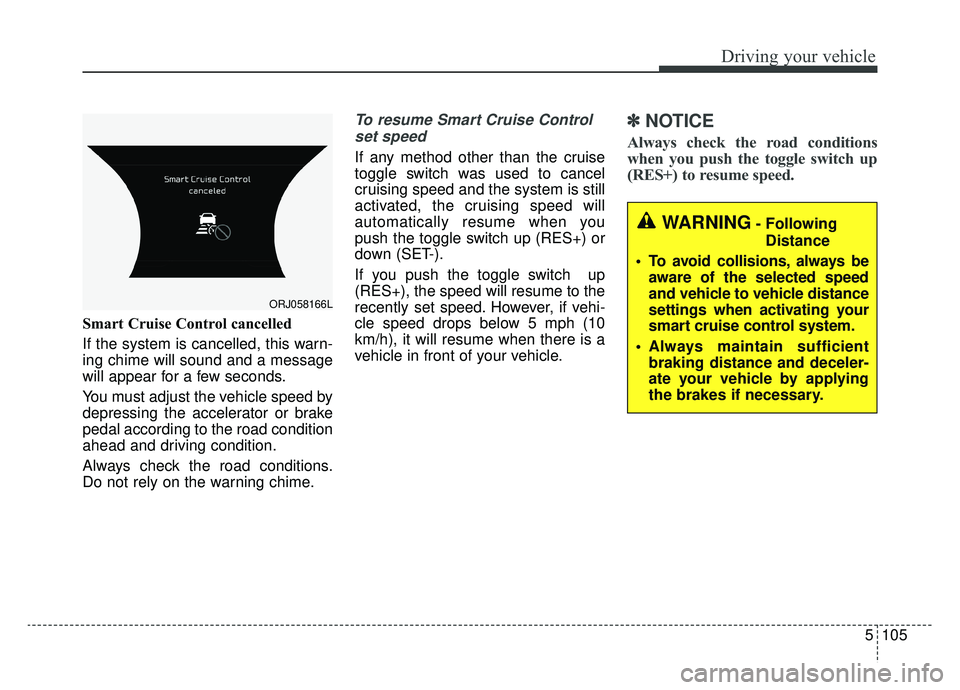
Smart Cruise Control cancelled
If the system is cancelled, this warn-
ing chime will sound and a message
will appear for a few seconds.
You must adjust the vehicle speed by
depressing the accelerator or brake
pedal according to the road condition
ahead and driving condition.
Always check the road conditions.
Do not rely on the warning chime.
To resume Smart Cruise Controlset speed
If any method other than the cruise
toggle switch was used to cancel
cruising speed and the system is still
activated, the cruising speed will
automatically resume when you
push the toggle switch up (RES+) or
down (SET-).
If you push the toggle switch up
(RES+), the speed will resume to the
recently set speed. However, if vehi-
cle speed drops below 5 mph (10
km/h), it will resume when there is a
vehicle in front of your vehicle.
✽ ✽ NOTICE
Always check the road conditions
when you push the toggle switch up
(RES+) to resume speed.
ORJ058166L
WARNING- Following
Distance
To avoid collisions, always be aware of the selected speed
and vehicle to vehicle distance
settings when activating your
smart cruise control system.
Always maintain sufficient braking distance and deceler-
ate your vehicle by applying
the brakes if necessary.
Page 380 of 593
Driving your vehicle
114
5
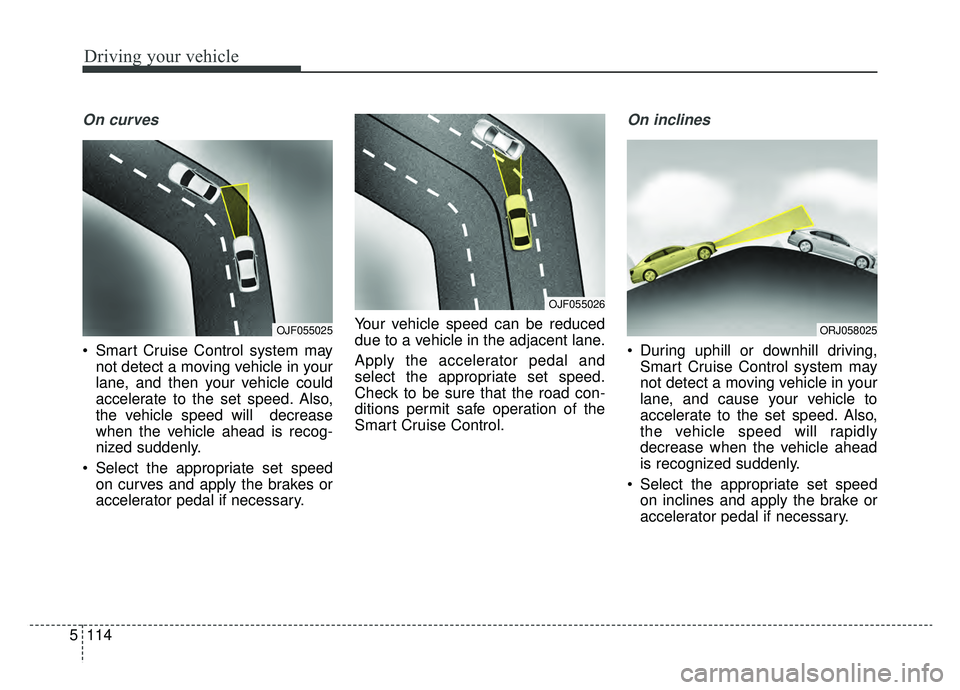
On curves
Smart Cruise Control system may
not detect a moving vehicle in your
lane, and then your vehicle could
accelerate to the set speed. Also,
the vehicle speed will decrease
when the vehicle ahead is recog-
nized suddenly.
Select the appropriate set speed on curves and apply the brakes or
accelerator pedal if necessary. Your vehicle speed can be reduced
due to a vehicle in the adjacent lane.
Apply the accelerator pedal and
select the appropriate set speed.
Check to be sure that the road con-
ditions permit safe operation of the
Smart Cruise Control.
On inclines
During uphill or downhill driving,
Smart Cruise Control system may
not detect a moving vehicle in your
lane, and cause your vehicle to
accelerate to the set speed. Also,
the vehicle speed will rapidly
decrease when the vehicle ahead
is recognized suddenly.
Select the appropriate set speed on inclines and apply the brake or
accelerator pedal if necessary.
OJF055025
OJF055026
ORJ058025
Page 383 of 593
5117
Driving your vehicle
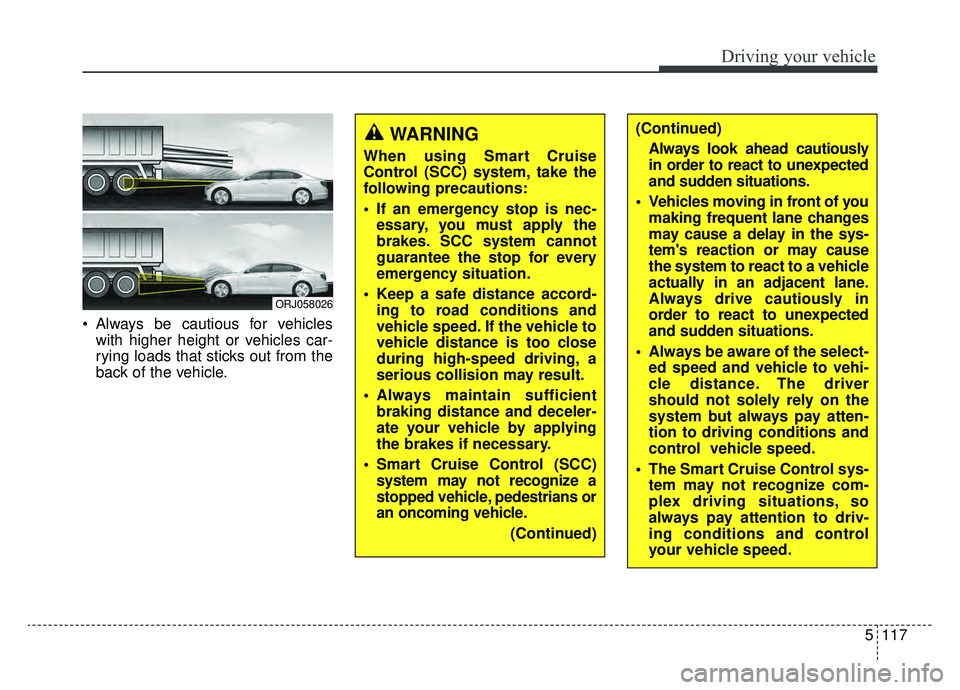
Always be cautious for vehicleswith higher height or vehicles car-
rying loads that sticks out from the
back of the vehicle.
ORJ058026
WARNING
When using Smart Cruise
Control (SCC) system, take the
following precautions:
If an emergency stop is nec-essary, you must apply the
brakes. SCC system cannot
guarantee the stop for every
emergency situation.
Keep a safe distance accord- ing to road conditions and
vehicle speed. If the vehicle to
vehicle distance is too close
during high-speed driving, a
serious collision may result.
Always maintain sufficient braking distance and deceler-
ate your vehicle by applying
the brakes if necessary.
Smart Cruise Control (SCC) system may not recognize a
stopped vehicle, pedestrians or
an oncoming vehicle.
(Continued)
(Continued)Always look ahead cautiously
in order to react to unexpected
and sudden situations.
Vehicles moving in front of you making frequent lane changes
may cause a delay in the sys-
tem's reaction or may cause
the system to react to a vehicle
actually in an adjacent lane.
Always drive cautiously in
order to react to unexpected
and sudden situations.
Always be aware of the select- ed speed and vehicle to vehi-
cle distance. The driver
should not solely rely on the
system but always pay atten-
tion to driving conditions and
control vehicle speed.
The Smart Cruise Control sys- tem may not recognize com-
plex driving situations, so
always pay attention to driv-
ing conditions and control
your vehicle speed.
Page 405 of 593
5139
Driving your vehicle
Check Lane Following Assist (LFA)
system
If there is a problem with the system
a message will appear for a few sec-
onds. If the problem continues, we
recommend that you have the vehi-
cle inspected by an authorized retail-
er of Genesis Branded products.LFA system will not be in the
ENABLED state and/or the steering
wheel will not be assisted when:
The turn signal is turned on before
changing a lane. If you change
lanes without the turn signal on,
the steering wheel might be con-
trolled.
The vehicle is not driven in the mid- dle of the lane when the system is
turned on or right after changing a
lane.
ESC (Electronic Stability Control) or VSM (Vehicle Stability
Management) is activated.
The vehicle is driven on a sharp curve.
Vehicle speed is over 95 mph (153 km/h).
The vehicle makes sharp lane changes.
The vehicle brakes suddenly.
Only one lane marker is detected.
The lane is very wide or narrow.
There are more than two lane markers on the road (e.g. construc-
tion area). Radius of a curve is too small.
The vehicle is driven on a steep
incline.
The steering wheel is turned sud- denly.
The system may not operate for 15 seconds after the engine is started
or the camera is initialized.