phone KIA K900 2020 User Guide
[x] Cancel search | Manufacturer: KIA, Model Year: 2020, Model line: K900, Model: KIA K900 2020Pages: 593, PDF Size: 14.99 MB
Page 201 of 593

Features of your vehicle
108
4
✽ ✽
NOTICE
• This system can only sense objects
within the range and location of
the sensors; It can not detect
objects in other areas where sen-
sors are not installed. Also, small
or slim objects, such as poles or
objects located between sensors
may not be detected by the sen-
sors. Always visually check behind
the vehicle when backing up.
• Be sure to inform any drivers of the vehicle that may be unfamiliar
with the system regarding the sys-
tems capabilities and limitations.
Non-operational conditions of
Parking Distance Warning sys-
tem
Parking Distance Warning system
may not operate when:
1. Moisture is frozen to the sensor. (It will operate normally when the ice
melts.)
2. Sensor is covered with foreign matter, such as snow or water, or
the sensor cover is blocked. (It will
operate normally when the materi-
al is removed or the sensor is no
longer blocked.)
3. Driving on uneven road surfaces such as unpaved roads, gravel,
bumps, or gradients.
4. Objects generating excessive noise such as vehicle horns, loud
motorcycle engines, or truck air
brakes can interfere with the sen-
sor.
5. The weather conditions produce heavy rain or water spray.
6. Wireless transmitters or mobile phones present near the sensor.
Detecting range may decrease
when:
1. Outside air temperature is extremely hot or cold.
2. The sensor is covered with foreign matter such as snow or water.
(The sensing range will return to
normal when removed.)
The following objects may not be
recognized by the sensor:
1. Sharp or slim objects such as ropes, chains or small poles.
2. Objects, which tend to absorb sen- sor frequency such as clothes,
spongy material or snow.
3. Undetectable objects smaller than 40 in. (1 m) and narrower than 5.5
in. (14 cm) in width.
Page 250 of 593
4157
Features of your vehicle
* The actual sunvisor lamp in the vehi-cle may differ from the illustration.Power outlet
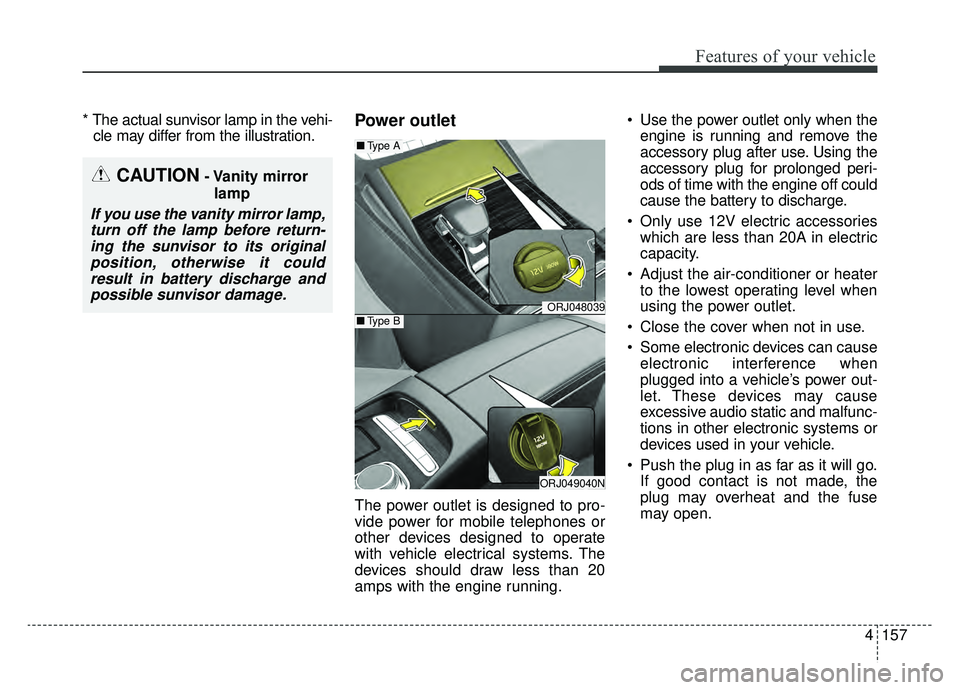
The power outlet is designed to pro-
vide power for mobile telephones or
other devices designed to operate
with vehicle electrical systems. The
devices should draw less than 20
amps with the engine running. Use the power outlet only when the
engine is running and remove the
accessory plug after use. Using the
accessory plug for prolonged peri-
ods of time with the engine off could
cause the battery to discharge.
Only use 12V electric accessories which are less than 20A in electric
capacity.
Adjust the air-conditioner or heater to the lowest operating level when
using the power outlet.
Close the cover when not in use.
Some electronic devices can cause electronic interference when
plugged into a vehicle’s power out-
let. These devices may cause
excessive audio static and malfunc-
tions in other electronic systems or
devices used in your vehicle.
Push the plug in as far as it will go. If good contact is not made, the
plug may overheat and the fuse
may open.
ORJ048039
ORJ049040N
■ Type A
■Type B
CAUTION- Vanity mirror
lamp
If you use the vanity mirror lamp,turn off the lamp before return-ing the sunvisor to its originalposition, otherwise it couldresult in battery discharge andpossible sunvisor damage.
Page 252 of 593
4159
Features of your vehicle
The battery charging state may be
monitored on the electrical device.
Disconnect the USB cable from the
USB port after use.
Use the USB charger when theengine is running to prevent bat-
tery discharge.
Only devices that fits the USB port can be used.
The USB charger can be used only for battery charging purposes.Wireless smart phone charg-
ing system (if equipped)
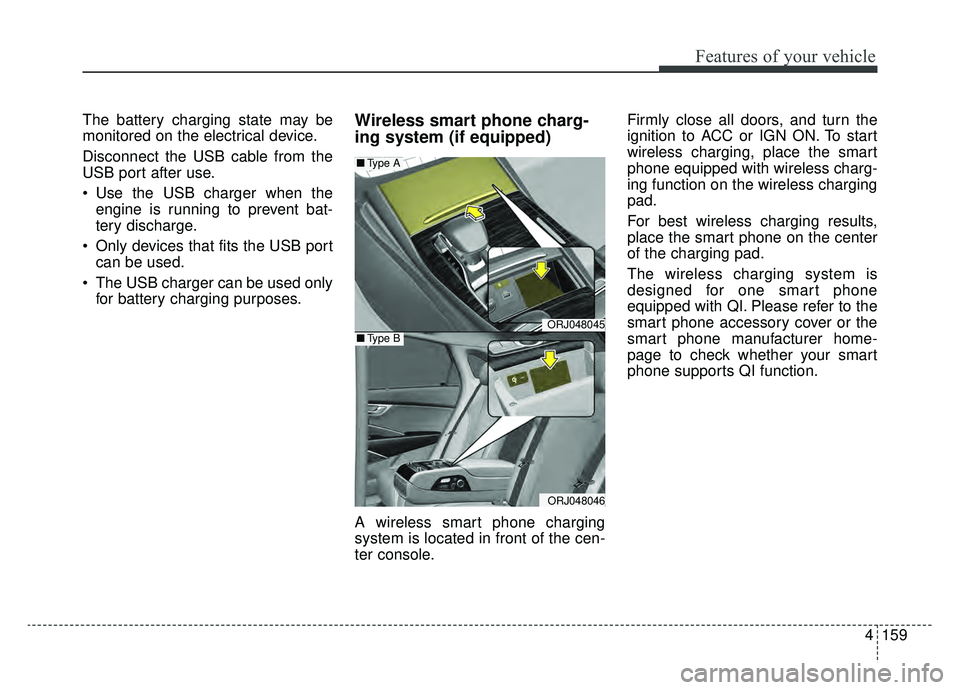
A wireless smart phone charging
system is located in front of the cen-
ter console. Firmly close all doors, and turn the
ignition to ACC or IGN ON. To start
wireless charging, place the smart
phone equipped with wireless charg-
ing function on the wireless charging
pad.
For best wireless charging results,
place the smart phone on the center
of the charging pad.
The wireless charging system is
designed for one smart phone
equipped with QI. Please refer to the
smart phone accessory cover or the
smart phone manufacturer home-
page to check whether your smart
phone supports QI function.
ORJ048045
ORJ048046
■
Type A
■Type B
Page 253 of 593
Features of your vehicle
160
4
Wireless smart phone charging
1. Remove any object on the smart
phone charging pad including the
smart key. If there is any foreign
object on the pad other than a
smart phone, the wireless charging
function may not operate properly.
2. Place the smart phone on the cen- ter of the wireless charging pad.
3. The indicator light will change to orange once the wireless charging
begins. After the charging is com-
plete, the orange light will change
to green.
4. You can choose to turn the wireless charging function to either ON or
OFF by selecting it on the AVN.
(Please refer to the AVN manual for
more details.)
If the wireless charging does not
work, gently move your smart phone
around the pad until the charging indi-
cator light turns yellow. Depending on
the smart phone, the charging indica-
tor light may not turn green even after
the charging is complete. If the wireless charging is not func-
tioning properly, the orange light will
blink and flash for ten seconds, then
turn off. If that occurs, remove the
smart phone from the pad and
replace it on the pad again, or double
check the charging status.
If you leave the smart phone on the
charging pad when the vehicle igni-
tion is in OFF, the vehicle will alert
you through warning messages and
sound (applicable for vehicles with
voice guidance function) after the
‘Good bye’ function on the instru-
ment cluster ends. However, it does
not alert for every smart phone. It is
not a malfunction of the system, but
the smart phone soft ware incompat-
ibility.WARNING - Distracted
driving
Driving while distracted can
result in a loss of vehicle con-
trol that may lead to an acci-
dent, severe bodily injury, and
death. The driver's primary
responsibility is in the safe and
legal operation of the vehicle,
and any handheld devices,
other equipment, or vehicle sys-
tems which take the driver's
eyes, attention, and focus away
from the safe operation of the
vehicle, or which are not per-
missible by law, should never
be used during operation of the
vehicle.
Page 254 of 593
4161
Features of your vehicle
✽ ✽NOTICE
• If it is not possible to close the tray
cover due to the size of your smart
phone or because the tray cover
has been broken, do not use the
wireless smart phone charging
function.
• Even if you're not charging your smart phone, keep the tray cover
closed at all times when it is left in
the tray. Driving with the tray
cover opened will increase the
chance of accidents and result in
injury as you're highly likely to get
distracted by the smart phone.
• When the interior temperature of the wireless charging system rises
above a set temperature, the wire-
less charging will cease to func-
tion. After the interior tempera-
ture drops below the threshold,
the wireless charging function will
resume.
• The wireless charging may not function properly when there is a
heavy accessory cover on the
smart phone.
• Charging a smart phone with a protection cover on may heat up. (Continued)(Continued)
• The wireless charging will stop
when the smart key is moved out
of the vehicle with the ignition in
ON.
• Charging may be temporarily interrupted when smart key detec-
tion is activated. (when turning on
ignition, opening or closing the
doors)
• The wireless charging will stop when the vehicle is turned OFF.
• The wireless charging will stop when the smart phone is not in
complete contact with the wireless
charging pad.
• Items equipped with magnetic components such as credit cards,
telephone cards, bank-books, or a
transportation ticket may become
damaged during wireless charg-
ing.
• Place the smart phone on the cen- ter of the charge pad for best
results. The smart phone may not
charge when placed near the rim
of the charging pad. When the
smart phone does get charged, it
may heat up excessively. (Continued)CAUTION - Liquid in
Wireless Smart Phone
Charger
To prevent liquid from damaging the wireless smart phone charg-ing system in your vehicle,securely close the tray coverwhen charging your phone.
WARNING - Metal in
Wireless Charging System
If any metallic object such as a
coin is placed between the wire-
less charging system and the
smart phone, the charging may
be disrupted. Also, the metallic
object may heat up and poten-
tially damage the charging sys-
tem. If there is any metallic
object between the smart phone
and the charging pad, immedi-
ately remove the smart phone.
Remove the metallic object
after it has cooled down.
Page 255 of 593
Features of your vehicle
162
4
(Continued)
• For smart phones without built-in
wireless charging system, an
appropriate accessory has to be
equipped in order to use the vehi-
cle's wireless charging system.
• Cellphones that are not certified for wireless smart phone charging
standards (QI) may not be able to
charge.
• Self-protection features in some smart phones could slow down or
stop charging.
• In some cases, the wireless charg- ing indicator could not turn green
even when the phone is fully
charged.
• Smart phones of some manufac- turers may display messages on
weak current. This is due to the
particular characteristic of the
smart phone and does not imply a
malfunction on wireless charging
function. (Continued)(Continued)
• The indicator light of some manu-
facturers' smart phones may still
be yellow after the smart phone is
fully charged.
This is due to the particular char-
acteristic of the smart phone and
not a malfunction of the wireless
charging system.
• When any smart phone without a wireless charging function or a
metallic object is placed on the
charging pad, a small noise may
sound. This small sound is due to
the vehicle discerning compatibili-
ty of the object placed on the
charging pad. It does not affect
your vehicle or the smart phone in
any way. This device complies with Part 15
of the FCC rules.
Operation is subject to the following
two conditions:
1. This device may not cause harm-
ful interference, and
2. This device must accept any inter- ference received, including inter-
ference that may cause undesired
operation
Page 264 of 593

4171
Features of your vehicle
Station Swapping - As an FM sig-nal weakens, another more power-
ful signal near the same frequency
may begin to play. This is because
your radio is designed to lock onto
the clearest signal. If this occurs,
select another station with a
stronger signal.
Multi-Path Cancellation - Radio sig- nals being received from several
directions can cause distortion or
fluttering. This can be caused by a
direct and reflected signal from the
same station, or by signals from
two stations with close frequencies.
If this occurs, select another station
until the condition has passed.
Using a cellular phone or a two-
way radio
When a cellular phone is used inside
the vehicle, noise may be produced
from the audio system. This does not
mean that something is wrong with
the audio equipment. If this occurs, try
using the cellular phone as far away
as possible from the audio equip-
ment. When using a communication
system such as a cellular phone or a
radio set inside the vehicle, a sepa-
rate external antenna must be fitted.
When a cellular phone or a radio set
is used with an internal antenna
alone, it may interfere with the vehi-
cle's electrical system and adversely
affect safe operation of the vehicle.
OJF045311L
WARNING- Cell phone use
Do not use a cellular phone
while driving. Stop at a safe
location to use a cellular phone.
WARNING- Distracted driving
Driving while distracted can
result in a loss of vehicle con-
trol that may lead to an acci-
dent, severe bodily injury, or
death. The driver's primary
responsibility is in the safe and
legal operation of the vehicle,
and any handheld devices,
other equipment, or vehicle sys-
tems which take the driver's
eyes, attention, and focus away
from the safe operation of the
vehicle, or which are not per-
missible by law, should never
be used during operation of the
vehicle.
Page 271 of 593
55
Driving your vehicle
Before entering vehicle
• Be sure that all windows, outsidemirror(s), and outside lights are
clean.
Check the condition of the tires.
Check under the vehicle for any sign of leaks.
Be sure there are no obstacles behind you if you intend to back up.
Necessary inspections
Fluid levels, such as engine oil,
engine coolant, brake fluid, and
washer fluid should be checked on a
regular basis, at the exact interval
depending on the fluid. Further
details are provided in chapter 7,
“Maintenance”.
Before starting
Close and lock all doors.
Position the seat so that all con-trols are easily reached.
Buckle your seat belt.
Adjust the inside and outside rearview mirrors.
Be sure that all lights work.
Check all gauges.
Check the operation of warning lights when the ignition switch is
turned to the ON position.
Release the parking brake and make sure the brake warning light
goes out.
Input any phone numbers or map locations (if vehicle equipped with
a navigation system) that you may
need during your trip.
For safe operation, be sure you are
familiar with your vehicle and its
equipment.
BEFORE DRIVING
WARNING - Distracted driving
Focus on the road while driving.
The driver's primary responsi-
bility is in the safe and legal
operation of the vehicle. Any
handheld devices, other equip-
ment or vehicle systems that
distract the driver should not be
used during vehicle operation.
Page 525 of 593
755
Maintenance
✽ ✽NOTICE- Remodeling
Prohibited
Do not rewire your vehicle in any
way as doing so may affect the per-
formance of several safety features
in your vehicle. Rewiring your vehi-
cle may also void your warranty and
cause you to be responsible for any
subsequent vehicle damage which
may result.
✽ ✽ NOTICE- Window tinting pre-
caution
Window tint (especially metallic
film) might cause communication
errors or poor radio reception, and a
malfunctioning automatic lighting
system due to reflections from the
mirror tint inside the vehicle. The
tint installation solution used might
also leak into the electronic compo-
nents, causing malfunctions or dam-
age.
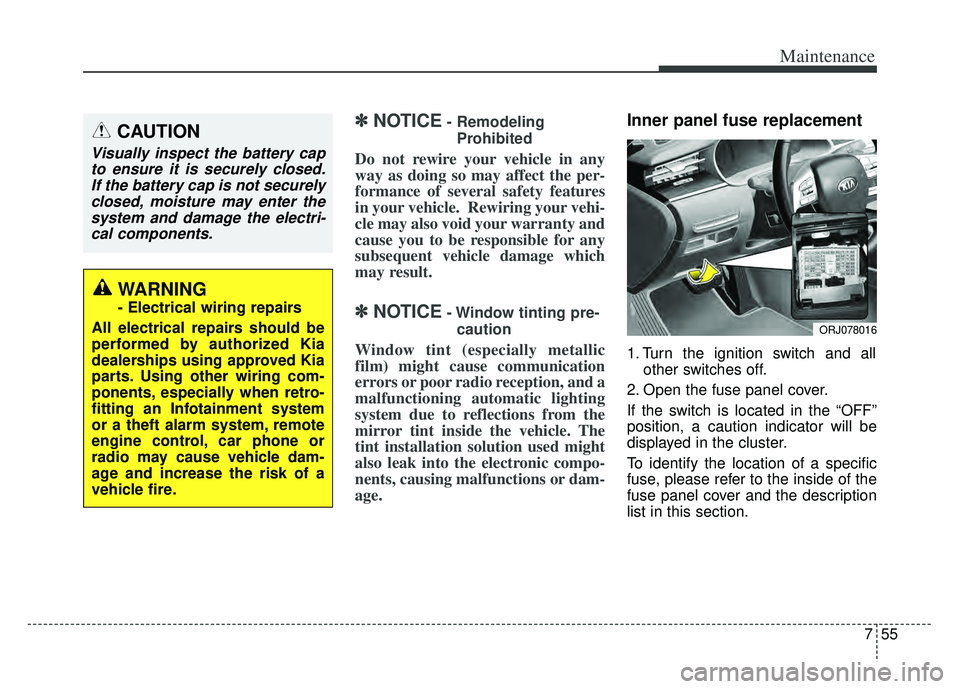
Inner panel fuse replacement
1. Turn the ignition switch and all other switches off.
2. Open the fuse panel cover.
If the switch is located in the “OFF”
position, a caution indicator will be
displayed in the cluster.
To identify the location of a specific
fuse, please refer to the inside of the
fuse panel cover and the description
list in this section.
CAUTION
Visually inspect the battery cap to ensure it is securely closed.If the battery cap is not securelyclosed, moisture may enter thesystem and damage the electri-cal components.
WARNING
- Electrical wiring repairs
All electrical repairs should be
performed by authorized Kia
dealerships using approved Kia
parts. Using other wiring com-
ponents, especially when retro-
fitting an Infotainment system
or a theft alarm system, remote
engine control, car phone or
radio may cause vehicle dam-
age and increase the risk of a
vehicle fire.
ORJ078016
Page 587 of 593
Index
6I
If you have a flat tire (With spare tire) . . . . . . . . . . . . . 6-14Jack and tools . . . . . . . . . . . . . . . . . . . . . . . . . . . . . . 6-14
Removing and storing the spare tire . . . . . . . . . . . . 6-15
Changing tires . . . . . . . . . . . . . . . . . . . . . . . . . . . . . 6-15
Important safety precautions . . . . . . . . . . . . . . . . . . . . . 3-2 Always wear your seat belt . . . . . . . . . . . . . . . . . . . . 3-2
Restrain all children . . . . . . . . . . . . . . . . . . . . . . . . . . 3-2
Air bag hazards . . . . . . . . . . . . . . . . . . . . . . . . . . . . . 3-2
Driver distraction . . . . . . . . . . . . . . . . . . . . . . . . . . . . 3-2
Control your speed . . . . . . . . . . . . . . . . . . . . . . . . . . . 3-3
Keep your vehicle in safe condition. . . . . . . . . . . . . . 3-3
In case of an emergency while driving . . . . . . . . . . . . . . 6-3 If the engine stalls at a crossroad or crossing . . . . . . 6-3
If you have a flat tire while driving . . . . . . . . . . . . . . 6-3
If the engine stalls while driving . . . . . . . . . . . . . . . . 6-3
Instrument cluster . . . . . . . . . . . . . . . . . . . . . . . . . . . . . 4-69 Instrument cluster control . . . . . . . . . . . . . . . . . . . . 4-70
LCD window control . . . . . . . . . . . . . . . . . . . . . . . . 4-70
Gauges . . . . . . . . . . . . . . . . . . . . . . . . . . . . . . . . . . . 4-\
71
Transmission shift indicator . . . . . . . . . . . . . . . . . . . 4-74
Instrument panel overview . . . . . . . . . . . . . . . . . . . . . . . 2-5
Interior features. . . . . . . . . . . . . . . . . . . . . . . . . . . . . . 4-153 Cup holder . . . . . . . . . . . . . . . . . . . . . . . . . . . . . . . 4-153
Seat warmer . . . . . . . . . . . . . . . . . . . . . . . . . . . . . . 4-154
Air ventilation seat . . . . . . . . . . . . . . . . . . . . . . . . . 4-155
Sunvisor . . . . . . . . . . . . . . . . . . . . . . . . . . . . . . . . . 4-156
Power outlet . . . . . . . . . . . . . . . . . . . . . . . . . . . . . . 4-157
USB charger . . . . . . . . . . . . . . . . . . . . . . . . . . . . . . 4-158 Wireless smart phone charging system . . . . . . . . . 4-159
Coat hook . . . . . . . . . . . . . . . . . . . . . . . . . . . . . . . . 4-163
Floor mat anchor (s) . . . . . . . . . . . . . . . . . . . . . . . . 4-164
Luggage net (holder) . . . . . . . . . . . . . . . . . . . . . . . 4-165
Clock . . . . . . . . . . . . . . . . . . . . . . . . . . . . . . . . . . . 4-\
165
Bag hanger . . . . . . . . . . . . . . . . . . . . . . . . . . . . . . . 4-166
Side curtain. . . . . . . . . . . . . . . . . . . . . . . . . . . . . . . 4-166
Rear curtain . . . . . . . . . . . . . . . . . . . . . . . . . . . . . . 4-167
Interior lights . . . . . . . . . . . . . . . . . . . . . . . . . . . . . . . 4-126 Automatic turn off function . . . . . . . . . . . . . . . . . . 4-126
Map lamp . . . . . . . . . . . . . . . . . . . . . . . . . . . . . . . . 4-126
Room lamp . . . . . . . . . . . . . . . . . . . . . . . . . . . . . . . 4-127
Trunk room lamp . . . . . . . . . . . . . . . . . . . . . . . . . . 4-128
Vanity mirror lamp . . . . . . . . . . . . . . . . . . . . . . . . . 4-128
Glove box lamp . . . . . . . . . . . . . . . . . . . . . . . . . . . 4-129
Door courtesy lamp . . . . . . . . . . . . . . . . . . . . . . . . 4-129
Interior overview. . . . . . . . . . . . . . . . . . . . . . . . . . . . . . . 2-4
ISG (Idle Stop and Go) system . . . . . . . . . . . . . . . . . 5-126 Auto stop . . . . . . . . . . . . . . . . . . . . . . . . . . . . . . . . 5-126
Auto start . . . . . . . . . . . . . . . . . . . . . . . . . . . . . . . . 5-127
Condition of ISG system operation . . . . . . . . . . . . 5-128
ISG system deactivation . . . . . . . . . . . . . . . . . . . . . 5-128
ISG system malfunction . . . . . . . . . . . . . . . . . . . . . 5-129