height KIA K900 2020 Owner's Manual
[x] Cancel search | Manufacturer: KIA, Model Year: 2020, Model line: K900, Model: KIA K900 2020Pages: 593, PDF Size: 14.99 MB
Page 148 of 593
455
Features of your vehicle
(Continued)
• When the charging system warninglight comes on due to low voltage
(when the alternator or battery do
not operate normally or malfunc-
tion), the steering wheel may
require increased steering effort.Tilt and telescopic steering
Tilt and telescopic steering allows
you to adjust the steering wheel
before you drive. You can also raise it
to give your legs more room when
you exit and enter the vehicle.
The steering wheel should be posi-
tioned so that it is comfortable for
you to drive, while permitting you to
see the instrument panel warning
lights and gauges.
Electric type
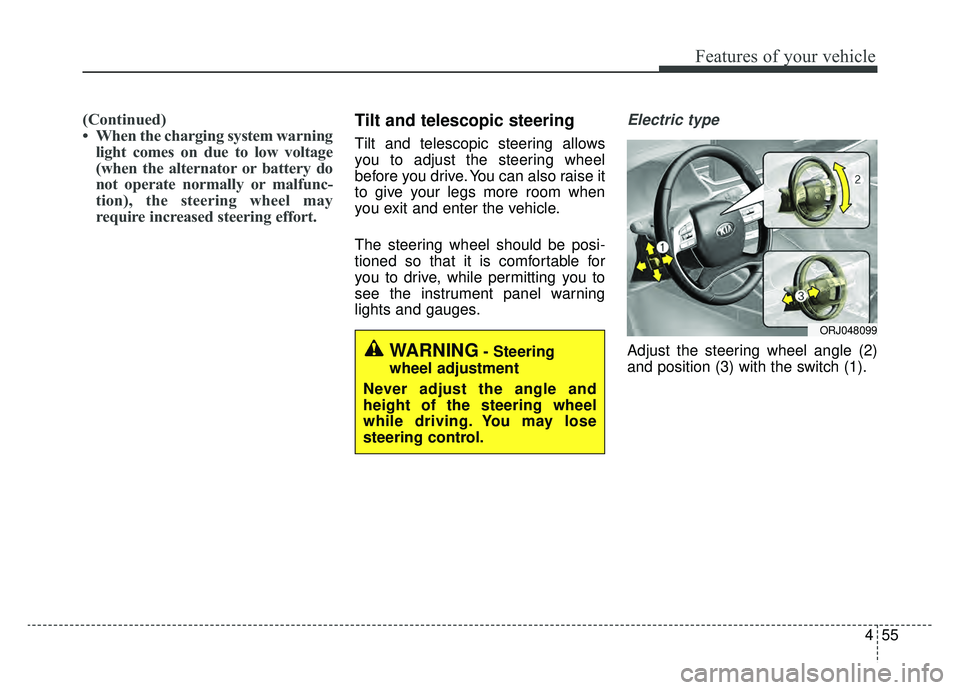
Adjust the steering wheel angle (2)
and position (3) with the switch (1).WARNING- Steering
wheel adjustment
Never adjust the angle and
height of the steering wheel
while driving. You may lose
steering control.
ORJ048099
Page 197 of 593
Features of your vehicle
104
4
Description
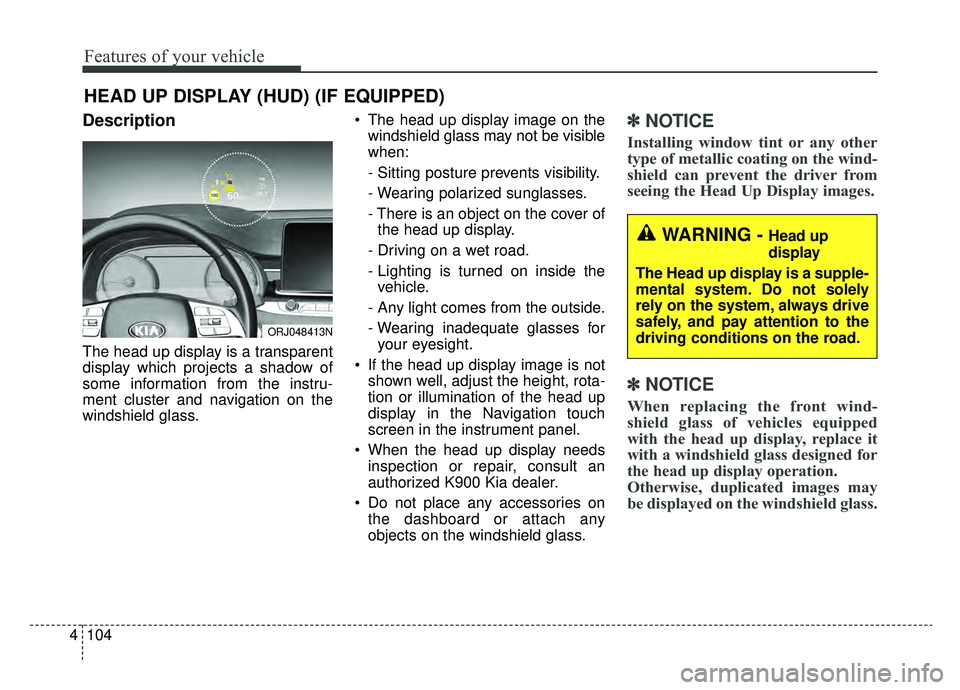
The head up display is a transparent
display which projects a shadow of
some information from the instru-
ment cluster and navigation on the
windshield glass. The head up display image on the
windshield glass may not be visible
when:
- Sitting posture prevents visibility.
- Wearing polarized sunglasses.
- There is an object on the cover ofthe head up display.
- Driving on a wet road.
- Lighting is turned on inside the vehicle.
- Any light comes from the outside.
- Wearing inadequate glasses for your eyesight.
If the head up display image is not shown well, adjust the height, rota-
tion or illumination of the head up
display in the Navigation touch
screen in the instrument panel.
When the head up display needs inspection or repair, consult an
authorized K900 Kia dealer.
Do not place any accessories on the dashboard or attach any
objects on the windshield glass.
✽ ✽ NOTICE
Installing window tint or any other
type of metallic coating on the wind-
shield can prevent the driver from
seeing the Head Up Display images.
✽ ✽NOTICE
When replacing the front wind-
shield glass of vehicles equipped
with the head up display, replace it
with a windshield glass designed for
the head up display operation.
Otherwise, duplicated images may
be displayed on the windshield glass.
HEAD UP DISPLAY (HUD) (IF EQUIPPED)
ORJ048413N
WARNING - Head up
display
The Head up display is a supple-
mental system. Do not solely
rely on the system, always drive
safely, and pay attention to the
driving conditions on the road.
Page 198 of 593
4105
Features of your vehicle
Head Up Display ON/OFF
The HUD display will be activated or
deactivated in Setup mode while
engine is ON.
Head Up Display Information
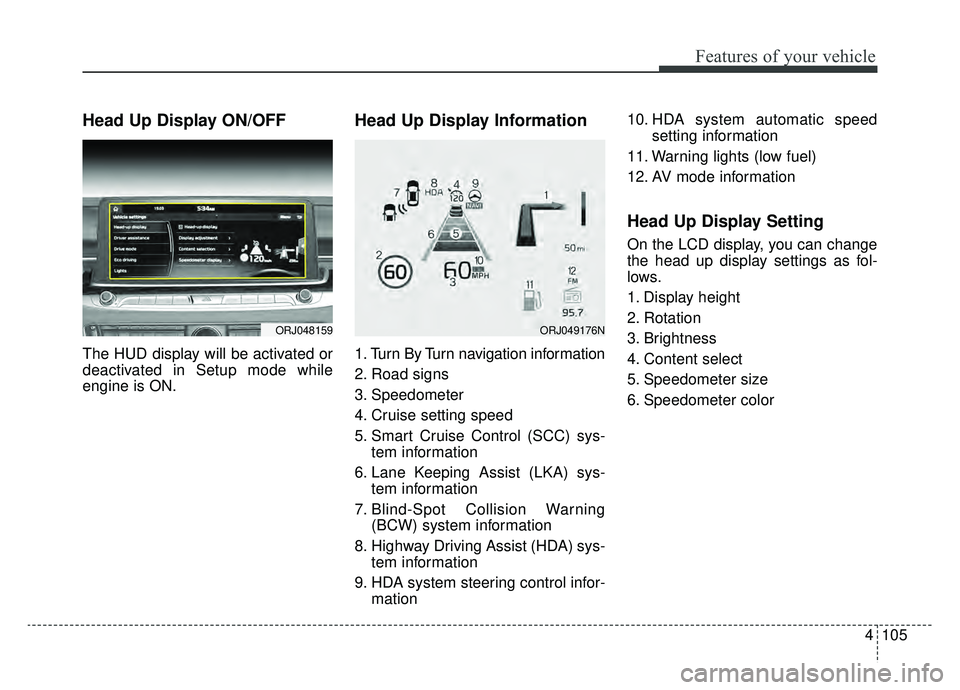
1. Turn By Turn navigation information
2. Road signs
3. Speedometer
4. Cruise setting speed
5. Smart Cruise Control (SCC) sys-tem information
6. Lane Keeping Assist (LKA) sys- tem information
7. Blind-Spot Collision Warning (BCW) system information
8. Highway Driving Assist (HDA) sys- tem information
9. HDA system steering control infor- mation 10. HDA system automatic speed
setting information
11. Warning lights (low fuel)
12. AV mode information
Head Up Display Setting
On the LCD display, you can change
the head up display settings as fol-
lows.
1. Display height
2. Rotation
3. Brightness
4. Content select
5. Speedometer size
6. Speedometer color
ORJ048159ORJ049176N
Page 202 of 593

4109
Features of your vehicle
✽ ✽NOTICE
1. The warning may not sound
sequentially depending on the
speed and shapes of the objects
detected.
2. The Parking Distance Warning system system may malfunction if
the vehicle bumper height or sen-
sor installation has been modified.
Any non-factory installed equip-
ment or accessories may also
interfere with the sensor perform-
ance.
3. Sensor may not recognize objects less than 12 in. (30 cm) from the
sensor, or it may sense an incor-
rect distance. Use with caution.
4. When the sensor is frozen or stained with snow or water, the
sensor may be inoperative until
the stains are removed using a
soft cloth.
5. Do not push, scratch or strike the sensor with any hard objects that
could damage the surface of the
sensor. Sensor damage could
occur.
✽ ✽NOTICE
This system can only sense objects
within the range and location of the
sensors, it can not detect objects in
other areas where sensors are not
installed. Also, small or slim objects,
or objects located between sensors
may not be detected.
Always visually check in front and
behind the vehicle when driving.
Be sure to inform any drivers in the
vehicle that may be unfamiliar with
the system regarding the system's
capabilities and limitations.
Pay close attention when the vehicle
is driven close to objects on the
road, particularly pedestrians, and
especially children. Be aware that
some objects may not be detected
by the sensors, due to the objects
distance, size or material, all of
which can limit the effectiveness of
the sensor. Always perform a visual
inspection to make sure the vehicle
is clear of all obstructions before
moving the vehicle in any direction.
Page 309 of 593
![KIA K900 2020 Owners Manual 543
Driving your vehicle
If you do not apply the brake pedal
when you release the Auto Hold by
pressing the [AUTO HOLD] switch, a
warning will sound and a message
will appear.When you press the [AUTO](/img/2/55052/w960_55052-308.png "KIA K900 2020 Owners Manual 543
Driving your vehicle
If you do not apply the brake pedal
when you release the Auto Hold by
pressing the [AUTO HOLD] switch, a
warning will sound and a message
will appear.When you press the [AUTO")
543
Driving your vehicle
If you do not apply the brake pedal
when you release the Auto Hold by
pressing the [AUTO HOLD] switch, a
warning will sound and a message
will appear.When you press the [AUTO HOLD]
switch, if the driver's door and engine
hood are not closed or the driver's
seat belt is unfastened, a warning
will sound and a message will
appear on the LCD display. At this
moment, press the [AUTO HOLD]
button after closing the driver's door
and engine hood and fastening the
seat belt.
Anti-lock brake system (ABS)
ABS (or ESC) will not prevent acci-
dents due to improper or dangerous
driving maneuvers. Even though
ABS (or ESC) helps improve vehicle
control during emergency braking,
always maintain a safe distance
between you and objects ahead.
Vehicle speeds should always be
reduced during extreme road condi-
tions. The vehicle should be driven at
reduced speeds in the following cir-
cumstances:
When driving on rough, gravel or
snow-covered roads
When driving with tire chains installed
When driving on roads where the road surface is pitted or has differ-
ent surface heights.
Driving in these conditions increases
the stopping distance for your vehicle.
ORJ058158LORJ058159L
Page 356 of 593

Driving your vehicle
90
5
Limitations of the system
The driver must be cautious in the
below situations, because the sys-
tem may not detect other vehicles or
objects in certain circumstances.
The system may not work around
15 seconds after starting the vehi-
cle or the initialization or rebooting
of the front view camera.
When a trailer or carrier is installed.
The vehicle drives in inclement weather such as heavy rain or
snow.
The sensor is polluted with rain, snow, mud, etc.
The rear bumper where the sensor is located is covered with a foreign
object such as a bumper sticker, a
bumper guard, a bike rack, etc.
The rear bumper is damaged, or the sensor is out of the original
default position.
The vehicle height gets lower or higher due to heavy loading in a
trunk, abnormal tire pressure, etc.
When the temperature of the rear bumper is high. When the sensors are blocked by
other vehicles, walls or parking-lot
pillars.
The vehicle drives on a curved road.
The vehicle drives through a tollgate.
The road pavement (or the periph- eral ground) abnormally contains
metallic components (i.e. possibly
due to subway construction).
There is a fixed object near the vehicle, such as a guardrail.
While going down or up a steep road where the height of the lane is
different.
Driving on a narrow road where trees or grass or overgrown.
Driving in rural areas where the sensor does not detect another
vehicle or structure for an extended
period of time.
Driving on a wet road.
Driving on a road where the guardrail or wall is in double structure.
A big vehicle is near such as a bus or truck.
When the other vehicle approach- es very close. When the other vehicle passes at a
very fast speed.
While changing lanes.
If the vehicle has started at the same time as the vehicle next to
you and has accelerated.
When the vehicle in the next lane moves two lanes away from you
OR when the vehicle two lanes
away moves to the next lane from
you.
A motorcycle or bicycle is near.
A flat trailer is near.
If there are small objects in the detecting area such as a shopping
cart or a baby stroller.
If there is a low height vehicle such as a sports car.
The brake pedal is depressed.
ESC (Electronic Stability Control) is activated.
ESC (Electronic Stability Control) malfunctions.
The tire pressure is low or a tire is damaged.
The brake is reworked.
Page 358 of 593
Driving your vehicle
92
5
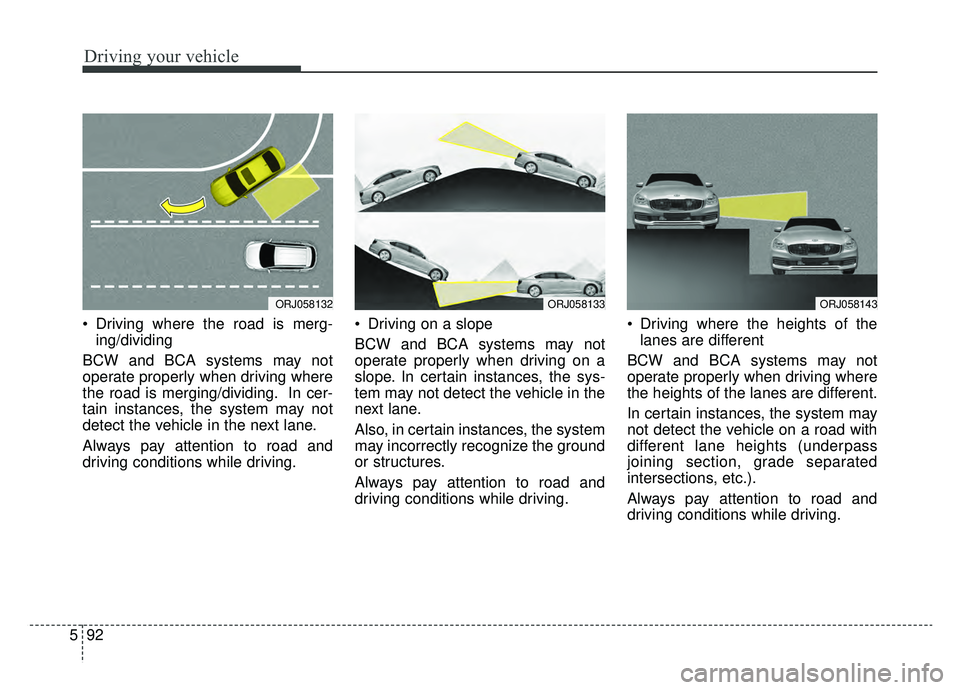
Driving where the road is merg-
ing/dividing
BCW and BCA systems may not
operate properly when driving where
the road is merging/dividing. In cer-
tain instances, the system may not
detect the vehicle in the next lane.
Always pay attention to road and
driving conditions while driving. Driving on a slope
BCW and BCA systems may not
operate properly when driving on a
slope. In certain instances, the sys-
tem may not detect the vehicle in the
next lane.
Also, in certain instances, the system
may incorrectly recognize the ground
or structures.
Always pay attention to road and
driving conditions while driving. Driving where the heights of the
lanes are different
BCW and BCA systems may not
operate properly when driving where
the heights of the lanes are different.
In certain instances, the system may
not detect the vehicle on a road with
different lane heights (underpass
joining section, grade separated
intersections, etc.).
Always pay attention to road and
driving conditions while driving.
ORJ058132ORJ058133ORJ058143
Page 383 of 593
5117
Driving your vehicle
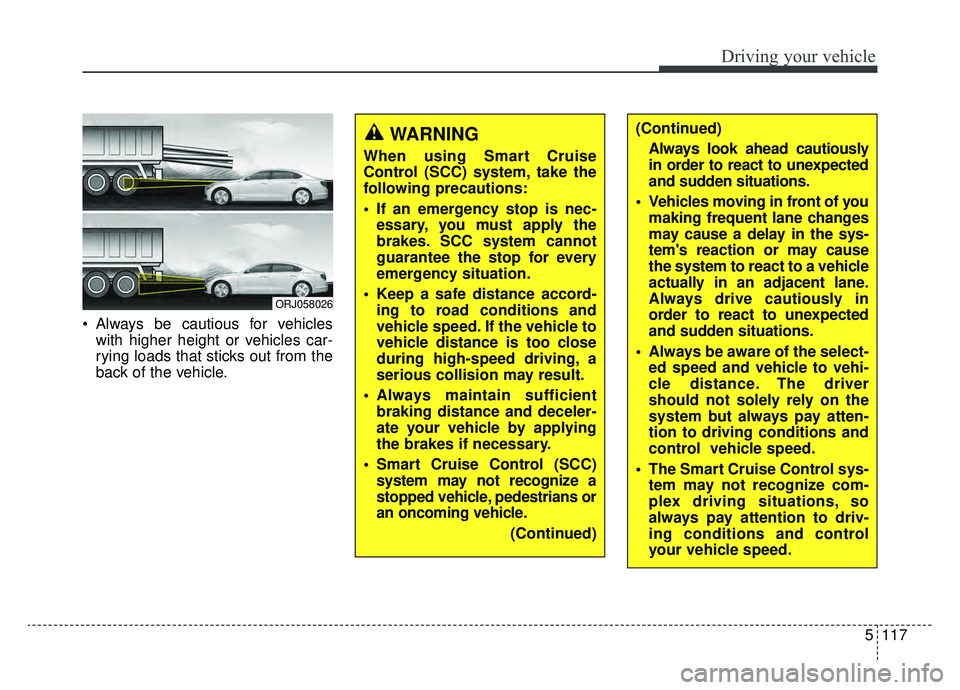
Always be cautious for vehicleswith higher height or vehicles car-
rying loads that sticks out from the
back of the vehicle.
ORJ058026
WARNING
When using Smart Cruise
Control (SCC) system, take the
following precautions:
If an emergency stop is nec-essary, you must apply the
brakes. SCC system cannot
guarantee the stop for every
emergency situation.
Keep a safe distance accord- ing to road conditions and
vehicle speed. If the vehicle to
vehicle distance is too close
during high-speed driving, a
serious collision may result.
Always maintain sufficient braking distance and deceler-
ate your vehicle by applying
the brakes if necessary.
Smart Cruise Control (SCC) system may not recognize a
stopped vehicle, pedestrians or
an oncoming vehicle.
(Continued)
(Continued)Always look ahead cautiously
in order to react to unexpected
and sudden situations.
Vehicles moving in front of you making frequent lane changes
may cause a delay in the sys-
tem's reaction or may cause
the system to react to a vehicle
actually in an adjacent lane.
Always drive cautiously in
order to react to unexpected
and sudden situations.
Always be aware of the select- ed speed and vehicle to vehi-
cle distance. The driver
should not solely rely on the
system but always pay atten-
tion to driving conditions and
control vehicle speed.
The Smart Cruise Control sys- tem may not recognize com-
plex driving situations, so
always pay attention to driv-
ing conditions and control
your vehicle speed.
Page 423 of 593

5157
Driving your vehicle
Limitations of the system
The driver must be cautious in the
below situations, because the sys-
tem may not detect other vehicles or
objects in certain circumstances.
When a trailer or carrier isinstalled.
The vehicle drives in inclement weather such as heavy rain or
snow.
The sensor is polluted with rain, snow, mud, etc.
The rear bumper where the sensor is located is covered with a foreign
object such as a bumper sticker, a
bumper guard, a bike rack, etc.
The rear bumper is damaged, or the sensor is out of the original
default position.
The vehicle height gets lower or higher due to heavy loading in a
trunk, abnormal tire pressure, etc.
When the temperature of the rear bumper is high.
When the sensors are blocked by other vehicles, walls or parking-lot
pillars. The vehicle drives on a curved road.
The road pavement (or the periph-
eral ground) abnormally contains
metallic components (i.e. possibly
due to subway construction).
There is a fixed object near the vehicle, such as a guardrail.
While going down or up a steep road where the height of the lane is
different.
Driving on a narrow road where trees or grass or overgrown.
Driving in rural areas where the sensor does not detect another
vehicle for an extended period of
time.
Driving on a wet road.
Driving on a road where the guardrail or wall is in double structure.
A big vehicle is near such as a bus or truck.
When the other vehicle approaches very close.
When the other vehicle passes at a very fast speed. If the vehicle has started at the
same time as the vehicle next to
you and has accelerated.
A motorcycle or bicycle is near.
A flat trailer is near.
If there are small objects in the detecting area such as a shopping
cart or a baby stroller.
If there is a low height vehicle such as a sports car.
The brake pedal is depressed.
ESC (Electronic Stability Control) is activated.
ESC (Electronic Stability Control) malfunctions.
The tire pressure is low or a tire is damaged.
The brake is reworked.
The vehicle sharply stops.
Temperature is extremely low around the vehicle.
Page 513 of 593
743
Maintenance
Wheel replacement
When replacing the metal wheels for
any reason, make sure the new
wheels are equivalent to the original
factory units in diameter, rim width
and offset.
A wheel that is not the correct size
may adversely affect wheel and
bearing life, braking and stopping
abilities, handling characteristics,
ground clearance, body-to-tire clear-
ance, snow chain clearance,
speedometer and odometer calibra-
tion, headlight aim and bumper
height.
Tire traction
Tire traction can be reduced if you
drive on worn tires, tires that are
improperly inflated or on slippery
road surfaces. Tires should be
replaced when tread wear indicators
appear. Slow down whenever there
is rain, snow or ice on the road, to
reduce the possibility of losing con-
trol of the vehicle.
Tire maintenance
In addition to proper inflation, correct
wheel alignment helps to decrease
tire wear. If you find a tire is worn
unevenly, have your dealer check the
wheel alignment.
When you have new tires installed,
make sure they are balanced. This
will increase vehicle ride comfort and
tire life. Additionally, a tire should
always be rebalanced if it is removed
from the wheel.
Tire sidewall labeling
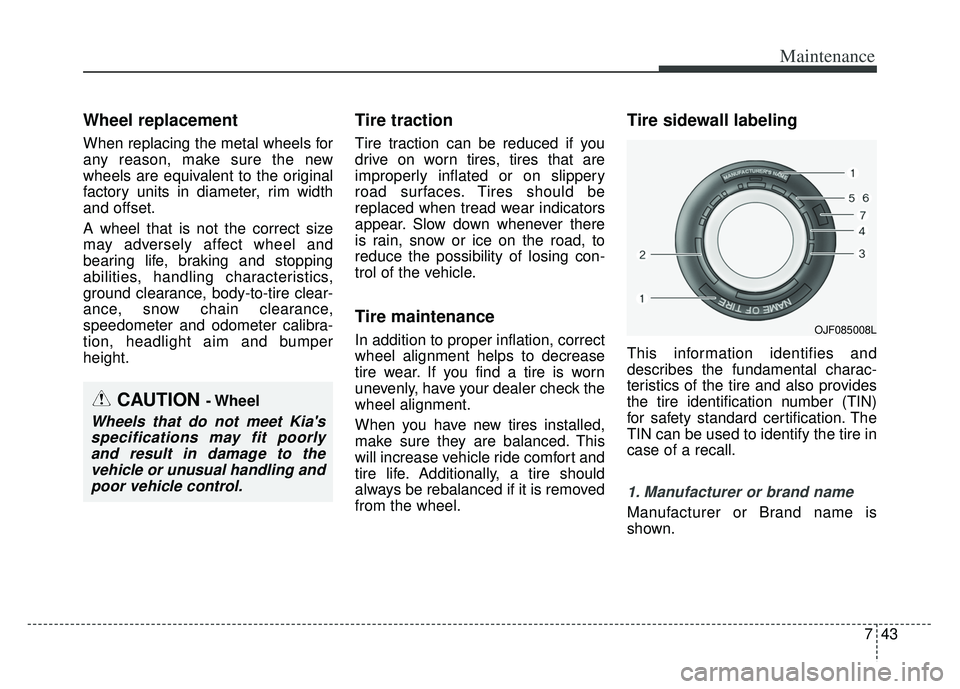
This information identifies and
describes the fundamental charac-
teristics of the tire and also provides
the tire identification number (TIN)
for safety standard certification. The
TIN can be used to identify the tire in
case of a recall.
1. Manufacturer or brand name
Manufacturer or Brand name is
shown.
CAUTION - Wheel
Wheels that do not meet Kia'sspecifications may fit poorlyand result in damage to thevehicle or unusual handling andpoor vehicle control.
OJF085008L