instrument panel KIA K900 2020 Owner's Manual
[x] Cancel search | Manufacturer: KIA, Model Year: 2020, Model line: K900, Model: KIA K900 2020Pages: 593, PDF Size: 14.99 MB
Page 178 of 593
485
Features of your vehicle
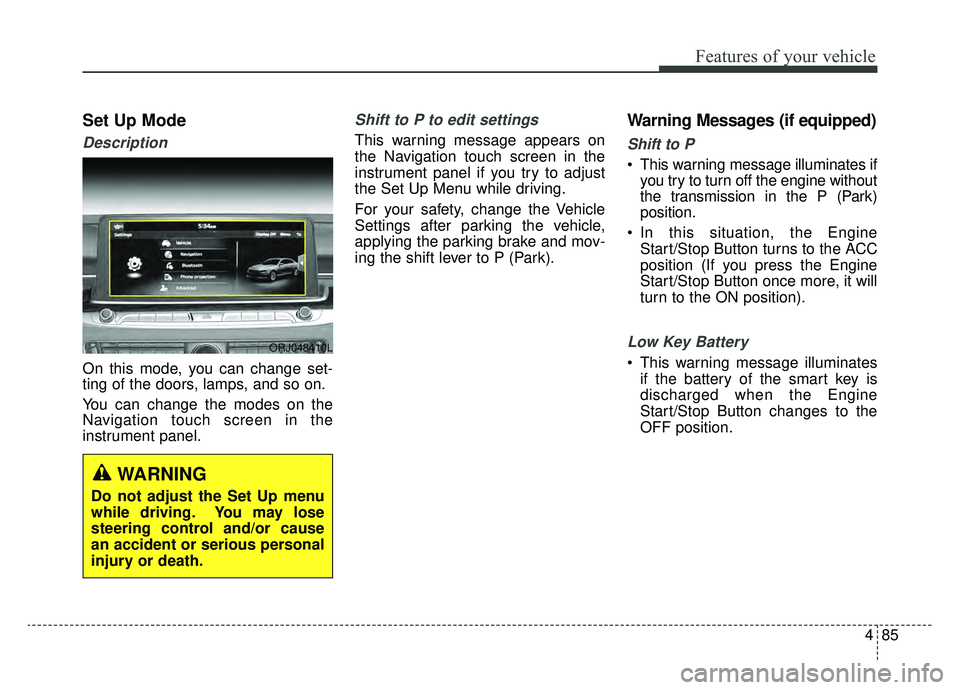
Set Up Mode
Description
On this mode, you can change set-
ting of the doors, lamps, and so on.
You can change the modes on the
Navigation touch screen in the
instrument panel.
Shift to P to edit settings
This warning message appears on
the Navigation touch screen in the
instrument panel if you try to adjust
the Set Up Menu while driving.
For your safety, change the Vehicle
Settings after parking the vehicle,
applying the parking brake and mov-
ing the shift lever to P (Park).
Warning Messages (if equipped)
Shift to P
This warning message illuminates ifyou try to turn off the engine without
the transmission in the P (Park)
position.
In this situation, the Engine Start/Stop Button turns to the ACC
position (If you press the Engine
Start/Stop Button once more, it will
turn to the ON position).
Low Key Battery
This warning message illuminatesif the battery of the smart key is
discharged when the Engine
Start/Stop Button changes to the
OFF position.
ORJ048410L
WARNING
Do not adjust the Set Up menu
while driving. You may lose
steering control and/or cause
an accident or serious personal
injury or death.
Page 197 of 593
Features of your vehicle
104
4
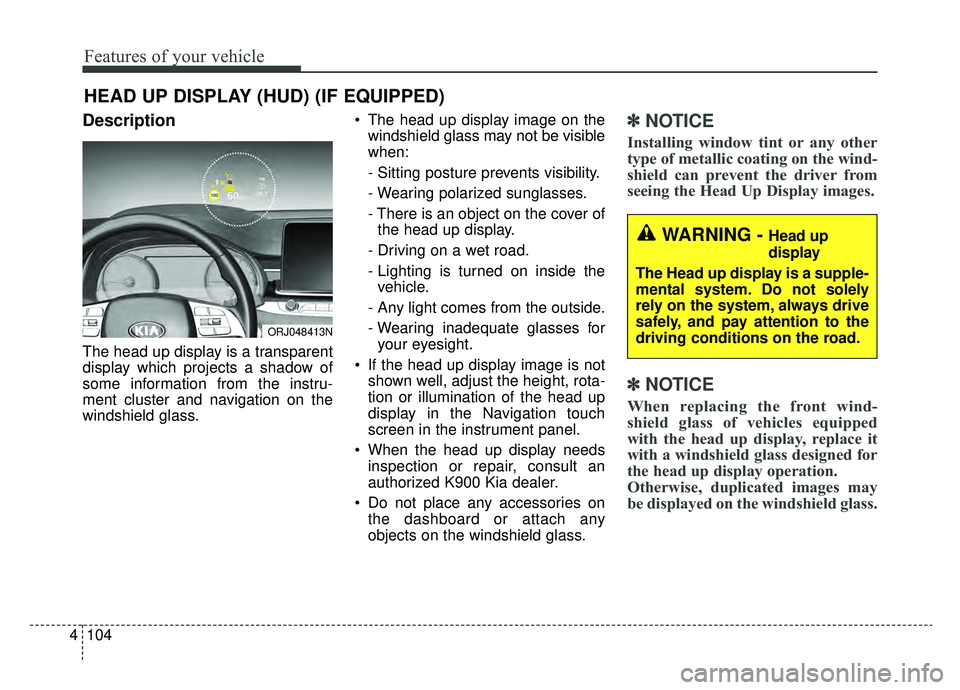
Description
The head up display is a transparent
display which projects a shadow of
some information from the instru-
ment cluster and navigation on the
windshield glass. The head up display image on the
windshield glass may not be visible
when:
- Sitting posture prevents visibility.
- Wearing polarized sunglasses.
- There is an object on the cover ofthe head up display.
- Driving on a wet road.
- Lighting is turned on inside the vehicle.
- Any light comes from the outside.
- Wearing inadequate glasses for your eyesight.
If the head up display image is not shown well, adjust the height, rota-
tion or illumination of the head up
display in the Navigation touch
screen in the instrument panel.
When the head up display needs inspection or repair, consult an
authorized K900 Kia dealer.
Do not place any accessories on the dashboard or attach any
objects on the windshield glass.
✽ ✽ NOTICE
Installing window tint or any other
type of metallic coating on the wind-
shield can prevent the driver from
seeing the Head Up Display images.
✽ ✽NOTICE
When replacing the front wind-
shield glass of vehicles equipped
with the head up display, replace it
with a windshield glass designed for
the head up display operation.
Otherwise, duplicated images may
be displayed on the windshield glass.
HEAD UP DISPLAY (HUD) (IF EQUIPPED)
ORJ048413N
WARNING - Head up
display
The Head up display is a supple-
mental system. Do not solely
rely on the system, always drive
safely, and pay attention to the
driving conditions on the road.
Page 213 of 593
Features of your vehicle
120
4
Turn signals and lane change
signals
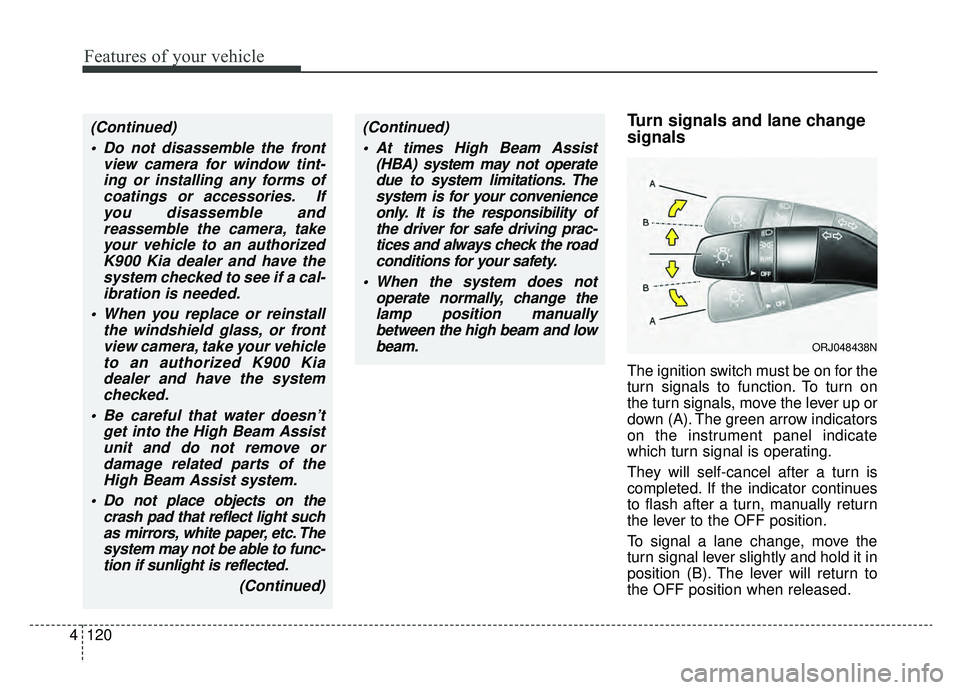
The ignition switch must be on for the
turn signals to function. To turn on
the turn signals, move the lever up or
down (A). The green arrow indicators
on the instrument panel indicate
which turn signal is operating.
They will self-cancel after a turn is
completed. If the indicator continues
to flash after a turn, manually return
the lever to the OFF position.
To signal a lane change, move the
turn signal lever slightly and hold it in
position (B). The lever will return to
the OFF position when released.
(Continued)
Do not disassemble the front view camera for window tint-ing or installing any forms ofcoatings or accessories. Ifyou disassemble andreassemble the camera, takeyour vehicle to an authorizedK900 Kia dealer and have thesystem checked to see if a cal-ibration is needed.
When you replace or reinstall the windshield glass, or frontview camera, take your vehicleto an authorized K900 Kiadealer and have the systemchecked.
Be careful that water doesn’t get into the High Beam Assistunit and do not remove ordamage related parts of theHigh Beam Assist system.
Do not place objects on the crash pad that reflect light suchas mirrors, white paper, etc. Thesystem may not be able to func-tion if sunlight is reflected.
(Continued)(Continued) At times High Beam Assist (HBA) system may not operatedue to system limitations. Thesystem is for your convenienceonly. It is the responsibility ofthe driver for safe driving prac-tices and always check the roadconditions for your safety.
When the system does not operate normally, change thelamp position manuallybetween the high beam and lowbeam.
ORJ048438N
Page 224 of 593
4131
Features of your vehicle
If you want to defrost and defog the
front windshield, refer to “Windshield
defrosting and defogging” in this sec-
tion.
Rear window defroster
The defroster heats the window to
remove frost, fog and thin ice from
the rear window, while the engine is
running.
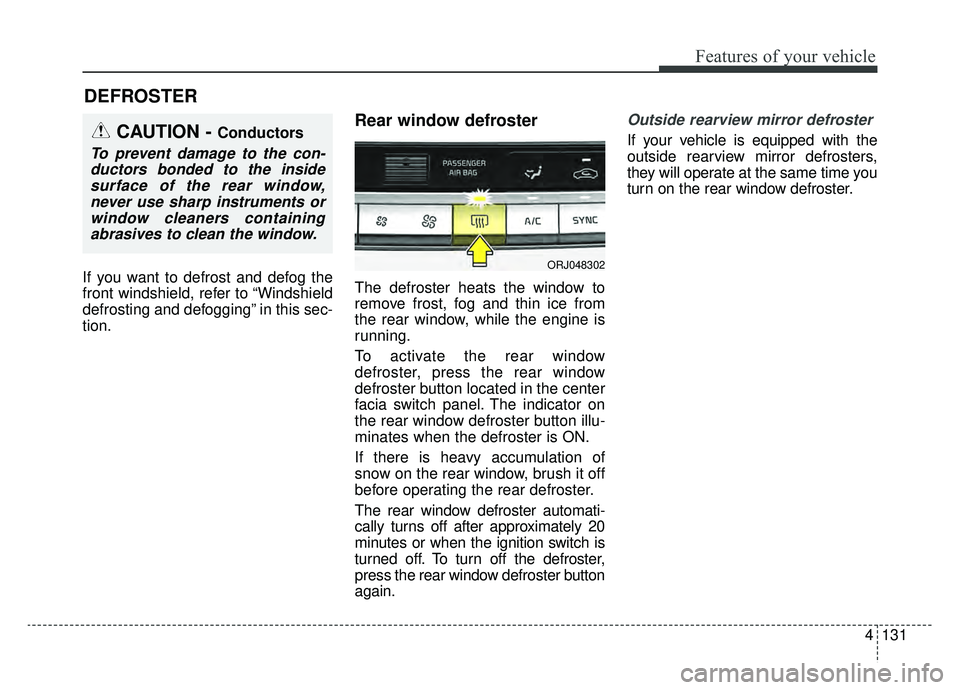
To activate the rear window
defroster, press the rear window
defroster button located in the center
facia switch panel. The indicator on
the rear window defroster button illu-
minates when the defroster is ON.
If there is heavy accumulation of
snow on the rear window, brush it off
before operating the rear defroster.
The rear window defroster automati-
cally turns off after approximately 20
minutes or when the ignition switch is
turned off. To turn off the defroster,
press the rear window defroster button
again.
Outside rearview mirror defroster
If your vehicle is equipped with the
outside rearview mirror defrosters,
they will operate at the same time you
turn on the rear window defroster.
DEFROSTER
CAUTION - Conductors
To prevent damage to the con-ductors bonded to the insidesurface of the rear window,never use sharp instruments orwindow cleaners containingabrasives to clean the window.
ORJ048302
Page 230 of 593
4137
Features of your vehicle
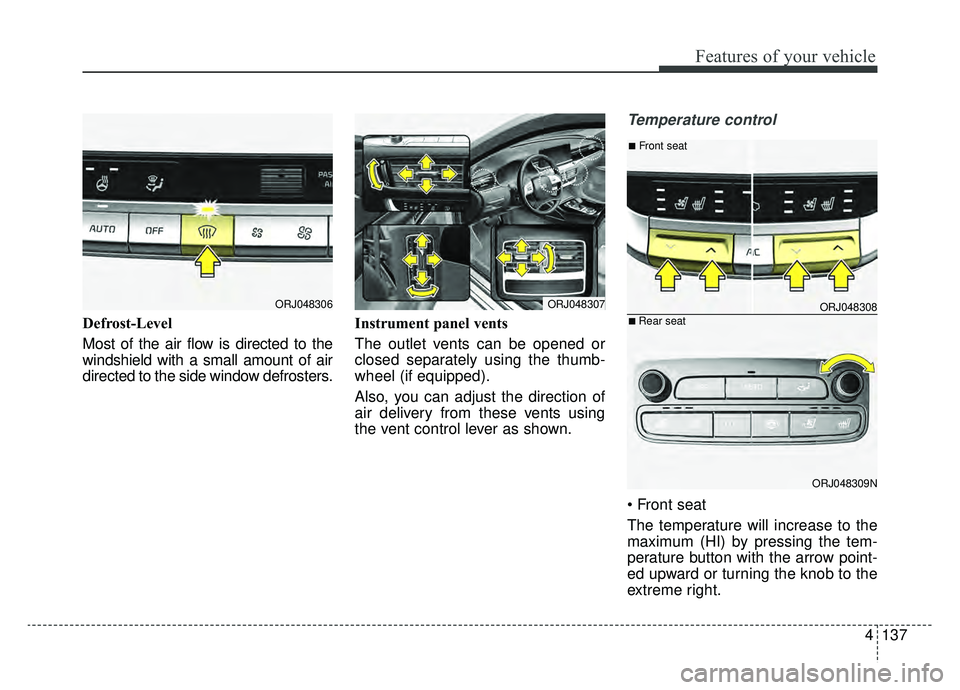
Defrost-Level
Most of the air flow is directed to the
windshield with a small amount of air
directed to the side window defrosters.Instrument panel vents
The outlet vents can be opened or
closed separately using the thumb-
wheel (if equipped).
Also, you can adjust the direction of
air delivery from these vents using
the vent control lever as shown.
Temperature control
The temperature will increase to the
maximum (HI) by pressing the tem-
perature button with the arrow point-
ed upward or turning the knob to the
extreme right.
ORJ048307ORJ048306ORJ048308
ORJ048309N
■Front seat
■Rear seat
Page 339 of 593

573
Driving your vehicle
LKA system operation
To activate/deactivate the LKA:
With the ignition ON status, press LKA
button located on the instrument panel
on the lower left hand side of the driv-
er. The indicator ( ) in the cluster
display will initially illuminate white.
When the indicator (white) activated in
the previous ignition cycle, the system
turns on without any control.
If you press LKA button again, the indi-
cator on the cluster display will go off.The color of indicator will change
depend on the condition of LKA sys-
tem.
- White : Sensor does not detect the lane marker or vehicle
speed is less than 40
mph (64 km/h).
- Green : Sensor detects the lane
marker and system is able
to control the steering.
LKA system activation
To see LKA system screen on the
LCD display in the cluster, Tab to
the ASSIST mode ( ).
For further details, refer to [menu settings] in chapter 4, [LCD win-
dows].
After LKA system is activated, if both lane markers are detected,
vehicle speed is over 40 mph (64
km/h). and all the activation condi-
tions are satisfied, the indicator will
turn green and the steering wheel
will be controlled.
ORJ058032
Page 450 of 593
What to do in an emergency
86
TIRE PRESSURE MONITORING SYSTEM (TPMS)
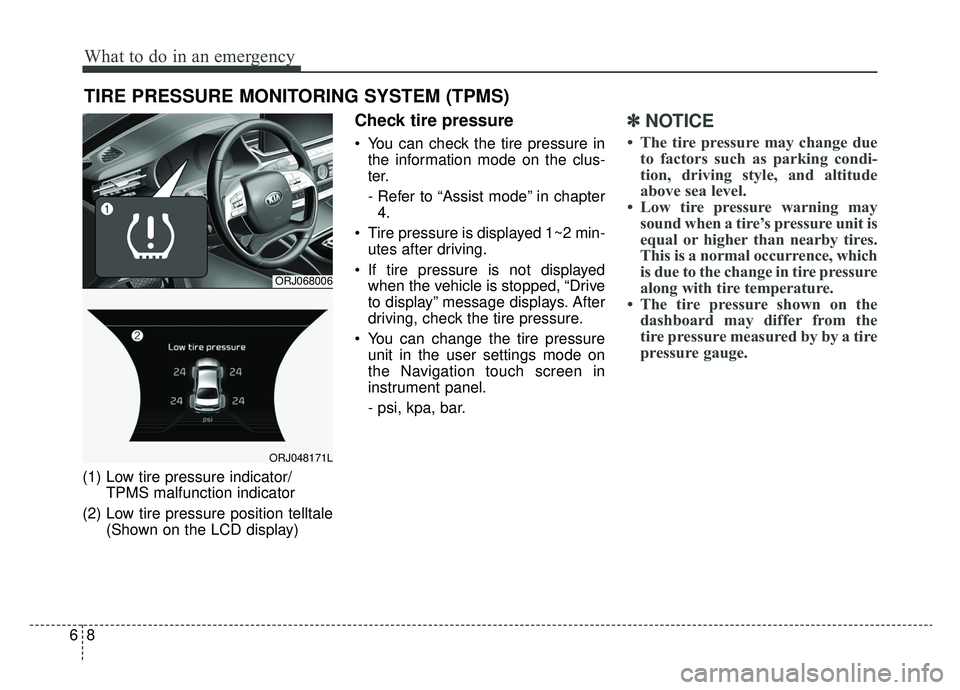
(1) Low tire pressure indicator/TPMS malfunction indicator
(2) Low tire pressure position telltale (Shown on the LCD display)
Check tire pressure
You can check the tire pressure inthe information mode on the clus-
ter.
- Refer to “Assist mode” in chapter4.
Tire pressure is displayed 1~2 min- utes after driving.
If tire pressure is not displayed when the vehicle is stopped, “Drive
to display” message displays. After
driving, check the tire pressure.
You can change the tire pressure unit in the user settings mode on
the Navigation touch screen in
instrument panel.
- psi, kpa, bar.
✽ ✽ NOTICE
• The tire pressure may change due
to factors such as parking condi-
tion, driving style, and altitude
above sea level.
• Low tire pressure warning may sound when a tire’s pressure unit is
equal or higher than nearby tires.
This is a normal occurrence, which
is due to the change in tire pressure
along with tire temperature.
• The tire pressure shown on the dashboard may differ from the
tire pressure measured by by a tire
pressure gauge.
ORJ068006
ORJ048171L
Page 526 of 593
Maintenance
56
7
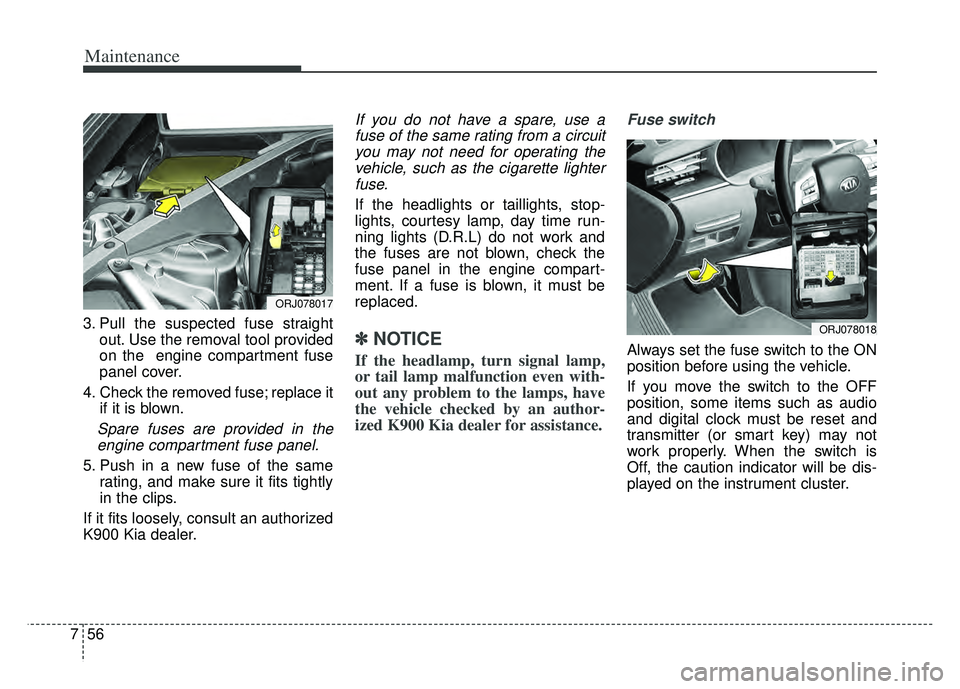
3. Pull the suspected fuse straight
out. Use the removal tool provided
on the engine compartment fuse
panel cover.
4. Check the removed fuse; replace it if it is blown.
Spare fuses are provided in theengine compartment fuse panel.
5. Push in a new fuse of the same rating, and make sure it fits tightly
in the clips.
If it fits loosely, consult an authorized
K900 Kia dealer.
If you do not have a spare, use a fuse of the same rating from a circuityou may not need for operating thevehicle, such as the cigarette lighterfuse.
If the headlights or taillights, stop-
lights, courtesy lamp, day time run-
ning lights (D.R.L) do not work and
the fuses are not blown, check the
fuse panel in the engine compart-
ment. If a fuse is blown, it must be
replaced.
✽ ✽ NOTICE
If the headlamp, turn signal lamp,
or tail lamp malfunction even with-
out any problem to the lamps, have
the vehicle checked by an author-
ized K900 Kia dealer for assistance.
Fuse switch
Always set the fuse switch to the ON
position before using the vehicle.
If you move the switch to the OFF
position, some items such as audio
and digital clock must be reset and
transmitter (or smart key) may not
work properly. When the switch is
Off, the caution indicator will be dis-
played on the instrument cluster.
ORJ078017
ORJ078018
Page 532 of 593
Maintenance
62
7
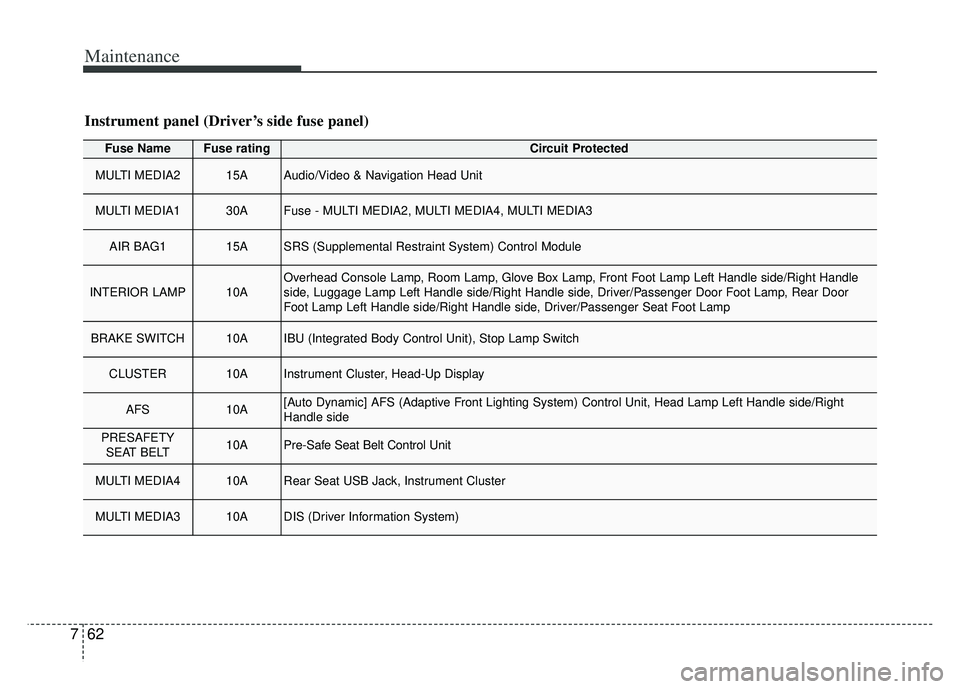
Fuse NameFuse ratingCircuit Protected
MULTI MEDIA215AAudio/Video & Navigation Head Unit
MULTI MEDIA130AFuse - MULTI MEDIA2, MULTI MEDIA4, MULTI MEDIA3
AIR BAG115ASRS (Supplemental Restraint System) Control Module
INTERIOR LAMP10AOverhead Console Lamp, Room Lamp, Glove Box Lamp, Front Foot Lamp Left Handle side/Right Handle
side, Luggage Lamp Left Handle side/Right Handle side, Driver/Passenger Door Foot Lamp, Rear Door
Foot Lamp Left Handle side/Right Handle side, Driver/Passenger Seat Foot Lamp
BRAKE SWITCH10AIBU (Integrated Body Control Unit), Stop Lamp Switch
CLUSTER10AInstrument Cluster, Head-Up Display
AFS10A[Auto Dynamic] AFS (Adaptive Front Lighting System) Control Unit, Head Lamp Left Handle side/Right
Handle side
PRESAFETY
SEAT BELT10APre-Safe Seat Belt Control Unit
MULTI MEDIA410ARear Seat USB Jack, Instrument Cluster
MULTI MEDIA310ADIS (Driver Information System)
Instrument panel (Driver’s side fuse panel)
Page 537 of 593
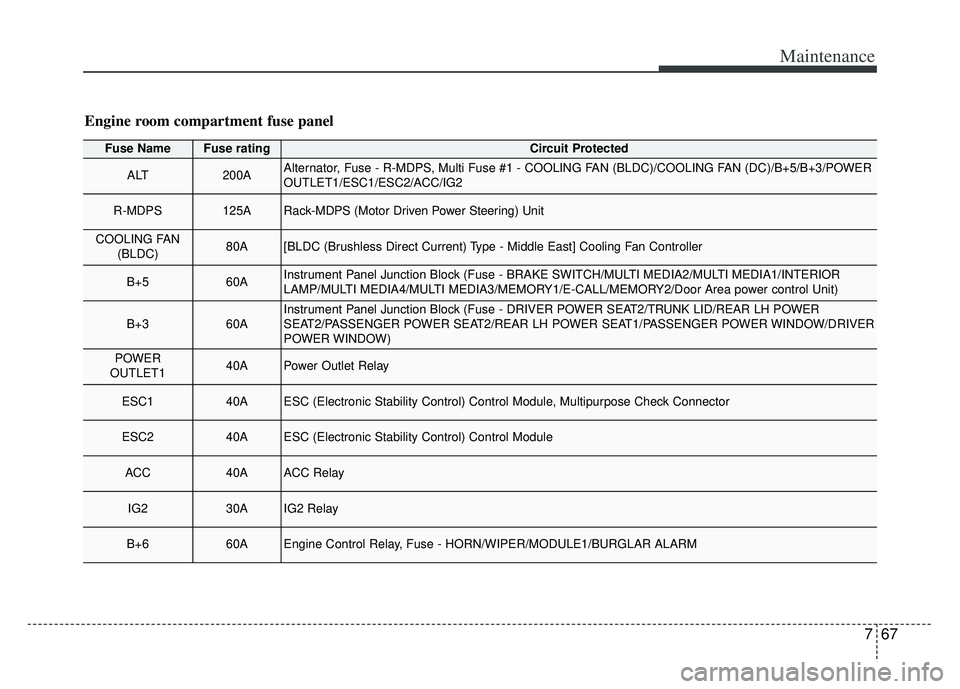
767
Maintenance
Fuse NameFuse ratingCircuit Protected
ALT200AAlternator, Fuse - R-MDPS, Multi Fuse #1 - COOLING FAN (BLDC)/COOLING FAN (DC)/B+5/B+3/POWER
OUTLET1/ESC1/ESC2/ACC/IG2
R-MDPS125ARack-MDPS (Motor Driven Power Steering) Unit
COOLING FAN(BLDC)80A[BLDC (Brushless Direct Current) Type - Middle East] Cooling Fan Controller
B+560AInstrument Panel Junction Block (Fuse - BRAKE SWITCH/MULTI MEDIA2/MULTI MEDIA1/INTERIOR
LAMP/MULTI MEDIA4/MULTI MEDIA3/MEMORY1/E-CALL/MEMORY2/Door Area power control Unit)
B+360AInstrument Panel Junction Block (Fuse - DRIVER POWER SEAT2/TRUNK LID/REAR LH POWER
SEAT2/PASSENGER POWER SEAT2/REAR LH POWER SEAT1/PASSENGER POWER WINDOW/DRIVER
POWER WINDOW)
POWER
OUTLET140APower Outlet Relay
ESC140AESC (Electronic Stability Control) Control Module, Multipurpose Check Connector
ESC240AESC (Electronic Stability Control) Control Module
ACC40AACC Relay
IG230AIG2 Relay
B+660AEngine Control Relay, Fuse - HORN/WIPER/MODULE1/BURGLAR ALARM
Engine room compartment fuse panel