mirror KIA K900 2020 Owner's Guide
[x] Cancel search | Manufacturer: KIA, Model Year: 2020, Model line: K900, Model: KIA K900 2020Pages: 593, PDF Size: 14.99 MB
Page 348 of 593
Driving your vehicle
82
5
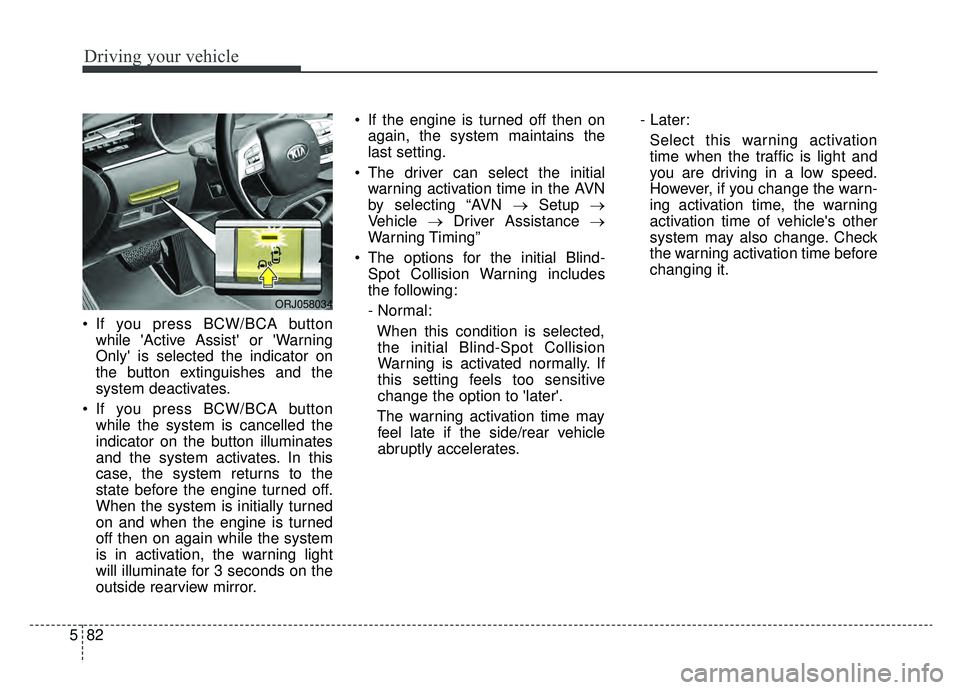
If you press BCW/BCA button
while 'Active Assist' or 'Warning
Only' is selected the indicator on
the button extinguishes and the
system deactivates.
If you press BCW/BCA button while the system is cancelled the
indicator on the button illuminates
and the system activates. In this
case, the system returns to the
state before the engine turned off.
When the system is initially turned
on and when the engine is turned
off then on again while the system
is in activation, the warning light
will illuminate for 3 seconds on the
outside rearview mirror. If the engine is turned off then on
again, the system maintains the
last setting.
The driver can select the initial warning activation time in the AVN
by selecting “AVN →Setup →
Vehicle →Driver Assistance →
Warning Timing”
The options for the initial Blind- Spot Collision Warning includes
the following:
- Normal:
When this condition is selected,the initial Blind-Spot Collision
Warning is activated normally. If
this setting feels too sensitive
change the option to 'later'.
The warning activation time may feel late if the side/rear vehicle
abruptly accelerates. - Later:
Select this warning activation
time when the traffic is light and
you are driving in a low speed.
However, if you change the warn-
ing activation time, the warning
activation time of vehicle's other
system may also change. Check
the warning activation time before
changing it.
ORJ058034
Page 350 of 593

Driving your vehicle
84
5
Warning message and system
control
Blind-Spot Collision Warning
(BCW) system
First stage alert
If a vehicle is detected within the
boundary of the system, a warning
light will illuminate on the outside
rearview mirror and the head up dis-
play (if equipped).
Once the detected vehicle is no
longer within the blind spot area, the
warning will turn off according to the
driving conditions of the vehicle.
ORJ058128ORJ058129
[A] : Warning sound
Second stage alert
A warning chime to alert the driver will activate when:
1. A vehicle has been detected in the blind spot area by the radar system AND.
2. The turn signal is applied (same side as where the vehicle is being detected).
When this alert is activated, the warning light on the outside rearview mirror and
the head up display (if equipped) will also blink. And a warning chime will sound.
If you turn off the turn signal indicator, the second stage alert will be deactivated.
Once the detected vehicle is no longer within the blind spot area, the warn-
ing will turn off according to the driving conditions of the vehicle.
ORJ058127
Page 351 of 593
585
Driving your vehicle
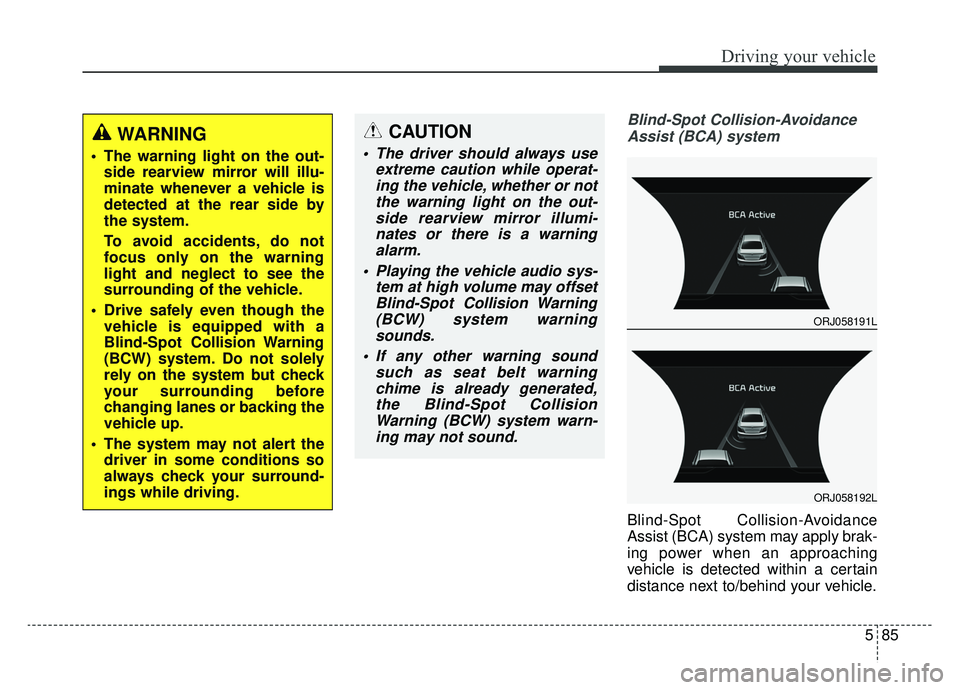
Blind-Spot Collision-AvoidanceAssist (BCA) system
Blind-Spot Collision-Avoidance
Assist (BCA) system may apply brak-
ing power when an approaching
vehicle is detected within a certain
distance next to/behind your vehicle.
WARNING
The warning light on the out- side rearview mirror will illu-
minate whenever a vehicle is
detected at the rear side by
the system.
To avoid accidents, do not
focus only on the warning
light and neglect to see the
surrounding of the vehicle.
Drive safely even though the vehicle is equipped with a
Blind-Spot Collision Warning
(BCW) system. Do not solely
rely on the system but check
your surrounding before
changing lanes or backing the
vehicle up.
The system may not alert the driver in some conditions so
always check your surround-
ings while driving.
CAUTION
The driver should always use extreme caution while operat-ing the vehicle, whether or notthe warning light on the out-side rearview mirror illumi-nates or there is a warningalarm.
Playing the vehicle audio sys- tem at high volume may offsetBlind-Spot Collision Warning(BCW) system warningsounds.
If any other warning sound such as seat belt warningchime is already generated,the Blind-Spot CollisionWarning (BCW) system warn-ing may not sound.
ORJ058191L
ORJ058192L
Page 364 of 593

Driving your vehicle
98
5
✽ ✽
NOTICE
Driver Attention Warning (DAW)
system utilizes the camera sensor on
the front windshield for its opera-
tion. To keep the camera sensor in
the best condition, you should
observe the followings:
- Do not disassemble the camera
when installing tint on the windows
or applying any type of coatings or
accessories. If you disassemble or
reassemble the camera, take your
vehicle to an authorized K900 Kia
dealer and have the system
checked.
- Do not locate any reflective objects (i.e. white paper, mirror)
over the dashboard. Any light
reflection may cause a mal-func-
tion of Driver Attention Warning
(DAW) system.
- Use extreme caution to keep the camera sensor out of water.
- Do not disassemble the camera assembly, nor apply any impact on
the camera assembly.
• Playing the vehicle audio system at high volume may offset the
Driver Attention Warning system
warning sounds.CAUTION
Driver Attention Warning (DAW)
system may not properly oper-ate with limited alerting in thefollowing situations:
The lane detection perform- ance is limited. (For moreinformation, refer to "LaneKeeping Assist (LKA) system"in this chapter.)
The vehicle is violently driven or is abruptly turned for obsta-cle avoidance (e.g. construc-tion area, other vehicles, fallenobjects, bumpy road).
Forward drivability of the vehi- cle is severely undermined(possibly due to wide varia-tion in tire pressures, uneventire wear-out, toe-in/toe-outalignment).
The vehicle drives on a curvy road.
The vehicle drives on a bumpy road.
(Continued)
(Continued) The vehicle drives through a windy area.
The vehicle is controlled by the following driving assistsystems:
- Lane Keeping Assist (LKA) system
- Forward Collision-Avoidance Assist (FCA) system
- Blind-Spot Collision- Avoidance Assist (BCA) sys-tem
- Lane Following Assist (LFA) system
- Smart Cruise Control (SCC) system
- Highway Driving Assist (HDA) system
Page 402 of 593
Driving your vehicle
136
5
(Continued)
Do not disassemble LFA sys-
tem camera temporarily to tint
the window or attach any
types of coatings and acces-
sories. If you disassemble the
camera and assemble it again,
we recommend that you take
your vehicle to an authorized
retailer of Kia products and
have the system checked for
calibration.
When you replace the wind- shield glass, LFA system cam-
era or related parts of the
steering wheel, take your
vehicle to an authorized retail-
er of Kia products and have
the system checked for cali-
bration.
The system helps detect lane markers and controls the
steering wheel by a camera,
therefore, if the lane markers
are hard to detect, the system
may not work properly.
(Continued)(Continued)Please refer to “Limitations of
the System”.
Do not remove or damage the related parts of LFA system.
You may not hear a warning sound of LFA system if the
audio volume is high.
Do not place objects on the dashboard that reflects light
such as mirrors, white paper,
etc. This may prevent LFA sys-
tem from functioning proper-
ly.
Always have your hands on the steering wheel while LFA
system is activated.
The steering wheel is not con- tinuously controlled so if the
vehicle speed is at a higher
rate when leaving a lane the
vehicle may not be controlled
by the system. The driver
must always follow the speed
limit when using the system.
(Continued)(Continued)
If you attach objects to thesteering wheel, the system
may not assist steering or the
hands off alarm may not work
properly.
Page 407 of 593

5141
Driving your vehicle
When external condition is inter-
vened
The brightness outside changessuddenly such as when entering or
exiting a tunnel, or when passing
under a bridge.
The brightness outside is too low such as when the headlamps are
not on at night or the vehicle is
going through a tunnel.
There is a boundary structure in the roadway such as a concrete
barrier, guardrail and reflector post
that is inadvertently being detected
by the camera.
When light coming from a street light or an oncoming vehicle is
reflected on a wet road surface
such as a puddle in the road.
The field of view in front is obstructed by sun glare.
There is not enough distance between you and the vehicle in
front to be able to detect the lane
marker or the vehicle ahead is driv-
ing on the lane marker. Driving on a steep grade, over a
hill, or when driving on a curved
road.
The adverse road conditions cause excessive vehicle vibrations while
driving.
The surrounding of the inside rear view mirror temperature is high
due to direct sunlight, etc.
The sensor recognition changes suddenly when passing over a
speed bump or driving on a steep
up/down or right/left grade When front visibility is poor
The windshield or the camera lens
is covered with dirt or debris.
The windshield glass is fogged up; a clear view of the road is obstruct-
ed.
Placing objects on the dashboard, etc.
The sensor cannot detect the lane because of fog, heavy rain or snow.
Page 416 of 593
Driving your vehicle
150
5
System setting and activation
System setting
The driver can activate the sys-
tems by placing the ignition switch
to the ON position and by selecting
“AVN →Setup →Vehicle →Driver
Assistance →Parking Safety →
Rear Cross-Traffic Safety system”.
RCCA and RCCW system turn on
and get ready to be activated when
'Rear Cross-Traffic safety' is select-
ed.
When the engine is turned off then on again, the systems always get
ready to be activated.
When the system is initially turned on and when the engine is turned
off then on again, the warning light
will illuminate for 3 seconds on the
outside side view mirror.
The driver can select the initial warn-
ing activation time in the AVN by
selecting “AVN →Setup →Vehicle
→ Driver Assistance →Warning
Timing”. The options for the initial
Rear Cross-Traffic Collision Warning
(RCCW) system includes the follow-
ing: - Normal:
When this condition is selected, the
initial Rear Cross-Traffic Collision
Warning (RCCW) system is activat-
ed normally. If this setting feels too
sensitive change the option to ‘Later’.
The warning activation time may feel
late if the side/rear vehicle abruptly
accelerates.
- Later:
Select this warning activation time
when the traffic is light and you are
driving in a low speed. However, if
you change the warning activation
time, the warning activation time of
vehicle's other system may also
change. Check the warning activa-
tion time before changing it.
The driver can select the warning vol-
ume of the Rear Cross-Traffic
Collision Warning (RCCW) system by
selecting “AVN
→Setup →Vehicle →
Driver Assistance → Warning Volume
→ High/Medium/Low”. However, if
you change the warning volume, the
warning volume of vehicle's other
system may also change.
Operating conditions
To operate:
Go to the “AVN → Setup →Vehicle
→ Driver Assistance →Parking
Safety →Rear Cross-Traffic Safety”.
on the AVN. The system will turn on
and standby to activate.
The system will activate when vehi-
cle speed is below 6 mph (10 km/h)
and with the shift lever in R
(Reverse).
* The system will not activate when the vehicle speed exceeds 6 mph
(10 km/h). The system will activate
again when the speed is below 5
mph (8 km/h).
The system's detecting range is
approximately 1 ft ~ 65 ft (0.5 m ~ 20
m). An approaching vehicle will be
detected if their vehicle speed is with-
in 5 mph ~ 22.5 mph (8 km/h ~ 36
km/h). Note that the detecting range
may vary under certain conditions.
As always, use caution and pay
close attention to your surroundings
when backing up your vehicle.
Page 417 of 593

5151
Driving your vehicle
If the vehicle detected by the sensors
approaches from the rear left/right
side of your vehicle, the warning
chime will sound, the warning light
on the outside rearview mirror will
blink and a message will appear on
the LCD display. If the rear view mon-
itor system is in activation, a mes-
sage will also appear on the AVN
screen.
The warning will stop when:
- The detected vehicle moves out ofthe sensing area or
- When the vehicle is right behind your vehicle or
- When the vehicle is not approach- ing your vehicle or
- When the other vehicle slows down.
- The vehicle is not driving towards your vehicle.
- The vehicle’s approaching speed is decreased.
ORJ058098
ORJ059141N
ORJ058099
ORJ059142N
Warning message and system control
Rear Cross-Traffic Collision Warning (RCCW) system
■ Left
■ Left
■ Right
■ Right
Page 419 of 593
5153
Driving your vehicle
The brake control may not operate
properly according to the status of
the ESC (Electronic Stability
Control). The same warning mes-
sage is displayed on the instrument
cluster for this case also.
- When the ESC (Electronic StabilityControl) warning light is on.
- When the ESC (Electronic Stability Control) is engaged in a different
function.CAUTION
When the operation condition of Rear Cross-Traffic CollisionWarning (RCCW) system issatisfied, the warning willoccur every time a vehicleapproaches the side/rear ofyour stopped (0 km/h vehiclespeed) vehicle.
The system's warning or brake may not operate proper-ly if the left/right of your vehi-cle's rear bumper is blockedby a vehicle or obstacle.
The driver should always use extreme caution while operat-ing the vehicle, whether or notthe warning light on the outsiderearview mirror illuminates orthere is a warning alarm.
Playing the vehicle audio sys- tem at high volume may offsetthe system's warning sounds.
(Continued)
(Continued) The warning of Rear Cross- Traffic Collision WarningSystem may not sound whileother system's warning sounds.
If any other warning sound such as seat belt warning chime isalready generated, Rear Cross-Traffic Collision Warning systemwarning may not sound.
Page 431 of 593
5165
Driving your vehicle
Adjust your mirrors to reduce theglare from other driver's head-
lights.
Keep your headlights clean and properly aimed. (On vehicles not
equipped with the automatic head-
light aiming feature.) Dirty or
improperly aimed headlights will
make it much more difficult to see
at night.
Avoid staring directly at the head- lights of oncoming vehicles. You
could be temporarily blinded, and it
will take several seconds for your
eyes to readjust to the darkness.Driving in the rain
Rain and wet roads can make driving
dangerous, especially if you’re not
prepared for the slick pavement.
Here are a few things to consider
when driving in the rain:
A heavy rainfall will make it harderto see and will increase the dis-
tance needed to stop your vehicle,
so slow down.
Keep your windshield wiping equipment in good shape. Replace
your windshield wiper blades when
they show signs of streaking or
missing areas on the windshield.
If your tires are not in good condi- tion, making a quick stop on wet
pavement can cause a skid and
possibly lead to an accident. Be
sure your tires are in good shape.
Turn on your headlights to make it easier for others to see you. Driving too fast through large pud-
dles can affect your brakes. If you
must go through puddles, try to
drive through them slowly.
If you believe you may have gotten your brakes wet, apply them lightly
while driving until normal braking
operation returns.