air condition KIA MOHAVE 2014 User Guide
[x] Cancel search | Manufacturer: KIA, Model Year: 2014, Model line: MOHAVE, Model: KIA MOHAVE 2014Pages: 417, PDF Size: 38.72 MB
Page 117 of 417

Features of your vehicle
40
4
D140100BHM
Inside rearview mirror
Adjust the rearview mirror so that the
center view through the rear window is
seen. Make this adjustment before you
start driving.
D140101AHM
Day/night rearview mirror
Make this adjustment before you start
driving and while the day/night lever is in
the day position.
Pull the day/night lever toward you to reduce the glare from the headlights of
the vehicles behind you during night driv-ing.
Remember that you lose some rearviewclarity in the night position.
D140102AHM-EE
Electric chromic mirror (ECM) (if equipped)
The electric rearview mirror automatical- ly controls the glare from the headlights
of the vehicles behind you in nighttime or
low light driving conditions. The sensormounted in the mirror senses the light
level around the vehicle, and automati-cally controls the headlight glare from the
vehicles behind you.
When the engine is running, the glare is
automatically controlled by the sensor
mounted in the rearview mirror.
Whenever the shift lever is shifted into
reverse (R), the mirror will automatically
go to the brightest setting in order to
improve the drivers view behind the vehi-
cle.
MIRRORS
WARNING -
Rear visibility
Do not place objects in the rear
seat or cargo area which would
interfere with your vision through
the rear window.
OHM048037
CAUTION
When cleaning the mirror, use a paper towel or similar materialdampened with glass cleaner. Donot spray glass cleaner directly on the mirror. It may cause the liquid
cleaner to enter the mirror housing.
Day
Night
WARNING
Do not adjust the rearview mirror
while the vehicle is moving. This
could result in loss of control, and
an accident which could cause
death, serious injury or property
damage.
WARNING
Do not modify the inside mirror and
do not install a wide mirror. It could
result in injury, during an accident
or deployment of the air bag.
Page 132 of 417
455
Features of your vehicle
✽✽NOTICE
If the vehicle is not on level ground or the battery power has been interrupt-
ed, the “Distance to empty” function
may not operate correctly.
The trip computer may not register
additional fuel if less than 6 liters (1.6
gallons) of fuel are added to the vehicle.
The fuel consumption and distance to empty values may vary significantly
based on driving conditions, driving
habits, and condition of the vehicle.
The distance to empty value is an esti- mate of the available driving distance.
This value may differ from the actual
driving distance available.D150300APB
Warnings and indicators
All warning lights are checked by turning
the ignition switch ON (do not start the
engine). Any light that does not illuminate
should be checked by an authorized Kia
dealer.
After starting the engine, check to make
sure that all warning lights are off. If any
warning lights are still on, this indicates a
situation that needs attention. When
releasing the parking brake, the brake
system warning light should go off. The
fuel warning light will stay on if the fuel
level is low. D150302AUN
Air bag warning light
This warning light will illuminate for
approximately 6 seconds each time you
turn the ignition switch to the ON posi-tion. This light also comes on when the
Supplemental Restraint System (SRS) is
not working properly. If the AIR BAG
warning light does not come on, or con-
tinuously remains on after operating for
about 6 seconds when you turned the
ignition switch to the ON position or start-
ed the engine, or if it comes on while
driving, have the SRS inspected by an
authorized Kia dealer.
Page 140 of 417
463
Features of your vehicle
D150328ASA
Glow indicator (Diesel engine)
The indicator illuminates when the igni-
tion switch is placed at the ON position.
The engine can be started after the pre-
heat indicator goes off. The illuminating
time varies with the water temperature,
air temperature and battery condition.
✽✽ NOTICE
If the engine does not start within 10
seconds after the preheating is complet-
ed, turn the ignition switch once more to
the LOCK position for 10 seconds, and
then to the ON position, in order to pre-
heat again.
D150329AHM
Fuel filter warning light (Diesel engine)
This warning light illuminates for 3 sec-
onds after the ignition switch is set to the
ON position and then it will go out. If it
lights up while the engine is running, it
indicates that water has accumulated
inside the fuel filter. If this happens,
remove the water from the fuel filter. For
more information, refer to “Fuel filter” insection 7. D150330AHM
Overspeed warning light
(if equipped)
Overspeed warning light
If you drive with the speed of 120 km/h or
more, the overspeed warning light will
blink. This is to prevent you from over-speeding.
Overspeed warning chime
If you drive with the speed of 120 km/h or
more, the overspeed warning chime will
sound until the vehicle speed under
120km/h. This is to prevent you from
overspeeding.
120km/h
CAUTION
When the fuel filter warning light
illuminates, engine power (vehiclespeed & idle speed) may decrease.If you keep driving with the warninglight on, you can damage your vehi-cle's engine parts and injection sys-
tem of the Common Rail. If thisoccurs, have your vehicle checked by an authorized Kia dealer as soonas possible.
CAUTION
If the preheat indicator continues toilluminate or blink on and off afterthe engine has warmed up or whiledriving, check the system by an
authorized Kia dealer as soon as possible.
Page 145 of 417
Features of your vehicle
68
4
Operation of the rear parking assist system D170101AEN
Operating condition
This system will activate when backing
up with the ignition switch ON.
If the vehicle is moving at a speed over
5 km/h (3 mph), the system may not be
activated correctly.
The sensing distance while the rear parking assist system is in operation is
approximately 120 cm (47 in.).
When more than two objects are sensed at the same time, the closest
one will be recognized first.
D170102AUN
Types of warning sound
When an object is 120 cm to 81 cm (47 in. to 32 in.) from the rear bumper:
Buzzer beeps intermittently.
When an object is 80 cm to 41 cm (31 in. to 16 in.) from the rear bumper:
Buzzer beeps more frequently.
When an object is within 40 cm (15 in.) of the rear bumper:
Buzzer sounds continuously. D170200AEN Non-operational conditions of rear parking assist system
The rear parking assist system may
not operate properly when:
1. Moisture is frozen to the sensor. (It will
operate normally when the moisture has been cleared.)
2. The sensor is covered with foreign matter, such as snow or water, or the
sensor cover is blocked. (It will operate
normally when the material is removed
or the sensor is no longer blocked.)
3. Driving on uneven road surfaces (unpaved roads, gravel, bumps, gradi-ent).
4. Objects generating excessive noise (vehicle horns, loud motorcycle
engines, or truck air brakes) are within
range of the sensor.
5. Heavy rain or water spray exists.
6. Wireless transmitters or mobile phones are within range of the sensor.
7. The sensor is covered with snow.
8. Trailer towing The detecting range may decrease when:
1. The sensor is stained with foreign mat-
ter such as snow or water. (The sens-
ing range will return to normal when
removed.)
2. Outside air temperature is extremely hot or cold.
The following objects may not be rec-
ognized by the sensor:
1. Sharp or slim objects such as ropes, chains or small poles.
2. Objects which tend to absorb the sen- sor frequency such as clothes, spongy
material or snow.
3. Undetectable objects smaller than 1 m (40 in.) in height and narrower than 14
cm (6 in.) in diameter.
Page 163 of 417
Features of your vehicle
86
4
MANUAL CLIMATE CONTROL SYSTEM (IF EQUIPPED)
D230000BHM-EE
OHM040088L/OHM048101
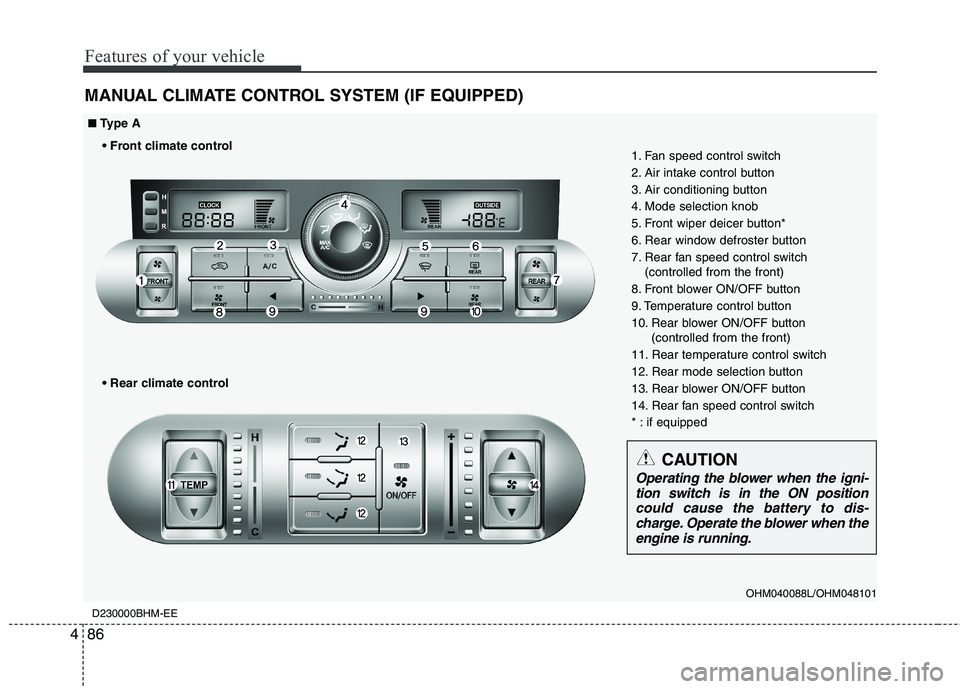
1. Fan speed control switch
2. Air intake control button
3. Air conditioning button
4. Mode selection knob
5. Front wiper deicer button*
6. Rear window defroster button
7. Rear fan speed control switch
(controlled from the front)
8. Front blower ON/OFF button
9. Temperature control button
10. Rear blower ON/OFF button (controlled from the front)
11. Rear temperature control switch
12. Rear mode selection button
13. Rear blower ON/OFF button
14. Rear fan speed control switch
* : if equipped
■■ Type A
CAUTION
Operating the blower when the igni- tion switch is in the ON position could cause the battery to dis-charge. Operate the blower when the
engine is running.
Page 164 of 417
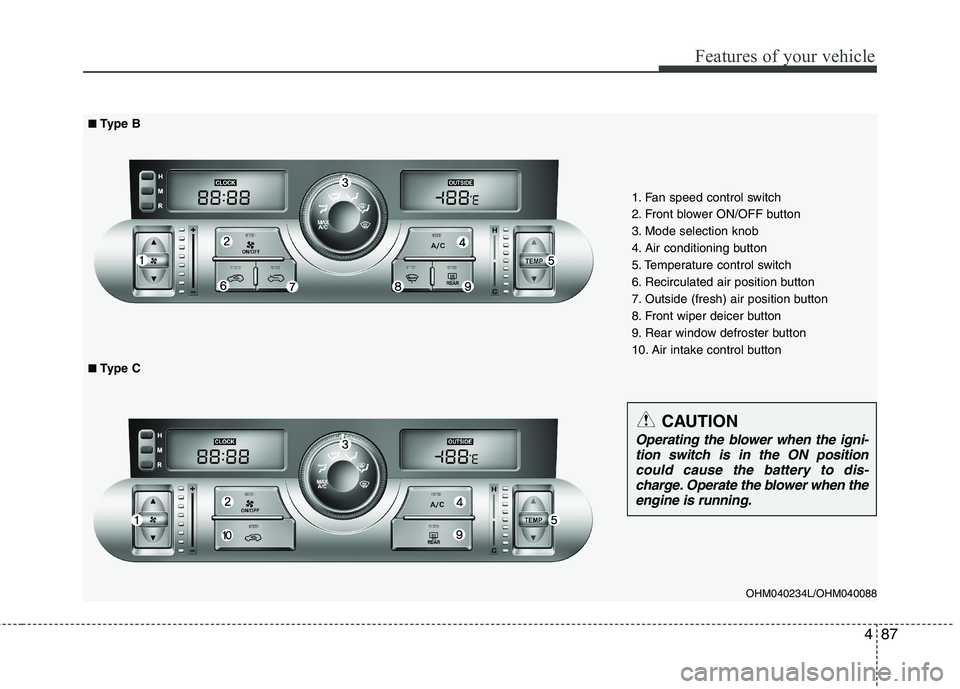
487
Features of your vehicle
OHM040234L/OHM040088
■■Type B
■
■ Type C
1. Fan speed control switch
2. Front blower ON/OFF button
3. Mode selection knob
4. Air conditioning button
5. Temperature control switch
6. Recirculated air position button
7. Outside (fresh) air position button
8. Front wiper deicer button
9. Rear window defroster button
10. Air intake control button
CAUTION
Operating the blower when the igni-
tion switch is in the ON positioncould cause the battery to dis- charge. Operate the blower when the
engine is running.
Page 165 of 417
Features of your vehicle
88
4
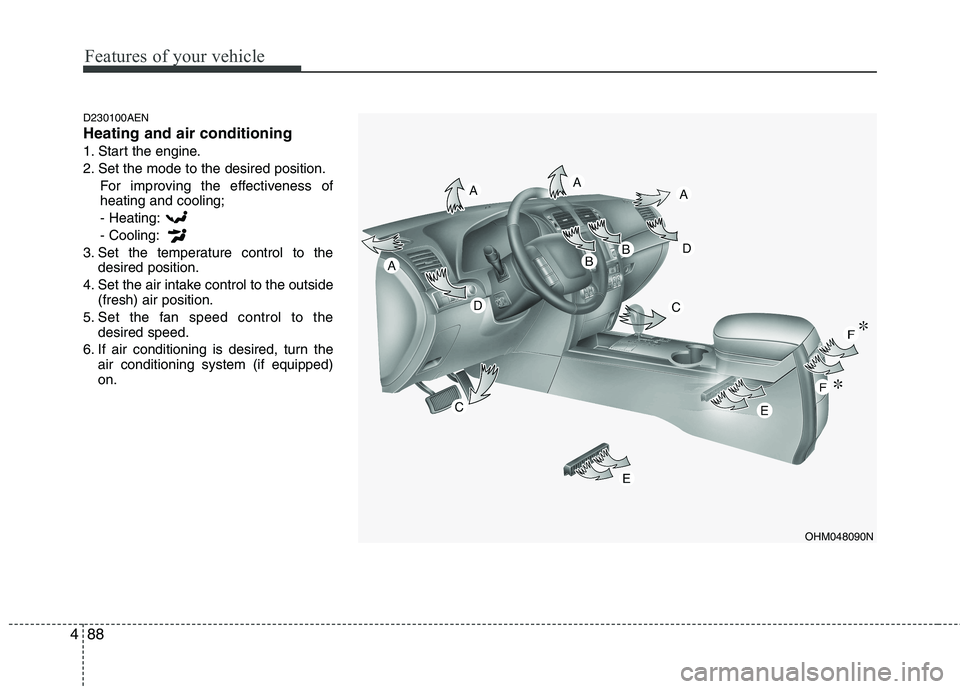
D230100AEN Heating and air conditioning
1. Start the engine.
2. Set the mode to the desired position.
For improving the effectiveness of heating and cooling;- Heating: - Cooling:
3. Set the temperature control to the desired position.
4. Set the air intake control to the outside (fresh) air position.
5. Set the fan speed control to the desired speed.
6. If air conditioning is desired, turn the air conditioning system (if equipped) on.
OHM048090N
Page 166 of 417
489
Features of your vehicle
D230101AHM
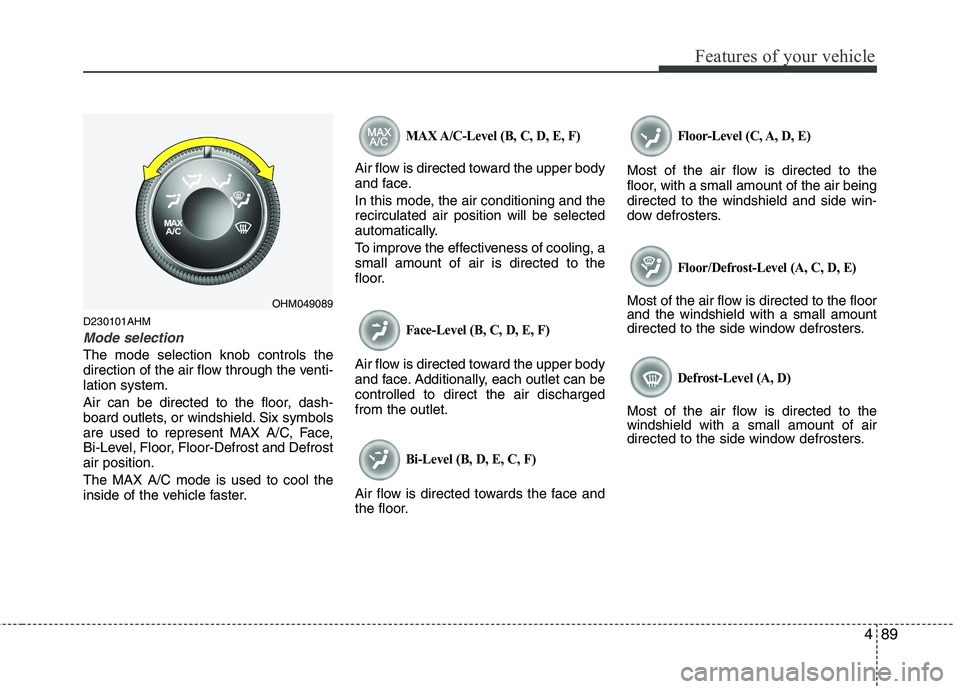
Mode selection
The mode selection knob controls the
direction of the air flow through the venti-lation system.
Air can be directed to the floor, dash-
board outlets, or windshield. Six symbols
are used to represent MAX A/C, Face,
Bi-Level, Floor, Floor-Defrost and Defrostair position. The MAX A/C mode is used to cool the
inside of the vehicle faster.
MAX A/C-Level (B, C, D, E, F)
Air flow is directed toward the upper body
and face.
In this mode, the air conditioning and the recirculated air position will be selected
automatically.
To improve the effectiveness of cooling, a small amount of air is directed to the
floor.
Face-Level (B, C, D, E, F)
Air flow is directed toward the upper body
and face. Additionally, each outlet can becontrolled to direct the air dischargedfrom the outlet.
Bi-Level (B, D, E, C, F)
Air flow is directed towards the face and
the floor.
Floor-Level (C, A, D, E)
Most of the air flow is directed to the
floor, with a small amount of the air beingdirected to the windshield and side win-
dow defrosters.
Floor/Defrost-Level (A, C, D, E)
Most of the air flow is directed to the floor and the windshield with a small amount
directed to the side window defrosters.
Defrost-Level (A, D)
Most of the air flow is directed to thewindshield with a small amount of air
directed to the side window defrosters.
OHM049089
Page 168 of 417
491
Features of your vehicle
Outside temperature conversion
You can switch the temperature mode
between Centigrade to Fahrenheit as fol-
lows:
While pressing the air intake control
(recirculated air position) button, press
down the temperature control switch for 3
seconds or more.
The display will change from Centigrade
to Fahrenheit or from Fahrenheit to
Centigrade.
If the battery has been discharged or dis-
connected, the temperature mode dis-
play will reset to Centigrade. D230103AHM
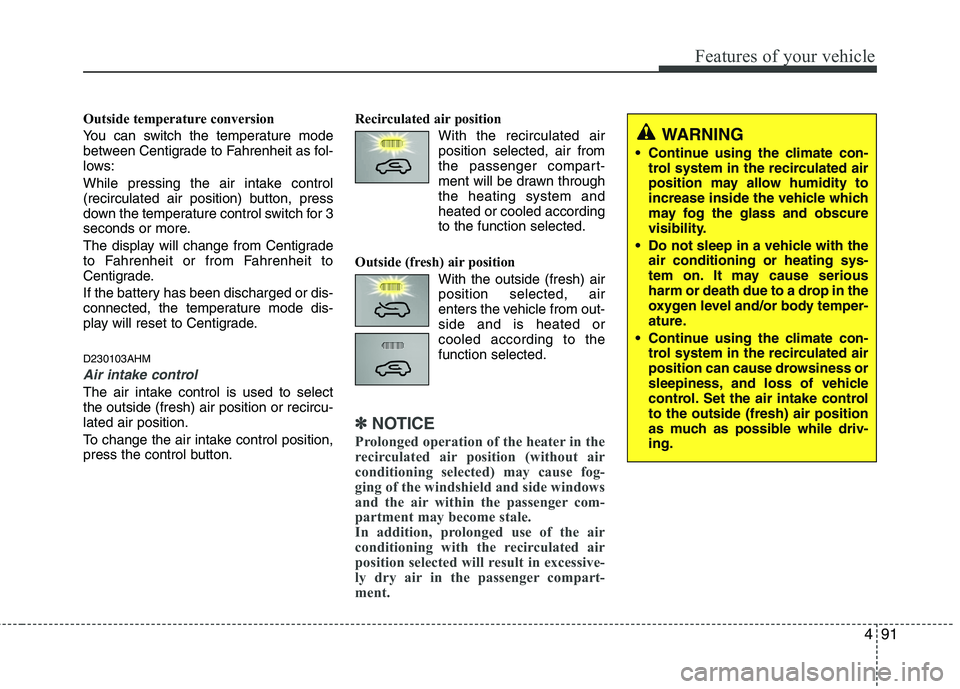
Air intake control
The air intake control is used to select the outside (fresh) air position or recircu-lated air position.
To change the air intake control position,
press the control button.Recirculated air position
With the recirculated airposition selected, air from
the passenger compart-
ment will be drawn throughthe heating system andheated or cooled according
to the function selected.
Outside (fresh) air position With the outside (fresh) airposition selected, air
enters the vehicle from out-side and is heated orcooled according to thefunction selected.
✽✽NOTICE
Prolonged operation of the heater in the
recirculated air position (without air
conditioning selected) may cause fog-
ging of the windshield and side windows
and the air within the passenger com-
partment may become stale.
In addition, prolonged use of the air
conditioning with the recirculated air
position selected will result in excessive-
ly dry air in the passenger compart-
ment.
WARNING
Continue using the climate con- trol system in the recirculated air
position may allow humidity to
increase inside the vehicle which
may fog the glass and obscure
visibility.
Do not sleep in a vehicle with the air conditioning or heating sys-
tem on. It may cause serious
harm or death due to a drop in the
oxygen level and/or body temper-
ature.
Continue using the climate con- trol system in the recirculated air
position can cause drowsiness or
sleepiness, and loss of vehicle
control. Set the air intake controlto the outside (fresh) air position
as much as possible while driv-ing.
Page 169 of 417
Features of your vehicle
92
4
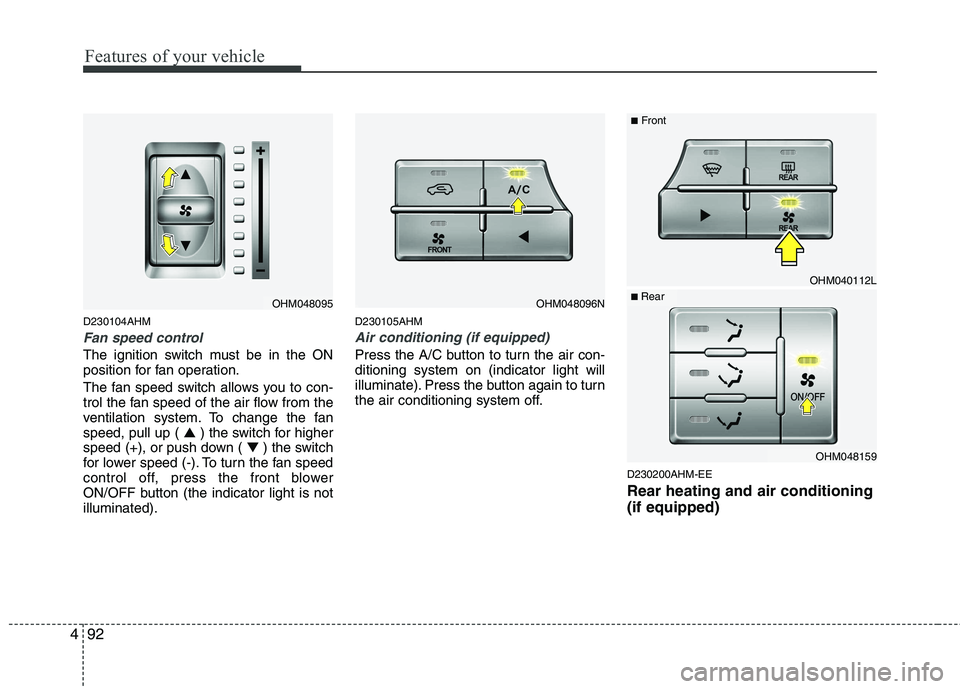
D230104AHM
Fan speed control
The ignition switch must be in the ON
position for fan operation.
The fan speed switch allows you to con-
trol the fan speed of the air flow from the
ventilation system. To change the fanspeed, pull up ( ▲) the switch for higher
speed (+), or push down ( ▼) the switch
for lower speed (-). To turn the fan speed
control off, press the front blower
ON/OFF button (the indicator light is notilluminated). D230105AHM
Air conditioning (if equipped)
Press the A/C button to turn the air con- ditioning system on (indicator light will
illuminate). Press the button again to turn
the air conditioning system off.
D230200AHM-EE Rear heating and air conditioning (if equipped)
OHM048095OHM048096N
OHM040112L
OHM048159
■
Front
■ Rear