audio KIA MOHAVE 2014 User Guide
[x] Cancel search | Manufacturer: KIA, Model Year: 2014, Model line: MOHAVE, Model: KIA MOHAVE 2014Pages: 417, PDF Size: 38.72 MB
Page 226 of 417
4149
Features of your vehicle
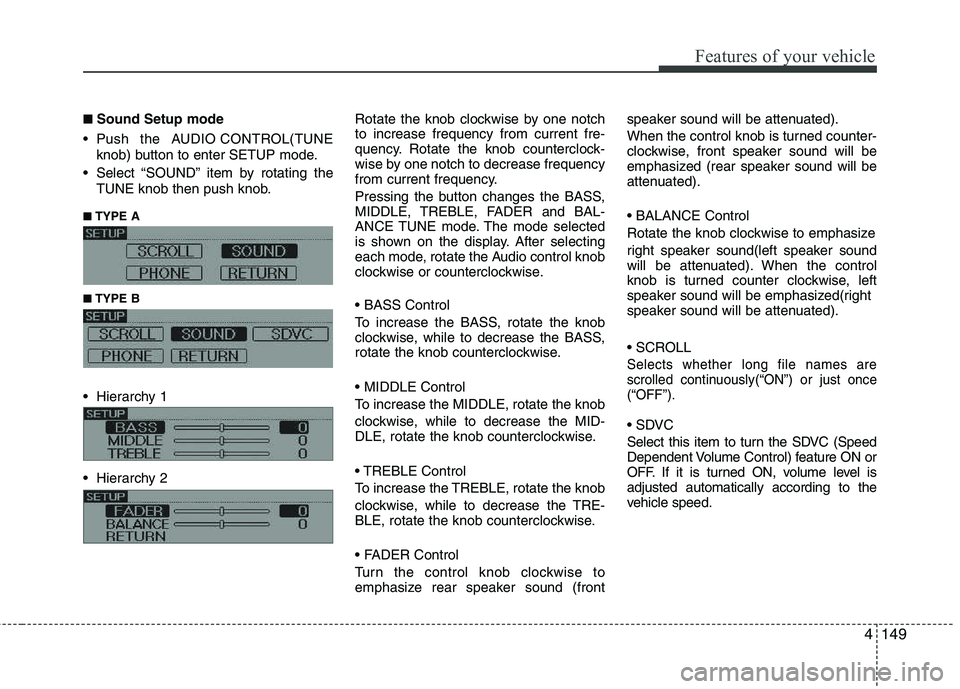
■■Sound Setup mode
Push the AUDIO CONTROL(TUNE knob) button to enter SETUP mode.
Select “SOUND” item by rotating the TUNE knob then push knob.
■
■ TYPE A
■
■ TYPE B
Hierarchy 1
Hierarchy 2 Rotate the knob clockwise by one notch to increase frequency from current fre-
quency. Rotate the knob counterclock-
wise by one notch to decrease frequency
from current frequency.
Pressing the button changes the BASS,
MIDDLE, TREBLE, FADER and BAL-
ANCE TUNE mode. The mode selected
is shown on the display. After selecting
each mode, rotate the Audio control knob
clockwise or counterclockwise.
To increase the BASS, rotate the knob
clockwise, while to decrease the BASS,
rotate the knob counterclockwise.
To increase the MIDDLE, rotate the knob
clockwise, while to decrease the MID-
DLE, rotate the knob counterclockwise.
Control
To increase the TREBLE, rotate the knob
clockwise, while to decrease the TRE-
BLE, rotate the knob counterclockwise.
Turn the control knob clockwise to
emphasize rear speaker sound (frontspeaker sound will be attenuated).
When the control knob is turned counter-
clockwise, front speaker sound will be
emphasized (rear speaker sound will be
attenuated).
Rotate the knob clockwise to emphasize
right speaker sound(left speaker sound
will be attenuated). When the control
knob is turned counter clockwise, left
speaker sound will be emphasized(right
speaker sound will be attenuated).
Selects whether long file names are
scrolled continuously(“ON”) or just once(“OFF”).
Select this item to turn the SDVC (Speed
Dependent Volume Control) feature ON or
OFF. If it is turned ON, volume level isadjusted automatically according to the
vehicle speed.
Page 231 of 417
Features of your vehicle
154
4
CAUTION IN USING
USB DEVICE
To use an external USB device, make sure the device is not con-nected when starting up the vehi-cle. Connect the device afterstarting up.
If you start the engine when the USB device is connected, it maydamage the USB device. (USBflashdrives are very sensitive to
electric shock.)
If the engine is started up or turned off while the external USBdevice is connected, the externalUSB device may not work.
It may not play inauthentic MP3 or WMA files.
1) It can only play MP3 files with the compression rate between8Kbps~320Kbps.
2) It can only play WMA music files with the compression ratebetween 8Kbps~320Kbps.
Take precautions for static electrici- ty when connecting or disconnect-ing the external USB device.
(Continued)
(Continued) An encrypted MP3 PLAYER is not recognizable.
Depending on the condition of the external USB device, the con-
nected external USB device can be unrecognizable.
When the formatted byte/sector setting of External USB device isnot either 512BYTE or 2048BYTE,
then the device will not be recog- nized.
Use only a USB device formatted to FAT 12/16/32.
USB devices without USB I/F authentication may not be recog-nizable.
Make sure the USB connection terminal does not come in contactwith the human body or other
objects.
If you repeatedly connect or dis- connect the USB device in a shortperiod of time, it may break thedevice.
You may hear a strange noise when connecting or disconnect-ing a USB device.
(Continued)(Continued) If you disconnect the external USB device during playback in USBmode, the external USB device canbe damaged or may malfunction.
Therefore, disconnect the externalUSB device when the audio is turned off or in another mode. (e.g,
Radio or CD)
Depending on the type and capac- ity of the external USB device orthe type of the files stored in thedevice, there is a difference in the
time taken for recognition of thedevice.
Do not use the USB device for pur- poses other than playing musicfiles.
Use of USB accessories such as rechargers or heaters using USBI/F may lower performance orcause trouble.
If you use devices such as a USB hub purchased separately, thevehicle’s audio system may not recognize the USB device. In thatcase, connect the USB device
directly to the multimedia termi- nal of the vehicle.
(Continued)
Page 232 of 417
4155
Features of your vehicle
(Continued)
If the USB device is divided by logical drives, only the music fileson the highest-priority drive arerecognized by car audio.
Devices such as MP3 Player/ Cellular phone/Digital camera canbe unrecognizable by standardUSB I/F can be unrecognizable.
Some non-standard USB devices (METAL COVER TYPE USB) can beunrecognizable.
Some USB flash memory readers (such as CF, SD, microSD, etc.) orexternal-HDD type devices can be unrecognizable.
Music files protected by DRM (DIGITAL RIGHTS MANAGEMENT)are not recognizable.
The data in the USB memory may be lost while using this audio.
Always back up important data ona personal storage device.
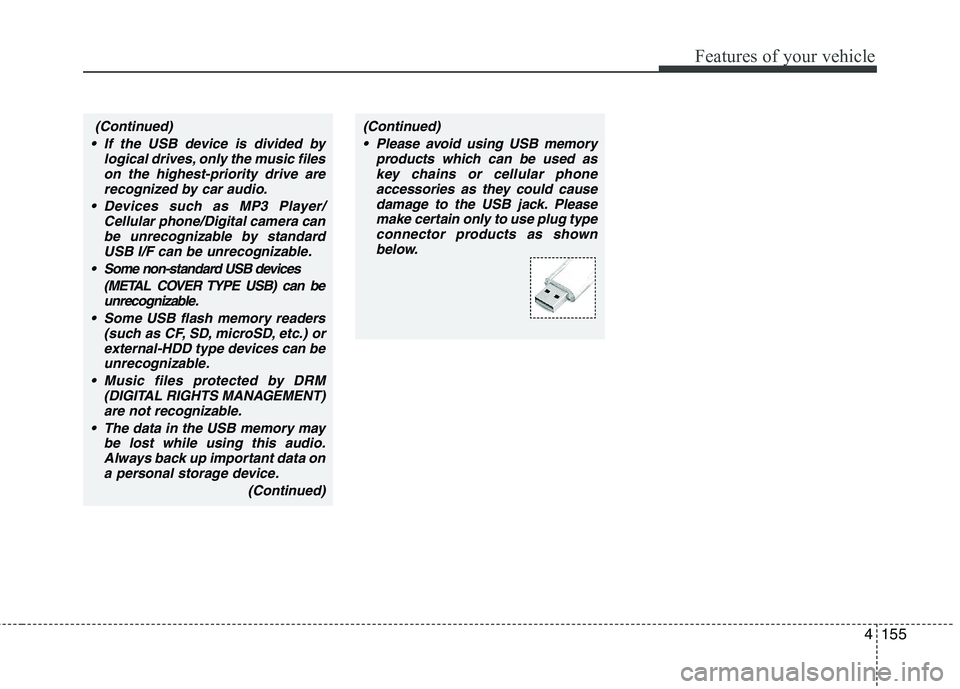
(Continued)(Continued) Please avoid using USB memory products which can be used askey chains or cellular phone
accessories as they could causedamage to the USB jack. Pleasemake certain only to use plug type
connector products as shownbelow.
Page 237 of 417
Features of your vehicle
160
4
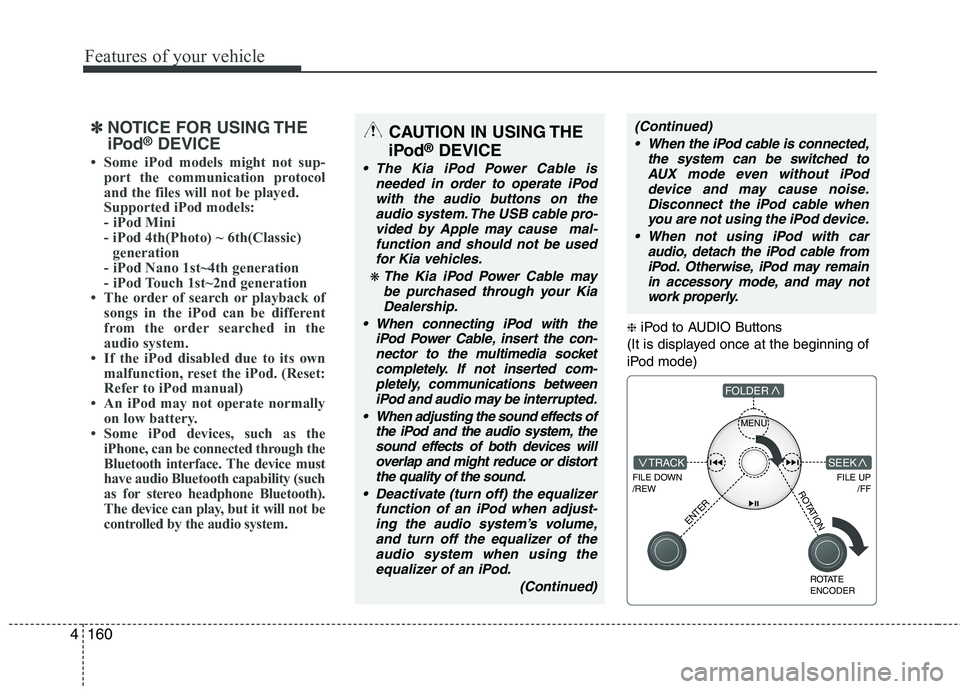
❈ iPod to AUDIO Buttons
(It is displayed once at the beginning of
iPod mode)
MENU
FILE DOWN /REW
FILE UP /FFTRACK
FOLDER
ENTER
ROTATE ENCODER
SEEK
ROTATION
✽✽NOTICE FOR USING THE
iPod ®
DEVICE
Page 239 of 417
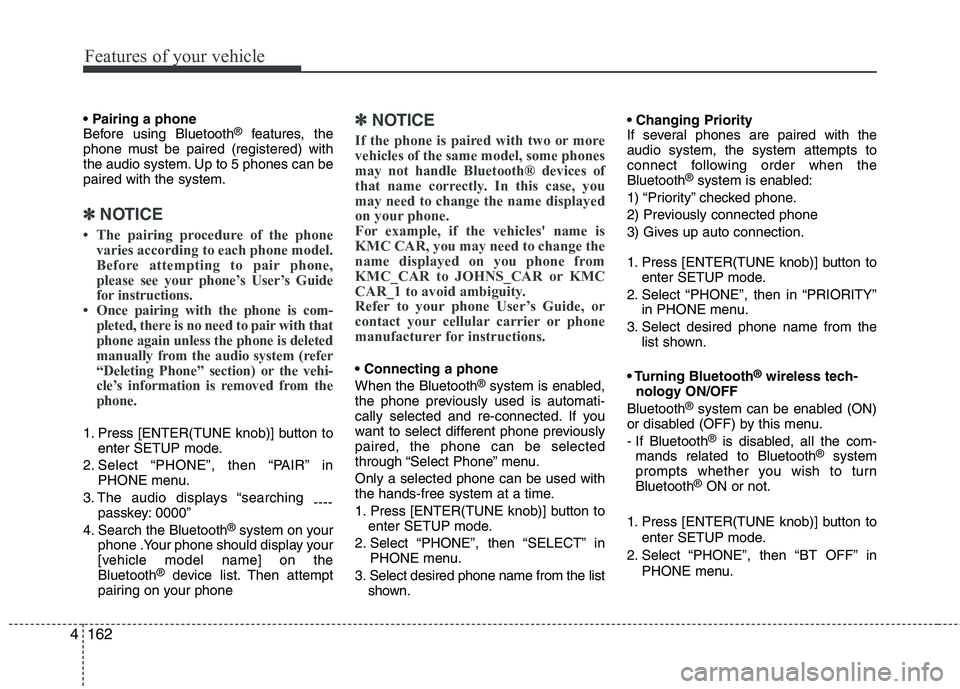
Features of your vehicle
162
4
Before using Bluetooth ®
features, the
phone must be paired (registered) with
the audio system. Up to 5 phones can bepaired with the system.
✽✽ NOTICE
Page 240 of 417
![KIA MOHAVE 2014 User Guide 4163
Features of your vehicle
The paired phone can be deleted.
1. Press [ENTER(TUNE knob)] button toenter SETUP mode.
2. Select “PHONE”, then “DELETE” in PHONE menu.
3. Select desired phone](/img/2/57960/w960_57960-239.png "KIA MOHAVE 2014 User Guide 4163
Features of your vehicle
The paired phone can be deleted.
1. Press [ENTER(TUNE knob)] button toenter SETUP mode.
2. Select “PHONE”, then “DELETE” in PHONE menu.
3. Select desired phone")
4163
Features of your vehicle
The paired phone can be deleted.
1. Press [ENTER(TUNE knob)] button toenter SETUP mode.
2. Select “PHONE”, then “DELETE” in PHONE menu.
3. Select desired phone name from the list shown.
■ Receiving a Phone Call
When receiving a phone call, a ringt one
is audible from speakers and the audio
system changes into telephone mode.
When receiving a phone call, “Incoming”
message and incoming phone number
(if available) are displayed on the audio.
- Press bu t t o n on the steering wheel.
- Press button on the steering wheel.
- Use VOLUME buttons on the steering wheel.
Call):
- Press and hold button on the steer- ing wheel until the audio system trans-
fers a call to the phone. ■
Talking on the Phone
When talking on the phone, “Active Calls”
message and the other party’s phone
number (if available) are displayed on the
audio.
- Press [MUTE] button on the audio.
- Press button on the steering wheel.
■ Making a Phone Call
A Call Back can be made by pressing button on the steering wheel.
- This is the same function as using the
button solely on the cellular phone.
✽✽NOTICE
Some phone models require pressing button twice to make a call.
✽
✽ NOTICE
In the following situations, you or the
other party may have difficulty hearing each other:
1. Speaking at the same time, your voice may not reach the other party. (This isnot a malfunction.) Speak alternately
with the other party on the phone.
2. Keep the Bluetooth ®
volume to a low
level. High-level volume may result indistortion and echo. 3. When driving on a rough road.
4. When driving at high speeds.
5. When the window is open.
6. When the air conditioning vents are
facing the microphone.
7. When the sound of the air condition-
ing fan is loud.
■Using the head unit as Bluetooth ®
wireless technology
music
This audio system supports A2DP (Audio
Advanced Distribution Profile) and
AVRCP(Audio Video Remote ControlProfile).
Both profiles are available for listening to
the MP3 music via Bluetooth cellular phone
supporting above Bluetooth profiles.
To play MP3 music from the Bluetooth
cellular phone, press the [AUX] button
until “MP3 Play” is displayed on the LCD.
Then try playing music by phone.
When playing music from the Bluetooth
cellular phone, the head unit displays MP3 MODE.
Page 245 of 417
Driving your vehicle
4
5
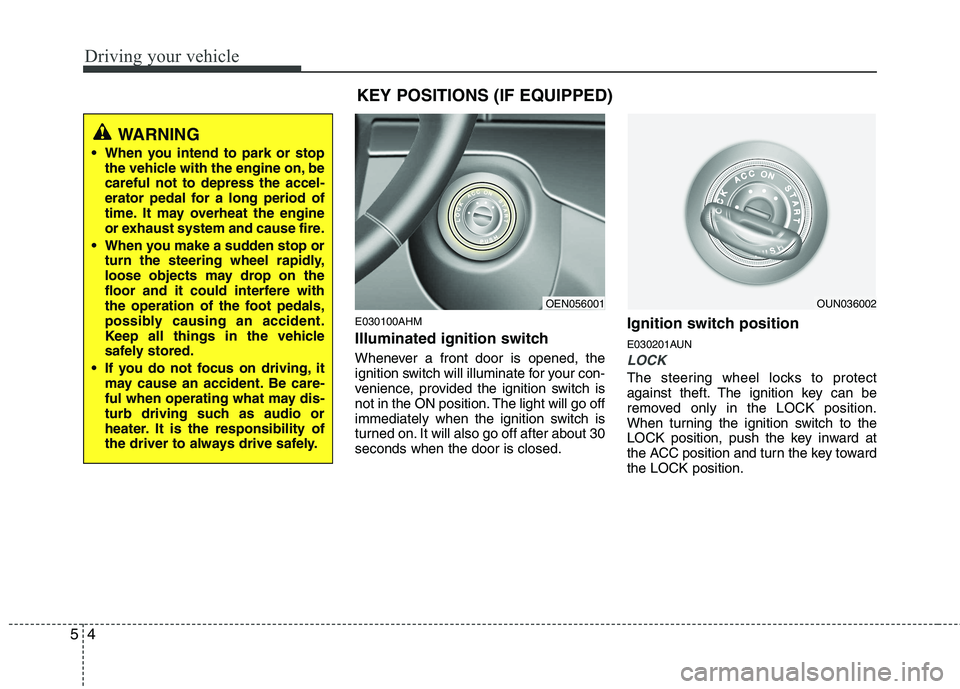
E030100AHM
Illuminated ignition switch
Whenever a front door is opened, the
ignition switch will illuminate for your con-
venience, provided the ignition switch is
not in the ON position. The light will go off
immediately when the ignition switch is
turned on. It will also go off after about 30seconds when the door is closed. Ignition switch position
E030201AUN
LOCK
The steering wheel locks to protect
against theft. The ignition key can be
removed only in the LOCK position.
When turning the ignition switch to the
LOCK position, push the key inward at
the ACC position and turn the key towardthe LOCK position.
OEN056001OUN036002
WARNING
When you intend to park or stop the vehicle with the engine on, be careful not to depress the accel-
erator pedal for a long period of
time. It may overheat the engine
or exhaust system and cause fire.
When you make a sudden stop or turn the steering wheel rapidly,
loose objects may drop on the
floor and it could interfere with
the operation of the foot pedals,
possibly causing an accident.
Keep all things in the vehicle
safely stored.
If you do not focus on driving, it may cause an accident. Be care-
ful when operating what may dis-
turb driving such as audio or
heater. It is the responsibility of
the driver to always drive safely.
KEY POSITIONS (IF EQUIPPED)
Page 361 of 417
Maintenance
34
7
G190200AUN
Battery recharging
Your vehicle has a maintenance-free,
calcium-based battery.
If the battery becomes discharged in a
short time (because, for example, the
headlights or interior lights were left on
while the vehicle was not in use),
recharge it by slow charging (trickle)
for 10 hours.
If the battery gradually discharges because of high electric load while the
vehicle is being used, recharge it at 20-
30A for two hours. G190300AHM Reset items
Items should be reset after the battery
has been discharged or the battery hasbeen disconnected.
Auto up/down window (See section 4)
Sunroof (See section 4)
Driver position memory system
(See section 4)
Trip computer (See section 4)
Climate control system (See section 4)
Clock (See section 4)
Audio (See section 4)(Continued)
Watch the battery during charg- ing, and stop or reduce the charg-
ing rate if the battery cells begin
gassing (boiling) violently or if
the temperature of the electrolyte
of any cell exceeds 49°C (120°F).
Wear eye protection when check- ing the battery during charging.
Disconnect the battery charger in the following order.
1. Turn off the battery charger main switch.
2. Unhook the negative clamp from the negative battery terminal.
3. Unhook the positive clamp from the positive battery terminal.
WARNING - Recharging
battery
When recharging the battery,
observe the following precautions:
The battery must be removed from the vehicle and placed in an area with good ventilation.
Do not allow cigarettes, sparks, or flame near the battery.
(Continued)
WARNING
Before performing maintenance or recharging the battery, turn off all accessories and stop the
engine.
The negative battery cable must be removed first and installed
last when the battery is discon-nected.
Page 374 of 417
747
Maintenance
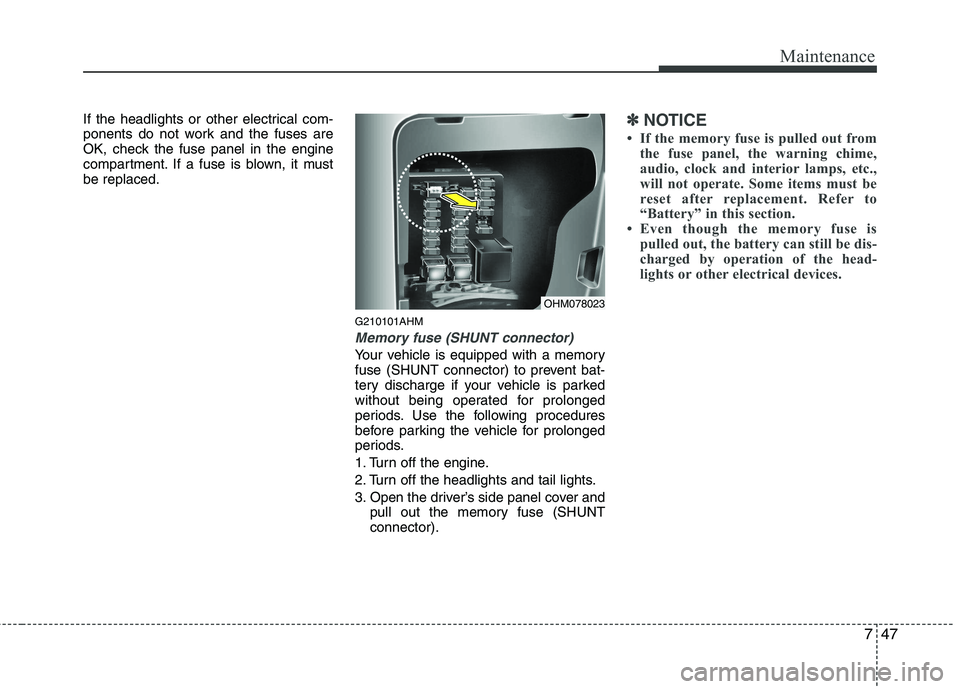
If the headlights or other electrical com-
ponents do not work and the fuses are
OK, check the fuse panel in the engine
compartment. If a fuse is blown, it mustbe replaced.G210101AHM
Memory fuse (SHUNT connector)
Your vehicle is equipped with a memory
fuse (SHUNT connector) to prevent bat-
tery discharge if your vehicle is parked
without being operated for prolonged
periods. Use the following procedures
before parking the vehicle for prolonged
periods.
1. Turn off the engine.
2. Turn off the headlights and tail lights.
3. Open the driver’s side panel cover andpull out the memory fuse (SHUNT connector).
✽✽ NOTICE
If the memory fuse is pulled out from the fuse panel, the warning chime,
audio, clock and interior lamps, etc.,
will not operate. Some items must be
reset after replacement. Refer to
“Battery” in this section.
Even though the memory fuse is
pulled out, the battery can still be dis-
charged by operation of the head-
lights or other electrical devices.
OHM078023
Page 377 of 417
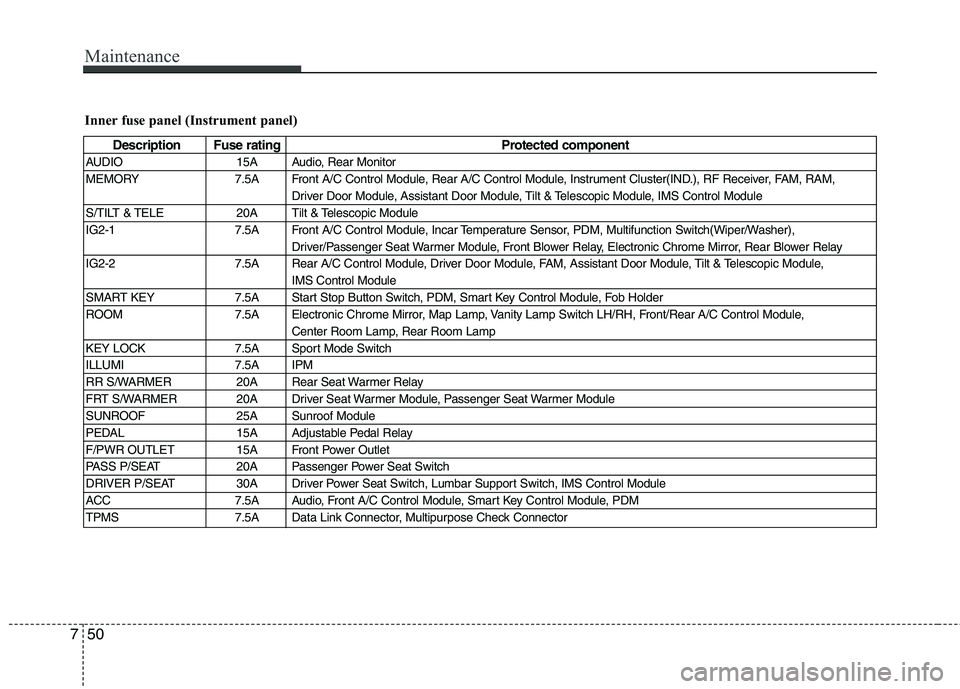
Maintenance
50
7
Inner fuse panel (Instrument panel)
Description Fuse rating Protected component
AUDIO 15A Audio, Rear Monitor
MEMORY 7.5A Front A/C Control Module, Rear A/C Control Module, Instrument Cluster(IND.), RF Receiver, FAM, RAM, Driver Door Module, Assistant Door Module, Tilt & Telescopic Module, IMS Control Module
S/TILT & TELE 20A Tilt & Telescopic Module
IG2-1 7.5A Front A/C Control Module, Incar Temperature Sensor, PDM, Multifunction Switch(Wiper/Washer), Driver/Passenger Seat Warmer Module, Front Blower Relay, Electronic Chrome Mirror, Rear Blower Relay
IG2-2 7.5A Rear A/C Control Module, Driver Door Module, FAM, Assistant Door Module, Tilt & Telescopic Module, IMS Control Module
SMART KEY 7.5A Start Stop Button Switch, PDM, Smart Key Control Module, Fob Holder
ROOM 7.5A Electronic Chrome Mirror, Map Lamp, Vanity Lamp Switch LH/RH, Front/Rear A/C Control Module, Center Room Lamp, Rear Room Lamp
KEY LOCK 7.5A Sport Mode Switch
ILLUMI 7.5A IPM
RR S/WARMER 20A Rear Seat Warmer Relay
FRT S/WARMER 20A Driver Seat Warmer Module, Passenger Seat Warmer Module
SUNROOF 25A Sunroof Module
PEDAL 15A Adjustable Pedal Relay
F/PWR OUTLET 15A Front Power Outlet
PASS P/SEAT 20A Passenger Power Seat Switch
DRIVER P/SEAT 30A Driver Power Seat Switch, Lumbar Support Switch, IMS Control Module
ACC 7.5A Audio, Front A/C Control Module, Smart Key Control Module, PDM
TPMS 7.5A Data Link Connector, Multipurpose Check Connector