radio KIA MOHAVE 2014 User Guide
[x] Cancel search | Manufacturer: KIA, Model Year: 2014, Model line: MOHAVE, Model: KIA MOHAVE 2014Pages: 417, PDF Size: 38.72 MB
Page 225 of 417
Features of your vehicle
148
4
Using RADIO, SETUP, VOLUME and
AUDIO CONTROL
1. FM/AM Button
FM Button
Turns to FM mode and switches
among FM1, FM2 when the button is
pressed each time.
AM Button Turns to AM mode when the button ispressed.
2. POWER Button & VOLUME Knob
Turns the Audio system on/off whenthe ignition switch is on ACC or ON.
If the knob is turned clockwise/counter- clockwise, the volume will increase
/decrease.
3. SEEK Button
When the [SEEK ] is pressed, it will automatically tune to the next lower station.
When the [SEEK ] is pressed, it will automatically tune to the next higherstation. 4. AST(AUTO STORE) Button
When AST is pressed, the frequency is
stored on the preset memory [1]~[6]
and automatically plays a channelstored on the Preset [1].
If nothing has been stored because there was no frequency received, it will
return to the previous frequency.
5. PRESET Buttons
Press [1]~[6] buttons less than 0.8 sec- ond to play the station saved in each
button.
Press [1]~[6] b uttons more than 0.8
second or longer to save the current
station to the respective button with a
beep. 6. TUNE Knob & ENTER Button
If the knob is turned clockwise/counter-
clockwise, the frequency will increase/
decrease.
Page 231 of 417
Features of your vehicle
154
4
CAUTION IN USING
USB DEVICE
To use an external USB device, make sure the device is not con-nected when starting up the vehi-cle. Connect the device afterstarting up.
If you start the engine when the USB device is connected, it maydamage the USB device. (USBflashdrives are very sensitive to
electric shock.)
If the engine is started up or turned off while the external USBdevice is connected, the externalUSB device may not work.
It may not play inauthentic MP3 or WMA files.
1) It can only play MP3 files with the compression rate between8Kbps~320Kbps.
2) It can only play WMA music files with the compression ratebetween 8Kbps~320Kbps.
Take precautions for static electrici- ty when connecting or disconnect-ing the external USB device.
(Continued)
(Continued) An encrypted MP3 PLAYER is not recognizable.
Depending on the condition of the external USB device, the con-
nected external USB device can be unrecognizable.
When the formatted byte/sector setting of External USB device isnot either 512BYTE or 2048BYTE,
then the device will not be recog- nized.
Use only a USB device formatted to FAT 12/16/32.
USB devices without USB I/F authentication may not be recog-nizable.
Make sure the USB connection terminal does not come in contactwith the human body or other
objects.
If you repeatedly connect or dis- connect the USB device in a shortperiod of time, it may break thedevice.
You may hear a strange noise when connecting or disconnect-ing a USB device.
(Continued)(Continued) If you disconnect the external USB device during playback in USBmode, the external USB device canbe damaged or may malfunction.
Therefore, disconnect the externalUSB device when the audio is turned off or in another mode. (e.g,
Radio or CD)
Depending on the type and capac- ity of the external USB device orthe type of the files stored in thedevice, there is a difference in the
time taken for recognition of thedevice.
Do not use the USB device for pur- poses other than playing musicfiles.
Use of USB accessories such as rechargers or heaters using USBI/F may lower performance orcause trouble.
If you use devices such as a USB hub purchased separately, thevehicle’s audio system may not recognize the USB device. In thatcase, connect the USB device
directly to the multimedia termi- nal of the vehicle.
(Continued)
Page 407 of 417
89
Specifications & Consumer information
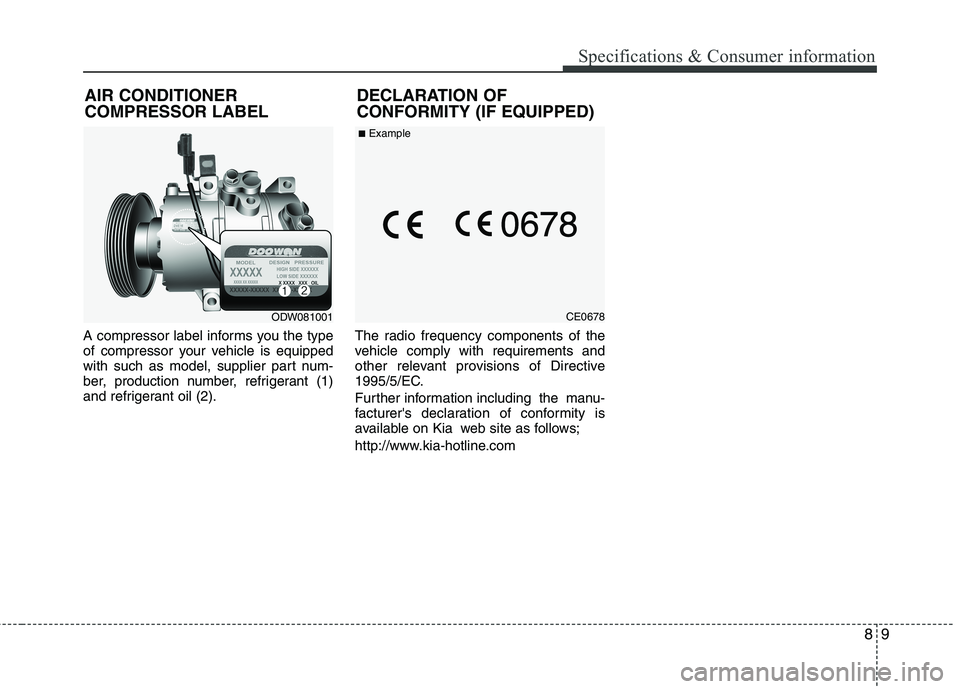
A compressor label informs you the type
of compressor your vehicle is equipped
with such as model, supplier part num-
ber, production number, refrigerant (1)
and refrigerant oil (2).The radio frequency components of the
vehicle comply with requirements and
other relevant provisions of Directive
1995/5/EC.
Further information including the manu-
facturer's declaration of conformity is
available on Kia web site as follows;
http://www.kia-hotline.com
ODW081001
AIR CONDITIONER COMPRESSOR LABEL
DECLARATION OF
CONFORMITY (IF EQUIPPED)CE0678
■
Example