engine KIA MORNING 2015 User Guide
[x] Cancel search | Manufacturer: KIA, Model Year: 2015, Model line: MORNING, Model: KIA MORNING 2015Pages: 420, PDF Size: 42.6 MB
Page 71 of 420
359
Safety features of your vehicle
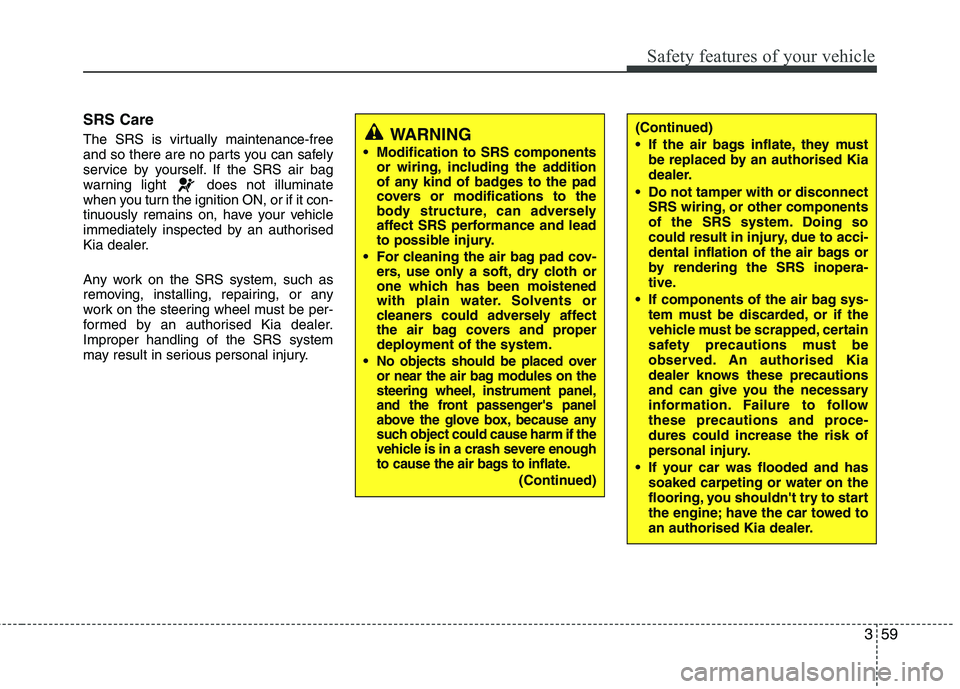
SRS Care
The SRS is virtually maintenance-free
and so there are no parts you can safely
service by yourself. If the SRS air bag
warning light does not illuminate
when you turn the ignition ON, or if it con-
tinuously remains on, have your vehicle
immediately inspected by an authorised
Kia dealer.
Any work on the SRS system, such as
removing, installing, repairing, or any
work on the steering wheel must be per-
formed by an authorised Kia dealer.
Improper handling of the SRS system
may result in serious personal injury.WARNING
Modification to SRS components
or wiring, including the addition
of any kind of badges to the pad
covers or modifications to the
body structure, can adversely
affect SRS performance and lead
to possible injury.
For cleaning the air bag pad cov-
ers, use only a soft, dry cloth or
one which has been moistened
with plain water. Solvents or
cleaners could adversely affect
the air bag covers and proper
deployment of the system.
No objects should be placed over
or near the air bag modules on the
steering wheel, instrument panel,
and the front passenger's panel
above the glove box, because any
such object could cause harm if the
vehicle is in a crash severe enough
to cause the air bags to inflate.
(Continued)
(Continued)
If the air bags inflate, they must
be replaced by an authorised Kia
dealer.
Do not tamper with or disconnect
SRS wiring, or other components
of the SRS system. Doing so
could result in injury, due to acci-
dental inflation of the air bags or
by rendering the SRS inopera-
tive.
If components of the air bag sys-
tem must be discarded, or if the
vehicle must be scrapped, certain
safety precautions must be
observed. An authorised Kia
dealer knows these precautions
and can give you the necessary
information. Failure to follow
these precautions and proce-
dures could increase the risk of
personal injury.
If your car was flooded and has
soaked carpeting or water on the
flooring, you shouldn't try to start
the engine; have the car towed to
an authorised Kia dealer.
Page 76 of 420
43
Features of your vehicle
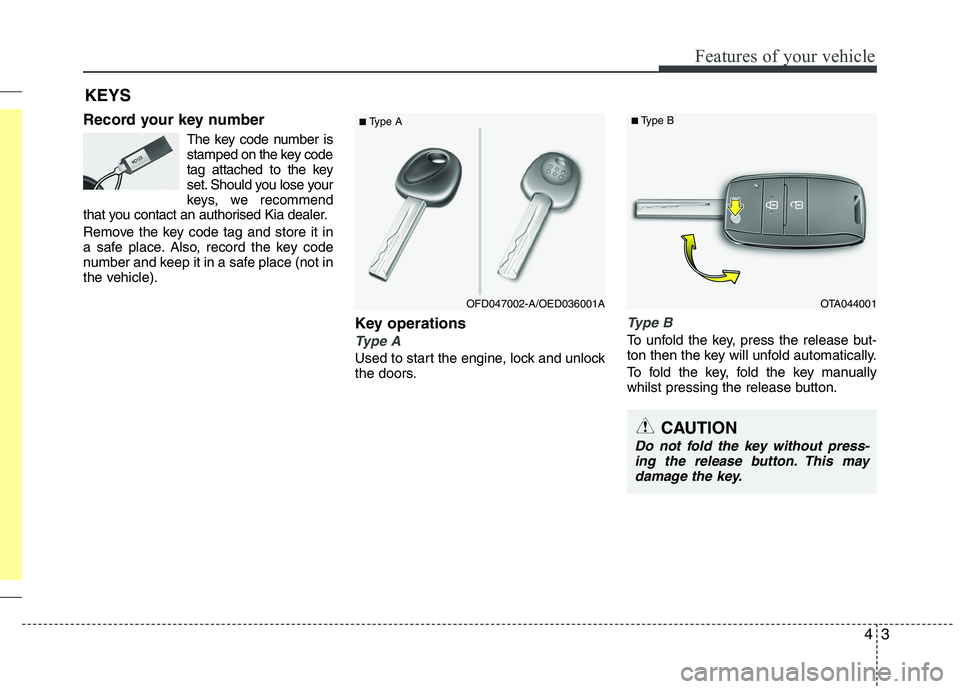
Record your key number
The key code number is
stamped on the key code
tag attached to the key
set. Should you lose your
keys, we recommend
that you contact an authorised Kia dealer.
Remove the key code tag and store it in
a safe place. Also, record the key code
number and keep it in a safe place (not in
the vehicle).
Key operations
Type A
Used to start the engine, lock and unlock
the doors.
Type B
To unfold the key, press the release but-
ton then the key will unfold automatically.
To fold the key, fold the key manually
whilst pressing the release button.
KEYS
■Type A
CAUTION
Do not fold the key without press-
ing the release button. This may
damage the key.
OTA044001
■Type B
OFD047002-A/OED036001A
Page 77 of 420
Features of your vehicle
4 4
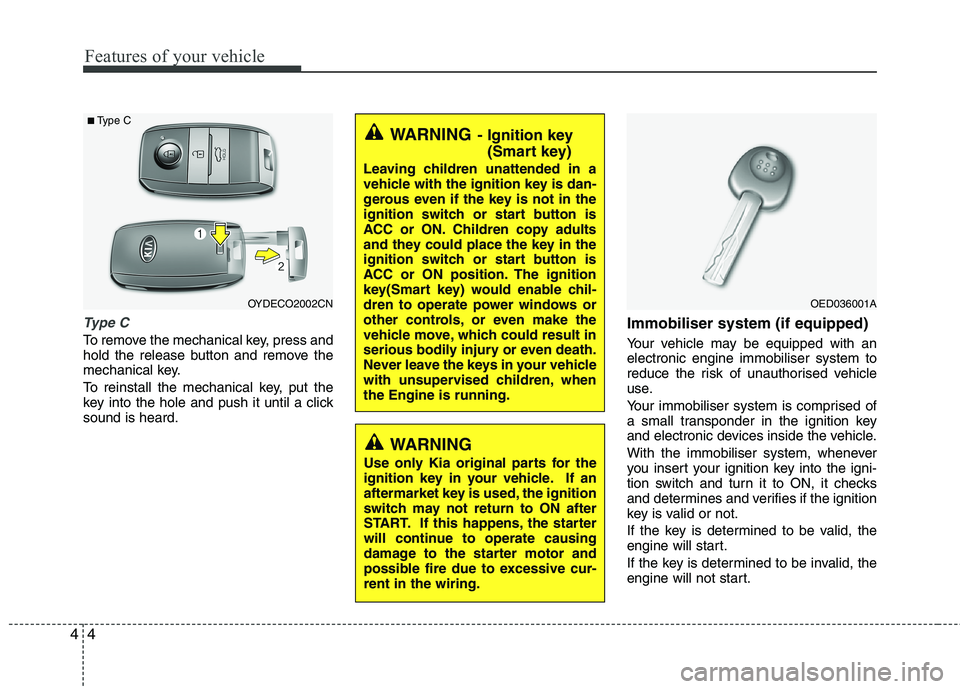
Type C
To remove the mechanical key, press and
hold the release button and remove the
mechanical key.
To reinstall the mechanical key, put the
key into the hole and push it until a click
sound is heard.
Immobiliser system (if equipped)
Your vehicle may be equipped with an
electronic engine immobiliser system to
reduce the risk of unauthorised vehicle
use.
Your immobiliser system is comprised of
a small transponder in the ignition key
and electronic devices inside the vehicle.
With the immobiliser system, whenever
you insert your ignition key into the igni-
tion switch and turn it to ON, it checks
and determines and verifies if the ignition
key is valid or not.
If the key is determined to be valid, the
engine will start.
If the key is determined to be invalid, the
engine will not start.
WARNING- Ignition key
(Smart key)
Leaving children unattended in a
vehicle with the ignition key is dan-
gerous even if the key is not in the
ignition switch or start button is
ACC or ON. Children copy adults
and they could place the key in the
ignition switch or start button is
ACC or ON position. The ignition
key(Smart key) would enable chil-
dren to operate power windows or
other controls, or even make the
vehicle move, which could result in
serious bodily injury or even death.
Never leave the keys in your vehicle
with unsupervised children, when
the Engine is running.
WARNING
Use only Kia original parts for the
ignition key in your vehicle. If an
aftermarket key is used, the ignition
switch may not return to ON after
START. If this happens, the starter
will continue to operate causing
damage to the starter motor and
possible fire due to excessive cur-
rent in the wiring.
OYDECO2002CN
■Type C
OED036001A
Page 78 of 420
45
Features of your vehicle
To activate the immobiliser system:
Turn the ignition key to the OFF position.
The immobiliser system activates auto-
matically. Without a valid ignition key for
your vehicle, the engine will not start.
To deactivate the immobiliser sys-
tem:
Insert the ignition key into the key cylin-
der and turn it to the ON position.
✽ ✽
NOTICE
When starting the engine, do not use the
key with other immobiliser keys around.
Otherwise the engine may not start or
may stop soon after it starts. Keep each
key separate in order to avoid a starting
malfunction.
✽ ✽
NOTICE
If you need additional keys or lose your
keys, consult an authorised Kia dealer.
WARNING
In order to prevent theft of your vehi-
cle, do not leave spare keys any-
where in your vehicle. Your immo-
biliser password is a customer
unique password and should be kept
confidential. Do not leave this num-
ber anywhere in your vehicle.CAUTION
The transponder in your ignition
key is an important part of the
immobiliser system. It is designed
to give years of trouble-free service,
however you should avoid expo-
sure to moisture, static electricity
and rough handling. Immobiliser
system malfunction could occur.
CAUTION
Do not put metal accessories near
the ignition switch. Metal acces-
sories may interrupt the transpon-
der signal and may prevent the
engine from being started.
CAUTION
Do not change, alter or adjust the
immobiliser system because it
could cause the immobiliser sys-
tem to malfunction and should only
be serviced by an authorised Kia
dealer.
Malfunctions caused by improper
alterations, adjustments or modifi-
cations to the immobiliser system
are not covered by your vehicle
manufacturer warranty.
Page 79 of 420
Features of your vehicle
6 4
Remote keyless entry system
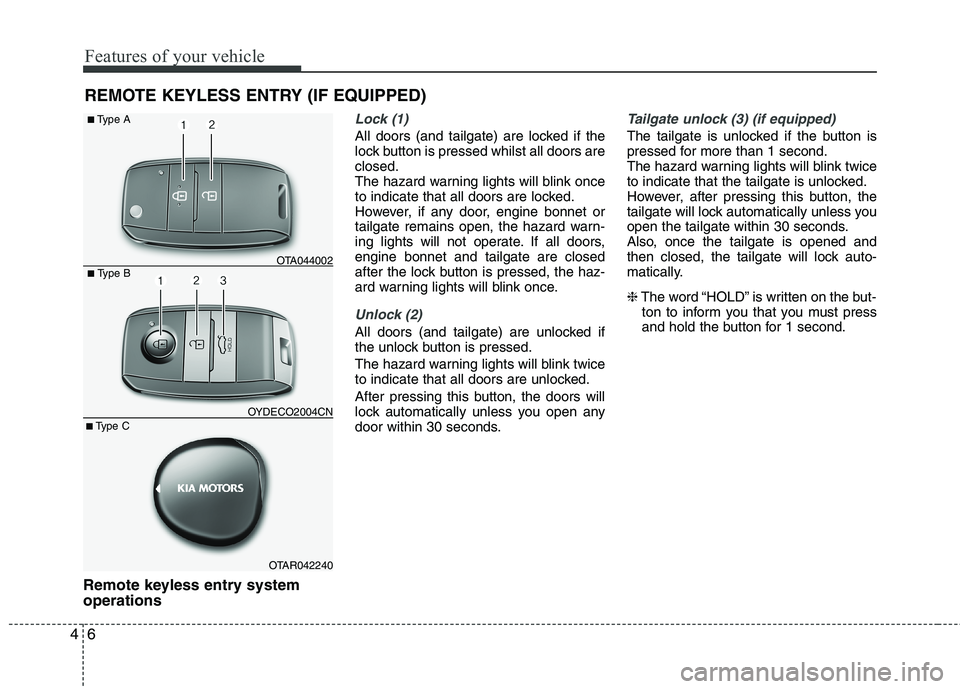
operations
Lock (1)
All doors (and tailgate) are locked if the
lock button is pressed whilst all doors are
closed.
The hazard warning lights will blink once
to indicate that all doors are locked.
However, if any door, engine bonnet or
tailgate remains open, the hazard warn-
ing lights will not operate. If all doors,
engine bonnet and tailgate are closed
after the lock button is pressed, the haz-
ard warning lights will blink once.
Unlock (2)
All doors (and tailgate) are unlocked if
the unlock button is pressed.
The hazard warning lights will blink twice
to indicate that all doors are unlocked.
After pressing this button, the doors will
lock automatically unless you open any
door within 30 seconds.
Tailgate unlock (3) (if equipped)
The tailgate is unlocked if the button is
pressed for more than 1 second.
The hazard warning lights will blink twice
to indicate that the tailgate is unlocked.
However, after pressing this button, the
tailgate will lock automatically unless you
open the tailgate within 30 seconds.
Also, once the tailgate is opened and
then closed, the tailgate will lock auto-
matically.
❈The word “HOLD” is written on the but-
ton to inform you that you must press
and hold the button for 1 second.
REMOTE KEYLESS ENTRY (IF EQUIPPED)
■ Type B
■Type A
OTA044002
OTAR042240 OYDECO2004CN
■Type C
Page 82 of 420
49
Features of your vehicle
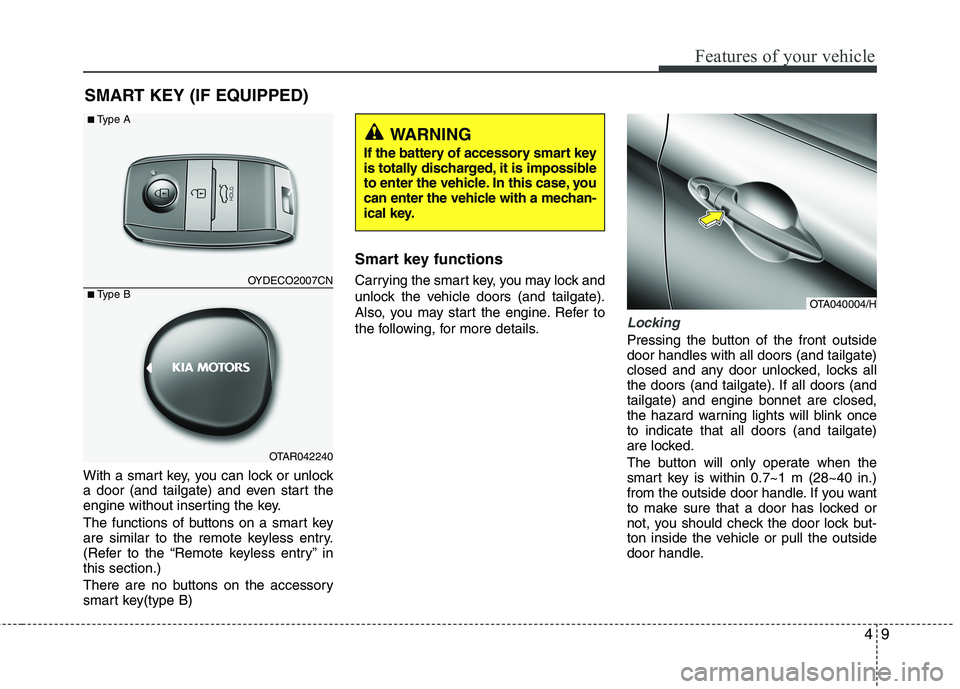
With a smart key, you can lock or unlock
a door (and tailgate) and even start the
engine without inserting the key.
The functions of buttons on a smart key
are similar to the remote keyless entry.
(Refer to the “Remote keyless entry” in
this section.)
There are no buttons on the accessory
smart key(type B)
Smart key functions
Carrying the smart key, you may lock and
unlock the vehicle doors (and tailgate).
Also, you may start the engine. Refer to
the following, for more details.
Locking
Pressing the button of the front outside
door handles with all doors (and tailgate)
closed and any door unlocked, locks all
the doors (and tailgate). If all doors (and
tailgate) and engine bonnet are closed,
the hazard warning lights will blink once
to indicate that all doors (and tailgate)
are locked.
The button will only operate when the
smart key is within 0.7~1 m (28~40 in.)
from the outside door handle. If you want
to make sure that a door has locked or
not, you should check the door lock but-
ton inside the vehicle or pull the outside
door handle.
SMART KEY (IF EQUIPPED)
OTA040004/H
OYDECO2007CN
OTAR042240
■Type A
■Type B
WARNING
If the battery of accessory smart key
is totally discharged, it is impossible
to enter the vehicle. In this case, you
can enter the vehicle with a mechan-
ical key.
Page 83 of 420
Features of your vehicle
10 4
Even though you press the outside door
handle buttons, the doors will not lock
and the chime will sound for 3 seconds if
any of following occur:
The smart key is in the vehicle.
The ENGINE START/STOP button is in
the ACC or ON position.
Any door except the tailgate is open.
Unlocking
Pressing the button of the front outside
door handles with all doors (and tailgate)
closed and locked, unlocks all the doors
(and tailgate). The hazard warning lights
blink twice to indicate that all doors (and
tailgate) are unlocked.
The button will only operate when the
smart key is within 0.7~1 m (28~40 in.)
from the outside door handle.
When the smart key is recognized in the
area of 0.7~1 m (28~40 in.) from the front
outside door handle, other people can
also open the door without possession of
the smart key.
After pressing the button, the doors will
lock automatically unless you open any
door within 30 seconds.
Tailgate unlocking
If you are within 0.7 m ~ 1 m (28 ~ 40 in.)
from the outside tailgate handle, with
your smart key in possession, the tail-
gate will unlock and open when you
press the tailgate handle switch.
The hazard warning lights will blink twice
to indicate that the tailgate is unlocked.
Also, once the tailgate is opened and
then closed, the tailgate will lock auto-
matically.
❈The word “HOLD” is written on the but-
ton to inform you that you must press
and hold the button for 1 second.
Start-up
You can start the engine without inserting
the key. For detailed information refer to
“Starting the engine with a smart key” in
section 5.
Smart key precautions
✽ ✽
NOTICE
• If, for some reason, you happen to lose
your smart key, you will not be able to
start the engine. Tow the vehicle, if
necessary, and contact an authorised
Kia dealer.
• A maximum of 2 smart keys can be
registered to a single vehicle. If you
lose a smart key, you should immedi-
ately take the vehicle and key to your
authorised Kia dealer to protect it
from potential theft.
• The smart key will not work if any of
following occur:
- The smart key is close to a radio
transmitter such as a radio station or
an airport which can interfere with
normal operation of the smart key.
- You keep the smart key near a
mobile two-way radio system or a
mobile phone.
- Another vehicle’s smart key is being
operated close to your vehicle.
When the smart key does not work
correctly, open and close the door with
the mechanical key. If you have a
problem with the smart key, contact
an authorised Kia dealer.
(Continued)
Page 85 of 420
Features of your vehicle
12 4
Armed stage
Using the smart key
Park the vehicle and stop the engine.
Arm the system as described below.
1. Turn off the engine.
2. Make sure that all doors (and tailgate)
and the engine bonnet are closed and
latched.
3. Lock the doors by pressing the button
of the front outside door handle with
the smart key in your possession.
After completion of the steps above,
the hazard warning lights operate
once to indicate that the system is
armed.
If any door remains open, the doors
won't lock and the chime will sound
for 3 seconds. Close the door and try
again to lock the doors.
If tailgate or engine bonnet remains
open, the hazard warning lights won't
operate and theft-alarm will not arm.
After this, if the tailgate and engine
bonnet are closed, the hazard warn-
ing lights will blink once.
button on the smart key.
After completion of the steps above,
the hazard warning lights will operate
once to indicate that the system is
armed.If any door (and tailgate) or engine
bonnet remains open, the hazard
warning lights won't operate and
theft-alarm will not arm. After this, if
all doors (and tailgate) and engine
bonnet are closed, the hazard warn-
ing lights blink once.
Using the transmitter
Park the vehicle and stop the engine.
Arm the system as described below.
1. Turn off the engine and remove the
ignition key from the ignition switch.
2. Make sure that all doors (and tailgate),
the engine bonnet are closed and
latched.
3. Lock the doors by pressing the lock
button on the transmitter.
After completion of the steps above,
the hazard warning lights will blink
once to indicate that the system is
armed.
If any door (and tailgate) or engine
bonnet remains open, the hazard
warning lights won't operate and theft-
alarm will not arm. After this, if all doors
(and tailgate) and engine bonnet are
closed, the hazard warning lights blink
once. Do not arm the system until all pas-
sengers have left the vehicle. If the
system is armed whilst a passen-
ger(s) remains in the vehicle, the
alarm may be activated when the
remaining passenger(s) leave the
vehicle. If any door, tailgate or
engine bonnet is opened within 30
seconds after entering the armed
stage, the system is disarmed to
prevent unnecessary alarm.
Theft-alarm stage
The alarm will be activated if any of the
following occurs whilst the system is
armed.
A door is opened without using the
transmitter (or smart key).
The tailgate is opened without using
the transmitter (or smart key).
The engine bonnet is opened.
The horn will sound and the hazard
warning lights will blink continuously for
approximately 30 seconds. To turn off the
system, unlock the doors with the trans-
mitter (or smart key).
Page 86 of 420
413
Features of your vehicle
Disarmed stage
The system will be disarmed when:
Transmitter
- The door unlock button is pressed.
- The engine is started.
- The ignition switch is in the “ON” posi-
tion for 30 seconds or more.
Smart key
- The door unlock button is pressed.
- The button of the front outside door is
pressed whilst carrying the smart key.
- The engine is started.
After the doors are unlocked, the hazard
warning lights will blink twice to indicate
that the system is disarmed.
After pressing the unlock button, if any
door (or tailgate) is not opened within 30
seconds, the system will be rearmed.
✽ ✽
NOTICE - Non-immobiliser
system
• Avoid trying to start the engine whilst
the alarm is activated. The vehicle
starting motor is disabled during the
theft-alarm stage.
If the system is not disarmed with the
transmitter, insert the key into the
ignition switch, turn the ignition
switch to the ON position and wait for
30 seconds. Then the system will be
disarmed.
• If you lose your keys, consult your
authorised Kia dealer.
✽ ✽
NOTICE- Immobiliser system
• If the system is not disarmed with the
transmitter, insert the key into the
ignition switch and start the engine.
Then the system will be disarmed.
• If you lose your keys, consult your
authorised Kia dealer.
CAUTION
Do not change, alter or adjust the
theft-alarm system because it could
cause the theft-alarm system to mal-
function and should only be serv-
iced by an authorised Kia dealer.
Malfunctions caused by improper
alterations, adjustments or modifi-
cations to the theft-alarm system
are not covered by your vehicle
manufacturer warranty.
Page 90 of 420
417
Features of your vehicle
Impact sensing door unlock sys-
tem (if equipped)
All doors will automatically unlock after
an impact causes the air bags to deploy.
Speed sensing door lock system
(if equipped)
All doors will be automatically locked
after the vehicle speed exceeds 15 km/h.
And all doors will be automatically
unlocked when you turn the engine off
and when you remove the ignition key. (if
equipped)
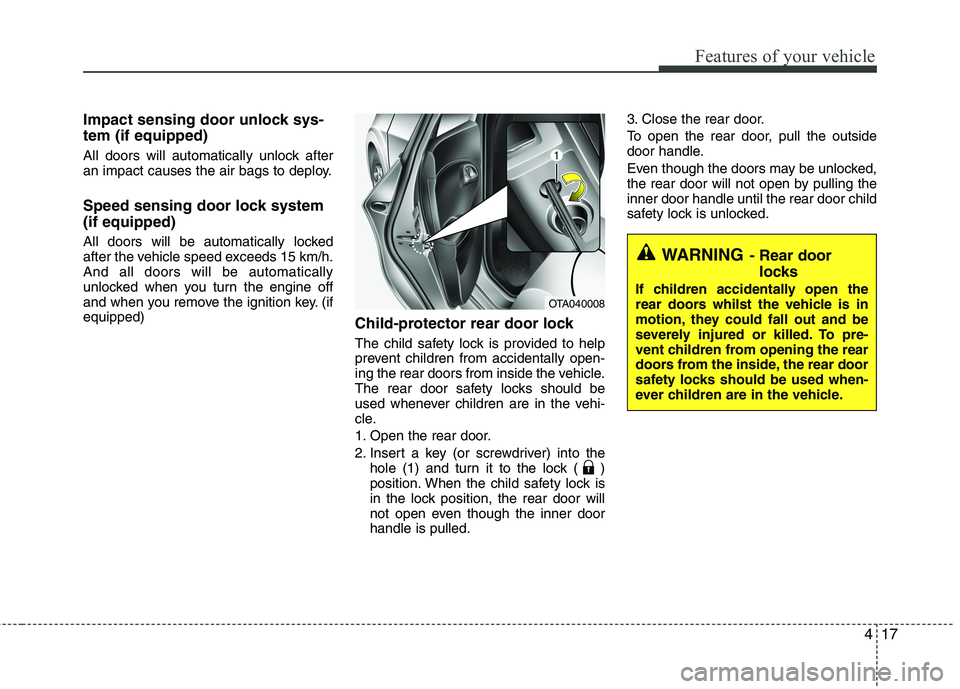
Child-protector rear door lock
The child safety lock is provided to help
prevent children from accidentally open-
ing the rear doors from inside the vehicle.
The rear door safety locks should be
used whenever children are in the vehi-
cle.
1. Open the rear door.
2. Insert a key (or screwdriver) into the
hole (1) and turn it to the lock ( )
position. When the child safety lock is
in the lock position, the rear door will
not open even though the inner door
handle is pulled.3. Close the rear door.
To open the rear door, pull the outside
door handle.
Even though the doors may be unlocked,
the rear door will not open by pulling the
inner door handle until the rear door child
safety lock is unlocked.
WARNING- Rear door
locks
If children accidentally open the
rear doors whilst the vehicle is in
motion, they could fall out and be
severely injured or killed. To pre-
vent children from opening the rear
doors from the inside, the rear door
safety locks should be used when-
ever children are in the vehicle.OTA040008