USB port KIA NIRO 2017 User Guide
[x] Cancel search | Manufacturer: KIA, Model Year: 2017, Model line: NIRO, Model: KIA NIRO 2017Pages: 552, PDF Size: 14.92 MB
Page 285 of 552
Audio system
532
Siri
✽
✽NOTICE - Using Siri
• If you want to use Siri, you have to
connect your iOS device to multi-
media system through Bluetooth
®
Wireless Technology. (Please
check whether your iOS device
supports Siri and turning Siri On)
• If the iOS version is changed, the functions and response may be dif-
ferent according to the iOS device
and the latest version.
• Siri automatically stops in the fol- lowing events.
1) Outgoing and incoming phone calls.
2) Media (USB, etc.) is connected. (Siri mode is maintained when
iPod
®s are connected)
3) Rear camera is activated (option).
4) Vehicle is started or engine is turned off. (Continued)(Continued)
5) Screen transition buttons, such as RADIO or MEDIA, are
selected.
6) When a pop-up message is dis- played on the screen due to
accidental execution of Siri.
• The microphone is located above the driver’s seat. To ensure proper
Siri, state your voice while main-
taining proper driving posture.
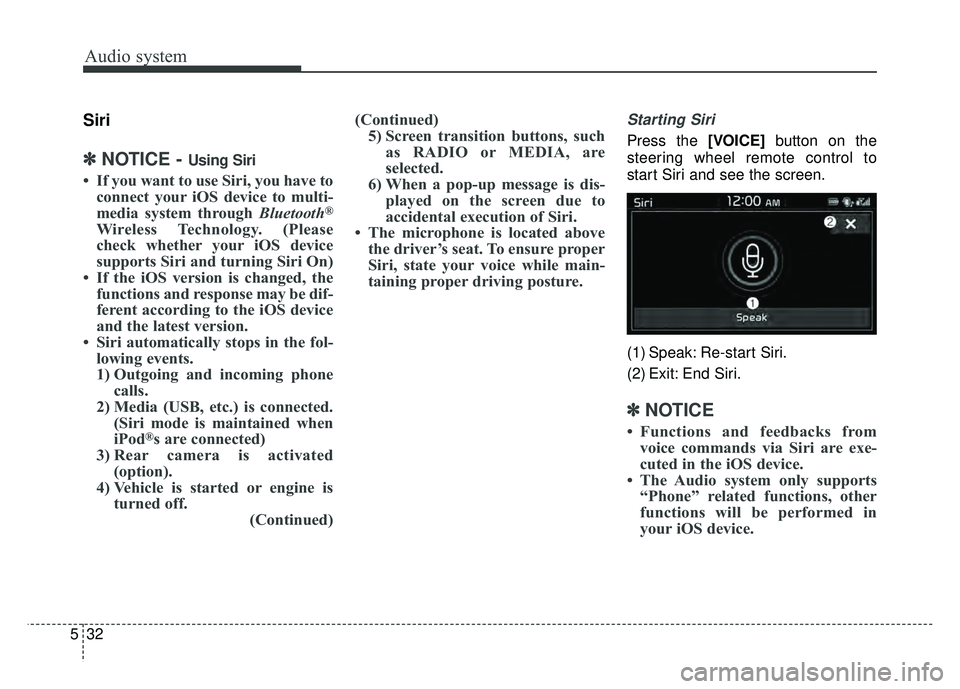
Starting Siri
Press the [VOICE] button on the
steering wheel remote control to
start Siri and see the screen.
(1) Speak: Re-start Siri.
(2) Exit: End Siri.
✽ ✽ NOTICE
• Functions and feedbacks from
voice commands via Siri are exe-
cuted in the iOS device.
• The Audio system only supports “Phone” related functions, other
functions will be performed in
your iOS device.
Page 287 of 552
Audio system
534
(Continued)
• Contacts can be downloaded onlyfrom the currently connected
Bluetooth
®Wireless Technology
device.
If no Bluetooth
®Wireless Technology
device is connected, the download
contacts button is disabled.
• If the language setting is Korean, Bluetooth
®Wireless Technology
voice prompts are not supported.
System
Press the [SETUP] button on the
audio system ➟ Select [System].
Memory Information: View My Music memory usage.
Language: Change the user lan- guage.
Default: Reset the audio system.
System Information: At the System Information screen, Software version
information, updates are available.
- System Update: At the SystemInformation screen, insert the
USB memory with the latest file
downloaded, and then select the
[Update] to begin updating. The
system with then reboot auto-
matically.
✽ ✽ NOTICE
• The system resets to the default
values, and all saved data and set-
tings are lost.
• This product needs supplemented software updates and additional
functions, which collectively may
take some time to complete,
depending on the amount of data.
• If the Power is disconnected or the USB is removed during an update,
the data might be damaged. Please
wait until the update is complete
while engine is on.
Screen Saver
Set the information displayed when
the audio system is switched off or
the screen is turned off.
Press the [SETUP] button on the
audio system ➟ Select [Screen
Saver].
Analog: An analog clock is dis- played.
Digital: A digital clock is displayed.
None: No information is displayed.
Display Off
To prevent glare, the screen can be
turned off with the audio system in
operation.
Press the [SETUP] button on the
audio system ➟ Select [Display Off].
Page 539 of 552
Index
2I
AC inverter . . . . . . . . . . . . . . . . . . . . . . . . . . . . . . . . . 4-141
Air bag warning label . . . . . . . . . . . . . . . . . . . . . . . . . . 3-67
Air bag warning light . . . . . . . . . . . . . . . . . . . . . . . . . . 3-45
Air bags. . . . . . . . . . . . . . . . . . . . . . . . . . . . . . . . . . . . \
. 3-42Air bag warning label. . . . . . . . . . . . . . . . . . . . . . . . 3-67
Air bag warning light . . . . . . . . . . . . . . . . . . . . . . . . 3-45
Curtain air bag . . . . . . . . . . . . . . . . . . . . . . . . . . . . . 3-62
Driver's and passenger's front air bag . . . . . . . . . . . 3-57
Inflation conditions . . . . . . . . . . . . . . . . . . . . . . . . . 3-64
Non-inflation conditions . . . . . . . . . . . . . . . . . . . . . 3-65
Occupant Detection System . . . . . . . . . . . . . . . . . . . 3-49
Operation . . . . . . . . . . . . . . . . . . . . . . . . . . . . . . . . . 3-43
Side air bag. . . . . . . . . . . . . . . . . . . . . . . . . . . . . . . . 3-60
SRS Care . . . . . . . . . . . . . . . . . . . . . . . . . . . . . . . . . 3-66
SRS components and functions . . . . . . . . . . . . . . . . 3-46
Air cleaner . . . . . . . . . . . . . . . . . . . . . . . . . . . . . . . . . . 8-36\
Filter replacement. . . . . . . . . . . . . . . . . . . . . . . . . . . 8-36
Air conditioner compressor label . . . . . . . . . . . . . . . . . . 9-9
Air conditioning system lubricants. . . . . . . . . . . . . . . . . 9-5
Air ventilation seat . . . . . . . . . . . . . . . . . . . . . . . . . . . 4-138
Anti-lock brake system (ABS) . . . . . . . . . . . . . . . . . . . 6-27
Appearance care . . . . . . . . . . . . . . . . . . . . . . . . . . . . . . 8-88 Exterior care . . . . . . . . . . . . . . . . . . . . . . . . . . . . . . . 8-88
Interior care . . . . . . . . . . . . . . . . . . . . . . . . . . . . . . . 8-93
Armed stage . . . . . . . . . . . . . . . . . . . . . . . . . . . . . . . . . 4-17
Assist Emergency Braking (AEB) . . . . . . . . . . . . . . . . 6-36 AEB warning message and system control . . . . . . . 6-39
Brake operation . . . . . . . . . . . . . . . . . . . . . . . . . . . . 6-40
Limitation of the system . . . . . . . . . . . . . . . . . . . . . 6-43
Sensor to detect the distance from the vehicle in
front (front radar) . . . . . . . . . . . . . . . . . . . . . . . . . . 6-41
System malfunction . . . . . . . . . . . . . . . . . . . . . . . . . 6-42
System setting and activation . . . . . . . . . . . . . . . . . . 6-36
AUDIO (With Touch Screen) . . . . . . . . . . . . . . . . . . . . 5-5 Feature of Your Audio . . . . . . . . . . . . . . . . . . . . . . . . 5-6
Media Mode . . . . . . . . . . . . . . . . . . . . . . . . . . . . . . . 5-11
Phone Mode . . . . . . . . . . . . . . . . . . . . . . . . . . . . . . . 5-24
Radio Mode . . . . . . . . . . . . . . . . . . . . . . . . . . . . . . . 5-10
Setup Mode . . . . . . . . . . . . . . . . . . . . . . . . . . . . . . . 5-33
Siri Mode . . . . . . . . . . . . . . . . . . . . . . . . . . . . . . . . . 5-32
Audio system . . . . . . . . . . . . . . . . . . . . . . . . . . . . . . . . . 5-2 Antenna . . . . . . . . . . . . . . . . . . . . . . . . . . . . . . . . . . . 5-\
2
Aux, USB port . . . . . . . . . . . . . . . . . . . . . . . . . . . . . . 5-3
Auto defogging system . . . . . . . . . . . . . . . . . . . . . . . . 4-131
Auto light . . . . . . . . . . . . . . . . . . . . . . . . . . . . . . . . . . 4-10\
2
Automatic climate control system . . . . . . . . . . . . . . . 4-114 Air Conditioning refrigerant label . . . . . . . . . . . . . 4-128
Automatic heating and air conditioning. . . . . . . . . 4-115
Automatic ventilation . . . . . . . . . . . . . . . . . . . . . . . 4-123
Checking the amount of air conditionerrefrigerant and compressor lubricant . . . . . . . . . . 4-127
Climate control air filter. . . . . . . . . . . . . . . . . . . . . 4-126
Sunroof inside air recirculation . . . . . . . . . . . . . . . 4-124
System operation . . . . . . . . . . . . . . . . . . . . . . . . . . 4-124
A