ESP KIA NIRO 2019 Workshop Manual
[x] Cancel search | Manufacturer: KIA, Model Year: 2019, Model line: NIRO, Model: KIA NIRO 2019Pages: 611, PDF Size: 15.28 MB
Page 388 of 611
Driving your vehicle
52
6
SMART CRUISE CONTROL SYSTEM (SCC) (IF EQUIPPED)
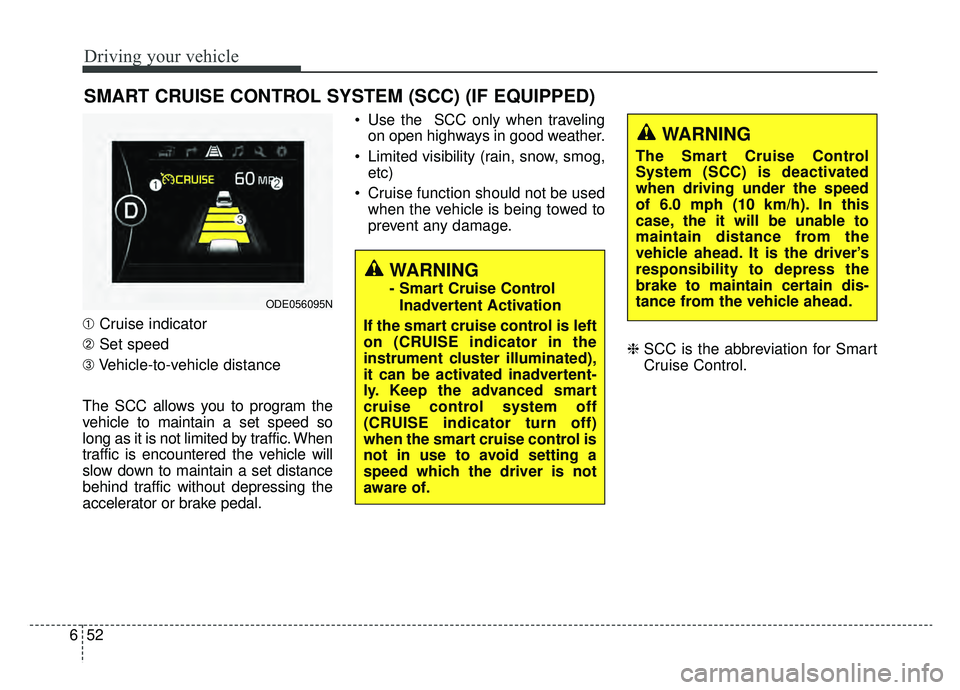
➀ Cruise indicator
➁ Set speed
\b Vehicle-to-vehicle distance
The SCC allows you to program the
vehicle to maintain a set speed so
long as it is not limited by traffic. When
traffic is encountered the vehicle will
slow down to maintain a set distance
behind traffic without depressing the
accelerator or brake pedal. Use the SCC only when traveling
on open highways in good weather.
Limited visibility (rain, snow, smog, etc)
Cruise function should not be used when the vehicle is being towed to
prevent any damage.
❈SCC is the abbreviation for Smart
Cruise Control.
WARNING
- Smart Cruise Control
Inadvertent Activation
If the smart cruise control is left
on (CRUISE indicator in the
instrument cluster illuminated),
it can be activated inadvertent-
ly. Keep the advanced smart
cruise control system off
(CRUISE indicator turn off)
when the smart cruise control is
not in use to avoid setting a
speed which the driver is not
aware of.ODE056095N
WARNING
The Smart Cruise Control
System (SCC) is deactivated
when driving under the speed
of 6.0 mph (10 km/h). In this
case, the it will be unable to
maintain distance from the
vehicle ahead. It is the driver’s
responsibility to depress the
brake to maintain certain dis-
tance from the vehicle ahead.
Page 389 of 611
653
Driving your vehicle
Speed setting (SCC)
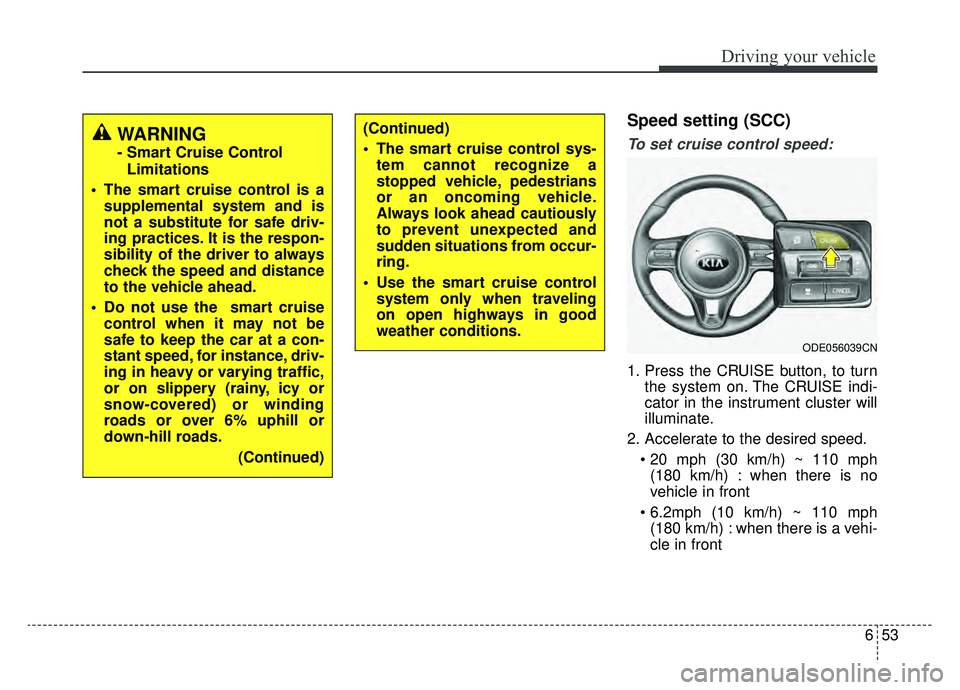
To set cruise control speed:
1. Press the CRUISE button, to turnthe system on. The CRUISE indi-
cator in the instrument cluster will
illuminate.
2. Accelerate to the desired speed. (180 km/h) : when there is no
vehicle in front
(180 km/h) : when there is a vehi-
cle in front
(Continued)
The smart cruise control sys- tem cannot recognize a
stopped vehicle, pedestrians
or an oncoming vehicle.
Always look ahead cautiously
to prevent unexpected and
sudden situations from occur-
ring.
Use the smart cruise control system only when traveling
on open highways in good
weather conditions.
ODE056039CN
WARNING
- Smart Cruise Control
Limitations
The smart cruise control is a supplemental system and is
not a substitute for safe driv-
ing practices. It is the respon-
sibility of the driver to always
check the speed and distance
to the vehicle ahead.
Do not use the smart cruise control when it may not be
safe to keep the car at a con-
stant speed, for instance, driv-
ing in heavy or varying traffic,
or on slippery (rainy, icy or
snow-covered) or winding
roads or over 6% uphill or
down-hill roads.
(Continued)
Page 390 of 611
Driving your vehicle
54
6
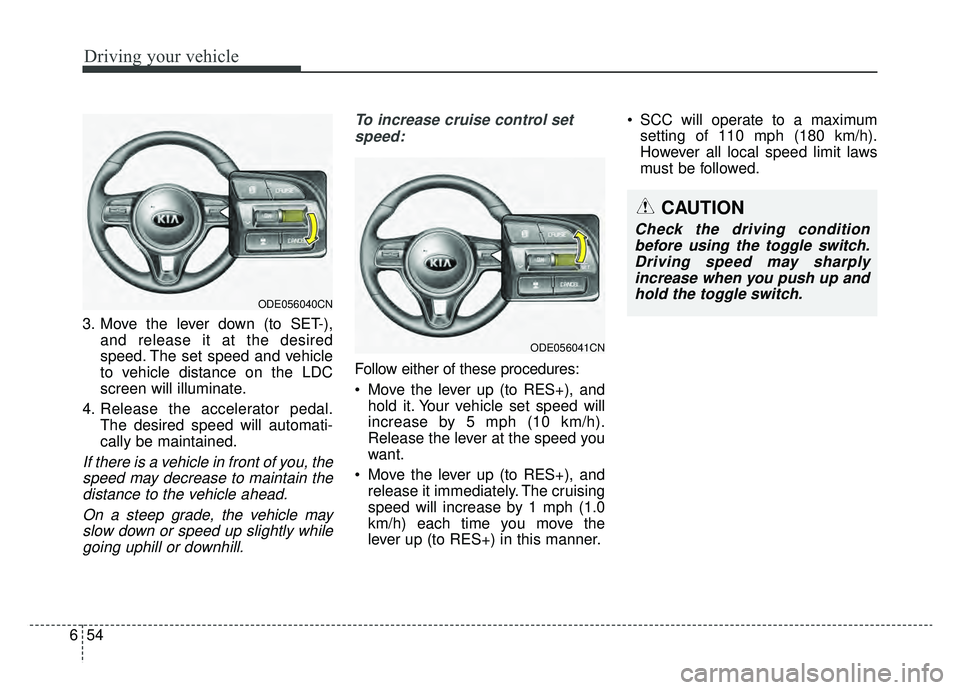
3. Move the lever down (to SET-),
and release it at the desired
speed. The set speed and vehicle
to vehicle distance on the LDC
screen will illuminate.
4. Release the accelerator pedal. The desired speed will automati-
cally be maintained.
If there is a vehicle in front of you, thespeed may decrease to maintain thedistance to the vehicle ahead.
On a steep grade, the vehicle mayslow down or speed up slightly whilegoing uphill or downhill. To increase cruise control set
speed:
Follow either of these procedures:
Move the lever up (to RES+), and hold it. Your vehicle set speed will
increase by 5 mph (10 km/h).
Release the lever at the speed you
want.
Move the lever up (to RES+), and release it immediately. The cruising
speed will increase by 1 mph (1.0
km/h) each time you move the
lever up (to RES+) in this manner. SCC will operate to a maximum
setting of 110 mph (180 km/h).
However all local speed limit laws
must be followed.
ODE056041CN
ODE056040CN
CAUTION
Check the driving conditionbefore using the toggle switch.Driving speed may sharplyincrease when you push up andhold the toggle switch.
Page 392 of 611
Driving your vehicle
56
6
Canceled automatically
The driver's door is opened.
The shift lever is shifted to N
(Neutral), R (Reverse) or P(Parking).
The EPB (electronic parking brake) is applied.
The vehicle speed is over 120 mph (190 km/h)
The ESC, ABS or TCS is operating.
The ESC is turned off.
The sensor or the cover is dirty or blocked with foreign matter.
When the vehicle is stopped for over 5 minutes.
The driver starts driving by pushing the lever up (RES +) or down
(SET -) or depressing the acceler-
ator pedal approximately 3 sec-
onds after the vehicle is stopped by
the Smart Cruise Control System
with no other vehicle ahead or a
vehicle stopped far away in front.
The engine speed is in a danger- ous range. The SCC system has malfunc-
tioned.
The accelerator pedal is continu- ously depressed for long time.
Each of these actions will cancel the
SCC operation. (The set speed and
vehicle-to-vehicle distance on the
LCD display will go off.)
If the SCC is cancelled automati-
cally, the SCC will not resume even
though the RES+ or SET- lever is
moved. Also, the EPB (electronic
parking brake) will be applied when
the vehicle is stopped.
- When activating the AEB(Autonomous Emergency Braking)
If the SCC is cancelled by a reason
not mentioned, have the system
checked by an authorized Kia dealer.CAUTION
If the system is automatically cancelled, the warning chimewill sound and a message(“Smart Cruise Control can-celed”) will appear for a few sec-onds.
You must adjust the vehiclespeed by depressing the accel-erator or brake pedal accordingto the road and driving condi-tions ahead.
Always check the road condi-tions. Do not rely on the warningchime.
Page 402 of 611
Driving your vehicle
66
6
- After an engine start, please stop
for several seconds. If system ini-
tialization is not completed, the
SCC does not normally operate.
- After an engine start, if any objects are not detected or the sensor
cover is obscured with foreign sub-
stances, there is a possibility that
the SCC system may not work.
- The following conditions may cause a malfunction: over-loading
the liftgate, suspension modifica-
tion, tire replacement with unau-
thorized tires or tires with different
tread wear and pressure levels. This device complies with Part 15
of the FCC rules.
Operation is subject to the following
three conditions:
1. This device may not cause harm-
ful interference, and
2. This device must accept any inter- ference received, including inter-
ference that may cause undesired
operation.
3. Changes or modifications not expressly approved by the party
responsible for compliance could
void the user’s authority to operate
the device.
WARNING - Inclines &
Towing
Do not use SCC on steep
inclines or when towing another
vehicle or trailer since such
extreme loading can interfere
with your vehicle's ability to
maintain the selected speed.(Continued)
Vehicles moving in front of you with a frequent lane
change may cause a delay in
the system's reaction or may
cause the system to react to a
vehicle actually in an adjacent
lane. Always drive cautiously
to prevent unexpected and
sudden situations from occur-
ring.
Always be aware of the select- ed speed and vehicle to vehi-
cle distance. The driver
should not solely rely on the
system but always pay atten-
tion to driving conditions and
control the vehicle speed.
The SCC system may not rec- ognize complex driving situa-
tions so always pay attention
to driving conditions and con-
trol the vehicle speed.
For safe operation of the SCC system, carefully read and fol-
low the instructions in this
manual before use.
Page 412 of 611
Driving your vehicle
76
6
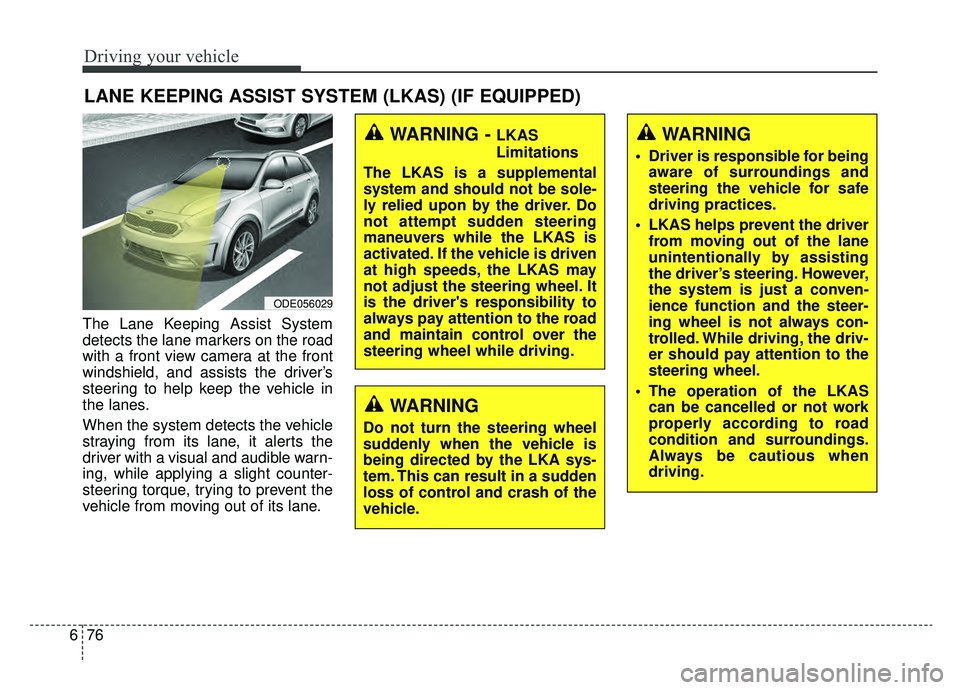
The Lane Keeping Assist System
detects the lane markers on the road
with a front view camera at the front
windshield, and assists the driver’s
steering to help keep the vehicle in
the lanes.
When the system detects the vehicle
straying from its lane, it alerts the
driver with a visual and audible warn-
ing, while applying a slight counter-
steering torque, trying to prevent the
vehicle from moving out of its lane.
LANE KEEPING ASSIST SYSTEM (LKAS) (IF EQUIPPED)
WARNING
Do not turn the steering wheel
suddenly when the vehicle is
being directed by the LKA sys-
tem. This can result in a sudden
loss of control and crash of the
vehicle.
ODE056029
WARNING - LKAS
Limitations
The LKAS is a supplemental
system and should not be sole-
ly relied upon by the driver. Do
not attempt sudden steering
maneuvers while the LKAS is
activated. If the vehicle is driven
at high speeds, the LKAS may
not adjust the steering wheel. It
is the driver's responsibility to
always pay attention to the road
and maintain control over the
steering wheel while driving.WARNING
Driver is responsible for being aware of surroundings and
steering the vehicle for safe
driving practices.
LKAS helps prevent the driver from moving out of the lane
unintentionally by assisting
the driver’s steering. However,
the system is just a conven-
ience function and the steer-
ing wheel is not always con-
trolled. While driving, the driv-
er should pay attention to the
steering wheel.
The operation of the LKAS can be cancelled or not work
properly according to road
condition and surroundings.
Always be cautious when
driving.
Page 417 of 611
681
Driving your vehicle
✽ ✽NOTICE
The steering wheel may feel heavier
when the steering wheel is assisted
by the system than when it is not.
The system will be cancelled under the
following situations:
You change lanes with the turn sig-
nal.
- Using the turn signal to change lanes.
- If you change lanes without the turn signal on, the steering wheel
might be controlled.
LKAS can transit to steering assist mode when the car is near to mid-
dle of the lane after system on or
the lane was changed. LKAS can
not assist steering if the vehicle fol-
lows lane marker too close contin-
uously before transition to steering
assist mode.
The control of ESC (Electronic Stability Control) or VSM (Vehicle
Stability Management) is activated.
The steering will not be assisted when you drive fast on a sharp
curve.
The steering will not be assisted when vehicle speed is below 40
mph (64 km/h) and over 110 mph
(177 km/h). The steering will not be assisted
when you change lanes fast.
The steering will not be assisted when you brake suddenly.
The steering will not be assisted when the lane is very wide or nar-
row.
The steering will not be assisted when only one side lane marker is
detected.
There are more than two lane markers such as a construction
area.
Radius of a curve is too small.
When you turn steering wheel sud- denly, the LKAS will be disabled
temporarily.
Driving on a steep slope or hill.
WARNING
The driver is responsible for accurate steering.
Even though the steering is assisted by the system, the
driver may control the steer-
ing wheel.
Turn off the system and drive the vehicle in below situa-
tions.
- In bad weather
- In bad road condition
- When the steering wheelneeds to be controlled by the
driver frequently.
Page 423 of 611
687
Driving your vehicle
WARNING
The Driver Attention Alertsystem is not a substitute for
safe driving practices, but a
supplemental system only. It
is the responsibility of the
driver to always drive cau-
tiously to prevent unexpected
and sudden situations from
occurring. Pay attention to the
road conditions at all times.
The system may suggest a break according to the dri-
ver’s driving pattern or habits
even if the driver doesn’t feel
fatigue.
The driver, who feels fatigued, should take a break, even
though there is no break sug-
gestion by the Driver
Attention Alert system.
CAUTION
The Driver Attention Alert sys-tem utilizes the camera sensoron the front windshield for itsoperation.
To prevent potential damage tothe camera and keep the camerasensor operating under optimalconditions, observe the follow-ings:
Do not disassemble camera temporarily for tinted windowor attaching any types of coat-ings and accessories. If youdisassemble a camera andassemble it again, take yourvehicle to an authorized Kiadealer and have the systemchecked for calibration.
Do not place any reflective objects (i.e. white paper, mir-ror) over the dashboard. Anylight reflection may cause amal-function of the DriverAttention Alert (DAA) system.
(Continued)
(Continued) Pay extreme caution to keep the camera sensor out ofwater.
Do not arbitrarily disassemble the camera assembly, norapply any impact on the cam-era assembly.
Playing the vehicle audio sys- tem at high volume may offsetthe Driver Attention Alert sys-tem warning sounds.
Page 425 of 611
689
Driving your vehicle
Your vehicle's fuel economy depends
mainly on your style of driving, where
you drive and when you drive.
Each of these factors affects how
many miles (kilometers) you can get
from a gallon (liter) of fuel. To operate
your vehicle as economically as pos-
sible, use the following driving sug-
gestions to help save money in both
fuel and repairs:
Drive smoothly. Accelerate at amoderate rate. Don't make "jack-
rabbit" starts or full-throttle shifts
and maintain a steady cruising
speed. Don't race between stop-
lights. Try to adjust your speed to
the traffic so you don't have to
change speeds unnecessarily.
Avoid heavy traffic whenever pos- sible. Always maintain a safe dis-
tance from other vehicles so you
can avoid unnecessary braking.
This also reduces brake wear.
Drive at a moderate speed. The faster you drive, the more fuel your
vehicle uses. Driving at a moderate
speed, especially on the highway,
is one of the most effective ways to
reduce fuel consumption. Don't "ride" the brake pedal. This
can increase fuel consumption and
also increase wear on these com-
ponents. In addition, driving with
your foot resting on the brake pedal
may cause the brakes to overheat,
which reduces their effectiveness
and may lead to more serious con-
sequences.
Take care of your tires. Keep them inflated to the recommended pres-
sure. Incorrect inflation, either too
much or too little, results in unnec-
essary tire wear. Check the tire
pressures at least once a month.
Be sure that the wheels are aligned correctly. Improper align-
ment can result from hitting curbs
or driving too fast over irregular
surfaces. Poor alignment causes
faster tire wear and may also result
in other problems as well as
greater fuel consumption. Keep your vehicle in good condi-
tion. For better fuel economy and
reduced maintenance costs, main-
tain your vehicle in accordance
with the maintenance schedule in
chapter 8. If you drive your vehicle
in severe conditions, more frequent
maintenance is required (see
chapter 8 for details).
Keep your vehicle clean. For maxi- mum service, your vehicle should
be kept clean and free of corrosive
materials. It is especially important
that mud, dirt, ice, etc. not be
allowed to accumulate on the
underside of the vehicle. This extra
weight can result in increased fuel
consumption and also contribute to
corrosion.
Travel lightly. Don't carry unneces- sary weight in your vehicle. Weight
reduces fuel economy.
Don't let the engine idle longer than necessary. If you are waiting
(and not in traffic), turn off your
engine and restart only when
you're ready to go.
ECONOMICAL OPERATION
Page 429 of 611
693
Driving your vehicle
Rocking the vehicle
If it is necessary to rock the vehicle
to free it from snow, sand, or mud,
first turn the steering wheel right and
left to clear the area around your
front wheels. Then, shift back and
forth between R (Reverse) and any
forward gear in vehicles equipped
with a dual clutch transmission. Do
not race the engine, and spin the
wheels as little as possible. If you are
still stuck after a few tries, have the
vehicle pulled out by a tow vehicle to
avoid engine overheating and possi-
ble damage to the transaxle.The ESC system should be turned
OFF prior to rocking the vehicle.
Smooth cornering
Avoid braking or gear changing in
corners, especially when roads are
wet. Ideally, corners should always
be taken under gentle acceleration. If
you follow these suggestions, tire
wear will be held to a minimum.CAUTION- Vehicle rocking
Prolonged rocking may causeengine overheating, transaxledamage or failure, and tire dam-age.
CAUTION- Spinning tires
Do not spin the wheels, espe-cially at speeds more than 35mph (56 km/h). Spinning thewheels at high speeds when thevehicle is stationary couldcause a tire to overheat whichcould result in tire damage thatmay injure bystanders.
WARNING- Sudden
Vehicle Movement
Do not attempt to rock the vehi-
cle if people or objects are near-
by. The vehicle may suddenly
move forward or backwards as it
becomes unstuck.