switch KIA NIRO 2019 Owners Manual
[x] Cancel search | Manufacturer: KIA, Model Year: 2019, Model line: NIRO, Model: KIA NIRO 2019Pages: 611, PDF Size: 15.28 MB
Page 14 of 611
H7
1. Conditions for lock :➀: When locking doors from out-
side the vehicle with the
charging door closed.
➁ : When locking the driver’s door
using a mechanical key
➂ : When locking doors using a
smart key
➃ : When pressing the door
lock/unlock button on the front
door outside handle while the
smart key is detected and
doors are unlocked
➄ : When locking all vehicle doors
with the charging door closed.
(When locking doors with
functions such as spare key,
smart key, door lock button on
the outside door handle, cen-
tral door lock switch, auto door
lock.) 2. Conditions for unlock :
➀: When unlocking doors from
outside the vehicle with the
charging door closed.
➁ : When unlocking the driver’s
door using a mechanical key
➂ : When unlocking doors using a
smart key
➃ : When pressing the door
lock/unlock button on the front
door outside handle while the
smart key is detected and
doors are locked
➄ : When unlocking all vehicle
doors with the charging door
closed. (When unlocking doors
with functions such as spare
key, smart key, door lock but-
ton on the outside door han-
dle, central door lock switch,
auto door lock.)Scheduled Charging
(if equipped)
You can set reserved charging using the AVN.
Refer to the AVN for detailed infor-
mation about setting reserved
charging.
Scheduled charging can only be done when using a AC Charger or
the portable charging cable (ICCB:
In-Cable Control Box).
❈ AVN : Audio, Video, Navigation
Page 17 of 611
H10
Comply with the following in orderto prevent electrical shock when
charging:
- Use a waterproof charger
- Make sure to not touch the charg-ing connector and charging plug
when your hand is wet
- Do not charge when there is light- ning
- Do not charge when the charging connector and plug is wet Always keep the charging connec-
tor and charging plug in clean and
dry condition. Be sure to keep the
charging cable in a condition where
there is no water or moisture.
Make sure to use the designated charger for charging the vehicle.
Using any other charger may
cause failure.
Before charging the battery, turn the vehicle OFF.
Be careful not to drop the charging connector. The charging connector
can be damaged.
Always inspect the charging con- nector terminals for damage or
overheating. Do not use if dam-
aged, as this may damage the
vehicle side charge connector and
is not a warrantable repair.
WARNING - Charging
cable
• Immediately stop charging when you discover abnormal
symptoms (smell, smoke).
Replace the charging cable if the cable coating is damaged
to prevent electrical shock.
When connecting or removing the charging cable, make sure
to hold the charging connec-
tor handle.
If you pull the cable itself
(without using the handle), the
internal wires may disconnect
or get damaged. This may lead
to electric shock or fire.
WARNING - Cooling fan
Do not touch the cooling fan
while vehicle is charging. When
the vehicle is switched OFF
while charging, the cooling fan
inside the engine compartment
or interior rear seat may auto-
matically operate.
CHARGING THE PLUG-IN HYBRID VEHICLE (CONT.)
Page 18 of 611
H11
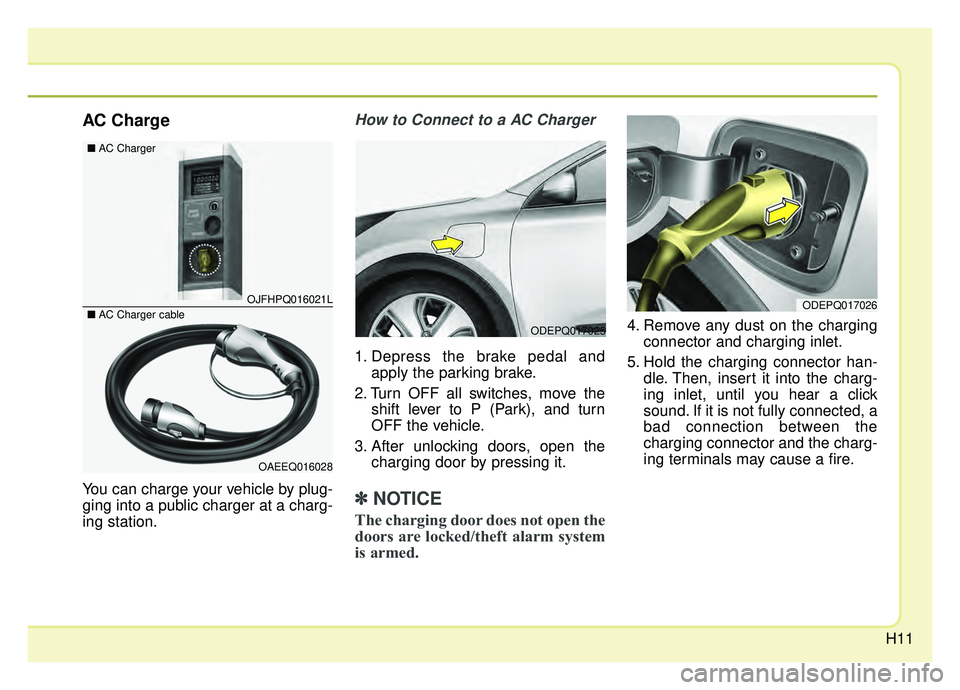
AC Charge
You can charge your vehicle by plug-
ging into a public charger at a charg-
ing station.
How to Connect to a AC Charger
1. Depress the brake pedal andapply the parking brake.
2. Turn OFF all switches, move the shift lever to P (Park), and turn
OFF the vehicle.
3. After unlocking doors, open the charging door by pressing it.
✽ ✽NOTICE
The charging door does not open the
doors are locked/theft alarm system
is armed.
4. Remove any dust on the charging
connector and charging inlet.
5. Hold the charging connector han- dle. Then, insert it into the charg-
ing inlet, until you hear a click
sound. If it is not fully connected, a
bad connection between the
charging connector and the charg-
ing terminals may cause a fire.ODEPQ017025
OJFHPQ016021L
OAEEQ016028
\bAC Charger
\bAC Charger cableODEPQ017026
Page 23 of 611
H16
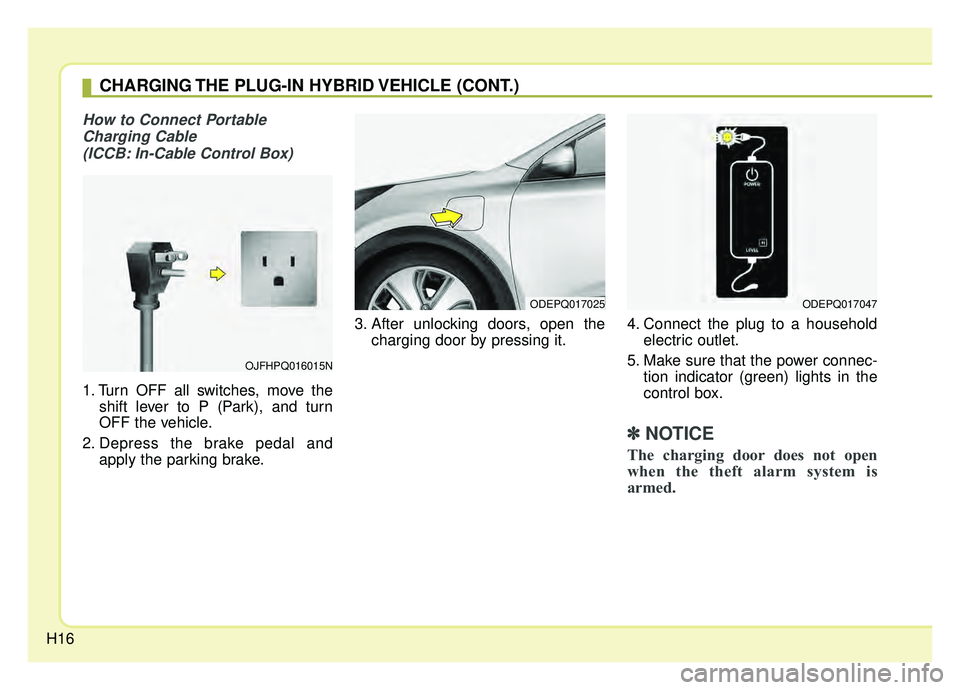
How to Connect PortableCharging Cable (ICCB: In-Cable Control Box)
1. Turn OFF all switches, move the shift lever to P (Park), and turn
OFF the vehicle.
2. Depress the brake pedal and apply the parking brake. 3. After unlocking doors, open the
charging door by pressing it. 4. Connect the plug to a household
electric outlet.
5. Make sure that the power connec- tion indicator (green) lights in the
control box.
✽ ✽NOTICE
The charging door does not open
when the theft alarm system is
armed.
ODEPQ017025ODEPQ017047
OJFHPQ016015N
CHARGING THE PLUG-IN HYBRID VEHICLE (CONT.)
Page 36 of 611
H29
Refuel to prevent Hybrid batteryDamage
This message is displayed when the
fuel tank is nearly empty.
You should refill the fuel tank to pre-
vent hybrid battery damage.
Check Virtual Engine SoundSystem
This message is displayed when
there is a problem with the Virtual
Engine Sound System (VESS).
In this case, have the system
inspected by an authorized Kia deal-
er.
Remaining charge time(Plug-in hybrid vehicle)
The message is displayed to notify
the remaining time to fully charge the
battery.
Charger Error! (Plug-in hybrid vehicle)
This message is displayed when
there is a problem with the charger.
Low/High System Temp.Maintaining Hybrid mode(Plug-in hybrid vehicle)
This message is displayed when the
temperature of the high-voltage
(hybrid) battery is too low or too high.
This warning message is to protect
the battery and the hybrid system.
Low/High System Temp.Switching to Hybrid mode (Plug-in hybrid vehicle)
This message is displayed when the
temperature of the high-voltage
(hybrid) battery is too low or high.
This warning message is to protect
the battery and the hybrid system.
Switching to Hybrid mode to allowheating (Plug-in hybrid vehicle)
When the coolant temperature is lower than 57 °F (-14 °C), and you
turn the climate control On for
heating, this message will be dis-
played in the cluster. Then, the
vehicle will automatically switch to
HEV mode.
When the coolant temperature is higher than 57 °F (-14 °C), or you
turn the climate control Off, the
vehicle will automatically return to
EV mode.
Page 37 of 611
H30
Wait until fuel door opens (Plug-in hybrid vehicle)
This message is displayed when you
attempt to open the fuel filler lid with
the fuel tank pressurized. Wait until
the fuel tank is depressurized.
✽ ✽ NOTICE
• It may take up to 20 seconds to
open fuel filler lid.
• When the fuel filler lid is frozen and does not open after 20 seconds
at freezing temperature, slightly
tap the fuel filler lid and then
attempt to open it.
Fuel door open
(Plug-in hybrid vehicle)
This message is displayed when the
fuel filler lid is opened.
Also means "Ready to refuel".
Check fuel door(Plug-in hybrid vehicle)
This message is displayed when the
fuel filler lid is open or an abnormal-
ity has occurred.
Charging Door Open (Plug-in hybrid vehicle)
This message indicates that the
charging door is open.
(Driving with the charging door open
may result in moisture inflow or dam-
age. This message is used to prevent
such occurrences.)
Unplug vehicle to start (Plug-in hybrid vehicle)
This message is displayed when you
start the engine without unplugging
the charging cable. Unplug the
charging cable, and then start the
vehicle.
Maintaining Hybrid mode to con-tinue heating(Plug-in hybrid vehicle)
This message is displayed when
heat-ng is in operation and the HEV
mode is maintained to meet the
heating operating conditions when
attempting to switch to EV mode by
pressing the HEV button.
EV / HEV modes (Plug-in hybrid vehicle)
A corresponding message is dis-
played when a mode is selected by
pressing the HEV button.
DRIVING THE HYBRID/PLUG-IN HYBRID VEHICLE (CONT.)
Page 64 of 611
Your vehicle at a glance
42
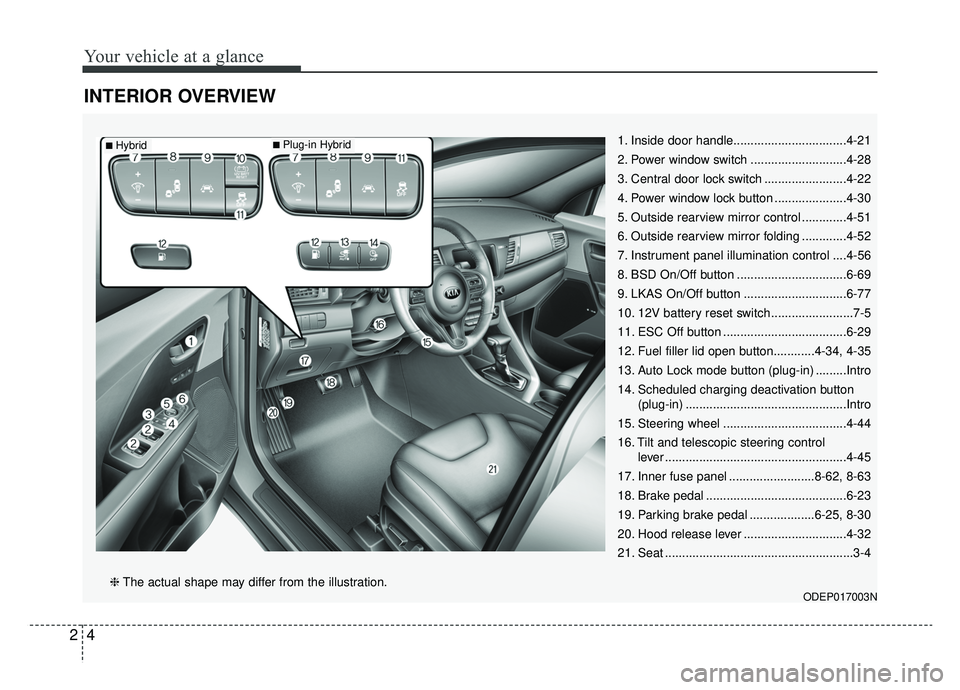
INTERIOR OVERVIEW
1. Inside door handle.................................4-21
2. Power window switch ............................4-28
3. Central door lock switch ........................4-22
4. Power window lock button .....................4-30
5. Outside rearview mirror control .............4-51
6. Outside rearview mirror folding .............4-52
7. Instrument panel illumination control ....4-56
8. BSD On/Off button ................................6-69
9. LKAS On/Off button ..............................6-77
10. 12V battery reset switch ........................7-5
11. ESC Off button ....................................6-29
12. Fuel filler lid open button............4-34, 4-35
13. Auto Lock mode button (plug-in) .........Intro
14. Scheduled charging deactivation button(plug-in) ...............................................Intro
15. Steering wheel ....................................4-44
16. Tilt and telescopic steering control lever .....................................................4-45
17. Inner fuse panel .........................8-62, 8-63
18. Brake pedal .........................................6-23
19. Parking brake pedal ...................6-25, 8-30
20. Hood release lever ..............................4-32
21. Seat .......................................................3-4
ODEP017003N❈ The actual shape may differ from the illustration.
■Plug-in Hybrid■Hybrid
Page 75 of 611
Safety features of your vehicle
83
Seat belts must be snug against your
hips and chest to work properly.
When the seatback is reclined, the
shoulder belt cannot do its job
because it will not be snug against
your chest. Instead, it will be in front
of you. During an accident, you could
be thrown into the seat belt, causing
neck or other injuries.
The more the seatback is reclined,
the greater chance the passenger’s
hips will slide under the lap belt or
the passenger’s neck will strike the
shoulder belt.Seat height (3)
To change the height of the seat, push
the lever upwards or downwards.
To lower the seat cushion, push thelever down several times.
To raise the seat cushion, pull the lever up several times.
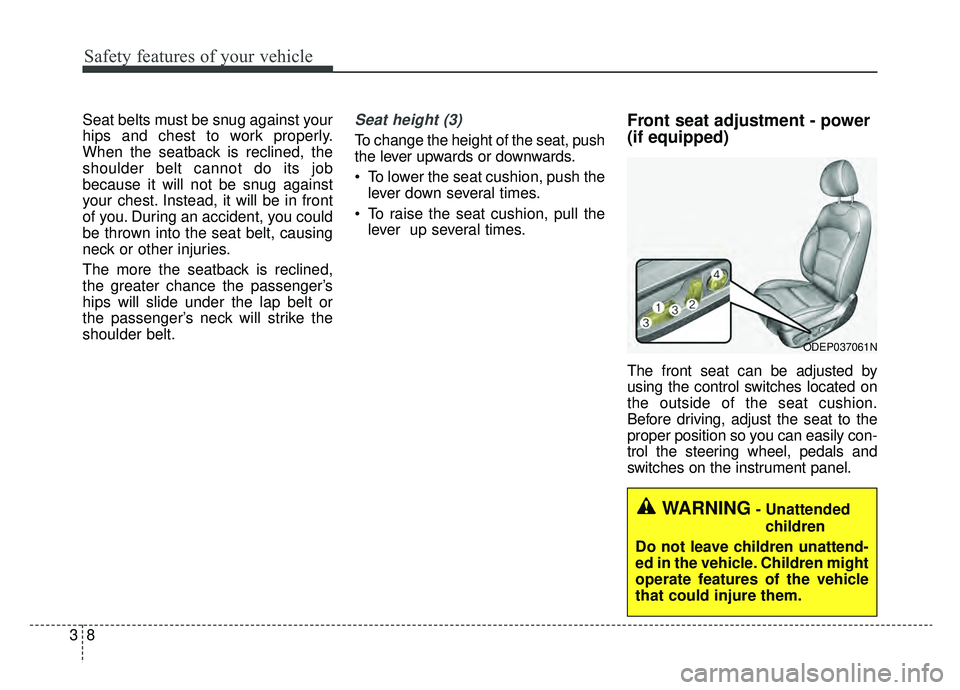
Front seat adjustment - power
(if equipped)
The front seat can be adjusted by
using the control switches located on
the outside of the seat cushion.
Before driving, adjust the seat to the
proper position so you can easily con-
trol the steering wheel, pedals and
switches on the instrument panel.
WARNING- Unattended
children
Do not leave children unattend-
ed in the vehicle. Children might
operate features of the vehicle
that could injure them.
ODEP037061N
Page 76 of 611
39
Safety features of your vehicle
Forward and backward (1)
Push the control switch forward or
backward to move the seat to the
desired position. Release the switch
once the seat reaches the desired
position.
Seatback angle (2)
Push the control switch forward or
backward to move the seatback to
the desired angle. Release the
switch once the seat reaches the
desired position.
Seat height (3)
Pull the front portion of the control
switch up to raise or press down to
lower the front part of the seat cush-
ion. Pull the rear portion of the con-
trol switch up to raise or press down
to lower the seat cushion. Release
the switch once the seat reaches the
desired position.
Lumbar support (for driver’s seat,if equipped) (4)
The lumbar support can be adjusted
by pressing the lumbar support
switch on the side of the seat.
1. Press the front portion of the switch to increase support, or the
rear portion of the switch, to
decrease support.
2. Release the switch once it reach- es the desired position.
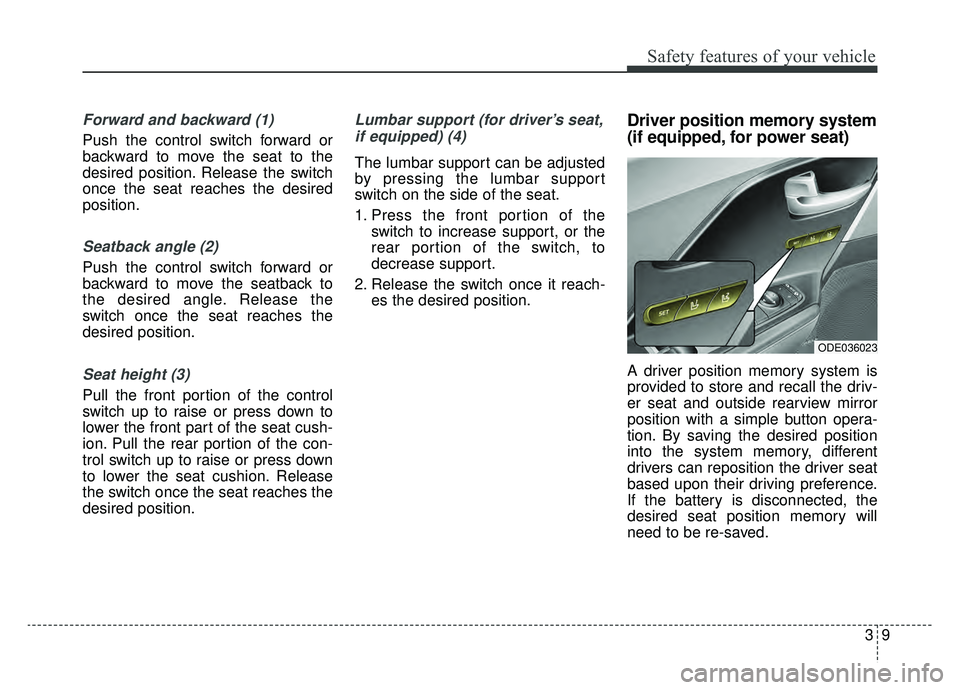
Driver position memory system
(if equipped, for power seat)
A driver position memory system is
provided to store and recall the driv-
er seat and outside rearview mirror
position with a simple button opera-
tion. By saving the desired position
into the system memory, different
drivers can reposition the driver seat
based upon their driving preference.
If the battery is disconnected, the
desired seat position memory will
need to be re-saved.
ODE036023
Page 77 of 611
Safety features of your vehicle
10
3
Storing positions into memory
using the buttons on the door
Storing driver’s seat positions
1. Shift the shift lever into P while the engine start/stop button is ON or
ignition switch is ON.
2. Adjust the driver’s seat and out- side rearview mirror comfortable
for the driver.
3. Press SET button on the control panel. The system will beep once.
4. Press one of the memory buttons (1 or 2) within 4 seconds after
pressing the SET button. The sys-
tem will beep twice when memory
has been successfully stored.
When recalling an adjustment mem-
ory button while sitting in the vehicle,
you can be surprised by the setting
chosen if the memory has been
adjusted by someone else. If that
occurs, immediately push the seat
position control knob in the direction
of the desired position to stop further
undesired movement. Recalling positions from memory
1. Shift the shift lever into P.
2. To recall the position in the memo-
ry, press the desired memory but-
ton (1 or 2). The system will beep
once, then the driver’s seat will
automatically adjust to the stored
position.
Adjusting the control switch for the
driver’s seat while the system is
recalling the stored position will
cause the movement to stop and
move in the direction that the control
switch is moved.
WARNING - Driver
Position Memory System
Never attempt to operate the
driver position memory system
while the vehicle is moving.
This could result in loss of con-
trol, and an accident causing
death or serious injury.