instrument cluster KIA NIRO 2020 Owner's Manual
[x] Cancel search | Manufacturer: KIA, Model Year: 2020, Model line: NIRO, Model: KIA NIRO 2020Pages: 687, PDF Size: 11.43 MB
Page 454 of 687
Driving your vehicle
144
5
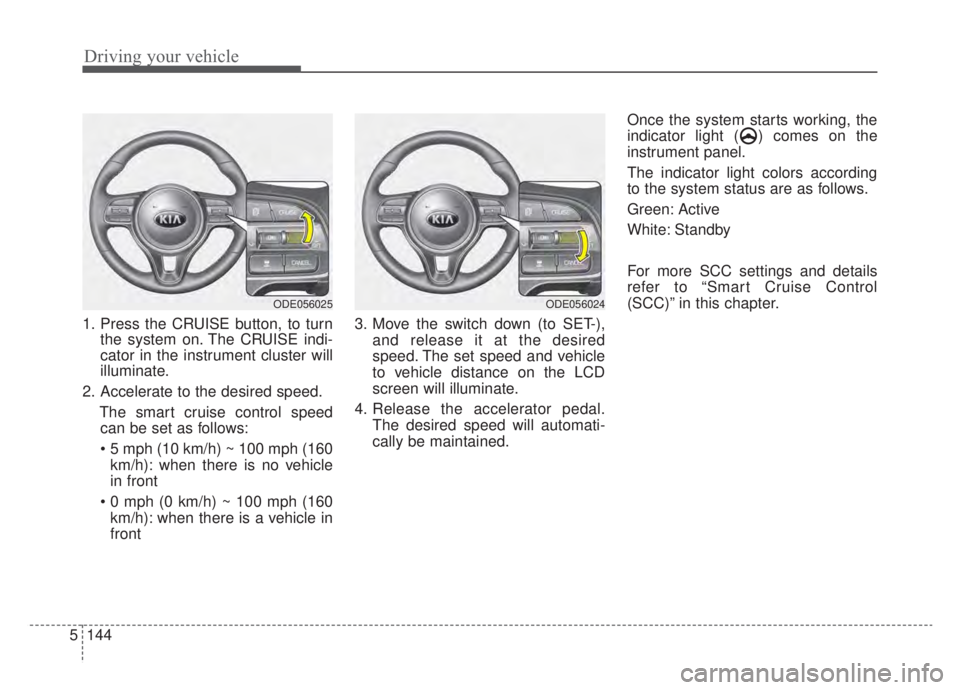
1. Press the CRUISE button, to turn
the system on. The CRUISE indi-
cator in the instrument cluster will
illuminate.
2. Accelerate to the desired speed. The smart cruise control speedcan be set as follows:
km/h): when there is no vehicle
in front
km/h): when there is a vehicle in
front 3. Move the switch down (to SET-),
and release it at the desired
speed. The set speed and vehicle
to vehicle distance on the LCD
screen will illuminate.
4. Release the accelerator pedal. The desired speed will automati-
cally be maintained. Once the system starts working, the
indicator light ( ) comes on the
instrument panel.
The indicator light colors according
to the system status are as follows.
Green: Active
White: Standby
For more SCC settings and details
refer to “Smart Cruise Control
(SCC)” in this chapter.
ODE056025ODE056024
Page 460 of 687
![KIA NIRO 2020 Owners Manual Driving your vehicle
150
5
Setting and activating HDA
system
With the ignition switch or ENGINE
START/STOP button in the [ON],
select or release the setting from
“User Setting → Driver Assistance](/img/2/55189/w960_55189-459.png "KIA NIRO 2020 Owners Manual Driving your vehicle
150
5
Setting and activating HDA
system
With the ignition switch or ENGINE
START/STOP button in the [ON],
select or release the setting from
“User Setting → Driver Assistance")
Driving your vehicle
150
5
Setting and activating HDA
system
With the ignition switch or ENGINE
START/STOP button in the [ON],
select or release the setting from
“User Setting → Driver Assistance
→Driving Assist → Highway Driving
Assist”.
Select HDA system in the User set-
ting of the instrument panel. and the
system will operate if the following
conditions are met :
If the engine is turned off then on
again, the system maintains the last
setting.
Operating conditions
If you activate HDA in the User set-
ting of the instrument panel. and the
following conditions are met, HDA
system will be ready to operate, and
the indicator light ( ) will come
on green in the cluster.
When driving on the highway main line.
When Smart Cruise Control is in operation (Vehicle deceleration
and acceleration control)
- Refer to “Smart Cruise Control(SCC)” in this chapter.
- If SCC is in standby mode (SCC is on but speed is not set), HDA
system will be in the same mode.
The white indicator ( ) light
will be turned on.
When the vehicle speed is below 95 mph (153 km/h)
HDA system operation
The speed is automatically set in
accordance with the steering control
and the highway speed limit when all
the operating conditions are met.
Page 503 of 687
611
What to do in an emergency
IF THE ENGINE OVERHEATS
If your temperature gauge indicates
overheating, you will experience a
loss of power, or hear loud pinging or
knocking, the engine is probably too
hot. If this happens, you should:
1. Turn on the emergency warningflasher and stop in a safe place.
Move the shift lever to P (Park)
and engage the parking brake.
2. If hot steam does not come out from the engine room, carefully
open the engine room and check
whether the water pump connec-
tor is properly engaged. If the con-
nector is not properly engaged,
stop the engine immediately and
properly engage the connector.
Then, turn the engine on.
3. Turn on the air conditioner. 4. If the “HEV Warning” light turns on
in the driver instrument cluster, or
engine coolant or hot steam emits
from the engine coolant filler, stop
the engine immediately. Then, call
the nearest authorized Kia dealer
for assistance. If the “Engine
Warning” light remains illuminated
or the engine coolant is not flowing
out, keep the engine running.
Open the engine hood for ventila-
tion to help cool down the engine. 5. Check whether the engine coolant
temperature is low enough by
checking its temperature. If the
engine coolant level is low, please
check the connecting parts
between the radiator hose, heater
hose, and water pump for any signs
of leakage. When there is no sign of
leakage, please refill the engine
coolant. If causes and signs of
engine overheating such as warn-
ing light illumination, engine coolant
leakage, or cooling fan malfunction
are found, stop the vehicle the ear-
liest. Then, call the nearest author-
ized Kia dealer for assistance.
WARNING- Under the
Hood
While the engine is running,
keep hair, hands and clothing
away from moving parts such
as the fan and drive belts to pre-
vent injury.
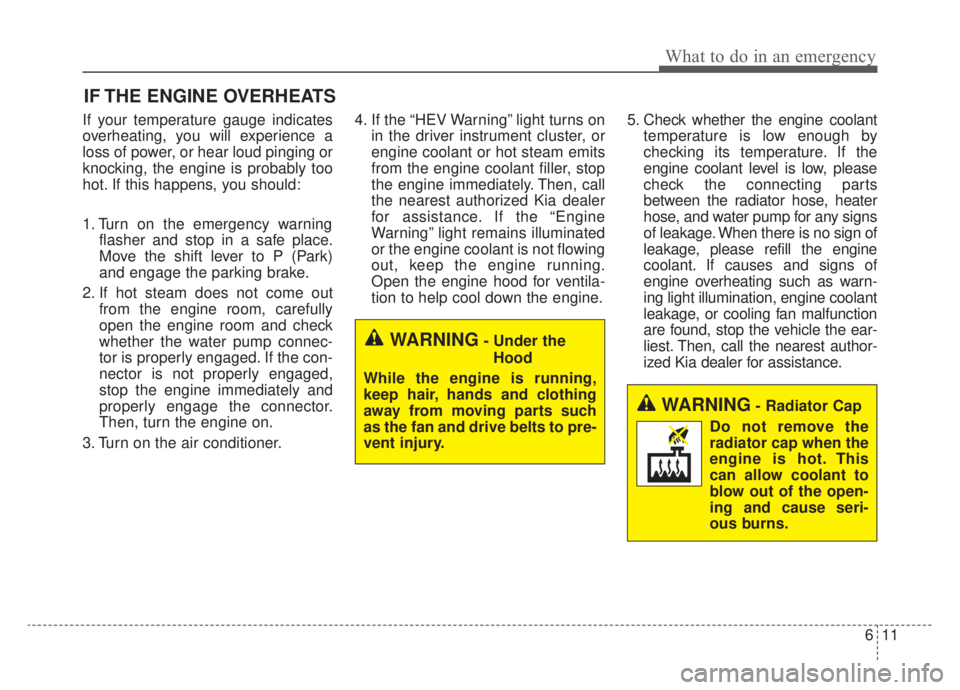
WARNING- Radiator Cap
Do not remove the
radiator cap when the
engine is hot. This
can allow coolant to
blow out of the open-
ing and cause seri-
ous burns.
Page 597 of 687
761
Maintenance
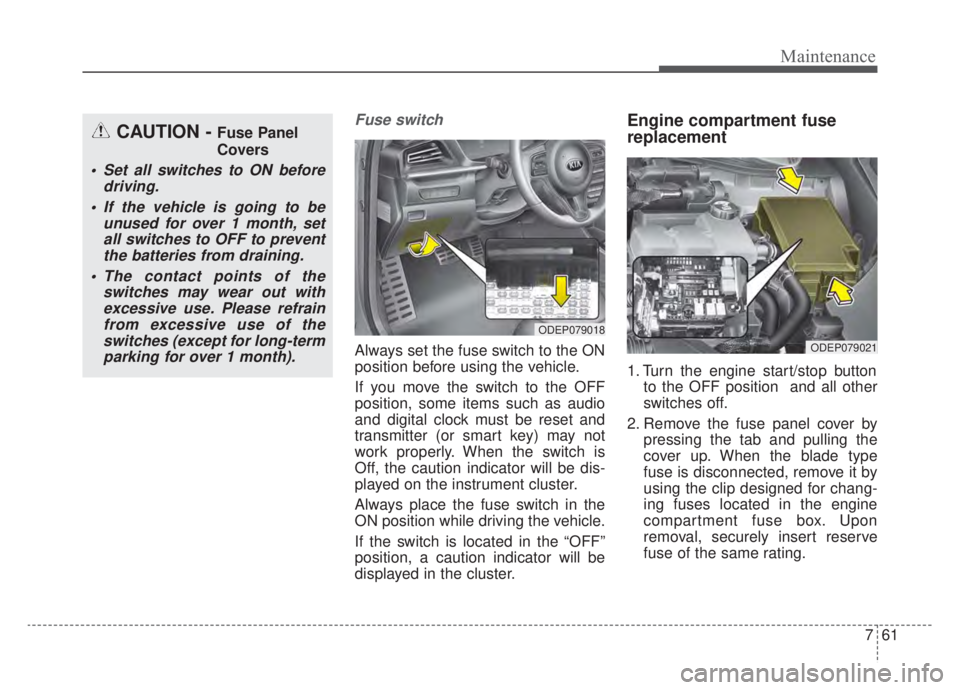
Fuse switch
Always set the fuse switch to the ON
position before using the vehicle.
If you move the switch to the OFF
position, some items such as audio
and digital clock must be reset and
transmitter (or smart key) may not
work properly. When the switch is
Off, the caution indicator will be dis-
played on the instrument cluster.
Always place the fuse switch in the
ON position while driving the vehicle.
If the switch is located in the “OFF”
position, a caution indicator will be
displayed in the cluster.
Engine compartment fuse
replacement
1. Turn the engine start/stop buttonto the OFF position and all other
switches off.
2. Remove the fuse panel cover by pressing the tab and pulling the
cover up. When the blade type
fuse is disconnected, remove it by
using the clip designed for chang-
ing fuses located in the engine
compartment fuse box. Upon
removal, securely insert reserve
fuse of the same rating.
ODEP079018
ODEP079021
CAUTION - Fuse Panel
Covers
Set all switches to ON beforedriving.
If the vehicle is going to be unused for over 1 month, setall switches to OFF to preventthe batteries from draining.
The contact points of the switches may wear out withexcessive use. Please refrainfrom excessive use of theswitches (except for long-termparking for over 1 month).
Page 602 of 687

Maintenance
66
7
Instrument panel (Driver’s side fuse panel) (Hybrid)
Fuse NameFuse ratingCircuit Protected
MODULE 510AElectro Chromic Mirror, Audio/Video & Navigation Head Unit, Audio, Shift Lever Indicator, Air Conditioner
Control Module, Rear Seat Warmer Control Module, Front Air Ventilation Seat Control Module, Front Seat
Warmer Control Module, Head Lamp Leveling Device Actuator LH/RH, Crash Pad Switch, AMP (Amplifier)
MODULE 410ALane Keeping Assist Control Module, Crash Pad Switch, Blind-Spot Collision Warning (BCW) Radar Left
Handle side/Right Handle side, EPB, VESS, Front Seat Warmer Control Module
INTERIOR
LAMP10AFront Vanity Lamp LH/RH, Room Lamp, Overhead Console Lamp, Luggage Lamp, Mood Lamp, BCM,
Wireless Charger
A/BAG15APassenger Occupant Detection Sensor, ACU
IG 125AEngine Room Junction Block (Fuse - DCT4, HPCU2, ACTIVE HYDRAULIC BOOSTER3, ECU3)
CLUSTER10AInstrument Cluster
MODULE 310ABCM (Body Control Module), DCT (Dual Clutch Transmission) Shift Lever, Stop Lamp Switch, Driver Door
Module, Passenger Door Module
MEMORY 27.5AActive Air Flap Unit, VESS
MODULE 810AActive Air Flap Unit, Electric Water Pump (Engine), Engine Room Junction Block (Battery C/Fan Relay),
BMS (Battery Management System) Control Module
A/BAG IND7.5AAir Conditioner Control Module, Instrument Cluster
START7.5A[With Smart Key/With Immobilizer] Inhibitor Switch
Page 603 of 687

767
Maintenance
Fuse NameFuse ratingCircuit Protected
MODULE 210AEngine Room Junction Block (Power Outlet Relay), Wireless Charger, BCM (Body Control Module), USB
Charger, Smart Key Control Module, Audio, BMS (Battery Management System) Control Module,
Audio/Video & Navigation Head Unit, Driver Power Outside Mirror Switch, AMP (Amplifier)
PDM 37.5A[Without Smart Key] Immobilizer Module
[With Smart Key] Smart Key Control Module
MEMORY 110AInstrument Cluster, Driver IMS (Integrated memory system) Module, BCM (Body Control Module), Air
Conditioner Control Module, Auto Light & Photo Sensor, Driver Door Module, Passenger Door Module,
ECM (Electric Chromic Mirror)
MULTI MEDIA15AAudio, Audio/Video & Navigation Head Unit
EWP10AElectric Water Pump (HEV)
MDPS7.5AMDPS (Motor Driven Power Steering) Unit
TAIL GATE10ATail Gate Relay, ICM Relay Box (Fuel Filler Door Relay), Fuel Filler Switch
PDM 115ASmart Key Control Module
MODULE 77.5AFront Seat Warmer Control Module, AC Inverter (110V), Front Air Ventilation Seat Control Module, Rear
Seat Warmer Module, AC Inverter Module
WIPER (RR)15AEngine Room Junction Block (Wiper RR Relay), Rear Wiper Motor
HEATED
STEERING15ABCM (Body Control Module)
SUNROOF20ASunroof Motor
Page 606 of 687

Maintenance
70
7
Instrument panel (Driver’s side fuse panel) (Plug-in Hybrid)
Fuse NameFuse ratingCircuit Protected
MODULE 510A
Electro Chromic Mirror, Audio/Video & Navigation Head Unit, Audio, VESS (Virtual Engine Sound System)
Unit, Air Conditioner Control Module, Rear Seat Warmer Control Module, Front Air Ventilation Seat Control
Module, Front Seat Warmer Control Module, Head Lamp Leveling Device Actuator LH/RH, Crash Pad
Switch, AMP (Amplifier)
MODULE 410ALane Keeping Assist Control Module, Crash Pad Switch, Blind-Spot Collision Warning (BCW) Radar Left
Handle side/Right Handle side, EPB, VESS, Front Seat Warmer Control Module
INTERIOR
LAMP10AFront Vanity Lamp LH/RH, Room Lamp, Overhead Console Lamp, Door Warning Switch, Luggage Lamp,
Wireless Charger, Mood Lamp, BCM
A/BAG15APassenger Occupant Detection Sensor, ACU
IG 125AEngine Room Junction Block (Fuse - DCT4, HPCU2, ACTIVE HYDRAULIC BOOSTER3)
CLUSTER10AInstrument Cluster
MODULE 310ABCM (Body Control Module), DCT (Dual Clutch Transmission) Shift Lever, Stop Lamp Switch, Driver Door
Module, Passenger Door Module
IG3 210AFuel Filler Door & Battery Charger Switch, Instument Cluster, Audio, Charger Indicator, Integrated Gateway
Power control Module, Audio/Video & Navigation Head Unit
MEMORY 27.5AActive Air Flap Unit, VESS
MODULE 810AActive Air Flap Unit, Electric Water Pump (Engine)
A/BAG IND7.5AAir Conditioner Control Module, Instrument Cluster
Page 607 of 687

771
Maintenance
Fuse NameFuse ratingCircuit Protected
START7.5AINHIBITOR SW
MODULE 210AEngine Room Junction Block (Power Outlet Relay), Wireless Charger, BCM (Body Control Module), USB
Charger, Smart Key Control Module, Audio, Audio / Video & Navigation Head Unit, Power Outside Mirror
Switch, AMP (Amplifier)
PDM37.5AImmobilizer Module, Smart Key Control Module
MEMORY 110AInstrument Cluster, Driver IMS (Integrated memory system) Module, BCM (Body Control Module), Air
Conditioner Control Module, Auto Light & Photo Sensor, Driver Door Module, Passenger Door Module,
ECM (Electric Chromic Mirror)
MULTI MEDIA15AAudio, Audio / Video & Navigation Head Unit
IG3 410AOBC (On-Board Charger) Unit, TCM (Transmission Control Module), ECM (Engine Control Module), HPCU
(Hybrid Power Control Unit)
IG3 310AElectric Water Pump (PHEV)
IG3 515ATransmission Range Switch, BMS (Battery Management System) Control Module, Engine Room Junction
Block (Battery C/Fan Relay)
IG3 120AICM Relay Box (IG3 #1, IG3 #2, IG3 #3 Relay)
MDPS7.5AMDPS (Motor Driven Power Steering) Unit
TAIL GATEOPEN10ATail Gate Relay, ICM Relay Box (Fuel Filler Door Relay, Charger Connector Lock/Unlock Relay), Fuel Filler
& Battery Charger Switch, Charge Connector Lamp
PDM 115ASmart Key Control Module
Page 681 of 687
Index
6I
Important safety precautions . . . . . . . . . . . . . . . . . . . . . 3-2Air bag hazards . . . . . . . . . . . . . . . . . . . . . . . . . . . . . 3-2
Always wear your seat belt . . . . . . . . . . . . . . . . . . . . 3-2
Control your speed . . . . . . . . . . . . . . . . . . . . . . . . . . . 3-3
Driver distraction . . . . . . . . . . . . . . . . . . . . . . . . . . . . 3-2
Keep your vehicle in safe condition. . . . . . . . . . . . . . 3-3
Restrain all children . . . . . . . . . . . . . . . . . . . . . . . . . . 3-2
In case of an emergency while driving . . . . . . . . . . . . . . 6-3 If the engine stalls at a crossroad or crossing . . . . . . 6-3
If the engine stalls while driving . . . . . . . . . . . . . . . . 6-3
If you have a flat tire while driving . . . . . . . . . . . . . . 6-3
Infotainment system . . . . . . . . . . . . . . . . . . . . . . . . . . 4-168 Antenna . . . . . . . . . . . . . . . . . . . . . . . . . . . . . . . . . 4-168
How vehicle radio works . . . . . . . . . . . . . . . . . . . . 4-169
USB port. . . . . . . . . . . . . . . . . . . . . . . . . . . . . . . . . 4-168
Instrument cluster . . . . . . . . . . . . . . . . . . . . . . . . . . . . . 4-57 Dual clutch transmission shift indicator . . . . . . . . . 4-65
Gauges . . . . . . . . . . . . . . . . . . . . . . . . . . . . . . . . . . . 4-\
59
Instrument cluster control . . . . . . . . . . . . . . . . . . . . 4-59
Instrument panel overview . . . . . . . . . . . . . . . . . . . . . . . 2-5
Interior features. . . . . . . . . . . . . . . . . . . . . . . . . . . . . . 4-154 Air ventilation seat . . . . . . . . . . . . . . . . . . . . . . . . . 4-156
Cargo security screen . . . . . . . . . . . . . . . . . . . . . . . 4-164
Clothes hanger . . . . . . . . . . . . . . . . . . . . . . . . . . . . 4-162
Cup holder . . . . . . . . . . . . . . . . . . . . . . . . . . . . . . . 4-154
Floor mat anchor(s) . . . . . . . . . . . . . . . . . . . . . . . . 4-163
Luggage net holder. . . . . . . . . . . . . . . . . . . . . . . . . 4-164
Power outlet . . . . . . . . . . . . . . . . . . . . . . . . . . . . . . 4-157 Seat warmer . . . . . . . . . . . . . . . . . . . . . . . . . . . . . . 4-154
Sunvisor . . . . . . . . . . . . . . . . . . . . . . . . . . . . . . . . . 4-157
USB charger . . . . . . . . . . . . . . . . . . . . . . . . . . . . . . 4-158
Wireless smart phone charging system . . . . . . . . . 4-159
Interior lights . . . . . . . . . . . . . . . . . . . . . . . . . . . . . . . 4-126 Automatic turn off function . . . . . . . . . . . . . . . . . . 4-126
Liftgate room lamp. . . . . . . . . . . . . . . . . . . . . . . . . 4-128
Map lamp . . . . . . . . . . . . . . . . . . . . . . . . . . . . . . . . 4-126
Room lamp . . . . . . . . . . . . . . . . . . . . . . . . . . . . . . . 4-127
Vanity mirror lamp . . . . . . . . . . . . . . . . . . . . . . . . . 4-128
Interior overview. . . . . . . . . . . . . . . . . . . . . . . . . . . . . . . 2-4
Key positions . . . . . . . . . . . . . . . . . . . . . . . . . . . . . . . . . 5-7 Ignition switch position . . . . . . . . . . . . . . . . . . . . . . . 5-7
Illuminated ignition switch . . . . . . . . . . . . . . . . . . . . 5-7
Starting the hybrid system . . . . . . . . . . . . . . . . . . . . . 5-9
Lane Following Assist (LFA) . . . . . . . . . . . . . . . . . . . 5-142 LFA system malfunction . . . . . . . . . . . . . . . . . . . . 5-146
LFA system operation . . . . . . . . . . . . . . . . . . . . . . 5-143
Limitation of the system . . . . . . . . . . . . . . . . . . . . 5-147
Lane Keeping Assist (LKA) . . . . . . . . . . . . . . . . . . . . . 5-87 Lane Keeping Assist system malfunction . . . . . . . . 5-93
LKA activation . . . . . . . . . . . . . . . . . . . . . . . . . . . . . 5-90
K
L