brake KIA NIRO 2021 Owners Manual
[x] Cancel search | Manufacturer: KIA, Model Year: 2021, Model line: NIRO, Model: KIA NIRO 2021Pages: 710, PDF Size: 14.77 MB
Page 404 of 710
581
Driving your vehicle
When the front view camera
(including lens) or front radar is
damaged.
If not using headlamp or using
weak light in the night or in a tun-
nel.
Backlight is shining in the driving
direction of the vehicle. (Including
oncoming vehicle headlights.)
When the rear part of the front
vehicle is small or low.
When a trailer or other vehicle is
towing the front vehicle.
When the ground clearance of the
front vehicle is high.
When a front vehicle makes sud-
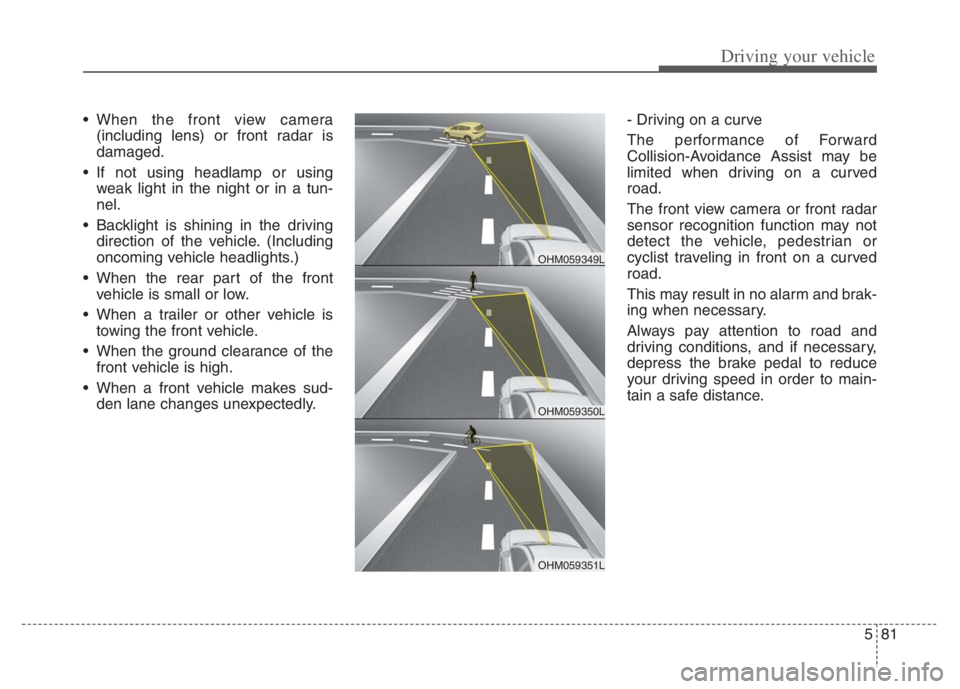
den lane changes unexpectedly.- Driving on a curve
The performance of Forward
Collision-Avoidance Assist may be
limited when driving on a curved
road.
The front view camera or front radar
sensor recognition function may not
detect the vehicle, pedestrian or
cyclist traveling in front on a curved
road.
This may result in no alarm and brak-
ing when necessary.
Always pay attention to road and
driving conditions, and if necessary,
depress the brake pedal to reduce
your driving speed in order to main-
tain a safe distance.
OHM059350L
OHM059349L
OHM059351L
Page 405 of 710
Driving your vehicle
82 5
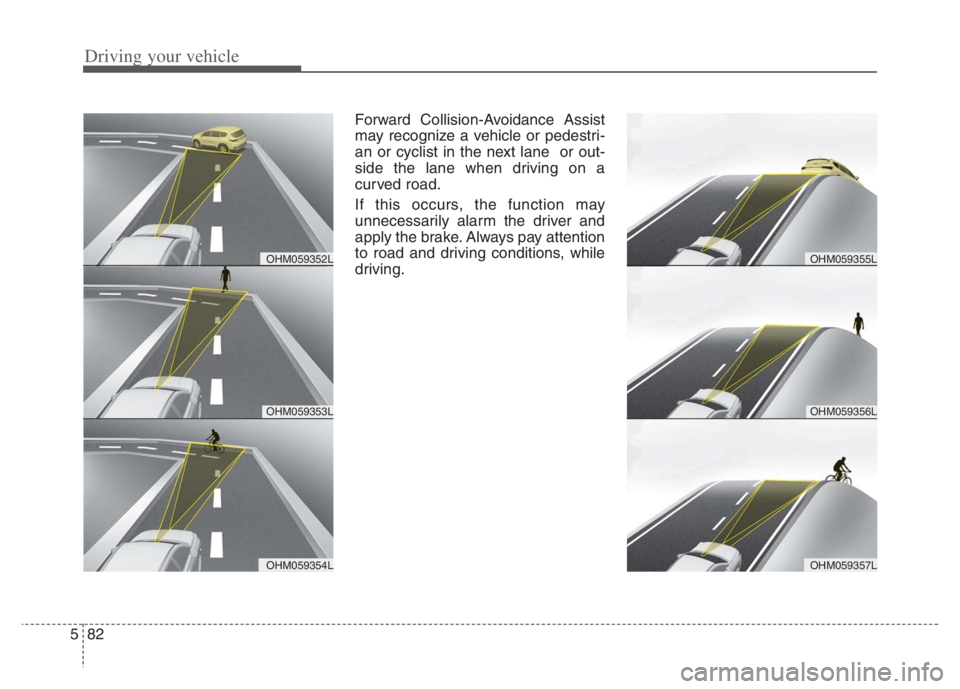
Forward Collision-Avoidance Assist
may recognize a vehicle or pedestri-
an or cyclist in the next lane or out-
side the lane when driving on a
curved road.
If this occurs, the function may
unnecessarily alarm the driver and
apply the brake. Always pay attention
to road and driving conditions, while
driving.
OHM059353L
OHM059352L
OHM059354L
OHM059356L
OHM059355L
OHM059357L
Page 406 of 710
583
Driving your vehicle
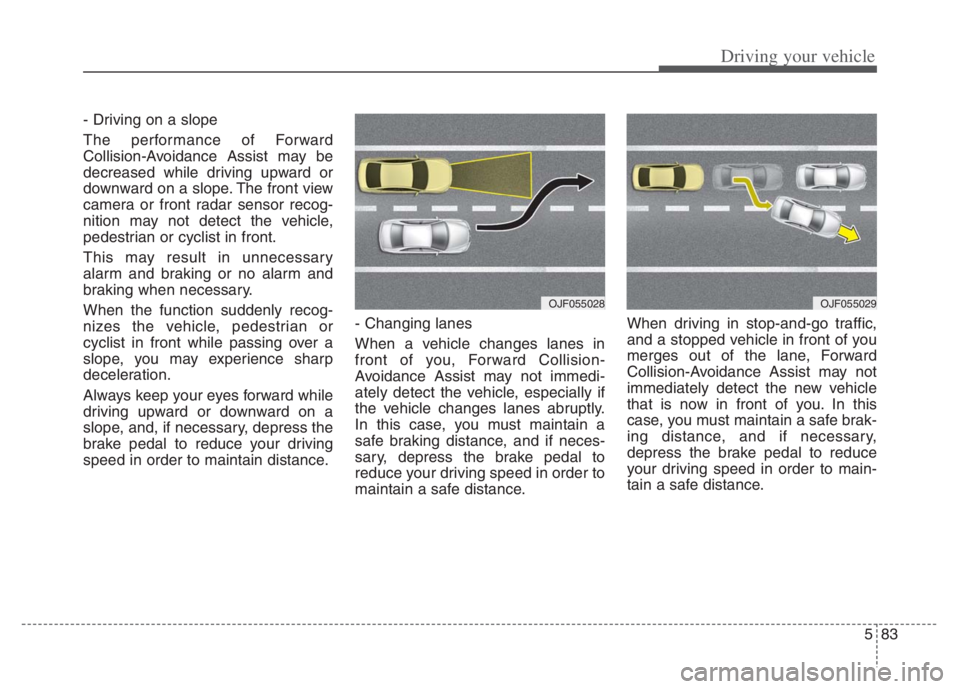
- Driving on a slope
The performance of Forward
Collision-Avoidance Assist may be
decreased while driving upward or
downward on a slope. The front view
camera or front radar sensor recog-
nition may not detect the vehicle,
pedestrian or cyclist in front.
This may result in unnecessary
alarm and braking or no alarm and
braking when necessary.
When the function suddenly recog-
nizes the vehicle, pedestrian or
cyclist in front while passing over a
slope, you may experience sharp
deceleration.
Always keep your eyes forward while
driving upward or downward on a
slope, and, if necessary, depress the
brake pedal to reduce your driving
speed in order to maintain distance.- Changing lanes
When a vehicle changes lanes in
front of you, Forward Collision-
Avoidance Assist may not immedi-
ately detect the vehicle, especially if
the vehicle changes lanes abruptly.
In this case, you must maintain a
safe braking distance, and if neces-
sary, depress the brake pedal to
reduce your driving speed in order to
maintain a safe distance.When driving in stop-and-go traffic,
and a stopped vehicle in front of you
merges out of the lane, Forward
Collision-Avoidance Assist may not
immediately detect the new vehicle
that is now in front of you. In this
case, you must maintain a safe brak-
ing distance, and if necessary,
depress the brake pedal to reduce
your driving speed in order to main-
tain a safe distance.
OJF055028OJF055029
Page 407 of 710
Driving your vehicle
84 5
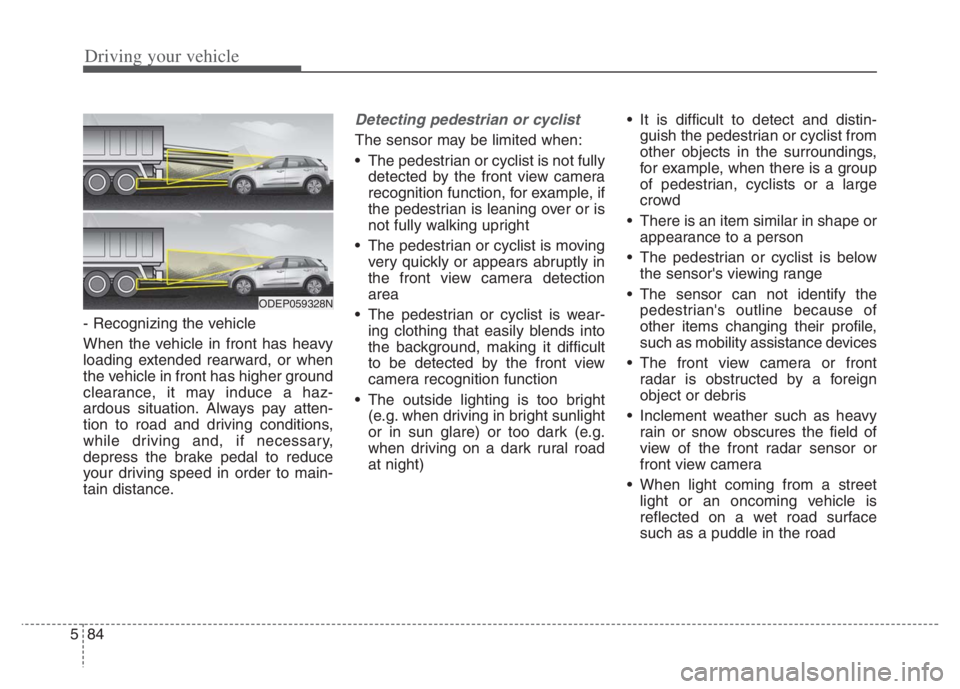
- Recognizing the vehicle
When the vehicle in front has heavy
loading extended rearward, or when
the vehicle in front has higher ground
clearance, it may induce a haz-
ardous situation. Always pay atten-
tion to road and driving conditions,
while driving and, if necessary,
depress the brake pedal to reduce
your driving speed in order to main-
tain distance.
Detecting pedestrian or cyclist
The sensor may be limited when:
The pedestrian or cyclist is not fully
detected by the front view camera
recognition function, for example, if
the pedestrian is leaning over or is
not fully walking upright
The pedestrian or cyclist is moving
very quickly or appears abruptly in
the front view camera detection
area
The pedestrian or cyclist is wear-
ing clothing that easily blends into
the background, making it difficult
to be detected by the front view
camera recognition function
The outside lighting is too bright
(e.g. when driving in bright sunlight
or in sun glare) or too dark (e.g.
when driving on a dark rural road
at night) It is difficult to detect and distin-
guish the pedestrian or cyclist from
other objects in the surroundings,
for example, when there is a group
of pedestrian, cyclists or a large
crowd
There is an item similar in shape or
appearance to a person
The pedestrian or cyclist is below
the sensor's viewing range
The sensor can not identify the
pedestrian's outline because of
other items changing their profile,
such as mobility assistance devices
The front view camera or front
radar is obstructed by a foreign
object or debris
Inclement weather such as heavy
rain or snow obscures the field of
view of the front radar sensor or
front view camera
When light coming from a street
light or an oncoming vehicle is
reflected on a wet road surface
such as a puddle in the road
ODEP059328N
Page 416 of 710

593
Driving your vehicle
LKA failure indicator
LKA failure indicator (yellow) will illu-
minate if LKA is not working properly.
If this occurs, have the system
checked by an authorized Kia dealer.LKA will be canceled when:
You change lanes with the turn sig-
nal.
- Using the turn signal to change
lanes.
- If you change lanes without the
turn signal on, the steering wheel
might be controlled.
LKA can transit to steering assist
mode when the car is near to mid-
dle of the lane after function on or
the lane was changed. LKA can
not assist steering if the vehicle fol-
lows lane marker too close contin-
uously before transition to steering
assist mode.
The control of ESC (Electronic
Stability Control) or VSM (Vehicle
Stability Management) is activated.
The steering will not be assisted
when your drive fast on a sharp
curve. The steering will not be assisted
when vehicle speed is below 34
mph (55 km/h) and over 125 mph
(200 km/h).
The steering will not be assisted
when you change lanes fast.
The steering will not be assisted
when you brake suddenly.
The steering will not be assisted
when the lane is very wide or nar-
row.
The steering will not be assisted
when only one side lane marker is
detected.
There are more than two lane
markers such as a construction
area.
Radius of a curve is too small.
When you turn steering wheel sud-
denly, LKA will be disabled tem-
porarily.
Driving on a steep slope or hill.
Page 427 of 710

Driving your vehicle
104 5
The vehicle drives on a curved road.
The vehicle drives through a tollgate.
The road pavement (or the periph-
eral ground) abnormally contains
metallic components (i.e. possibly
due to subway construction).
There is a fixed object near the
vehicle, such as a guardrail.
While going down or up a steep
road where the height of the lane is
different.
Driving on a narrow road where
trees or grass or overgrown.
Driving in rural areas where the
sensor does not detect another
vehicle or structure for an extended
period of time.
Driving on a wet road.
Driving on a road where the guardrail
or wall is in double structure.
A big vehicle is near such as a bus
or truck.
When the other vehicle approach-
es very close.
When the other vehicle passes at a
very fast speed. While changing lanes.
If the vehicle has started at the
same time as the vehicle next to
you and has accelerated.
When the vehicle in the next lane
moves two lanes away from you
OR when the vehicle two lanes
away moves to the next lane from
you.
A motorcycle or bicycle is near.
A flat trailer is near.
If there are small objects in the
detecting area such as a shopping
cart or a baby stroller.
If there is a low height vehicle such
as a sports car.
The brake pedal is depressed.
ESC (Electronic Stability Control)
is activated.
ESC (Electronic Stability Control)
malfunctions.
The tire pressure is low or a tire is
damaged.
The brake is reworked. The vehicle abruptly changes driv-
ing direction.
The vehicle makes sharp lane
changes.
The vehicle sharply stops.
Temperature is extremely low
around the vehicle.
The vehicle severely vibrates while
driving over a bumpy road,
uneven/bumpy road, or concrete
patch.
The vehicle drives on a slippery
surface due to snow, water puddle,
or ice.
Lane Departure Warning or Lane
Keeping Assist do not operate nor-
mally.
For more information refer to “Lane
Keeping Assist (LKA)” in this chap-
ter.
Page 438 of 710

5115
Driving your vehicle
✽ ✽
NOTICE
• During normal Cruise Control
operation, when the SET switch is
activated or reactivated after apply-
ing the brakes, Cruise Control will
energize after approximately 3 sec-
onds. This delay is normal.
• To activate Cruise Control, depress
the brake pedal at least once after
placing the ignition switch or
ENGINE START/STOP button to
the ON position or starting the
engine. This is to check if the brake
switch which is important part to
cancel Cruise Control is in normal
condition.
Driving Assist button
CRUISE : Turns Cruise Control on or
off.
RES+ :Resumes or increases
Cruise Control speed.
SET- : Sets or decreases Cruise
Control speed.
CANCEL :Cancels Cruise Control
operation.
To set Cruise Control speed:
1. Press the Driving Assist button on
the steering wheel, to turn the
function on. The cruise indicator
light will illuminate.
2. Accelerate to the desired speed,
which must be more than approxi-
mately 20 mph (30 km/h).
ODE056019ODE056019
Page 440 of 710
5117
Driving your vehicle
To temporarily accelerate with
Cruise Control on:
If you want to speed up temporarily
when Cruise Control is on, depress
the accelerator pedal. Increased
speed will not interfere with Cruise
Control operation or change the set
speed.
To return to the set speed, take your
foot off the accelerator pedal.
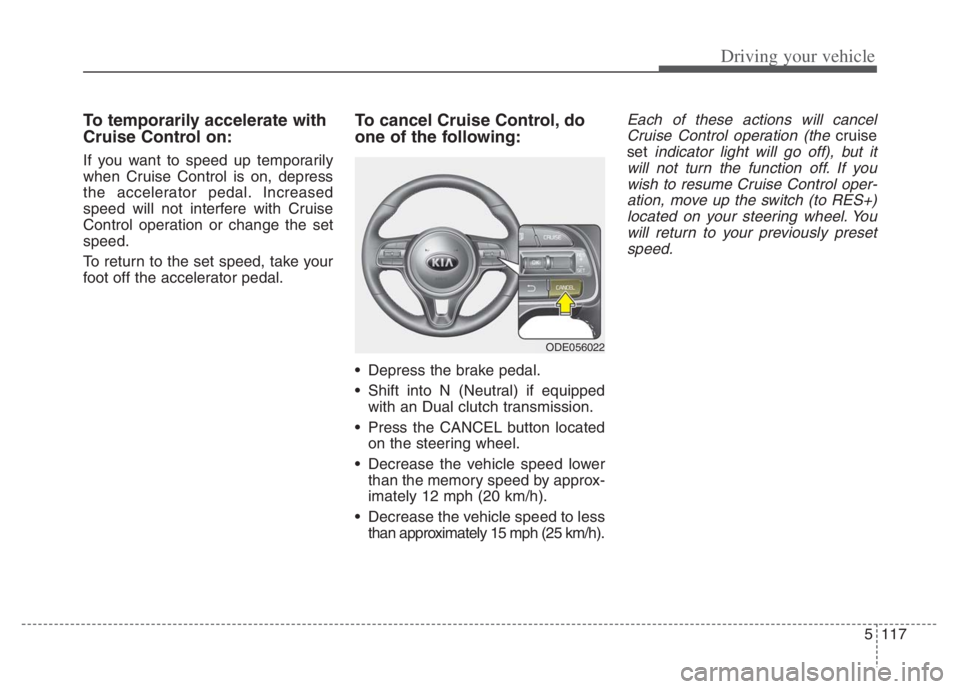
To cancel Cruise Control, do
one of the following:
Depress the brake pedal.
Shift into N (Neutral) if equipped
with an Dual clutch transmission.
Press the CANCEL button located
on the steering wheel.
Decrease the vehicle speed lower
than the memory speed by approx-
imately 12 mph (20 km/h).
Decrease the vehicle speed to less
than approximately 15 mph (25 km/h).
Each of these actions will cancel
Cruise Control operation (the
cruise
set
indicator light will go off), but it
will not turn the function off. If you
wish to resume Cruise Control oper-
ation, move up the switch (to RES+)
located on your steering wheel. You
will return to your previously preset
speed.
ODE056022
Page 442 of 710

5119
Driving your vehicle
➀Cruise indicator ( CRUISE)
➁Set speed
➂Vehicle distance
Smart Cruise Control allows you to
program the vehicle to maintain con-
stant speed and distance detecting
the vehicle ahead without depressing
the accelerator or brake pedal.
To see SCC screen on the LCD dis-
play on the cluster, select Driving
Assist ( ). For more informations,
refer to “LCD Display Modes” in
chapter 4.
✽ ✽
NOTICE
To activate Smart Cruise Control,
depress the brake pedal at least once
after placing the ignition switch or
ENGINE START/STOP button to
the ON position or starting the
engine. This is to check if the brake
switch which is important part to
cancel Smart Cruise Control is in
normal condition.
Driving Assist button
CRUISE : Turns Smart Cruise
Control on or off.
RES + : Sets or increases Smart
Cruise Control speed.
SET - : Sets or decreases Smart
Cruise Control speed.
: Sets vehicle distance
CANCEL :Cancels Smart Cruise
Control operation.
SMART CRUISE CONTROL (SCC) (IF EQUIPPED)
WARNING
For your safety, please read the
owner's manual before using
Smart Cruise Control.
ODEP059080N
Page 444 of 710

5121
Driving your vehicle
SCC Not Operating Conditions
The driver’s door is opened.
The vehicle is shifted to N (Neutral)
/ R (Reverse) / P (Parking).
The parking brake is applied.
The vehicle speed is not within the
specified SCC range.
The ESC (Electronic Stability
Control), TCS (Traction Control
System)or ABS is operating. The ESC (Electronic Stability
Control), TCS (Traction Control
System)or ABS is off.
The ESC (Electronic Stability
Control), TCS (Traction Control
System)or ABS is operating.
The sensor cover is extremely con-
taminated.
The engine performance is abnor-
mal.
Forward Collision-Avoidance
Assist is activated.
The engine RPM is in the red zone.
The front radar is abnormal.
To increase Smart Cruise Control
set speed:
Follow either of these procedures:
Push the switch up (to RES+), and
hold it. Your vehicle set speed will
increase by 5 mph (10 km/h).
Release the switch at the speed
you want.
Push the switch up (to RES+), and
release it immediately. The cruising
speed will increase by 1.0 mph (1.0
km/h) each time you move the
switch up (to RES+) in this manner.
OYG059346L
ODE056025