service KIA NIRO 2021 User Guide
[x] Cancel search | Manufacturer: KIA, Model Year: 2021, Model line: NIRO, Model: KIA NIRO 2021Pages: 710, PDF Size: 14.77 MB
Page 218 of 710

Features of your vehicle
78 4
LCD Display Modes
RangeRoute Guidance
Control
Assist
Warning
AssistDriver AssistanceThe Master Warning
mode displays warn-
ing messages related
to the vehicle when
one or more functions
is not operating nor-
mally.
Fuel EconomyDestination InfoDoor
Accumulated InfoLights
Drive InfoSound
Digital SpeedometerConvenience
Driving StyleDriver Attention
WarningService Interval
Energy FlowTPMSOther
Engine TemperatureLanguage
Reset
Mode
Trip Computer TBT Driving Assist User Settings
Master warning
Up/Down
❈ ❈
The information provided may differ depending on which functions are applicable to your vehicle.
Page 221 of 710
481
Features of your vehicle
User settings mode (if equipped)
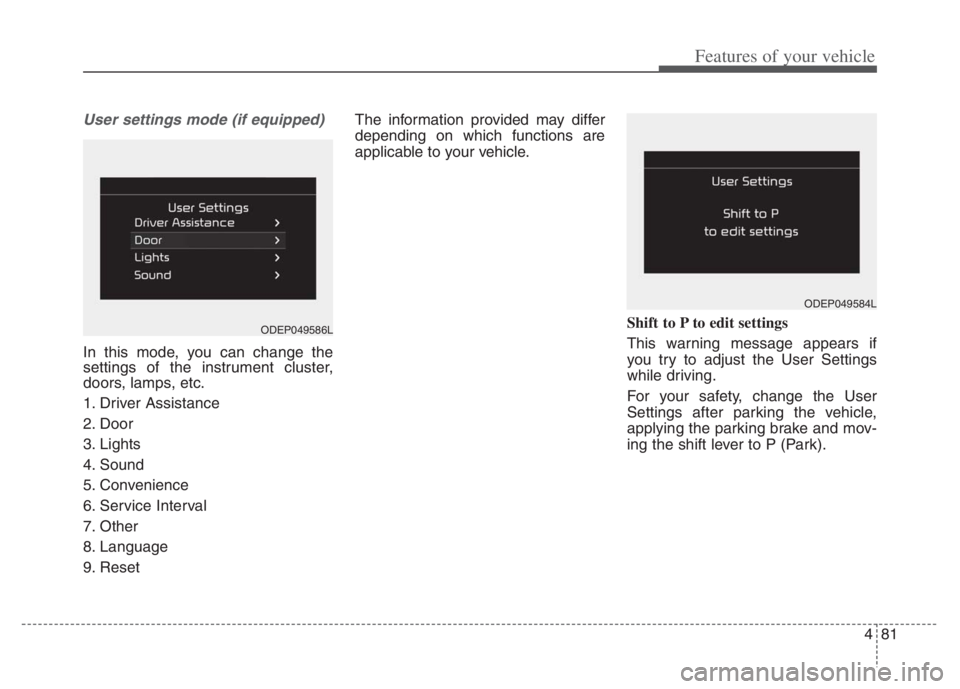
In this mode, you can change the
settings of the instrument cluster,
doors, lamps, etc.
1. Driver Assistance
2. Door
3. Lights
4. Sound
5. Convenience
6. Service Interval
7. Other
8. Language
9. ResetThe information provided may differ
depending on which functions are
applicable to your vehicle.
Shift to P to edit settings
This warning message appears if
you try to adjust the User Settings
while driving.
For your safety, change the User
Settings after parking the vehicle,
applying the parking brake and mov-
ing the shift lever to P (Park).
ODEP049584L
ODEP049586L
Page 227 of 710
487
Features of your vehicle
ItemsExplanation
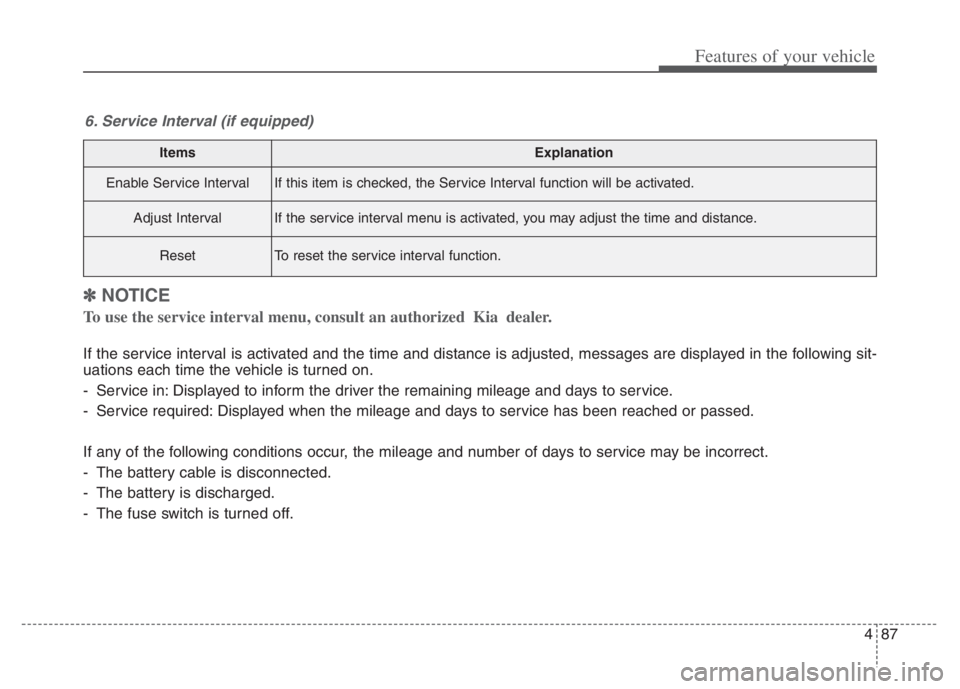
Enable Service IntervalIf this item is checked, the Service Interval function will be activated.
Adjust IntervalIf the service interval menu is activated, you may adjust the time and distance.
ResetTo reset the service interval function.
6. Service Interval (if equipped)
✽ ✽
NOTICE
To use the service interval menu, consult an authorized Kia dealer.
If the service interval is activated and the time and distance is adjusted, messages are displayed in the following sit-
uations each time the vehicle is turned on.
- Service in: Displayed to inform the driver the remaining mileage and days to service.
- Service required: Displayed when the mileage and days to service has been reached or passed.
If any of the following conditions occur, the mileage and number of days to service may be incorrect.
- The battery cable is disconnected.
- The battery is discharged.
- The fuse switch is turned off.
Page 229 of 710
489
Features of your vehicle
ItemsExplanation
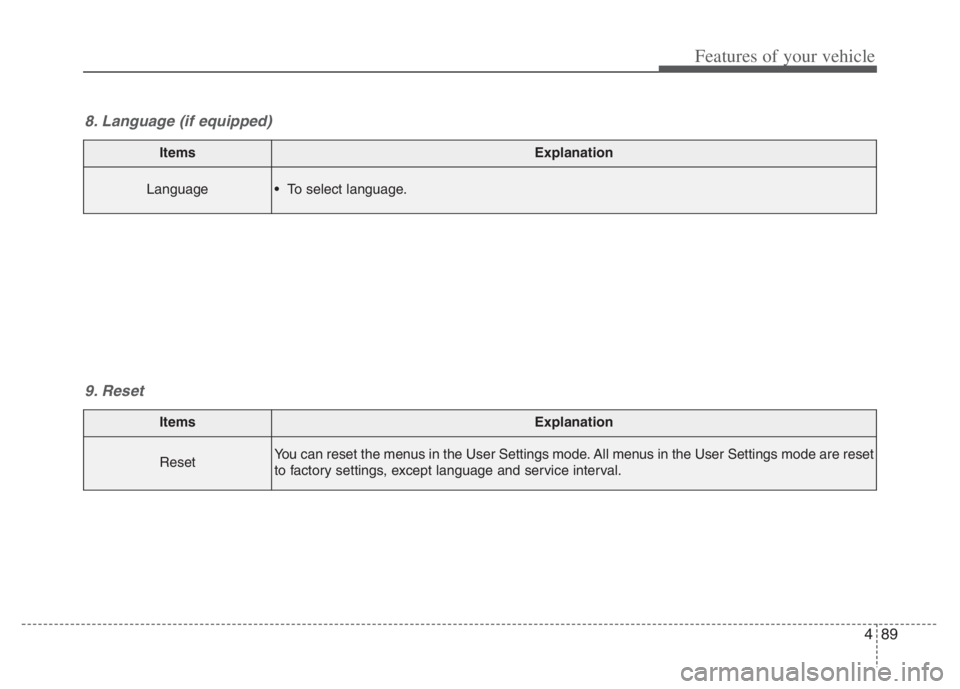
ResetYou can reset the menus in the User Settings mode. All menus in the User Settings mode are reset
to factory settings, except language and service interval.
9. Reset
ItemsExplanation
Language To select language.
8. Language (if equipped)
Page 239 of 710

499
Features of your vehicle
Press START button again
(for smart key system)
This warning message illuminates
if you can not operate the ENGINE
START/STOP button when there is
a problem with the ENGINE
START/STOP button system.
It means that you could start the
engine by pressing the ENGINE
START/STOP button once more.
If the warning illuminates each
time you press the ENGINE
START/STOP button, have your
vehicle inspected by an authorized
Kia dealer.
Press START button with key (for
smart key system)
This warning message illuminates
if you press the ENGINE
START/STOP button while the
warning message “Key not detect-
ed” is illuminating.
At this time, the immobilizer indica-
tor light blinks.
Check BRAKE SWITH fuse
(for smart key system)
This warning message illuminates
if the brake switch fuse is discon-
nected.
It means that you should replace
the fuse with a new one. If that is
not possible, you can start the
engine by pressing the ENGINE
START/STOP button for 10 sec-
onds in the ACC position.
Shift to P or N to start engine
(for smart key system)
This warning message illuminates
if you try to start the engine with
the shift lever not in the P (Park) or
N (Neutral) position.
✽ ✽
NOTICE
You can start the engine with the
shift lever in the N (Neutral) posi-
tion. But, for your safety, we recom-
mend that you start the engine with
the shift lever in the P (Park) posi-
tion.
Low washer fluid
This warning message illuminates
on the service reminder mode if
the washer fluid level in the reser-
voir is nearly empty.
It means that you should refill the
washer fluid.
Low fuel
This warning message illuminates
if the fuel tank is nearly empty.
- When the low fuel level warning
light is illuminates.
Add fuel as soon as possible.
Page 295 of 710
4155
Features of your vehicle
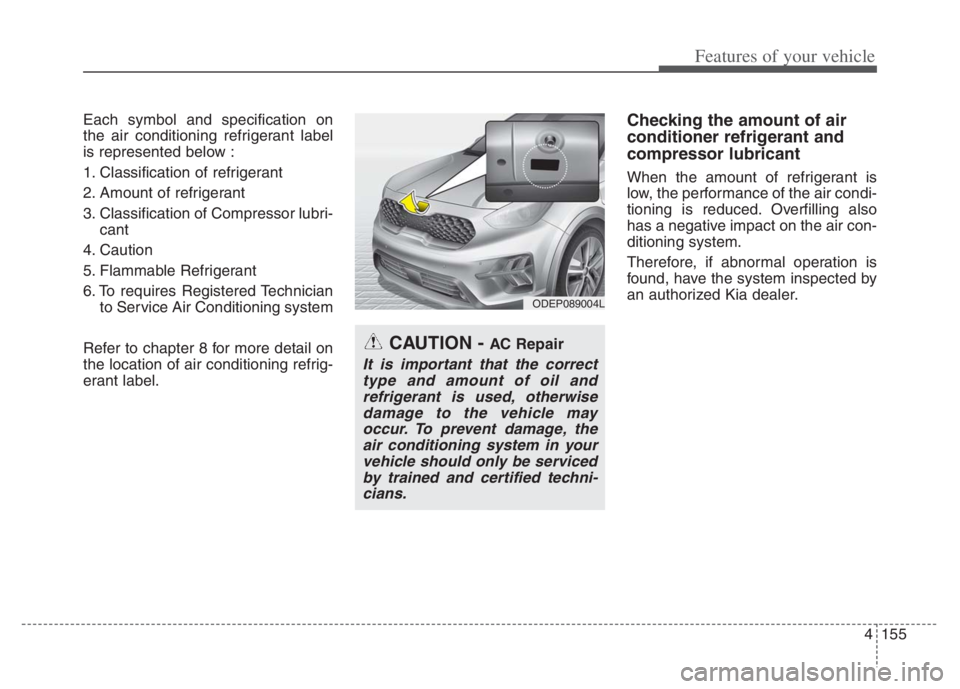
Each symbol and specification on
the air conditioning refrigerant label
is represented below :
1. Classification of refrigerant
2. Amount of refrigerant
3. Classification of Compressor lubri-
cant
4. Caution
5. Flammable Refrigerant
6. To requires Registered Technician
to Service Air Conditioning system
Refer to chapter 8 for more detail on
the location of air conditioning refrig-
erant label.Checking the amount of air
conditioner refrigerant and
compressor lubricant
When the amount of refrigerant is
low, the performance of the air condi-
tioning is reduced. Overfilling also
has a negative impact on the air con-
ditioning system.
Therefore, if abnormal operation is
found, have the system inspected by
an authorized Kia dealer.
ODEP089004L
CAUTION - AC Repair
It is important that the correct
type and amount of oil and
refrigerant is used, otherwise
damage to the vehicle may
occur. To prevent damage, the
air conditioning system in your
vehicle should only be serviced
by trained and certified techni-
cians.
Page 341 of 710
Driving your vehicle
18 5
DCT warning messages
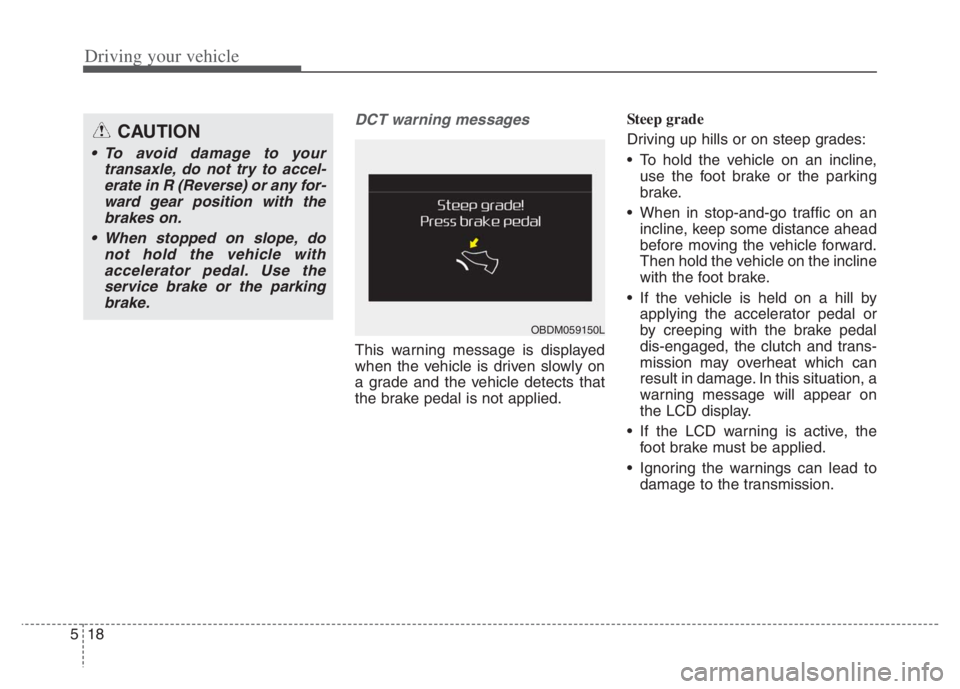
This warning message is displayed
when the vehicle is driven slowly on
a grade and the vehicle detects that
the brake pedal is not applied.Steep grade
Driving up hills or on steep grades:
To hold the vehicle on an incline,
use the foot brake or the parking
brake.
When in stop-and-go traffic on an
incline, keep some distance ahead
before moving the vehicle forward.
Then hold the vehicle on the incline
with the foot brake.
If the vehicle is held on a hill by
applying the accelerator pedal or
by creeping with the brake pedal
dis-engaged, the clutch and trans-
mission may overheat which can
result in damage. In this situation, a
warning message will appear on
the LCD display.
If the LCD warning is active, the
foot brake must be applied.
Ignoring the warnings can lead to
damage to the transmission.
CAUTION
To avoid damage to your
transaxle, do not try to accel-
erate in R (Reverse) or any for-
ward gear position with the
brakes on.
When stopped on slope, do
not hold the vehicle with
accelerator pedal. Use the
service brake or the parking
brake.
OBDM059150L
Page 355 of 710
Driving your vehicle
32 5
Wet brakes may impair the vehicle’s
ability to safely slow down; the vehi-
cle may also pull to one side when
the brakes are applied. Applying the
brakes lightly will indicate whether
they have been affected in this way.
Always test your brakes in this fash-
ion after driving through deep water.
To dry the brakes, apply them lightly
while maintaining a safe forward
speed until brake performance
returns to normal.
✽ ✽
NOTICE
Do not depress the brake pedal con-
tinuously without the “ ” indica-
tor ON. The battery may be dis-
charged.
In the event of brake failure
If service brakes fail to operate while
the vehicle is in motion, you can
make an emergency stop with the
parking brake. The stopping dis-
tance, however, will be much greater
than normal.
Disc brakes wear indicator
When your brake pads are worn and
new pads are required, you will hear
a high-pitched warning sound from
your front brakes or rear brakes. You
may hear this sound come and go or
it may occur whenever you depress
the brake pedal.
Please remember that some driving
conditions or climates may cause a
brake squeal when you first apply (or
lightly apply) the brakes. This is nor-
mal and does not indicate a problem
with your brakes.
Always replace the front or rear
brake pads as pairs.
WARNING- Parking
brake
Avoid applying the parking
brake to stop the vehicle while it
is moving except in an emer-
gency situation. Applying the
parking brake while the vehicle
is moving at normal speeds can
cause a sudden loss of control
of the vehicle. If you must use
the parking brake to stop the
vehicle, use great caution in
applying the brake.
CAUTION- Replace brake
pads
Do not continue to drive with
worn brake pads. Continuing to
drive with worn brake pads can
damage the braking system and
result in costly brake repairs.
Page 468 of 710
5145
Driving your vehicle
The navigation cannot detect the
current vehicle position (ex: elevat-
ed roads including overpass adja-
cent to general roads or nearby
roads exist in a parallel way)
The vehicle enters a service sta-
tion or rest area
The speed limit of some sections
changes depending on the road
situations
Android Auto or Car Play is operat-
ing
The navigation is being updated
while driving
The navigation is being restarted
while driving
There is bad weather, such as
heavy rain, heavy snow, etc.
Driving on a road under construc-
tion
Driving on a road that is controlled
Driving on a road that is sharply
curved
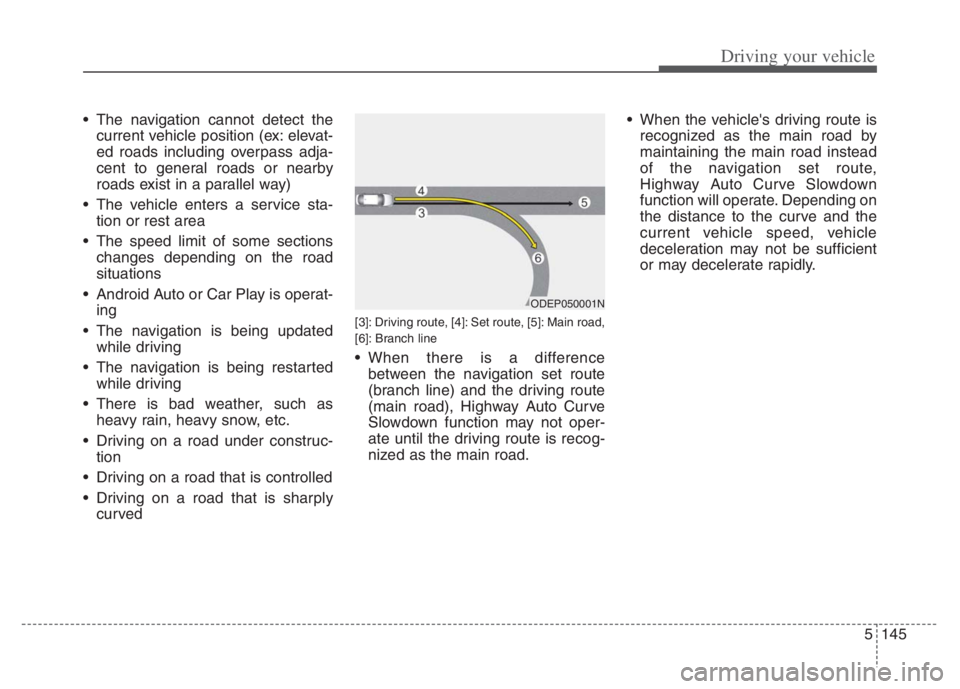
[3]: Driving route, [4]: Set route, [5]: Main road,
[6]: Branch line
When there is a difference
between the navigation set route
(branch line) and the driving route
(main road), Highway Auto Curve
Slowdown function may not oper-
ate until the driving route is recog-
nized as the main road. When the vehicle's driving route is
recognized as the main road by
maintaining the main road instead
of the navigation set route,
Highway Auto Curve Slowdown
function will operate. Depending on
the distance to the curve and the
current vehicle speed, vehicle
deceleration may not be sufficient
or may decelerate rapidly.
ODEP050001N
Page 485 of 710
Driving your vehicle
162 5
* Refer to “Smart Cruise Control
(SCC)” in this chapter. for cautions
and warnings about vehicle dis-
tance control and front radar.
* Refer to “Lane Following Assist
(LFA) “ in this chapter. for cautions
and warnings about steering con-
trol and front view camera.CAUTION
Highway Driving Assist may not
function properly in the follow-
ing situations:
The navigation is not working
properly.
The navigation is not updated.
The real-time GPS or map
information provided has
errors.
The navigation is overloaded
by performing functions such
as route search, video play-
back, voice recognition, etc.
are performing simultaneously.
The navigation is recalculat-
ing the route while driving.
GPS signals are blocked in
areas such as a tunnel.
The driver goes off course or
the route to the destination is
changed or canceled by reset-
ting the navigation.
The vehicle enters a service
station or rest area
(Continued)
(Continued)
The speed limit of selected
highway section is changed
due to road conditions.
Android Auto or Car Play is
operating.
The navigation cannot detect
the current vehicle position
(ex: elevated roads including
overpass adjacent to general
roads or nearby roads exist in
a parallel way).
The navigation is being updat-
ed while driving.
The navigation is being reset
while driving.
The road is slippery due to
bad weather such as rain or
snow.
If your vehicle tows a trailer or
another vehicle, you should
release Highway Driving
Assist system. Operating the
brake system or steering sys-
tem while towing may
adversely affect the safety.