cruise control KIA NIRO 2021 Owner's Manual
[x] Cancel search | Manufacturer: KIA, Model Year: 2021, Model line: NIRO, Model: KIA NIRO 2021Pages: 710, PDF Size: 14.77 MB
Page 450 of 710
5127
Driving your vehicle
Set SCC Reaction
The sensitivity of vehicle speed
when following the front vehicle to
maintain the set distance can be
adjusted.
The acceleration speed (reaction) for
following the front vehicle is set in
conjunction with the DRIVE MODE
button.
SCC Reaction
Fast:
Vehicle speed following the front
vehicle to maintain the set distance
is faster than normal speed.
Normal:
Vehicle speed following the front
vehicle to maintain the set distance
is normal
Slow:
Vehicle speed following the front
vehicle to maintain the set distance
is slower than normal speed.
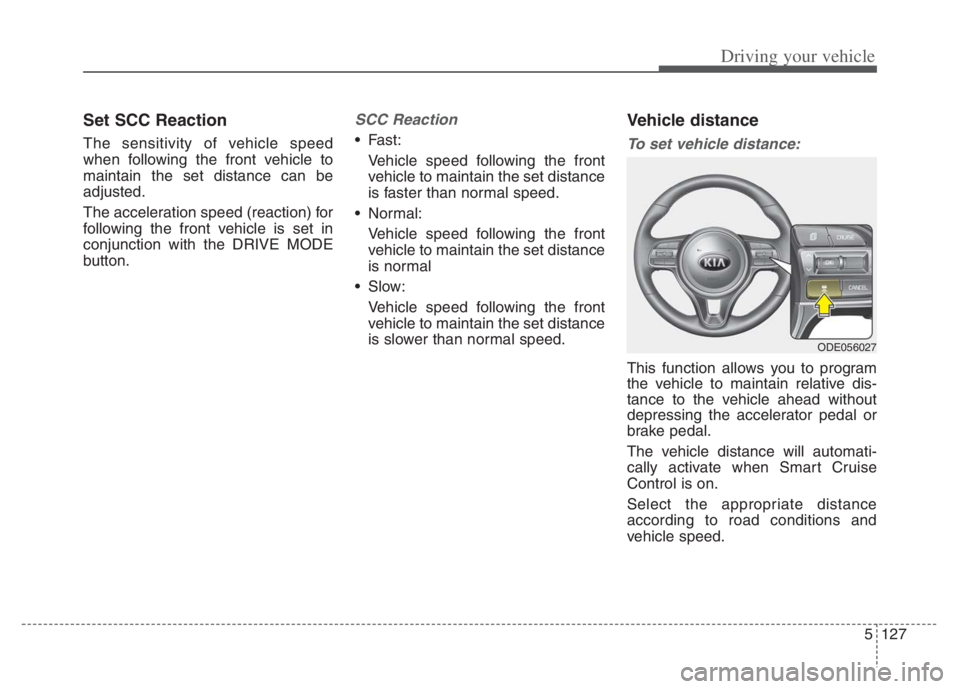
Vehicle distance
To set vehicle distance:
This function allows you to program
the vehicle to maintain relative dis-
tance to the vehicle ahead without
depressing the accelerator pedal or
brake pedal.
The vehicle distance will automati-
cally activate when Smart Cruise
Control is on.
Select the appropriate distance
according to road conditions and
vehicle speed.
ODE056027
Page 454 of 710

5131
Driving your vehicle
In traffic situation
Use switch or pedal to accelerate
In traffic, your vehicle will stop if the
vehicle ahead of you stops. Also, if
the vehicle ahead of you starts
moving, your vehicle will start as
well. However, if the vehicle stops
you must depress the accelerator
pedal or push up the switch
(RES+) to start driving. If you push switch (RES+ or SET-)
while Auto Hold and Smart Cruise
Control is operating the Auto Hold
will be released regardless of
accelerator pedal operation and
the vehicle will start to move. The
AUTO HOLD indicator changes
from green to white. (if equipped
with EPB (Electronic Parking
Brake))
CAUTION
If the vehicle ahead (vehicle
speed: less than 20 mph (30
km/h) disappears to the next
lane, the warning chime will
sound and a message will
appear. Adjust your vehicle
speed for vehicles or objects
that can suddenly appear in
front of you by depressing the
brake pedal according to the
road condition ahead and driv-
ing condition.
ODEP059084L OJF058402L
Page 456 of 710
5133
Driving your vehicle
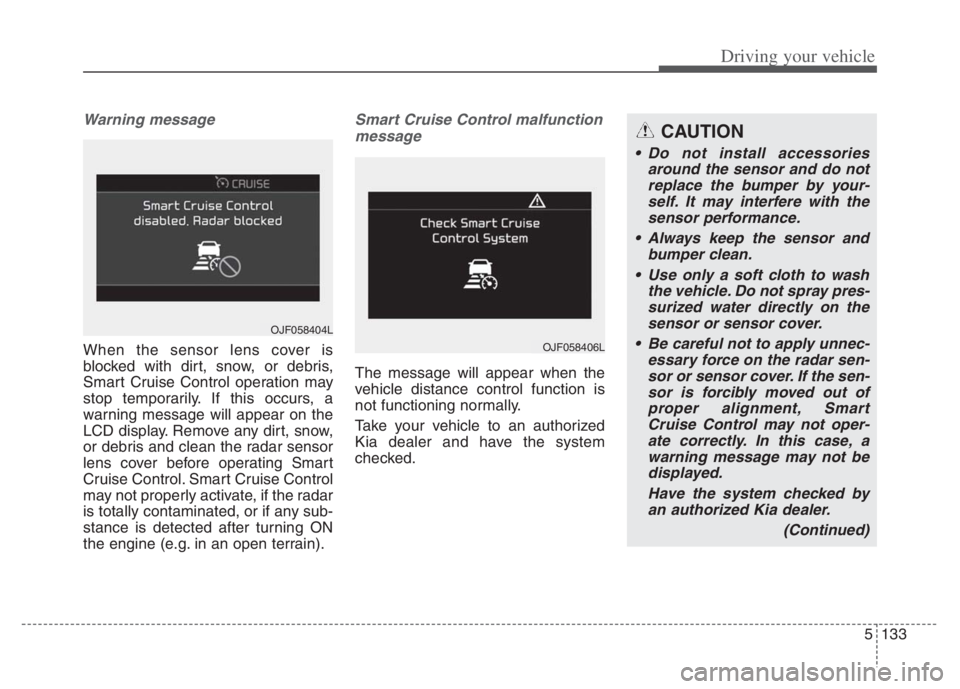
Warning message
When the sensor lens cover is
blocked with dirt, snow, or debris,
Smart Cruise Control operation may
stop temporarily. If this occurs, a
warning message will appear on the
LCD display. Remove any dirt, snow,
or debris and clean the radar sensor
lens cover before operating Smart
Cruise Control. Smart Cruise Control
may not properly activate, if the radar
is totally contaminated, or if any sub-
stance is detected after turning ON
the engine (e.g. in an open terrain).
Smart Cruise Control malfunction
message
The message will appear when the
vehicle distance control function is
not functioning normally.
Take your vehicle to an authorized
Kia dealer and have the system
checked.
OJF058404L
OJF058406L
CAUTION
Do not install accessories
around the sensor and do not
replace the bumper by your-
self. It may interfere with the
sensor performance.
Always keep the sensor and
bumper clean.
Use only a soft cloth to wash
the vehicle. Do not spray pres-
surized water directly on the
sensor or sensor cover.
Be careful not to apply unnec-
essary force on the radar sen-
sor or sensor cover. If the sen-
sor is forcibly moved out of
proper alignment, Smart
Cruise Control may not oper-
ate correctly. In this case, a
warning message may not be
displayed.
Have the system checked by
an authorized Kia dealer.
(Continued)
Page 457 of 710
Driving your vehicle
134 5
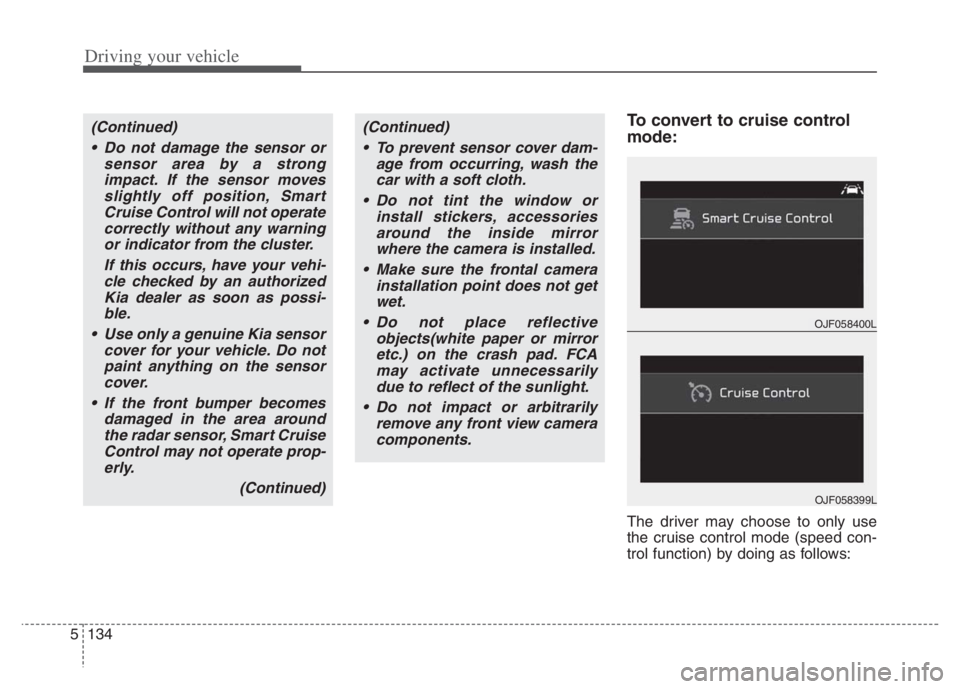
To convert to cruise control
mode:
The driver may choose to only use
the cruise control mode (speed con-
trol function) by doing as follows:
(Continued)
Do not damage the sensor or
sensor area by a strong
impact. If the sensor moves
slightly off position, Smart
Cruise Control will not operate
correctly without any warning
or indicator from the cluster.
If this occurs, have your vehi-
cle checked by an authorized
Kia dealer as soon as possi-
ble.
Use only a genuine Kia sensor
cover for your vehicle. Do not
paint anything on the sensor
cover.
If the front bumper becomes
damaged in the area around
the radar sensor, Smart Cruise
Control may not operate prop-
erly.
(Continued)(Continued)
To prevent sensor cover dam-
age from occurring, wash the
car with a soft cloth.
Do not tint the window or
install stickers, accessories
around the inside mirror
where the camera is installed.
Make sure the frontal camera
installation point does not get
wet.
Do not place reflective
objects(white paper or mirror
etc.) on the crash pad. FCA
may activate unnecessarily
due to reflect of the sunlight.
Do not impact or arbitrarily
remove any front view camera
components.
OJF058400L
OJF058399L
Page 458 of 710
5135
Driving your vehicle
1. Turn Smart Cruise Control on (the
cruise indicator light will be on but
the function will not be activated).
2. Push the distance to distance
switch for more than 2 seconds.
3. Choose between "Smart Cruise
Control" and "Cruise Control".
When the function is canceled using
the Driving Assist button or the
Driving Assist button is used after the
engine is turned on, Smart Cruise
Control mode will turn on.Limitations of the function
Smart Cruise Control may have lim-
its to its ability to detect distance to
the vehicle ahead due to road and
traffic conditions.
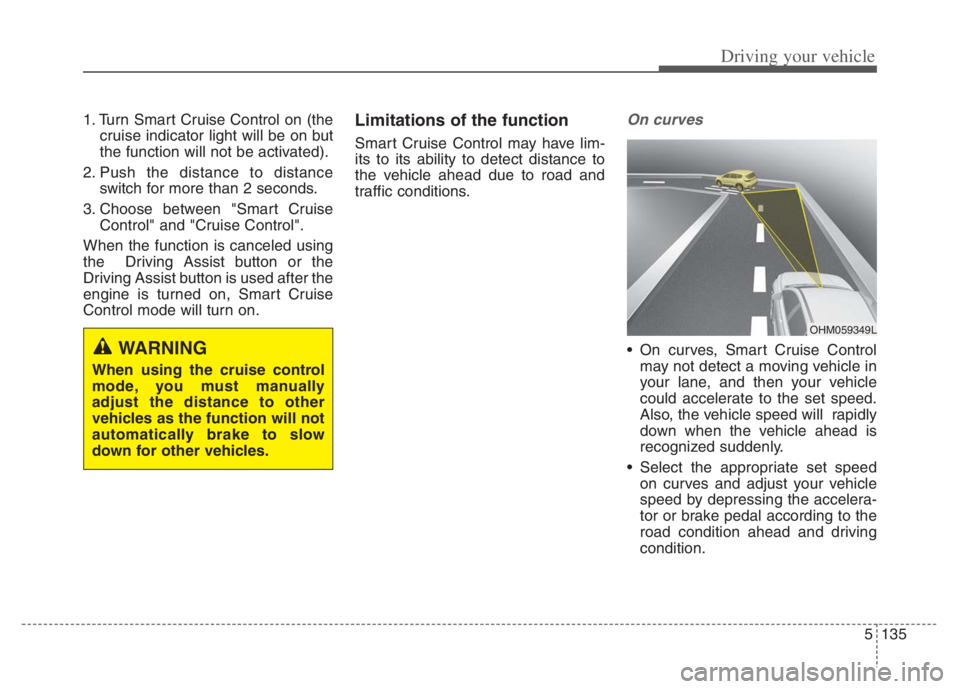
On curves
On curves, Smart Cruise Control
may not detect a moving vehicle in
your lane, and then your vehicle
could accelerate to the set speed.
Also, the vehicle speed will rapidly
down when the vehicle ahead is
recognized suddenly.
Select the appropriate set speed
on curves and adjust your vehicle
speed by depressing the accelera-
tor or brake pedal according to the
road condition ahead and driving
condition.WARNING
When using the cruise control
mode, you must manually
adjust the distance to other
vehicles as the function will not
automatically brake to slow
down for other vehicles.
OHM059349L
Page 459 of 710
Driving your vehicle
136 5
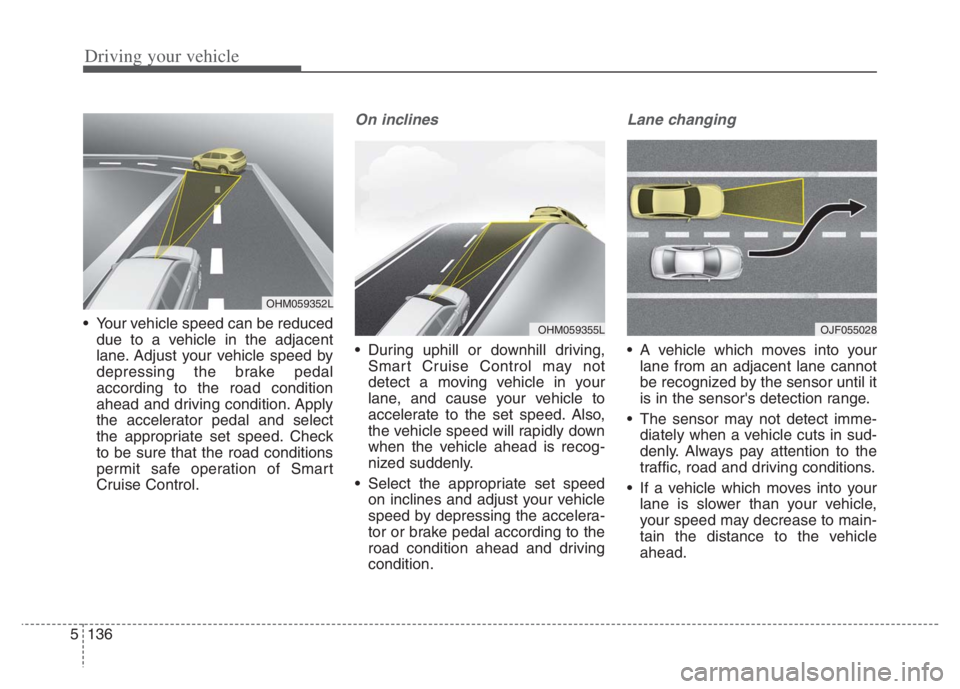
Your vehicle speed can be reduced
due to a vehicle in the adjacent
lane. Adjust your vehicle speed by
depressing the brake pedal
according to the road condition
ahead and driving condition. Apply
the accelerator pedal and select
the appropriate set speed. Check
to be sure that the road conditions
permit safe operation of Smart
Cruise Control.
On inclines
During uphill or downhill driving,
Smart Cruise Control may not
detect a moving vehicle in your
lane, and cause your vehicle to
accelerate to the set speed. Also,
the vehicle speed will rapidly down
when the vehicle ahead is recog-
nized suddenly.
Select the appropriate set speed
on inclines and adjust your vehicle
speed by depressing the accelera-
tor or brake pedal according to the
road condition ahead and driving
condition.
Lane changing
A vehicle which moves into your
lane from an adjacent lane cannot
be recognized by the sensor until it
is in the sensor's detection range.
The sensor may not detect imme-
diately when a vehicle cuts in sud-
denly. Always pay attention to the
traffic, road and driving conditions.
If a vehicle which moves into your
lane is slower than your vehicle,
your speed may decrease to main-
tain the distance to the vehicle
ahead.
OHM059355LOJF055028
OHM059352L
Page 462 of 710
5139
Driving your vehicle
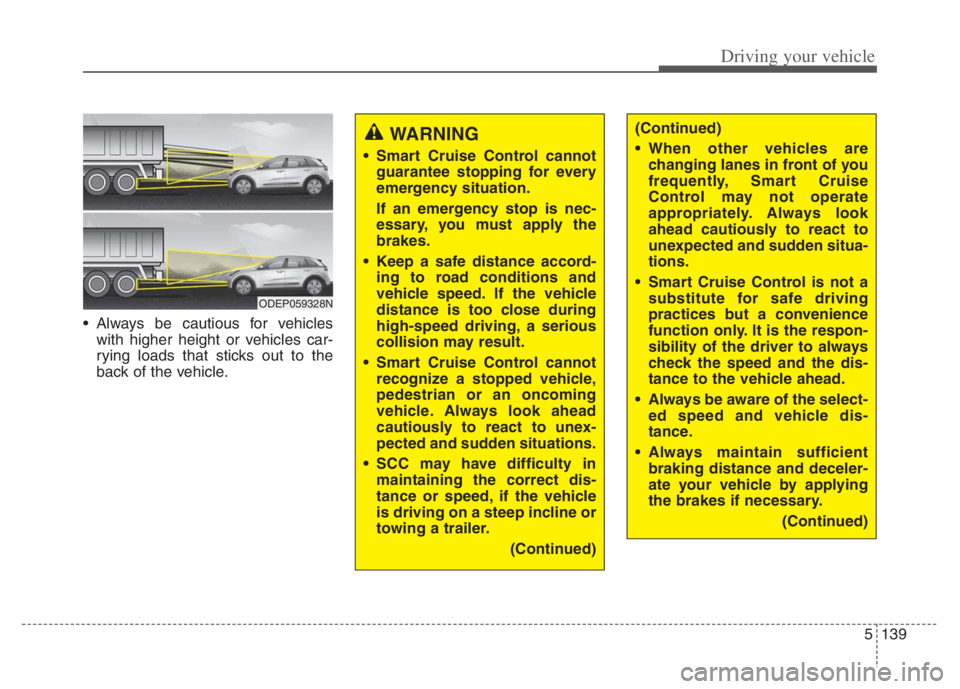
Always be cautious for vehicles
with higher height or vehicles car-
rying loads that sticks out to the
back of the vehicle.
WARNING
Smart Cruise Control cannot
guarantee stopping for every
emergency situation.
If an emergency stop is nec-
essary, you must apply the
brakes.
Keep a safe distance accord-
ing to road conditions and
vehicle speed. If the vehicle
distance is too close during
high-speed driving, a serious
collision may result.
Smart Cruise Control cannot
recognize a stopped vehicle,
pedestrian or an oncoming
vehicle. Always look ahead
cautiously to react to unex-
pected and sudden situations.
SCC may have difficulty in
maintaining the correct dis-
tance or speed, if the vehicle
is driving on a steep incline or
towing a trailer.
(Continued)
ODEP059328N
(Continued)
When other vehicles are
changing lanes in front of you
frequently, Smart Cruise
Control may not operate
appropriately. Always look
ahead cautiously to react to
unexpected and sudden situa-
tions.
Smart Cruise Control is not a
substitute for safe driving
practices but a convenience
function only. It is the respon-
sibility of the driver to always
check the speed and the dis-
tance to the vehicle ahead.
Always be aware of the select-
ed speed and vehicle dis-
tance.
Always maintain sufficient
braking distance and deceler-
ate your vehicle by applying
the brakes if necessary.
(Continued)
Page 463 of 710
Driving your vehicle
140 5
CAUTION
Smart Cruise Control may not
operate temporarily due to elec-
trical interference.
(Continued)
As Smart Cruise Control may
not recognize complex driv-
ing situations, always pay
attention to driving conditions
and control your vehicle
speed.
For safe operation, carefully
read and follow the instruc-
tions in this manual before
use.
If another warning sound,
such as the fasten seat belt
warning, is played, SCC warn-
ing sound may not occur.
When driving with SCC set,
the function may not detect
parked vehicles ahead. Be
careful if this occurs and do
not rely solely on SCC.
Please turn off SCC when the
vehicle is being towed.
(Continued)(Continued)
If the vehicle ahead is no
longer detected while you are
driving with the set distance,
the vehicle may accelerate
until it reached the set speed.
If this occurs, be cautious and
control your vehicle speed if
needed.
Be cautious and be careful of
dangerous situations when
driving on a slippery road.
Beware of dangerous situa-
tions as you may quickly pass
the vehicle driving in the next
lane.
Page 464 of 710
5141
Driving your vehicle
Navigation-based Smart Cruise
Control will help automatically adjust
vehicle speed when driving on high-
ways (or motorways) with speed lim-
its by using road information from the
navigation system while Smart
Cruise Control is operating.✽ ✽
NOTICE
• Navigation-based Smart Cruise
Control is available only on con-
trolled access road of certain high-
ways.
❈ ❈
Controlled access road indicates
roads with limited entrances
and exits that allow uninter-
rupted high speed traffic flow.
Only passenger cars and motor-
cycles are allowed on controlled
access roads.
• Additional highways may be
expanded by future navigation
updates.
✽ ✽
NOTICE
Navigation-based Smart Cruise
Control operates on main roads of
highways (or motorways), and does
not operate on interchanges or junc-
tions.
NAVIGATION-BASED SMART CRUISE CONTROL (NSCC) (IF EQUIPPED)
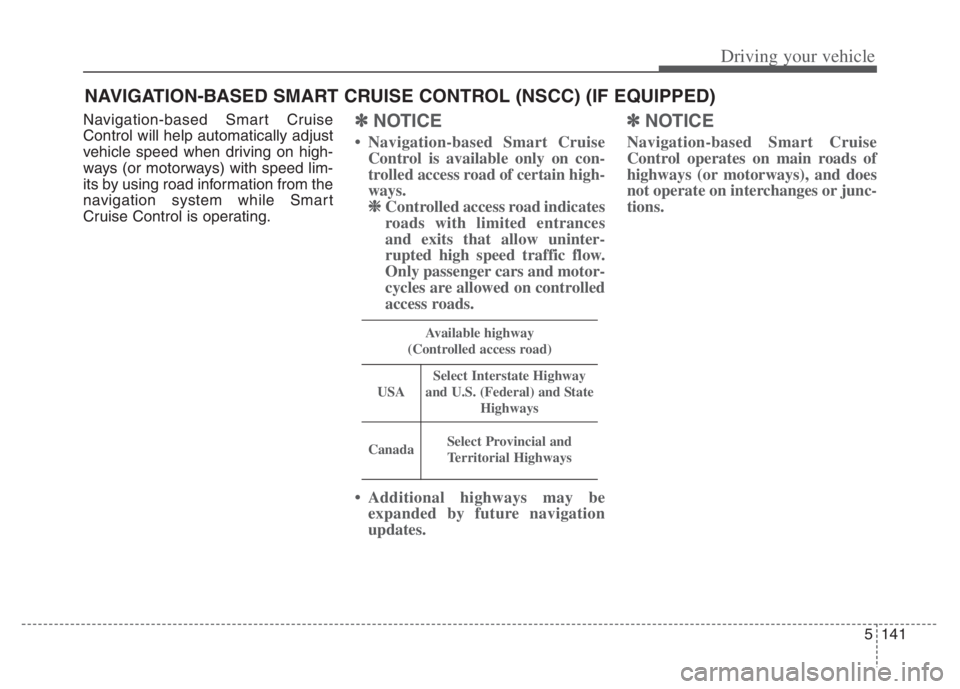
Available highway
(Controlled access road)
USA
Select Interstate Highway
and U.S. (Federal) and State
Highways
CanadaSelect Provincial and
Territorial Highways
Page 465 of 710

Driving your vehicle
142 5
Highway Auto Curve
Slowdown
If vehicle speed is high, Highway
Auto Curve Slowdown function will
temporarily decelerate your vehicle
to help you drive safely on a curve,
based on the curve information from
the navigation.
Function settings
Settings
Highway Auto Curve Slowdown
With the ENGINE START/STOP
button in the ON position, select
“Driver Assist Driving Assist
Highway Auto Curve Slowdown”
from the “User Settings (LCD dis-
play)” to turn on Navigation-based
Smart Cruise Control and deselect
to turn off the function.
✽ ✽
NOTICE
When there is a problem with
Navigation-based Smart Cruise
Control, the function cannot be set
from the “User Settings” in the LCD
display.
ODEP050009N