front windshield KIA NIRO 2021 Owner's Manual
[x] Cancel search | Manufacturer: KIA, Model Year: 2021, Model line: NIRO, Model: KIA NIRO 2021Pages: 710, PDF Size: 14.77 MB
Page 425 of 710

Driving your vehicle
102 5
Warning message
Blind-Spot Collision Warning (BCW)
system disabled. Radar blocked
This warning message may appear
when :
- One or both of the sensors on the
rear bumper is blocked by dirt or
snow or a foreign object.
- Driving in rural areas where the
sensor does not detect another
vehicle for an extended period of
time.
- When there is inclement weather
such as heavy snow or rain.If any of these conditions occur, the
light on the Blind-Spot Safety button
and the function will turn off automat-
ically.
Turn off BCW (if equipped) when a
trailer or carrier is installed.
- Press the Blind-Spot Safety button
(the indicator on the button extin-
guish) or “User Settings Driver
Assistance Blind-Spot Safety
Off ”.
- Deactivate RCCW by deselecting
“User Settings Driver Assistance
Blind-Spot Safety Rear Cross-
Traffic Safety”.
If you use BCW, remove a trailer or
carrier.
When BCW canceled warning mes-
sage is displayed in the cluster,
check to make sure that the rear
bumper is free from any dirt or snow
in the areas where the sensor is
located. Remove any dirt, snow, or
foreign material that could interfere
with the radar sensors.
(Continued)
Have the vehicle inspected by
an authorized Kia dealer.
Do not apply foreign objects
such as a bumper sticker or a
bumper guard near the radar
sensor or apply paint to the
sensor area. Doing so may
adversely affect the perform-
ance of the sensor.
NEVER install any acces-
sories or stickers on the front
windshield, nor tint the front
windshield.
Pay extreme caution to keep
the camera sensor out of water.
NEVER locate any reflective
objects (i.e. white paper, mir-
ror) over the crash pad. Any
light reflection may cause a
malfunction of the function.
OJF058433L
Page 434 of 710
5111
Driving your vehicle
✽ ✽
NOTICE
Driver Attention Warning utilizes
the front view camera sensor on the
front windshield for its operation.
To keep the front view camera
sensor in the best condition, you
should observe the followings:
- Do not disassemble camera tem-
porarily for tinted window or
attaching any types of coatings and
accessories. If you disassemble a
camera and assemble it again, take
your vehicle to an authorized Kia
dealer and have the system
checked.
- Do not locate any reflective
objects (i.e. white paper, mirror)
over the dashboard. Any light
reflection may cause a mal-func-
tion of Driver Attention Warning.
(Continued)(Continued)
- Pay extreme caution to keep the
front view camera out of water.
- Do not arbitrarily disassemble the
camera assembly, nor apply any
impact on the camera assembly.
• Playing the vehicle audio system
at high volume may offset Driver
Attention Warning warning
sounds.
For more information of front
view camera, refer to “Lane
Keeping Assist (LKA)”.CAUTION
Driver Attention Warning may
not properly operate with limit-
ed alerting in the following situ-
ations:
The function will not operate
for about 15 seconds when
restarting the engine or initial-
izing the front view camera
such as rebooting, etc.
The lane detection perform-
ance is limited. (For more
information, refer to "Lane
Keeping Assist (LKA)" in this
chapter.)
The vehicle is violently driven
or is abruptly turned for obsta-
cle avoidance (e.g. construc-
tion area, other vehicles, fallen
objects, bumpy road).
Intentionally frequent lane
cut-in
(Continued)
Page 436 of 710
5113
Driving your vehicle
✽ ✽
NOTICE
The function may not warn or may
not work properly when:
• A pedestrian or a bicycle is ahead
• A car cut in ahead.
• Meet a traffic jam during the
curve or right turn driving.
• Busy road such as reducing lanes.
• Stopping at a shoulder, rest area
or a parking lot.
• If the vehicle head makes a sudden
start or the U-turn.
• If the vehicle is stopped at the
speed bumps or a slope.WARNING
This function is a driver assis-
tance device and may not
warn the driver even after the
leading vehicle's departure.
Even if you are warned of the
leading vehicle's departure,
always check the traffic condi-
tions yourself before safely
moving the vehicle.
CAUTION
Leading Vehicle Departure
Alert function utilizes the front
view camera on the front
windshield for its operation.
To keep the front view camera
in the best condition.
For more information of front
view camera, refer to “Lane
Keeping Assist (LKA)”.
The function may not operate
for 15 seconds after the
engine is started or the front
view camera is initialized.
Page 472 of 710
5149
Driving your vehicle
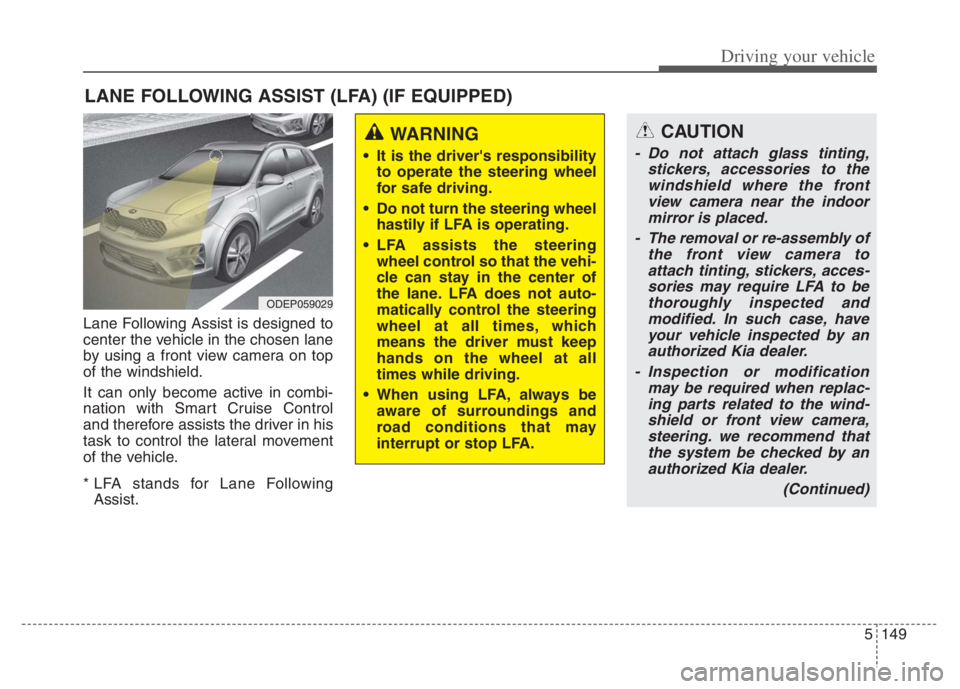
Lane Following Assist is designed to
center the vehicle in the chosen lane
by using a front view camera on top
of the windshield.
It can only become active in combi-
nation with Smart Cruise Control
and therefore assists the driver in his
task to control the lateral movement
of the vehicle.
* LFA stands for Lane Following
Assist.
LANE FOLLOWING ASSIST (LFA) (IF EQUIPPED)
ODEP059029
WARNING
It is the driver's responsibility
to operate the steering wheel
for safe driving.
Do not turn the steering wheel
hastily if LFA is operating.
LFA assists the steering
wheel control so that the vehi-
cle can stay in the center of
the lane. LFA does not auto-
matically control the steering
wheel at all times, which
means the driver must keep
hands on the wheel at all
times while driving.
When using LFA, always be
aware of surroundings and
road conditions that may
interrupt or stop LFA.
CAUTION
- Do not attach glass tinting,
stickers, accessories to the
windshield where the front
view camera near the indoor
mirror is placed.
- The removal or re-assembly of
the front view camera to
attach tinting, stickers, acces-
sories may require LFA to be
thoroughly inspected and
modified. In such case, have
your vehicle inspected by an
authorized Kia dealer.
- Inspection or modification
may be required when replac-
ing parts related to the wind-
shield or front view camera,
steering. we recommend that
the system be checked by an
authorized Kia dealer.
(Continued)
Page 478 of 710
5155
Driving your vehicle
- If the number of lanes increases
or decreases, or if the lanes inter-
sect with each other more
intensely (tollgate entry section,
road section / joining section,
etc.)
- When there are two or more lane
markings such as a construction
section, a designated lane, etc.
- When the lane is crowded such
as the construction section or the
lane is replaced by some struc-
tures
- If there is a road marking such as
a zigzag lane, crosswalk mark, or
road surface milestone
- When a lane suddenly becomes
invisible or disappears from an
intersection
• The external environment affecting
the function
- If the outside brightness of the vehi-
cle suddenly changes, such as
when entering or exiting the tunnel
or passing under the bridge- If the vehicle's headlights are not
used at night or in the tunnel, or the
brightness of the headlights is too
weak
- If there are boundary structures
such as tollgate booths and side-
walk blocks
- If it is difficult to distinguish lanes
due to the reflection on the wet road
made by sunlight, streetlight, and
oncoming traffic.
- When the backlight is strongly reflect-
ed in the direction of the vehicle
- When Driving to the left or right lane
by bus lane or on the bus lane
- If there is no enough distance
between the front car or if the lane
is covered by the car ahead of me
- When the lane change is large,
such as a steep curve or a continu-
ous curve
- When passing through speed
bump, sudden up / down or left /
right slope
- If the vehicle is severely shaken
- When the temperature around the
mirror is very high due to direct sun-
light• When the front view camera has
poor visibility
- If the windshield of the vehicle
and the camera lens are covered
with dust, fingerprints, or tinting.
- If the camera has poor visibility
due to bad weather such as fog,
heavy rain, heavy snow.
- If moisture is not completely
removed from the windscreen.
- When placing objects on the
dashboard, etc.
Page 601 of 710
737
Maintenance
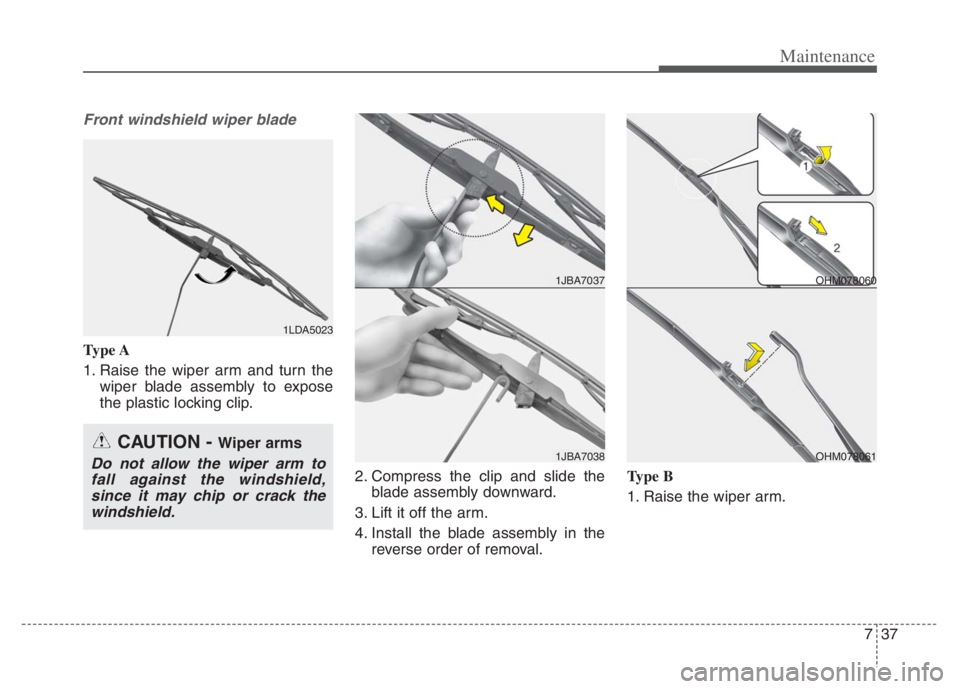
Front windshield wiper blade
Type A
1. Raise the wiper arm and turn the
wiper blade assembly to expose
the plastic locking clip.
2. Compress the clip and slide the
blade assembly downward.
3. Lift it off the arm.
4. Install the blade assembly in the
reverse order of removal.Type B
1. Raise the wiper arm.
1LDA5023
CAUTION - Wiper arms
Do not allow the wiper arm to
fall against the windshield,
since it may chip or crack the
windshield.
1JBA7037
1JBA7038
OHM078060
OHM078061
Page 709 of 710
I11
Index
Vehicle load limit . . . . . . . . . . . . . . . . . . . . . . . . . . . . 5-193
Certification label . . . . . . . . . . . . . . . . . . . . . . . . . . 5-196
Tire and loading information label. . . . . . . . . . . . . 5-193
Vehicle modifications . . . . . . . . . . . . . . . . . . . . . . . . . . . 1-5
Vehicle weight . . . . . . . . . . . . . . . . . . . . . . . . . . . . . . 5-197
Base curb weight . . . . . . . . . . . . . . . . . . . . . . . . . . 5-197
Cargo weight . . . . . . . . . . . . . . . . . . . . . . . . . . . . . 5-197
GAW (Gross axle weight) . . . . . . . . . . . . . . . . . . . 5-197
GAWR (Gross axle weight rating) . . . . . . . . . . . . . 5-197
GVW (Gross vehicle weight). . . . . . . . . . . . . . . . . 5-197
GVWR (Gross vehicle weight rating) . . . . . . . . . . 5-197
Vehicle curb weight . . . . . . . . . . . . . . . . . . . . . . . . 5-197
Warning and indicator lights. . . . . . . . . . . . . . . . . . . . 4-106
Indicator Lights . . . . . . . . . . . . . . . . . . . . . . . . . . . 4-115
Warning lights . . . . . . . . . . . . . . . . . . . . . . . . . . . . 4-106
Washer fluid . . . . . . . . . . . . . . . . . . . . . . . . . . . . . . . . . 7-30
Checking the washer fluid level . . . . . . . . . . . . . . . . 7-30
Welcome system . . . . . . . . . . . . . . . . . . . . . . . . . . . . 4-139
Headlight (Headlamp) escort function . . . . . . . . . . 4-139
Interior light . . . . . . . . . . . . . . . . . . . . . . . . . . . . . 4-139
Pocket lamp (if equipped) . . . . . . . . . . . . . . . . . . . 4-139
Windows . . . . . . . . . . . . . . . . . . . . . . . . . . . . . . . . . . . . 4-31
Power windows . . . . . . . . . . . . . . . . . . . . . . . . . . . . 4-32
Windshield defrosting and defogging. . . . . . . . . . . . . 4-157
Automatic climate control system . . . . . . . . . . . . . 4-157Defogging logic . . . . . . . . . . . . . . . . . . . . . . . . . . . 4-158
Winter driving . . . . . . . . . . . . . . . . . . . . . . . . . . . . . . . 5-189
Carry emergency equipment . . . . . . . . . . . . . . . . . 5-192
Change to "winter weight" oil if necessary . . . . . . 5-191
Check battery and cables . . . . . . . . . . . . . . . . . . . . 5-191
Check spark plugs and ignition system . . . . . . . . . 5-191
Don’t let your parking brake freeze . . . . . . . . . . . . 5-192
Don't let ice and snow accumulate underneath . . . 5-192
Snowy or icy conditions . . . . . . . . . . . . . . . . . . . . . 5-189
To keep locks from freezing. . . . . . . . . . . . . . . . . . 5-192
Use approved window washer anti-freeze
in system . . . . . . . . . . . . . . . . . . . . . . . . . . . . . . . 5-192
Use high quality ethylene glycol coolant. . . . . . . . 5-191
Wiper blades . . . . . . . . . . . . . . . . . . . . . . . . . . . . . . . . . 7-36
Blade inspection . . . . . . . . . . . . . . . . . . . . . . . . . . . . 7-36
Blade replacement . . . . . . . . . . . . . . . . . . . . . . . . . . 7-36
Wipers and washers . . . . . . . . . . . . . . . . . . . . . . . . . . 4-132
Front windshield washers. . . . . . . . . . . . . . . . . . . . 4-133
Rear window wiper and washer switch . . . . . . . . . 4-134
Windshield wipers . . . . . . . . . . . . . . . . . . . . . . . . . 4-132
W