front windshield KIA NIRO 2021 User Guide
[x] Cancel search | Manufacturer: KIA, Model Year: 2021, Model line: NIRO, Model: KIA NIRO 2021Pages: 710, PDF Size: 14.77 MB
Page 288 of 710
Features of your vehicle
148 4
Air intake control
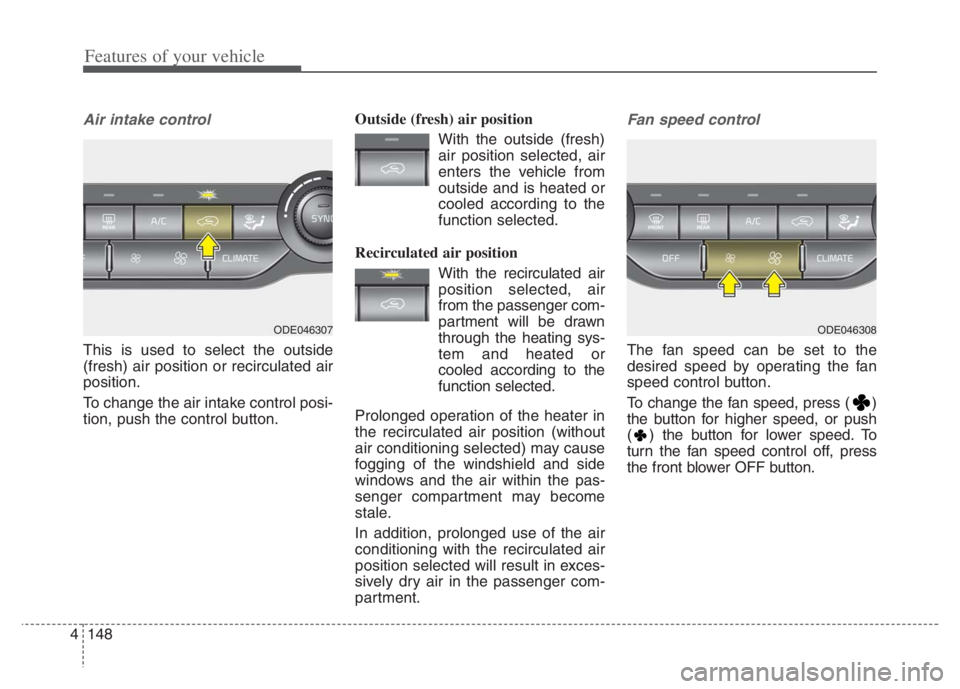
This is used to select the outside
(fresh) air position or recirculated air
position.
To change the air intake control posi-
tion, push the control button.Outside (fresh) air position
With the outside (fresh)
air position selected, air
enters the vehicle from
outside and is heated or
cooled according to the
function selected.
Recirculated air position
With the recirculated air
position selected, air
from the passenger com-
partment will be drawn
through the heating sys-
tem and heated or
cooled according to the
function selected.
Prolonged operation of the heater in
the recirculated air position (without
air conditioning selected) may cause
fogging of the windshield and side
windows and the air within the pas-
senger compartment may become
stale.
In addition, prolonged use of the air
conditioning with the recirculated air
position selected will result in exces-
sively dry air in the passenger com-
partment.
Fan speed control
The fan speed can be set to the
desired speed by operating the fan
speed control button.
To change the fan speed, press ( )
the button for higher speed, or push
( ) the button for lower speed. To
turn the fan speed control off, press
the front blower OFF button.
ODE046308ODE046307
Page 290 of 710
Features of your vehicle
150 4
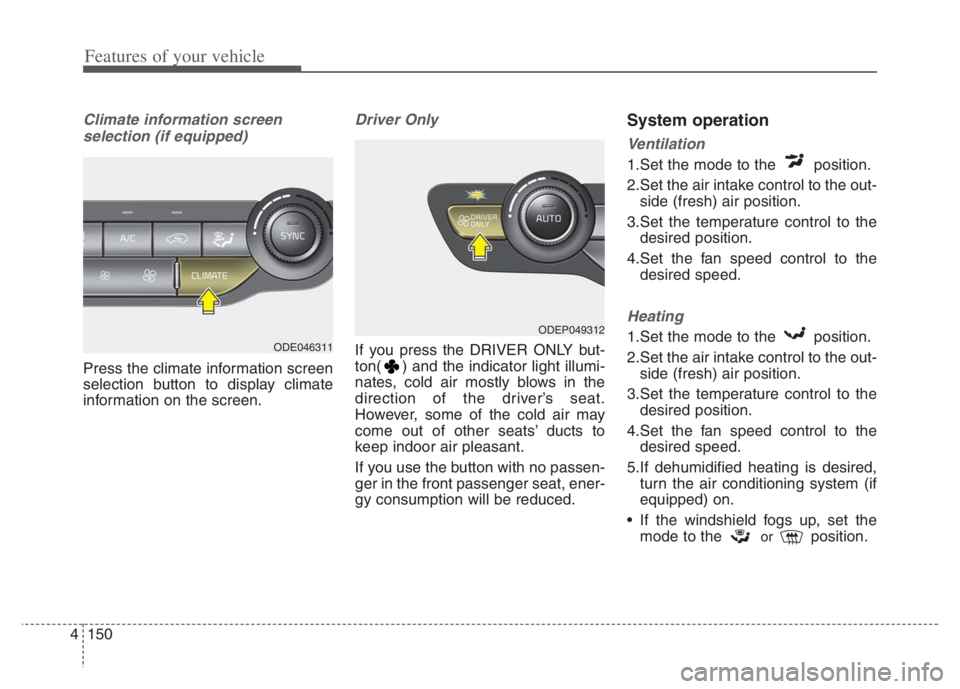
Climate information screen
selection (if equipped)
Press the climate information screen
selection button to display climate
information on the screen.
Driver Only
If you press the DRIVER ONLY but-
ton( ) and the indicator light illumi-
nates, cold air mostly blows in the
direction of the driver’s seat.
However, some of the cold air may
come out of other seats’ ducts to
keep indoor air pleasant.
If you use the button with no passen-
ger in the front passenger seat, ener-
gy consumption will be reduced.
System operation
Ventilation
1.Set the mode to the position.
2.Set the air intake control to the out-
side (fresh) air position.
3.Set the temperature control to the
desired position.
4.Set the fan speed control to the
desired speed.
Heating
1.Set the mode to the position.
2.Set the air intake control to the out-
side (fresh) air position.
3.Set the temperature control to the
desired position.
4.Set the fan speed control to the
desired speed.
5.If dehumidified heating is desired,
turn the air conditioning system (if
equipped) on.
If the windshield fogs up, set the
mode to the
orposition.
ODEP049312
ODE046311
Page 300 of 710
Features of your vehicle
160 4
To cancel or reset the Auto Defogging
System
Press the front windshield defroster
button for 3 seconds when the igni-
tion switch is in the ON position.
When the ADS system is canceled,
the indicator light on the button will
blink 3 times per 0.5 sec.
When the ADS system is reset, the
indicator light on the button will blink
6 times per 0.25 sec.CAUTION
Do not remove the sensor cover
located on the upper end of the
passenger side windshield
glass. Damage to the system
parts could occur and may not
be covered by your vehicle war-
ranty.
Page 386 of 710
563
Driving your vehicle
Limitation of the function
Forward Collision-Avoidance Assist
is designed to monitor the vehicle
ahead in the roadway through front
view camera recognition to warn the
driver that a collision is imminent,
and if necessary, apply emergency
braking. In certain situations, the
front view camera may not be able to
detect the vehicle ahead or pedestri-
an ahead. In these cases, FCA may
not operate normally. The driver must
pay careful attention in the following
situations where FCA operation may
be limited.
Recognizing vehicles
The sensor may be limited when:
The function may not work around
15 seconds after starting the vehi-
cle or the initialization or rebooting
of the front view camera.
The front view camera is blocked
with a foreign object or debris
The front view camera lens is con-
taminated due to tinted, filmed or
coated windshield, damaged
glass, or stuck of foreign matter
(sticker, bug, etc.) on the glass
Inclement weather such as heavy
rain or snow obscures the field of
view of the front view camera
There is interference by electro-
magnetic waves
The front view camera recognition
is limited
The vehicle in front is too small to
be detected (for example a motor
cycle or bicycle etc.)
The vehicle in front is an oversize
vehicle or trailer that is too big to
be detected by the front view cam-
era recognition function (for exam-
ple a tractor trailer, etc.) The driver's field of view is not well
illuminated (either too dark or too
much reflection or too much back-
light that obscures the field of view)
The vehicle in front does not have
their rear lights properly turned
ON.
The outside brightness changes
suddenly, for example when enter-
ing or exiting a tunnel
The vehicle in front is driving errat-
ically
The vehicle is on unpaved or
uneven rough surfaces, or road
with sudden gradient changes.
The vehicle is under ground level
or inside a building.
The vehicle is driven near areas
containing metal substances as a
construction zone, railroad, etc.
The sensor recognition changes
suddenly when passing over a
speed bump
The vehicle shakes heavily.
You are on a roundabout and the
vehicle in front circles
Page 387 of 710
Driving your vehicle
64 5
The front view camera is broken.
The headlamps are not on at night
or in a tunnel, or light level is low.
The light of street, sun, oncoming
vehicle and so on reflects from the
water on the road.
When light shines brightly in the
reverse direction you drive.
The shadow is on the lane marker
by a median strip, trees, etc.
The windshield glass is fogged up;
a clear view of the road is obstruct-
ed
The front view camera sensor
recognition is limited
When only a part of vehicle image
does not cover the entire vehicle.
When the front view camera is
blocked by continuous washer
spray and wiper operation.
The vehicle in front is a special
purpose vehicle, a trailer, or a truck
loading with unusual shape of lug-
gage.
The ambient light is too high or low.
The vehicle is passing a tunnel, a
tollgate, or partially paved road. The windshield glass is fogged up;
It is hard to see the rear side of the
vehicle in front.
When it is hard to see the rear side
of the front vehicle. (The front vehi-
cle is turning or is overturned.)
When the rear part of the front
vehicle is small or low.
When a trailer or other vehicle is
towing the front vehicle.
When the ground clearance of the
front vehicle is high.
When a front vehicle makes sud-
den lane changes unexpectedly.Detecting pedestrian
The sensor may be limited when:
The pedestrian is not fully detected
by the front view camera recogni-
tion function, for example, if the
pedestrian is leaning over or is not
fully walking upright.
The pedestrian is moving very
quickly or appears abruptly in the
front view camera detection area.
The pedestrian is wearing clothing
that easily blends into the back-
ground, making it difficult to be
detected by the front view camera
recognition function.
The outside lighting is too bright
(e.g. when driving in bright sunlight
or in sun glare) or too dark (e.g.
when driving on a dark rural road
at night).
It is difficult to detect and distin-
guish the pedestrian from other
objects in the surroundings, for
example, when there is a group of
pedestrian or a large crowd.
There is an item similar to a per-
son's body structure.
The pedestrian is small.
Page 402 of 710
579
Driving your vehicle
Limitation of the function
FCA is an assistant function for a
driver in a certain risky driving condi-
tion and it does not take every
responsibility for all risks from driving
condition.
FCA monitors the driving situations
through the front radar and the front
view camera sensor. Thus, for a situ-
ation out of the sensing range, FCA
may not normally operate. The driver
should pay great caution in the fol-
lowing situations. FCA operation may
be limited.
Recognizing vehicles
The sensor may be limited when:
The front view camera or front
radar sensor is blocked with a for-
eign object or debris
The front view camera lens is con-
taminated due to tinted, filmed or
coated windshield, damaged
glass, or stuck of foreign matter
(sticker, bug, etc.) on the glass
Inclement weather such as heavy
rain or snow obscures the field of
view of the front radar sensor or
front view camera
There is interference by electro-
magnetic waves
There is severe irregular reflection
from the front view camera sensor
The front view camera/front radar
sensor recognition is limited
The vehicle in front is too small to
be detected (for example a motor-
cycle etc.)
The vehicle in front is an oversize
vehicle or trailer that is too big to
be detected by the front view cam-
era recognition function (for exam-
ple a tractor trailer, etc.)(Continued)
The regular braking function
will operate normally even if
There is a problem with FCA
brake control function or
other functions. In this case,
the braking control will not
operate in an imminent colli-
sion.
FCA may not activate accord-
ing to driving condition, traffic
on the road, weather, road
condition, etc.
FCA may not activate in
response to all types of vehi-
cles.
Page 403 of 710
Driving your vehicle
80 5
The front view camera’s field of
view is not well illuminated (either
too dark or too much reflection or
too much backlight that obscures
the field of view)
The vehicle in front does not have
their rear lights or their rear lights
does not turned ON or their rear
lights are located unusually.
The outside brightness changes
suddenly, for example when enter-
ing or exiting a tunnel
When light coming from a street
light or an oncoming vehicle is
reflected on a wet road surface
such as a puddle in the road
The field of view in front is
obstructed by sun glare
The vehicle in front is driving errat-
ically
The vehicle is on unpaved or
uneven rough surfaces, or road
with sudden gradient changes.
The vehicle is driven near areas
containing metal substances as a
construction zone, railroad, etc. The vehicle drives inside a build-
ing, such as a basement parking
lot
The front view camera does not
recognize the entire vehicle in
front.
The front view camera is damaged.
The brightness outside is too low
such as when the headlamps are
not on at night or the vehicle is
going through a tunnel.
The shadow is on the road by a
median strip, trees, etc.
The vehicle drives through a toll-
gate.
The windshield glass is fogged up; a
clear view of the road is obstructed.
The rear part of the vehicle in front
is not normally visible. (the vehicle
turns in other direction or the vehi-
cle is overturned.)
The adverse road conditions cause
excessive vehicle vibrations while
driving The sensor recognition changes
suddenly when passing over a
speed bump
The vehicle in front is moving lon-
gitudinally to the driving direction
The vehicle in front is stopped lon-
gitudinally
The vehicle in front is driving
towards your vehicle or reversing
You are on a roundabout and the
vehicle in front circles
It is difficult to secure the field of
view of the front view camera such
as backlight, reflected light, and
darkness.
When the front view camera is
blocked by continuous washer
spray and wiper operation.
The vehicle in front is a special
purpose vehicle, a trailer, or a truck
loading with unusual shape of lug-
gage.
The ambient light is too high or low.
The front view camera is contami-
nated by front glass tinting, attach-
ing film, water proof coating, dam-
aged, foreign material such as a
sticker, worm, etc.
Page 408 of 710
585
Driving your vehicle
The field of view in front is
obstructed by sun glare
The windshield glass is fogged up;
a clear view of the road is obstruct-
ed
The adverse road conditions cause
excessive vehicle vibrations while
driving
When the pedestrian or cyclist
suddenly enters the path of travel
of the vehicle
When the cyclist in front is riding
perpendicular to the direction of
travel
When there is any electromagnetic
interference
When the cyclist is near areas con-
taining metal objects such as a
construction zone, railroad, etc.
If the bicycle material is not reflect-
ed well on the front radar
When a pedestrian or cyclist’s
height is small.
When a pedestrian or cyclist’s
behavior is unstable. When a pedestrian or cyclist sud-
denly interrupts in front of the vehi-
cle.
When there are many pedestrian
or cyclist.
When there is an object that
reflects front radar well. (such as a
guardrail or a nearby vehicle)
WARNING
Do not use Forward Collision
avoidance Assist when tow-
ing a vehicle. Application of
FCA while towing may
adversely affect the safety of
your vehicle or the towing
vehicle.
Use extreme caution when the
vehicle in front of you has
cargo that extends rearward
from the cab, or when the
vehicle in front of you has
higher ground clearance.
FCA is designed to detect and
monitor the vehicle ahead or
detect a pedestrian or cyclist
in the roadway through front
view camera recognition and
front radar signals. It may not
always detect bicycles, motor-
cycles, or smaller wheeled
objects such as luggage bags,
shopping carts, or strollers.
(Continued)
Page 410 of 710
587
Driving your vehicle
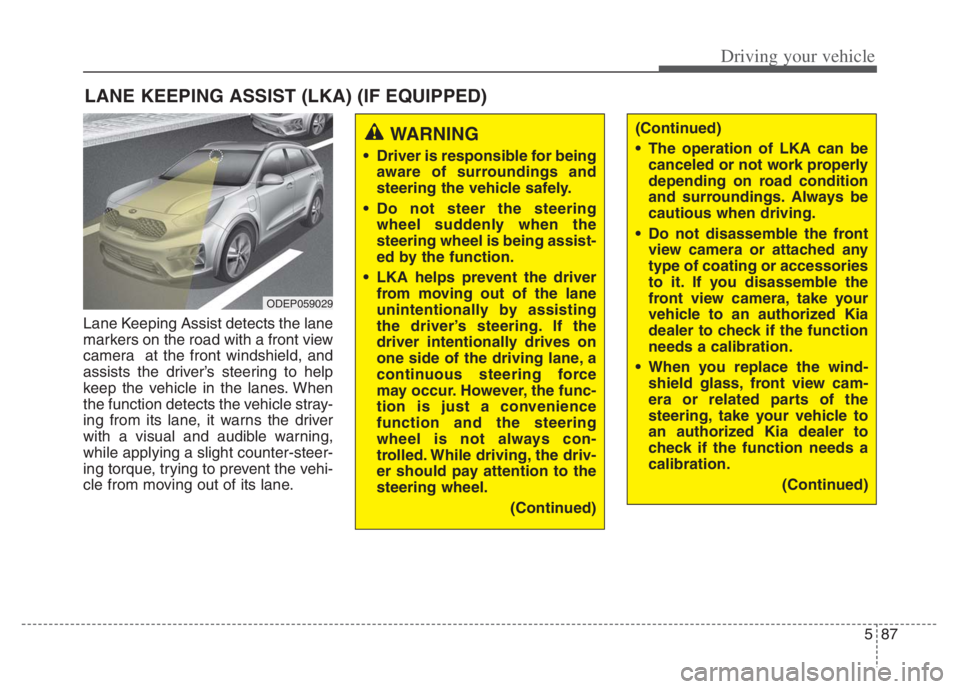
Lane Keeping Assist detects the lane
markers on the road with a front view
camera at the front windshield, and
assists the driver’s steering to help
keep the vehicle in the lanes. When
the function detects the vehicle stray-
ing from its lane, it warns the driver
with a visual and audible warning,
while applying a slight counter-steer-
ing torque, trying to prevent the vehi-
cle from moving out of its lane.
LANE KEEPING ASSIST (LKA) (IF EQUIPPED)
WARNING
Driver is responsible for being
aware of surroundings and
steering the vehicle safely.
Do not steer the steering
wheel suddenly when the
steering wheel is being assist-
ed by the function.
LKA helps prevent the driver
from moving out of the lane
unintentionally by assisting
the driver’s steering. If the
driver intentionally drives on
one side of the driving lane, a
continuous steering force
may occur. However, the func-
tion is just a convenience
function and the steering
wheel is not always con-
trolled. While driving, the driv-
er should pay attention to the
steering wheel.
(Continued)
(Continued)
The operation of LKA can be
canceled or not work properly
depending on road condition
and surroundings. Always be
cautious when driving.
Do not disassemble the front
view camera or attached any
type of coating or accessories
to it. If you disassemble the
front view camera, take your
vehicle to an authorized Kia
dealer to check if the function
needs a calibration.
When you replace the wind-
shield glass, front view cam-
era or related parts of the
steering, take your vehicle to
an authorized Kia dealer to
check if the function needs a
calibration.
(Continued)
ODEP059029
Page 417 of 710

Driving your vehicle
94 5
DRIVER’S ATTENTION
The driver must be cautious in the
below situations as the function may
not work properly when recognition
of the lane marker is poor or limited
:
When lane and road condition is
poor
• It is difficult to distinguish the lane
marker from road when the lane
marker is covered with dust or
sand.
• It is difficult to distinguish the
color of the lane marker from
road.
• There is something looks like a
lane marker.
• The lane marker is indistinct or
damaged.
• The number of lanes increases/
decreases or the lane lines are
crossing (Driving through a toll
plaza/toll gate, merged/divided
lane).
• There are more than two lane
markers.
• The lane marker is very thick or
thin.
(Continued)(Continued)
• The lane marker is not visible due
to snow, rain, stain, a puddle or
other factors.
• A shadow is on the lane marker
because of a median strip,
guardrail, noise barriers and oth-
ers.
• When the lane markers are com-
plicated or a structure substitutes
for the lines such as a construc-
tion area.
• There are crosswalk signs or other
symbols on the road.
• The lane suddenly disappears
such as at the intersection.
• The lane marker in a tunnel is cov-
ered with dirt or oil and etc.
• The lane is very wide or narrow.
When external condition is inter-
vened
• The brightness of outside changes
suddenly when entering/existing a
tunnel or passing under a bridge.
• The headlamps are not on at night
or in a tunnel, or light level is low.
(Continued)(Continued)
• There is a boundary structure in
the roadway.
• The light of street, sun, or oncom-
ing vehicle reflects from the water
on the road.
• When light shines brightly in the
reverse direction you drive.
• Road surface is not even.
• The distance from the vehicle
ahead is very short or the vehicle
ahead drives hiding the lane line.
• You drive on a steep grade or a
sharp curve.
• The vehicle vibrates heavily.
• The temperature near inside mir-
ror is very high due to direct sun
light and etc.
when front visibility is poor
• The lens or windshield is covered
by strange materials.
• The sensor cannot detect the lane
because of fog, heavy rain or snow.
• The windshield is fogged by
humid air in the vehicle.
• Putting something on the crash
pad and etc.