mirror KIA NIRO 2021 Owner's Manual
[x] Cancel search | Manufacturer: KIA, Model Year: 2021, Model line: NIRO, Model: KIA NIRO 2021Pages: 710, PDF Size: 14.77 MB
Page 280 of 710
Features of your vehicle
140 4
If you want to defrost and defog the
front windshield, refer to “Windshield
defrosting and defogging” in this sec-
tion.
Rear window defroster
The defroster heats the window to
remove frost, fog and thin ice from
the rear window, while the engine is
running.To activate the rear window
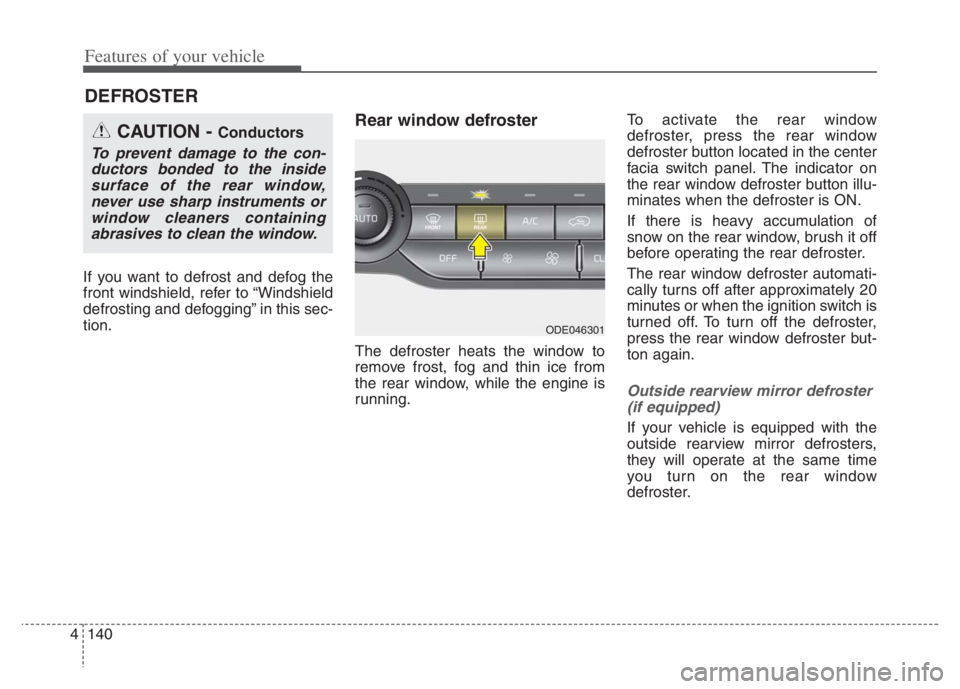
defroster, press the rear window
defroster button located in the center
facia switch panel. The indicator on
the rear window defroster button illu-
minates when the defroster is ON.
If there is heavy accumulation of
snow on the rear window, brush it off
before operating the rear defroster.
The rear window defroster automati-
cally turns off after approximately 20
minutes or when the ignition switch is
turned off. To turn off the defroster,
press the rear window defroster but-
ton again.
Outside rearview mirror defroster
(if equipped)
If your vehicle is equipped with the
outside rearview mirror defrosters,
they will operate at the same time
you turn on the rear window
defroster.
DEFROSTER
CAUTION - Conductors
To prevent damage to the con-
ductors bonded to the inside
surface of the rear window,
never use sharp instruments or
window cleaners containing
abrasives to clean the window.
ODE046301
Page 297 of 710
4157
Features of your vehicle
For maximum defrosting, set the
temperature control to the extreme
right/hot position and the fan speed
control to the highest speed.
If warm air to the floor is desired
while defrosting or defogging, set
the mode to the floor-defrost posi-
tion.
Before driving, clear all snow and
ice from the windshield, rear win-
dow, outside rear view mirrors, and
all side windows.
Clear all snow and ice from the
hood and air inlet in the cowl grill to
improve heater and defroster effi-
ciency and to reduce the probabili-
ty of fogging up the inside of the
windshield.Automatic climate control
system
To defog inside windshield
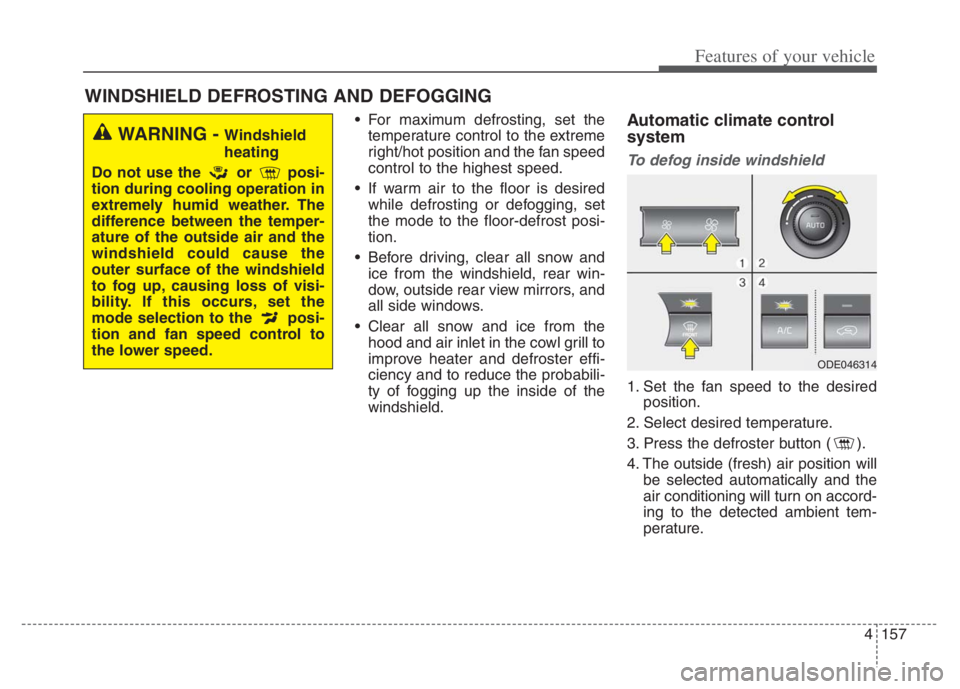
1. Set the fan speed to the desired
position.
2. Select desired temperature.
3. Press the defroster button ( ).
4. The outside (fresh) air position will
be selected automatically and the
air conditioning will turn on accord-
ing to the detected ambient tem-
perature.
WINDSHIELD DEFROSTING AND DEFOGGING
WARNING - Windshield
heating
Do not use the or posi-
tion during cooling operation in
extremely humid weather. The
difference between the temper-
ature of the outside air and the
windshield could cause the
outer surface of the windshield
to fog up, causing loss of visi-
bility. If this occurs, set the
mode selection to the posi-
tion and fan speed control to
the lower speed.
ODE046314
Page 302 of 710
Features of your vehicle
162 4
✽
✽
NOTICE
If the temperature control knob is in
the warm or hot position, warm or
hot air will flow into the glove box.
Sunglass holder
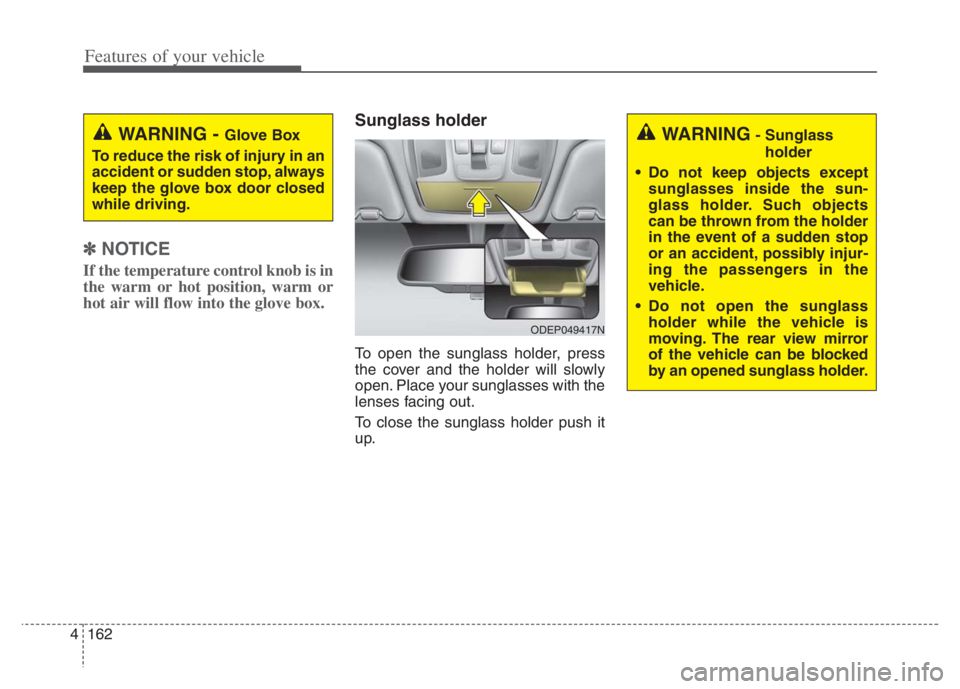
To open the sunglass holder, press
the cover and the holder will slowly
open. Place your sunglasses with the
lenses facing out.
To close the sunglass holder push it
up.
WARNING - Glove Box
To reduce the risk of injury in an
accident or sudden stop, always
keep the glove box door closed
while driving.WARNING- Sunglass
holder
Do not keep objects except
sunglasses inside the sun-
glass holder. Such objects
can be thrown from the holder
in the event of a sudden stop
or an accident, possibly injur-
ing the passengers in the
vehicle.
Do not open the sunglass
holder while the vehicle is
moving. The rear view mirror
of the vehicle can be blocked
by an opened sunglass holder.
ODEP049417N
Page 307 of 710
4167
Features of your vehicle
Sun visor
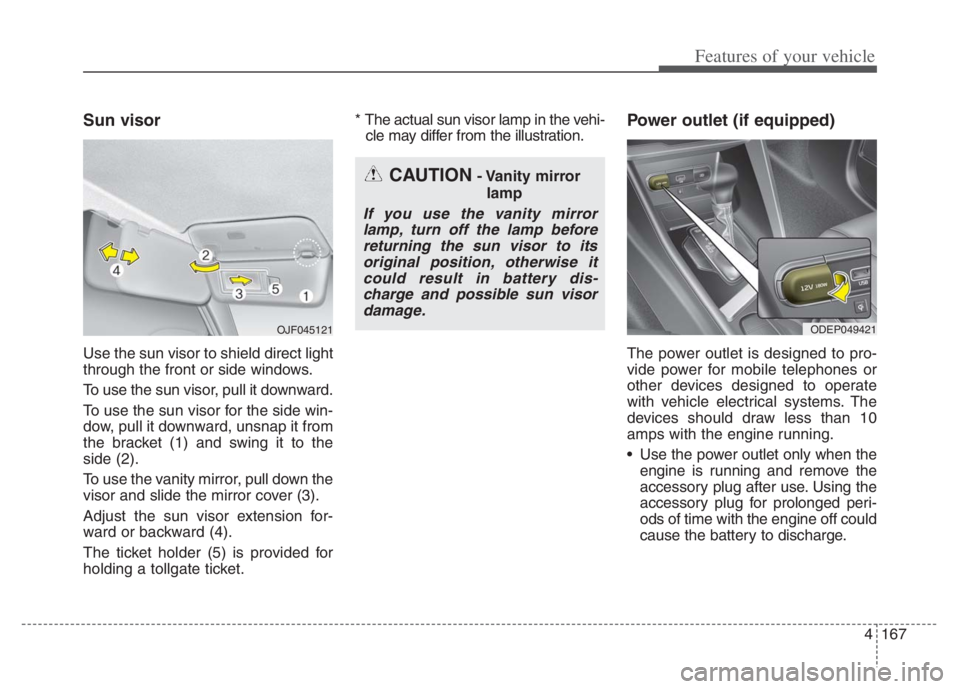
Use the sun visor to shield direct light
through the front or side windows.
To use the sun visor, pull it downward.
To use the sun visor for the side win-
dow, pull it downward, unsnap it from
the bracket (1) and swing it to the
side (2).
To use the vanity mirror, pull down the
visor and slide the mirror cover (3).
Adjust the sun visor extension for-
ward or backward (4).
The ticket holder (5) is provided for
holding a tollgate ticket.* The actual sun visor lamp in the vehi-
cle may differ from the illustration.
Power outlet (if equipped)
The power outlet is designed to pro-
vide power for mobile telephones or
other devices designed to operate
with vehicle electrical systems. The
devices should draw less than 10
amps with the engine running.
Use the power outlet only when the engine is running and remove the
accessory plug after use. Using the
accessory plug for prolonged peri-
ods of time with the engine off could
cause the battery to discharge.
CAUTION- Vanity mirror
lamp
If you use the vanity mirrorlamp, turn off the lamp beforereturning the sun visor to itsoriginal position, otherwise itcould result in battery dis-charge and possible sun visordamage.
ODEP049421 OJF045121
Page 328 of 710

55
Driving your vehicle
Before entering vehicle
• Be sure that all windows, outside
mirror(s), and outside lights are
clean.
Check the condition of the tires.
Check under the vehicle for any
sign of leaks.
Be sure there are no obstacles
behind you if you intend to back up.
Necessary inspections
Fluid levels, such as engine oil,
engine coolant, brake fluid, and
washer fluid should be checked on a
regular basis, at the exact interval
depending on the fluid. Further
details are provided in chapter 7,
“Maintenance”.
Before starting
Close and lock all doors.
Position the seat so that all con-
trols are easily reached.
Buckle your seat belt.
Adjust the inside and outside
rearview mirrors.
Be sure that all lights work.
Check all gauges.
Check the operation of warning
lights when the ignition switch or
ENGINE START/STOP button is in
the ON position.
Release the parking brake and
make sure the brake warning light
goes out.
For safe operation, be sure you are
familiar with your vehicle and its
equipment.
BEFORE DRIVING
WARNING - Distracted
driving
Focus on the road while driving.
The driver's primary responsi-
bility is in the safe and legal
operation of the vehicle. Any
handled devices, other equip-
ment or vehicle systems that
distract the driver should not be
used during vehicle operation.
Page 383 of 710
Driving your vehicle
60 5
✽
✽
NOTICE
• Be careful not to apply unneces-
sary force on the frontal sensor
area. When the sensor moves out
of the correct position due to
external force, FCA may not nor-
mally operate even without the
warning light or message. In this
case, have your vehicle inspected
by an authorized Kia dealer.
• Keep the sensor and sensor area
clean.
• Be careful not to force to shock on
sensor or area. If the sensor is out
of the position by the shock, FCA
may not normally operate even
without the warning light ON or
message. In this case, have your
vehicle inspected by an authorized
Kia dealer.
• Do not tint the window or install
stickers, accessories around the
inside mirror where the front view
camera is installed.
• Make sure the front view camera
installation point does not get wet.
(Continued)(Continued)
• Do not impact or arbitrarily
remove any front view camera
components.
• Do not place reflective
objects(white paper or mirror etc.)
on the crash pad.
FCA may activate unnecessarily
due to reflect of the sunlight.
• For more cautions for the camera
sensor, refer to Lane Keeping
Assist (LKA) in this chapter.
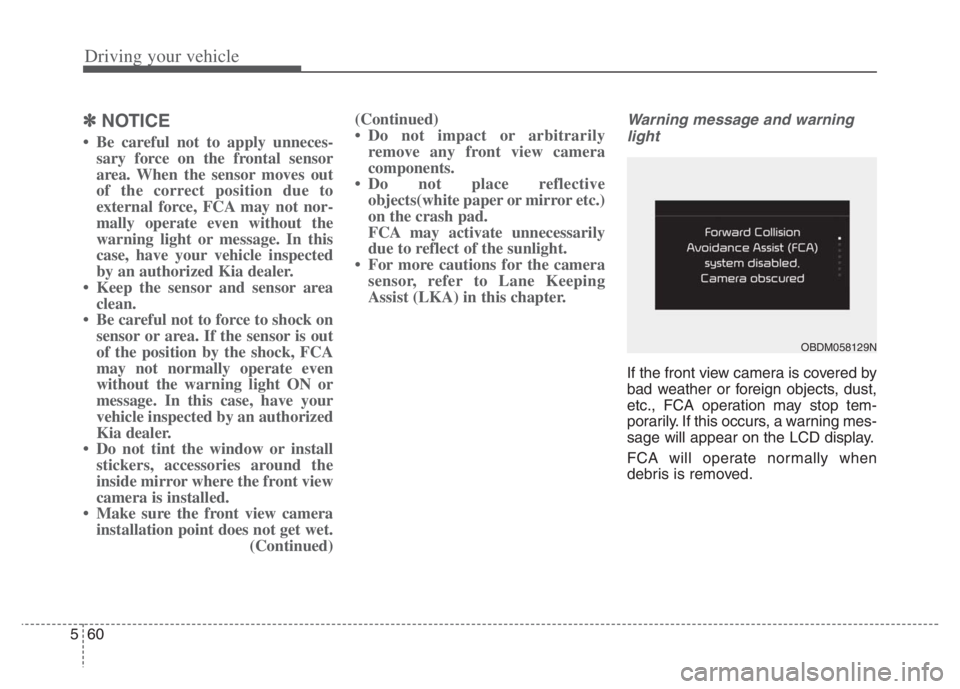
Warning message and warning
light
If the front view camera is covered by
bad weather or foreign objects, dust,
etc., FCA operation may stop tem-
porarily. If this occurs, a warning mes-
sage will appear on the LCD display.
FCA will operate normally when
debris is removed.
OBDM058129N
Page 399 of 710
Driving your vehicle
76 5
In bad weather conditions such as
heavy rain, heavy snow, and fog, or
when sensor is covered by foreign
material, dust, tec., the sensors will
be degraded and the function will be
temporarily disabled.
Always keep the sensor clean.✽ ✽
NOTICE
• Do not install any accessories,
such as license plate molding or
sticker, on the sensor area. Nor
arbitrarily replace the bumper.
Those may adversely affect the
sensing performance.
• Always keep the sensor/bumper
area clean.
• Use only soft cloths to wash the
vehicle. Also, do not spray highly-
pressurized water on the sensor
installed on the bumper.
• Be careful not to apply unneces-
sary force on the frontal sensor
area. When the sensor moves out
of the correct position due to
external force, the function may
not normally operate even without
the warning light or message. In
this case, have your vehicle
inspected by an authorized Kia
dealer.
• Use only the genuine Kia sensor
cover. Do not arbitrarily apply
paint on the sensor cover.
(Continued)(Continued)
• Do not tint the window or install
stickers, accessories around the
inside mirror where the camera is
installed.
• Make sure the front view camera
installation point does not get wet.
• Do not impact or arbitrarily
remove any front radar compo-
nents.
• Do not place reflective
objects(white paper or mirror etc.)
on the crash pad.
The function may activate unnec-
essarily due to reflect of the sun-
light.
• Excessive audio volume may dis-
turb the sound of the function
warning alarm.
• For more cautions for the front
view camera sensor, refer to the
“Lane Keeping Assist (LKA)” in
this chapter.
Page 411 of 710

Driving your vehicle
88 5
LKA operation
To activate/deactivate LKA :
With the ignition switch or ENGINE
START/STOP button in the ON posi-
tion, press the Lane Safety button
located on the instrument panel on
the lower left hand side of the driver.
The indicator ( )in the cluster dis-
play will initially illuminate white.
When the indicator(white) was acti-
vated in the previous ignition cycle,
the function turns on without any
control. If you press the Lane Safety
button again, the indicator on the
cluster display will go off.
(Continued)
The function detects lane
markers and controls the
steering wheel by a front view
camera, therefore, if the lane
markers are hard to detect,
the function may not work
properly. Always be cautious
when using the function.
When the lane markers are
hard to detect, please refer to
“DRIVER’S ATTENTION”.
Do not remove or damage the
related parts of the front view
camera function.
Do not place objects on the
crash pad that reflect light
such as mirrors, white paper,
etc. it may cause malfunction
of LKA if sunlight is reflected.
You may not hear warning
sound of LKA because of the
excessive audio sound.
(Continued)(Continued)
If other beeps such as the
seat belt warning sound are in
operation and override LKA
alarming function, LKA beeps
may not occur.
At high vehicle speeds, the
steering torque needed for
assistance may not be suffi-
cient to keep your vehicle
within the lane. If so, the vehi-
cle may move out of its lane.
Always obey the speed limit
when using LKA.
If you attach objects to the
steering wheel, the function
may not assist steering.
If you attach objects to the
steering wheel, hands off
alarm may not work properly.
ODEP059113
Page 420 of 710

597
Driving your vehicle
Function setting and activa-
tion
Function setting
The driver can activate the function
by placing the ignition switch or
ENGINE START/STOP button to the
ON position and by selecting “User
Settings Driver Assistance
Blind-Spot Safety”
- BCW turns on and gets ready to
be activated when “Warning
Only” is selected. Then, if a vehi-
cle approaches the driver's blind
spot area a warning sounds.
- The function is deactivated and
the indicator on the Blind-Spot
Safety button is extinguished
when 'Off' is selected. If you press Blind-Spot Safety but-
ton while “Warning Only” is select-
ed the indicator on the button extin-
guishes and the function deacti-
vates.
If you press Blind-Spot Safety but-
ton while the function is cancelled
the indicator on the button illumi-
nates and the function activates. In
this case, the function returns to the
state before the vehicle turned off.
When the function is initially turned
on and when the motor is turned off
then on again while the function is
in activation, the warning light will
illuminate for 3 seconds on the out-
side rearview mirror. If the vehicle is turned off then on
again, the function maintains the
previous state.
ODEP059293
Page 422 of 710
599
Driving your vehicle
Operating conditions
The function enters the ready status,
when ‘Warning Only’ is selected and
the following conditions are satisfied:
(1) Blind-Spot Collision Warning will
activate when:
- The vehicle speed above approxi-
mately 20 mph (30 km/h).
Warning message and func-
tion control
Blind-Spot Collision Warning
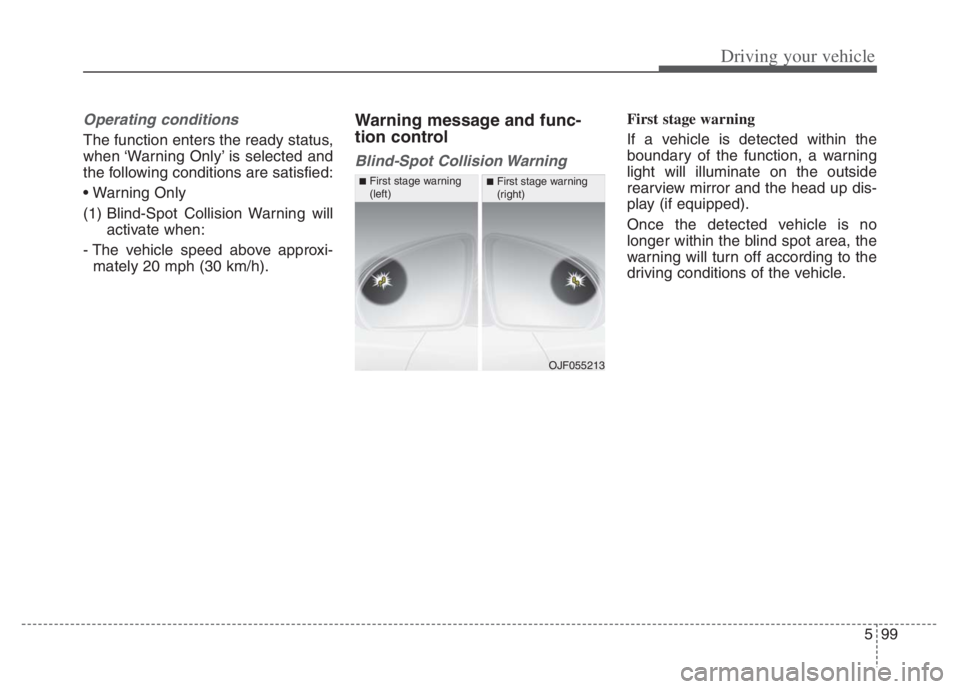
First stage warning
If a vehicle is detected within the
boundary of the function, a warning
light will illuminate on the outside
rearview mirror and the head up dis-
play (if equipped).
Once the detected vehicle is no
longer within the blind spot area, the
warning will turn off according to the
driving conditions of the vehicle.
OJF055213
■First stage warning
(left)■First stage warning
(right)