ignition KIA NIRO 2021 Workshop Manual
[x] Cancel search | Manufacturer: KIA, Model Year: 2021, Model line: NIRO, Model: KIA NIRO 2021Pages: 710, PDF Size: 14.77 MB
Page 289 of 710
4149
Features of your vehicle
Air conditioning
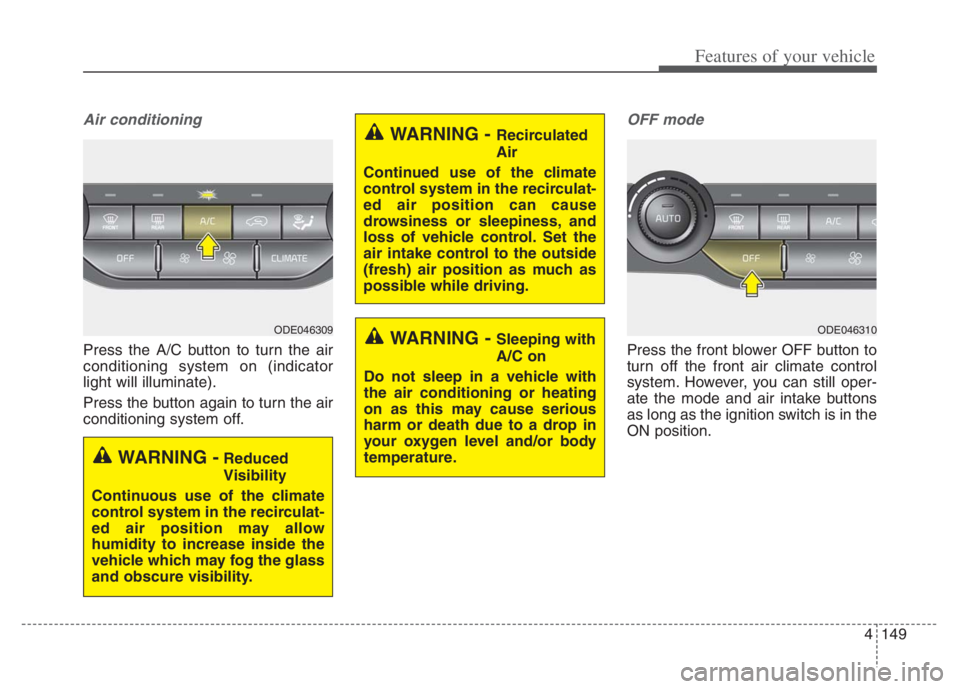
Press the A/C button to turn the air
conditioning system on (indicator
light will illuminate).
Press the button again to turn the air
conditioning system off.
OFF mode
Press the front blower OFF button to
turn off the front air climate control
system. However, you can still oper-
ate the mode and air intake buttons
as long as the ignition switch is in the
ON position.
WARNING - Recirculated
Air
Continued use of the climate
control system in the recirculat-
ed air position can cause
drowsiness or sleepiness, and
loss of vehicle control. Set the
air intake control to the outside
(fresh) air position as much as
possible while driving.
WARNING - Sleeping with
A/C on
Do not sleep in a vehicle with
the air conditioning or heating
on as this may cause serious
harm or death due to a drop in
your oxygen level and/or body
temperature.
WARNING -Reduced
Visibility
Continuous use of the climate
control system in the recirculat-
ed air position may allow
humidity to increase inside the
vehicle which may fog the glass
and obscure visibility.
ODE046309ODE046310
Page 293 of 710

4153
Features of your vehicle
Sunroof inside air recircula-
tion (if equipped)
The outside (fresh) air position is
automatically selected when the sun-
roof is opened.
When you select the recirculated air
position, the system maintains the
recirculated air position for 3 minutes
and then automatically converts to
the outside (fresh) air position.
When the sunroof is closed, the air
intake position will return to the orig-
inal position that was selected.
Recirculated air at washer
fluid spray
To prevent the odor from entering to
inside the vehicle, the ventilation sys-
tem changes to Recirculated Air
Mode for a while when the wind-
shield washer fluid sprayed.
However, at low outside temperature,
to prevent from windshield fogging,
the system continues to outside air
mode.
System setting
1. ENGINE START/STOP button is
On or ignition switch ON.
2. Select Floor-Level ( ) air flow
direction by pressing
Mode Selection button.
3. With pressing Air Conditioning but-
ton, press the Recirculated Air but-
ton more than 4 times within 2
seconds.
4. If the system is set up, the indica-
tor on Recirculated Air button will
blinks 6 times.
System cancellation
1. ENGINE START/STOP button is
On or ignition switch ON.
2. Select Floor-Level ( ) air flow
direction by pressing
Mode Selection button.
3. With pressing Air Conditioning but-
ton, press the Recirculated Air but-
ton more than 4 times within 2
seconds.
4. If the system is cancelled, the indi-
cator on Recirculated Air button
will blinks 3 times.
Page 299 of 710
4159
Features of your vehicle
Automatic climate control system
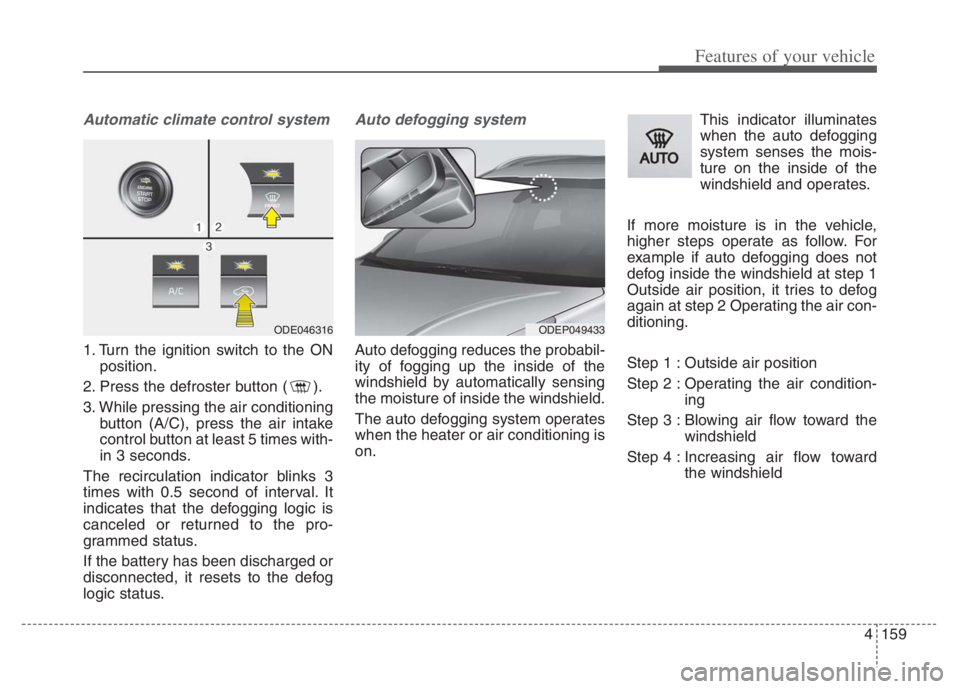
1. Turn the ignition switch to the ON
position.
2. Press the defroster button ( ).
3. While pressing the air conditioning
button (A/C), press the air intake
control button at least 5 times with-
in 3 seconds.
The recirculation indicator blinks 3
times with 0.5 second of interval. It
indicates that the defogging logic is
canceled or returned to the pro-
grammed status.
If the battery has been discharged or
disconnected, it resets to the defog
logic status.
Auto defogging system
Auto defogging reduces the probabil-
ity of fogging up the inside of the
windshield by automatically sensing
the moisture of inside the windshield.
The auto defogging system operates
when the heater or air conditioning is
on.This indicator illuminates
when the auto defogging
system senses the mois-
ture on the inside of the
windshield and operates.
If more moisture is in the vehicle,
higher steps operate as follow. For
example if auto defogging does not
defog inside the windshield at step 1
Outside air position, it tries to defog
again at step 2 Operating the air con-
ditioning.
Step 1 : Outside air position
Step 2 : Operating the air condition-
ing
Step 3 : Blowing air flow toward the
windshield
Step 4 : Increasing air flow toward
the windshield
ODEP049433 ODE046316
Page 304 of 710
Features of your vehicle
164 4
Cup holder
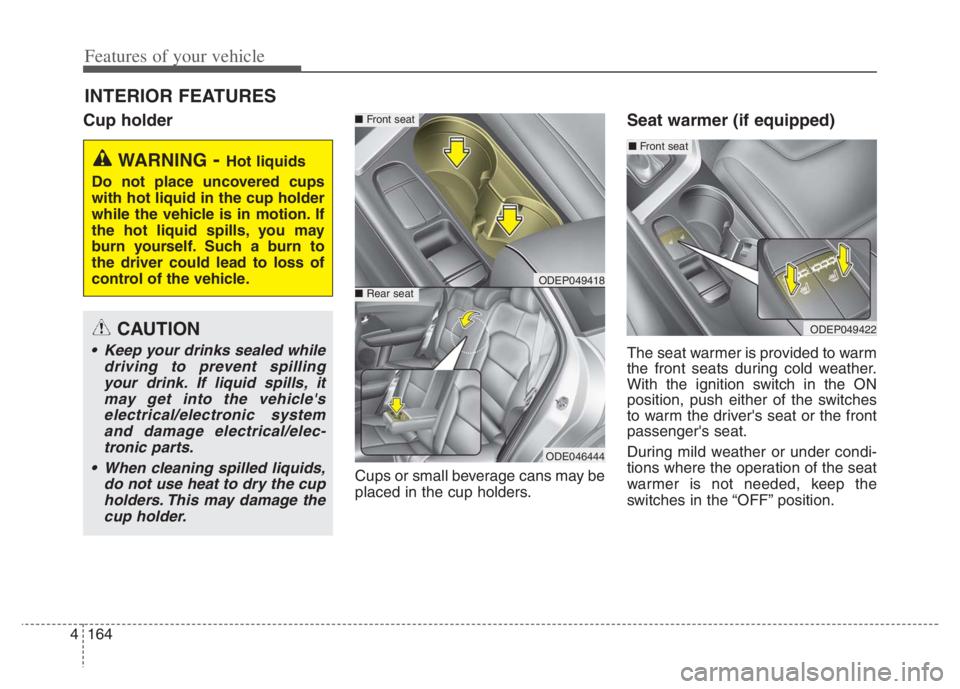
Cups or small beverage cans may be
placed in the cup holders.
Seat warmer (if equipped)
The seat warmer is provided to warm
the front seats during cold weather.
With the ignition switch in the ON
position, push either of the switches
to warm the driver's seat or the front
passenger's seat.
During mild weather or under condi-
tions where the operation of the seat
warmer is not needed, keep the
switches in the “OFF” position.
INTERIOR FEATURES
WARNING- Hot liquids
Do not place uncovered cups
with hot liquid in the cup holder
while the vehicle is in motion. If
the hot liquid spills, you may
burn yourself. Such a burn to
the driver could lead to loss of
control of the vehicle.
ODEP049418
■Front seat
■Rear seat
ODE046444
CAUTION
Keep your drinks sealed while
driving to prevent spilling
your drink. If liquid spills, it
may get into the vehicle's
electrical/electronic system
and damage electrical/elec-
tronic parts.
When cleaning spilled liquids,
do not use heat to dry the cup
holders. This may damage the
cup holder.
ODEP049422
■Front seat
Page 305 of 710

4165
Features of your vehicle
Temperature control (Manual)
Each time you press the switch,
the temperature setting of the seat
will change as follows :
■ Front seat
The seat warmer defaults to the
OFF position whenever the ignition
switch is turned on.Temperature control(Automatic)
The seat warmer starts to automati-
cally control the seat temperature in
order to prevent low-temperature
burns after being manually turned
ON.
■ Front seat
You may manually press the button
to increase the seat temperature.
However, it soon returns to the auto-
matic mode again when pressing the
switch for more than 1.5 seconds
with the seat warmer operating, the
seat warmer will turn OFF. The seat
warmer defaults to the OFF position
whenever the Engine Start/Stop but-
ton is in the ON position.✽ ✽
NOTICE
With the seat warmer switch in the
ON position, the heating system in
the seat turns off or on automatical-
ly depending on the seat tempera-
ture.▼ ▼
OFFHIGH( )MIDDLE( )LOW( )
OFFHIGH( )MIDDLE( )LOW( )
30min
60min
Page 306 of 710
Features of your vehicle
166 4
Air ventilation seat (if equipped)
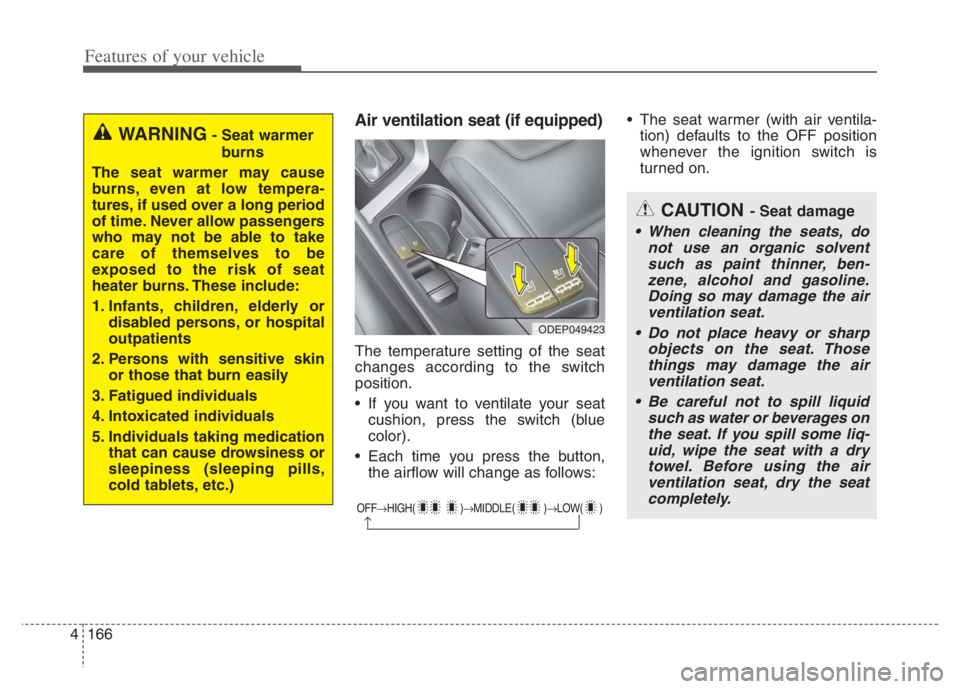
The temperature setting of the seat
changes according to the switch
position.
If you want to ventilate your seat
cushion, press the switch (blue
color).
Each time you press the button,
the airflow will change as follows: The seat warmer (with air ventila-
tion) defaults to the OFF position
whenever the ignition switch is
turned on.
OFFHIGH( )MIDDLE( )LOW( )
CAUTION - Seat damage
When cleaning the seats, do
not use an organic solvent
such as paint thinner, ben-
zene, alcohol and gasoline.
Doing so may damage the air
ventilation seat.
Do not place heavy or sharp
objects on the seat. Those
things may damage the air
ventilation seat.
Be careful not to spill liquid
such as water or beverages on
the seat. If you spill some liq-
uid, wipe the seat with a dry
towel. Before using the air
ventilation seat, dry the seat
completely.
ODEP049423
WARNING- Seat warmer
burns
The seat warmer may cause
burns, even at low tempera-
tures, if used over a long period
of time. Never allow passengers
who may not be able to take
care of themselves to be
exposed to the risk of seat
heater burns. These include:
1. Infants, children, elderly or
disabled persons, or hospital
outpatients
2. Persons with sensitive skin
or those that burn easily
3. Fatigued individuals
4. Intoxicated individuals
5. Individuals taking medication
that can cause drowsiness or
sleepiness (sleeping pills,
cold tablets, etc.)
Page 309 of 710

4169
Features of your vehicle
Use the USB charger when the
engine is running to prevent bat-
tery discharge.
Only devices that fit the USB port
can be used.
The USB charger can be used only
for battery charging purposes.
Battery chargers cannot be
charged.Wireless smart phone charg-
ing system (if equipped)
A wireless smart phone charging
system is located in front of the cen-
ter console
Firmly close all doors, and turn the
ignition to ACC or IGN ON. To start
wireless charging, place the smart
phone equipped with wireless charg-
ing function on the wireless charging
pad.For best wireless charging results,
place the smart phone on the center
of the charging pad.
The wireless charging system is
designed for one smart phone
equipped with QI per single usage
only. Please refer to the smart phone
accessory cover or the smart phone
manufacturer homepage to check
whether your smart phone supports
QI function.
ODEP049424
Page 311 of 710
4171
Features of your vehicle
✽ ✽
NOTICE
• When the interior temperature of
the wireless charging system rises
above a set temperature, the wire-
less charging will cease to func-
tion. After the interior tempera-
ture drops below the threshold,
the wireless charging function will
resume.
• The wireless charging may not
function properly when there is a
heavy accessory cover on the
smart phone.
• The wireless charging will stop
when using the wireless smart key
search function to prevent radio
wave disruption.
• The wireless charging will stop
when the smart key is moved out
of the vehicle with the ignition in
ON.
• The wireless charging will stop
when any of the doors is opened
(applicable for vehicles equipped
with smart keys).
(Continued)(Continued)
• The wireless charging will stop
when the vehicle is turned OFF.
• The wireless charging will stop
when the smart phone is not in
complete contact with the wireless
charging pad.
• Items equipped with magnetic
components such as credit card,
telephone card, bankbook or any
transportation ticket may become
damaged during wireless charg-
ing.
• Place the smart phone on the cen-
ter of the charge pad for best
results. The smart phone may not
charge when placed near the rim
of the charging pad. When the
smart phone does get charged, it
may heat up excessively.
• For smart phones without built-in
wireless charging system, an
appropriate accessory has to be
equipped in order to use the vehi-
cle's wireless charging system.
(Continued)CAUTION - Liquid in
Wireless Smart Phone
Charger
To prevent liquid from damag-
ing the wireless smart phone
charging system in your vehi-
cle, be sure not to spill liquid
over the charging system when
charging your phone.
CAUTION - Metal in
Wireless Charging System
If any metallic object such as a
coin is located between the
wireless charging system and
the smart phone, the charging
may be disrupted. Also, the
metallic object may heat up and
potentially damage the charging
system. If there is any metallic
object between the smart phone
and the charging pad, immedi-
ately remove the smart phone.
Remove the metallic object after
it has cooled down.
Page 328 of 710

55
Driving your vehicle
Before entering vehicle
• Be sure that all windows, outside
mirror(s), and outside lights are
clean.
Check the condition of the tires.
Check under the vehicle for any
sign of leaks.
Be sure there are no obstacles
behind you if you intend to back up.
Necessary inspections
Fluid levels, such as engine oil,
engine coolant, brake fluid, and
washer fluid should be checked on a
regular basis, at the exact interval
depending on the fluid. Further
details are provided in chapter 7,
“Maintenance”.
Before starting
Close and lock all doors.
Position the seat so that all con-
trols are easily reached.
Buckle your seat belt.
Adjust the inside and outside
rearview mirrors.
Be sure that all lights work.
Check all gauges.
Check the operation of warning
lights when the ignition switch or
ENGINE START/STOP button is in
the ON position.
Release the parking brake and
make sure the brake warning light
goes out.
For safe operation, be sure you are
familiar with your vehicle and its
equipment.
BEFORE DRIVING
WARNING - Distracted
driving
Focus on the road while driving.
The driver's primary responsi-
bility is in the safe and legal
operation of the vehicle. Any
handled devices, other equip-
ment or vehicle systems that
distract the driver should not be
used during vehicle operation.
Page 330 of 710
57
Driving your vehicle
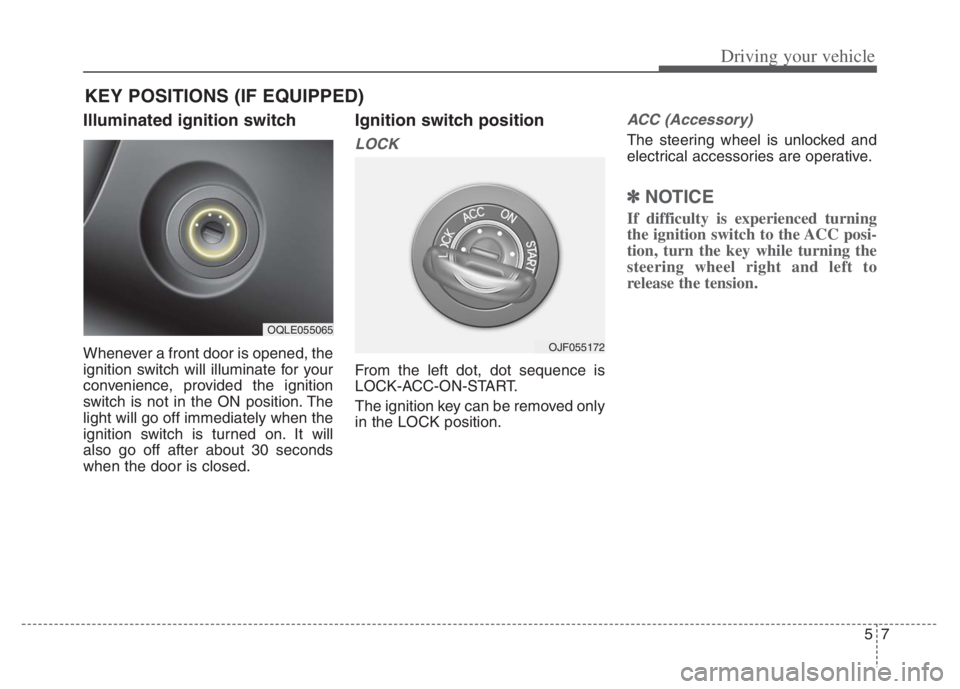
Illuminated ignition switch
Whenever a front door is opened, the
ignition switch will illuminate for your
convenience, provided the ignition
switch is not in the ON position. The
light will go off immediately when the
ignition switch is turned on. It will
also go off after about 30 seconds
when the door is closed.
Ignition switch position
LOCK
From the left dot, dot sequence is
LOCK-ACC-ON-START.
The ignition key can be removed only
in the LOCK position.
ACC (Accessory)
The steering wheel is unlocked and
electrical accessories are operative.
✽ ✽
NOTICE
If difficulty is experienced turning
the ignition switch to the ACC posi-
tion, turn the key while turning the
steering wheel right and left to
release the tension.
KEY POSITIONS (IF EQUIPPED)
OQLE055065
OJF055172