navigation system KIA NIRO EV 2022 Navigation System Quick Reference Guide
[x] Cancel search | Manufacturer: KIA, Model Year: 2022, Model line: NIRO EV, Model: KIA NIRO EV 2022Pages: 332, PDF Size: 11.18 MB
Page 46 of 332
2-8
Using the Apple CarPlay
1 On the All Menus screen, press Apple CarPlay.
2 Perform the desired function.
\225To run any of functions (phone, messaging, navigation, etc.) on your iPhone, press the
corresponding function icon.
0000
A
When you are using your smartphone′s navigation via phone projection, sounds
from both the system′s radio/media function and the navigation will be output
through your vehicle′s speakers. When you use the Volume knob while both
sounds are being output, the navigation volume is adjusted first.
\225To run the Siri voice recognition, press and hold the Voice Recognition button on the
steering wheel.
0000
A
By pressing the [ MODE] button on the steering wheel, you can run the media App on
your smartphone as well as the Radio/Media mode of the system.
0000
A
To specify which functions to run when the [ MODE] button on the steering wheel is
pressed, press and hold the [ MODE] button to display the settings screen.
0000
A
When you receive a call, press the Call button on the steering wheel to answer it.
0000
A
When phone projection is active, you cannot change the phone projection settings. To
change the settings, remove the USB cable from your system.
0000
A
Apps or functions used through Apple CarPlay are subject to change according to the
policy of Apple Corporation. For supportable functions, visit the Apple Corporation
website at http://www.apple.com/ios/carplay .
0000
A
To use the functions on your smartphone with the minimized system settings, update the
smartphone OS to the latest version.
0000
A
The recognition time may differ depending on the device type, firmware, and OS version.
0000
A
Charges may apply for any mobile data used while Apple CarPlay is running.
0000
A
Some functions may not work properly depending on the network signal strength.
0000
A
Avoid interacting with the smartphone while using Apple CarPlay.
0000
A
You cannot use the following functions when Apple CarPlay is in use.
000DBluetooth phone
000DUSB mode
000DAndroid Auto
000DBrowsing using the Search knob on the control panel (if equipped)
Page 64 of 332
2-26
Viewing notifications (if equipped)
You can view UVO notifications including the navigation and map update information.0000
A
Subscribe to UVO to check the function.
> See "Subscribing to the service."
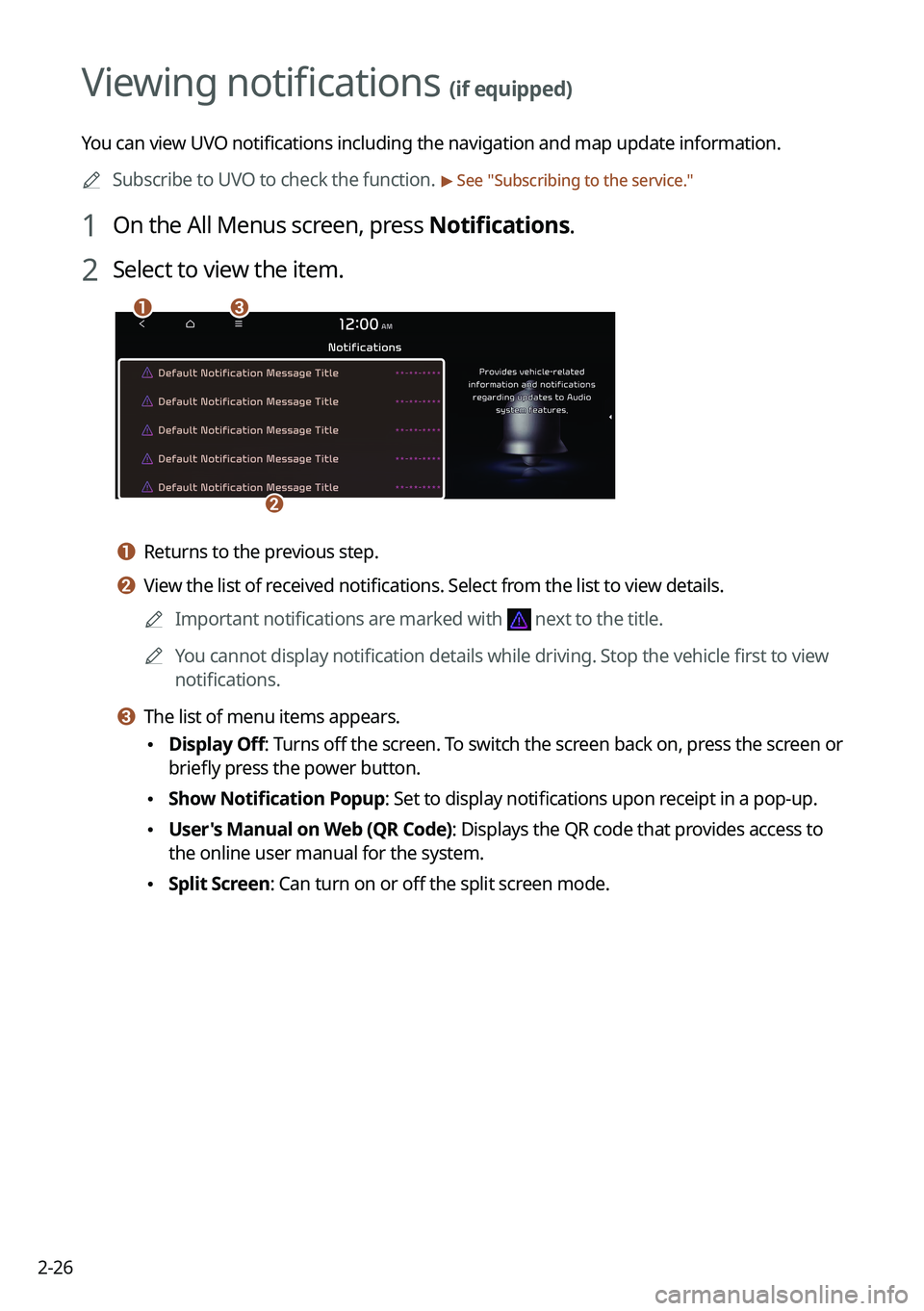
1 On the All Menus screen, press Notifications.
2 Select to view the item.
\037\036
\035
a a Returns to the previous step.
b b View the list of received notifications. Select from the list to view details.
0000
A
Important notifications are marked with
next to the title.
0000
A
You cannot display notification details while driving. Stop the vehicle first to view
notifications.
c c The list of menu items appears.
\225Display Off
: Turns off the screen. To switch the screen back on, press the screen or
briefly press the power button.
\225 Show Notification Popup: Set to display notifications upon receipt in a pop-up.
\225User's Manual on Web (QR Code): Displays the QR code that provides access to
the online user manual for the system.
\225Split Screen: Can turn on or off the split screen mode.
Page 68 of 332
2-30
h h The list of menu items appears.
\225Display Off
: Turns off the screen. To switch the screen back on, press the screen or
briefly press the power button.
\225 User's Manual on Web (QR Code): Displays the QR code that provides access to
the online user manual for the system.
\225Split Screen: Can turn on or off the split screen mode.
Searching for nearby charging stations
When you want to drive beyond the drivable range, you can search for charging stations
within the range and start route guidance to a selected charging station.
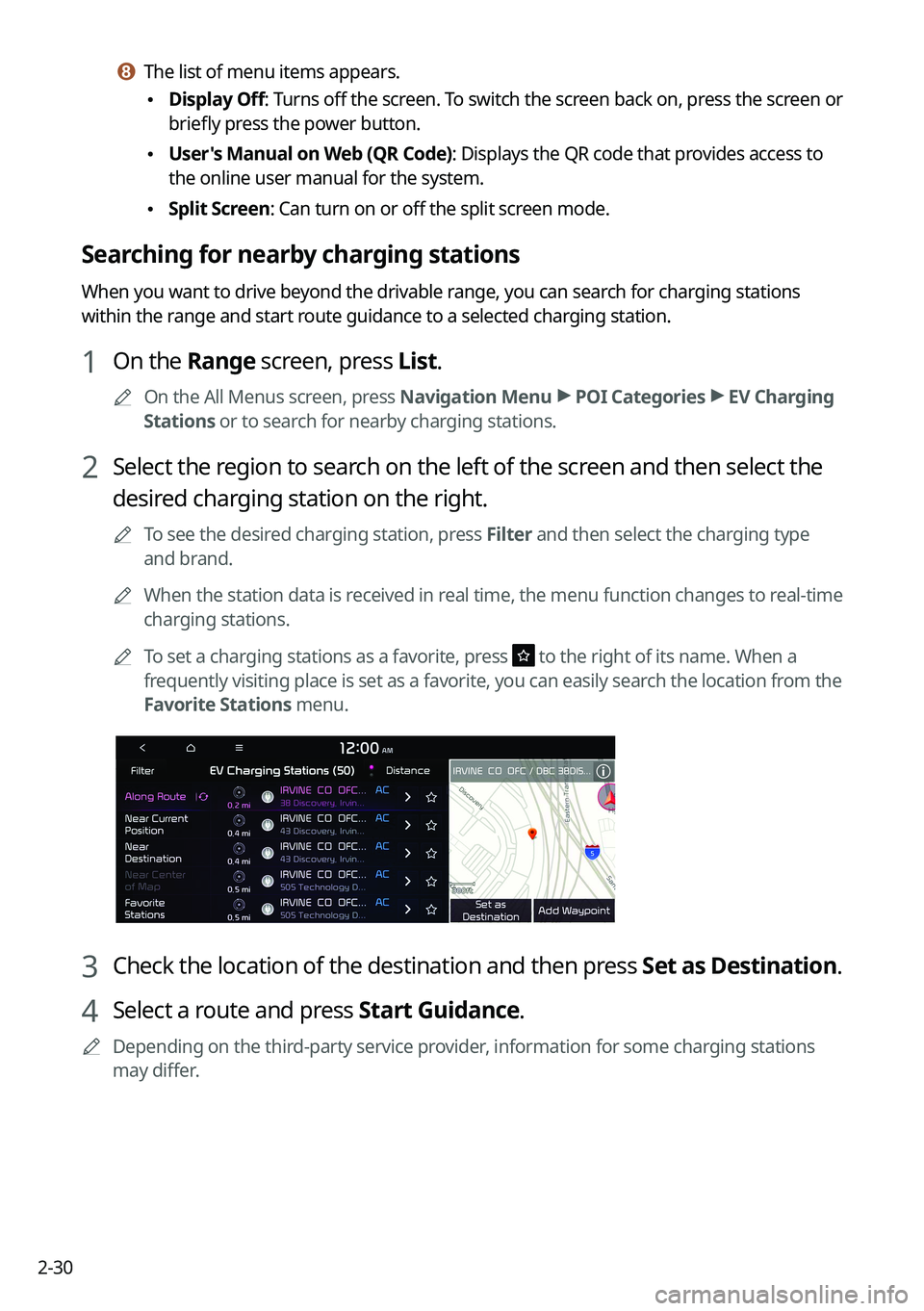
1 On the Range screen, press List.
0000
A
On the All Menus screen, press Navigation Menu >
POI Categories >
EV Charging
Stations or to search for nearby charging stations.
2 Select the region to search on the left of the screen and then select the
desired charging station on the right.
0000
A
To see the desired charging station, press Filter and then select the charging type
and brand.
0000
A
When the station data is received in real time, the menu function changes to real-time
charging stations.
0000
A
To set a charging stations as a favorite, press
to the right of its name. When a
frequently visiting place is set as a favorite, you can easily search the location from the
Favorite Stations menu.
3 Check the location of the destination and then press Set as Destination.
4 Select a route and press Start Guidance.
0000
A
Depending on the third-party service provider, information for some charging stations
may differ.
Page 76 of 332
2-38
Configuring the EV settings (EV only)
You can set to display the warning message when the remaining battery amount is low for
the destination and you can also see the drivable distance. In winter, you can also set to
increase the battery temperature in advance.
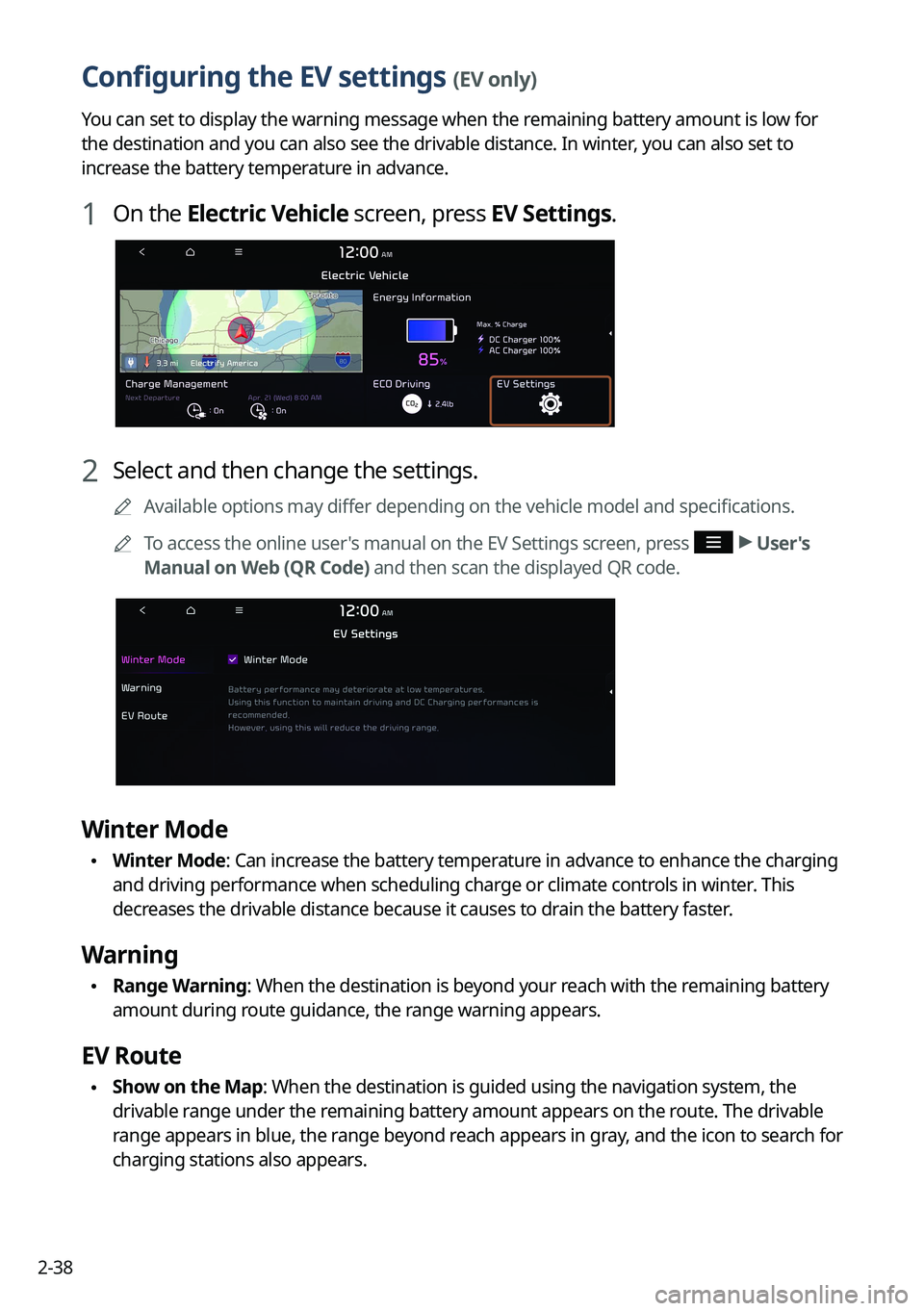
1 On the Electric Vehicle screen, press EV Settings.
2 Select and then change the settings.
0000
A
Available options may differ depending on the vehicle model and specifications.
0000
A
To access the online user's manual on the EV Settings screen, press
>
User's
Manual on Web (QR Code) and then scan the displayed QR code.
Winter Mode
\225 Winter Mode: Can increase the battery temperature in advance to enhance the charging
and driving performance when scheduling charge or climate controls in winter. This
decreases the drivable distance because it causes to drain the battery faster.
Warning
\225Range Warning: When the destination is beyond your reach with the remaining battery
amount during route guidance, the range warning appears.
EV Route
\225Show on the Map: When the destination is guided using the navigation system, the
drivable range under the remaining battery amount appears on the route. The drivable
range appears in blue, the range beyond reach appears in gray, and the icon to search for
charging stations also appears.
Page 108 of 332

5-2
Navigation functions
Navigation Menu overview
You can use the navigation system conveniently through various functions on the Navigation
Menu screen.
Perform any of the following methods:
\225On the All Menus screen, press Navigation Menu.
\225On the control panel, press the [
NAV] button.
\037\036
\035
\034
\033\032\031\030\027
\026\025\024
\023
a a Returns to the previous step.
b b Customize the navigation settings.
c c Search for a location by entering various types of keywords such as place name and
address.
> See " Searching by keyword."
d d Search for a location by using the point of interest (POI) categories. > See "Searching for
nearby points of interest."
e e Select one of the destinations you entered previously. > See " Searching from previous
destinations."
f f Select one of the locations stored in your address book. > See " Using saved favorite places."
g g Search for Kia Dealerships easily. > See "Searching for Kia Dealerships."
h h Cancel guidance to the destination. > See "Canceling the route guidance."
i i View information on the entire route to the destination.
j j Edit the waypoints on the way to the destination. > See "Editing the route."
k k Reroute by changing the route search option. > See "Changing the route search option."
Page 109 of 332
5-3
l l Register your home, office or other frequently visited places as a favorite location to
making searching easier.
> See "Saving a frequently visited place as a favorite place."
m m The list of menu items appears.
\225 Reorder Icons: Can change the location of an icon on the Navigation Menu screen.
\225Display Off: Turns off the screen. To switch the screen back on, press the screen or
briefly press the power button.
\225User's Manual on Web (QR Code): Displays the QR code that provides access to the
online user manual for the system.
0000
A
Available icons and their arrangement may differ depending on the vehicle model and
specifications.
Finding a route easily
\335Warning
Driving while distracted may cause a loss of vehicle control that may lead to an accident,
severe bodily injury, or death. The driver's primary responsibility is the safe and legal
operation of the vehicle, and the use of any devices or systems that take the driver's attention
away from driving.
1 Perform any of the following methods:
\225On the All Menus screen, press Navigation Menu >
Places.
\225 On the map screen, press .
0000
A
Press and hold the [ NAV] button on the control panel to enter into Places.
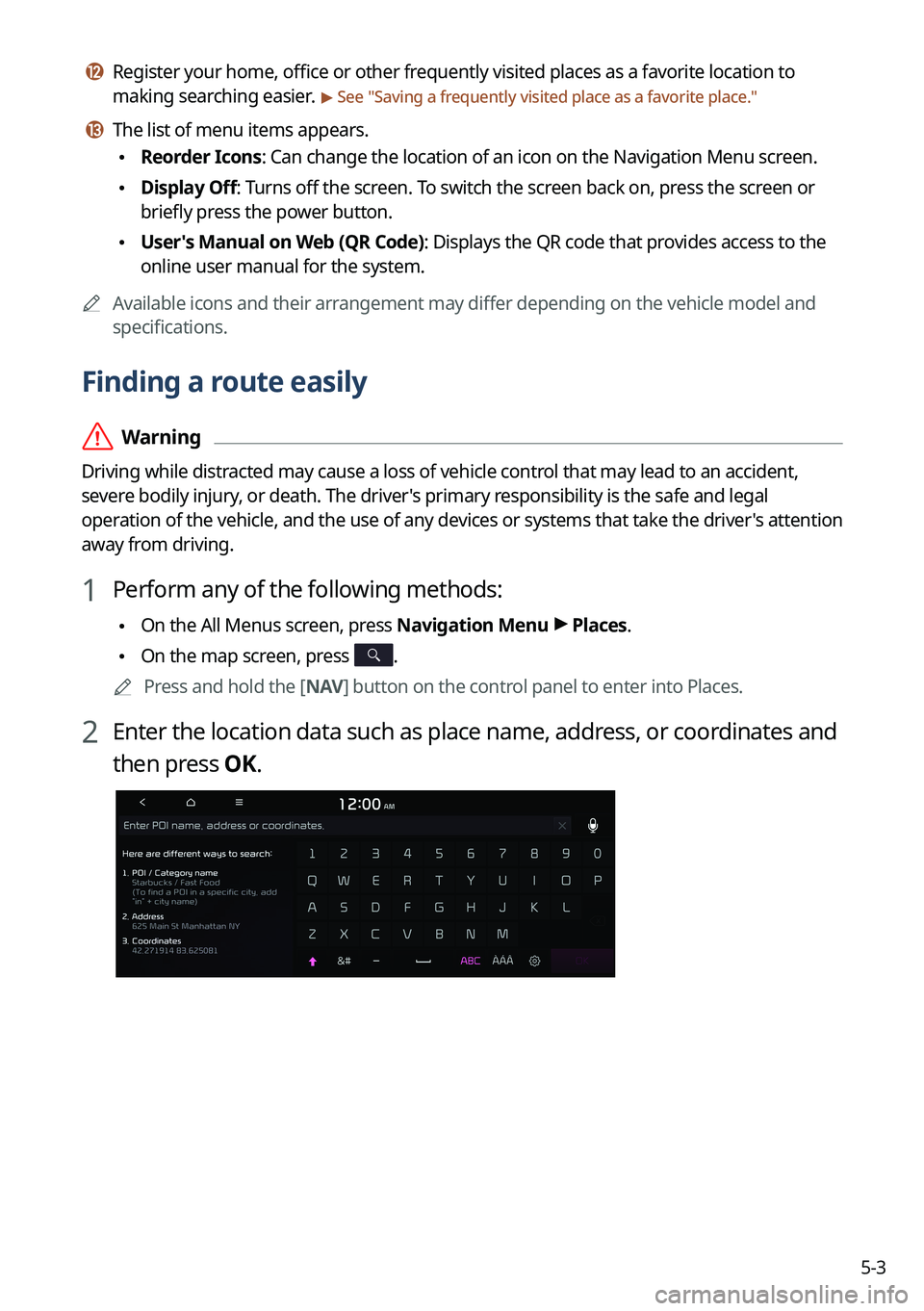
2 Enter the location data such as place name, address, or coordinates and
then press OK.
Page 111 of 332
5-5
0000
A
Vehicle location may not be displayed correctly if:
000DThe vehicle is driving on a Y-shaped or winding road with narrow angles.
000DThe vehicle is driving closely to another road.
000DThe vehicle is driving on a road where there are many tall buildings in the vicinity.
000DThe vehicle is driving on a new road or a road under construction.
000DThe vehicle is transported by a ferry or heavy-duty transport vehicle.
000DThe vehicle is driving in a rugged mountain area or on a steep curve road.
000DThe vehicle is entering a public road after making a turn through the turntable in an
underground parking lot or multi-story parking lot.
000DThe vehicle stops and starts repeatedly or moves slowly in front of an intersection.
000DThe system reboots after the vehicle battery has been recharged or replaced.
000DThe vehicle is driving on a slippery road due to heavy snow, etc.
000DThe tires have been replaced recently or spare tires (or studless tires) are used.
000DImproper-sized tires are used or the pressure of each tire is different.
000DThe replaced tire is worn out or the studless tires have been used for over two seasons.
000DA roof carrier is installed on the vehicle.
000DOn a highway continued driving causes the system to perform map matching or apply
the updated GPS data.
0000
A
Navigation service may not be provided correctly under the following conditions:
000DWhen the vehicle drives on a straight road continuously, the system may guide you to
drive straight. It is not a malfunction.
000DGuidance may not be followed immediately after the vehicle makes a turn at an
intersection or drives through an intersection.
000DThe system may guide you to make a U-turn in a prohibited area.
000DThe system may guide you to a traffic-blocked road (e.g. no-entry road or road under
construction).
000DThe system may guide you to a road away from the destination when there is no road
to the destination or there are only narrow roads on the way.
000DGuidance may not be proper when the vehicle is off the route.
000DGuidance may not match the actual distance on an overpass or underpass due to the
difference of the start point.
000DWhen you are driving at high speeds, route recalculations may take longer.
0000
A
Because the navigation system is used for information purposes only, Kia does not
assume responsibility of the accuracy of the information.
0000
A
When the traffic information is not received, the status icon (
) appears at the top of the
map screen.
Page 113 of 332
5-7
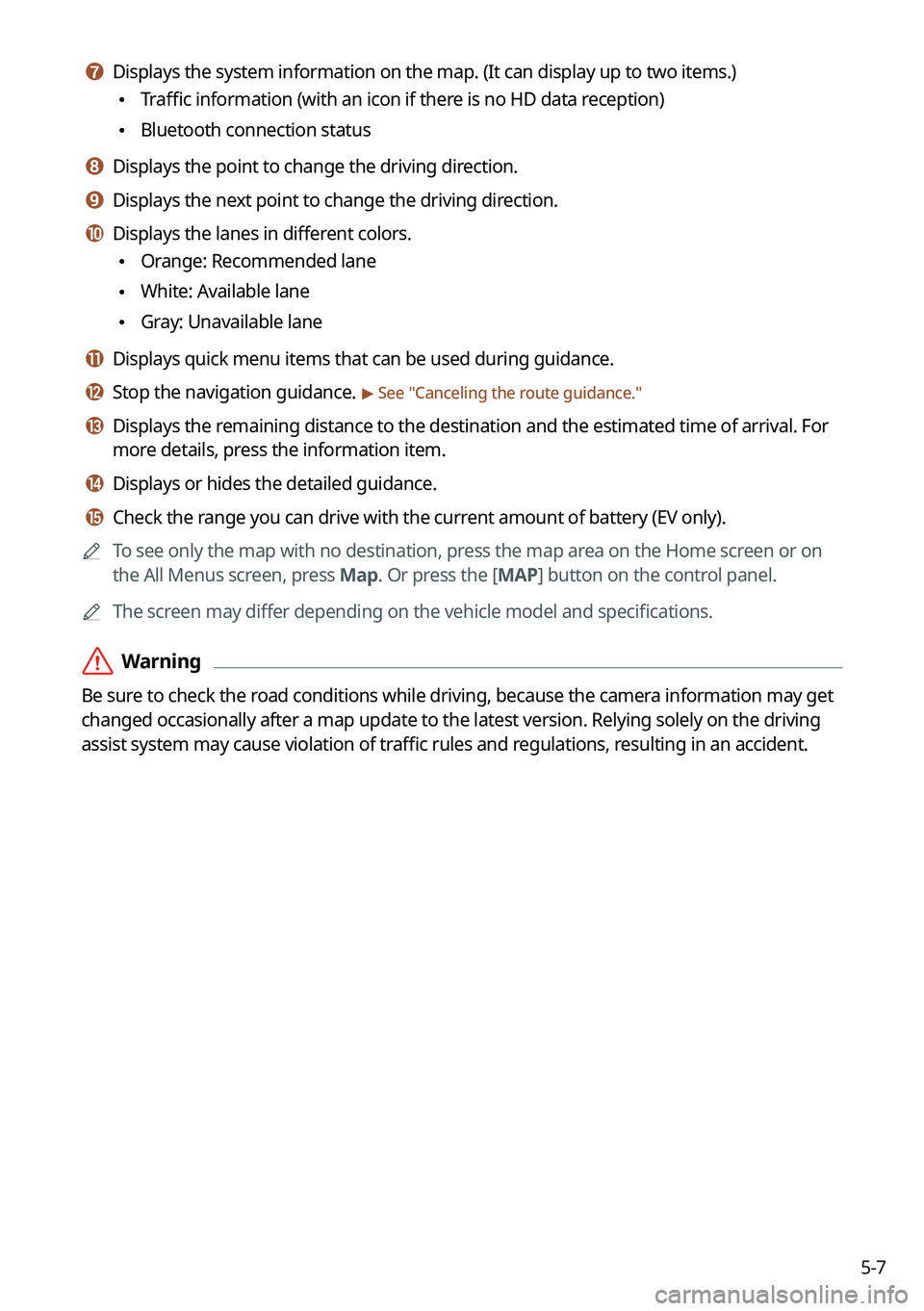
g g Displays the system information on the map. (It can display up to two items.)
\225Traffic information (with an icon if there is no HD data reception)
\225Bluetooth connection status
h h Displays the point to change the driving direction.
i i Displays the next point to change the driving direction.
j j Displays the lanes in different colors.
\225Orange: Recommended lane
\225White: Available lane
\225Gray: Unavailable lane
k k Displays quick menu items that can be used during guidance.
l l Stop the navigation guidance. > See "
Canceling the route guidance."
m m Displays the remaining distance to the destination and the estimated time of arrival. For
more details, press the information item.
n n Displays or hides the detailed guidance.
o o Check the range you can drive with the current amount of battery (EV only).
0000
A
To see only the map with no destination, press the map area on the Home screen or on
the All Menus screen, press Map. Or press the [ MAP] button on the control panel.
0000
A
The screen may differ depending on the vehicle model and specifications.
\335Warning
Be sure to check the road conditions while driving, because the camera information may get
changed occasionally after a map update to the latest version. Relying solely on the driving
assist system may cause violation of traffic rules and regulations, resulting in an accident.
Page 132 of 332
5-26
Setting a saved favorite place as the destination
You can set any in the saved places of the navigation system as a destination.
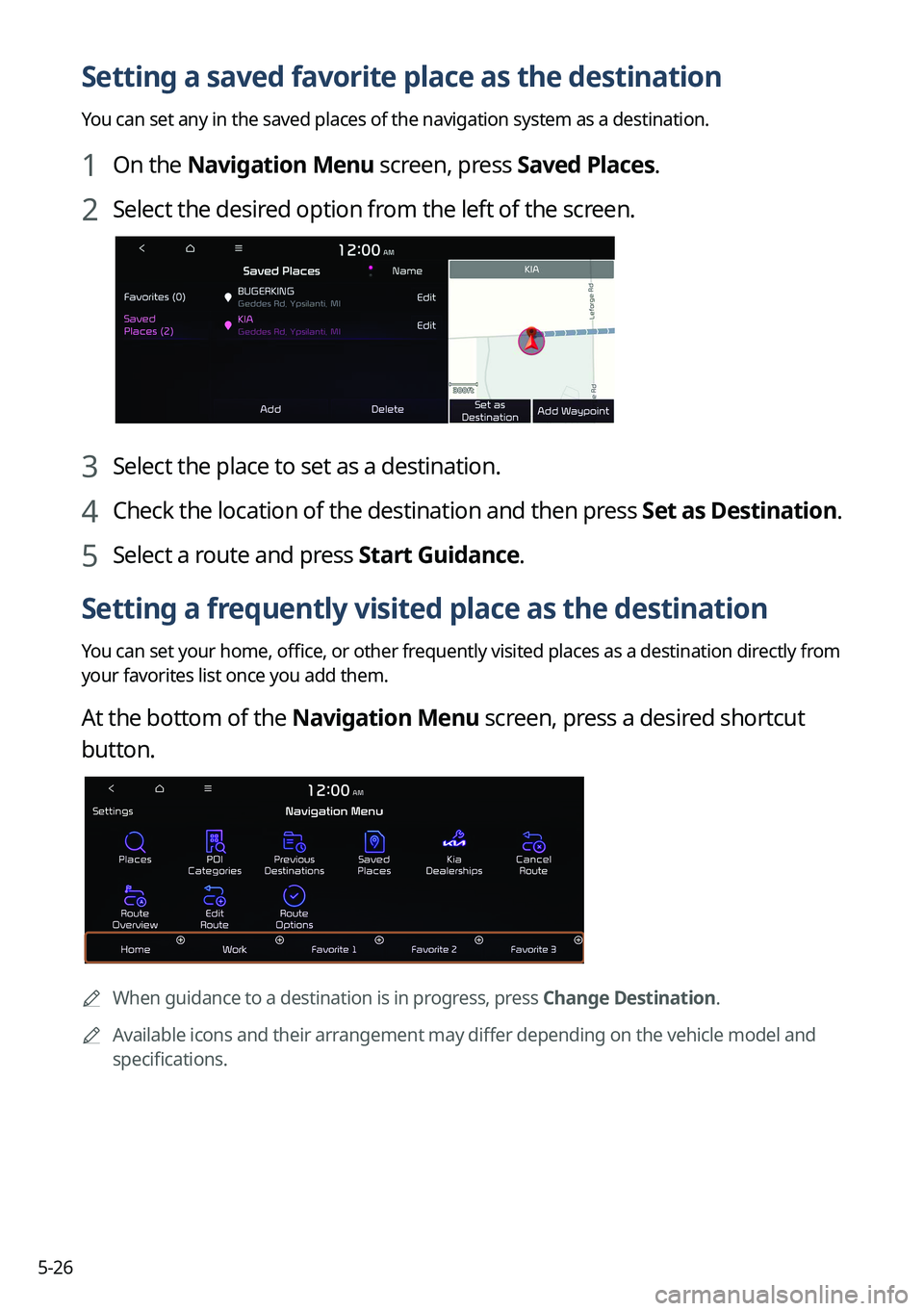
1 On the Navigation Menu screen, press Saved Places.
2 Select the desired option from the left of the screen.
3 Select the place to set as a destination.
4 Check the location of the destination and then press Set as Destination.
5 Select a route and press Start Guidance.
Setting a frequently visited place as the destination
You can set your home, office, or other frequently visited places as a destination directly from
your favorites list once you add them.
At the bottom of the Navigation Menu screen, press a desired shortcut
button.
0000A
When guidance to a destination is in progress, press Change Destination.
0000
A
Available icons and their arrangement may differ depending on the vehicle model and
specifications.
Page 136 of 332

5-30
END USER LICENSE AGREEMENT
PLEASE READ THIS END USER LICENSE AGREEMENT ("EULA") CAREFULLY BEFORE USING THE
NAVIGATION SYSTEM.
This is a license agreement between you and Hyundai Autoever, CORP. including its affiliates
("COMPANY") regarding a copy of the COMPANY navigable map database together with
associated software, media and explanatory printed documentation published by COMPANY
(jointly the "Product"). The Product is provided for your personal, internal use only and not for
resale. It is protected by copyright and is subject to the following terms which are agreed to
by you, on the one hand, and COMPANY and its licensors (and their licensors and suppliers)
(collectively, "Licensors") on the other hand.
By using the Product, you accept and agree to all terms and conditions in this End User
License Agreement ("EULA"). IF YOU DO NOT AGREE TO THE TERMS OF THIS EULA, YOU
MUST PROMPTLY EXIT THE PRODUCT OPERATION PROGRAM AND DO NOT USE OR ACCESS
TO THE PRODUCT. YOU AGREE THAT YOUR RIGHTS UNDER THIS EULA MAY BE TERMINATED
AUTOMATICALLY WITHOUT NOTICE IF YOU FAIL TO COMPLY WITH ANY TERM(S) OF THIS
EULA.
Terms and Conditions
Personal Use Only. You agree to use this Product together with COMPANY's authorized
application for the solely personal, non-commercial purposes for which you were licensed,
and not for service bureau, time-sharing or other similar purposes. Accordingly, but subject to
the restrictions set forth in the following paragraphs, you agree not to otherwise reproduce,
copy, modify, decompile, disassemble, create any derivative works of, or reverse engineer any
portion of this Data, and may not transfer or distribute it in any form, for any purpose, except
to the extent permitted by mandatory laws. You may not assign this EULA or any of the rights
or licenses granted under this EULA, except when installed in the system for which it was
created.
Restrictions. Except where you have been specifically licensed to do so by COMPANY, and
without limiting the preceding paragraph, you may not use the Product (i) with any products,
systems, or applications installed or otherwise connected to or in communication with
vehicles, capable of vehicle navigation, positioning, dispatch, real time route guidance, fleet
management or similar applications; or (ii) with or in communication with any positioning
devices or any mobile or wireless-connected electronic or computer devices, including
without limitation cellular phones, palmtop and handheld computers, pagers, and personal
digital assistants or PDAs.