engine KIA NIRO HYBRID EV 2021 Owners Manual
[x] Cancel search | Manufacturer: KIA, Model Year: 2021, Model line: NIRO HYBRID EV, Model: KIA NIRO HYBRID EV 2021Pages: 667, PDF Size: 9.17 MB
Page 284 of 667
Features of your vehicle
144 4
If you want to defrost and defog the
front windshield, refer to “Windshield
defrosting and defogging” in this sec-
tion.
Rear window defroster
The defroster heats the window to
remove frost, fog and thin ice from
the rear window, while the engine is
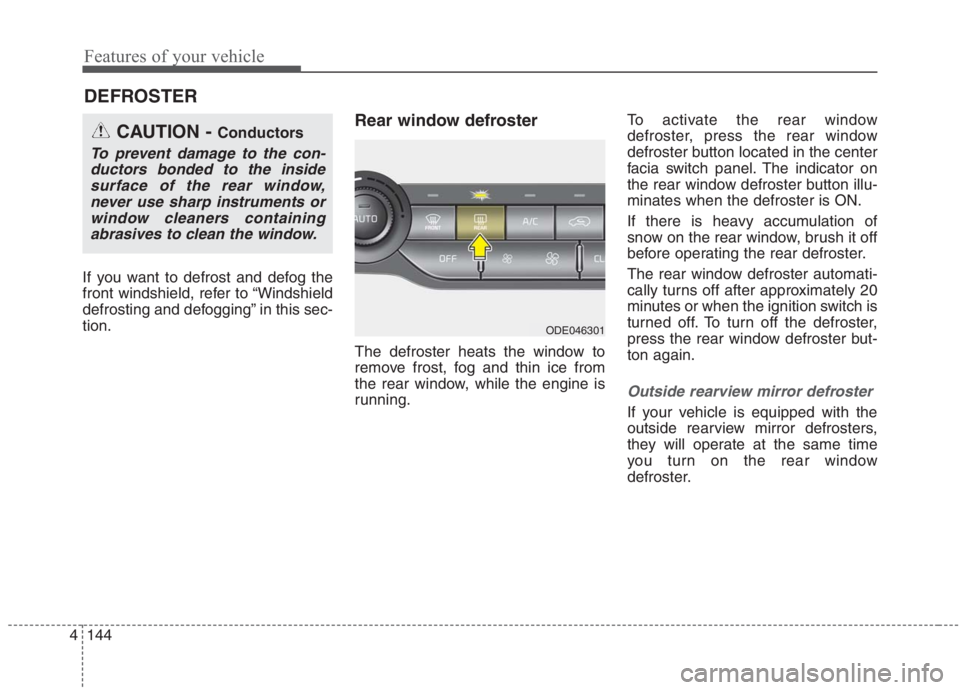
running.To activate the rear window
defroster, press the rear window
defroster button located in the center
facia switch panel. The indicator on
the rear window defroster button illu-
minates when the defroster is ON.
If there is heavy accumulation of
snow on the rear window, brush it off
before operating the rear defroster.
The rear window defroster automati-
cally turns off after approximately 20
minutes or when the ignition switch is
turned off. To turn off the defroster,
press the rear window defroster but-
ton again.
Outside rearview mirror defroster
If your vehicle is equipped with the
outside rearview mirror defrosters,
they will operate at the same time
you turn on the rear window
defroster.
DEFROSTER
CAUTION - Conductors
To prevent damage to the con-
ductors bonded to the inside
surface of the rear window,
never use sharp instruments or
window cleaners containing
abrasives to clean the window.
ODE046301
Page 285 of 667
4145
Features of your vehicle
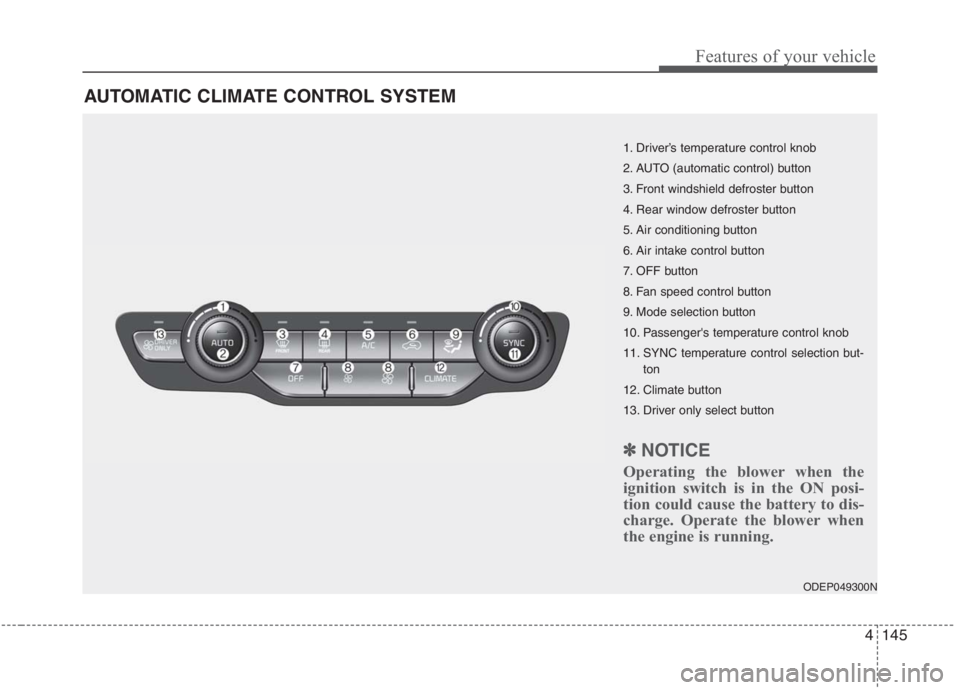
AUTOMATIC CLIMATE CONTROL SYSTEM
ODEP049300N
1. Driver’s temperature control knob
2. AUTO (automatic control) button
3. Front windshield defroster button
4. Rear window defroster button
5. Air conditioning button
6. Air intake control button
7. OFF button
8. Fan speed control button
9. Mode selection button
10. Passenger's temperature control knob
11. SYNC temperature control selection but-
ton
12. Climate button
13. Driver only select button
✽ ✽
NOTICE
Operating the blower when the
ignition switch is in the ON posi-
tion could cause the battery to dis-
charge. Operate the blower when
the engine is running.
Page 288 of 667
Features of your vehicle
148 4
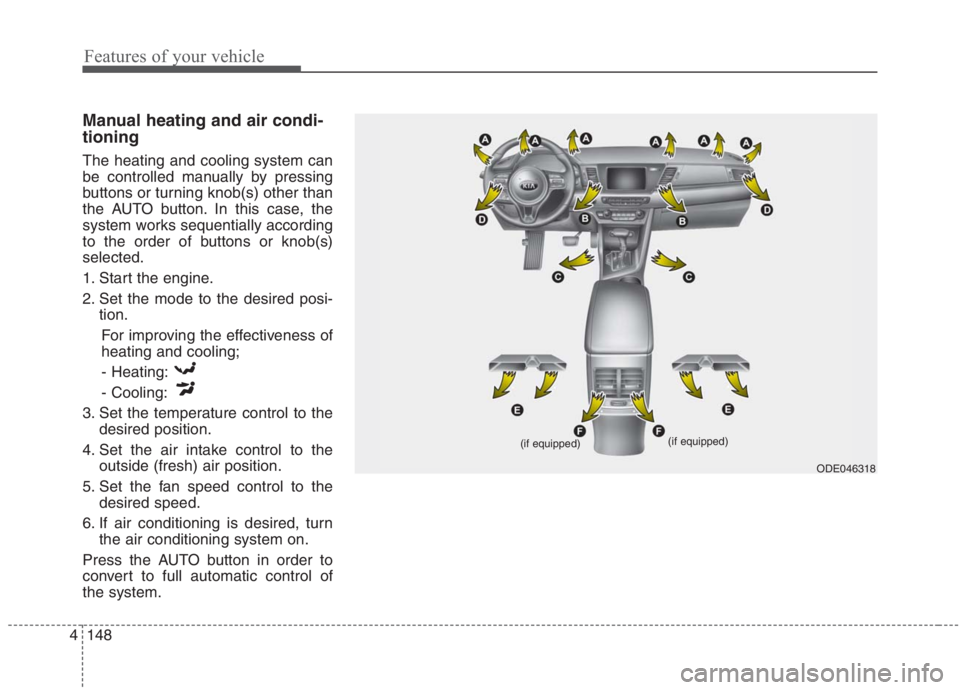
Manual heating and air condi-
tioning
The heating and cooling system can
be controlled manually by pressing
buttons or turning knob(s) other than
the AUTO button. In this case, the
system works sequentially according
to the order of buttons or knob(s)
selected.
1. Start the engine.
2. Set the mode to the desired posi-
tion.
For improving the effectiveness of
heating and cooling;
- Heating:
- Cooling:
3. Set the temperature control to the
desired position.
4. Set the air intake control to the
outside (fresh) air position.
5. Set the fan speed control to the
desired speed.
6. If air conditioning is desired, turn
the air conditioning system on.
Press the AUTO button in order to
convert to full automatic control of
the system.
ODE046318 (if equipped)
(if equipped)
Page 291 of 667
4151
Features of your vehicle
✽
✽NOTICE
When starting the vehicle in cold
weather using manual temperature
control, operate the system in the fol-
lowing method to improve heating.
- Turn off or lower the blower, right
after starting the engine.
- Allow the engine to warm up dur- ing this time since the air flow
from the heater is still cold.
- After a few minutes of engine warm up, turn on or set the fan to
a higher level and adjust the tem-
perature setting to hot.
Adjusting the driver and passenger
side temperature equally
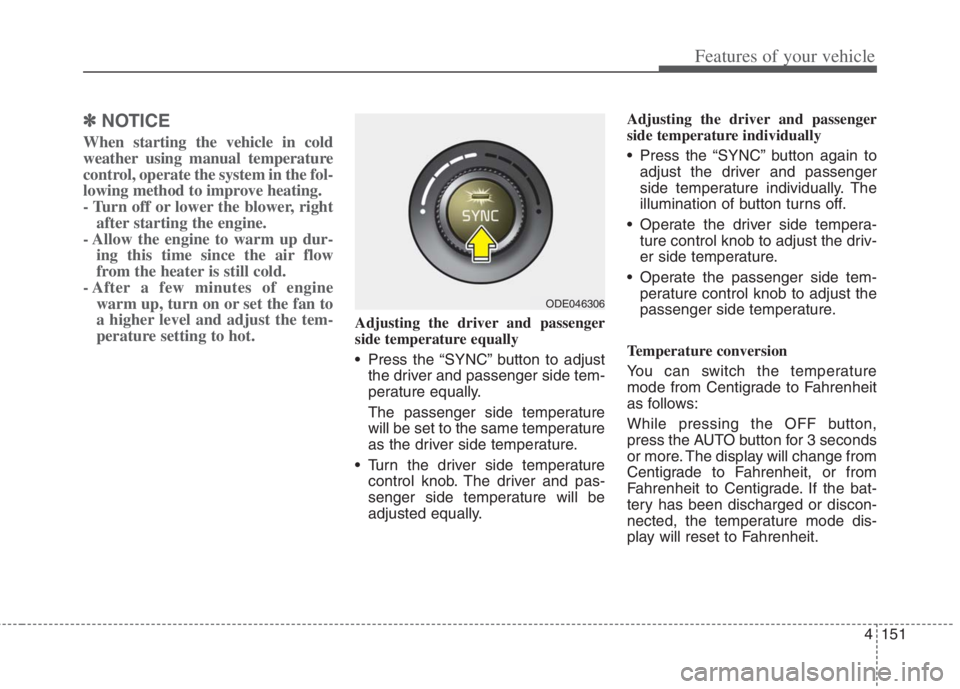
• Press the “SYNC” button to adjust
the driver and passenger side tem-
perature equally.
The passenger side temperature
will be set to the same temperature
as the driver side temperature.
Turn the driver side temperature control knob. The driver and pas-
senger side temperature will be
adjusted equally. Adjusting the driver and passenger
side temperature individually
Press the “SYNC” button again to
adjust the driver and passenger
side temperature individually. The
illumination of button turns off.
Operate the driver side tempera- ture control knob to adjust the driv-
er side temperature.
Operate the passenger side tem- perature control knob to adjust the
passenger side temperature.
Temperature conversion
You can switch the temperature
mode from Centigrade to Fahrenheit
as follows:
While pressing the OFF button,
press the AUTO button for 3 seconds
or more. The display will change from
Centigrade to Fahrenheit, or from
Fahrenheit to Centigrade. If the bat-
tery has been discharged or discon-
nected, the temperature mode dis-
play will reset to Fahrenheit.
ODE046306
Page 295 of 667
4155
Features of your vehicle
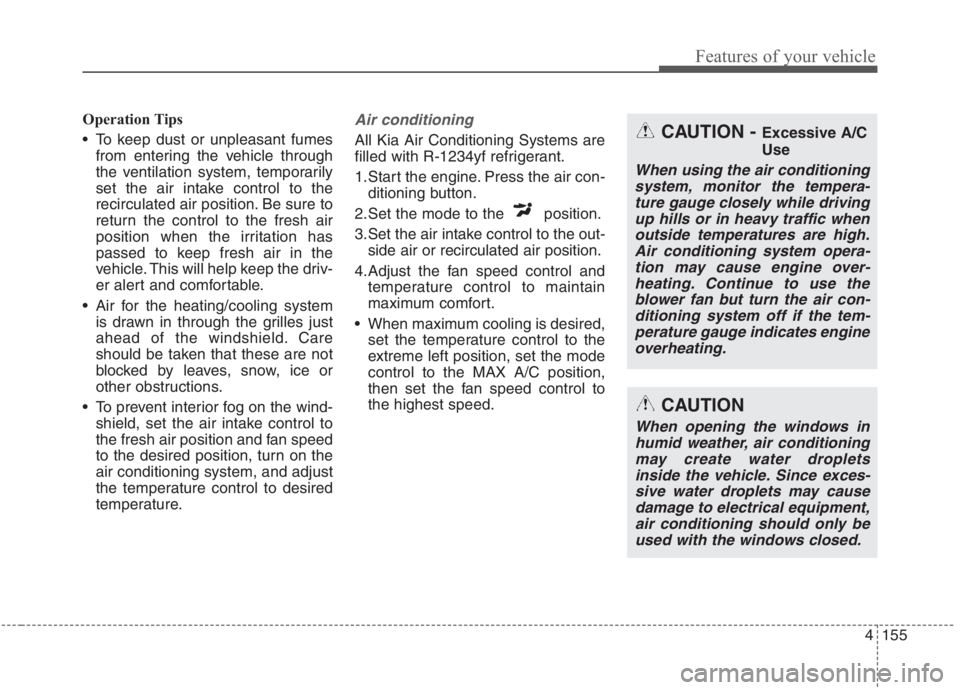
Operation Tips
To keep dust or unpleasant fumes
from entering the vehicle through
the ventilation system, temporarily
set the air intake control to the
recirculated air position. Be sure to
return the control to the fresh air
position when the irritation has
passed to keep fresh air in the
vehicle. This will help keep the driv-
er alert and comfortable.
Air for the heating/cooling system
is drawn in through the grilles just
ahead of the windshield. Care
should be taken that these are not
blocked by leaves, snow, ice or
other obstructions.
To prevent interior fog on the wind-
shield, set the air intake control to
the fresh air position and fan speed
to the desired position, turn on the
air conditioning system, and adjust
the temperature control to desired
temperature.Air conditioning
All Kia Air Conditioning Systems are
filled with R-1234yf refrigerant.
1.Start the engine. Press the air con-
ditioning button.
2.Set the mode to the position.
3.Set the air intake control to the out-
side air or recirculated air position.
4.Adjust the fan speed control and
temperature control to maintain
maximum comfort.
When maximum cooling is desired,
set the temperature control to the
extreme left position, set the mode
control to the MAX A/C position,
then set the fan speed control to
the highest speed.CAUTION - Excessive A/C
Use
When using the air conditioning
system, monitor the tempera-
ture gauge closely while driving
up hills or in heavy traffic when
outside temperatures are high.
Air conditioning system opera-
tion may cause engine over-
heating. Continue to use the
blower fan but turn the air con-
ditioning system off if the tem-
perature gauge indicates engine
overheating.
CAUTION
When opening the windows in
humid weather, air conditioning
may create water droplets
inside the vehicle. Since exces-
sive water droplets may cause
damage to electrical equipment,
air conditioning should only be
used with the windows closed.
Page 296 of 667
Features of your vehicle
156 4
Air conditioning system operation tips
If the vehicle has been parked in
direct sunlight during hot weather,
open the windows for a short time
to let the hot air inside the vehicle
escape.
To help reduce moisture inside of
the windows on rainy or humid
days, decrease the humidity inside
the vehicle by operating the air
conditioning system.
During air conditioning system
operation, you may occasionally
notice a slight change in engine
speed as the air conditioning com-
pressor cycles. This is a normal
system operation characteristic.
Use the air conditioning system
every month only for a few minutes
to ensure maximum system per-
formance.
When using the air conditioning
system, you may notice clear water
dripping (or even puddling) on the
ground under the passenger side
of the vehicle. This is a normal sys-
tem operation characteristic. Operating the air conditioning sys-
tem in the recirculated air position
provides maximum cooling; howev-
er, continual operation in this mode
may cause the air inside the vehi-
cle to become stale.
During cooling operation, you may
occasionally notice a misty air flow
because of rapid cooling and
humid air intake. This is a normal
system operation characteristic.
Automatic ventilation
The system automatically selects the
outside (fresh) air position when the
climate control system operates over
a certain period of time (5 minutes)
in low temperature with the recircu-
lated air position selected. (when
floor mode or bi-level mode)To cancel or reset the Automatic
Ventilation
When the air conditioning system is
on, select Face Level ( ) mode
and while pressing the A/C button,
press the air intake control button 5
times within 3 seconds.
When the automatic ventilation func-
tion is canceled, the indicator light
blinks 3 times at an interval of 0.5
seconds.
The air intake will be automatically
controlled to the fresh air position,
and the flow and air conditioning will
be automatically controlled.
When the automatic ventilation func-
tion is selected, the indicator light
blinks 6 times at an interval of 0.25
seconds.
The air intake will be automatically
controlled to the fresh air position,
and the flow and air conditioning will
be automatically controlled.
After the battery has been dis-
charged or separated, the automatic
ventilation function will be reset, so
please selected, according to you
preference.
Page 297 of 667
4157
Features of your vehicle
Sunroof inside air recircula-
tion (if equipped)
The outside (fresh) air position is
automatically selected when the sun-
roof is opened.
When you select the recirculated air
position, the system maintains the
recirculated air position for 3 minutes
and then automatically converts to
the outside (fresh) air position.
When the sunroof is closed, the air
intake position will return to the orig-
inal position that was selected.
Recirculated air at washer
fluid spray
To prevent the odor from entering to
inside the vehicle, the ventilation sys-
tem changes to Recirculated Air
Mode for a while when the wind-
shield washer fluid sprayed.
However, at low outside temperature,
to prevent from windshield fogging,
the system continues to outside air
mode.
System setting
1. ENGINE START/STOP button is
On or ignition switch ON.
2. Select Floor-Level ( ) air flow
direction by pressing
Mode Selection button.
3. With pressing Air Conditioning but-
ton, press the Recirculated Air but-
ton more than 4 times within 2
seconds.
4. If the system is set up, the indica-
tor on Recirculated Air button will
blinks 6 times.
System cancellation
1. ENGINE START/STOP button is
On or ignition switch ON.
2. Select Floor-Level ( ) air flow
direction by pressing
Mode Selection button.
3. With pressing Air Conditioning but-
ton, press the Recirculated Air but-
ton more than 4 times within 2
seconds.
4. If the system is cancelled, the indi-
cator on Recirculated Air button
will blinks 3 times.
Page 308 of 667
Features of your vehicle
168 4
During mild weather or under condi-
tions where the operation of the seat
warmer is not needed, keep the
switches in the “OFF” position.
Temperature control (Manual)
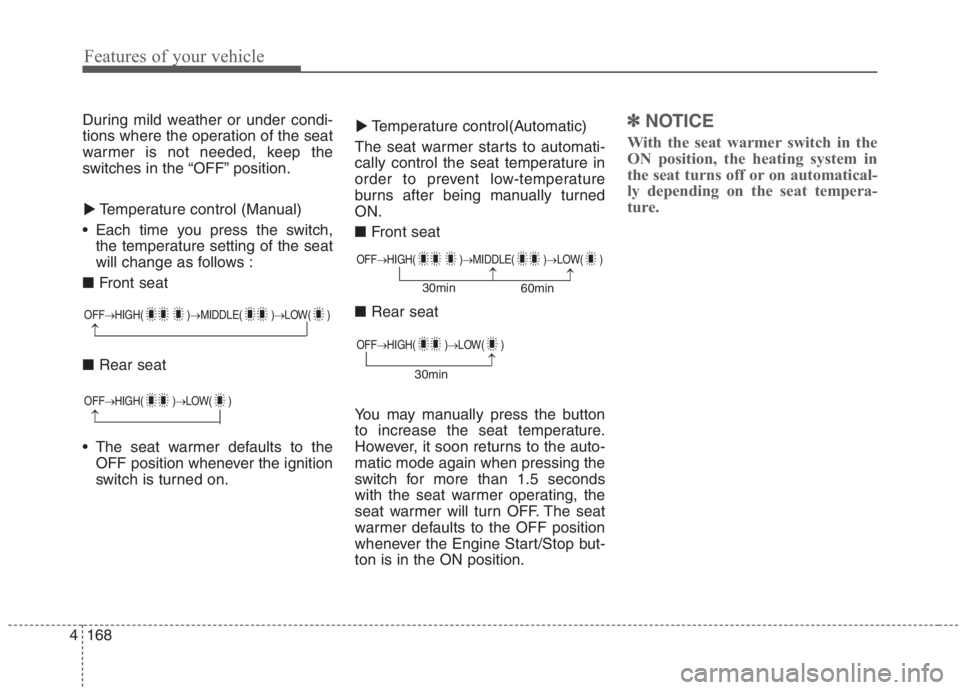
Each time you press the switch,
the temperature setting of the seat
will change as follows :
■ Front seat
■ Rear seat
The seat warmer defaults to the
OFF position whenever the ignition
switch is turned on.Temperature control(Automatic)
The seat warmer starts to automati-
cally control the seat temperature in
order to prevent low-temperature
burns after being manually turned
ON.
■ Front seat
■ Rear seat
You may manually press the button
to increase the seat temperature.
However, it soon returns to the auto-
matic mode again when pressing the
switch for more than 1.5 seconds
with the seat warmer operating, the
seat warmer will turn OFF. The seat
warmer defaults to the OFF position
whenever the Engine Start/Stop but-
ton is in the ON position.✽ ✽
NOTICE
With the seat warmer switch in the
ON position, the heating system in
the seat turns off or on automatical-
ly depending on the seat tempera-
ture.▼ ▼
OFF→HIGH( )→MIDDLE( )→LOW( )
→
OFF→HIGH( )→MIDDLE( )→LOW( )
→→30min
60min
OFF→HIGH( )→LOW( )
→
OFF→HIGH( )→LOW( )
→30min
Page 310 of 667
Features of your vehicle
170 4
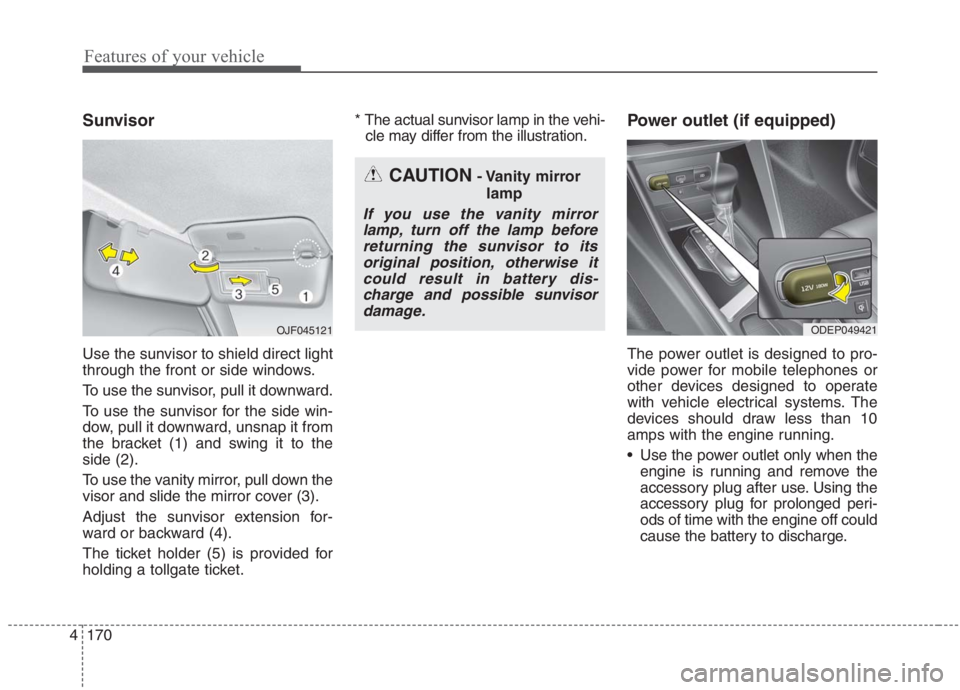
Sunvisor
Use the sunvisor to shield direct light
through the front or side windows.
To use the sunvisor, pull it downward.
To use the sunvisor for the side win-
dow, pull it downward, unsnap it from
the bracket (1) and swing it to the
side (2).
To use the vanity mirror, pull down the
visor and slide the mirror cover (3).
Adjust the sunvisor extension for-
ward or backward (4).
The ticket holder (5) is provided for
holding a tollgate ticket.* The actual sunvisor lamp in the vehi-
cle may differ from the illustration.
Power outlet (if equipped)
The power outlet is designed to pro-
vide power for mobile telephones or
other devices designed to operate
with vehicle electrical systems. The
devices should draw less than 10
amps with the engine running.
Use the power outlet only when the
engine is running and remove the
accessory plug after use. Using the
accessory plug for prolonged peri-
ods of time with the engine off could
cause the battery to discharge.
CAUTION- Vanity mirror
lamp
If you use the vanity mirror
lamp, turn off the lamp before
returning the sunvisor to its
original position, otherwise it
could result in battery dis-
charge and possible sunvisor
damage.
ODEP049421 OJF045121
Page 311 of 667
4171
Features of your vehicle
Only use 12V electric accessories
which are less than 10A in electric
capacity.
Adjust the air-conditioner or heater
to the lowest operating level when
using the power outlet.
Close the cover when not in use.
Some electronic devices can cause
electronic interference when
plugged into a vehicle’s power out-
let. These devices may cause
excessive audio static and malfunc-
tions in other electronic systems or
devices used in your vehicle.
Push the plug in as far as it will go.
If good contact is not made, the
plug may overheat and the fuse
may open.
Plug in battery equipped electronic
devices with reverse current pro-
tection. The current from the bat-
tery may flow into the vehicle’s
electri cal/electronic system and
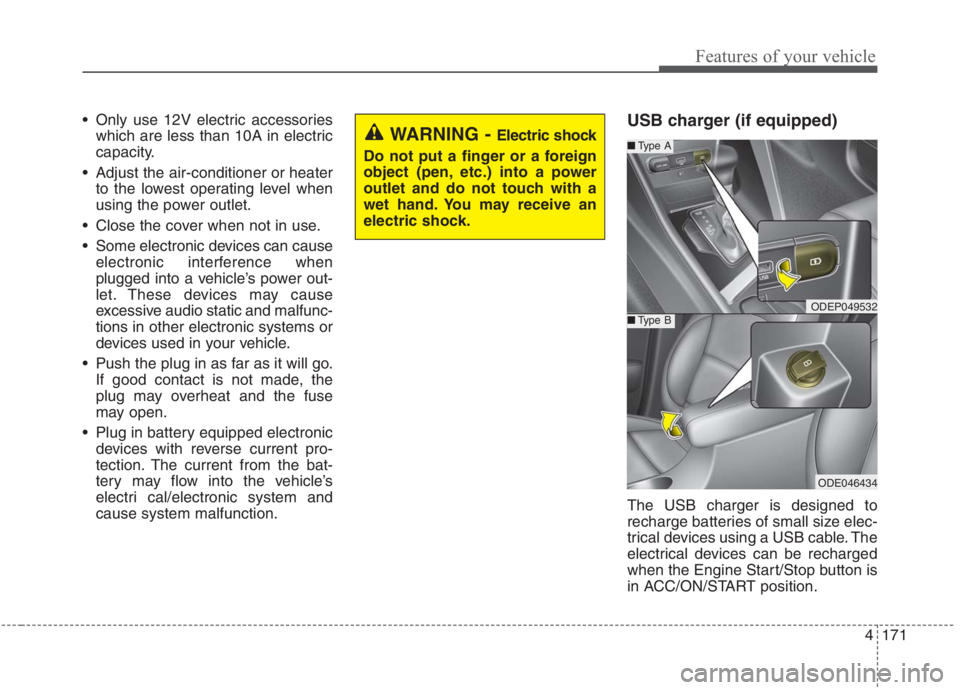
cause system malfunction.USB charger (if equipped)
The USB charger is designed to
recharge batteries of small size elec-
trical devices using a USB cable. The
electrical devices can be recharged
when the Engine Start/Stop button is
in ACC/ON/START position.
WARNING - Electric shock
Do not put a finger or a foreign
object (pen, etc.) into a power
outlet and do not touch with a
wet hand. You may receive an
electric shock.
ODEP049532
■Type A
■Type B
ODE046434