audio KIA NIRO HYBRID EV 2021 Owners Manual
[x] Cancel search | Manufacturer: KIA, Model Year: 2021, Model line: NIRO HYBRID EV, Model: KIA NIRO HYBRID EV 2021Pages: 667, PDF Size: 9.17 MB
Page 66 of 667
25
Your vehicle at a glance
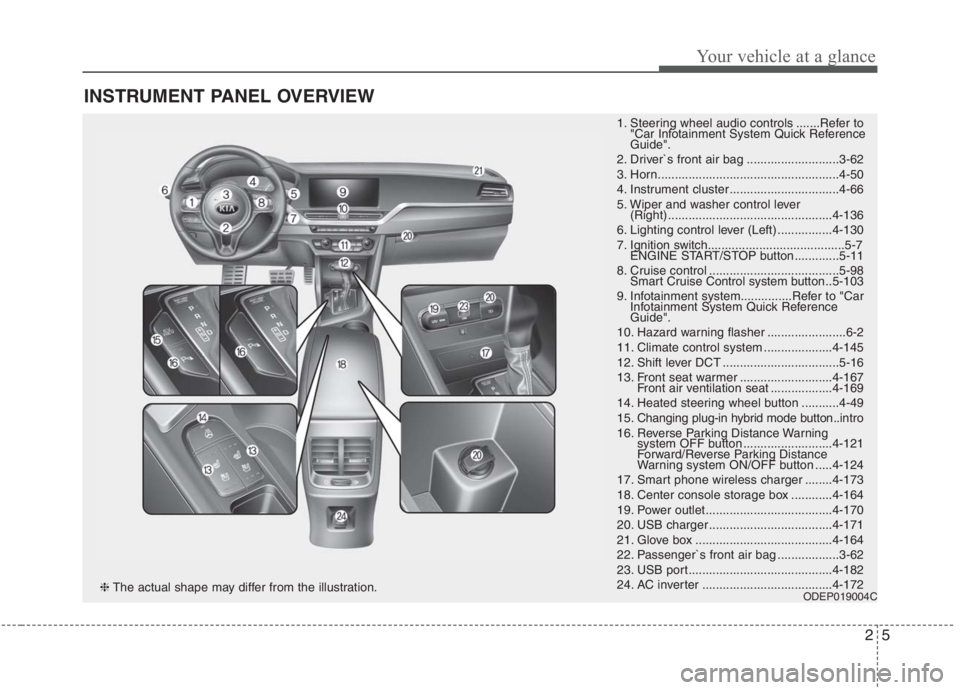
INSTRUMENT PANEL OVERVIEW
1. Steering wheel audio controls .......Refer to
"Car Infotainment System Quick Reference
Guide".
2. Driver`s front air bag ...........................3-62
3. Horn.....................................................4-50
4. Instrument cluster ................................4-66
5. Wiper and washer control lever
(Right) ................................................4-136
6. Lighting control lever (Left) ................4-130
7. Ignition switch........................................5-7
ENGINE START/STOP button .............5-11
8. Cruise control ......................................5-98
Smart Cruise Control system button ..5-103
9. Infotainment system...............Refer to "Car
Infotainment System Quick Reference
Guide".
10. Hazard warning flasher .......................6-2
11. Climate control system ....................4-145
12. Shift lever DCT ..................................5-16
13. Front seat warmer ...........................4-167
Front air ventilation seat ..................4-169
14. Heated steering wheel button ...........4-49
15. Changing plug-in hybrid mode button..intro
16. Reverse Parking Distance Warning
system OFF button ..........................4-121
Forward/Reverse Parking Distance
Warning system ON/OFF button .....4-124
17. Smart phone wireless charger ........4-173
18. Center console storage box ............4-164
19. Power outlet.....................................4-170
20. USB charger ....................................4-171
21. Glove box ........................................4-164
22. Passenger`s front air bag ..................3-62
23. USB port..........................................4-182
24. AC inverter ......................................4-172
ODEP019004C❈The actual shape may differ from the illustration.
Page 311 of 667
4171
Features of your vehicle
Only use 12V electric accessories
which are less than 10A in electric
capacity.
Adjust the air-conditioner or heater
to the lowest operating level when
using the power outlet.
Close the cover when not in use.
Some electronic devices can cause
electronic interference when
plugged into a vehicle’s power out-
let. These devices may cause
excessive audio static and malfunc-
tions in other electronic systems or
devices used in your vehicle.
Push the plug in as far as it will go.
If good contact is not made, the
plug may overheat and the fuse
may open.
Plug in battery equipped electronic
devices with reverse current pro-
tection. The current from the bat-
tery may flow into the vehicle’s
electri cal/electronic system and
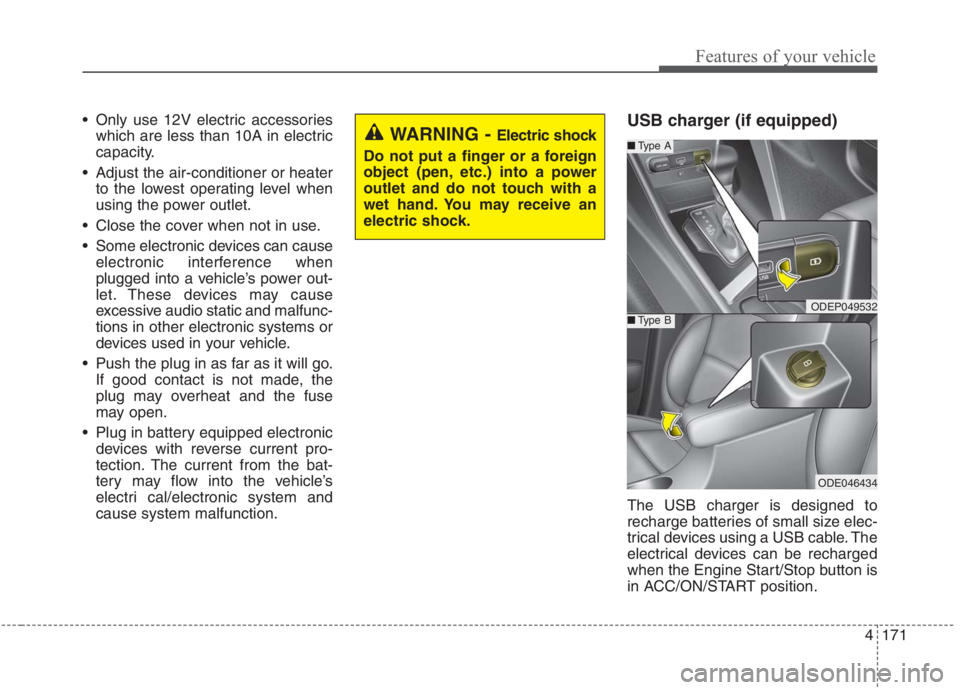
cause system malfunction.USB charger (if equipped)
The USB charger is designed to
recharge batteries of small size elec-
trical devices using a USB cable. The
electrical devices can be recharged
when the Engine Start/Stop button is
in ACC/ON/START position.
WARNING - Electric shock
Do not put a finger or a foreign
object (pen, etc.) into a power
outlet and do not touch with a
wet hand. You may receive an
electric shock.
ODEP049532
■Type A
■Type B
ODE046434
Page 322 of 667
Features of your vehicle
182
4
✽
✽
NOTICE
If you install an after market HID
head lamp, your vehicle’s audio and
electronic device may malfunction.
❈ If your vehicle is equipped with
Infotainment system, refer to a
separately supplied manual for
detailed information.
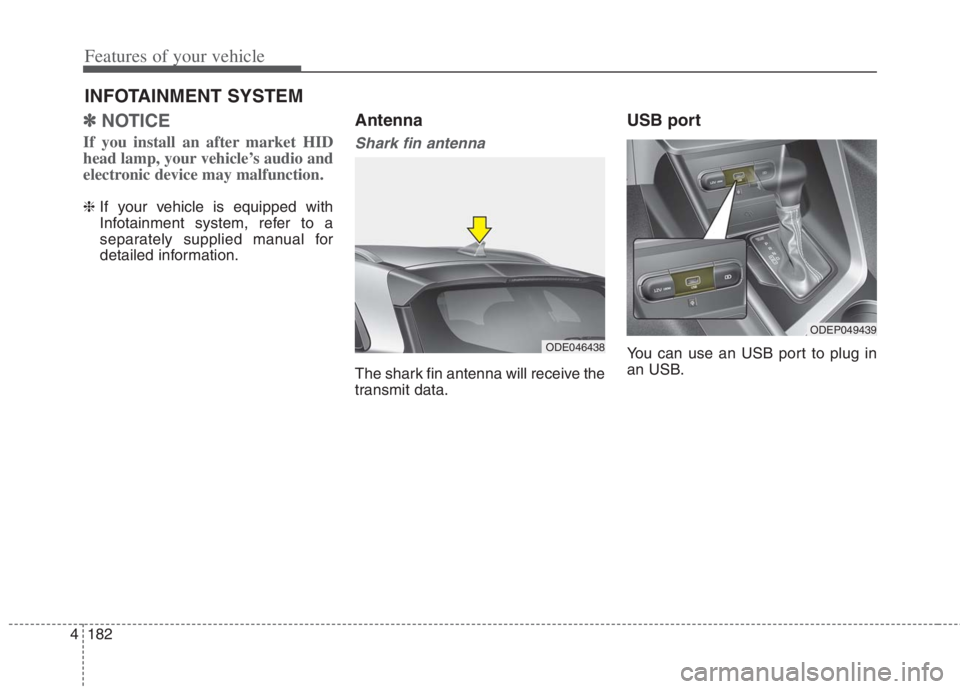
Antenna
Shark fin antenna
The shark fin antenna will receive the
transmit data.
USB port
You can use an USB port to plug in
an USB.
INFOTAINMENT SYSTEM
ODE046438
ODEP049439
Page 325 of 667
4185
Features of your vehicle
Using a cellular phone or a two-
way radio
When a cellular phone is used inside
the vehicle, noise may be produced
from the audio system. This does not
mean that something is wrong with
the audio equipment. In such a case,
try to operate mobile devices as far
from the audio equipment as possible.
When using a communication sys-
tem such as a cellular phone or a
radio set inside the vehicle, a sepa-
rate external antenna must be fitted.
When a cellular phone or a radio set
is used with an internal antenna
alone, it may interfere with the vehi-
cle's electrical system and adversely
affect safe operation of the vehicle.
WARNING- Cell phone use
Do not use a cellular phone
while driving. Stop at a safe
location to use a cellular phone.
WARNING- Distracted
driving
Driving while distracted can
result in a loss of vehicle control
that may lead to an accident,
severe personal injury, and death.
The driver's primary responsibili-
ty is in the safe and legal opera-
tion of a vehicle, and use of any
handheld devices, other equip-
ment, or vehicle systems which
take the driver's eyes, attention
and focus away from the safe
operation of a vehicle or which
are not permissible by law should
never be used during operation
of the vehicle.
Page 385 of 667
559
Driving your vehicle
In bad weather conditions such as
heavy rain, heavy snow, and fog, or
when sensor is covered by foreign
material, dust, tec., the sensors will
be degraded and the system will be
temporarily disabled.
Always keep the sensor clean.✽ ✽
NOTICE
• Do not install any accessories,
such as license plate molding or
sticker, on the sensor area. Nor
arbitrarily replace the bumper.
Those may adversely affect the
sensing performance.
• Always keep the sensor/bumper
area clean.
• Use only soft cloths to wash the
vehicle. Also, do not spray highly-
pressurized water on the sensor
installed on the bumper.
• Be careful not to apply unneces-
sary force on the frontal sensor
area. When the sensor moves out
of the correct position due to
external force, the system may not
normally operate even without the
warning light or message. In this
case, have your vehicle inspected
by an authorized Kia dealer.
• Use only the genuine Kia sensor
cover. Do not arbitrarily apply
paint on the sensor cover.
(Continued)(Continued)
• Do not tint the window or install
stickers, accessories around the
inside mirror where the camera is
installed.
• Make sure the frontal camera
installation point does not get wet.
• Do not impact or arbitrarily
remove any radar/camera compo-
nents.
• Do not place reflective
objects(white paper or mirror etc.)
on the crash pad.
The system may activate unneces-
sarily due to reflect of the sunlight.
• Excessive audio volume may dis-
turb the sound of the system warn-
ing alarm.
• For more cautions for the camera
sensor, refer to the “Lane Keeping
Assist (LKA)” in this chapter.
Page 397 of 667
571
Driving your vehicle
(Continued)
The system detects lane
markers and controls the
steering wheel by a front view
camera, therefore, if the lane
markers are hard to detect,
the system may not work
properly. Always be cautious
when using the system.
When the lane markers are
hard to detect, please refer to
“DRIVER’S ATTENTION”.
Do not remove or damage the
related parts of the front view
camera system.
Do not place objects on the
crash pad that reflect light
such as mirrors, white paper,
etc. it may cause malfunction
of LKA system if sunlight is
reflected.
(Continued)(Continued)
You may not hear warning
sound of LKA system because
of the excessive audio sound.
If other beeps such as the
seat belt warning sound are in
operation and override LKA
alarming system, LKA beeps
may not occur.
At high vehicle speeds, the
steering torque needed for
assistance may not be suffi-
cient to keep your vehicle
within the lane. If so, the vehi-
cle may move out of its lane.
Always obey the speed limit
when using LKA system.
(Continued)(Continued)
If you attach objects to the
steering wheel, the system
may not assist steering.
If you attach objects to the
steering wheel, hands off
alarm may not work properly.
Page 410 of 667
Driving your vehicle
84 5
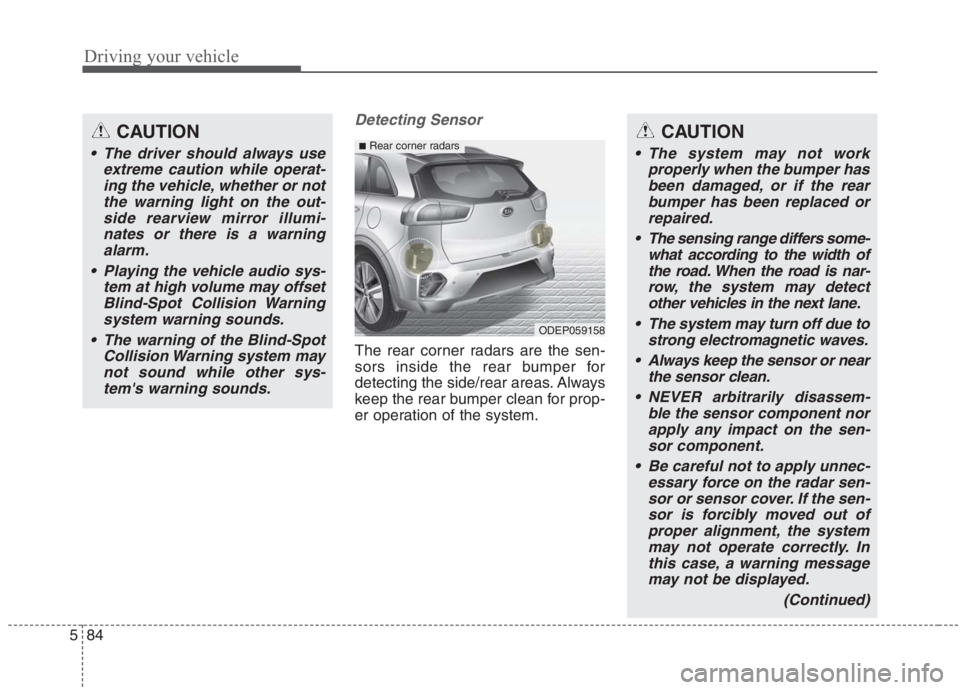
Detecting Sensor
The rear corner radars are the sen-
sors inside the rear bumper for
detecting the side/rear areas. Always
keep the rear bumper clean for prop-
er operation of the system.
CAUTION
The driver should always use
extreme caution while operat-
ing the vehicle, whether or not
the warning light on the out-
side rearview mirror illumi-
nates or there is a warning
alarm.
Playing the vehicle audio sys-
tem at high volume may offset
Blind-Spot Collision Warning
system warning sounds.
The warning of the Blind-Spot
Collision Warning system may
not sound while other sys-
tem's warning sounds.
ODEP059158
■Rear corner radarsCAUTION
The system may not work
properly when the bumper has
been damaged, or if the rear
bumper has been replaced or
repaired.
The sensing range differs some-
what according to the width of
the road. When the road is nar-
row, the system may detect
other vehicles in the next lane.
The system may turn off due to
strong electromagnetic waves.
Always keep the sensor or near
the sensor clean.
NEVER arbitrarily disassem-
ble the sensor component nor
apply any impact on the sen-
sor component.
Be careful not to apply unnec-
essary force on the radar sen-
sor or sensor cover. If the sen-
sor is forcibly moved out of
proper alignment, the system
may not operate correctly. In
this case, a warning message
may not be displayed.
(Continued)
Page 420 of 667
Driving your vehicle
94 5
✽
✽
NOTICE
Driver Attention Warning system
utilizes the front view camera sensor
on the front windshield for its oper-
ation. To keep the front view camera
sensor in the best condition, you
should observe the followings:
- Do not disassemble camera tem-
porarily for tinted window or
attaching any types of coatings and
accessories. If you disassemble a
camera and assemble it again, take
your vehicle to an authorized Kia
dealer and have the system
checked.
- Do not locate any reflective
objects (i.e. white paper, mirror)
over the dashboard. Any light
reflection may cause a mal-func-
tion of Driver Attention Warning
system.
(Continued)(Continued)
- Pay extreme caution to keep the
front view camera out of water.
- Do not arbitrarily disassemble the
camera assembly, nor apply any
impact on the camera assembly.
- Playing the vehicle audio system
at high volume may offset the
Driver Attention Warning system
warning sounds.
For more information of front
view camera, refer to “Lane
Keeping Assist (LKA)”.WARNING
Driver Attention Warning sys-
tem is not a substitute for safe
driving practices, but a con-
venience function only. It is
the driver's responsibility to
always drive cautiously and
safely.
A fatigued driver should take
a break, even if there is no
suggestion to do so by the
Driver Attention Warning sys-
tem.
Page 440 of 667
Driving your vehicle
114 5
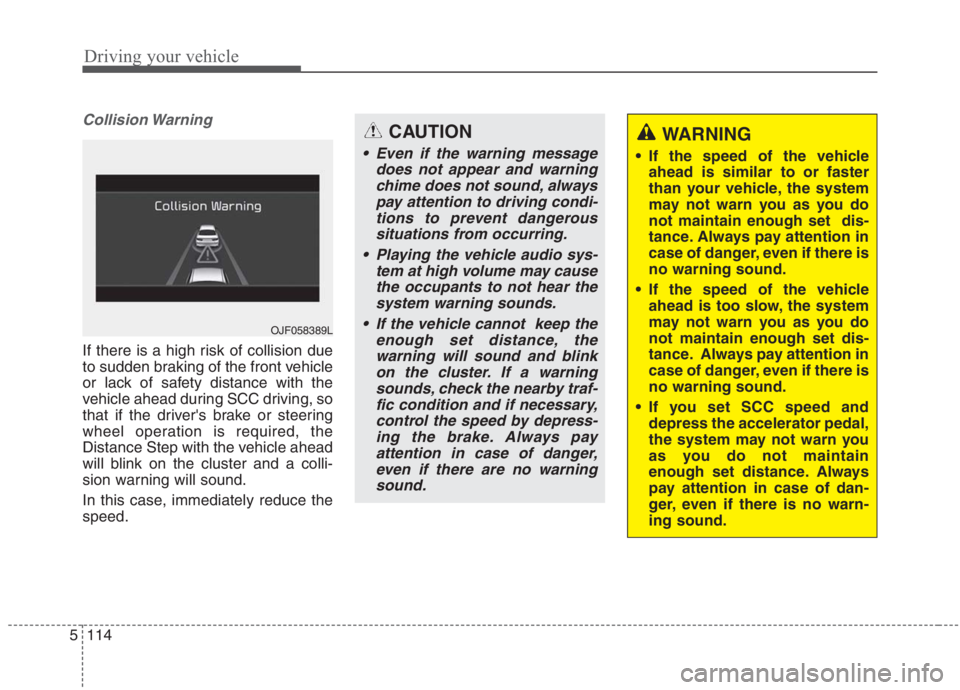
Collision Warning
If there is a high risk of collision due
to sudden braking of the front vehicle
or lack of safety distance with the
vehicle ahead during SCC driving, so
that if the driver's brake or steering
wheel operation is required, the
Distance Step with the vehicle ahead
will blink on the cluster and a colli-
sion warning will sound.
In this case, immediately reduce the
speed.
OJF058389L
CAUTION
Even if the warning message
does not appear and warning
chime does not sound, always
pay attention to driving condi-
tions to prevent dangerous
situations from occurring.
Playing the vehicle audio sys-
tem at high volume may cause
the occupants to not hear the
system warning sounds.
If the vehicle cannot keep the
enough set distance, the
warning will sound and blink
on the cluster. If a warning
sounds, check the nearby traf-
fic condition and if necessary,
control the speed by depress-
ing the brake. Always pay
attention in case of danger,
even if there are no warning
sound.
WARNING
If the speed of the vehicle
ahead is similar to or faster
than your vehicle, the system
may not warn you as you do
not maintain enough set dis-
tance. Always pay attention in
case of danger, even if there is
no warning sound.
If the speed of the vehicle
ahead is too slow, the system
may not warn you as you do
not maintain enough set dis-
tance. Always pay attention in
case of danger, even if there is
no warning sound.
If you set SCC speed and
depress the accelerator pedal,
the system may not warn you
as you do not maintain
enough set distance. Always
pay attention in case of dan-
ger, even if there is no warn-
ing sound.
Page 460 of 667
Driving your vehicle
134 5
Warning message and system
control
Rear Cross-Traffic Collision
Warning system
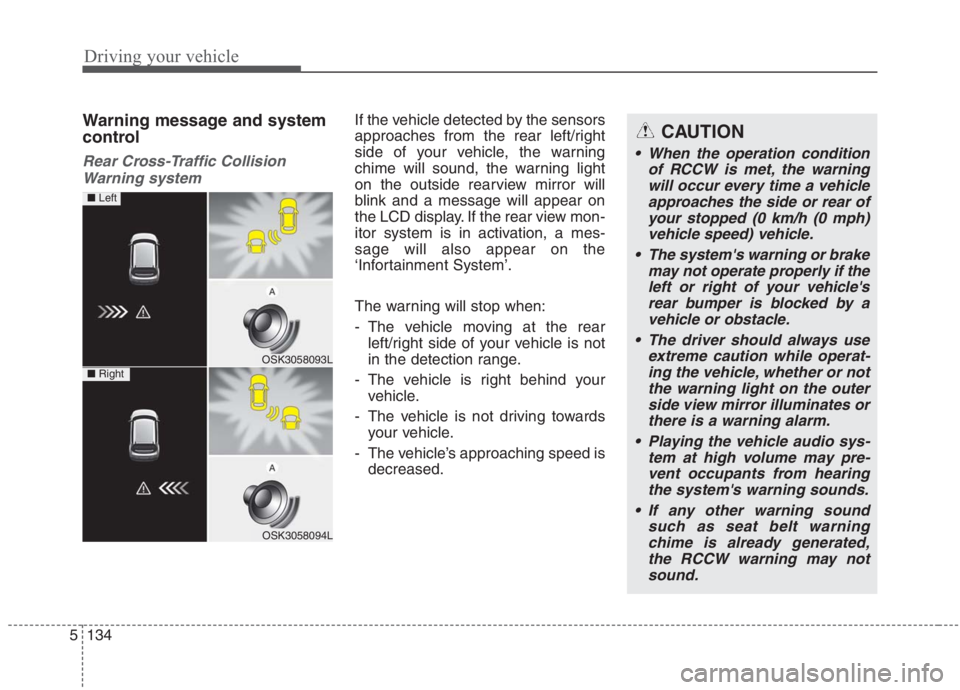
If the vehicle detected by the sensors
approaches from the rear left/right
side of your vehicle, the warning
chime will sound, the warning light
on the outside rearview mirror will
blink and a message will appear on
the LCD display. If the rear view mon-
itor system is in activation, a mes-
sage will also appear on the
‘Infortainment System’.
The warning will stop when:
- The vehicle moving at the rear
left/right side of your vehicle is not
in the detection range.
- The vehicle is right behind your
vehicle.
- The vehicle is not driving towards
your vehicle.
- The vehicle’s approaching speed is
decreased.CAUTION
When the operation condition
of RCCW is met, the warning
will occur every time a vehicle
approaches the side or rear of
your stopped (0 km/h (0 mph)
vehicle speed) vehicle.
The system's warning or brake
may not operate properly if the
left or right of your vehicle's
rear bumper is blocked by a
vehicle or obstacle.
The driver should always use
extreme caution while operat-
ing the vehicle, whether or not
the warning light on the outer
side view mirror illuminates or
there is a warning alarm.
Playing the vehicle audio sys-
tem at high volume may pre-
vent occupants from hearing
the system's warning sounds.
If any other warning sound
such as seat belt warning
chime is already generated,
the RCCW warning may not
sound.
OSK3058093L
OSK3058094L
■ Left
■ Right